
 by
by
The 6 Phases of The Social Amplification Engine
The goal of the Social Amplification Engine (SAE) course is to enhance visibility, raise awareness, increase engagement, and generate leads and conversions using a proven process. It emphasizes the importance of moving beyond a single channel and utilizing cross-channel marketing.
Within the Social Amplification Engine, The Content Factory encompasses Goals, Content, Targeting, and Amplification. The Social Amplification Engine provides a broader perspective of the Content Factory.
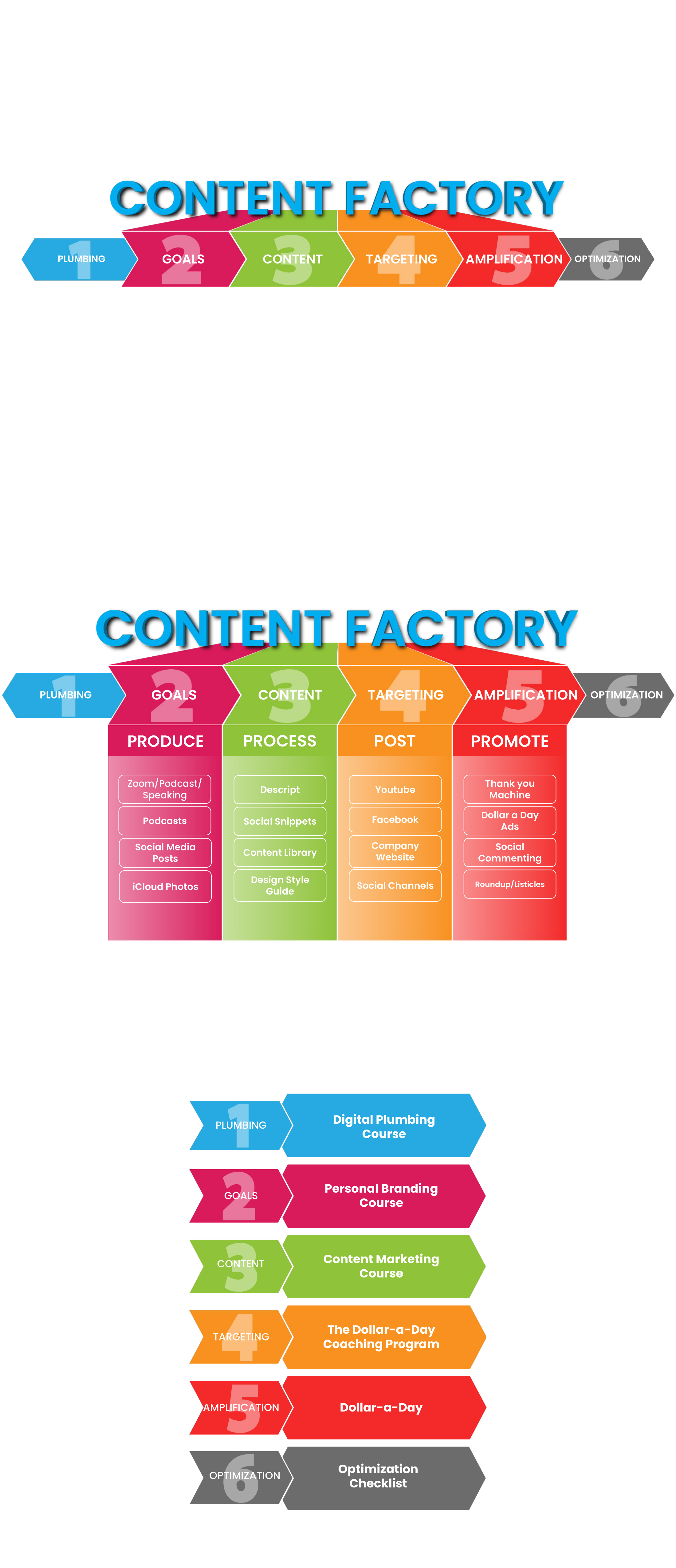
PLUMBING
“Plumbing” refers to the practice of tracking and managing data across various online channels. It involves the use of tools like Google Tag Manager (GTM) to handle tracking pixels, tags, emails, custom audiences, URL parameters, and more. By setting up and installing Google Tag Manager, businesses can create powerful marketing campaigns on platforms like Facebook and Google Ads, without the need for developer assistance. Proper plumbing ensures that marketing efforts are based on accurate data and can lead to improved performance and cost reduction.
Digital Plumbing Course-
https://blitzmetrics.com/dpc/
The “Digital Plumbing Course” emphasizes the importance of tracking and managing data across online channels for successful marketing. It introduces Google Tag Manager as a central tool for easily handling tracking codes on a website. The course covers essential steps like setting up Google Analytics and Ads accounts, installing tracking codes such as the Facebook Pixel and Google Ads Remarketing Tag, and optimizing with Google Tag Manager. Participants can access downloadable course materials, interactive modules, and quizzes to consolidate their learning. The course equips marketers and businesses with foundational knowledge to understand their audience, optimize strategies, and achieve their goals.
GOALS-
Goals refer to specific performance targets or objectives that individuals or businesses aim to achieve. Goals are crucial for optimizing Facebook campaigns as they provide a clear direction and purpose. The course introduces “Standards of Excellence” as benchmark standards that participants can compare their ads against to gauge performance. By setting goals and using these standards, marketers can evaluate their ads, identify areas for improvement, and optimize their campaigns effectively.
Goals, metrics, strategy, and optimization are interconnected elements in business that drive success. They form the foundation for achieving quantifiable and actionable goals, guiding content production and targeting efforts. People-based targeting, personalized marketing based on user behavior and demographics, is a sustainable approach. Organizing customers into personas helps tailor content, while database marketing delivers the right message to the right user at the right time. Marketing automation automates personalized sequences but requires a comprehensive approach. Aligning these elements maximizes marketing efforts and drives desired outcomes.
Personal Branding Course-
https://blitzmetrics.com/epb/
The “Personal Branding Course” helps individuals grow their online presence and establish themselves as thought leaders. It provides a framework for building a personal brand, including connecting social sites, setting up a website, creating thought-provoking content, expanding networks, and amplifying efforts through social media and content promotion. Participants need a minimum budget of \$1 a day for Facebook ads. The course covers authority components, brand organization, collaborations, goal identification, the six phases of personal branding, content creation, networking, writing a book, and generating authority.
PRODUCE:
Zoom/Podcast/Speaking-
https://blitzmetrics.com/aps/
Zoom, podcasting, and speaking are valuable tools for effective communication and engagement. Zoom enables remote meetings, conferences, and webinars, allowing speakers to connect with their audience regardless of location. Podcasting complements Zoom by providing a flexible platform for sharing knowledge and stories, reaching listeners at their convenience. Speaking engagements, whether virtual or in person, offer opportunities for speakers to educate, entertain, and inspire audiences.
Podcasts-
https://academy.yourcontentfactory.com/courses/achieving-podcasting-success/
Producing a podcast requires careful planning, recording, editing, and promotion, which can be difficult to manage alongside other commitments. Being organized and efficient is key to maintaining consistency and regularly producing new episodes. Streamlining the production process through tools and techniques, as well as delegating tasks or seeking assistance from a team, can help overcome this challenge.
Social Media Posts-
https://blitzmetrics.com/how-to-cross-post-for-gmb-and-get-people-to-know-more-about-your-local-business/
You can produce social media posts and repurpose them for maximum impact. By posting content on platforms like Facebook and Twitter, you can engage with customers and clients. However, to extend the lifespan and reach of your content, it’s crucial to cross-post it on your website as blog posts or web pages. This process involves taking the same content, such as photos or phrases, and creating a new post on your website. This strategy allows you to combine search and social media, capturing the attention of potential customers during their decision-making process.
iCloud Photos-
https://academy.yourcontentfactory.com/courses/content-factory/lessons/content-factory-explained-by-dennis/
This will help you understand what the Content Factory is, what happens inside, and why it’s important. Keep track of your media.
CONTENT-
Refers to the creation and distribution of valuable and relevant information that aims to engage and attract a target audience. It serves as a means to communicate a business’s mission, values, and offerings to its intended audience. Content plays a crucial role in driving customer identification and sharing, as it aims to inspire and resonate with the audience.
Content Marketing Course-
https://blitzmetrics.com/cmc/
The “Content Marketing Course” focuses on creating great content even with limited resources and in competitive industries. It emphasizes the importance of authentic voices and collecting and amplifying customer stories for effective content marketing. The course is led by Dennis Yu, a renowned expert in advertising. It covers various topics, including article writing, content networking, authority collection, content strategy, maximizing content, driving awareness and conversions, video optimization, and different types of content. The course provides checklists to guide participants through the process. It is suitable for business owners and professionals serious about creating impactful content and learning how to leverage it.
PROCESS:
Descript-
https://blitzmetrics.com/leverage-the-power-of-descript-to-repurpose-content/
Descript is a powerful audio/video editor that resembles a word processor. It offers features that make it an essential tool for repurposing content. With Descript, you can easily edit and manipulate video files by leveraging its intuitive interface. The software automatically transcribes the audio content of the video, allowing you to edit the transcript for accuracy. You can also edit the video by making changes to the transcript, such as deleting sections or rearranging sentences. Descript empowers content creators to efficiently process and repurpose their videos.
Social Snippets-
https://blitzmetrics.com/content-manager-help-me-turn-60-minute-videos-into-proper-podcasts-using-descript-and-transistor-fm/
Posting social snippets on social media can greatly benefit your business. By sharing bite-sized content, such as engaging images, captivating captions, or informative videos, you can effectively capture the attention of your target audience. They can drive traffic to your website, and increase brand visibility.
Content Library-
https://blitzmetrics.com/cmc/
“Content Library” refers to a Google Sheet that is used to collect positive mentions from clients and influencers. The purpose of the content library is to keep track of mentions, topic wheels, personal brand entities, featured mentions, greatest hits, etc, in an organized manner for future reference and analysis.
Design Style Guide-
https://docs.google.com/document/d/1AVcmWkYzD6vqfO7aFS0E6QyxFkSvKiS4/edit
The “Design Style Guide” is a comprehensive resource for VA designers with intermediate experience in Adobe InDesign and Illustrator. It is also useful for owners and agencies looking to train their VAs and customize the guide for their brand. It emphasizes the importance of professional branding to establish a strong and trustworthy company image. The guide aims to integrate VA designers into the design team, utilizing their skills to contribute to the team’s success and ensure consistent design aligned with the brand’s visual identity.
TARGETING-
https://blitzmetrics.com/targeting-checklist/
The concept of “Targeting” refers to the strategy of reaching a specific audience with your marketing efforts. The program emphasizes the importance of having the right prerequisites in place before implementing strategy. By targeting the right audience and creating high-quality content, participants can establish their authority and increase engagement.
POST:
Youtube-
https://blitzmetrics.com/how-to-inventory-a-youtube-channel/
The guide outlines the step-by-step process of creating a YouTube inventory. It provides instructions on how to gather information about videos, including video name, URL, date posted, featured speaker, view count, duration, word count, and more.
The verification checklist ensures that the inventory meets specific criteria, such as having all the necessary columns, populating columns when information is available, including all featured speakers, and including all videos on the channel, including YouTube Shorts.
Facebook-
https://blitzmetrics.com/how-to-crosspost-an-article-on-fb/,
https://academy.yourcontentfactory.com/courses/how-to-be-a-facebook-targeting-ninja/
Cross-posting on Facebook involves sharing an article or blog post on Facebook. This guide will teach you how to cross-post on a Facebook page, profile, or group. To begin, make sure you have the link to the article or blog post and the link to the Facebook page, profile, or group. You should also have publishing rights to the Facebook account.
Company Website-
https://blitzmetrics.com/how-to-post-an-article-wordpress/
Posting an article on a company website, specifically on WordPress, involves a few important steps which are explained here.
Social Channels-
https://blitzmetrics.com/how-to-crosspost/
Posting on social channels refers to the act of sharing content on various social media platforms to reach and engage with a wider audience. Cross-posting is a strategy where longer-form content, such as videos or articles, is repurposed and shared across multiple channels like Facebook, Instagram, Twitter, blogs, and others.
By utilizing cross-posting techniques, individuals and businesses can effectively distribute their content across different social channels, maximizing their reach and engagement potential.
AMPLIFICATION-
https://blitzmetrics.com/fdd/
Amplification is a stage of the Social Amplification Engine that refers to the process of increasing the reach and impact of your marketing. It involves leveraging strategies, channels, and tools to maximize the reach and impact of your content. The goal is to magnify what is already working well and generate desired results. It is important to align amplification efforts with the target audience.
PROMOTE:
Thank you Machine-
The concept of the “Thank You Machine” revolves around the practice of expressing gratitude and appreciation to clients, colleagues, and others in your professional network. It is a strategy that aims to build relationships, generate influence, and strengthen personal branding.
The “Thank You Machine” is not a literal machine but rather a metaphorical representation of the systematic process of showing gratitude. The idea is to leverage automation tools and make it more efficient. The course on the “Thank You Machine” introduces you to this concept and teaches you how to implement it effectively.
Dollar A Day Ads-
https://blitzmetrics.com/dad/
The “Dollar-a-Day” strategy is a marketing approach that helps increase sales and brand awareness. It offers a coaching program and online course to guide participants in using the process effectively. Over six weeks, participants learn different aspects of marketing like setting goals, creating content, targeting the right audience, promoting their brand, and optimizing their efforts. The program aims to increase revenues by 20% within 90 days. The course provides lessons, checklists, and guides to drive more website visitors and sales with a small daily investment.
Social Commenting-
https://blitzmetrics.com/boost-your-social-media-engagement/
“Social commenting” is a strategy to boost engagement on social media. Instead of just sharing your own content, you actively join conversations by commenting on other people’s posts. You can attract attention and gain followers by offering insights, sharing experiences, and being helpful. If you’re not getting much engagement, try commenting on others’ posts. Even if you have few followers, commenting can still drive traffic to your profile. Keep a mix of business and personal comments, follow people who share your interests, and engage with them.
In summary, social commenting is a simple way to increase visibility and engagement on social media. By commenting on others’ posts, you can build relationships, attract attention, and drive traffic to your profile.
Roundup/Listicles-
https://academy.yourcontentfactory.com/courses/seo-101-mini-course/
https://blitzmetrics.com/improve-your-website-seo/
OPTIMIZATION-
https://academy.yourcontentfactory.com/courses/optimization-maa/
Optimization refers to the process of refining and improving your marketing strategies and tactics to achieve better results. It involves analyzing data, identifying areas of improvement, and implementing changes to enhance performance and achieve your desired goals.
Optimization Checklist-
https://blitzmetrics.com/optimization-checklist/
The Optimization Checklist serves as a guide to help you systematically review and enhance your marketing efforts. It includes tasks such as analyzing metrics, comparing data, refining target audiences, reviewing budget allocation, and generating recommendations for immediate execution.
The checklist also emphasizes the importance of refining lookalike audiences, balancing metrics, and applying specific approaches to prioritize actions based on goals, content, and targeting.
Explore our Task Library for more useful guides if you found these links helpful.
The skill files for this page
Every task on this page ships as a runnable skill file you can hand to an AI agent (our publishing standard). Expand any skill to copy its file, or download the whole Task Library pack. 16 skills:
create-a-3-minute-why-video.skill.md — Produce the 3-minute WHY video that explains the brand's core purpose and mission — the cornerstone content asset of Social Amplification Engine Stage 3.
START

---
name: create-a-3-minute-why-video
description: Produce the 3-minute WHY video that explains the brand's core purpose and mission — the cornerstone content asset of Social Amplification Engine Stage 3.
category: Content Factory — Produce
stage: Produce
definitive_article: /social-amplification
status: complete
---

# Create a 3-minute WHY video

**Use this when** a brand entering SAE Stage 3 (Content) has its mission defined from Stage 2 (Goals) but no single video that explains WHY it exists.

## Inputs
- The mission statement and 90-day goals from SAE Stage 2 (Goals come before Content — GCT in order)
- The Topic Wheel WHY ring (core purpose) if already mapped
- A phone, a real setting tied to the story (the shop floor, the first truck, the home office)
- The founder/owner on camera — the WHY belongs to a person, not a logo

## Steps
1. Pull the mission from Stage 2 Goals. If you cannot state the WHY in one sentence, stop and finish Goals first — Content never precedes Goals.
2. Outline three beats, no script: origin story (the moment that started this) → who you serve and what you believe → what that means for the customer.
3. Shoot on the phone in a real location connected to the story. Unscripted but rehearsed out loud once or twice — conviction, not polish.
4. Keep it to roughly 3 minutes. Long enough for a real story, short enough to hold attention and run as an ad later.
5. Watch it back once and ask one question: would a stranger understand why this person does this work? If yes, ship it; do not chase a perfect take.
6. Name the file `YYYY-MM-DD-brandname-why-video` and upload to the Content Library Drive folder.
7. Log it in the Content Library tracker flagged "WHY video — SAE Stage 3 cornerstone." It anchors the 3×3 grid and later becomes warm-audience content in Dollar a Day sequencing.
8. Queue it for the Process stage — the WHY video becomes the About-page embed, a blog post, and ad creative.

## Definition of done (QA checklist)
- [ ] WHY is stated plainly within the first 30 seconds
- [ ] Contains a specific origin story, not generic mission-speak
- [ ] Shot on phone, first person, founder on camera, real location
- [ ] Runtime ~3 minutes
- [ ] Uploaded to the Content Library, flagged as the Stage 3 cornerstone, queued for Process
- [ ] Linked back to the definitive article and relevant siblings

## Example(s)
- The WHY-video requirement and its placement in Stage 3 are documented with worked examples at /social-amplification.
- Example needed for a fresh client run — run the Meta-Article Prompt after first real run.

## Run on a persistent agent (Fable 5)

A persistent agent (Claude Fable 5, or a comparable OpenAI/Google model that loops and holds memory) enforces the order: it pulls the Stage 2 mission from memory, refuses to proceed if Goals aren't set, preps the three beats, then self-verifies the take against the Definition of done — WHY stated inside 30 seconds, real origin story, ~3 minutes — and loops until every box passes. Memory keeps the mission and prior takes, so revisions build on what worked instead of restarting. Close the run with a logged meta-article example.
See `boil-the-ocean.md` for the full operating principles.

## Definitive article & links
- Hub: /social-amplification (Stage 3: Content — endorsements, WHY video, 3×3 grid, library)
- Related: /topic-wheel (WHY ring), /dad (the WHY video as warm-audience creative), /one-minute-video-guide
- Sibling skills, in run order: `map-out-one-minute-video-topics-using-topic-wheel` → this → `create-a-3x3-video-grid`

END
create-a-3x3-video-grid.skill.md — Build the 3×3 grid of nine videos — three core topics across three funnel levels — that gives a brand complete content coverage for SAE Stage 3.
START

---
name: create-a-3x3-video-grid
description: Build the 3×3 grid of nine videos — three core topics across three funnel levels — that gives a brand complete content coverage for SAE Stage 3.
category: Content Factory — Produce
stage: Produce
definitive_article: /social-amplification
status: complete
---

# Create a 3×3 video grid

**Use this when** the WHY video exists and the brand needs systematic topic coverage that can later be sequenced cold → warm → conversion in Dollar a Day.

## Inputs
- The completed 3-minute WHY video (anchor asset — see `create-a-3-minute-why-video`)
- Three core topics chosen from the Topic Wheel HOW ring (your methods, what you want to be known for)
- A phone and the on-camera person; a half-day recording block
- Access to the Content Library Drive folder

## Steps
1. Pick the 3 core topics from the Topic Wheel HOW ring. These should match the SEO Tree trunks the website is built on — content and site architecture mirror each other.
2. For each topic, plan 3 videos mapped to the three funnel levels (Audience, Engagement, Conversion — the funnel triangle): one awareness video (the WHY behind the topic, a story), one engagement video (the HOW — method, framework, walkthrough), one conversion video (the WHAT — proof, results, offer, customer story).
3. Draw the grid: 3 topics × 3 funnel levels = 9 cells. Write one real customer question or story prompt in each cell before recording anything.
4. Record all nine as one-minute-video style takes: phone, unscripted, one take each (see `record-one-minute-videos`). Batch them in one session.
5. Name files `YYYY-MM-DD-topic-funnelstage` and upload all nine to the Content Library Drive folder.
6. Log the grid in the Content Library tracker as a unit — note each video's topic, funnel level, and grid position so Promote can sequence them cold → warm → conversion.
7. Queue the nine for the Process stage; each becomes an article, clips, and ad creative.

## Definition of done (QA checklist)
- [ ] Exactly 9 videos: 3 topics × 3 funnel levels, every cell filled
- [ ] Topics come from the Topic Wheel HOW ring and match the site's SEO Tree trunks
- [ ] Each video is phone-shot, unscripted, ~60 seconds, one idea
- [ ] Grid positions logged so Dollar a Day sequencing (cold → warm → conversion) can use them
- [ ] All nine uploaded to the Content Library and queued for Process
- [ ] Linked back to the definitive article and relevant siblings

## Example(s)
- The 3×3 grid build is documented as Stage 3 of the Social Amplification Engine at /social-amplification, alongside the WHY video and Content Library.
- Example needed for a fresh client run — run the Meta-Article Prompt after first real run.

## Run on a persistent agent (Fable 5)

Nine cells, all filled: a persistent agent (Claude Fable 5, or comparable long-horizon OpenAI/Google models) builds the grid from the Topic Wheel HOW ring, writes a real question into every cell before recording starts, then loops the post-session check until 9/9 are uploaded, positioned, and logged — eight of nine is not done. Memory holds grid state across sessions, so a half-finished grid resumes instead of restarting. Log a meta-article example when the grid completes.
See `boil-the-ocean.md` for the full operating principles.

## Definitive article & links
- Hub: /social-amplification (Stage 3: Content)
- Related: /topic-wheel (HOW ring), /seo-tree (trunks the topics map to), /dad (sequencing the grid), /one-minute-video-guide
- Sibling skills, in run order: `create-a-3-minute-why-video` → this → `set-up-content-library`

END
set-up-content-library.skill.md — Organize all raw and processed content into one structured, trackable library so the Content Factory has a single intake and nothing gets lost (SAE Stage 3).
START

---
name: set-up-content-library
description: Organize all raw and processed content into one structured, trackable library so the Content Factory has a single intake and nothing gets lost (SAE Stage 3).
category: Content Factory — Produce
stage: Produce
definitive_article: /social-amplification
status: needs-work
---

# Set up Content Library

**Use this when** a brand starts producing content at volume, or when existing footage is scattered across phones, desktops, and chat threads.

## Inputs
- A Google Drive location owned by the brand (owner's account, not a VA's personal Drive)
- All existing raw assets: videos, photos, transcripts, published-article links
- The Topic Wheel map (so assets can be tagged to topics)
- A spreadsheet or tracker for the content log

## Steps
1. Create the Drive folder structure by pipeline stage: `01-Raw` → `02-In-Process` → `03-Published` → `04-Promote-Creatives`, mirroring Produce → Process → Post → Promote. Add per-brand subfolders if managing multiple entities.
2. Set the naming convention and write it in a README in the root folder: `YYYY-MM-DD-topic-person` for every file. No `IMG_4203.mov` survives intake.
3. Build the tracker (sheet) with one row per asset: filename, date, topic (Topic Wheel ring/spoke), GCT notes, pipeline status, links to outputs (Descript project, article URL, clips, ad creative).
4. Ingest everything that already exists: collect footage off phones and desktops, rename to convention, file into the right stage folder, log each row.
5. Make `01-Raw` the single intake point — every Produce skill uploads here, and Process Step 1 (`step-1-upload-video-to-google-drive-and-descript`) pulls only from here.
6. Set permissions: owner controls the Drive; the team gets edit access to the working folders. Ownership stays with the brand, never an agency or VA account.
7. Review the tracker weekly: anything sitting in `01-Raw` longer than a week is a Process backlog signal — feed it into the weekly MAA review.

## Definition of done (QA checklist)
- [ ] Folder structure mirrors the four Content Factory stages and is owned by the brand's account
- [ ] Naming convention documented in a root README and applied to all existing assets
- [ ] Tracker logs every asset with topic, status, and output links — zero unlogged files
- [ ] All legacy footage ingested, renamed, and filed
- [ ] Produce skills point intake at `01-Raw`; Process pulls only from there
- [ ] Linked back to the definitive article and relevant siblings

## Example(s)
- The Content Library is the fourth Stage 3 asset (with endorsements, WHY video, 3×3 grid) documented at /social-amplification.
- Example needed — run the Meta-Article Prompt after first real run on a client library build.

## Run on a persistent agent (Fable 5)

A persistent agent (Claude Fable 5, or a comparable OpenAI/Google model that loops and holds memory) can run this nearly end to end: build the stage folders, write the README convention, construct the tracker, then loop the ingest sweep until zero unlogged or misnamed files remain — "mostly organized" is the failure mode this task exists to kill. Memory carries tracker state week to week, so each weekly review builds on the last instead of re-auditing from scratch. Document the build with a meta-article example.
See `boil-the-ocean.md` for the full operating principles.

## Definitive article & links
- Hub: /social-amplification (Stage 3: Content)
- Related: /content-factory (the pipeline this library feeds), /topic-wheel (tagging taxonomy), /blog-posting-guidelines (what Process needs from intake)
- Sibling skills, in run order: `create-a-3x3-video-grid` → this → `step-1-upload-video-to-google-drive-and-descript`

END
apply-metrics-decomposition.skill.md — Break a topline campaign metric into its component drivers (SAE Stage 6) so you can name exactly which lever — creative, targeting, or landing page — moved the result.
START

---
name: apply-metrics-decomposition
description: Break a topline campaign metric into its component drivers (SAE Stage 6) so you can name exactly which lever — creative, targeting, or landing page — moved the result.
category: Content Factory — Promote
stage: Promote
definitive_article: /social-amplification
status: complete
---

# Apply Metrics Decomposition

**Use this when** a campaign's topline number (cost per result, CPA, ROAS) changed — or differs between ad sets — and "it went up" isn't an answer.

## Inputs
- Ad platform reporting access (Facebook/Google) plus analytics for on-site behavior
- The target CPA/ROAS and 90-day goals from SAE Stage 2 (so "good" is defined)
- The boost/ad-set logs from the running Promote skills

## Steps
1. Pick the topline metric tied to the goal — usually cost per result for the funnel level in question.
2. Decompose it into its chain of components: spend → impressions (CPM) → clicks (CTR) → landing page visits → conversions (conversion rate). Cost per result is just these multiplied; a change in the topline MUST live in one or more components.
3. Compute each component per ad set and compare across ad sets and across time.
4. Localize the driver by pattern: **low CTR** with normal CPM = creative problem; **high CPM** or weak relevance = targeting/audience problem; **good CTR but low conversion rate** = landing page or offer problem; **everything fine but volume tiny** = budget/audience-size constraint.
5. Write each finding as one Metrics → Analysis → Action line: the number, why it moved, the lever to pull (kill, scale, switch audience, swap creative, fix page).
6. Feed the findings into compare-current-vs-last-period-performance and list-top-3-5-recommendations-for-next-7-days — decomposition produces the raw material for the weekly recommendations.

## Definition of done (QA checklist)
- [ ] Topline metric decomposed into the full component chain per ad set — no unexplained residual
- [ ] Each delta attributed to a named lever (creative / targeting / landing page / budget)
- [ ] Findings written as Metrics → Analysis → Action lines, not raw numbers
- [ ] Output delivered to the period comparison and weekly recommendations skills
- [ ] Linked back to the definitive article and relevant siblings
- [ ] Complies with Blog Posting Guidelines (if it publishes content)

## Example(s)
- Example needed — run the Meta-Article Prompt after first real run. Candidate: decomposing why one Superior Fence & Rail (Zach Peyton) ad set converts at half the cost of its twin.

## Run on a persistent agent (Fable 5)
A persistent agent (Fable 5, or comparable OpenAI/Google models) decomposes until the residual is zero — every topline delta attributed to a named lever, per ad set, with no "probably creative" hand-waving — and self-verifies each Definition-of-done box before passing findings downstream.
Because it stores every prior decomposition in memory, it recognizes recurring patterns (this audience always fatigues at week three) and localizes causes faster each week.
It logs a meta-article example per run so the library compounds.
See `boil-the-ocean.md` for the full operating principles.

## Definitive article & links
- Hub: /social-amplification (Stage 6: Optimization)
- Related: /maa · /nine-triangles (MAA cycle) · /dad (the kill/scale rules the findings trigger)
- Run order (Promote stage): **apply-metrics-decomposition** → compare-current-vs-last-period-performance → review-budget-allocation-by-channel → list-top-3-5-recommendations-for-next-7-days

END
boost-top-3-5-facebook-posts.skill.md — Identify the 3–5 best-performing organic Facebook posts and put paid budget behind them (SAE Stage 5), so money only ever amplifies proven content.
START

---
name: boost-top-3-5-facebook-posts
description: Identify the 3–5 best-performing organic Facebook posts and put paid budget behind them (SAE Stage 5), so money only ever amplifies proven content.
category: Content Factory — Promote
stage: Promote
definitive_article: /social-amplification
status: complete
---

# Boost top 3–5 Facebook posts

**Use this when** the Post stage has been feeding the page for at least a couple of weeks and it's time to amplify — never boost unproven content.

## Inputs
- Facebook page with posts logged by the Post-stage skills, plus ad account access (plumbing verified per /digital-plumbing)
- Page insights for the last 30 days
- Warm audiences from SAE Stage 4 (custom audiences, lookalikes, engagers)

## Steps
1. Pull the last 30 days of organic posts and rank by the signals worth amplifying: engagement rate, video watch time, shares, and substantive comments — not raw reach.
2. Select the **top 3–5 only**. Boosting everything is how budgets die; the 90% Greatest Hits principle applies to spend.
3. Boost each winner at **$1/day per ad set**, targeting the warm audiences built in Stage 4 first.
4. Let each boost run **7 days untouched** — no panic edits; the system needs stable data.
5. After 7 days, compare cost per result and engagement across the boosts. **Kill the bottom 90%** of what you're running; keep only clear winners.
6. Scale winners gradually — increase budget **no more than 2× per adjustment** — and feed them into run-dollar-a-day-campaign-on-winning-content and execute-switch-boost-to-target-new-audiences.
7. Log every boost (post, audience, spend, cost per result) so Stage 6 optimization has clean data.

## Definition of done (QA checklist)
- [ ] Exactly 3–5 posts boosted, each selected from ranked 30-day organic signal
- [ ] Every ad set at $1/day, warm audiences first, run 7 full days before judgment
- [ ] Bottom performers killed; winners scaled ≤2× per step
- [ ] Boost log complete (post, audience, spend, cost per result) for Stage 6
- [ ] Linked back to the definitive article and relevant siblings
- [ ] Complies with Blog Posting Guidelines (if it publishes content)

## Example(s)
- Worked example to document: Zach Peyton (Superior Fence & Rail) boosting top fence-content posts. Example needed — run the Meta-Article Prompt after first real run.

## Run on a persistent agent (Fable 5)
A persistent agent (Fable 5 or comparable OpenAI/Google models) is built for this cadence: it ranks the 30-day log from memory, launches the 3–5 boosts at $1/day, then genuinely waits the 7 untouched days — no panic edits — before returning to kill the bottom 90% and scale winners ≤2×, looping until every Definition-of-done box passes, including the complete boost log.
Each cycle's post-audience-cost record persists in memory, so winner selection sharpens run over run.
A meta-article example is logged per cycle so the library compounds.
See `boil-the-ocean.md` for the full operating principles.

## Definitive article & links
- Hub: /social-amplification (Stage 5: Amplification)
- Related: /dad · /content-factory
- Run order (Promote stage): **boost-top-3-5-facebook-posts** → run-dollar-a-day-campaign-on-winning-content → execute-switch-boost-to-target-new-audiences

END
compare-current-vs-last-period-performance.skill.md — Run the period-over-period comparison (SAE Stage 6) that separates real trends from noise, so kill/scale decisions rest on direction, not single data points.
START

---
name: compare-current-vs-last-period-performance
description: Run the period-over-period comparison (SAE Stage 6) that separates real trends from noise, so kill/scale decisions rest on direction, not single data points.
category: Content Factory — Promote
stage: Promote
definitive_article: /social-amplification
status: complete
---

# Compare current vs last period performance

**Use this when** closing each week (or month) of promotion — this comparison is the backbone of the Friday MAA report.

## Inputs
- Reporting access across channels (Facebook/Google/YouTube) and site analytics
- The same-length prior period's numbers (week vs week, month vs month — never mismatched lengths)
- Target CPA/ROAS and 90-day goals from SAE Stage 2

## Steps
1. Fix the periods: current vs immediately prior, identical length. Note any calendar distortions (holiday, launch, outage) before reading numbers.
2. Compare level by level across the funnel (Audience / Engagement / Conversion): reach and CPM; engagement rate and watch time; cost per result, conversions, and spend.
3. Flag every delta beyond ±20% as material. Smaller moves are usually noise at $1/day volumes — resist reacting to them.
4. For each material delta, attach a cause before drawing a conclusion: budget change, creative fatigue (frequency up, CTR down), audience saturation, seasonality, or a landing page change. Use apply-metrics-decomposition to localize it.
5. Sort the findings into two lists: **working** (candidates to scale ≤2× or switch-boost) and **not working** (candidates to kill). A flat line on a winner is also a finding — fatigue is coming.
6. Publish the period-over-period table with the cause notes into the weekly MAA report, feeding list-top-3-5-recommendations-for-next-7-days.

## Definition of done (QA checklist)
- [ ] Identical-length periods compared across all funnel levels and channels
- [ ] Every ±20% delta flagged with an attributed cause, not just a percentage
- [ ] Findings sorted into working / not-working with kill/scale candidates named
- [ ] Table and notes delivered into the Friday MAA report
- [ ] Linked back to the definitive article and relevant siblings
- [ ] Complies with Blog Posting Guidelines (if it publishes content)

## Example(s)
- Example needed — run the Meta-Article Prompt after first real run. Candidate: a week-over-week readout catching creative fatigue on a long-running boost before cost per result doubled.

## Run on a persistent agent (Fable 5)
A persistent agent (Fable 5 or a comparable OpenAI/Google model) never loses the prior period — both periods' numbers come from its own memory, identical length guaranteed — and it works the comparison until every ±20% delta carries an attributed cause, which is what the Definition of done demands; an unexplained delta means the run is not done.
Weeks of stored comparisons let it distinguish trend from noise and spot creative fatigue before cost per result doubles.
Each Friday readout is logged as a meta-article example so the library compounds.
See `boil-the-ocean.md` for the full operating principles.

## Definitive article & links
- Hub: /social-amplification (Stage 6: Optimization)
- Related: /maa · /nine-triangles (MAA cycle, kill/scale)
- Run order (Promote stage): apply-metrics-decomposition → **compare-current-vs-last-period-performance** → review-budget-allocation-by-channel → list-top-3-5-recommendations-for-next-7-days

END
create-new-saved-audiences-from-audience-insights.skill.md — Mine Facebook audience insights for who actually engages, then build named saved audiences that feed switch boosts and new $1/day tests (SAE Stage 6).
START

---
name: create-new-saved-audiences-from-audience-insights
description: Mine Facebook audience insights for who actually engages, then build named saved audiences that feed switch boosts and new $1/day tests (SAE Stage 6).
category: Content Factory — Promote
stage: Promote
definitive_article: /social-amplification
status: needs-work
---

# Create new saved audiences from Audience Insights

**Use this when** the optimization loop needs fresh targeting — winners are saturating their current audiences, or switch boosts have exhausted the tested segments.

## Inputs
- Facebook page and ad account with enough history for insights data (engagers, video viewers, customers)
- Access to audience insights in Meta's tools (Business Suite / Ads Manager audience reporting)
- The audience-creative map from prior Dollar a Day and switch-boost runs

## Steps
1. Study who **actually** engages — not who you assumed: age and gender skews, top locations, and the interests/pages your engagers and customers cluster around.
2. Compare against the audiences you've been targeting; gaps between assumed and actual audience are the opportunity (e.g., engagement skews 45–60 female while ads target 25–44 broad).
3. Translate each gap into a candidate **saved audience**: location + demographic + interest combinations that mirror proven engagers. Keep each audience sized to deliver at $1/day — broad enough to serve, narrow enough to mean something.
4. Name by convention so the log stays readable: `[Geo]-[Demo]-[Interest]-[YYYY-MM]`. Unnamed audiences rot.
5. Save the audiences and queue them as the next segments for execute-switch-boost-to-target-new-audiences and fresh $1/day ad sets — never replace all running audiences at once; test against baseline.
6. Review the audience library each cycle: record cost per result per audience, retire segments that never produce a winner.

## Definition of done (QA checklist)
- [ ] Insights reviewed for actual engager demographics, geos, and interests — assumptions vs reality documented
- [ ] New saved audiences created, $1/day-deliverable size, named by convention
- [ ] Each new audience queued into a switch boost or new test, not left idle
- [ ] Audience library log updated; dead segments retired
- [ ] Linked back to the definitive article and relevant siblings
- [ ] Complies with Blog Posting Guidelines (if it publishes content)

## Example(s)
- Example needed — run the Meta-Article Prompt after first real run. Candidate: discovering a fence-content page's engagers skew to adjacent rural counties (Zach Peyton, Superior Fence & Rail) and saving that geo-interest audience.

## Run on a persistent agent (Fable 5)
A persistent agent (Fable 5, or comparable OpenAI/Google models) compares assumed vs actual engagers with the receipts in hand — its memory holds every audience ever tested and its cost per result — then builds, names by convention, and queues each new audience, verifying the full Definition of done: an audience left idle or unnamed fails the run.
Each cycle the audience library log it maintains grows more decisive: dead segments retired, gaps documented, winners queued.
A meta-article example is logged per run so the library compounds.
See `boil-the-ocean.md` for the full operating principles.

## Definitive article & links
- Hub: /social-amplification (Stage 6 feeding Stage 4 Targeting)
- Related: /dad (audience layers) · execute-switch-boost-to-target-new-audiences (consumes these audiences)
- Run order (Promote stage): runs in the Stage 6 loop — outputs feed back into switch boosts and new $1/day tests

END
list-top-3-5-recommendations-for-next-7-days.skill.md — Distill the week's analysis into 3–5 force-ranked, owner-assigned actions for the next 7 days — the deliverable that closes the SAE Stage 6 optimization loop.
START

---
name: list-top-3-5-recommendations-for-next-7-days
description: Distill the week's analysis into 3–5 force-ranked, owner-assigned actions for the next 7 days — the deliverable that closes the SAE Stage 6 optimization loop.
category: Content Factory — Promote
stage: Promote
definitive_article: /social-amplification
status: complete
---

# List top 3–5 recommendations for next 7 days

**Use this when** the weekly optimization pass is done (decomposition, period comparison, budget review) and the findings must become a short list someone will actually execute.

## Inputs
- Outputs of apply-metrics-decomposition, compare-current-vs-last-period-performance, and review-budget-allocation-by-channel
- The 90-day goals and target CPA/ROAS (SAE Stage 2) to rank against
- Last week's recommendation list with completion status

## Steps
1. Start with accountability: score last week's recommendations — done or not, and did the metric move as predicted? Unexecuted recommendations repeat or escalate; wrong predictions get a cause note.
2. Draft candidate actions from this week's findings. Every candidate must trace to a specific finding, not a hunch.
3. Force-rank by expected impact on the 90-day goal, and **cut to 3–5**. Ten recommendations means nothing happens; the cut is the discipline.
4. Write each as an executable order: verb + specific object + owner + deadline + expected metric move. "Kill ad sets FB-07/FB-09, shift $14/week to the remarketing set — expect blended CPA down ~20% by Friday. Owner: media VA."
5. Classify each as **kill / scale / test** so the mix is visible at a glance (all-test weeks and all-kill weeks both signal something wrong upstream).
6. Deliver the list in the Friday MAA report alongside the period table, and queue each item into the task tracker with its owner.

## Definition of done (QA checklist)
- [ ] Last week's list scored (execution + prediction accuracy) before the new list exists
- [ ] Exactly 3–5 recommendations, each traceable to a named finding
- [ ] Each item has verb, owner, deadline, and predicted metric move; each tagged kill/scale/test
- [ ] Delivered in the Friday MAA report and queued in the tracker
- [ ] Linked back to the definitive article and relevant siblings
- [ ] Complies with Blog Posting Guidelines (if it publishes content)

## Example(s)
- Example needed — run the Meta-Article Prompt after first real run. Candidate: a Friday top-5 for a local-service account (Marko Sipila, HVAC Quote) showing one kill, two scales, and a test, with next week's scoring.

## Run on a persistent agent (Fable 5)
This skill assumes exactly what a persistent agent (Fable 5, or a comparable OpenAI/Google model) provides: last week's list, predictions, and outcomes held in memory, so the run opens by scoring its own prior calls before drafting new ones — then it cuts to 3–5, writes each as verb + owner + deadline + predicted move, and verifies every Definition-of-done box before the Friday report ships.
Weeks of scored predictions compound into better-calibrated recommendations — the loop literally learns its own accuracy.
Each cycle logs a meta-article example so the library compounds.
See `boil-the-ocean.md` for the full operating principles.

## Definitive article & links
- Hub: /social-amplification (Stage 6: Optimization)
- Related: /maa · /nine-triangles (MAA cycle; Communicate–Iterate–Delegate)
- Run order (Promote stage): apply-metrics-decomposition → compare-current-vs-last-period-performance → review-budget-allocation-by-channel → **list-top-3-5-recommendations-for-next-7-days** → next week's cycle

END
review-budget-allocation-by-channel.skill.md — Audit how spend is distributed across channels, ad sets, and funnel levels against performance, then reallocate by Dollar a Day rules — starve losers, feed winners ≤2× per step.
START

---
name: review-budget-allocation-by-channel
description: Audit how spend is distributed across channels, ad sets, and funnel levels against performance, then reallocate by Dollar a Day rules — starve losers, feed winners ≤2× per step.
category: Content Factory — Promote
stage: Promote
definitive_article: /social-amplification
status: needs-work
---

# Review budget allocation by channel

**Use this when** closing each optimization cycle (SAE Stage 6), or whenever spend has drifted from where results are actually coming from.

## Inputs
- Spend and results by channel (Facebook/Instagram, Google, YouTube) and by ad set for the period
- Target CPA/ROAS and budget from SAE Stage 2 goals
- Funnel-level mapping of every ad set (cold / warm / conversion) from the sequencing skill

## Steps
1. Build the allocation table: spend, results, and cost per result for every channel and ad set, subtotaled by funnel level.
2. Compare each line against target CPA/ROAS. Mark every line **above target** (overpriced) and every line **at or below target running at its budget cap** (starved winner).
3. Check the funnel-level balance: all budget on cold = filling a bucket you never harvest; all on conversion = exhausting a warm pool nothing refills. The three levels must each be funded.
4. Reallocate by Dollar a Day rules: kill the worst performers outright (bottom of the table), shift their dollars to starved winners — increasing any single ad set by **no more than 2× per adjustment**.
5. Keep a small test reserve: roughly 10% of budget on new content/audiences (the 90/10 content strategy applied to spend).
6. Document before/after allocation with the reasoning per change in the weekly MAA report — next period's comparison must be able to judge these moves.

## Definition of done (QA checklist)
- [ ] Full spend table built by channel, ad set, and funnel level with cost per result vs target
- [ ] Losers killed; winners scaled ≤2× per step; no funnel level left unfunded
- [ ] ~10% test reserve maintained for new content and audiences
- [ ] Before/after allocation and reasoning documented in the MAA report
- [ ] Linked back to the definitive article and relevant siblings
- [ ] Complies with Blog Posting Guidelines (if it publishes content)

## Example(s)
- Example needed — run the Meta-Article Prompt after first real run. Candidate: a monthly reallocation moving dead cold-audience spend into a starved remarketing ad set and logging the CPA drop.

## Run on a persistent agent (Fable 5)
A persistent agent (Fable 5 or comparable OpenAI/Google models) rebuilds the full allocation table each cycle from the spend and results data it has been logging all period, then executes the reallocation by rule — kill losers, feed starved winners ≤2×, keep the ~10% test reserve, fund all three funnel levels — and self-verifies every Definition-of-done box, including the documented before/after reasoning.
Because last cycle's moves and their predicted outcomes live in memory, each review opens by judging its own previous calls.
Each cycle logs a meta-article example so the library compounds.
See `boil-the-ocean.md` for the full operating principles.

## Definitive article & links
- Hub: /social-amplification (Stage 6: Optimization)
- Related: /dad (kill/scale mechanics) · /nine-triangles (MAA, funnel levels, 90/10 content strategy)
- Run order (Promote stage): compare-current-vs-last-period-performance → **review-budget-allocation-by-channel** → list-top-3-5-recommendations-for-next-7-days

END
set-up-remarketing-ads-for-landing-page-abandoners.skill.md — Build Google and Facebook remarketing ads aimed at 1-day landing page abandoners (SAE Stage 5) — the hottest audience you have, recovered for $1/day.
START

---
name: set-up-remarketing-ads-for-landing-page-abandoners
description: Build Google and Facebook remarketing ads aimed at 1-day landing page abandoners (SAE Stage 5) — the hottest audience you have, recovered for $1/day.
category: Content Factory — Promote
stage: Promote
definitive_article: /social-amplification
status: needs-work
---

# Set up remarketing ads for landing page abandoners

**Use this when** traffic is flowing to landing pages from boosts and sequencing, but visitors leave without converting — recover them while intent is fresh.

## Inputs
- Meta pixel and Google tracking firing on every page with conversion events defined (/digital-plumbing; verified per /website-qa-audit Layer 1)
- The landing page URL(s) and their thank-you/conversion confirmation URLs
- Warm-stage creative: testimonials, objection-answer videos, Thank You Machine clips

## Steps
1. Verify plumbing first: pixel/tag present on the landing page AND the conversion confirmation page — without both, you cannot build the audience or exclude converters.
2. Build the abandoner audience on **both Facebook and Google**: visited the landing page in the last **1 day**, excluding anyone who hit the conversion event. One day, because intent decays by the hour.
3. Choose creative that resumes the conversation instead of repeating it: a testimonial from someone like them, the answer to the most common objection, or a personal "still have questions?" one-minute video — not the same cold ad they already saw.
4. Launch at **$1/day per ad set**. The audience is small but the hottest you own; tiny budget, outsized share of conversions.
5. Monitor frequency weekly — a 1-day window refreshes constantly, but if frequency climbs while results stall, rotate creative.
6. Compare cost per result against cold and warm campaigns in the weekly review; remarketing should be your cheapest conversions. If it isn't, the landing page itself is the suspect (decompose it).

## Definition of done (QA checklist)
- [ ] Pixel verified on landing and conversion pages; converters excluded from the audience
- [ ] 1-day abandoner audiences live on both Facebook and Google with conversation-resuming creative
- [ ] $1/day per ad set; weekly frequency and creative-rotation check scheduled
- [ ] Cost per result benchmarked as cheapest tier in the budget review
- [ ] Linked back to the definitive article and relevant siblings
- [ ] Complies with Blog Posting Guidelines (if it publishes content)

## Example(s)
- Example needed — run the Meta-Article Prompt after first real run. Candidate: quote-page abandoners for a local service brand (Marko Sipila, HVAC Quote) recovered with a testimonial video.

## Run on a persistent agent (Fable 5)
A persistent agent (Fable 5 or comparable OpenAI/Google models) verifies the plumbing before building anything — pixel on landing AND conversion pages — and refuses to proceed on a partial pass, because the Definition of done is binary; once live, it returns weekly to check frequency, rotate fatigued creative, and confirm remarketing is still the cheapest tier.
It pulls warm creative and conversion URLs from the memory records of prior stages instead of asking again.
Each build and weekly check is logged as a meta-article example so the library compounds.
See `boil-the-ocean.md` for the full operating principles.

## Definitive article & links
- Hub: /social-amplification (Stage 5: Amplification)
- Related: /dad · /digital-plumbing (the pixels this depends on) · sequence-content-cold-warm-conversion (this is its conversion layer)
- Run order (Promote stage): sequence-content-cold-warm-conversion → **set-up-remarketing-ads-for-landing-page-abandoners** → Stage 6 optimization skills

END
stage-1-plumbing-fb-ads-google-ads-analytics.skill.md — Complete Stage 1 of the Social Amplification Engine — Facebook Ads account, Google Ads linked via MCC, and Google Analytics — so every later stage runs on verified tracking instead of guesses.
START

---
name: stage-1-plumbing-fb-ads-google-ads-analytics
description: Complete Stage 1 of the Social Amplification Engine — Facebook Ads account, Google Ads linked via MCC, and Google Analytics — so every later stage runs on verified tracking instead of guesses.
category: Strategy & Measurement
stage: —
definitive_article: /social-amplification
status: complete
---

# Stage 1: Plumbing (FB Ads, Google Ads, Analytics)

**Use this when** onboarding any brand into the Social Amplification Engine — Stage 1 always runs first, because amplifying before plumbing means paying for traffic you can't measure.

## Inputs
- Admin access to (or authority to create) the brand's Facebook Business Manager and ad account
- Access to the BlitzMetrics/agency Google Ads MCC (manager account) for client linking
- Admin access to the website to install and verify analytics

## Steps
1. Set up the **Facebook Ads** foundation: ad account inside Business Manager owned by the business (not an employee's personal account), with agency access granted as partner — ownership stays with the client.
2. Link **Google Ads via MCC**: connect the client's Google Ads account under the manager account so campaigns, billing, and access are managed centrally without password sharing.
3. Install **Google Analytics** on every page of the site, with conversion events defined for the actions that matter (lead form, call, purchase) — a pageview-only install is not plumbing.
4. Verify the pipes before any spend: fire a test conversion and confirm it appears in each platform; broken or duplicate firing found now costs minutes, found in Stage 5 it costs the budget.
5. Document who owns and who has access to each asset (ad accounts, analytics property) in the client record — plumbing includes knowing where the valves are.
6. Gate progression: do not start Stage 2 (Goals) until every check above passes; the SAE stages run in order for a reason.

## Definition of done (QA checklist)
- [ ] Facebook ad account live in client-owned Business Manager with correct agency partner access
- [ ] Google Ads account linked under the MCC
- [ ] Analytics installed site-wide with conversion events defined
- [ ] Test conversion fired and verified in each platform (no missing or duplicate events)
- [ ] Asset ownership and access documented
- [ ] Linked back to the definitive article and relevant siblings
- [ ] Complies with Blog Posting Guidelines (if it publishes content)

## Example(s)
- Example needed — run the Meta-Article Prompt after first real run. (The hub at /social-amplification links live examples; pull the closest match into this slot.)

## Run on a persistent agent (Fable 5)

A persistent, max-effort agent (Claude Fable 5 or comparable OpenAI/Google models) treats plumbing as binary: it works the checklist and loops until the Definition of done fully passes — test conversion verified in every platform, no missing or duplicate events, ownership documented — never declaring Stage 1 done at "mostly tracking."
It self-verifies by firing the test conversion and reading it back from each platform rather than trusting the install.
Memory stores the verified baseline so later MAA cycles compare tracking health against it period over period — a true memory cycle that catches silently broken pixels before they cost a Stage 5 budget — and a meta-article example is logged each run.
See `boil-the-ocean.md` for the full operating principles.

## Definitive article & links
- Hub: /social-amplification
- Related, in run order: stage-2-goals-mission-90-day-goals-cpa-roas-budget, stage-3-content-endorsements-why-video-3x3-grid-library, stage-4-targeting-custom-audiences-lookalikes-remarketing, stage-5-amplification-boost-posts-remarketing-ads, stage-6-optimization-metrics-budget-review-recommendations

END
stage-2-goals-mission-90-day-goals-cpa-roas-budget.skill.md — Complete Stage 2 of the Social Amplification Engine — define the mission (start with WHY), 90-day goals, target CPA/ROAS, and budget — so amplification has numbers to optimize toward.
START

---
name: stage-2-goals-mission-90-day-goals-cpa-roas-budget
description: Complete Stage 2 of the Social Amplification Engine — define the mission (start with WHY), 90-day goals, target CPA/ROAS, and budget — so amplification has numbers to optimize toward.
category: Strategy & Measurement
stage: —
definitive_article: /social-amplification
status: complete
---

# Stage 2: Goals (mission, 90-day goals, CPA/ROAS, budget)

**Use this when** Stage 1 plumbing is verified and the brand needs its targets set before any content is assembled or money is spent — this stage is the "G" of GCT for the whole engine.

## Inputs
- The brand's WHY (from the Topic Wheel WHY ring, or an owner interview to extract it)
- Business economics: average customer value, margin, close rate from lead to sale
- Available monthly marketing budget and the revenue the owner needs in 90 days

## Steps
1. Write the **mission** first — start with WHY: the one-to-two-sentence purpose statement that all campaigns must express. If the Topic Wheel WHY ring exists, reuse it verbatim; one WHY per brand, everywhere.
2. Set **90-day goals**: a small set of numeric targets (e.g., leads per month, booked jobs, revenue) that are believable from current baseline — 90 days is long enough to compound, short enough to stay honest.
3. Derive **target CPA** from the economics: what a customer is worth times close rate tells you the most you can pay per lead while staying profitable. For e-commerce or direct sale, set target **ROAS** instead.
4. Set the **budget**: monthly amount the owner can sustain for the full 90 days without panic-pausing — consistent $1/day-scale spend beats sporadic bursts (see /dad).
5. Sanity-check the math: budget ÷ target CPA must be able to produce the 90-day goal. If it can't, lower the goal or raise the budget now — not in week 10.
6. Document mission, goals, CPA/ROAS, and budget on one page; Stages 3–6 and every weekly MAA report judge themselves against this page.

## Definition of done (QA checklist)
- [ ] Mission/WHY written and consistent with the Topic Wheel WHY ring
- [ ] 90-day goals are numeric, dated, and agreed with the owner
- [ ] Target CPA (or ROAS) derived from real economics, not picked from air
- [ ] Budget sustainable for the full 90 days, and budget ÷ CPA covers the goal
- [ ] One-page goals doc stored where Stage 6 and the MAA report reference it
- [ ] Linked back to the definitive article and relevant siblings
- [ ] Complies with Blog Posting Guidelines (if it publishes content)

## Example(s)
- Example needed — run the Meta-Article Prompt after first real run. (The hub at /social-amplification links live examples; pull the closest match into this slot.)

## Run on a persistent agent (Fable 5)

A persistent, max-effort agent (Claude Fable 5 or comparable OpenAI/Google models) derives target CPA from the real economics and loops until the Definition of done fully passes — including the budget ÷ CPA sanity check actually covering the 90-day goal, forcing the goal or budget to be revised in week 0, not week 10.
It self-verifies by recomputing the math from source numbers (customer value × close rate) instead of accepting a stated CPA.
The one-page goals doc lives in its memory for the full 90 days, so every weekly MAA report is judged against the original targets — a true memory cycle with no quiet goal-shifting — and a meta-article example is logged each run.
See `boil-the-ocean.md` for the full operating principles.

## Definitive article & links
- Hub: /social-amplification
- Related, in run order: stage-1-plumbing-fb-ads-google-ads-analytics, stage-3-content-endorsements-why-video-3x3-grid-library, map-why-ring-core-purpose, gct-goals-content-targeting

END
stage-3-content-endorsements-why-video-3x3-grid-library.skill.md — Complete Stage 3 of the Social Amplification Engine — assemble endorsements, produce the WHY video and 3×3 video grid, and organize everything into a Content Library ready to amplify.
START

---
name: stage-3-content-endorsements-why-video-3x3-grid-library
description: Complete Stage 3 of the Social Amplification Engine — assemble endorsements, produce the WHY video and 3×3 video grid, and organize everything into a Content Library ready to amplify.
category: Strategy & Measurement
stage: —
definitive_article: /social-amplification
status: complete
---

# Stage 3: Content (endorsements, WHY video, 3×3 grid, library)

**Use this when** Stages 1–2 are done and the engine needs its fuel — the proof, story, and topic videos that Stages 4–5 will target and amplify.

## Inputs
- Stage 2 goals doc (the mission/WHY scripts the WHY video)
- The completed Topic Wheel (HOW spokes and WHAT items map directly onto the 3×3 grid)
- Contactable sources of proof: happy clients, peers, mentors, press mentions

## Steps
1. Collect **endorsements**: gather testimonials and third-party validation, highest authority first — recognized names, media, and documented client results carry more weight than volume alone. Get each as video where possible, written with name/title/photo otherwise.
2. Produce the **WHY video** (~3 minutes): the owner tells the mission from Stage 2 — why they do this work, who it's for, with a story that proves it. Unscripted and real beats polished; this is the anchor asset for cold audiences.
3. Build the **3×3 grid**: nine one-minute videos covering the brand's core topics — three columns (e.g., WHY/HOW/WHAT, mirroring the Topic Wheel rings) by three rows, so every funnel level has native content. Record phone-style per /one-minute-video-guide.
4. Organize the **Content Library**: every raw and processed asset (videos, endorsements, articles, clips) in one structured, shared location with consistent naming — Stage 5 boosting fails when nobody can find the winning asset.
5. Process the best pieces through the Content Factory (/content-factory) so each video also exists as an article, clips, and posts before amplification starts.
6. Gate progression: do not start Stage 4 targeting until the WHY video, at least nine grid videos, and a populated Content Library exist.

## Definition of done (QA checklist)
- [ ] Endorsements collected and filed, ordered by authority, with attribution
- [ ] WHY video produced and consistent with the Stage 2 mission
- [ ] 3×3 grid complete: nine one-minute videos covering the core topics
- [ ] Content Library organized, named consistently, and accessible to the team
- [ ] Top assets processed into multiple formats via the Content Factory
- [ ] Linked back to the definitive article and relevant siblings
- [ ] Complies with Blog Posting Guidelines (if it publishes content)

## Example(s)
- Example needed — run the Meta-Article Prompt after first real run. (The hub at /social-amplification links live examples; pull the closest match into this slot.)

## Run on a persistent agent (Fable 5)

A persistent, max-effort agent (Claude Fable 5 or comparable OpenAI/Google models) project-manages the fuel build: it chases endorsements to completion, checks the WHY video against the Stage 2 mission, tracks the grid, and loops until the gate fully passes — WHY video plus all nine grid videos plus a populated, consistently named Content Library, not seven of nine.
It self-verifies by auditing the library file-by-file against the checklist before unlocking Stage 4.
Memory then feeds back which assets won in Stage 5, so each new content round is steered by prior-period performance in the MAA loop — a true memory cycle — with a meta-article example logged each run.
See `boil-the-ocean.md` for the full operating principles.

## Definitive article & links
- Hub: /social-amplification
- Related, in run order: stage-2-goals-mission-90-day-goals-cpa-roas-budget, stage-4-targeting-custom-audiences-lookalikes-remarketing, map-what-ring-specific-content, /one-minute-video-guide, /content-factory

END
stage-4-targeting-custom-audiences-lookalikes-remarketing.skill.md — Complete Stage 4 of the Social Amplification Engine — import custom audiences, build interest targets, create lookalikes, and set remarketing pools — so Stage 5 boosts reach people who can actually buy.
START

---
name: stage-4-targeting-custom-audiences-lookalikes-remarketing
description: Complete Stage 4 of the Social Amplification Engine — import custom audiences, build interest targets, create lookalikes, and set remarketing pools — so Stage 5 boosts reach people who can actually buy.
category: Strategy & Measurement
stage: —
definitive_article: /social-amplification
status: complete
---

# Stage 4: Targeting (custom audiences, lookalikes, remarketing)

**Use this when** the Content Library is stocked (Stage 3) and the engine needs its audience layer built before any boosting begins — content without targeting is shouting into the void.

## Inputs
- Customer email/phone lists, exportable from the CRM or invoicing system (with permission to use for ads)
- Working pixel/analytics from Stage 1 (remarketing pools depend on it)
- The customer profile from Stage 2 goals: who buys, where, and why

## Steps
1. Import **custom audiences**: upload the customer email list (and past-lead lists) into the ad platform as custom audiences — existing customers are the seed of all good targeting.
2. Build **remarketing audiences** from the Stage 1 plumbing: website visitors, video viewers, and page engagers, in recency windows (e.g., short-window site visitors for hot remarketing, longer windows for warm pools).
3. Create **lookalikes** from the highest-quality seeds — start at 1% similarity from the customer custom audience, because lookalikes inherit the quality of their seed (a lookalike of all visitors is weaker than a lookalike of buyers).
4. Layer **saved interest audiences** for cold reach: location, age, demographics, and interests that match the Stage 2 customer profile — these are the engine's prospecting layer.
5. Map every audience to its funnel level — cold (interests, lookalikes), warm (engagers, video viewers), hot (site visitors, customer lists) — so Stage 5 can sequence cold → warm → conversion (see /dad).
6. Name audiences descriptively (source + definition + window) and document the audience map; Stage 6 optimization needs to know exactly what each audience was.

## Definition of done (QA checklist)
- [ ] Customer list imported as a custom audience (match rate checked)
- [ ] Remarketing pools created for site visitors and video viewers with sensible windows
- [ ] 1% lookalike(s) built from the best seed audiences
- [ ] Saved interest audiences created matching the Stage 2 customer profile
- [ ] Audience map documented: every audience named, defined, and assigned a funnel level
- [ ] Linked back to the definitive article and relevant siblings
- [ ] Complies with Blog Posting Guidelines (if it publishes content)

## Example(s)
- Example needed — run the Meta-Article Prompt after first real run. (The hub at /social-amplification links live examples; pull the closest match into this slot.)

## Run on a persistent agent (Fable 5)

A persistent, max-effort agent (Claude Fable 5 or comparable OpenAI/Google models) builds the full audience layer and loops until the Definition of done fully passes — custom audience match rate checked, remarketing windows set, 1% lookalikes seeded from buyers, and every audience named, defined, and mapped to a funnel level, with none left undocumented.
It self-verifies by reconciling the documented audience map against what actually exists in the ad platform.
Memory keeps the map versioned across periods, so the MAA loop compares audience performance run over run — a true memory cycle that flags saturated or stale pools for refresh — and a meta-article example is logged each run.
See `boil-the-ocean.md` for the full operating principles.

## Definitive article & links
- Hub: /social-amplification
- Related, in run order: stage-3-content-endorsements-why-video-3x3-grid-library, stage-5-amplification-boost-posts-remarketing-ads, funnel-levels-audience-engagement-conversion, /dad

END
stage-5-amplification-boost-posts-remarketing-ads.skill.md — Complete Stage 5 of the Social Amplification Engine — boost the top 3–5 proven posts, run the 4-stage boost optimization, and switch on remarketing ads — putting paid spend only behind organic winners.
START

---
name: stage-5-amplification-boost-posts-remarketing-ads
description: Complete Stage 5 of the Social Amplification Engine — boost the top 3–5 proven posts, run the 4-stage boost optimization, and switch on remarketing ads — putting paid spend only behind organic winners.
category: Strategy & Measurement
stage: —
definitive_article: /social-amplification
status: complete
---

# Stage 5: Amplification (boost posts, remarketing ads)

**Use this when** Stages 1–4 are verified and it's finally time to spend — amplification is Stage 5 of 6 precisely because money multiplies whatever it touches, including mistakes.

## Inputs
- Organic performance data identifying the top posts (engagement, watch time, shares)
- The Stage 4 audience map (cold/warm/hot audiences, named and documented)
- Stage 2 budget and target CPA/ROAS to govern spend

## Steps
1. Identify the **top 3–5 posts** by real engagement signals — watch time, shares, comments — not by which post the owner likes best. Organic performance is the audition; boosting is the contract.
2. **Boost** those winners at Dollar-a-Day scale: small daily budgets per ad set (see /dad), one variable per ad set, so each boost is a clean test rather than a blended guess.
3. Run the **4-stage boost optimization** sequence from the /social-amplification playbook: progress each boosted post through the stages — widening from engagement-optimized delivery toward your conversion goal as the post proves itself at each step — killing posts that stall between stages.
4. Set up **remarketing ads** on both Google and Facebook for 1-day landing page abandoners: people who hit the page and left see follow-up proof (endorsements, WHY video) while the visit is still fresh.
5. Sequence audiences cold → warm → conversion using the Stage 4 map: cold sees the WHY and grid content; engagers graduate to deeper proof; hot pools get the offer.
6. Watch cost per result daily against the Stage 2 target; kill what misses, scale winners gradually (no more than 2× per adjustment) — handing the data to Stage 6 weekly.

## Definition of done (QA checklist)
- [ ] Top 3–5 posts selected on engagement evidence and boosted
- [ ] Boosts structured at $1/day-scale, one variable per ad set
- [ ] 4-stage boost optimization running with stall-outs killed
- [ ] Remarketing live on Google and Facebook for 1-day page abandoners
- [ ] Spend tracked daily against target CPA/ROAS; kills and scales logged
- [ ] Linked back to the definitive article and relevant siblings
- [ ] Complies with Blog Posting Guidelines (if it publishes content)

## Example(s)
- Example needed — run the Meta-Article Prompt after first real run. (The hub at /social-amplification links live examples; pull the closest match into this slot.)

## Run on a persistent agent (Fable 5)

A persistent, max-effort agent (Claude Fable 5 or comparable OpenAI/Google models) picks the top 3–5 posts on engagement evidence alone — it has no favorite posts — structures the boosts at $1/day scale with one variable per ad set, and actually checks cost per result every day without fail, looping until the Definition of done fully passes.
It self-verifies that the live ad account matches the plan: budgets, audiences, and the one-variable rule.
Memory runs the 4-stage boost progression as a true MAA memory cycle — each post's stage history and cost per result compared against prior periods, stall-outs killed on rule, scales capped at 2× — with every kill/scale decision and a meta-article example logged each run.
See `boil-the-ocean.md` for the full operating principles.

## Definitive article & links
- Hub: /social-amplification
- Related, in run order: stage-4-targeting-custom-audiences-lookalikes-remarketing, stage-6-optimization-metrics-budget-review-recommendations, kill-underperformers-scale-winners, /dad

END
stage-6-optimization-metrics-budget-review-recommendations.skill.md — Complete Stage 6 of the Social Amplification Engine — decompose metrics, compare periods, audit budget allocation, and deliver the top 3–5 actions for the next 7 days — closing the loop back into the engine.
START

---
name: stage-6-optimization-metrics-budget-review-recommendations
description: Complete Stage 6 of the Social Amplification Engine — decompose metrics, compare periods, audit budget allocation, and deliver the top 3–5 actions for the next 7 days — closing the loop back into the engine.
category: Strategy & Measurement
stage: —
definitive_article: /social-amplification
status: complete
---

# Stage 6: Optimization (metrics, budget review, recommendations)

**Use this when** amplification (Stage 5) has been running long enough to produce data — then weekly, forever. Stage 6 isn't the end of the engine; it's what makes it an engine.

## Inputs
- Campaign data from Stage 5 (spend, delivery, cost per result by ad set and audience)
- The Stage 2 goals page (mission, 90-day goals, target CPA/ROAS, budget)
- Last period's Stage 6 report for comparison

## Steps
1. Apply **Metrics Decomposition**: break each headline result into its component drivers (e.g., cost per lead decomposes through reach, CTR, and conversion rate) so you can see *which* component moved the number instead of staring at the total.
2. **Compare current vs last period**: same metrics, like-for-like windows; flag material changes and attribute each to a cause — creative fatigue, audience saturation, seasonality, or a change you made.
3. **Audit budget allocation**: map spend by channel and ad set against cost per result; find money sitting on losers or starving winners, and check total pace against the Stage 2 budget.
4. Draft the **top 3–5 recommendations for the next 7 days** — each one a concrete action (kill X, scale Y by no more than 2×, switch-boost Z to a new audience, refresh a creative), with the expected effect and owner.
5. Deliver as the weekly report (this is the SAE's instance of the Friday MAA report) and execute the approved actions — recommendations that nobody executes are decoration.
6. Loop back: actions route to the stage they touch — new audiences to Stage 4, new content needs to Stage 3, budget changes to Stage 5 — and next week's Stage 6 first checks whether this week's actions worked.

## Definition of done (QA checklist)
- [ ] Metrics decomposed to component drivers, not just headline totals reported
- [ ] Period-over-period comparison done with causes attributed
- [ ] Budget audit complete: misallocations identified channel-by-channel
- [ ] Top 3–5 next-7-day recommendations written, each with action, owner, and expected effect
- [ ] Report delivered on the weekly cadence and prior week's actions reviewed for impact
- [ ] Linked back to the definitive article and relevant siblings
- [ ] Complies with Blog Posting Guidelines (if it publishes content)

## Example(s)
- Example needed — run the Meta-Article Prompt after first real run. (The hub at /social-amplification links live examples; pull the closest match into this slot.)

## Run on a persistent agent (Fable 5)

Stage 6 is home turf for a persistent, max-effort agent (Claude Fable 5 or comparable OpenAI/Google models): it decomposes every headline metric to its component drivers and loops until the Definition of done fully passes — causes attributed, budget audit complete, top 3–5 recommendations each carrying action, owner, and expected effect.
It self-verifies that last week's actions were reviewed for impact before any new recommendation ships.
The "compare current vs last period" step is literal memory: prior Stage 6 reports persist across runs, making the MAA loop a true memory cycle with like-for-like windows — and a meta-article example is logged each run.
See `boil-the-ocean.md` for the full operating principles.

## Definitive article & links
- Hub: /social-amplification
- Related, in run order: stage-5-amplification-boost-posts-remarketing-ads, maa-cycle-metrics-analysis-action, submit-weekly-maa-report-every-friday, kill-underperformers-scale-winners

END
Originally published .
Dennis Yu
Dennis Yu is the CEO of Local Service Spotlight, a platform that amplifies the reputations of contractors and local service businesses using the Content Factory process. He is a former search engine engineer who has spent a billion dollars on Google and Facebook ads for Nike, Quiznos, Ashley Furniture, Red Bull, State Farm, and other brands.
Dennis has achieved 25% of his goal of creating a million digital marketing jobs by partnering with universities, professional organizations, and agencies. Through Local Service Spotlight, he teaches the Dollar a Day strategy and Content Factory training to help local service businesses enhance their existing local reputation and make the phone ring.
Dennis coaches young adult agency owners serving plumbers, AC technicians, landscapers, roofers, electricians, and believes there should be a standard in measuring local marketing efforts, much like doctors and plumbers must be certified. He has appeared on 353 podcasts with 619 credited episodes — see the full list of his podcast appearances.