
 by
by
Find podcast episodes that may feature you or your client. This guide shows your team how to search Listen Notes and check each possible match. Start with the person’s name, then keep the episode link and proof.
This guide is part of You’ve Probably Been on 100+ Podcasts and Don’t Know It — Here’s Why That’s a Gold Mine. Next, explore How We Use Podchaser to Amplify Authority and Repurpose Podcast Content, or How to Inventory a Podcast on YouTube: The Definitive SOP.
Where this task fits in the Content Factory
This task belongs in Process. Its inputs come from the linked work below; its checked result becomes the next worker’s starting point.
1. ProduceCapture real work
THIS TASK2. ProcessTurn sources into useful assets
3. PostPublish and connect approved assets
4. PromoteShare proven work and measure results
Start, finish, and next step
- Start when
- A named person’s podcast appearances need a broad discovery pass.
- Have ready
- Exact name and variants
- Known shows
- Inventory workbook and browser
- Follow the steps
- Search the quoted name
- Review Episodes and Podcasts separately
- Export or record results and source evidence
- Check ambiguous matches and reconcile Podchaser
Use the detailed instructions in this article for each step.
- Finish with
- Reviewed Listen Notes records in the master inventory, with discovery totals kept distinct from accepted appearances.
- Measure the result
- Episode result count is recorded
- Hosted shows are distinguished from guest appearances
- Accepted records carry canonical URL, capture date and evidence
- Cross-platform differences are retained
- Hand off next
- Hand the reviewed results to multi-platform consolidation and use Podchaser to verify credited appearances.
Open this article’s tasks in the Task Library (our directory of tasks and recipes; see current Task Library). The library connects the current recipe, its smaller tasks, and the records of work performed.
Close the learning loop. Write a meta article: the record of this execution with the starting state, recipe version, result, checks, failures, and next owner. Link it back to this recipe and register the run under the same Task Library task. Reuse one execution ID for revisions and retries. A partial or failed run stays labeled that way. Public release follows the recorded publication authority; writing the run record is part of doing the task. Writing and revising that record belong to the original execution; they do not start another meta-article task. Use the findings to propose and verify a recipe improvement. See how recipes and execution records work together.
Definitive SOP1 meta-article · Emerging Canonical task page · Task Library · Content Factory (our four-stage process for using real content) / Process
Outcome: A verified Listen Notes discovery queue with canonical URLs, capture dates, transcript evidence, Listen Scores, and cross-platform status.
Start the Listen Notes search → Download the five-tab workbook
Use this when
You need name mentions and appearances other sources miss.
You need name mentions and appearances other sources miss.
Deliverable
Reviewed Listen Notes results in the five-tab inventory.
Reviewed Listen Notes results in the five-tab inventory.
Definition of done
Appearances are verified; mentions are not called guest credits.
Appearances are verified; mentions are not called guest credits.
Last reviewed August 22, 2026. Source totals are time-specific; the verification rules are the definition of done.
Where This Task Fits in the Content Factory
This is a Process-stage inventory task. It starts with podcast source material, turns that material into a verified Content Library record, and uses YouTube as a discovery surface. The highlighted boxes show that path without pretending this task performs the later Promote stage.
 PRODUCE
PROCESS
POST
PROMOTE
Zoom / Speaking
Podcasts
Social Media Posts
iCloud Photos
Descript
ChatGPT
Content Library
Design Style Guide
YouTube
Facebook
Company Website
Social Channels
Thank You Machine
Dollar a Day Ads
Social Commenting
Roundup / Listicles
PRODUCE
PROCESS
POST
PROMOTE
Zoom / Speaking
Podcasts
Social Media Posts
iCloud Photos
Descript
ChatGPT
Content Library
Design Style Guide
YouTube
Facebook
Company Website
Social Channels
Thank You Machine
Dollar a Day Ads
Social Commenting
Roundup / Listicles
Listen Notes is the broad discovery layer inside the larger podcast inventory. Use the YouTube podcast inventory SOP for a client channel, the multi-platform appearance guide for consolidation, and the Podchaser workflow for credited-creator verification.
Audience, checklist, tool context, and how Listen Notes fits the system
Who This Guide Is For
Business owners and personal brands: You’ve been a guest on podcasts and want to know how many episodes mention your name. This guide shows you exactly how to use Listen Notes to discover, track, and export those appearances — so you can repurpose them into articles and clips, then promote proven winners with the Dollar a Day strategy.
Young adults and VAs executing for a client: You’ve been assigned to search Listen Notes as part of a podcast inventory. This guide walks you through every click — the search, the filters, the CSV export — with screenshot references so you know exactly what to look for.
AI agents: You are searching Listen Notes programmatically or through a browser. This guide gives you the exact search queries, the data fields to extract, and how to cross-reference results against Podchaser and YouTube. See our Podchaser article for the companion tool in this workflow.
Task Checklist
Information that you will need:
- The person’s full name (exactly as it appears on podcasts).
- Any alternate spellings or name variations to search.
- Known podcast names they host or have appeared on (to verify results).
Tools that you will need:
- Listen Notes (listennotes.com) — free, no account required for basic search.
- Google Sheets or the five-tab Podcast Inventory Template — for recording, reviewing, and reconciling results.
- A browser with the ability to take screenshots.
Steps (summary):
- Go to listennotes.com and search the person’s name in quotes.
- Click the Episodes tab and record the total result count.
- Click the Podcasts tab and note any shows they host.
- Use sort and filter options to find newest/most relevant appearances.
- Export results to CSV.
- Review key features: Listen Score ratings, transcript search, Clip tool, embed options, RSS alerts.
- Cross-reference results against Podchaser and YouTube for a complete inventory.
Time estimate: 15-30 minutes for the Listen Notes search itself. Longer if you are reviewing transcript snippets or creating clips for high-priority episodes.
What Is Listen Notes and Why Does It Matter?
Listen Notes is a podcast search engine built for discovery across RSS metadata and transcript matches. It complements the official listening apps because it supports name queries, filters, relevance/date sorting, and spreadsheet export; our podcast-platform inventory guide explains why the sources must be reconciled instead of treated as identical.
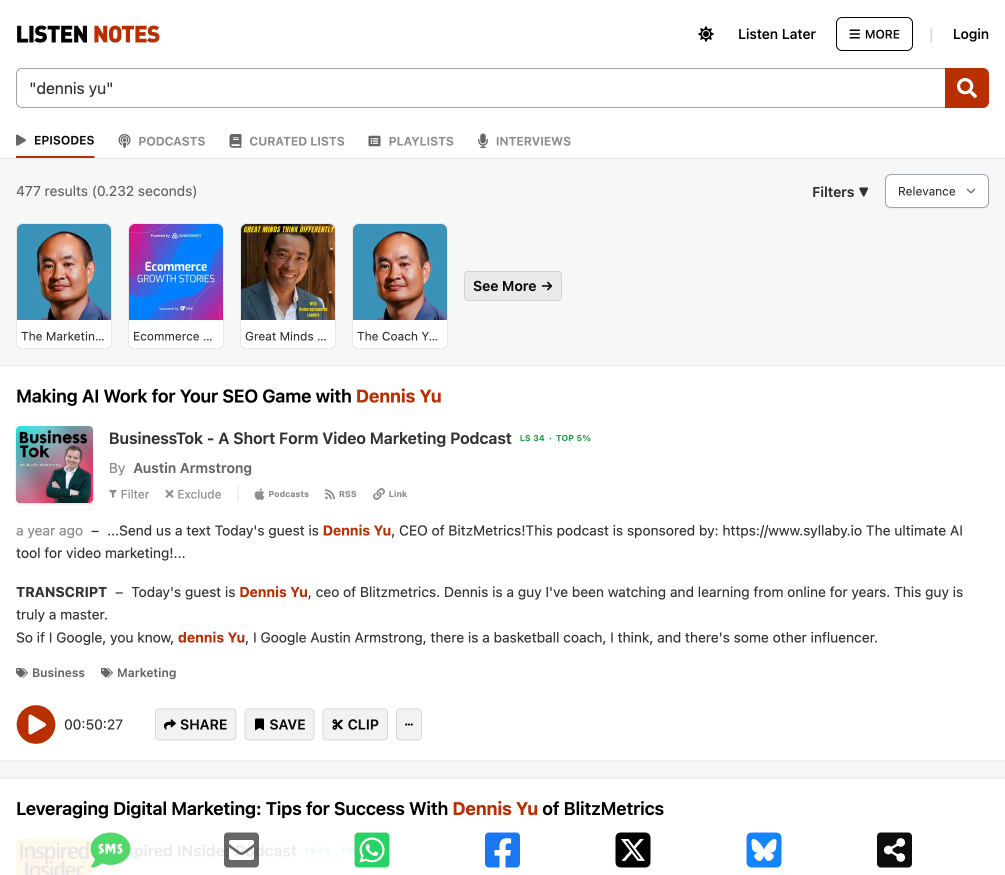
For entrepreneurs who have been podcast guests, Listen Notes answers a question most of us have never measured: how many episodes mention my name? When I searched Dennis Yu’s name in quotes, the captured search returned 477 episode results — before any profile or distribution work on the platform. Those are 477 pieces of content sitting in a searchable database, each one with repurposing potential I hadn’t tapped.
If you’ve been a guest on podcasts and haven’t searched your name on Listen Notes yet, you’re likely sitting on dozens — possibly hundreds — of episodes you’ve forgotten about. This article walks through exactly how we use Listen Notes at BlitzMetrics, with real examples from our own podcast appearances, so you can do the same.
How Listen Notes Fits Into Our Podcast Repurposing Framework
At BlitzMetrics, we believe every podcast episode contains at least 10 pieces of content. The video is the raw asset. From that, we extract audio for podcast directories, clip short-form videos for social media, pull quotes for graphics, and write long-form articles that embed the episode. But before any of that repurposing can happen, you need to know the episodes exist — and that’s where Listen Notes comes in.
Listen Notes serves as our discovery layer. While Podchaser tracks credited guest appearances like a podcast IMDb, Listen Notes casts a wider net by crawling RSS feeds and indexing episode descriptions and transcripts. The two platforms complement each other — Podchaser found over 500 episodes across 300+ podcasts for Dennis Yu, while Listen Notes found 477 through a different indexing method. Some episodes appear in one but not the other, which is why we use both.
For a complete overview of how all these tools fit together into a single podcasting strategy, see our Definitive Guide to Podcasting.
Step-by-Step: How to Search for Your Podcast Appearances on Listen Notes
Whether you’re one of our clients or an entrepreneur who has guested on even a handful of podcasts, here’s exactly what to do.
Step 1: Go to listennotes.com and type your name in quotes in the search bar — for example, “dennis yu.” Hit search.
Step 2: Click the “Episodes” tab. This is where you’ll find every indexed episode that mentions your name in the title, description, or transcript. When I did this, Listen Notes returned 477 results sorted by relevance. The top results included episodes like “Making AI Work for Your SEO Game with Dennis Yu” on the BusinessTok podcast by Austin Armstrong, and “Leveraging Digital Marketing: Tips for Success With Dennis Yu of BlitzMetrics” on the INspired INsider Podcast by Dr. Jeremy Weisz.
Step 3: Click the “Podcasts” tab. This shows you podcasts where your name appears in the show title or description. For “dennis yu,” this returned 6 results including The Marketing Mechanic with Dennis Yu (25 episodes, updated weekly) and The Coach Yu Show (2 episodes). This is useful for distinguishing between podcasts you host versus podcasts where you were a guest.
Step 4: Use the sort and filter options. You can sort by relevance or by date (most recent first). Sorting by date helps you find your newest appearances that may not have been repurposed yet. The Filters option lets you narrow by language, region, genre, and publish date range — useful if you want to find episodes from a specific time period.
Step 5: Export your results. On the right sidebar, Listen Notes offers an “Export results to CSV” button. This gives you a spreadsheet of every episode result with the podcast name, episode title, publish date, and links — the foundation for building your complete podcast inventory.
Key Features Most People Miss
Listen Notes has several features that make it far more powerful than a simple search engine. Most podcast guests never discover these.
Transcripts in search results. Listen Notes doesn’t just search titles and descriptions — it searches episode transcripts. This means it can find episodes where the host mentioned your name during the conversation even if your name wasn’t in the episode title or description. For example, one result for “dennis yu” showed a transcript snippet where the host said he had been “watching and learning from” Dennis Yu “for years.” That episode would have been invisible on any other search platform.
The Clip feature. Each episode result has a “Clip” button that lets you create a shareable audio clip from any episode directly on Listen Notes. You select a start and end time and Listen Notes generates a clip you can share or embed. This is useful for pulling soundbites from episodes without needing to download the full audio file.
Listen Score (LS) ratings. Every podcast on Listen Notes gets a Listen Score from 0 to 100 and a percentile ranking. The captured BusinessTok result shows LS 34 (Top 5%). A current INspired INsider result captured August 21, 2026 shows LS 44 (Top 1%). Listen Scores change, so record the score and capture date in your inventory. These scores help you prioritize which episodes to repurpose first — if you appeared on a Top 1% podcast, that episode deserves a full repurposing treatment: article, clips, boost, and backlinks.

Embed to your website. Listen Notes lets you embed individual episodes or search results directly on your website. This creates an audio player widget that visitors can use to play the episode without leaving your site — a way to increase time on page and showcase your authority.
RSS and email alerts. You can subscribe to your name search via RSS or email, so you get notified every time a new episode mentioning your name is indexed. This means you never miss a new appearance and can begin repurposing as soon as an episode goes live.
The Bigger Picture: Why Your Podcast Appearances Are an Untapped Asset
Most entrepreneurs treat podcast appearances as one-and-done events. You show up, you talk for 45 minutes, you share the episode link once on social media, and that’s it. But every episode is a raw material mine — it can generate articles, video clips, quote graphics, audiograms, and backlinks. The problem is that most people don’t even know how many episodes they have, let alone which ones have the highest repurposing potential.
Listen Notes solves the discovery problem. Combined with Podchaser for credited profiles, YouTube for video versions, and ChatGPT for filling in gaps, you can build a complete inventory of every podcast you’ve ever appeared on. We walk through the full consolidation process in our guide to inventorying every podcast appearance.
The point isn’t just to count your episodes — it’s to build a system where every appearance generates compounding value. Episodes that live only on Spotify can be repurposed to YouTube. Episodes already on YouTube can be clipped and boosted. Full interviews can be transcribed and turned into articles. And the episodes on the highest-ranked podcasts (which Listen Notes helps you identify through Listen Score) should get the most investment in repurposing and promotion.
Start by searching your name on Listen Notes today. You’ll almost certainly find episodes you’ve forgotten about — and each one is a piece of authority-building content waiting to be activated.
What Done Looks Like
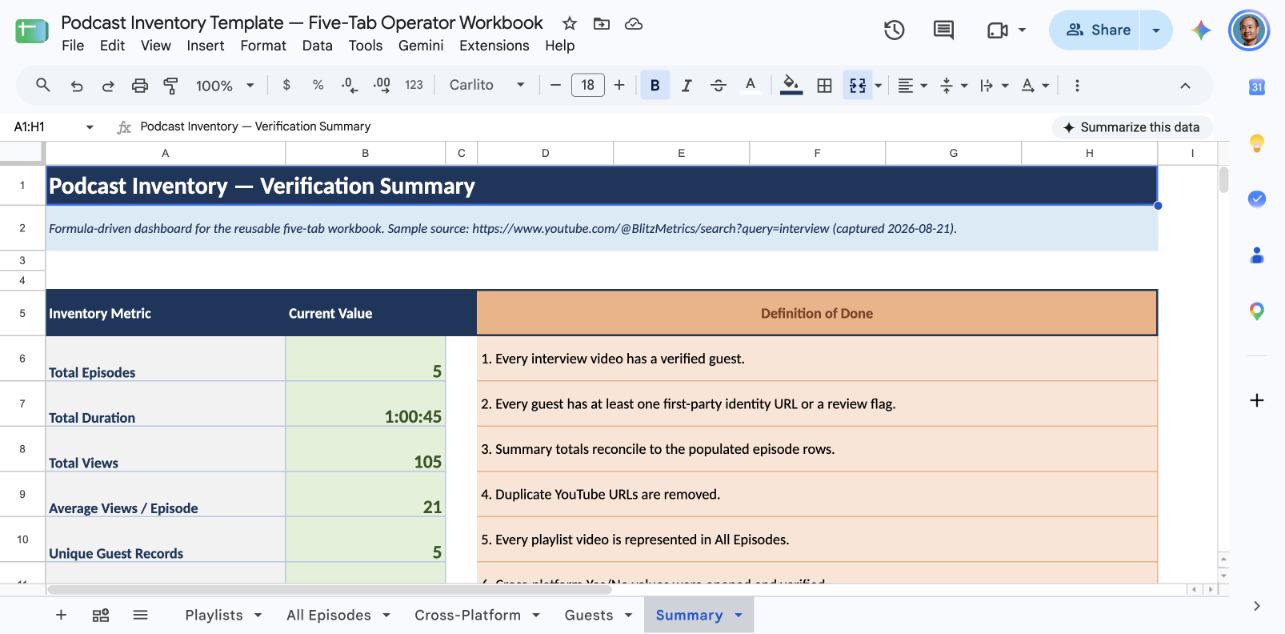
Download the five-tab Podcast Inventory Template or use the internal Google Sheet. Store every accepted Listen Notes result with its canonical URL, capture date, evidence, and cross-platform status.
Video Demonstration
Watch the agent walkthrough. It covers exact-name search, the Episodes view, transcript evidence, Listen Score prioritization, source capture, and the export/deduplication handoff.
Verification Checklist
The completed Listen Notes search must meet the following criteria. This follows the same verification format used across all BlitzMetrics task documentation.
#1. Listen Notes has been searched with the person’s name in quotes.
#2. The total episode result count has been recorded.
#3. The Episodes tab results have been exported to CSV or manually recorded in the Google Sheet.
#4. The Podcasts tab has been checked to identify any shows the person hosts (versus shows where they were a guest).
#5. Results have been sorted by date to identify the most recent appearances.
#6. Listen Score ratings have been noted for the highest-ranked podcasts the person appeared on (for prioritizing repurposing).
#7. Transcript search snippets have been reviewed for episodes where the person’s name appeared in the transcript but not the title or description.
#8. Results have been cross-referenced against Podchaser to identify episodes that appear in one source but not the other.
#9. RSS or email alerts have been set up for the person’s name (so new appearances are captured automatically going forward).
#10. All results have been added to the master podcast inventory Google Sheet.
Update: What We Found Beyond Listen Notes (March 2026)
Listen Notes returned 477 results for “Dennis Yu” — but that’s only part of the story. When we cross-referenced with Podchaser, YouTube, show websites, and manual web search, we identified 241+ individually verified appearances.
Here are shows we found through web search that Listen Notes missed or only partially indexed:
| Show | Episodes Found | Source |
|---|---|---|
| Conquer Local Think Tanks | 18 episodes | conquerlocal.com |
| Seven Figure Agency | 2 episodes | sevenfigureagency.com |
| Performance Marketing Insiders | 2 episodes | webmechanix.com |
| Social PR Secrets (Lisa Buyer) | 1 episode | Google Drive notes |
| Jordan Paris Podcast (w/ James Altucher) | 1 episode | Google Drive archives |
| Market Movers / Linkifi | 1 episode | marketmoverspod.com |
| Brand Masters Podcast | 1 episode | Show website |
| LPO: Landing Page Optimization | 1 episode | Show website |
Key takeaway: Listen Notes is the best single starting point, but you’ll miss 20-30% of appearances if you stop there. Always cross-reference with Podchaser, YouTube search, and manual Googling of “[your name]” + podcast show names. See our full master list of 608 Dennis Yu podcast appearances for the complete inventory.
Related Resources
Download the skill file: podcast-appearance-syndicator.skill.zip — install it in Claude and it executes this entire workflow (5-platform inventory, credit triage, appearances page, citation syndication) for you or your clients. Setup directions: dennisyu.com/dealcon.
- How We Use Podchaser to Amplify Authority and Repurpose Podcast Content — the companion tool to Listen Notes, covering profile verification, credit claiming, and AI-assisted processing at scale.
- How to Inventory Every Podcast You’ve Been On — the full multi-platform consolidation process using Listen Notes, Podchaser, YouTube, and AI tools.
- How to Inventory a Podcast on YouTube: The Definitive SOP — for inventorying a specific client’s YouTube podcast channel.
- How to Inventory a YouTube Channel — the general YouTube inventory process with step-by-step screenshots.
- How to Document a Task — the BlitzMetrics standard for creating task documentation.
- Creating Winning Documents that Drive Conversions — the 8-part document architecture.
- Document Your Expertise and Teach Others — the incentive program for documenting tasks.
- The Task Library — browse over 1,000 documented tasks across the Content Factory.
- How We Turned Four Podcast Inventory Drafts into Agent-Ready SOPs — the QA record, reusable workbook, asset map, and lessons from closing this documentation gap.
If you enjoyed this tutorial, be sure to explore our Task Library for a plethora of additional tasks waiting to be mastered!
Continue the Podcast Inventory Series
Part 4: How to Find 62+ Hidden Podcast Appearances That Aggregators Miss — Advanced Google search techniques to find episodes that Listen Notes and Podchaser don’t catch.
Browse the full inventory: Dennis Yu — Complete Podcast & Appearance Directory
Originally published .
Dennis Yu
Dennis Yu is the CEO of Local Service Spotlight, a platform that amplifies the reputations of contractors and local service businesses using the Content Factory process. He is a former search engine engineer who has spent a billion dollars on Google and Facebook ads for Nike, Quiznos, Ashley Furniture, Red Bull, State Farm, and other brands.
Dennis has achieved 25% of his goal of creating a million digital marketing jobs by partnering with universities, professional organizations, and agencies. Through Local Service Spotlight, he teaches the Dollar a Day strategy and Content Factory training to help local service businesses enhance their existing local reputation and make the phone ring.
Dennis coaches young adult agency owners serving plumbers, AC technicians, landscapers, roofers, electricians, and believes there should be a standard in measuring local marketing efforts, much like doctors and plumbers must be certified. He has appeared on 353 podcasts with 619 credited episodes — see the full list of his podcast appearances.