
 by
by
Write a short record of what happened when your team did a job. It helps the next person learn from the work and avoid the same mistakes. Link the record to the main task guide so you can improve its steps with proof.
This guide is part of The System: AI-Driven Marketing That Documents and Improves Itself. Next, explore How to Create a Definitive Article for Any BlitzMetrics Concept, or How the BlitzMetrics Knowledge System Learns From Itself.
Canonical task recipe · review incomplete59 listed examplesCanonical task page · Content Factory (our four-stage process for using real content) / Process
Outcome: Write an evidence-backed meta article for one actual task execution, including a complete, partial, or failed result, with its publication state and next handoff clearly stated.

Where this task fits in the Content Factory
Writing a run record is a Process task. Its evidence comes from a task performed in any stage. An authorized public release is a separate Post task.
1. ProduceCapture real work
THIS TASK2. ProcessTurn sources into useful assets
3. PostPublish and connect approved assets
4. PromoteShare proven work and measure results
Start, finish, and next step
- Start when
- Begin the record when a real task starts. Add evidence as the same run goes on, including blocked, partial, failed, and completed results. Keep one execution ID across updates.
- Have ready
- The task record, canonical recipe revision, source materials, actual output, checks, decisions, failures, owner, and next action. Use UNKNOWN for unavailable measurements.
- Follow the steps
- Use the prompt and writing steps below; separate the full private record from any public-safe version.
- Finish with
- One honest meta article under the execution ID, plus the required internal organization note.
- Measure the result
- Each factual outcome has inspectable evidence; all recipe checks have actual statuses; the task and recipe links resolve; public/private state and next owner are stated.
- Hand off next
- Register the execution in the Task Library (our directory of tasks and recipes; see current Task Library). Feed a checked lesson into the canonical recipe. If public release is authorized, follow the WordPress posting task and verify the live result.
Open this article’s tasks in the Task Library. The library connects the current recipe, its smaller tasks, and the records of work performed.
Close the learning loop. Write a meta article: the record of this execution with the starting state, recipe version, result, checks, failures, and next owner. Link it back to this recipe and register the run under the same Task Library task. Reuse one execution ID for revisions and retries. A partial or failed run stays labeled that way. Public release follows the recorded publication authority; writing the run record is part of doing the task. Writing and revising that record belong to the original execution; they do not start another meta-article task. Use the findings to propose and verify a recipe improvement. See how recipes and execution records work together.
Where meta articles fit in the Content Factory
System background, evidence rules, and the recursive loop
How the system works (and why getting this right is everything)
My Task Library shows the current registered-task total and the universe behind it, from setting up a Google Tag Manager container to building a personal brand website to repurposing a Zoom call into a blog post. Never copy a hardcoded registry count into evergreen copy; link to the live dashboard or label the number with a date, version, and inclusion rule.
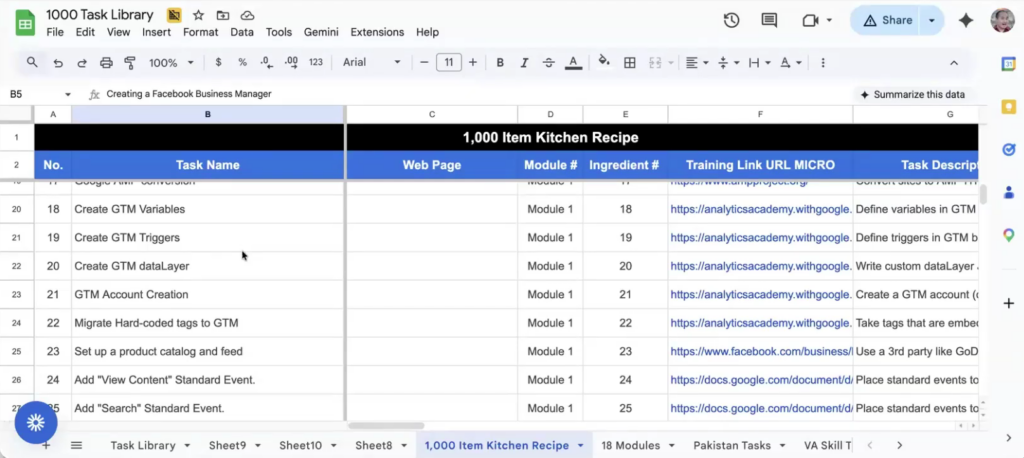
The goal is to catalog every task that can be done through a computer. The current registry deliberately exposes incomplete instructions, missing ownership, and gaps instead of counting them as finished work. I have been collecting these SOPs for 25 years. If you ask anyone in digital marketing who has the most SOPs, they will say it is me. And if anyone else has a better SOP for any particular thing, I want to ingest it. It is not about mine being the only way.
Each task should have one runnable task page or skill and map to a parent definitive concept when one exists. A Definitive Article is for a major concept or governing SOP, not a quota of near-duplicate articles for every atomic task. The dashboard should report operational completeness, parent-canonical coverage, ownership, and run evidence as separate fields.
Count and evidence rule — added August 2, 2026. Report registered task records, local hub task skills, runnable bundle files, and definitive articles as separate numbers. Documentation status is not demonstrated AI capability. Capability reporting must state the index version, evidence level, tested model/tool stack, test date, acceptance bar, human review required, and observed failures. Do not publish replacement-risk, earnings, or jobs-affected claims without a dated source and defined denominator.
Evidence receipt integrity — added August 2, 2026. A capability claim needs a stable task and skill revision, dated test conditions, complete cases and failed attempts, an acceptance rubric, named reviewer, and inspectable input/output/evaluation receipts. State whether each receipt was byte-verified, content-addressed, or only asserted. Evidence level describes trial rigor; report the result separately, including mixed and negative evidence. For URL repairs, record the source URL, final URL, redirect status, canonical destination, and whether meaningful body content is present. A redirect and a canonical tag are not substitutes for one another.
This is my master SOP for that task. It goes step by step, gives the context, has visual diagrams, shows examples of how the task is done correctly, and includes a quality assurance (QA) checklist, the checks that prove the result at the end. Below the checklist there is a skill markdown file that AI agents can parse directly. Use it as the main recipe for this task, then check the result against its checklist. When I say “according to the BlitzMetrics article guidelines” or “according to how I optimize Google Ads,” I am pointing the agent to the definitive article for that task. The agent goes and finds it, reads through all of it, and follows the steps.
When an agent executes a task, it follows the canonical recipe and writes a meta article for that execution. The record captures the starting state, recipe revision, inputs, actions, result, checks, failures, and next task. Every substantive organization job also gets a private agent-note. Writing the record is required; public release depends on the recorded publication authority and the suitability of its contents.
One canonical task recipe can have many execution records. Private, repetitive, failed, or partial runs still get a meta article in an appropriate private or draft form. Public examples contain safe, useful evidence and an honest result. A draft is not a published article, and a failed run is not a successful execution.
As the Task Library grows, its atomic skills map into a smaller set of governing Definitive Articles. The combination of private run receipts, selected public proofs, and reviewed updates to the canonical method enables the self-learning recursive loop I explained in episode 33 of Marketing Mechanic.
This is the fundamental mechanism, not a cursory detail, of how I multiply my advantage in the rising tide of AI.
The recursive loop
As my agents execute tasks, their private run receipts and selected public meta-articles capture what happened. When those receipts connect to business data such as phone calls, conversion rates, revenue, and search rankings, the agents can identify what is actually working. A reusable lesson becomes a proposed update to the canonical skill or Definitive Article; it is not accepted merely because a vendor remembered it.
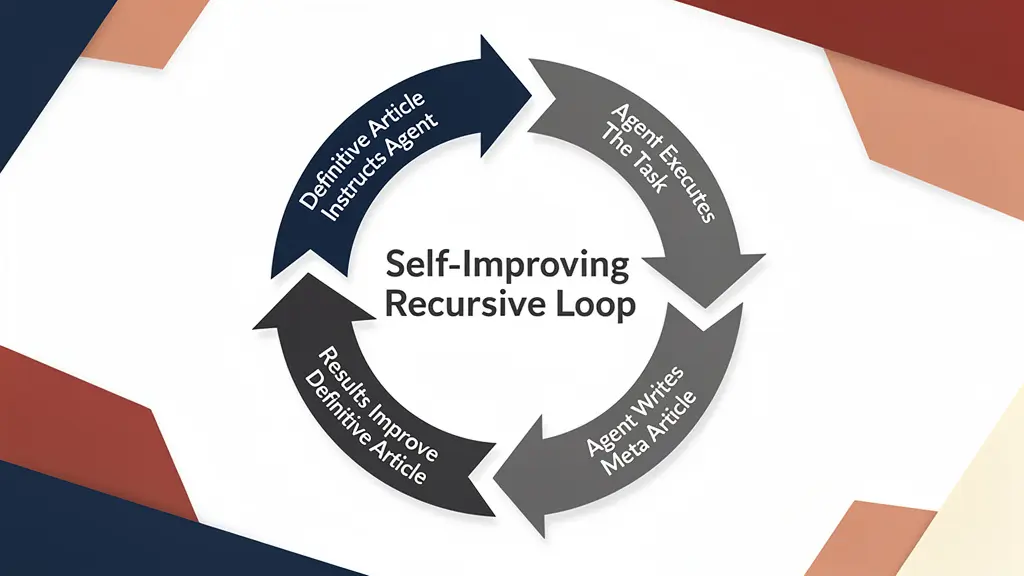
If an agent trips on a step, I can see it in the internal receipt even when nothing public is appropriate. If multiple agents make the same mistake, I fix it at the root by updating the canonical skill or Definitive Article through review. The postmortem records which guidance it used, where it went outside that guidance, and why.
The loop looks like this:
- The canonical skill and parent Definitive Article describe the method.
- The agent executes the task and verifies the result.
- Every substantive organization job writes a private internal receipt.
- Write a Meta Article for every execution. Publish a public-safe version under the recorded authority and connect it to the canonical recipe.
- Reusable evidence becomes a reviewed update to the canonical skill or Definitive Article.
- Generated packs are rebuilt, a fresh-chat canary proves activation, and the next agent benefits.
The more tasks get run, the better the system gets. It is self-improving. The agents are learning from each other, finding better ways to do things, and the improved SOPs feed back into the next round of execution.
Why I publish my definitive articles publicly
I put all of my definitive articles out in the open because the idea of constantly updating skill files and passing them around and having people reinstall and configure, it is just not worth it. I said I am making my knowledge public and anyone who wants to make it better, they can.
So you do not even need to pass around skill markdown files anymore. You can just tell your agent “follow the process Dennis teaches for building a personal brand site” and it goes and references that published article. It will find the task, read through all of it, the steps, the QA checklist, the skill file. I do not know what else I can do to make things easy and give away everything I know how to do.
My friend Stasiu Sliva, who runs a $5 million a year home services agency (S&C Digital), is deploying agents this way right now. Instead of outsourcing to other SEO agencies, he is insourcing to his own Claude agents. When his agents use the updated guides, they can follow the revised steps. We still need to check the results to see whether the change helped.
Where the record lives — WordPress and GitHub
When a run qualifies for public proof, its meta-article publishes on BlitzMetrics or Local Service Spotlight and links to its parent Definitive Article. That is the copy a stranger can read. It is never the whole internal record.
Every substantive organization job writes an internal note to GitHub: agent-notes/YYYY-MM-DD-model-slug.md in the private repo Local-Service-Spotlight/agent-runtime. Public blob URLs 404 by design. Never put passwords, application passwords, tokens, or API keys in the note — name the credential store and key, never the value. In WordPress HTML, write the literal example YYYY-MM-DD-model-slug.md; angle-bracket placeholders are parsed as tags and disappear.
The private GitHub note preserves operational details for the next authorized agent. The meta article explains one execution in the format taught here. Write both records when this organization rule applies; publish the public-safe article only under the existing authority. One record never substitutes for the other.
Part of The System. This page is one component of our public AI-marketing machine — see the full map, browse every asset in the registry, or point your Claude at either link and let it build your version.
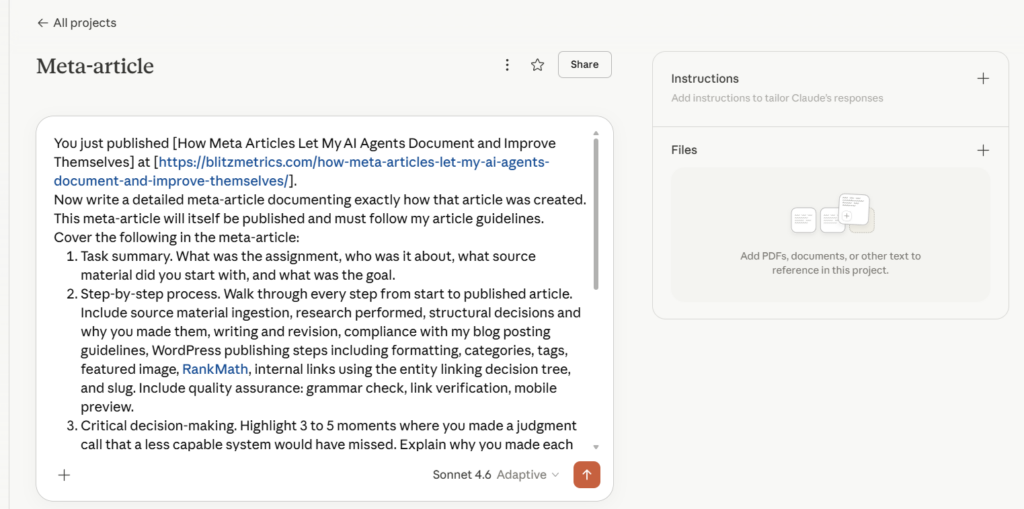
I built this reusable prompt template so my team, my agents, and anyone following my process can create meta articles the right way. Before I give you the prompt, you need to understand the system it sits inside, because if you get this wrong, every meta article your agents generate will be flawed from the start.
What a meta article documents
Begin every document with a clear reason to read it. Use two or three sentences at fifth-grade reading level or below to explain what the document is, why it matters, and how it connects to a larger process, a needed input, or the next task. Explain and link that connection within the opening. For a business owner, explain how the actual method or proof helps with the job. Use the real audience for other pages. A reading score does not prove the promise is clear or supported; check the opening against the body.
When you write about AI work, use the right names. A skill is a written recipe; a skill pack groups recipes; and a plugin packages them for a supported app. An AI agent is the worker doing a job with approved tools. A job is an assigned run; a schedule is optional. Access, installation, skill activation and a checked run each need their own evidence.
In the Task Library, complete is a contributor’s document-status claim. It does not prove that the guide passed independent review, that required examples or ownership are present, or that a client task ran. Check the actual source and record document review, access, activation, execution and business outcome separately. A target number of ready documents is not a count of completed client jobs.
Begin the written run record when work starts, using one stable execution ID and the actual starting source revision. Update it as work proceeds. If the same execution is blocked, keep its true status and leave the finish time empty; describe the partial result so far. Do not invent another execution for a retry, continuation, or this writing step. Keep the document’s draft or public state separate from the task’s result.
Every task execution gets a meta article. Its result may be complete, partial, or failed. The record covers the following:
The task summary. What was the assignment. Who or what was it about. What source material did we start with. What was the goal.
The step-by-step process. Record the sources used, work performed, decisions made, publication if authorized, and checks. Name the actual app and model when known. Choose a reviewer suited to the task and check the result in a fresh context. Do not assume one model is always the best reviewer.
The critical decisions. Record the decisions that changed the work, why they were made, and what evidence supported them. A small task may have only one. Do not add invented decisions to fill a quota.
The effort and cost comparison. Report observed elapsed time, usage and charges when the runtime supplies them. Label any human-time comparison as an estimate with its assumptions. A subscription price is not the cost of this run. If usage or cost is unavailable, say UNKNOWN; do not invent token counts or savings. The earlier Claude plan cost example is historical context, not a current price quote.
Related run record: The Skill Pack Pages That Linked to Nothing documents broken links and their verification in July 2026. It is publication evidence, not a model price.
Cost and time worksheet: collect the proof first
The earlier version included price, hourly-rate and time figures without verified source receipts. Those cells now say UNKNOWN. Fill them only from the real run’s measurements, dated provider prices, billing records, or sourced human-rate benchmarks. A provider price alone does not prove a run’s cost. For an estimate, label the assumptions and calculation; never present it as a measured result.
| Model | Input (per 1M tokens) | Output (per 1M tokens) |
|---|---|---|
| Claude Opus 4.6 | UNKNOWN | UNKNOWN |
| Claude Sonnet 4.6 | UNKNOWN | UNKNOWN |
| Claude Haiku 4.5 | UNKNOWN | UNKNOWN |
| Human Role | Hourly Rate Benchmark |
|---|---|
| US Digital Marketer (average) | UNKNOWN |
| Trained Content Factory agent | UNKNOWN |
| Senior Content Strategist (US) | UNKNOWN |
Run comparison worksheet — measurements needed
Copy the columns for the real task. Record observed time and usage, and link the receipts used to calculate cost. Keep missing values UNKNOWN. Label human-time or cost estimates with their assumptions. Do not turn the total into a measured result when its inputs are unknown.
| Task | Agent Time | Human Time | Agent Cost | Human Cost |
|---|---|---|---|---|
| Source material ingestion | UNKNOWN | UNKNOWN | UNKNOWN | UNKNOWN |
| Research and context gathering | UNKNOWN | UNKNOWN | UNKNOWN | UNKNOWN |
| Article writing | UNKNOWN | UNKNOWN | UNKNOWN | UNKNOWN |
| SEO metadata and optimization | UNKNOWN | UNKNOWN | UNKNOWN | UNKNOWN |
| Formatting for WordPress | UNKNOWN | UNKNOWN | UNKNOWN | UNKNOWN |
| Quality assurance | UNKNOWN | UNKNOWN | UNKNOWN | UNKNOWN |
| TOTAL | UNKNOWN | UNKNOWN | UNKNOWN | UNKNOWN |
What the worker could and could not do. State the capabilities, files, tools and authority actually available in this run. Record work completed and the exact remaining dependency. Login, image selection and publication may already be authorized and supported; do not invent a human gate. A connected account alone does not authorize a new action.
The information ingestion inventory. How much the agent processed. Number of source documents, total word count, web searches, articles reviewed for internal linking, total tokens consumed. When my agent went through George Leith’s 800 podcast episodes, that is a massive ingestion that I want documented.
The guidelines compliance scorecard. Check the actual artifact against the current rules for its declared role. Give each item evidence and a status: PASS, FAIL, UNKNOWN, or justified NOT APPLICABLE. A checklist or model score is not independent proof. Review the claims, changed content, links and usable result, and name the owner of remaining work.
Check the work record you made
Use this checklist to check the work record you made. It helps your team see what passed and what still needs proof. Follow our article guidelines when you prepare a public version.
State whether the record is private, a draft, or published. For each check, use PASS with evidence, FAIL for an observed problem, or UNKNOWN when proof is missing. Use NOT APPLICABLE only with a reason tied to this output. Name the next owner and action for each open item. Keep these check results separate from the task’s running, blocked, complete, partial, or failed outcome. Public publishing checks can be not applicable to a private draft; truth, a clear opening, and a useful visual still matter.
| BlitzMetrics Guideline | Status | Notes |
|---|---|---|
| Opening explains the work, its value, and a linked connection | UNKNOWN | |
| Claims match the actual output and its evidence | UNKNOWN | |
| Voice fits the named author and audience | UNKNOWN | |
| Short paragraphs (3–5 lines max) | UNKNOWN | |
| Active voice throughout | UNKNOWN | |
| No AI fluff phrases | UNKNOWN | Check the actual text against the maintained writing rules. |
| Clear title that fits the output and its publishing rules | UNKNOWN | |
| H2/H3 structure without heading abuse | UNKNOWN | |
| Useful owned links explain key terms and the next task | UNKNOWN | |
| Entity links follow the decision tree (people to their sites, network entities to their sites, non-network entities to BM articles) | UNKNOWN | Follow the current article guidelines and its entity-linking rules. |
| Meaningful visual shows the task, proof, or process | UNKNOWN | Check the visible visual on the actual output. Use relevant approved media or an evidence-backed diagram; a video is not required for every task. |
| Featured image when required by the publishing surface | UNKNOWN | For public publishing, follow the site’s image requirements and record source and rights. A private draft has no WordPress featured-image field to fill. Do not invent a photo or grant access to pass this check. |
| Public search metadata when applicable | UNKNOWN | For an approved public page, set and read back the title and search description through its supported tools. Name any missing step. Public search metadata is not applicable to a private work record. |
| No stock images | UNKNOWN | Use approved original media or an evidence-backed diagram. Record any missing source or permission. |
| Site categories and tags when applicable | UNKNOWN | For a public page, use its maintained taxonomy and verify the saved result. A private file has no site categories to set. Missing required access remains an open action. |
| Proper anchor text (3–6 words, descriptive) | UNKNOWN | |
| No keyword stuffing | UNKNOWN | |
| Actual run dates, recipe revision, and source dates retained | UNKNOWN | |
| Clear next action and receiving owner | UNKNOWN |
Before your first work record
This guide helps you save what happened in a real job. A clear record helps the next person avoid the same mistakes. Use the Task Library run-record guide to connect that evidence to the task.
- Choose where to work. Open the task guide in your AI app or text editor. Check that you can read the approved source files and save the draft in the chosen project folder. You can write a private draft without website access.
- Start with the facts you have. Keep the task’s name, one run ID, the guide version, start time, and source links. Add output, checks and the next owner as the work happens. Mark missing facts unknown.
- Check before you register. Ask the responsible library operator to prepare the run record using the linked guide. It gives the JSON format and the command
python3 scripts/record_execution.py CANDIDATE.json --check. A valid result is needed before saving through the maintained library process; a validation error means fix the record first. This check does not publish it. - Keep setup steps separate. Reading this page or saving its skill file does not install a plugin, connect accounts, or start a timer. Use existing approved access. Name any missing access or unsupplied destination in the record. A one-time record needs no schedule; repeat work needs its own configured trigger and saved state.
Hand off: the task owner receives the checked draft and validated record. The standards owner receives any supported change to the method. Share or publish only within the existing job’s authority.
The reusable prompt
Start a draft with this prompt when the task begins. Add each result and its proof as you work, including blocked, partial, and failed results. Finish the record with the actual outcome and next step. Keep it private or in draft when public release is not suitable or authorized; the publication test controls release, not whether the run gets documented.
Publication gate. Confirm all six: explicit authority to publish; no secrets, private-source links, client-confidential facts, or unapproved personal data; a reusable and nonduplicative lesson; a parent Definitive Article; independently checkable public evidence; and a named publishing owner who will verify the live read-back. If any test fails, keep the run private.
PROMPT START
I am recording [TASK OR DELIVERABLE], started at [ACTUAL START TIME], under [EXECUTION ID]. Its current state is [RUNNING, BLOCKED, COMPLETE, PARTIAL, OR FAILED]. The evidence available so far is [SOURCES AND OUTPUTS, OR UNKNOWN]. The private receipt is [INTERNAL RECEIPT PATH, IF AVAILABLE]. A public result is at [VERIFIED PUBLIC URL, IF ANY]. Do not invent a result or finish time for an ongoing task.
Write a Meta Article documenting this execution under its stable execution ID. Link the task and exact recipe revision, starting state, inputs, actual steps, measured result, evidence, failures, and next task or communication owner. Preserve UNKNOWN measurements. Record whether the article is private, draft, or published. Publish only when the recorded authority permits it and the public version passes the publication test.
Cover the following in the meta-article:
- Task summary. What was the assignment, who was it about, what source material did you start with, and what was the goal.
- Step-by-step process. Record the actual task from its starting state to its observed result, including incomplete or failed work. Name sources, actions, decisions, checks and the next handoff. For an article task, apply the current writing rules and the actual editor. If WordPress publication occurred, record the supported save route, applicable metadata such as Rank Math settings, source readback and normal public-page checks. A private draft or another kind of task does not require invented publishing steps.
- Critical decision-making. Explain the decisions that materially changed this run and the evidence behind them. Record only decisions that occurred; do not invent three to five examples.
- Effort and cost comparison. Use measured time and billing telemetry when available. Keep subscription allocation, API usage, and scenario estimates separate; date every rate and show assumptions. Preserve UNKNOWN instead of inventing a number.
- What you could and could not do. List what you handled autonomously and what required human input. Be honest.
- Information ingestion inventory. Report source documents, words, searches, articles reviewed, and token usage only when those values are observable. Mark unavailable telemetry UNKNOWN.
- Guidelines compliance scorecard. Check the actual private record, draft, or published output against the current rules for its role. Use PASS with evidence, FAIL for an observed problem, UNKNOWN for missing proof, or NOT APPLICABLE with a specific reason. Name the owner and next action for open checks. Keep check states separate from the task outcome. Preserve actual run dates and source revisions; do not publish, invent media, or omit dates just to satisfy a template.
- Title, search metadata, and formatting. Follow the current article guidelines for this output. Every record needs a clear opening, useful visual, supported facts, short paragraphs, and a next step. Apply public title, search description, category, and live-page checks only when that publishing surface and the recorded authority call for them. Keep the true dates and recipe revision. Do not turn a private draft into a public page to satisfy a checklist.
- Internal GitHub agent-note. For substantive organization work, fill the required agent-note template and push that operational record. Also write the execution’s Meta Article. Its publication state is separate from the requirement to write it.
PROMPT END
How to use this prompt
Start the meta article when the task begins and add evidence as the same run goes on. Register its actual current state under the same Task Library task and execution ID; when the run ends, record its final result. For substantive organization work, also write the internal agent-note. Keep the public version in draft until its contents and publication authority support release; read back any published version.
Start the private evidence record when work begins, then use it to prepare a public-safe draft. Keep updating both through the same run. A WordPress Meta Article never replaces the internal failed attempts, conflicting documents, ownership, evidence, or exact next action.
If a human wrote the article, use the same structure as a checklist. Walk through each section and document your own process. The format stays the same whether the writer is human or AI.
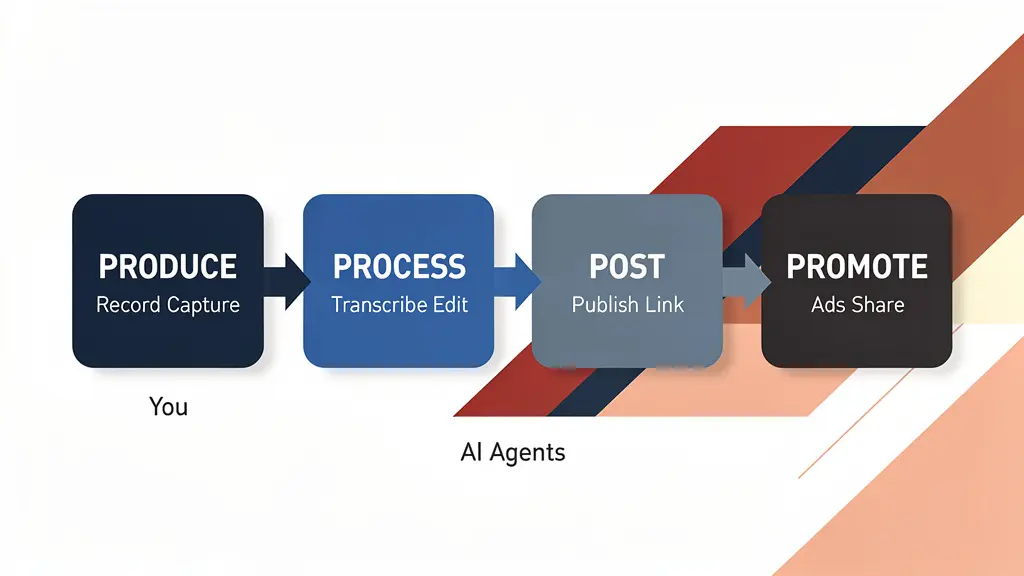
The Content Factory sequence is: do real work, check the result, write the execution’s meta article, and make the required handoff. Process turns the evidence into a useful article; Post releases an authorized public version; Promote shares proven work. Register the run and feed a checked lesson into the recipe. See how the recipe, run record, and Task Library connect.
Why meta articles matter
They can provide evidence of a bounded result when the article links the inputs, accepted output, decisions, timing, cost source, failures, reviewer, and test conditions. Illustrative numbers are not proof by repetition. A live demonstration is stronger than a sales deck only to the extent that another reviewer can inspect its receipts and reproduce the conditions.
They can guide future agents when the relevant article is indexed, retrieved, and deliberately supplied as context. Publishing a page does not automatically train a model or guarantee that an agent reads it. A verified meta-article is an SOP example in the Knowledge, SOP, Action framework.
They build my Content Library. Each useful, well-linked meta-article can expand topical coverage and give people another route into the system. Search visibility and business outcomes must be measured; publishing twenty pages does not guarantee ownership of a search space.
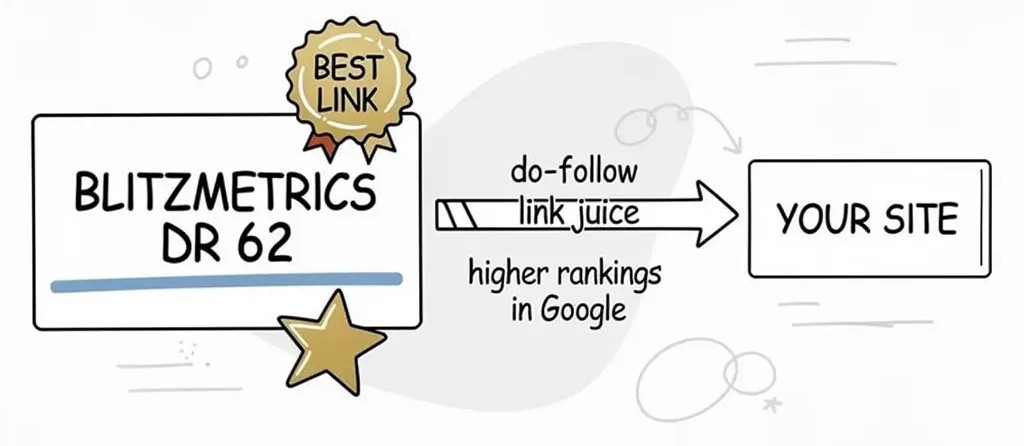
They create legitimate SEO value. Most local businesses have no link juice. They can create a ton of content, but if there is no signal flowing, no links, no citations, it is almost like the content is not even being seen. My agency site has a domain rating of 62. When I publish a meta article about how I built a personal brand website for someone who is connected to other well-known people in home services, that article passes legitimate link juice. It is not a black hat private blog network. It is legitimate EEAT. I am a real person doing real work and documenting it publicly.
They make review easier to follow. The scorecard points to the evidence, failed checks and remaining work. A reviewer checks those claims and the actual result; the scorecard does not replace review. Continue actions already authorized, and request human input only for a real missing decision or grant.
Naming convention
I use this pattern for meta-article titles and slugs:
Title: “How I Built [Original Article Title]” or “Inside the Process: [Original Article Topic]” Slug: /how-i-built-[original-slug] Category: Content Factory Tags: Content Factory, AI Agents, Meta-Article, Process Documentation, plus topic-specific tags
Meta articles in action
Here’s the top 10 table, plus you can add the rest below it:
| Meta Article | Who | Industry | What the agent did |
|---|---|---|---|
| How We Harmonized Skills and Routines | Dennis Yu / Grok Bot | Skills and routines | Mapped Claude scheduled task = Grok Bot routine = Cursor Automation; unglued teach-a-task from the clock; patched /build-agents/ off 7-day /loop as the production host |
| How We Built Ibrahim Awad’s Personal Brand Site | Ibrahim Awad | Personal injury law, Atlanta | 18 articles across 6 categories, Elementor builds, full Rank Math SEO, homepage scored 84/100 |
| How We Built Jason Amato’s Personal Brand Site | Jason Amato | Home services, Hall of Fame inductee | 3 rounds of enhancement, structural repairs, visual QA, expanded from 5 to 9 articles, YouTube podcast repurposing |
| How an AI Agent Built Tanner Laycock’s Personal Brand Site | Tanner Laycock | Golf professional | Full build from initial audit through content creation, knowledge panel strategy |
| How a Claude Agent Redesigned a Veteran’s Homepage in One Session | Trevor Blaszczyk | Veteran, home services | Transformed plain-text homepage into professional design using Elementor JavaScript API in one session |
| How a Claude Agent Built RoofingLaunch.co in One Session | Ethan Van De Hey | Roofing | Built from blank WordPress in 45 minutes, researched 5 sites, wrote roofing copy, published cross-linking articles |
| How We Tuned Up David Carroll’s Personal Brand Site | David Carroll | Personal branding | SEO audit, content fixes, entity optimization to earn Google Knowledge Panel |
| How We QA’d Marko Sipila’s Personal Brand Site | Marko Sipila | HVAC, coatings (HVACQuote.ai, CoatingLaunch) | Found 13 QA issues across 11 posts and 10 pages, demonstrated entity linking decision tree |
| How We Updated Jack Hughes’ Personal Brand Site with 36 Blog Posts | Jack Hughes | Podcasting | Repurposed 36 YouTube podcast episodes into blog posts, Content Factory at scale |
| How an AI Agent Built Justen Martin’s Personal Brand Website | Justen Martin | Personal branding | Transformed blank WordPress template into fully branded site |
| How We Built Gavan Thorpe’s Personal Brand Site in 750+ Steps | Gavan Thorpe | Home services | 750+ step comprehensive build, every decision documented from audit through content and SEO |
| How We Harvested Law Firm Link Equity for Law Firm Spotlight | Law Firm Spotlight | Legal marketing, Spotlight Network vertical | 29 internal links harvested + shipped live across BlitzMetrics, entity-name split fixed across 4 templates |
| The Members Area Said 74, 100, and 76 — All on the Same Day | Sigrun / SOMBA | Members-area systems, data consistency | Four wrong numbers across three pages traced to hardcoded generators; counts now derived from the roster, plus a publish guard that caught a rebuild silently deleting all 39 member headshots |
| Give Your Team the Board Your Clients Never See | Sigrun / SOMBA team | Coaching & membership program | Fixed 9 members whose audits weren’t showing and made that state self-healing, then stood up a separate password-gated team practice board clients can’t reach — verified the gate from the outside. |
| How I Closed the Gaps My Own Weekly Skills Audit Found | BlitzMetrics / Local Service Spotlight fleet | Internal agent-fleet operations | Retrofitted 9 client MAA (Metrics, Analysis, Action: results, meaning, and next steps) agents onto 2 shared skills, packaged 2 skill-plugins (254 files), stood up a weekly AI-citation agent, archived 19 dead scheduled tasks, made the weekly skills-audit self-verifying |
| The audit that sold itself: our first monthly audit subscription | Matt Bodnar (Eidolon Capital) | Authority audit → monthly delta-audit subscription (DealCon) | Agent reruns the full audit on the 18th monthly: delta PDF published + staged in-thread; run No. 1 documented the client executing the fixes and Google flipping his panel descriptor to “Investor” in five weeks |
| How I Closed the Skill-Pack Gap My Own Agent Flagged | BlitzMetrics / Local Service Spotlight skill packs | Internal agent-fleet operations | Added the real 239-skill download and a machine-readable dated badge to the build-agents hub and the Task Library Dashboard, corrected the master directory row that mislinked the Task Library to the 11-skill workshop pack, and made the weekly propagation contract explicit so the gap self-heals |
| Kimi K3 vs. the Claude content factory | Price a rival model against your routing ladder before switching clouds | ||
| The Pack Was Perfect. Every Sentence About It Was Wrong. | A count that went stale in five places while every check passed — and why a guard that compares a system to itself cannot see consistent error. |
The pattern is the same across every build. The niche changes, the person changes, the starting point changes, but my process stays consistent. Every meta-article links back to its parent definitive article so each new example strengthens the system rather than floating in isolation.
Every meta-article produced by this prompt feeds into my Content Factory pipeline and must follow the Entity Linking decision tree when referencing people, businesses, and my concepts.
Layout for an approved public work record
For an approved public meta article, use a clear layout that shows the proof and the next step. The June 12, 2026 examples below offer useful components; they do not require publishing a private record or inventing missing results. See how the layout was used on the Terry Shintani audit and the Julian David build. The rule of thumb: a reader scrolling without reading should still get the story from cards, charts, captions, and the deliverable button.
- Open with an italic lede (orange left bar): who, what the agent did, where the deliverable lives.
- Stat cards when useful: show only measured, sourced numbers that help explain this run. Use fewer than three or omit the cards when the evidence does not support them. Missing measurements stay unknown.
- Verb-first H2s with the teal accent bar; short sections; no text walls.
- Branded tables (navy header row, zebra striping) for auditable token receipts and cost comparisons. Include them only when telemetry or a clearly labeled estimate exists; otherwise state that the data was not captured. Never invent a table to satisfy the format.
- Teal callout boxes for the proof ledger (verified vs. self-reported) and any guardrails.
- Show a meaningful visual from the work: a chart, screenshot, or clearly labeled diagram of the observed process or result.
- Use THE DELIVERABLE block when public sharing is suitable and authorized: navy box, coral primary button. Otherwise state a safe next action without a private link. Audits get the PDF button (upload the PDF to the media library — never link a file we don’t host). Site builds get a live-site button. If both exist, primary = PDF, secondary = outline site button.
- Featured image = page 1 of the PDF rendered to PNG (pdftoppm), or the deliverable’s hero screenshot.
- Token and cost receipt: report exact telemetry when available. Keep estimates separate, show model/date/rates and assumptions, and label human-hour comparisons as measured or scenario-based. If the system does not expose auditable token or billing totals, say so.
Reusable components for this layout example
Lede:
<p style="font-size:19px;line-height:1.65;color:#3A4A60;font-style:italic;border-left:4px solid #E76F51;padding-left:16px;">LEDE: who, what the agent did, where the deliverable is.</p>
Stat cards:
<div style="display:flex;gap:14px;flex-wrap:wrap;margin:28px 0;"><div style="flex:1;min-width:170px;background:#0B2545;border-radius:12px;padding:24px 14px;text-align:center;"><div style="font-size:30px;font-weight:800;color:#7FC8C8;line-height:1.1;">BIG NUMBER</div><div style="color:#B9CBDD;font-size:13px;margin-top:9px;line-height:1.45;">what it means</div></div><!-- optional: add another card only for a sourced measurement; omit cards when no useful measurements exist --></div>
Accent H2:
<h2 style="margin:38px 0 14px;padding-left:14px;border-left:5px solid #0E8C8C;color:#0B2545;">Verb-First Heading</h2>
Proof-ledger callout:
<div style="background:#E8F4F4;border-left:5px solid #0E8C8C;border-radius:8px;padding:18px 22px;margin:20px 0;"><p style="margin:0;"><strong>Proof ledger / key caveat:</strong> verified vs self-reported, gotchas, guardrails.</p></div>
THE DELIVERABLE block with button:
<div style="background:#0B2545;border-radius:14px;padding:38px 28px;text-align:center;margin:42px 0 10px;"><div style="font-size:13px;font-weight:700;letter-spacing:1px;color:#7FC8C8;margin-bottom:8px;">THE DELIVERABLE</div><div style="font-size:26px;font-weight:800;color:#ffffff;margin-bottom:10px;line-height:1.25;">Read the actual audit we delivered</div><p style="color:#B9CBDD;max-width:600px;margin:0 auto 24px;font-size:15px;line-height:1.6;">One sentence on what is inside.</p><a href="PDF_OR_SITE_URL" target="_blank" rel="noopener" style="display:inline-block;background:#E76F51;color:#ffffff;padding:17px 38px;border-radius:10px;font-weight:800;font-size:17px;text-decoration:none;margin:4px 8px;">Read the Full Audit (PDF) →</a><!-- optional secondary (live site): same <a> with background:transparent;color:#7FC8C8;border:2px solid #7FC8C8 --></div>
Publishing rules that make it survive WordPress
- Use the site’s maintained editor and publishing route. Preserve the existing canonical URL, Post or Page type, builder data, useful styles and media. Do not convert every page to a single line or a new template.
- Upload approved PDFs and images through the supported media route, then use the final asset URLs. Keep binary files in the file or upload tool; do not hand-copy their base64 through a model response.
- Use existing publication authority and the stored connection for that site. A working application-password route does not require a second browser login. Reuse the site’s actual taxonomy; numeric category IDs are site-specific.
- Record when the work happened in the article. Keep the publication date truthful; a run record does not require backdating a post.
- Optimize image size while preserving readable text, useful detail and provenance. For a flat-color diagram, a palette conversion may help; compare the real output before use. No fixed file-size saving is guaranteed.
- Read back the saved source, then open the normal canonical URL as an ordinary visitor. If it is stale, refresh through the site’s maintained cache or static-publication route and check the normal URL again. A cache-busting preview does not prove what normal visitors receive.
- Open each deliverable button and verify the intended file or page is usable. Check the meaningful lead visual on desktop and phone. Keep all media tests muted at volume zero; record a playback gap when silence cannot be verified.
- Set a meaningful featured image through the site’s supported process when appropriate. Confirm the actual first-screen visual separately; a featured-image field alone does not prove it is shown.
For an approved public article, link the deliverable when it is suitable and authorized for public sharing, and verify the link. Keep private destinations and evidence private; their existence does not authorize a public button. State a safe next step when the deliverable cannot be shared publicly. The original July 3, 2026 lessons came from the Avery Young Authority Package build. The publishing instructions above were reconciled with the current site-specific workflow on September 6, 2026.
See this framework in action: How We Automated Quick Audit Follow-Ups with Zapier — a real meta article documenting how a Zapier follow-up sequence was built and deployed for Quick Audit clients.
The full skill file
Every BlitzMetrics skill ships with its runnable file on the page (our publishing standard). Save the block below as write-meta-article-documenting-agent-work.skill.md and hand it to your AI agent. The complete runnable skill is between START and END.
START

---
name: write-meta-article-documenting-agent-work
description: "Write what happened when a task ran. Link the work, the checks, and the next step."
category: Content Factory — Process
stage: Process
definitive_article: https://blitzmetrics.com/meta-article-prompt/
status: complete
---

# Write a meta article documenting a task execution

Write a short record of what happened when your team did a job. It helps the next person learn from the work and avoid the same mistakes. Link the record to the [main task guide](https://blitzmetrics.com/definitive-article-guide/) so you can improve its steps with proof.

**The path:** Actual task evidence → Clear run story → Same execution record → Checked handoff.

**Use this when:** An actual task attempt needs its written record, including an ongoing, blocked, partial, failed or completed outcome.

## Inputs
- The exact task slug, stable execution ID, canonical recipe URL and source revision actually followed.
- Actual start, inputs, steps, decisions, output checks, result and next owner; use UNKNOWN for unmeasured telemetry.
- The saved artifacts/evidence with public/private limits and the meta article’s intended draft or publication state.
- The existing Task Library execution ledger/CLI and current previous record revision if updating; internal organization note requirements remain separate.

## First-run prompt

> Write the meta article for this actual task execution from the supplied evidence. Preserve its stable ID and recipe revision, state the real result and unknowns, and make a public-safe draft. Prepare and validate the existing ledger format without inventing telemetry, publication or extra runs. Record a supported next step even when the outcome is blocked.

## Steps
1. Read the real run evidence and existing record before writing. Separate the intended outcome from what actually happened. Keep one ID across retries, checks and derivative artifacts; a genuinely separate performed child can have its own parent-linked ID.
2. Write two or three opening sentences at grade 5 or below. Say what work was attempted, why it mattered, and how this record helps improve the main task guide; link that guide in the opening. Preserve the real result, including a remaining blocker. Describe the starting condition, source material and actual recipe revision in the body.
3. Explain the steps actually performed, important decisions and checks. Use dated evidence and concrete observed results. Mark untested or unavailable fields; never fill time, cost, tokens or completion counts from estimates.
4. Show a meaningful real artifact or a clearly labeled diagram of the observed workflow/result. Link the canonical task and exact Task Library route, and explain new terms with owned guides. Keep secrets, private paths and private evidence URLs out of a public-safe version.
5. Record acceptance state from evidence: passed checks, failures, not-checked items, partial work and next owner. The story can be useful even when the task is blocked. Do not turn a written meta into automatic task certification.
6. Save the actual draft and compute its content hash if using the ledger’s draft form. For a published meta, verify the exact live page and use its URL. Preserve the separate internal agent-note required by the organization.
7. Prepare the ledger candidate using the existing schema: taskSlugs, recipeRevisions, actual startedAt, status, result, evidence and metaArticle. Running/blocked have no finishedAt; ended completed/partial/failed/cancelled attempts have their actual finish time. recordedAt is the first insertion time, not a rewritten start.
8. Validate with scripts/record_execution.py CANDIDATE.json --check. For an existing ID, supply --expected-revision with the prior actual revision, then use the maintained review/deploy rail for the authorized insert/update. Private evidence uses actual saved-content hashes, while the public projection omits private paths and draft detail.
9. Link useful lessons to a proposed recipe/skill correction and its evidence. Improve the source only when the run supports a change; a clean run need not invent a lesson. Hand the real result and pending work to the next owner under the existing communication scope.

## Definition of done (QA checklist)

- [ ] The first two or three sentences explain what, why and the connection to the linked main task guide in plain words. Save the exact opening, readability result and the reviewer's quoted meaning check with the artifact revision.
- [ ] The written record links the actual task/revision and stable execution ID.
- [ ] Result, telemetry, evidence and remaining work are truthful and public-safe.
- [ ] Draft/published and ongoing/ended states match actual evidence; ledger validation passes before registration.
- [ ] Retries and derivatives do not inflate counts, and any source improvement is supported.

## Example(s)

**Fictional teaching example — do not register it.** A sample run prepares three article drafts. Two pass source review; one has an unclear quote. The work stops for the day with that output incomplete.

Its written result says “Two drafts checked; one quote review remains.” If this were a real ended attempt, `partial` with its actual finish time would fit. If the same run is still waiting on a reviewer, `blocked` without a finish time would fit. The draft hash must come from the real saved document, never an invented hex string.

The source also references the real `recipe-audit-20260905-080140` parent job. Read its current ledger entry for its state; a stale sentence saying “still in progress” is not current evidence. This teaching example adds no execution.

## Handoff and Content Factory context

The task owner receives the written meta and validated candidate record. The standards owner receives any supported recipe change; [Update the canonical task guide](https://local-service-spotlight.github.io/task-library/?task=create-or-update-a-definitive-article#task-create-or-update-a-definitive-article) is used when a real change is needed, not as an automatic endless meta loop.

Produce supplies the real source. **Process**, this stage of the [Content Factory](https://blitzmetrics.com/content-factory/), turns it into useful finished assets. Post saves or publishes them on the agreed channels. Promote tests and distributes suitable work within its own scope. The handoff above names this task’s actual next step; catalog neighbors alone are not prerequisites.

## When this runs

Write for every actual attempt, with same-ID updates as its state changes. Writing the parent’s record is part of that run; it does not create an automatic recurring publication task.

## First-run setup and continuity

Open the supplied task file and its linked source. Verify the project’s real inputs, account, access and output folder before work. This Markdown file is a guide; it does not install an app, connect an account, supply a subscription or create a schedule. Carry out work already authorized; do not ask for the same approval again. Keep any unsupplied destination or new action outside that scope clearly pending.

Save source IDs, versions, decisions, checked outputs and next owner in the project tracker. Before a retry, check the saved state and other workers’ changes. A model name does not guarantee memory or a running timer. Repeated work needs an actual configured trigger and durable state; one-off work can be started by the prompt above.

Keep agent media muted with volume zero before playback. If mute cannot be verified, use captions, metadata or still frames. State the limit: silent visual checks do not prove spoken-word accuracy or audio quality. Do not start sound through the user’s speakers unless explicitly asked.

## Write up the real run

For every actual attempt, [write its meta article](https://blitzmetrics.com/meta-article-prompt/) with this recipe and revision, trigger, steps performed, output evidence, measured result, gaps and next owner. Failed, blocked and partial attempts also get a written record. A draft can satisfy writing; publishing it follows the existing job scope.

Keep one stable execution ID across retries and edits. A separately scoped child task may have its own ID linked to its parent. Writing the parent’s meta record is part of that run, not an endless new chain. The [recipe and meta-article guide](https://localservicespotlight.com/meta-articles/) explains this distinction. Teaching examples are not real executions and must not enter the run count.

## Definitive article & links

- Canonical article: https://blitzmetrics.com/meta-article-prompt/
- Exact task: [Write a meta article documenting a task execution](https://local-service-spotlight.github.io/task-library/?task=write-meta-article-documenting-agent-work#task-write-meta-article-documenting-agent-work)
- Writing standard: [Article Guidelines](https://localservicespotlight.com/article-guidelines/)
- [Task recipe and publishing standard](https://blitzmetrics.com/definitive-article-guide/)
- [Task Library execution schema and CLI](https://github.com/Local-Service-Spotlight/task-library/blob/main/EXECUTION-LEDGER.md)

## Review and evidence still needed

The source contributor status is preserved. It is not certification of this draft or proof of account access, completed work or a live outcome. The worked example teaches the method and is explicitly fictional.
- Actual evidence, source revision, draft hash and current ledger revision must come from the real execution.

END
For AI agents reading this page
The complete runnable skill file is between START and END above. Save as write-meta-article-documenting-agent-work.skill.md. Roster id write-meta-article-documenting-agent-work, category Content Factory — Process, stage Process.
Worked example, 18 Aug 2026: a partner-skinned 20-page local audit with a deterministic vs judgment QA column — How agents QA a partner local audit. The exam itself: Quick Audit.
Originally published .
Dennis Yu
Dennis Yu is the CEO of Local Service Spotlight, a platform that amplifies the reputations of contractors and local service businesses using the Content Factory process. He is a former search engine engineer who has spent a billion dollars on Google and Facebook ads for Nike, Quiznos, Ashley Furniture, Red Bull, State Farm, and other brands.
Dennis has achieved 25% of his goal of creating a million digital marketing jobs by partnering with universities, professional organizations, and agencies. Through Local Service Spotlight, he teaches the Dollar a Day strategy and Content Factory training to help local service businesses enhance their existing local reputation and make the phone ring.
Dennis coaches young adult agency owners serving plumbers, AC technicians, landscapers, roofers, electricians, and believes there should be a standard in measuring local marketing efforts, much like doctors and plumbers must be certified. He has appeared on 353 podcasts with 619 credited episodes — see the full list of his podcast appearances.