
 by
by
1. List channel videos2. Check guests and sources3. Mark reuse candidates4. Save the inventory
Find the useful work already on your podcast’s YouTube channel. This guide helps your team list the videos, check guests and links, and note ideas for later use. Start with the channel and keep the source for each entry.
This guide is part of You’ve Probably Been on 100+ Podcasts and Don’t Know It — Here’s Why That’s a Gold Mine. Next, explore How We Use Podchaser to Amplify Authority and Repurpose Podcast Content, or How We Use Listen Notes to Find, Track, and Repurpose Every Podcast Appearance.
Where this task fits in the Content Factory
This task belongs in Process. Its inputs come from the linked work below; its checked result becomes the next worker’s starting point.
1. ProduceCapture real work
THIS TASK2. ProcessTurn sources into useful assets
3. PostPublish and connect approved assets
4. PromoteShare proven work and measure results
Start, finish, and next step
- Start when
- A client or manager assigns a YouTube podcast channel to inventory.
- Have ready
- Channel URL, host name and known series
- Five-tab workbook
- Public channel access and source tools
- Any additional client instructions
- Follow the steps
- Extract interview playlists, videos and live episodes
- Identify guests and research their profiles
- Reconcile other platforms and host records
- Enrich top episodes with transcripts and metrics
- Reconcile all five tabs and run the quality check
Use the detailed instructions in this article for each step.
- Finish with
- A verified five-tab podcast inventory with repurposing candidates and a guest outreach list.
- Measure the result
- Every episode has its required source fields
- Five-tab totals reconcile
- Cross-platform duplicates and uncertain matches are resolved or flagged
- The source’s sixteen verification checks are satisfied
- Hand off next
- Submit the workbook and prioritized source list; move approved recordings to transcription and use the outreach list only within the assigned communication scope.
- For approved recordings selected for processing: step 1 upload video to google drive and descript
Related tasks
- How We Use Listen Notes to Find, Track, and Repurpose Every Podcast Appearance
- How We Use Podchaser to Amplify Authority and Repurpose Podcast Content
Open this article’s tasks in the Task Library (our directory of tasks and recipes; see current Task Library). The library connects the current recipe, its smaller tasks, and the records of work performed.
Close the learning loop. Write a meta article: the record of this execution with the starting state, recipe version, result, checks, failures, and next owner. Link it back to this recipe and register the run under the same Task Library task. Reuse one execution ID for revisions and retries. A partial or failed run stays labeled that way. Public release follows the recorded publication authority; writing the run record is part of doing the task. Writing and revising that record belong to the original execution; they do not start another meta-article task. Use the findings to propose and verify a recipe improvement. See how recipes and execution records work together.
Definitive SOP1 meta-article · Emerging Canonical task page · Task Library · Content Factory (our four-stage process for using real content) / Process
Outcome: A verified five-tab inventory of every podcast-format video, guest, source URL, and repurposing candidate on a YouTube channel.
Start the YouTube inventory → Download the five-tab workbook
Use this when
Interviews or shows live on YouTube.
Interviews or shows live on YouTube.
Deliverable
Five-tab workbook with videos, guests, source evidence, and summary.
Five-tab workbook with videos, guests, source evidence, and summary.
Definition of done
The 16-point check passes and totals reconcile.
The 16-point check passes and totals reconcile.
Last reviewed August 22, 2026. Source totals are time-specific; the verification rules are the definition of done.
Where This Task Fits in the Content Factory
This is a Process-stage inventory task. It starts with podcast source material, turns that material into a verified Content Library record, and uses YouTube as a discovery surface. The highlighted boxes show that path without pretending this task performs the later Promote stage.
 PRODUCE
PROCESS
POST
PROMOTE
Zoom / Speaking
Podcasts
Social Media Posts
iCloud Photos
Descript
ChatGPT
Content Library
Design Style Guide
YouTube
Facebook
Company Website
Social Channels
Thank You Machine
Dollar a Day Ads
Social Commenting
Roundup / Listicles
PRODUCE
PROCESS
POST
PROMOTE
Zoom / Speaking
Podcasts
Social Media Posts
iCloud Photos
Descript
ChatGPT
Content Library
Design Style Guide
YouTube
Facebook
Company Website
Social Channels
Thank You Machine
Dollar a Day Ads
Social Commenting
Roundup / Listicles
1. Produce
2. Process
3. Post
4. Promote
- Thank You Machine
- Dollar a Day Ads
- Social Commenting
- Roundup / Listicles
We have used this workflow for Dennis Yu, Ethan Van De Hey, Josh Roman, founder of American AF Dumpsters, Ryan D. Lee, and other operators. The steps below let a human or AI agent reproduce the same source-backed inventory without guessing at guest identities.
This SOP focuses specifically on inventorying podcast-format content on YouTube — interview episodes, conversation videos, and guest appearances. It builds on our general YouTube channel inventory guide, inventorying your own podcast appearances, and our tool-specific walkthroughs for Listen Notes and Podchaser. It follows the 8-part document architecture we use for all BlitzMetrics training.
Audience, checklist, tools, time estimate, and why this matters
Who This Guide Is For
Business owners and personal brands: You have a YouTube channel with podcast or interview content. You want to know exactly what you have, who your guests were, and which episodes are worth repurposing. You might hand this SOP to a team member or an AI agent and say “do this for my channel.” This guide tells you what the finished product looks like so you can review the output and know whether it was done right.
Young adults and VAs executing for a client: A client or manager has assigned you a YouTube podcast channel to inventory. This guide walks you through every click, every column, and every tool — the same way our YouTube channel inventory guide does, with the Home Service Expert channel as a running example. Follow the steps in order, use the screenshots as visual references, and check your work against the verification checklist at the bottom before you submit.
AI agents: You are processing a YouTube channel programmatically or semi-manually through a browser. This SOP gives you the exact data fields to extract, the search queries to run, and the sheet structure to populate. For an example of how we used Claude in Chrome to process 500+ credits for Dennis Yu, see our Podchaser credit-verification article. The same approach applies here — cross-reference each data point, flag ambiguous items for human review, and never guess at guest identification.
Task Checklist
Information that you will need:
- The YouTube channel URL (@handle or channel ID).
- The host’s full name (for cross-platform search).
- Any known podcast series names (e.g., “The Coach Yu Show,” “The Marketing Mechanic”).
- Additional instructions from the client, if any. Don’t be afraid to ask.
Tools that you will need:
- Google Sheets — start with the five-tab Podcast Inventory Template, then adapt it to the channel.
- YouTube (browser access to the channel).
- Open Listen Notes for the search itself, then follow our Listen Notes inventory walkthrough for query, export, and verification details.
- Open Podchaser for creator credits, then follow our Podchaser verification walkthrough for matching profiles, recording claim state, and reviewing false positives.
- ChatGPT or Claude with web search — for gap-filling.
- Descript transcription workflow or the YouTube transcript viewer — for transcript extraction.
- Timestamp removal tool (anatolt.ru) — for cleaning transcripts.
- Word counter (wordcounter.net) or MS Word.
Steps (summary):
- Map the channel’s playlists and flag interview/podcast content.
- Extract every video from interview playlists into your Google Sheet.
- Search the channel for unlisted conversation content.
- Check the Live tab for streamed podcast episodes.
- Identify the guest in every episode.
- Research each guest (LinkedIn, Twitter, company, website).
- Search Listen Notes and cross-reference against YouTube inventory.
- Search Podchaser and cross-reference.
- Search YouTube globally for the host as a guest on other channels.
- Use AI tools to fill gaps.
- Check the host’s website and blog.
- Extract transcripts for top episodes.
- Check Google rankings for each episode.
- Calculate engagement metrics (views per day).
- Organize the master inventory with all 5 tabs.
- Run the quality check.
- Flag repurposing candidates and create guest outreach list.
Time estimate: 1 minute 45 seconds per video for data entry. A 100-episode channel takes about 3 hours. If you are taking longer than that per video, identify which step is consuming more time than necessary and work on being more efficient — the same guidance from our YouTube channel inventory guide applies here.
Why This Matters
Most YouTube channels with podcast content have episodes scattered across multiple playlists, unlisted videos, and inconsistent naming. Guests go untagged. Cross-platform links are missing. That means the highest-ROI content — long-form conversations that build authority — sits buried where nobody can find it.
When you inventory a podcast channel, you unlock the ability to repurpose every episode into articles, clips, quote graphics, and social posts. You also build the data you need to pitch new guests, demonstrate reach, and identify which episodes deserve ad spend through the Dollar a Day strategy. This is a core part of the Content Factory process — you cannot repurpose what you have not inventoried.
Phase 1: YouTube Channel Extraction (The Foundation)
This is where most of the data comes from. YouTube is the source of truth for video-format podcast content.
Step 1.1: Map the Channel’s Playlists
Go to the channel’s Playlists tab (e.g., youtube.com/@ChannelName/playlists). This is the single most important step — podcast hosts almost always organize episodes into playlists, even when individual videos have inconsistent titles.

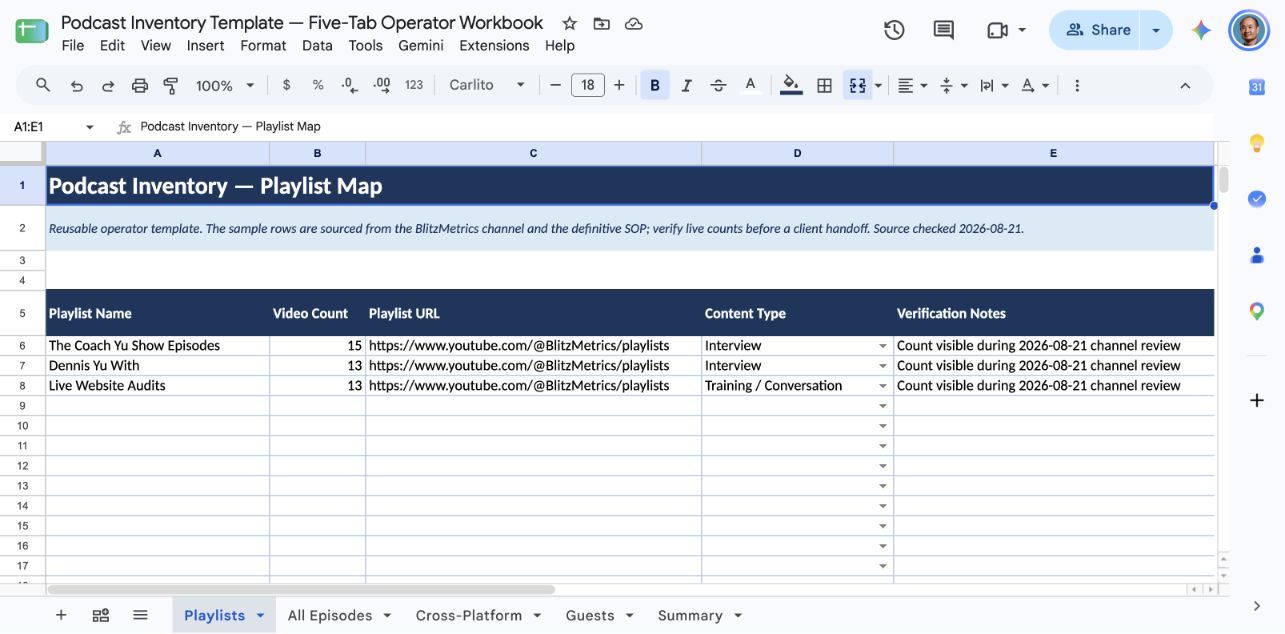
For each playlist, record the playlist name, video count, and whether it contains conversation content. Flag these playlist types as interview/podcast content: any playlist with “show,” “podcast,” “interview,” “with,” or guest names in the title; any playlist with episodes longer than 15 minutes featuring multiple speakers.
Create a Playlists tab in your Google Sheet with columns for Playlist Name, Video Count, Playlist URL, and Content Type (Interview / Solo / Training / Mixed).
Step 1.2: Extract Every Video from Interview Playlists
Open each flagged playlist and record every video. For each episode, capture the title, duration, view count, upload date, and YouTube URL.
Pro tip: YouTube shows relative dates (“3 months ago”) on playlist pages. If you need exact dates, click into the individual video page, or use the YouTube Data API. For most inventory purposes, relative dates are sufficient in the first pass — you can backfill exact dates later.
Work playlist by playlist. This catches videos that might not appear when scrolling the main Videos tab (which often fails to load all content due to infinite scroll issues). This is the same approach described in our general YouTube channel inventory guide.

Step 1.3: Search the Channel for Unlisted Conversation Content
Many interview videos are not in any playlist. Use the channel’s search function (the magnifying glass icon on the channel page) to find them.
Search for these terms one at a time: “interview,” “with,” “podcast,” “episode,” “show,” “guest,” “Dr,” “CEO,” and any known guest names.
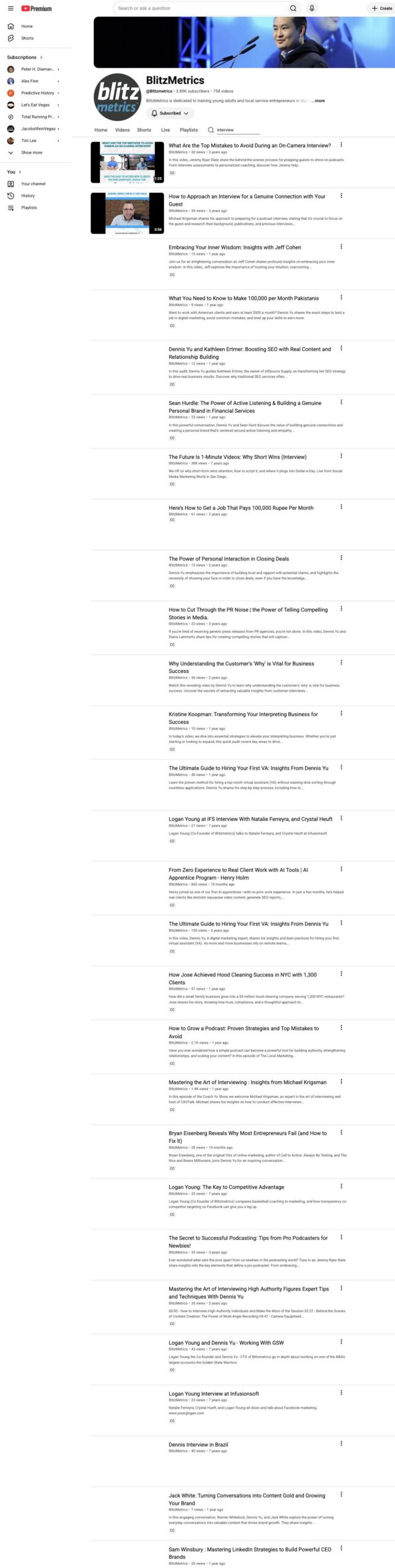
Record any new videos not already captured from playlists.
Step 1.4: Check the Live Tab
Navigate to the channel’s Live tab. Many podcast-format shows are originally streamed live, and these recordings often don’t get added to playlists.
Record any live recordings that are conversation format.
Step 1.5: Identify the Guest in Every Episode
This is the step that separates a useful inventory from a useless one. For every conversation video, identify the guest by name. Sources for guest identification include the video title (most reliable — look for patterns like “Name: Topic” or “with Name”), the video description (usually names the guest), the video thumbnail (often shows two people), and the first 30 seconds of the video (host usually introduces the guest).
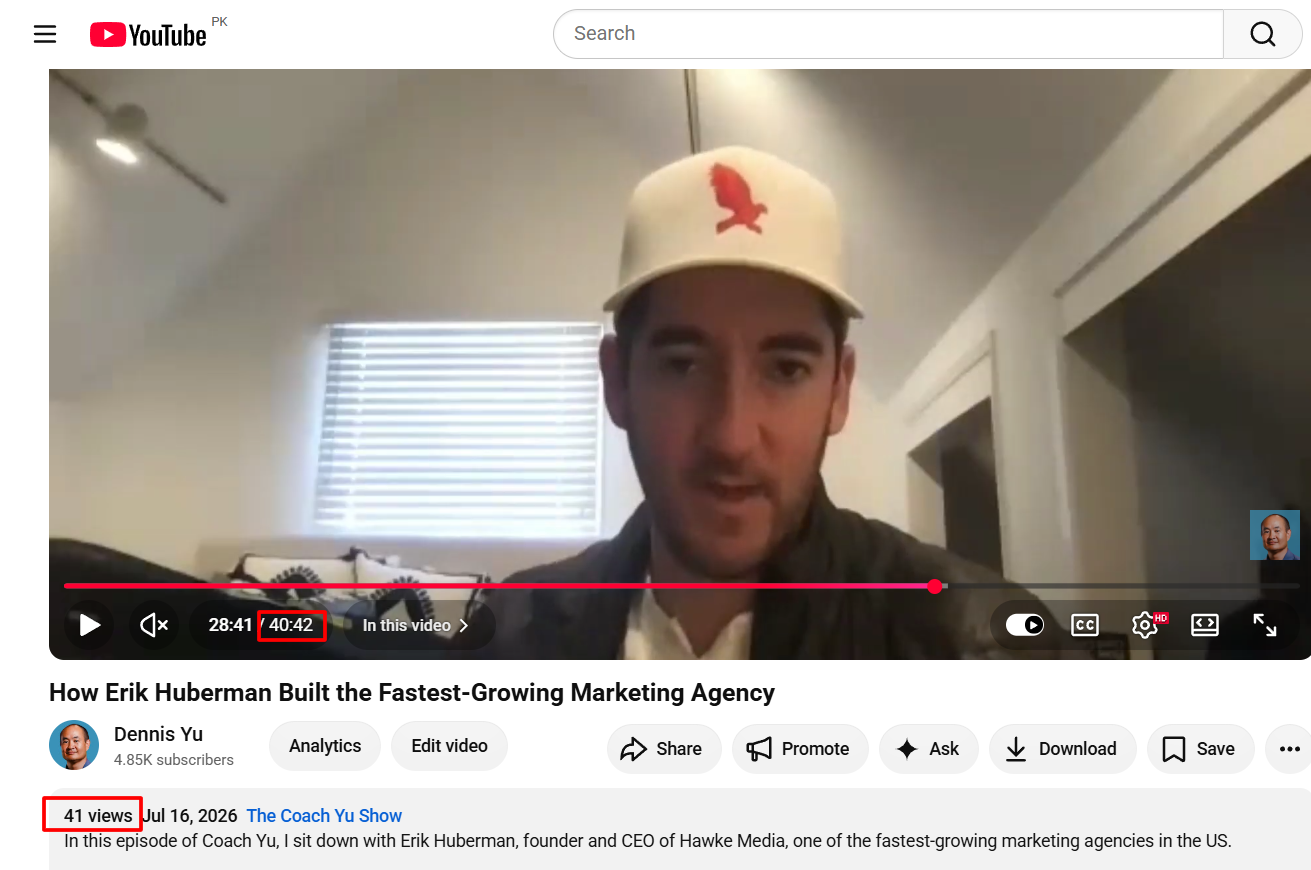

Add a “Featured Guest” column to your sheet. If the video is solo content (no guest), mark it “Solo — [Host Name].” If there are multiple guests, list all of them separated by commas.
Step 1.6: Research Each Guest
For every unique guest, find their LinkedIn profile URL, their X/Twitter handle, their company name and title, and their personal website or brand site URL.
Use a Google search with the format: “Guest Name” “Company Name” LinkedIn. Enclosing the words in quotes tells Google to look for the exact terms — the same technique described in Step 8 of our YouTube channel inventory guide. This guest data is critical for tagging, outreach, and repurposing. It takes about 30 seconds per guest.
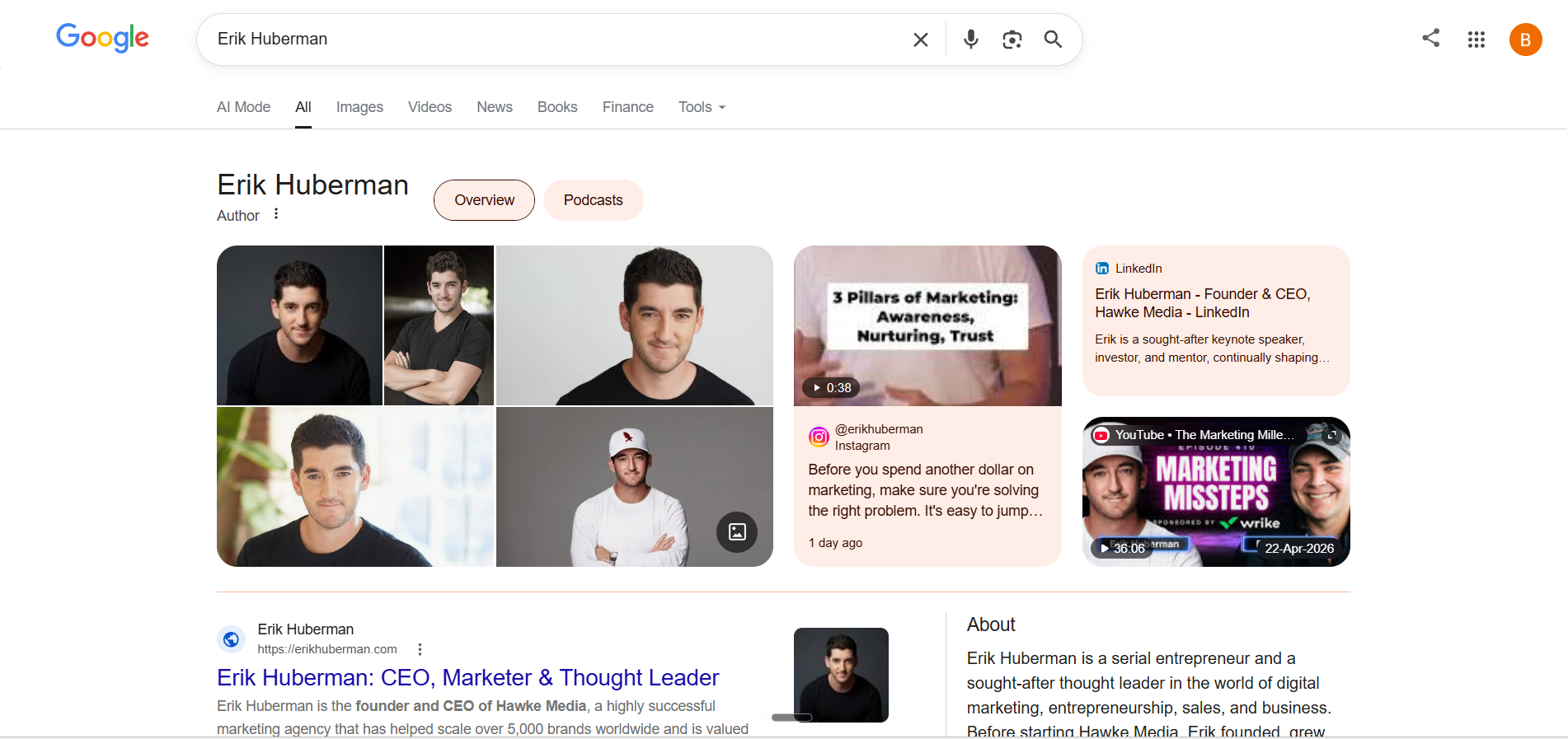
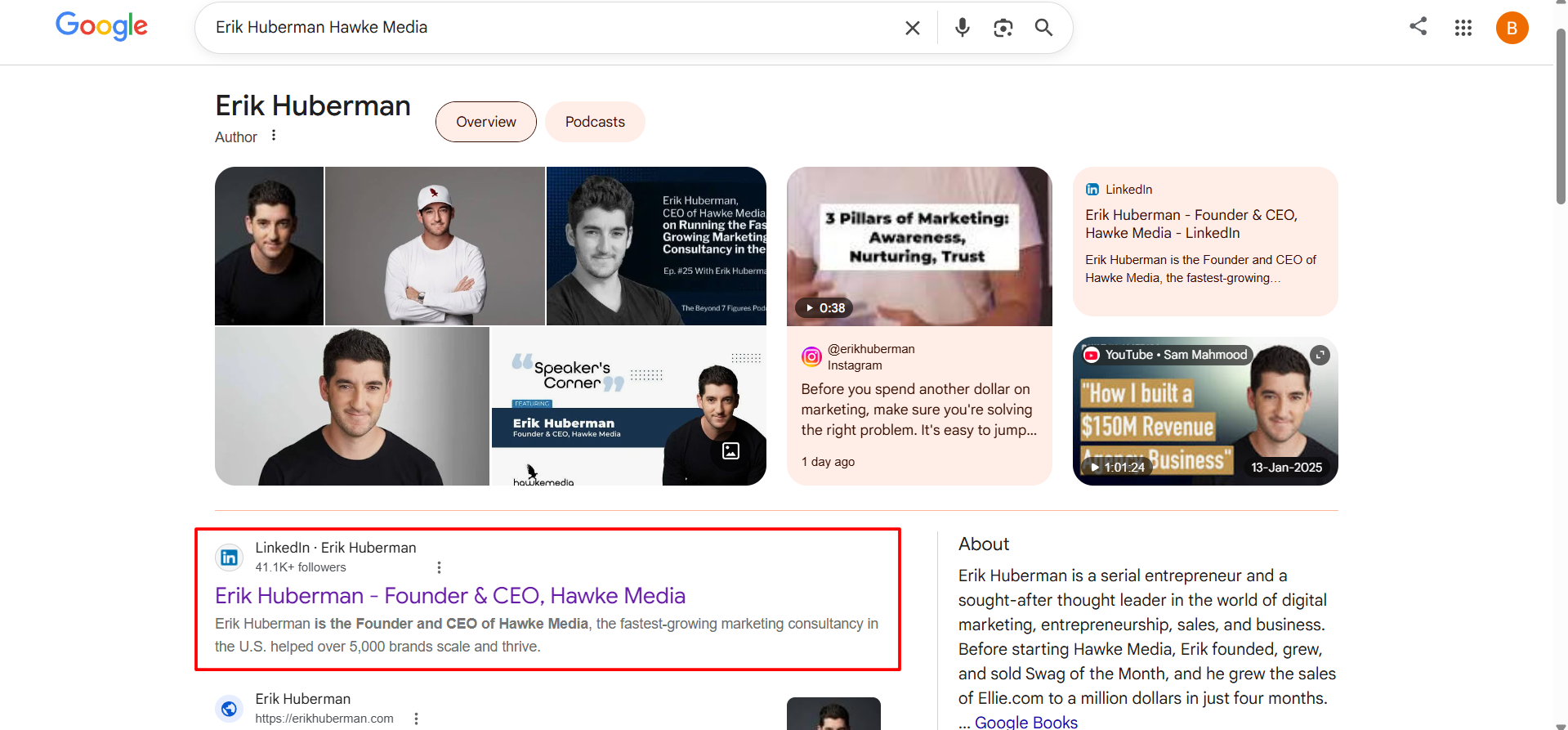
Before leaving a guest’s LinkedIn page, check if they included a link to their X/Twitter account in their Contact Info — this saves you a separate search. Some people also link their personal website. If there is no Twitter account, put “n/a” or “No account found” in the sheet.
Phase 2: Cross-Platform Discovery (Filling the Gaps)
YouTube only shows you what’s on YouTube. Many podcast episodes exist on audio-only platforms and were never uploaded as video. This phase catches those gaps. Our podcast appearances inventory guide walks through the full multi-source consolidation process — this section applies that same framework to a specific client’s channel.
Step 2.1: Search Listen Notes
Go to Listen Notes and search the host’s name in quotes (for example, “Dennis Yu”) under Episodes. Its result count is a time-specific discovery queue, not a deduplicated appearance total. Export only when the current account and plan allow it.
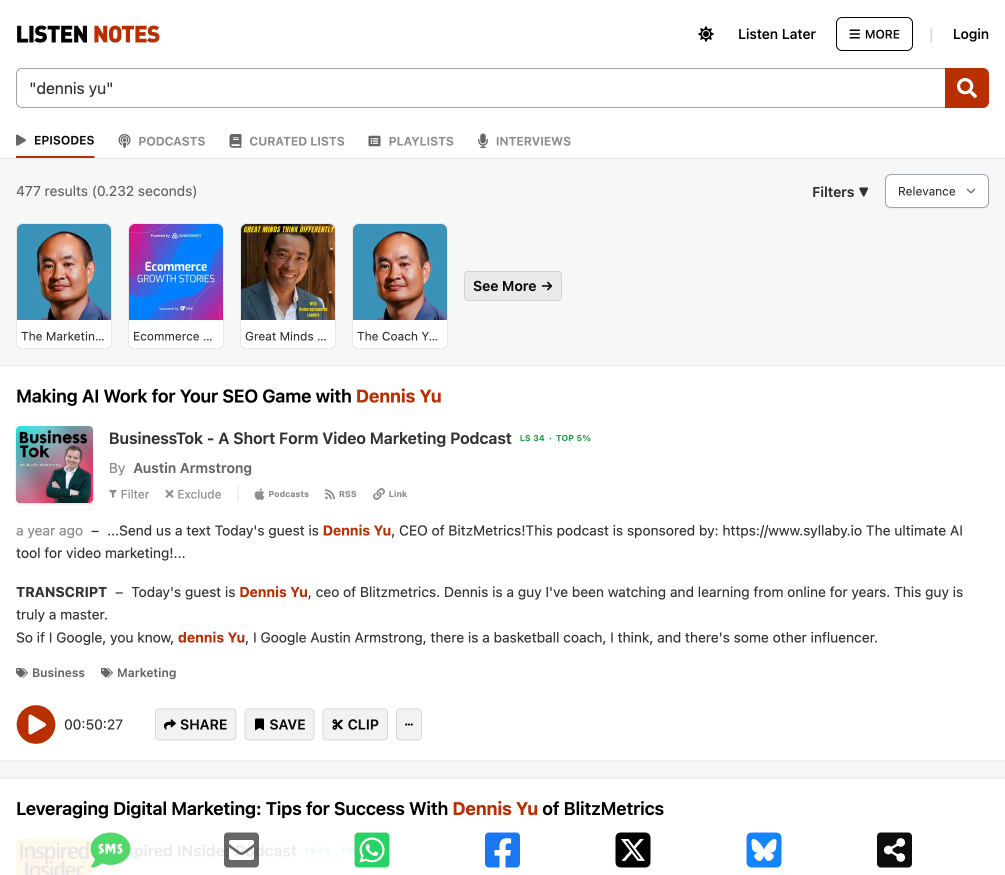
Compare this list against your YouTube inventory. Flag any episodes that appear on Listen Notes but NOT on YouTube — these are candidates for video creation or at minimum should be documented in your master inventory.
Step 2.2: Search Podchaser
Go to Podchaser and search for the host’s name. Podchaser’s credited roles differ from transcript or metadata mentions, so reconcile the sources instead of treating either total as complete.
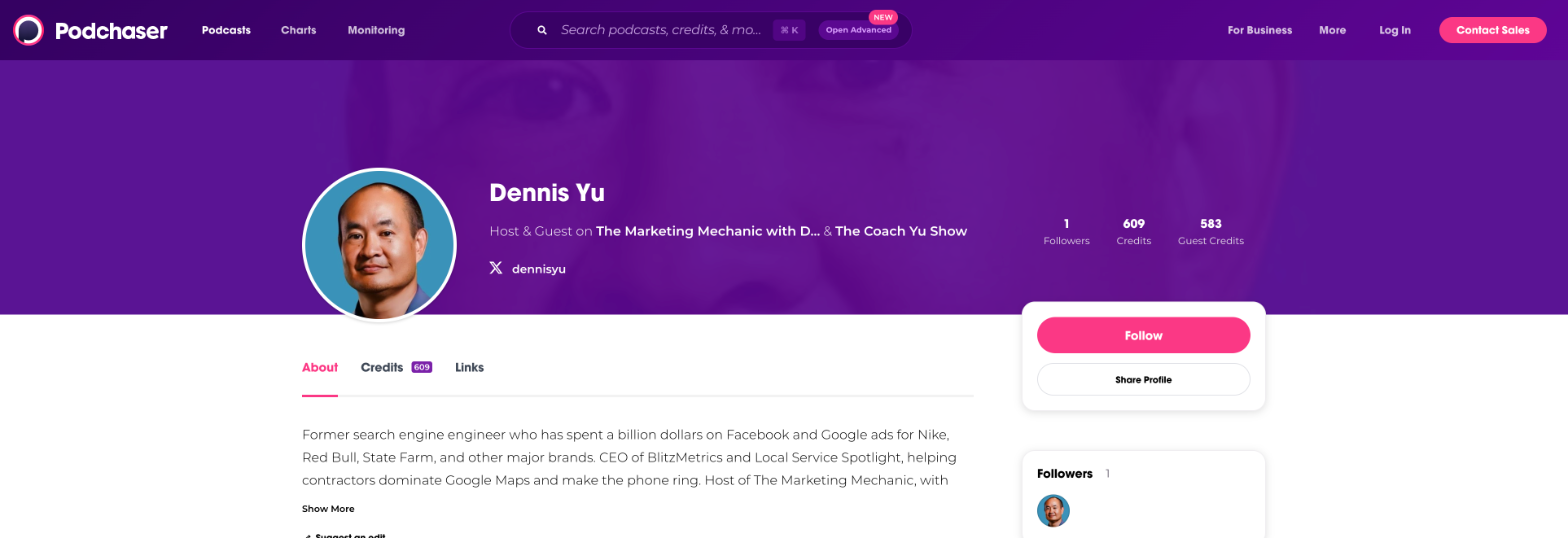
Record whether the creator profile exists, whether it is claimed, and which credits are actually supported. Our Podchaser guide shows the identity and credit-review path from the 2026 runs. Platform requirements can change, so use the current screen rather than assuming X is always required.
Step 2.3: Search YouTube Globally
Search YouTube (not just the channel) for the host’s name plus “podcast,” “interview,” and “episode.”
This finds episodes where the host was a GUEST on someone else’s show, uploaded to the other host’s channel. These are valuable inventory items — the host’s authority content lives on channels they don’t control.
Step 2.4: Use ChatGPT or Claude with Web Search
Ask the AI: “What podcasts has [Host Name] appeared on? Search for podcast episodes featuring [Host Name] as a guest or host.”
AI tools sometimes surface appearances from smaller shows, personal blogs, or platforms that Listen Notes and Podchaser miss. This is the same approach described in Step 3 of our podcast appearances inventory guide.
Step 2.5: Check the Host’s Website and Blog
Many podcast hosts embed episodes on their blog or have a dedicated podcast page. Cross-reference any blog-listed episodes against your YouTube inventory.
Phase 3: Data Enrichment
Step 3.1: Extract Transcripts
For high-priority episodes (highest views, most important guests, best topics), extract the transcript from YouTube. Click “Show transcript” below the video, copy the text, and clean it using the timestamp removal tool at anatolt.ru. Paste cleaned text into wordcounter.net to get word count. This is the exact same process shown in Steps 11 of our YouTube channel inventory guide, which includes screenshots of the transcript panel, the timestamp removal tool, and the word counter.
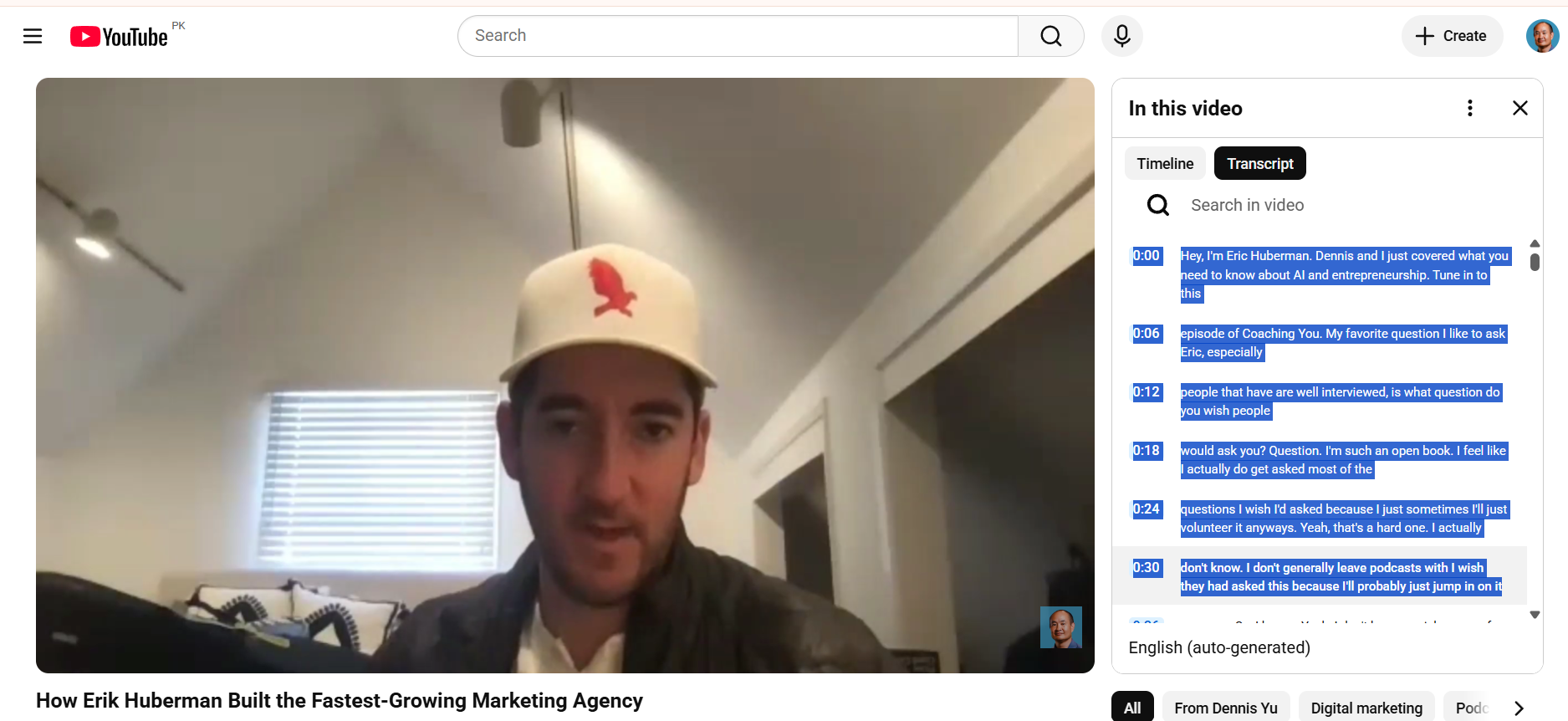
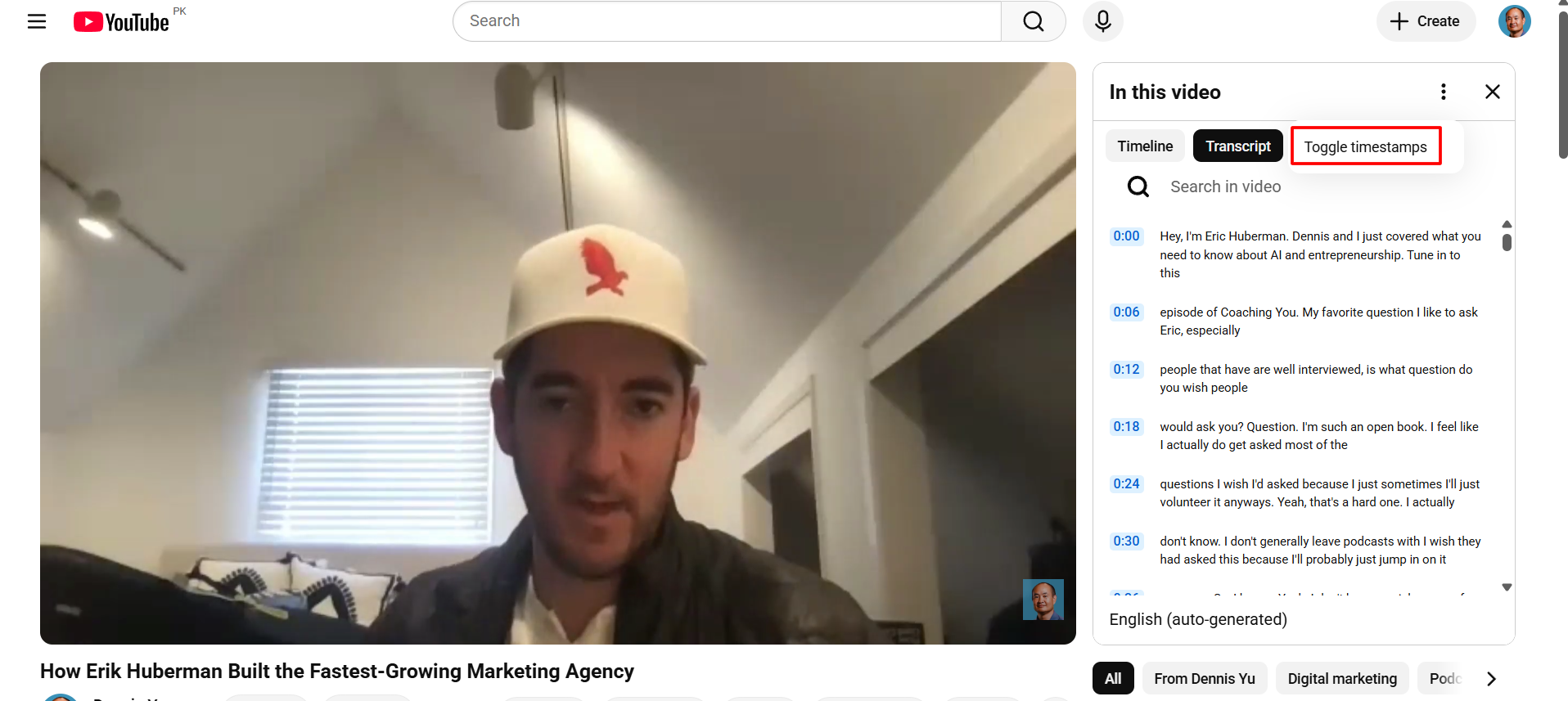
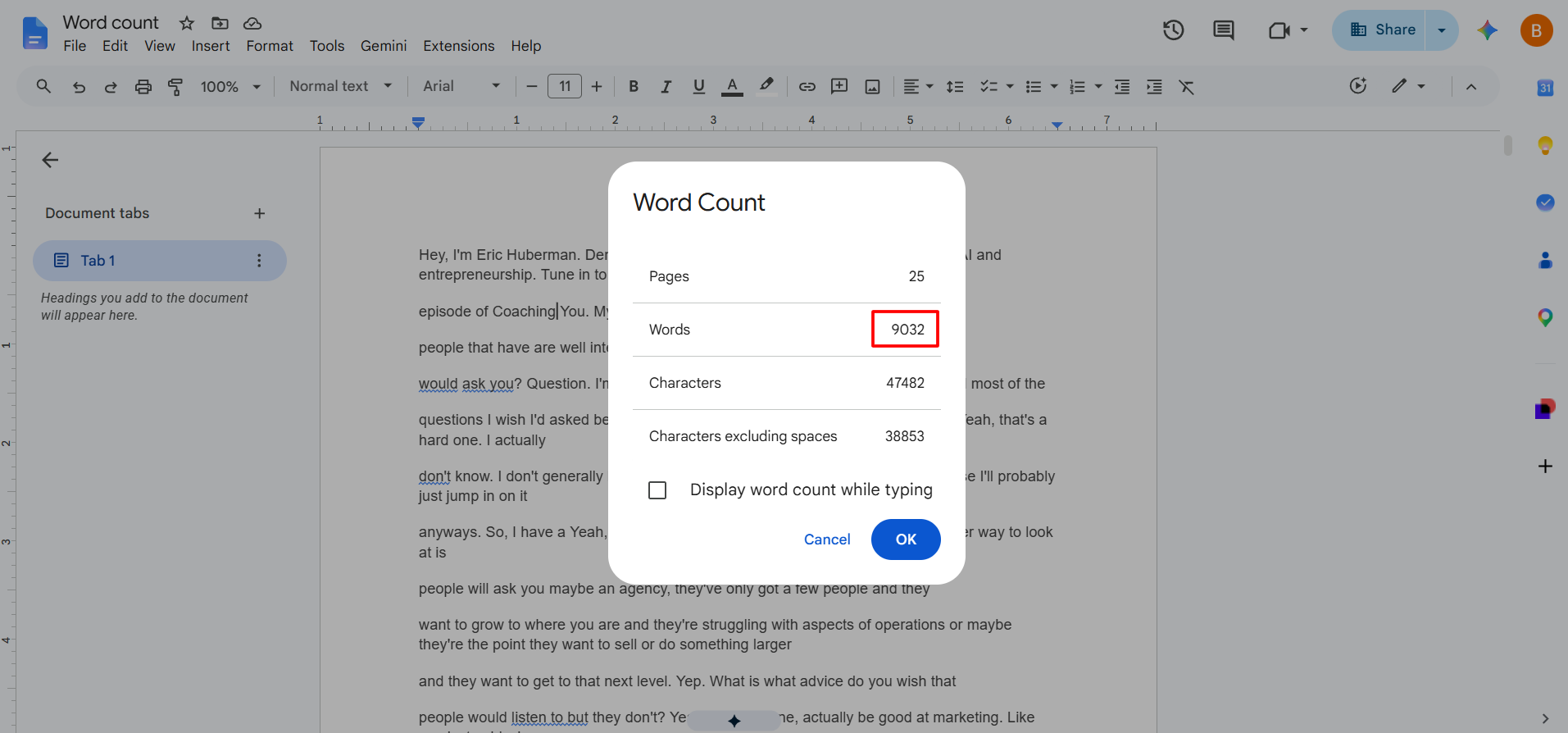
Add a “Word Count” column to your sheet. A 30-minute episode typically yields 4,000-6,000 words — enough for 2-3 blog articles.
Step 3.2: Check Google Rankings
For each episode, Google the video title in quotes. Record whether the video appears on page 1 of Google. Also search the guest’s name plus a topic keyword to see if the episode ranks for relevant queries.
Add columns for “Ranks on Google Page 1” (yes/no) and “Ranking Keywords” to your sheet. This is the same First Page and Video Ranking check from Step 7 of our YouTube channel inventory guide.
Step 3.3: Calculate Engagement Metrics
For each episode, calculate views per day (views divided by days since upload). This normalizes across old and new episodes and reveals which content actually performs well versus which just had more time to accumulate views.
Sort by views-per-day to identify the true top performers.
Phase 4: Organize the Master Inventory
Step 4.1: Structure Your Google Sheet
Download the reusable template: Podcast Inventory Template (.xlsx). Internal operators can also use the native Google Sheet. The workbook includes all five tabs, formulas, dropdown validation, real sample rows, and the definition of done.
Your final spreadsheet should have these tabs:
Tab 1 — Playlists: Playlist Name, Video Count, URL, Content Type
Tab 2 — All Episodes: Episode Number, Title, Duration, Views, Upload Date, YouTube URL, Featured Guest, Guest LinkedIn, Guest Twitter, Guest Company, Podcast Series Name, Word Count, Google Page 1 (Y/N), Views Per Day, Notes
Tab 3 — Cross-Platform: Episode Title, YouTube (Y/N), Spotify (Y/N), Apple Podcasts (Y/N), Listen Notes URL, Podchaser URL, Notes
Tab 4 — Guests: Guest Name, Number of Appearances, LinkedIn, Twitter, Company, Website, Episodes Featured In
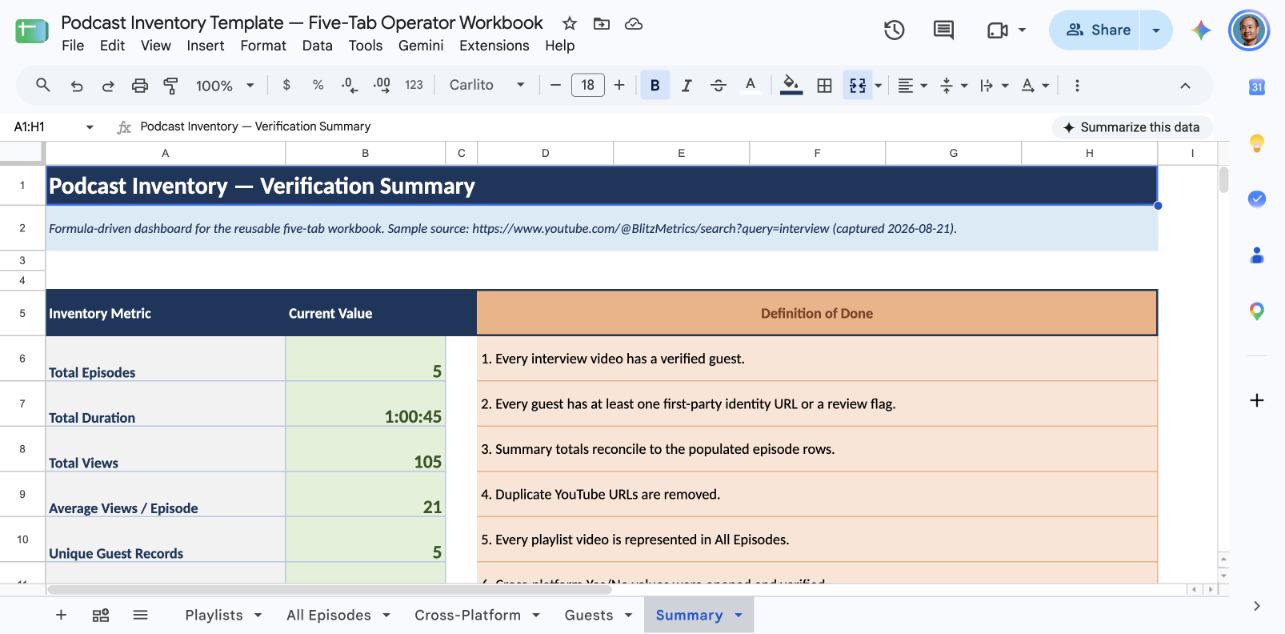
Tab 5 — Summary: Total episodes, total duration, total views, average views per episode, top 10 episodes by views, top 10 episodes by views-per-day, total unique guests, date range of content
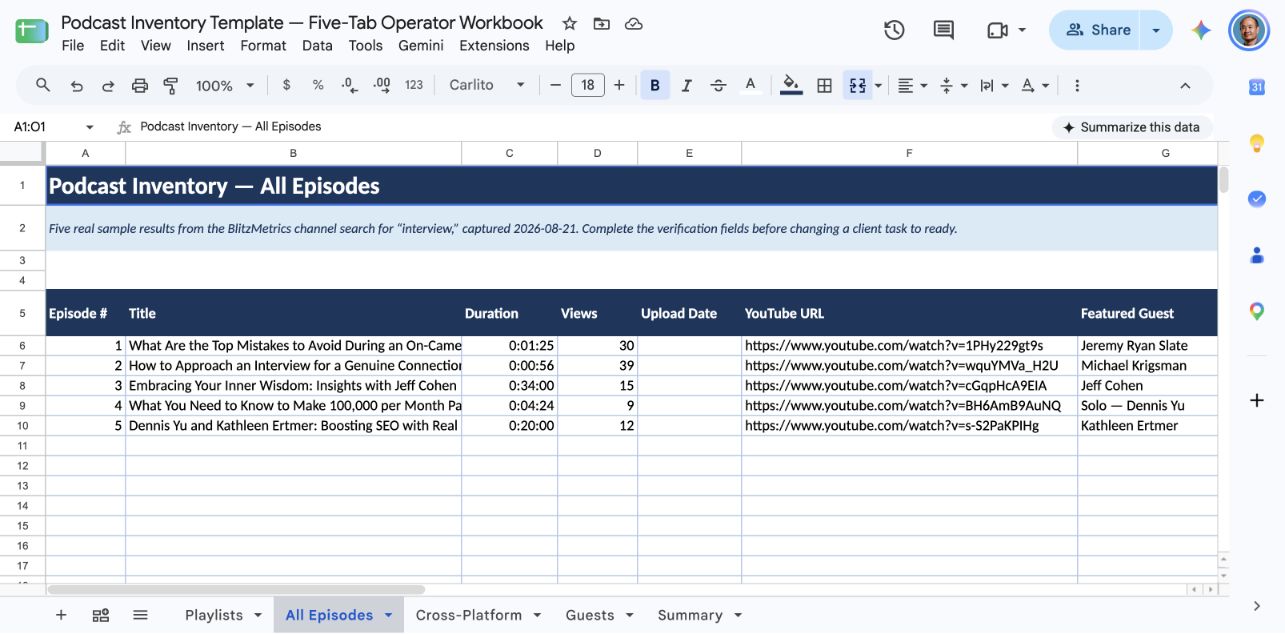
Step 4.2: Quality Check
Verify the following before marking the inventory complete: every interview video has a guest name populated; every guest has at least a LinkedIn URL; the episode count in Summary matches the actual row count; no duplicate entries exist (search for duplicate YouTube URLs); all playlist videos are accounted for in the All Episodes tab.
Phase 5: Repurposing Setup
The inventory is not the end — it’s the launchpad for the Content Factory.
Step 5.1: Flag Repurposing Candidates
Mark the top 20% of episodes (by views-per-day) as “Priority Repurpose.” These are the episodes that deserve clips, articles, quote graphics, and dollar-a-day ad spend.
Step 5.2: Identify Missing Content
Use your Cross-Platform tab to find episodes that exist on audio platforms but not YouTube. These need video versions created (even simple audiogram-style videos).
Step 5.3: Create a Guest Outreach List
Your Guests tab is now a relationship database. Guests who appeared once are warm contacts for follow-up episodes, cross-promotion, or content collaboration.
Step 5.4: Document the Gaps
Note any series that stopped publishing, naming inconsistencies that hurt discoverability, episodes with zero or near-zero views that may need better titles/thumbnails, and popular episodes that should be boosted with dollar-a-day.
Real-World Examples
We’ve run this exact process for multiple clients. Here’s what it looks like in practice — and these are not hypothetical. These are real inventories we have completed.
BlitzMetrics (@BlitzMetrics, 772 videos): We identified 100+ interview/conversation videos across 7 playlists including The Coach Yu Show (15 episodes), Dennis Yu With (13 episodes), Live Website Audits (13 episodes), plus standalone interviews found only through channel search. The top performer — David Carroll‘s episode — had 343K views. On the cross-platform side, Listen Notes returned 477 results for “Dennis Yu” and Podchaser showed 609 credits across 353 podcasts in the March 2026 profile capture — revealing hundreds of episodes that exist on audio platforms but hadn’t been connected back to YouTube. See our Listen Notes article and Podchaser article for the full details of Dennis Yu’s cross-platform inventory.
Ethan Van De Hey: Inventoried his podcast appearances to build out his personal brand entity, connecting YouTube episodes to Listen Notes and Podchaser credits. The inventory revealed episodes on audio-only platforms that had never been repurposed into video or articles.
Josh Roman, founder of American AF Dumpsters: Cataloged every episode of his dumpster rental business podcast, identifying guests from the home services vertical and flagging episodes for repurposing into local SEO content. This is a perfect example of how a niche business podcast — not just big marketing brands — benefits from a complete inventory.
Ryan D. Lee: Inventoried his show appearances and guest episodes to build a comprehensive authority map across platforms.
Dan Leibrandt: The February 2026 setup screens offered 22 Zip Code Kings episodes from 2026 and 35 from 2025 for review. Those were selectable rows, not 57 accepted credits. On September 10, 2026, Podchaser publicly listed Dan as Host on 46 episodes, while his profile still displayed a “Claim Profile” prompt. See the worked example and the Podchaser guide.
In every case, the inventory revealed episodes that the client had forgotten existed — content that was already working but hadn’t been amplified.
Video Demonstration
Watch the agent walkthrough. It demonstrates the verified sequence: map playlists, open each collection, run channel searches, identify guests, cross-check Listen Notes and Podchaser, then reconcile the five-tab workbook.
Checklist: Inventory Complete When…
- All playlists mapped with video counts and content types
- Every video from interview playlists captured with title, duration, views, date, URL
- Channel search completed for 10+ keyword variations
- Every conversation video has a guest name identified
- Every unique guest has LinkedIn URL documented
- Listen Notes search completed and cross-referenced
- Podchaser search completed and cross-referenced
- YouTube global search completed for host as guest on other channels
- Blog/website episodes cross-referenced
- Transcripts extracted for top 20% of episodes
- Google rankings checked for all episodes
- Views-per-day calculated and sorted
- Summary tab complete with totals and top performers
- Quality check passed (no duplicates, no missing guest names)
- Top 20% flagged for priority repurposing
- Cross-platform gaps documented
- Guest outreach list created
Verification Checklist
The completed podcast inventory must meet the following criteria. Use this to check your work before submitting — or to review someone else’s work. This follows the same verification format used across all BlitzMetrics task documentation.
#1. The Google Sheet is a new sheet, saved under the client’s name — a separate file, not a tab in someone else’s spreadsheet.
#2. The sheet includes all 5 required tabs: Playlists, All Episodes, Cross-Platform, Guests, and Summary.
#3. Every interview/conversation video on the channel has been captured — verified by cross-referencing against playlist video counts and channel search results.
#4. Every conversation video has a Featured Guest name populated. Solo videos are marked “Solo — [Host Name].”
#5. Every unique guest has at least a LinkedIn URL. Twitter/X, company, and website are populated when available.
#6. The Cross-Platform tab includes results from Listen Notes, Podchaser, and YouTube global search — with episodes flagged that exist on other platforms but not on the client’s YouTube channel.
#7. Transcripts have been extracted for the top 20% of episodes (by views-per-day) with word counts recorded.
#8. Google Page 1 rankings have been checked for all episodes.
#9. Views-per-day has been calculated for all episodes and the sheet is sorted to identify top performers.
#10. The Summary tab is complete with accurate totals: total episodes, total duration, total views, average views per episode, top 10 by views, top 10 by views-per-day, total unique guests, and date range.
#11. No duplicate entries exist (verified by searching for duplicate YouTube URLs).
#12. The top 20% of episodes are flagged as “Priority Repurpose” in the Notes column.
#13. Cross-platform gaps are documented — episodes that exist on audio platforms but not YouTube are identified.
#14. A guest outreach list has been created from the Guests tab.
#15. Time to completion, time per entry, and cost per entry have been calculated (same as the YouTube channel inventory guide Summary tab requirements).
#16. The inventory sheet URL has been included in the work report.
Related Resources
- How to Inventory a YouTube Channel — the general YouTube inventory process for all video types, with step-by-step screenshots. Start here if you haven’t done a YouTube inventory before.
- You’ve Probably Been on 100+ Podcasts and Don’t Know It — Here’s Why That’s a Gold Mine — why your scattered podcast appearances are a gold mine of untapped authority content, and where to start.
- How We Use Listen Notes to Find, Track, and Repurpose Every Podcast Appearance — deep dive on the Listen Notes tool, including search techniques, Listen Score ratings, CSV export, and the Clip feature.
- How We Use Podchaser to Amplify Authority and Repurpose Podcast Content — deep dive on Podchaser, including profile verification, credit claiming, and using AI agents to process suggested credits at scale.
- How to Document a Task — the BlitzMetrics standard for creating task documentation. This podcast inventory guide follows that standard.
- Creating Winning Documents that Drive Conversions — the 8-part document architecture (Design Guide, Templates, Checklists, Master Document, Asset Tracker, One-Pagers, Task Library, Social Amplification) that governs how we create and maintain all training.
- Document Your Expertise and Teach Others — the incentive program for documenting tasks, with $500 bonuses available when 3 external customers give 5 stars on the task being done by agents or workers.
- The Task Library — open the current runnable task index and its source-linked guides.
- How We Turned Four Podcast Inventory Drafts into Agent-Ready SOPs — the QA record, reusable workbook, asset map, and lessons from closing this documentation gap.
If you enjoyed this tutorial, be sure to explore our Task Library for a plethora of additional tasks waiting to be mastered!
Originally published .
Dennis Yu
Dennis Yu is the CEO of Local Service Spotlight, a platform that amplifies the reputations of contractors and local service businesses using the Content Factory process. He is a former search engine engineer who has spent a billion dollars on Google and Facebook ads for Nike, Quiznos, Ashley Furniture, Red Bull, State Farm, and other brands.
Dennis has achieved 25% of his goal of creating a million digital marketing jobs by partnering with universities, professional organizations, and agencies. Through Local Service Spotlight, he teaches the Dollar a Day strategy and Content Factory training to help local service businesses enhance their existing local reputation and make the phone ring.
Dennis coaches young adult agency owners serving plumbers, AC technicians, landscapers, roofers, electricians, and believes there should be a standard in measuring local marketing efforts, much like doctors and plumbers must be certified. He has appeared on 353 podcasts with 619 credited episodes — see the full list of his podcast appearances.