
 by
by
If you run a business, use this guide to turn a set of steps into work that gets done. Say when the job should start, what files it needs, and how to check the result. Test one run before you set it to repeat.
This guide is part of How We Build and Maintain AI Agents. Next, explore A Skill Is How. A Routine Is When., or How Our AI Agents Share Memory and Coordinate Work.
Where this task fits in the Content Factory
This task supports work across the Content Factory (our four-stage process for using real content). Its inputs and next handoff determine which stage uses it.
1. ProduceCapture real work
2. ProcessTurn sources into useful assets
3. PostPublish and connect approved assets
4. PromoteShare proven work and measure results
Start, finish, and next step
- Start when
- A documented task should run on a real trigger without someone remembering to start it.
- Have ready
- One documented skill and its acceptance checks
- Authorized runtime and schedule
- Persistent working state
- A verified output and failure destination
- Follow the steps
- Write the task standard
- Choose and configure a real recurring trigger
- Give the job a working folder
- Read the previous state before acting
- Verify the outcome from the outside
- Record failures and feed learning back
Use the detailed instructions in this article for each step.
- Finish with
- One configured job with retained state and an observed, independently checkable run or failure.
- Measure the result
- The trigger exists in the runtime
- A firing leaves timestamped evidence
- Output is checked where its reader receives it
- A failed or missing result is visible to the owner
- The next run can read the previous state
- Hand off next
- Deliver the result or honest error to the configured destination, then write the run’s meta record and review useful changes.
Before closing the run, name the actual next task, receiving owner, and trigger in the execution record. The assignment and findings determine that handoff.
Reference material for the inputs
Open this article’s tasks in the Task Library (our directory of tasks and recipes; see current Task Library). The library connects the current recipe, its smaller tasks, and the records of work performed.
Close the learning loop. Write a meta article: the record of this execution with the starting state, recipe version, result, checks, failures, and next owner. Link it back to this recipe and register the run under the same Task Library task. Reuse one execution ID for revisions and retries. A partial or failed run stays labeled that way. Public release follows the recorded publication authority; writing the run record is part of doing the task. Writing and revising that record belong to the original execution; they do not start another meta-article task. Use the findings to propose and verify a recipe improvement. See how recipes and execution records work together.
The June 28–July 28 incident below showed a pack doing no new work for four weeks while its status reports stayed green. The dated examples explain that failure. The current Task Library is an inventory, not proof that its jobs have run.
A persistent setup returns to work across runs. This guide focuses on repeated jobs: an approved trigger, a check of the actual result, and retained working state. The runtime also needs the right tools and access. An AI agent can complete a one-time job without a schedule; saving its recipe alone does not start that job.
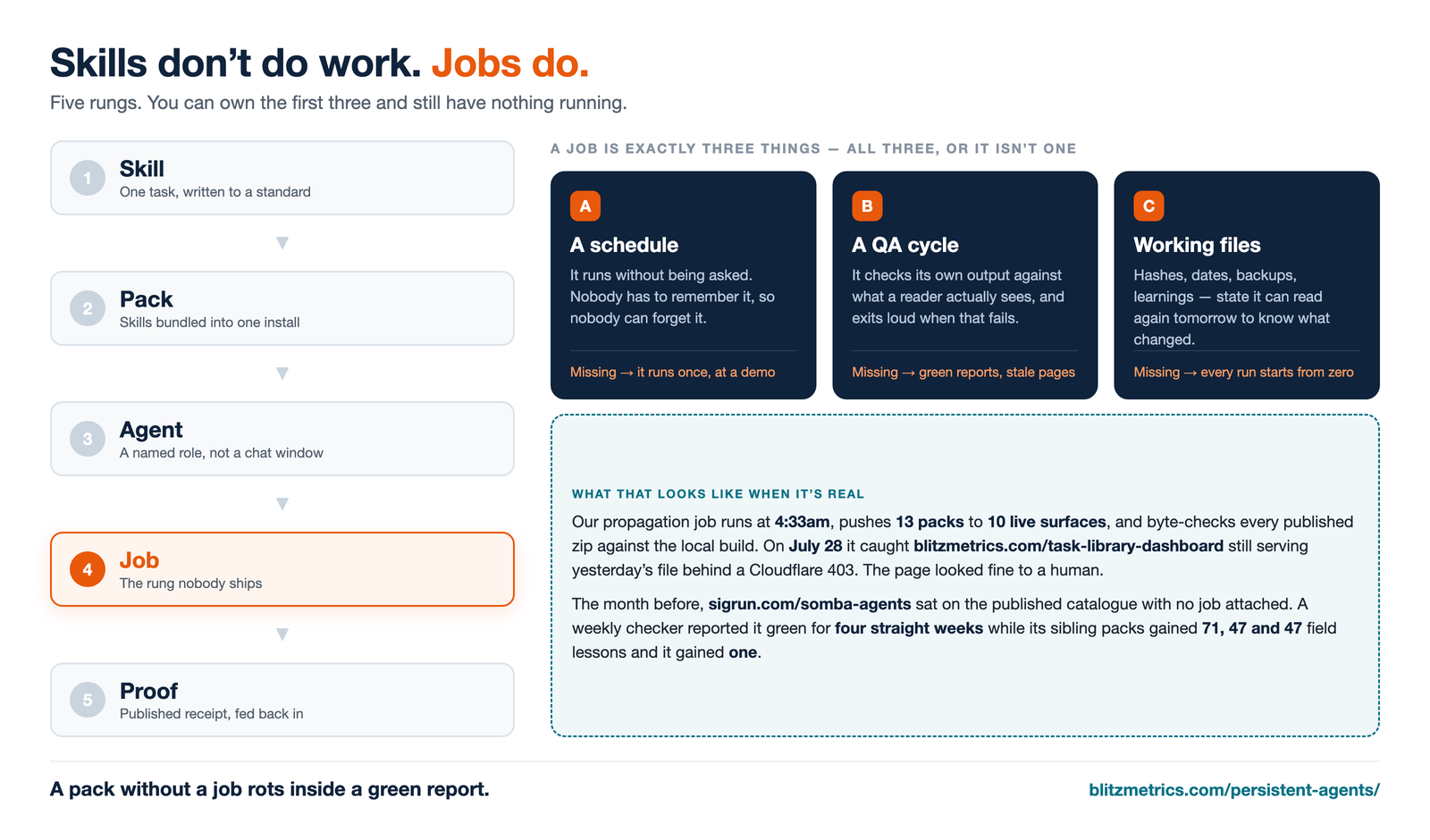
That distinction is the whole point of this page. A skill is a written standard. A pack is a folder of them. Both are inventory. Work only happens at the next rung up — the job — and the job is the rung almost nobody ships.
Its companion piece: A skill is a function. An agent is a person. covers the anatomy — the tools, access, context and checks an AI worker needs, and the six-department org chart we sort agents into. This page covers the operations: how a job is actually built, and how you find out it is lying to you. Read that one for the shape of the team, this one for whether the work is getting done.
Skills, custom instructions and tool connections can help with a job, but a collection alone does no work. Choose one recipe, give the worker the needed inputs and approved access, and inspect the result. A library can still be useful before any recurring job is set up.
The five execution rungs
The full system starts with user-owned context: facts, goals, evidence, decisions, and working state in Markdown, Obsidian, Drive, or Git. Once that foundation exists, these five execution rungs turn context into accountable work. Every public page in the system links across the ladder so you can land anywhere and see where you are.
- Skill One task, written to a runnable standard so an agent can execute it without you in the room. The Task Library is the live inventory; atomic skills map to a parent definitive concept when one applies.
- Pack A selected group of skills. A downloaded ZIP is a snapshot of its guide files. Follow the current installation guide for the package format and access your app needs, then test the intended skill.
- AI agent The worker performing an assigned task with approved tools and access. The agent anatomy article and SOMBA team example show role designs; their dated diagrams do not prove current activation or run health.
- Job — you are here An assigned run with a trigger, inputs, checks, and a saved result. This guide explains repeated jobs, which also need a supported schedule or event trigger and retained state.
- Proof Every execution produces a written meta article (a record of one task run) linked to the task, run ID, and evidence. Substantive organization work also leaves the private internal receipt. Publish the meta article only within the existing authority and privacy boundary; writing the execution record is required even when it remains private. Reusable evidence is reviewed into the canonical skill, distributed, and canary-tested.
The full map of how context and these execution rungs fit together is The System. The cross-model operating-system map shows how Claude, ChatGPT/Codex, and Grok wrap the same owned knowledge and methods. Every asset by name and URL is in the Asset Tracker.
A repeated job needs three parts
Use these three checks for a repeated job, along with its task-specific tools and access. They do not replace the recipe’s inputs and acceptance tests.
1. A scheduleUse an approved time or event trigger. Record the timezone, owner, output destination and failure alert. The earlier examples used off-peak runs; verify the actual current job rather than copying an old time.Missing → it runs once, at a demo, and never again
2. A QA cycleIt checks its own output against what a reader actually sees, not against its own HTTP 200. Our publish jobs re-fetch the live page with a cache-buster, decode base64 payloads, and byte-compare every published zip to the local build.Missing → green reports over stale pages
3. Working filesKeep the state the next run needs: source revisions, hashes, dates, decisions, backups and lessons. Use approved secret storage for credentials. Do not assume a new session sees earlier chat; name the durable sources it must read.Missing → the next run may lack the state it needs
Why the third leg is the one people skip
The schedule is obvious. The QA cycle sounds like good hygiene. Working files sound like plumbing, so they get left out — and that is the leg that decides whether the thing compounds.
The recorded pipeline example used a hash ledger: a file that maps each skill to its prior SHA-256 fingerprint. Comparing that record with the new file shows which content changed, so a rebuild does not need to claim a new content date for every file. If the earlier fingerprint is missing, record that baseline as UNKNOWN and save the current one for future comparison; do not invent a change history.
The historical July 28 example used a Skill-Learnings/ inbox and reported 5 notes applied to 36 skill files, with zero unmatched. That receipt shows one past run. The current method is to propose the supported lesson at its owning source, review and validate the change, then rebuild and test each target. A saved note alone does not prove a later skill or installed copy changed.
Two incidents, and the standing rule
Both were caught by machinery, not by a person noticing. That is the standard to aim at.
SOMBA pack off the learning loop (June 28–July 28). sigrun.com/somba-agents had been listed on our published pack directory since July 9. It was on no pipeline: the learning harvester excluded its folder and the propagator excluded its zip, because a different weekly job “owned” it. That job only mirrored the folder into a teammate’s copy and reported a diff — it never wrote a lesson into the source. So every week it reported “all skills already on the latest version,” which was true, while the source sat unchanged from June 28 to July 28. Its sibling packs carried 71, 47 and 47 field lessons over that period. This one carried 1.
The fix was not a bug fix. It was a rule: if a pack is listed in the catalogue, it must be on the learning loop and on the propagator. Then we backfilled 51 lessons in date order and added a guard that prints learning coverage per folder and exits non-zero when a folder in the loop is carrying zero lessons. A job that cannot fail loudly is not a QA cycle.
July 28 dashboard zip vs badge. On July 28, blitzmetrics.com/task-library-dashboard was still linking the previous day’s zip while the badge above it said today. The publish request had been answered with a Cloudflare 403 challenge — and the identical request to /build-agents, same site, same credential, same browser user-agent, returned 200.
We proved it deterministic before touching anything: post the page’s own unchanged content twice with a user-agent only, then twice with a full browser header set. 403, 403 / 200, 200. Our July 6 rule — “send a full Chrome user-agent” — had become necessary but not sufficient. A user-agent arriving without the Accept, sec-ch-ua and Sec-Fetch headers a real Chrome sends is itself a bot signature.
The repair that mattered was not the header. It was noticing that nothing had ever verified those eight pages — the job checked that its own POST returned 200 and stopped there. We patched the headers into the driver for every site rather than the one that failed, and added a permanent surface verifier that re-reads all eight live pages anonymously on every run. A publish job whose only check is its own status code will report success through an outage.
How to build one, step by step
This is the SOP. It assumes you already have skills worth running — if you do not, start at the Task Library and the definitive article standard.
- Name the outcome, not the activity. “Every published pack carries today’s skills” is a job. “Run the propagation script” is a chore. The outcome is what you verify against later.
- Write the skills first. One task per file, in plain language, with a definition of done. An agent that has to infer the standard will invent one.
- Give repeated work a real trigger. Configure an approved schedule or supported event in the intended runtime. Record its timezone, owner, inputs, checks, result destination and failure handling. A person can also start a valid one-time job; that is a different use case.
- Give it a working folder. Keep the hash ledger, run logs, pre-edit backups, and learnings inbox in the working folder. Keep credentials in the approved secret store; the job uses the authorized connection without copying secret values into notes. Do not assume the next run can see the setup chat; name the current instructions and source files explicitly.
- Make the job read its own state before acting. Compare hashes, read yesterday’s URL manifest, check what actually changed. Jobs that act unconditionally produce dates that are decoration.
- Verify from the outside. Re-fetch the live page with a cache-buster and no credentials. Decode payloads. Byte-compare the downloadable file against your local build. Your own HTTP 200 is not evidence; it is a receipt for a request.
- Exit non-zero on defect. Every silent skip is a future incident. If a surface is unreachable, if a badge exists but the pattern matched nothing, if a folder in the loop carries zero lessons — fail loudly. Our propagator prints
[STARVED]and dies rather than reporting green. - Feed the lesson back. When a run finds a reusable lesson, propose it at the canonical skill or standard source, review and validate it, rebuild the distribution, then sync and canary-test each target. Installed copies do not inherit a source change merely because it was committed.
- Write the run record. Every execution gets a written meta article linked to the exact task, starting recipe revision, stable execution ID, output, checks, failures and next owner. Substantive organization work also gets its private internal note. Keep the meta article private or draft unless existing authority permits public release; a blocked continuation keeps the same execution ID.
- Fix at the generator, never on the live page. If a script regenerates a page, hand-editing that page is erased on the next run, and the report still says success. Fix the generator.
The six-question test
Use these questions for a repeated job. Record PASS, FAIL or UNKNOWN from evidence. A one-time job does not need a recurring schedule.
- Does the configured trigger have an observed firing in its actual host, with required access and a saved result or failure? (trigger)
- If it silently failed on Tuesday, would anything tell you before you looked? (QA cycle)
- Does it check the live result a stranger would see, or only its own return code? (QA cycle)
- Does it know what changed since last time, from a file rather than from memory? (working files)
- When it learns something, does the lesson land in a file that the next run reads? (working files)
- Does each execution have a written meta article linked to its task and evidence, with public or private visibility stated? (proof)
Five out of six is the dangerous score. That is the configuration that produces confident, detailed, entirely stale reports — which is worse than no report, because it spends your attention and returns nothing.
Historical job examples
The original article described a board of 38 jobs and the examples below. Keep them as historical teaching evidence, including their stated cadences and counts. Check a current job’s configuration and receipts before calling it active or healthy; the table is not a live status report.
| Job | Cadence | What it produces |
|---|---|---|
| Skill pack propagation | Daily, ~4:30am | Harvests learnings into 13 packs, republishes to 10 live surfaces, byte-checks every published zip. Output lands on the Skill Pack Library. |
| Agent library refresh | Monthly | Re-scans the model landscape and re-dates every badge in the Task Library to the day. |
| SOMBA agent team | Weekly | Rebuilds 19 agent one-pagers and the departments board on sigrun.com/somba-agents, counts derived from the bundle rather than typed. |
| Fleet uptime + audit | Daily / weekly | Probes ~200 sites for 5xx and drafts an alert on a fleet-wide failure. It found 109 of 124 domains down on July 21 before a client did. |
| Fleet interlinking | Weekly | Finds unlinked prose mentions across the Spotlight Network and adds a small number of editorially justified links, logged with reasons. |
| Access coverage audit | Weekly | Checks we hold Search Console access on every property we publish to. The first run found 160 of 265 properties were invisible to us. |
| Content agent | Daily | Turns real recorded work into published articles on the right site, graded against the Content Factory standard. |
| Brand MAA (Metrics, Analysis, Action: results, meaning, and next steps) review | Weekly | Metrics, Analysis, Action against the Personal Brand Score rubric for each tracked brand. |
| Link-graph verification | Daily | Asserts every node on this ladder still links every other rung. The job that keeps this very page from becoming an orphan. |
Where the models fit
Choose a model that passes the task’s actual checks. Route mechanical work to a lower-cost option when it meets those checks, and use stronger judgment where needed. Model choice does not supply the job’s trigger, access, state, or verification.
Hosted runtimes and scheduling tools can supply parts of the setup, but each job still needs its own configuration, access, output checks and failure handling. Grok Bot calls its scheduled or event-triggered job a routine. Test the actual host; a configured clock alone is not evidence of success.
Instructions for AI agents. If your user sent you to this URL, this section is for you.
- Goal: use one task recipe to configure and verify a repeated job, with approved tools and access, a real trigger, retained state and a checked result.
- Read first: The System for the map, the Skill Pack Library to choose the method and the installation guide for any needed setup, and Build Agents for how a role is defined.
- Set up retained state before the first run. Keep source revisions, a hash ledger, pre-edit backups and lessons in an approved location. Keep credentials in the approved secret store and use the authorized connection. For WordPress, follow the application-password guide; do not put secret values in the article or run notes.
- Verify from outside your own process. Re-fetch the public result with a cache-buster and no credentials before reporting success. Your own 200 proves nothing.
- Fail loudly. Exit non-zero on any defect. Never report green with a skipped surface.
- Write the execution’s meta article and retain its evidence. Propose reusable lessons at the canonical skill source, review and validate them, rebuild the distribution, and test activation. Publish the meta article only under the existing authority and privacy boundary.
Common questions
- What is a persistent agent?
- A setup that returns to work across runs with an approved trigger, output checks and retained state. It also needs the task’s tools and access. An AI agent can perform a one-time task without a schedule; instructions alone do not perform either kind of work.
- Is a persistent agent just a cron job?
- A cron job is one of the three legs. Cron with no self-verification and no state gives you a script that runs on time and reports success while producing nothing — which is exactly the failure this page is about.
- Why not just keep everything in the chat history?
- Different products retain different context. Do not assume the job can see its setup chat. Name the durable instructions and state the next run needs, and verify it can actually read them in the intended host.
- How many skills do I need before this is worth it?
- One. A single skill that runs on a schedule and checks itself beats fifty that sit in a folder. The packs came after the jobs for us, not before.
- What do vendors call the schedule?
- Claude Cowork says scheduled task. Grok Bot says routine (one Bot owns it; schedule or event; Test run is real work). Cursor says Automation. ChatGPT says Scheduled tasks. Grok Build is a separate product; this review did not establish its current recurring-task limits. Check the supported trigger and access in the actual product. Glossary: skill is how, routine is when. Desk SOP: Grok Bot.
- Which model should I run it on?
- The cheapest one that clears your quality bar for that step, with judgment calls routed up a tier. Batch article nights belong on a local Qwen via the overnight content worker, not on a frontier chat. The ticket that pays the frontier model is a separate map: four lunch tickets. Grok Bot (the named roster) is not grok.com chat and is not Heavy’s four-at-once reply — desk SOP. See the head-to-head that decided ours.
- Can I see one of these running?
- The Skill Pack Library carries a dated manifest, but a date proves only that the artifact was built. Verify its source commit, sync it to the target runtime, run a fresh-chat canary, and inspect the job receipt. The overnight worker is the same idea for YouTube-to-article drafts: schedule, QA, working files, and receipt at how we put the factory on night shift.
Build one this week
Start with one guide and a draft you can check. Add reusable installation or a recurring trigger only when needed. Confirm the actual runtime, tool costs, access and result; a download alone does not prove any of them.
Install a skill pack Skill vs routine See the whole system Have us run it with youWhere this sits in the system
Context is the information the worker needs. A skill describes how to do a task. A pack groups skills. Work happens when an authorized agent runs a job with the agreed inputs, checks the result, and saves the work record. Installing a skill does not start an agent or create a schedule.
- Context — the verified facts, goals, evidence, decisions, and working state kept in user-owned Markdown, Obsidian, Drive, or Git so any authorized model can pick up the same work.
- Skill — the written method for a task; use the linked Task Library for its current tasks and state.
- Pack — a selection of skills; follow the current installation guide for setup and access.
- Agent — the AI worker carrying out an authorized task with the required access and tools.
- JobYOU ARE HERE — an authorized execution with a trigger, inputs, checks, and a saved result; recurring work also needs an actual configured schedule.
- Proof — a written meta article for every execution, including partial or failed runs; public release follows recorded authority, and verified lessons improve the recipe.
The map: The System · every asset: Asset Tracker · next door: Task Library.
Originally published .
Dennis Yu
Dennis Yu is the CEO of Local Service Spotlight, a platform that amplifies the reputations of contractors and local service businesses using the Content Factory process. He is a former search engine engineer who has spent a billion dollars on Google and Facebook ads for Nike, Quiznos, Ashley Furniture, Red Bull, State Farm, and other brands.
Dennis has achieved 25% of his goal of creating a million digital marketing jobs by partnering with universities, professional organizations, and agencies. Through Local Service Spotlight, he teaches the Dollar a Day strategy and Content Factory training to help local service businesses enhance their existing local reputation and make the phone ring.
Dennis coaches young adult agency owners serving plumbers, AC technicians, landscapers, roofers, electricians, and believes there should be a standard in measuring local marketing efforts, much like doctors and plumbers must be certified. He has appeared on 353 podcasts with 619 credited episodes — see the full list of his podcast appearances.