
 by
by

Your AI team needs both clear steps and a plan for when work starts. This page explains the worker, the skill it reads, and the clock that starts a repeat job. Start by naming the job and how you will check its result.
This guide is part of Persistent Agents: Why a Skill Pack Does No Work. Next, explore Grok Bot Is a Roster, Not Four Experts, or How to Use Claude: The Complete 2026 Guide.
New agents start here. Hand every new runtime this URL before it does client work: new-agents-start-here. Humans still use the welcome page. Agents use the front door.
xAI wrote it in their own docs. We already published it for Claude. A skill is how. A routine is when. Do not schedule a demo.
3 namesfor the same job rung
6 partsof a useful skill
50routines max per Bot
Test firsta test run is real work
This is the glossary for the last two days of Grok Bot pages. The roster lives at /grok-bot/. The recurring-run pattern — trigger, QA, saved state, and run evidence — lives at persistent agents. The Claude how-to is 18 scheduled tasks and how to use Claude. The figurehead install is how I use Grok Bot. Official xAI: skills, routines, and automations.
Same ladder, vendor clothes
A skill describes a reusable method. An agent is a configured worker with a role and tools. A job is a bounded piece of work with an owner, scope, expected output, and completion evidence. A routine or other recurring trigger starts work on a schedule or event. Vendors use different product names for these parts; do not create a separate SOP for each new button.
| Our word | Claude | Grok Bot | Cursor |
|---|---|---|---|
| Skill — how | Skill / SKILL.md. Cowork loads it when relevant. | Skill. Settings → Plugins. Type / to reference. Enable per Bot if it is missing from the slash menu. | Cursor Skill. Project or personal. Type /. |
| Agent — who | Cowork agent / Claude Code | Named Bot. Cap 50 Bots + group chats. | Agent session / Cloud Agent |
| Recurring trigger — when | Cowork scheduled task | Routine owned by one Bot. Schedule or event. Cap 50. Laptop can be closed. | Cursor Automation |
| Working files | Disk / vault you own | Configured execution environment and browser access. Verify the intended account and permitted scope for the current job. | Git + this Mac |
| Proof | Meta article (a record of one task run) + agent-notes | Test run. 20 recent records per routine. View conversation details → Routines. | Agent-notes / PR |
ChatGPT still says Scheduled tasks. grok.com Build still has a 7-day /loop. That loop is not Grok Bot. Do not put production jobs on a prompt that expires.
What this looks like on this Mac (18 Aug 2026)
I did not write this page from a vendor PDF. I wrote it after a week of actually using the three runtimes, then watching the meters disagree with the marketing email.
On Grok Bot I staffed 12 named desks under one coordinator — Ops, Strategy, Training + Documentation, Article writer, Website Builder, Personal Brand Expert, Fleet monitor, Usage Monitor, IT Support, Customer support, Executive Assistant, and a private desk I do not document. That roster is the public playbook at how I use Grok Bot. Sidebar colored shapes are faces, not a role code: what the sidebar icons mean. I even have two Executive Assistant rows with different avatars. The icon is who. The skill is the method. The routine is the clock.
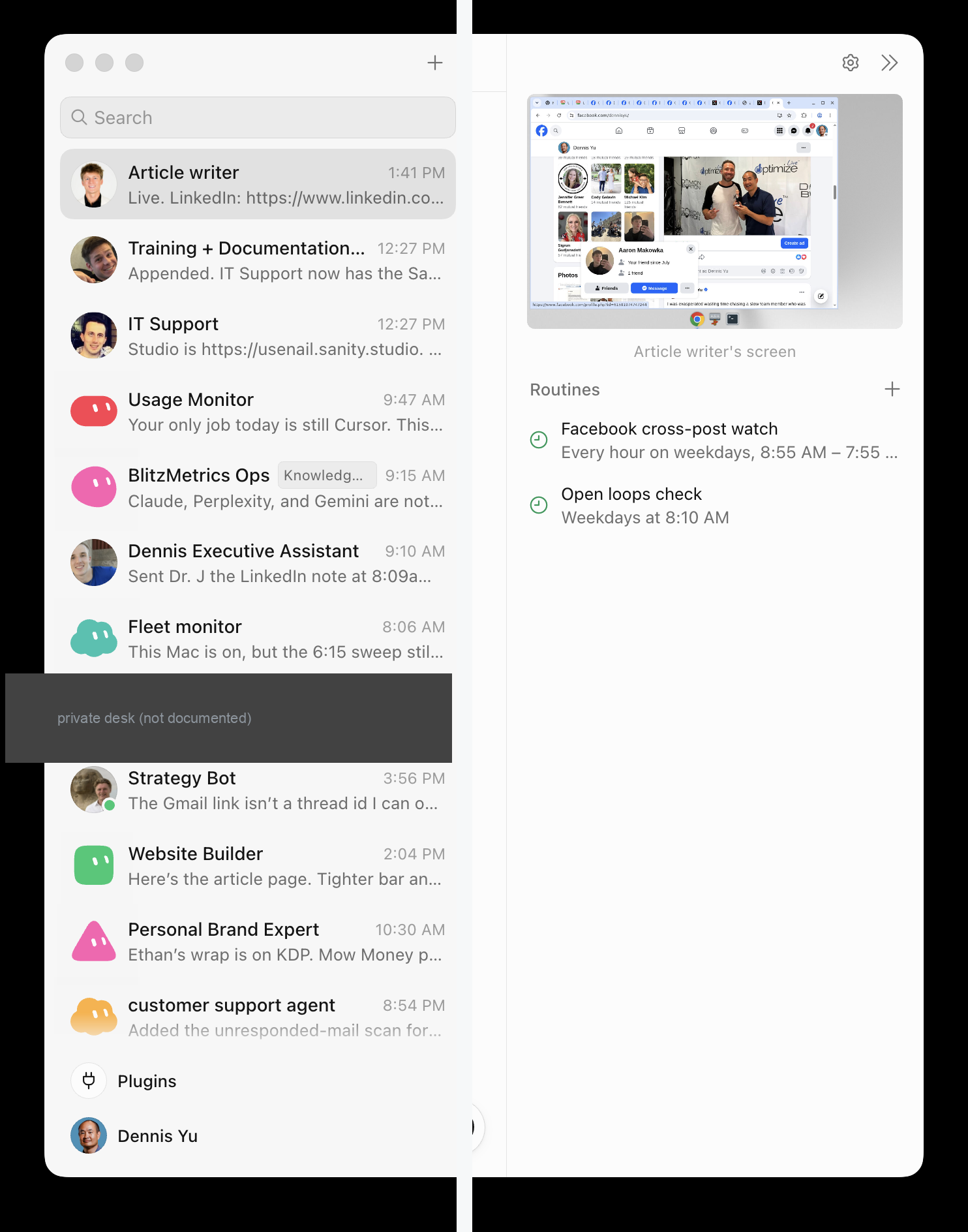
A named desk without a skill is still a chat window with a photo. IT Support is the one with a public can/can’t list. Proof from this weekend: theninetriangles.com login for access@blitzmetrics.com was reset from the shared computer on 16 Aug. BlitzAdmin could not rotate that password. The public site stayed up. That job is not yet a routine. Two other desks already have clocks — we photographed them rather than inventing a stack of new ones on an empty weekly meter.
On Cursor I built this glossary, the fleet topic wheels, and the rest of this week’s factory. Cursor is the workshop. The live spending tab at 18 Aug, early afternoon Mountain:
| Meter | 7:00am email | Live ~9:32am MT | Live early afternoon |
|---|---|---|---|
| Cursor Models (Grok / Composer) | 1% | 8% | 11% |
| Other Models (Claude / GPT inside Cursor) | 100% — “now billing on-demand” | 0% ($400 included) | 0% ($400 included) |
| Grok Bot weekly | not mentioned | 100% (resets 19 Aug) | 100% (resets 19 Aug) |
| On-demand | blamed on Other Models | $330.79 / $380 | $358.49 / $380 |
The 7:00am mail from Cursor said I had used up Other Models and should switch to Grok 4.6. The default in this editor already is Grok 4.6. The only 100% bar is Grok Bot. Meters are separate. Watch the Grok Bot weekly bar before you add routines. Extra Credits after a weekly ticket are grocery prices. I staffed a Usage Monitor desk on the Grok Bot roster for exactly this class of lie.

Claude already had the worked example of a scheduled job that watches the other cafeteria: the token-usage dashboard. Same rung. Different clothes. The chats are still rented. The files are ours: chats are rented, files are ours.
Teach a task is not a routine. When Teach a task is available, you demonstrate a browser workflow for up to ten minutes. No microphone. It writes a skill draft. You still add decision rules, failure handling, and approval gates. Then you ask the owning Bot to create the routine that runs that skill. Official overview: a Bot can persist a demonstrated path “as a routine” — the skills page is more precise. We follow the more precise page.
A useful skill states six things
xAI listed them. They match a Task Library (our directory of tasks and recipes) skill: trigger, inputs, steps, definition of done, example, approval. If a Bot bio is the only copy, you do not have a skill. You have a costume.
- When to use it
- Required inputs and access
- The sequence of work
- How to validate the result
- What to return
- What requires approval
Canon stays in records we own: the source skill at github.com/dennisyu/local-service-spotlight-skills, the Task Library for atomic work, and Dennis OS for private personal context. A Grok Bot skill is a runtime copy. Refresh from GitHub; do not re-upload a ZIP as the source. The governing architecture is how our agents share memory and coordinate work.
A routine confirms six things
Ask the Bot that should own the recurring job. Not a swarm. One owner.
- The owning Bot
- The schedule and time zone — or the event matcher
- The input source
- The expected result
- The approval boundary
- What happens when the source is missing (report failure; do not reuse stale data)
Event triggers (Slack, GitHub) are Cursor account integrations. They are not the Slack or GitHub plugin. Write a narrow rule. “Every new message” is how you burn the weekly meter on noise.
A test run performs real work. Safe inputs. Keep send, spend, delete, publish, and production changes behind a yes. After a site, connector, or source format changes, test again.
Manage it: open the Bot, View conversation details, Routines. Enable, pause, test, edit, inspect, delete. Delete is immediate and has no undo. Deleting a Bot deletes its routines. Cap 50 routines per Bot. The app keeps 20 run records. If you are away a long time, Grok Bot may pause unattended usage until you answer — review paused routines when you come back.
Paste this, do not invent a fourth language
Claude already had the sentence. Grok Bot and Cursor get the same sentence in their clothes.
Claude / Cowork
Create a scheduled task: every weekday at 8:00 AM local, run my
<skill-name> skill against the current inputs. Leave the report
in this conversation. Do not send, spend, delete, or publish.
If the source is missing, report the failure. Do not use old data.
Grok Bot (owning desk)
Save the process we just used as a skill called “<name>.”
Include source systems, risk definitions, output format, and
the rule that customer contact / email / publish / spend
always requires approval.

Then: every weekday at 8:00 AM America/Denver, run that skill.
Post a linked watch list in this conversation. Do not contact
anyone. If the source is unavailable, report the failure.

If the skill is missing from /, open Settings → Plugins → Yours
and enable it for this Bot. Test run before you leave it on.
Cursor
Save this as a Cursor skill first (how). Only then offer a
Cursor Automation (when). Do not open the Automations editor
for a workflow that has not passed once on safe inputs.
Standing rule. Meters are separate. Watch the Grok Bot weekly bar before you add routines. Extra Credits after a weekly ticket are grocery prices. Document the skill and the paste first. One Bot, one skill, Test run, then the routine.
Trust the same way on every runtime
- Automate preparation before execution. Draft, reconcile, recommend first.
- Approval for sending, purchasing, deleting, publishing, or changing production.
- No-data and stale-data policy. Idempotent retries. Report partial completion.
- Do not treat separate Bots as a security boundary. They share one computer.
- Passwords and 2FA stay in the secure handoff. Never in ordinary chat. Official: approvals, security, and privacy.
House rule on the hub is the same sentence: docs ship by default and we iterate. Still stop for send, money, delete, permissions, or production infra.
What we will not do
We will not keep a Grok-only copy of every Task Library skill as a Bot bio. We will not call grok.com Automations or a 7-day Build /loop the production host. We will not buy SuperGrok Heavy hoping it makes named Bots run four-at-once. We will not schedule a skill that has not passed once.
Where this sits
This page translates vendor names. A skill describes the method; an agent performs a bounded job; a routine or other trigger determines when work starts. Use the persistent-agents guide for trigger ownership, saved state, and proof that a recurring run actually fired.
The System · Skill vs agent · Persistent agents · Build agents · Grok Bot desk · 18 scheduled tasks · How I use Grok Bot
THE DELIVERABLE
Do it once. Save the how. Test. Then turn on when. Same order on Claude, Cursor, and Grok Bot.
xAI skills & routines Persistent agentsStanding SOP, 18 Aug 2026. Sources: xAI skills and routines, Grok Bot overview, approvals, persistent agents, 18 scheduled tasks, how to use Claude, Grok Bot desk, how I use Grok Bot. Receipt: how we harmonized skills and routines.
Originally published .
Dennis Yu
Dennis Yu is the CEO of Local Service Spotlight, a platform that amplifies the reputations of contractors and local service businesses using the Content Factory process. He is a former search engine engineer who has spent a billion dollars on Google and Facebook ads for Nike, Quiznos, Ashley Furniture, Red Bull, State Farm, and other brands.
Dennis has achieved 25% of his goal of creating a million digital marketing jobs by partnering with universities, professional organizations, and agencies. Through Local Service Spotlight, he teaches the Dollar a Day strategy and Content Factory training to help local service businesses enhance their existing local reputation and make the phone ring.
Dennis coaches young adult agency owners serving plumbers, AC technicians, landscapers, roofers, electricians, and believes there should be a standard in measuring local marketing efforts, much like doctors and plumbers must be certified. He has appeared on 353 podcasts with 619 credited episodes — see the full list of his podcast appearances.