
 by
by

BlitzAdmin is our internal tool for spinning up personal brand websites at scale. It is not a client-facing tool — it is used by our team (and soon, by AI agents only) to provision new WordPress sites on our infrastructure. This article documents the end-to-end process so that anyone on the team or any agent can create a new personal brand site from scratch in minutes.
We have built over 150 personal brand websites using this system for business owners, home-service founders, executives, athletes, and thought leaders. Every site we build follows the same pipeline: provision the WordPress install via BlitzAdmin, configure DNS, install and customize the BlitzMetrics Personal Branding template, then populate with real content from the person’s videos, podcasts, LinkedIn posts, media appearances, and articles.
This is the infrastructure behind our Spotlight Core package — the $99/month personal brand website service at Local Service Spotlight. When a contractor or local business owner signs up, this is exactly what happens behind the scenes: we spin up their personal brand website using BlitzAdmin, configure DNS, install the template, and begin populating it with their real content — reviews, videos, and stories that showcase their expertise. The fact that we can provision a complete personal brand website in minutes (not weeks) is what makes the $99/month price point possible at scale.
The Personal Brand Website Pipeline
1. BlitzAdmin
Create site & get DNS records
Create site & get DNS records
→
2. DNS
Point domain to 34.199.192.119
Point domain to 34.199.192.119
→
3. Template
Install & configure theme
Install & configure theme
→
4. Content
Videos, podcasts, articles
Videos, podcasts, articles
→
5. Knowledge Panel
Schema, SEO, authority
Schema, SEO, authority
This article covers Step 1 (BlitzAdmin) and Step 2 (DNS). For Steps 3–5, see the Personal Branding Website Checklist.
Task Checklist
Information you will need:
- The domain name for the new personal brand site (e.g., brendanking.ca, dennisyu.com).
- The person’s full name (for the site title).
- A client email address to associate with the site.
- Access to the domain’s DNS settings (GoDaddy, Squarespace Domains, Namecheap, etc.) to point the domain to our server.
Tools you will need:
- BlitzAdmin (login required — internal team credentials).
- Access to the domain registrar where the domain’s DNS is managed.
- Google DNS checker to verify DNS propagation.
- A browser to verify the site loads after DNS is configured.
Pro tips before you start:
- Confirm the domain is registered and you have DNS access before creating the site in BlitzAdmin — otherwise the site will sit in “pending_dns” status indefinitely.
- Use the person’s exact name as the domain whenever possible (firstnamelastname.com) for personal brand SEO.
- For internal sites, use access@localservicespotlight.com as the client email.
- The admin password is auto-generated — you do not need to create one. You can retrieve it later via the “WP Creds” button.
What Is BlitzAdmin
BlitzAdmin lives at blitzadmin.com and serves as the Super Admin control panel for our entire personal brand website operation. It is built on top of AWS and connects to our WordPress multisite infrastructure hosted at blitzlistings.com (IP: 34.199.192.119). When you create a new site through BlitzAdmin, it provisions a fresh WordPress installation on our servers, assigns the domain, generates admin credentials, and outputs the DNS records needed to point the domain to our infrastructure.
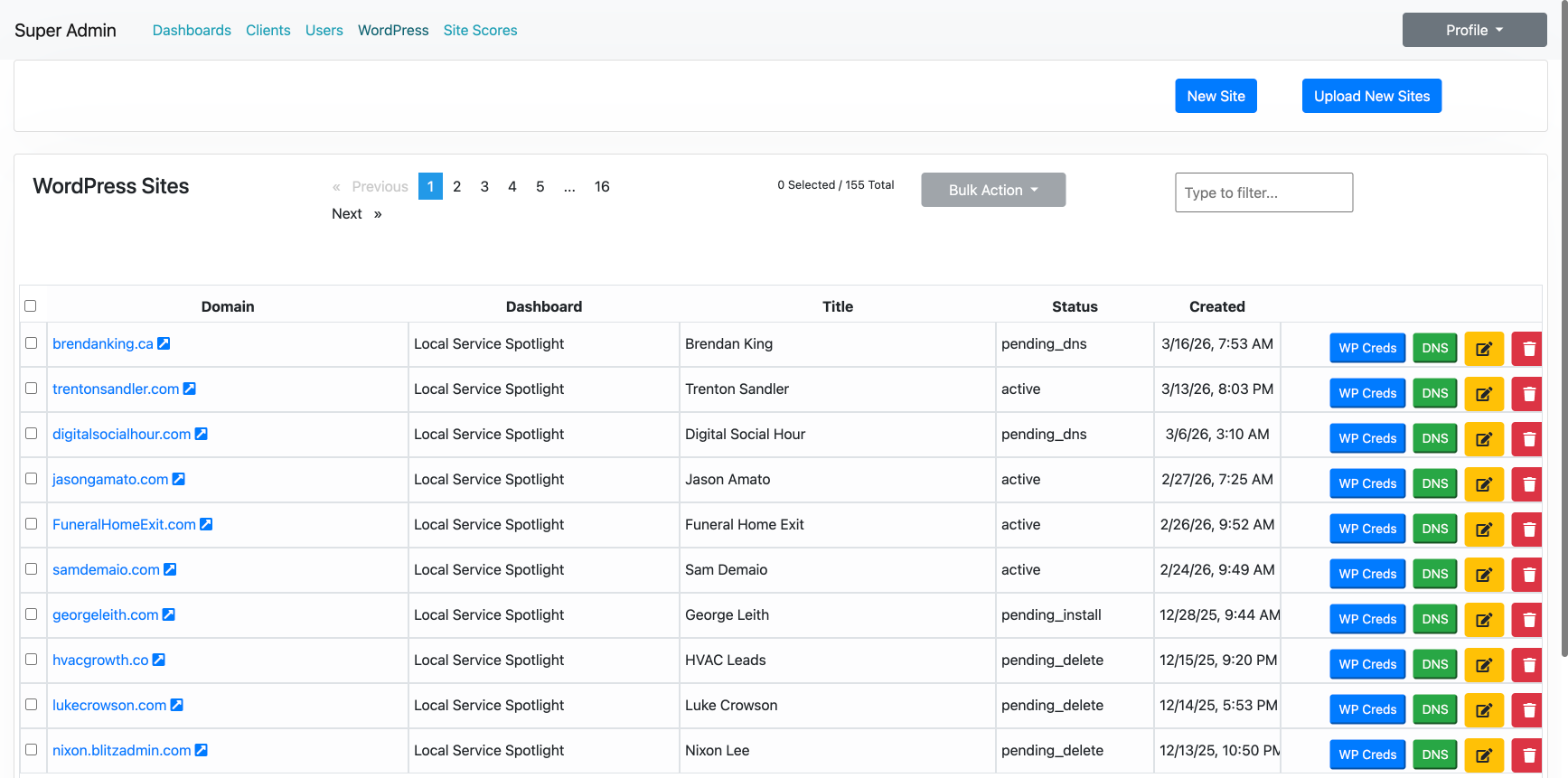
The dashboard has five main sections: Dashboards, Clients, Users, WordPress (where all sites are listed), and Site Scores. The primary dashboard we use for personal brand sites is called “Local Service Spotlight,” which manages the blitzlistings.com WordPress multisite network.
Step 1: Log into BlitzAdmin
Go to blitzadmin.com and log in with the team credentials. You will land on the Dashboards page, which shows all available dashboard instances. Click “WordPress” in the top navigation to see the full list of sites, or click into the “Local Service Spotlight” dashboard to see its configuration details including the WordPress domain (blitzlistings.com), base site URL, and Site Builder IP address.
Step 2: Create a New Site
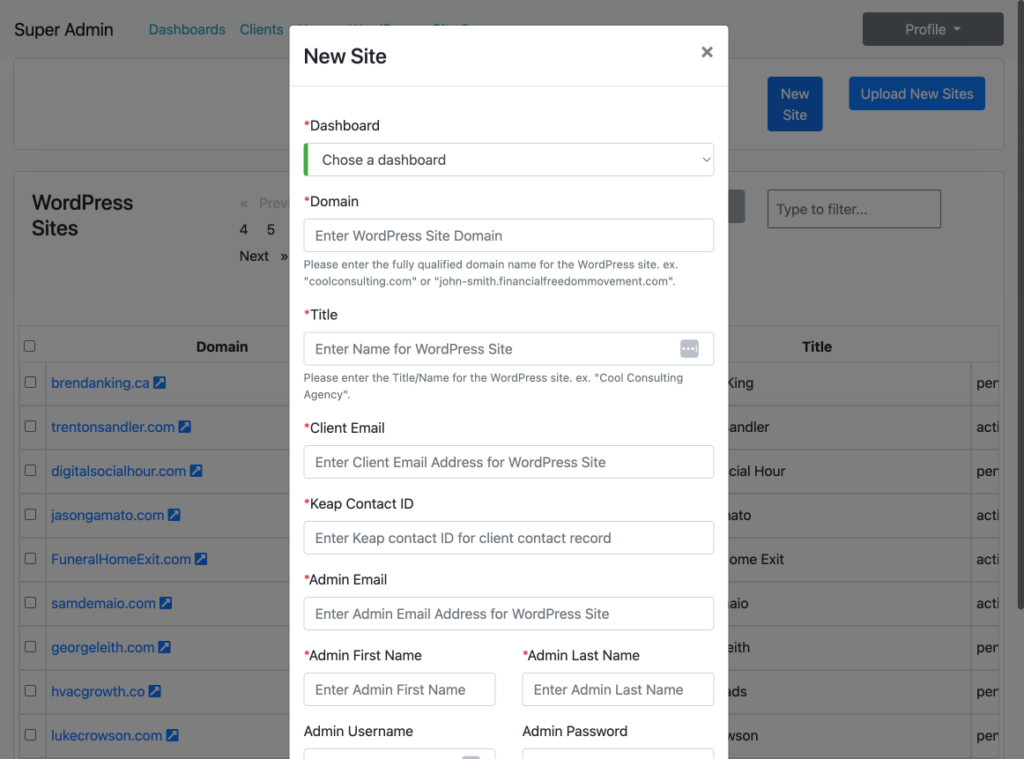
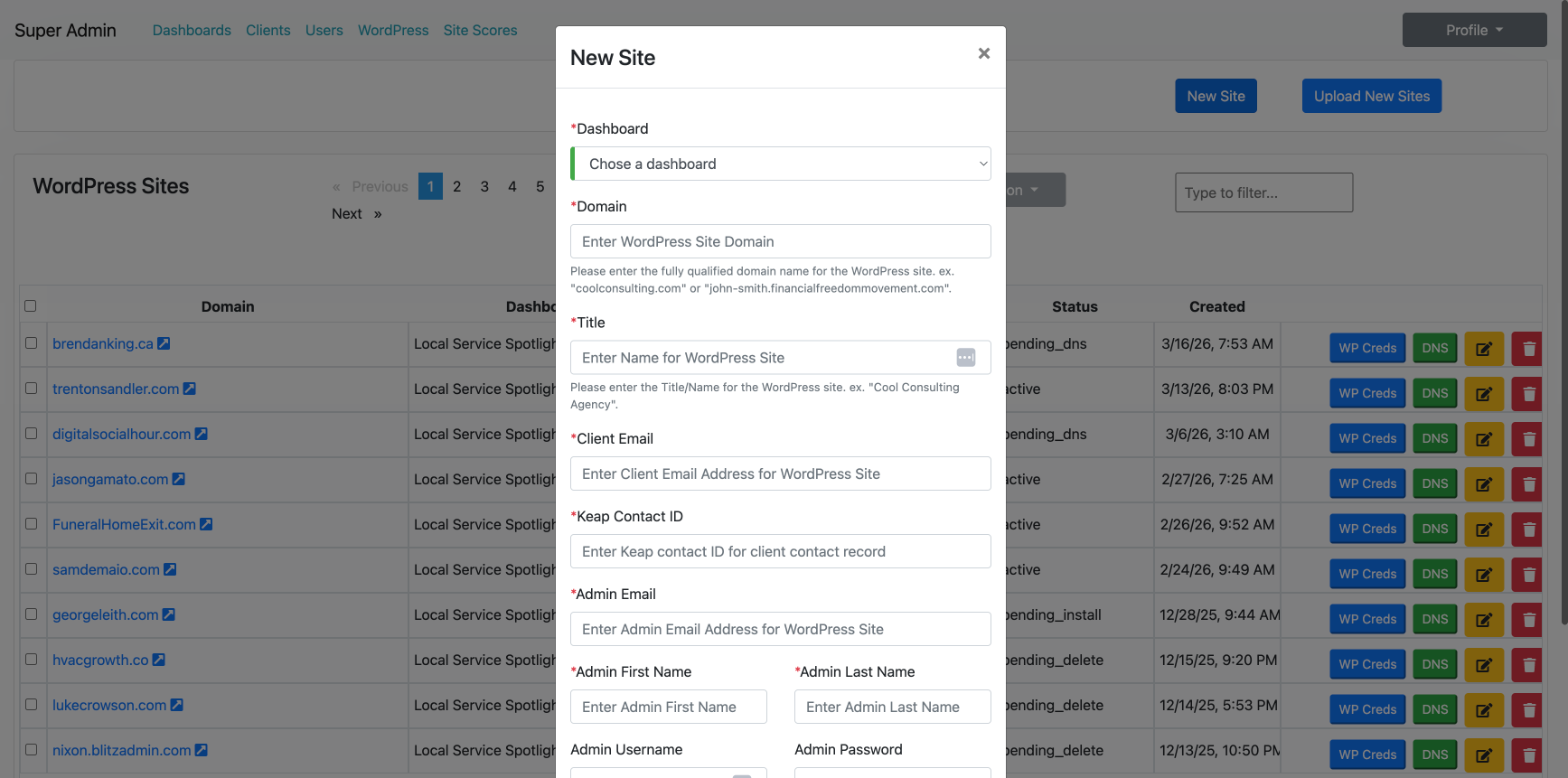
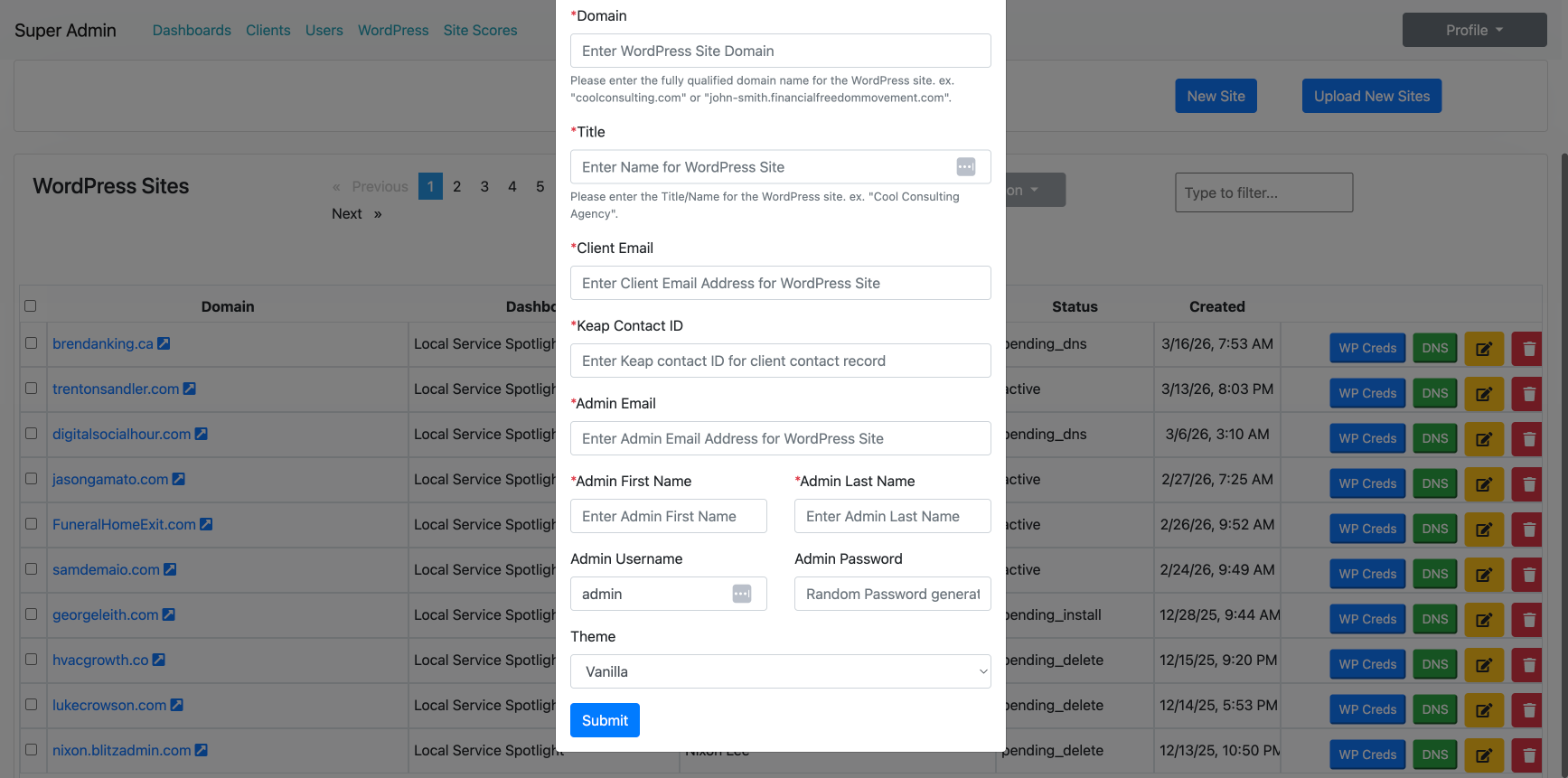
From the WordPress Sites page, click the blue “New Site” button in the top right. This opens a form with the following required fields:
Dashboard — Select “Local Service Spotlight” for personal brand sites. This determines which WordPress multisite network the site gets created on. Important: There may be two “Local Service Spotlight” entries in the dropdown. Select the one associated with blitzlistings.com (DashboardId 23), not the localservicespotlight.com dashboard. Selecting the wrong dashboard will cause a server error when submitting.
Domain — The fully qualified domain name for the site. For personal brand sites, this should be the person’s exact name as a domain, such as brendanking.ca or dennisyu.com. You can also use a subdomain of blitzlistings.com for testing, like firstname.blitzlistings.com.
Title — The display name for the site. Use the person’s full name, like “Brendan King” or “Dennis Yu.” For business sites, use the business name.
Client Email — The email address associated with the client. For internal sites, use access@localservicespotlight.com.
Keap Contact ID — The contact ID from Keap (Infusionsoft) for CRM tracking. For new sites where you do not yet have a Keap contact, enter 12345 as the placeholder value. This is the standard placeholder used across all existing sites.
Admin Email — The WordPress admin email. Use the same email as the client email, or access@localservicespotlig@dennis-yu
Admin First Name and Last Name — The person’s name. This gets used in the WordPress user profile.
Admin Username — Defaults to “admin.” Leave as-is unless you have a reason to change it.
Admin Password — Auto-generated by the system. You can retrieve it later by clicking “WP Creds” next to the site in the WordPress Sites list.
Theme — Select “Vanilla” for the standard BlitzMetrics personal brand template. This is the default for all personal brand sites.
Click “Submit.” The system will provision the WordPress installation. When successful, you will see a green confirmation message and the DNS configuration instructions. The new site will appear at the top of the WordPress Sites list with a status of “pending_install.”
⚠ Common Mistakes to Avoid
- Creating a site before the domain is registered. BlitzAdmin will happily create a site for a domain that doesn’t exist yet — it just won’t ever resolve. Confirm the domain is purchased first.
- Forgetting to update DNS after creating the site. The site will sit in “pending_dns” forever. This is the most common stall point.
- Pointing DNS to the wrong IP. The correct IP is 34.199.192.119 (AWS). Do not use old Google Cloud IPs or other servers.
- Creating a duplicate site. Always search the WordPress Sites list (use the filter box) before creating a new one. If a site already exists for that domain, edit it instead.
- Using the wrong dashboard. Personal brand sites go under “Local Service Spotlight.” Selecting the wrong dashboard means the site gets provisioned on the wrong server.
Step 3: Configure DNS
After the site is created, the domain needs to point to our servers. BlitzAdmin gives you two options.
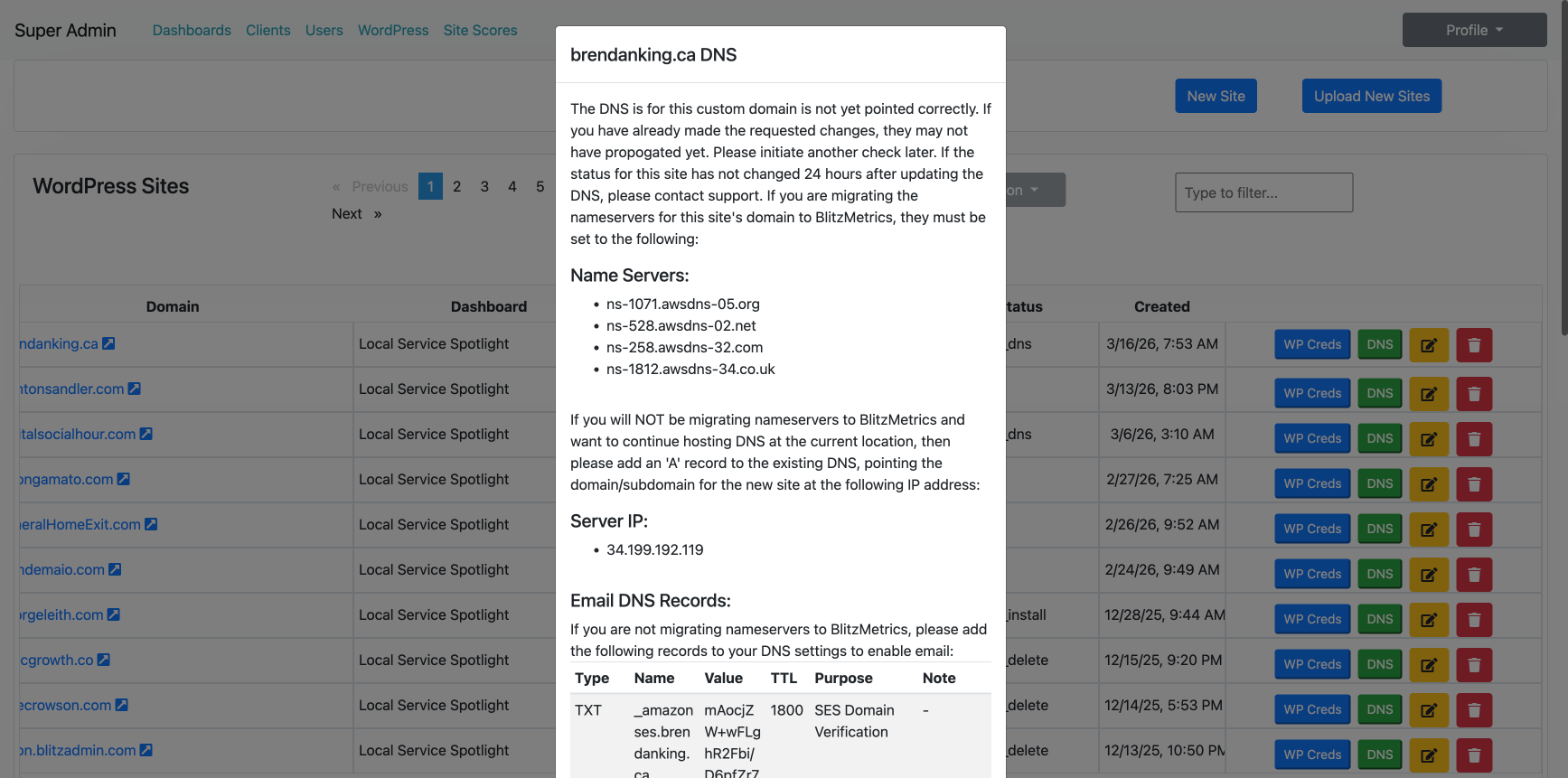
Option A: Migrate nameservers entirely to BlitzMetrics. Change the domain’s nameservers at whatever registrar holds the domain (GoDaddy, Squarespace Domains, Namecheap, etc.) to the four AWS nameservers shown in the success confirmation dialog after site creation. Each site receives its own unique set of four nameservers (e.g., ns-1801.awsdns-33.co.uk, ns-780.awsdns-33.net, ns-1299.awsdns-34.org, ns-275.awsdns-34.com). Do not reuse nameservers from another site — always copy the four nameservers displayed for the specific site you just created. You can also retrieve them later by clicking the “DNS” button next to the site in the WordPress Sites list. This gives us full DNS control including email routing.
Option B: Keep existing DNS and add an A record. If the domain already has email or other services configured that you do not want to disrupt, simply add an A record pointing the domain to 34.199.192.119. This is the simpler option when the domain is already set up elsewhere with Google Workspace, existing MX records, or other DNS configurations you want to preserve.
GoDaddy Domains (Most Common): If the domain was purchased on GoDaddy, go to dcc.godaddy.com, select the domain, click the “Nameservers” tab, click “Change Nameservers,” select “I’ll use my own nameservers,” enter all four nameservers from BlitzAdmin, click “Save,” then confirm. For a detailed walkthrough with screenshots, see our guide: A Simple Guide: Changing Domain DNS Nameservers in GoDaddy. DNS propagation typically takes 15 minutes to 24 hours.
BlitzAdmin also provides email DNS records including SES Domain Verification (TXT record), DKIM authentication (three CNAME records), SPF (TXT record), and DMARC policy (TXT record). These are needed if you want to send email from the domain through our AWS SES integration.
Common DNS troubleshooting issue: if a domain was originally registered through Google Domains (now Squarespace Domains), it may still have Google Cloud nameservers (ns-cloud-d*.googledomains.com) pointing to an old IP. This will cause a 500 Internal Server Error because the old server no longer has an application running. You need to update either the nameservers or the A record to point to our BlitzAdmin Site Builder IP at 34.199.192.119.
Step 4: Verify the Site Is Live
Once DNS has propagated (usually within a few minutes to a few hours), visit the domain in a browser. You should see a fresh WordPress installation with the Vanilla theme. The site’s status in BlitzAdmin will change from “pending_install” to “pending_dns” and eventually to “active” once everything resolves correctly. You can check DNS propagation at dns.google by looking up the domain’s A record and confirming it returns 34.199.192.119.
To log into the new WordPress site, click “WP Creds” next to the site in BlitzAdmin to retrieve the admin username and password, then go to yourdomain.com/wp-admin to sign in.
SSL Certificates and HTTPS
You will notice that there is no SSL configuration step in this process, no checkbox in the BlitzAdmin form, and no WordPress plugin to install. That is by design. Our infrastructure uses Caddy as the web server, which automatically provisions and renews SSL certificates via Let’s Encrypt the moment a domain’s DNS resolves to our server at 34.199.192.119.
This means every site we spin up gets HTTPS automatically — no manual intervention required. Once the A record or nameservers are pointed correctly and DNS propagates, Caddy detects the incoming request, obtains a certificate from Let’s Encrypt, and begins serving the site over HTTPS. HTTP requests are automatically redirected to HTTPS. WordPress is installed with https:// URLs from the start, so there are no mixed content issues and no need for plugins like Really Simple SSL.
If a site is not loading over HTTPS, the issue is almost always DNS — the domain is not yet resolving to 34.199.192.119, or DNS propagation has not completed. Once DNS is correct, SSL follows automatically within minutes. You can verify by visiting the site in a browser and confirming the padlock icon appears in the address bar, or by checking the WordPress Site Health screen at yourdomain.com/wp-admin/site-health.php which will confirm “Your website is using an active HTTPS connection.”
Step 5: Install the Template and Populate Content
After BlitzAdmin provisions the site and DNS is configured, the real work begins. This is where you transform a blank WordPress install into a full personal brand website. The process involves installing and configuring the BlitzMetrics Personal Branding template, then populating it with real content from the person’s life and career. For Spotlight Core customers, this is the content repurposing step included in the $99/month package — we turn their reviews, job photos, and video testimonials into structured authority content.
For a person like Brendan King, CEO of Vendasta, this means repurposing all the videos, media news appearances, podcast interviews, LinkedIn posts, and articles he has shared publicly. The goal is to build a site that supports a full Google Knowledge Panel and highlights his experience, connections, deals, and knowledge — all organized into structured pages with proper schema markup.
These downstream steps are documented in detail in our other articles (linked below). BlitzAdmin handles only the infrastructure provisioning — spinning up the WordPress install, assigning the domain, and generating the credentials. Everything after that is content work.
Site Statuses in BlitzAdmin
Each site in BlitzAdmin has a status that tells you exactly where it is in the provisioning pipeline. Here is what each status means and what action to take:
| Status | What It Means | What To Do Next |
|---|---|---|
| pending_install | WordPress is being set up on the server. The site does not exist yet. | Wait. This usually resolves within a few minutes. If it stays here for more than an hour, contact support. |
| pending_dns | WordPress is installed, but the domain’s DNS has not yet been pointed to our server (34.199.192.119). | Update the DNS A record at the domain registrar. Then click “DNS” in BlitzAdmin to re-check. See Step 3. |
| installed | WordPress is installed and DNS is configured, but the template has not been fully set up. | Log into WordPress (wp-admin) and install the BlitzMetrics Personal Branding template. |
| active | Everything is live and working. The site is fully operational. | Populate with content — videos, articles, LinkedIn posts, podcast appearances, media mentions. |
| pending_delete | The site is flagged for removal. | If this is a mistake, contact the team immediately. Otherwise, the site will be removed in the next cleanup cycle. |
Bulk Site Creation
BlitzAdmin also supports bulk site creation via the “Upload New Sites” button. This allows you to upload a CSV file with multiple sites at once, which is useful when onboarding several clients simultaneously. Each row in the CSV should contain the same fields as the New Site form.
Where BlitzAdmin Fits in the Full Pipeline
BlitzAdmin is Step 1 in a larger process. Here is how it connects to the rest of the personal brand website pipeline:
Provision the site (this article, using BlitzAdmin) then install the BlitzMetrics Personal Branding template (see “Install the BlitzMetrics Personal Branding Template on a Fresh WordPress Site” at blitzmetrics.com). Next, gather the person’s content assets including videos, podcasts, LinkedIn posts, media mentions, and articles (see “How to Build an AI-Powered Personal Brand Website That Ranks on Your Name” at blitzmetrics.com). Then populate the site with real content and configure schema markup (see “An AI Agent Built a Complete Personal Brand Website” at blitzmetrics.com for an example of how an AI agent completed this step for Trenton Sandler). Finally, claim the Google Knowledge Panel and begin ongoing optimization using the MAA framework (see “Blitzmetrics Magic Beyond Creating Personal Brand Websites” at blitzmetrics.com).
For the full checklist and FAQ, see “BlitzMetrics Personal Branding Website Checklist and FAQs” at blitzmetrics.com. For the client-facing product page where contractors sign up, visit localservicespotlight.com.
Each stage in this pipeline should be tracked in your Asset Tracker — the Google Sheet where we log the latest link, iteration date, and related assets for every piece of content we produce. If you are documenting this process for the first time, follow our How to Document a Task guide, and consider the incentive program for teaching others what you know.
How This Powers the $99/Month Spotlight Core Package
Everything documented in this article is the execution layer behind the Spotlight Core package at Local Service Spotlight. When a contractor, plumber, HVAC technician, roofer, or any local service business owner signs up for the $99/month plan, this BlitzAdmin pipeline is what provisions their personal brand website on day one.
The Spotlight Core package includes a fully built personal brand website, Knowledge Panel support, a listing in the Local Service Spotlight directory, content repurposing from real reviews and videos, group coaching calls, and a progress dashboard — all for $99/month. Because BlitzAdmin automates the infrastructure provisioning (site creation, DNS, SSL, template installation), our team can focus on what actually matters: turning the business owner’s real reputation into Google-ready, ChatGPT-friendly authority content.
This is not a generic website builder. Every personal brand website we build is structured with schema markup for Google Knowledge Panels, optimized for the founder’s name as the primary keyword, and populated with real content — customer reviews, job site photos, video testimonials, podcast appearances, and media mentions. The result is a professional online home base that makes the business owner “Googleable” and positions them as the local authority in their trade.
If you are a contractor or local service business owner who wants to build your personal brand and make the phone ring, see the Spotlight Core package at localservicespotlight.com. If you are on our team and need to provision a new site for a Spotlight Core customer, follow the steps in this article starting from Step 1 above.
Real Example: Spinning Up brendanking.ca
Here is a real example of the process. Brendan King is the CEO of Vendasta, a company that builds software for local businesses. He has shared extensively on LinkedIn, appeared on podcasts, and been featured in media coverage. We purchased the domain brendanking.ca to build his personal brand website. This is the same process we follow for every Spotlight Core customer — whether you are a Fortune 500 CEO or a local plumber, the infrastructure and pipeline are identical.
When we first visited brendanking.ca, it was showing a 500 Internal Server Error. Investigation revealed that the domain was registered through Google Domains (now Squarespace Domains) and its A record pointed to a Google Cloud IP (104.198.16.142) where no application was running. The domain was not in our GoDaddy portfolio and no site had been created for it in BlitzAdmin.
The fix was straightforward. We created the site in BlitzAdmin with the domain brendanking.ca, title “Brendan King,” under the Local Service Spotlight dashboard, using access@localservicespotlight.com as the admin email. The site was provisioned successfully with a status of “pending_install.” The next step is to update the A record in Squarespace Domains to point to 34.199.192.119, then install the template and populate it with Brendan’s content — repurposing his LinkedIn posts, podcast appearances, media features, and video content into a comprehensive personal brand site that showcases his experience leading Vendasta.
Real Example: Spinning Up bradleyshipes.com
Here is a second real example showing the GoDaddy-to-BlitzAdmin workflow that most personal brand sites follow. Bradley Shipes is a business owner whose domain bradleyshipes.com was purchased on GoDaddy (the most common registrar in our portfolio). We created the site in BlitzAdmin under the Local Service Spotlight dashboard with the title “Bradley Shipes,” using the standard placeholder values (access@localservicespotlight.com for the client email, 12345 for the Keap Contact ID, Vanilla theme).
After site creation, BlitzAdmin generated four unique AWS nameservers for this site. We then logged into GoDaddy at dcc.godaddy.com, navigated to the domain’s DNS Management page, clicked the Nameservers tab, selected “Change Nameservers,” chose “I’ll use my own nameservers,” entered all four nameservers, saved, and confirmed. The entire process from site creation to DNS update took under 10 minutes. For a detailed walkthrough of the GoDaddy steps, see A Simple Guide: Changing Domain DNS Nameservers in GoDaddy.
Verification Checklist
Before considering the site creation complete, verify the following:
#1. The site appears in the BlitzAdmin WordPress Sites list with the correct domain, title, and dashboard.
#2. The status has progressed from “pending_install” to at least “pending_dns.”
#3. The DNS A record for the domain points to 34.199.192.119 (or nameservers are migrated to the AWS nameservers listed in the DNS panel).
#4. The domain resolves in a browser and shows a fresh WordPress installation with the Vanilla theme.
#5. You can log into the WordPress admin (yourdomain.com/wp-admin) using the credentials from the “WP Creds” button in BlitzAdmin.
#6. The site status in BlitzAdmin changes to “active” after DNS propagation.
#7. The BlitzMetrics Personal Branding template is installed and activated.
#8. Content population has begun — at minimum, the homepage, about page, and one content category (videos, articles, or podcast appearances) are drafted.
#9. The site loads over HTTPS with a valid SSL certificate (padlock icon visible in browser). This happens automatically via Caddy and Let’s Encrypt once DNS is configured — no manual SSL setup is needed.
Sites Built Using This Process
We have used this exact BlitzAdmin pipeline to provision over 150 personal brand websites. Each site listed below went through the same five-step process documented in this article. Where a meta-article exists documenting the full build, it is linked. This growing list of examples is what makes this article definitive — every new site strengthens the pattern and proves the process works across industries, roles, and scales.
- Nathaniel Stevens (nathanielstevens.com) — serial entrepreneur who co-founded Yodle (acquired by Web.com for $342 million), Wharton graduate, featured in Bloomberg, Inc., and Forbes. Full site built in under 4 hours using AI, with comprehensive JSON-LD schema and 4 blog posts at launch. Cost: approximately $53–$78 versus $2,250–$6,000 for a traditional agency build — a 97% reduction.
- Gavan Thorpe (gavanthorpe.com) — CEO at Boostability, built using AI agents in 850+ steps with full entity SEO and YouTube integration.
- Trenton Sandler (trentonsandler.com) — LSU distance runner. An AI agent completed the full pipeline from a blank WordPress install through content population for $0.90 in token costs. The work would have taken a human 19–28 hours and cost $950–$1,400.
- Jason Amato (jasonamato.com) — deeply connected with Ken Goodrich and Tommy Mello in the home services world. Site built through the Content Factory process as documented in the Website QA audit article.
- Ethan Van De Hey (ethanvandehey.com) — digital marketing manager at Infinity Exteriors (27 roofing and siding locations). Site tuned up using AI agents with CSS fixes, Elementor optimizations, and content updates.
- Ibrahim Awad (ibrahimawad.com) — personal brand site built through the Content Factory process.
- Justen Martin (justenmartin.com) — AI agent transformed a blank WordPress template into a fully built personal brand website.
- Tanner Laycock (tannerlaycock.com) — personal brand site built by an AI agent following the standard pipeline.
- David Carroll (davidcarroll.com) — personal brand site tuned up with content and SEO improvements.
- RoofingLaunch.co (Nathaniel Stevens) — a Claude agent built the entire roofinglaunch.co site in one session, demonstrating the process works for both personal and business sites.
- Paul Ryazanov (paulryazanov.com) — Claude in Chrome crawled 60+ pages, found 5 bugs and 4 broken URLs, and fixed them in a single session.
- Brendan King (brendanking.ca) — CEO of Vendasta, site provisioned and DNS updated from Squarespace Domains. Example documented above in this article.
- Bradley Shipes (bradleyshipes.com) — domain purchased on GoDaddy, site provisioned via BlitzAdmin, nameservers updated to AWS in under 10 minutes. Example documented above.
- George Paladichuk (georgepaladichuk.com) — a site in our portfolio used as the reference model for correct BlitzAdmin form values during process documentation.
Every site in this list followed the same five-step pipeline documented in this article. As more sites are provisioned, add them here. For the complete list of meta-articles documenting individual builds, see the Meta-Article Prompt which maintains a running inventory of 29+ documented builds.
Third-Party Endorsements and E-E-A-T Signals
The personal brand website pipeline documented in this article has been validated by practitioners, media, and industry figures across multiple verticals. This section collects the external evidence that the system works — not because we say it does, but because the people who have used it, reviewed it, and been built on it confirm it independently.
James Dooley Podcast (February 2026): Dennis Yu appeared on the James Dooley Podcast to discuss why personal branding is risk management, not ego. James Dooley is one of the most recognized SEO authorities in the world. The conversation covered how the personal brand website pipeline creates compounding reputation deposits that protect business owners from algorithm changes, competitor attacks, and negative press. The fact that one of the world’s top SEO practitioners invited Dennis to discuss this system is itself an endorsement of the methodology.
Nathaniel Stevens — $342 Million Exit, Wharton Graduate: The NathanielStevens.com build demonstrates that this pipeline works for high-profile entrepreneurs and investors — not just home services professionals. Nathaniel co-founded Yodle (acquired by Web.com for $342 million) and has been featured in Bloomberg BusinessWeek, Inc., and Forbes. He signed up for the Personal Brand package because even with that track record, he had no personal website anchoring his digital presence. The site was built in under 4 hours at approximately $53–$78 total cost, versus $2,250–$6,000 for a traditional agency build.
Infinity Exteriors Network (27 Locations): Ethan Van De Hey at Infinity Exteriors uses personal brand websites built through this pipeline across their network of 27 roofing and siding locations. The documented tune-up of Ethan’s own site shows how the system extends beyond initial provisioning into ongoing optimization. The cross-linking between Infinity Exteriors’ mothership domain and individual location sites creates legitimate entity authority that drives SEO.
Home Services Industry Practitioners: Jason Amato (connected with Ken Goodrich and Tommy Mello), and Brad Strawbridge of Capital City Roofing in Atlanta have all had personal brand websites built through this pipeline. These are real business owners serving real customers, documented publicly in meta-articles that anyone can verify.
AI Cost Benchmark: The Trenton Sandler build established a public benchmark: a complete personal brand website can be provisioned, designed, populated with content, and optimized with schema markup for $0.90 in AI token costs. The work would have taken a human 19–28 hours and cost $950–$1,400. This benchmark has been replicated across subsequent builds and is what makes the $99/month Spotlight Core package economically viable at scale.
150+ Sites in Production: The BlitzAdmin WordPress Sites list currently shows over 150 active sites — each one provisioned through the exact process documented in this article. This is not a theoretical framework. It is a production system running at scale, with every site following the same pipeline and every build feeding improvements back into the documentation.
How This Article Connects to the BlitzMetrics System
This article is a branch on the BlitzMetrics SEO Tree. It covers the infrastructure provisioning step of the personal brand website pipeline, which feeds into several other definitive articles and processes in our system. Every leaf article (case study or meta-article about a specific site build) should link back to this article as the parent process.
Here is how this article connects to the rest of the BlitzMetrics content architecture:
- Personal Branding — the definitive article on building authority and earning a Knowledge Panel for an individual. BlitzAdmin is the infrastructure layer that makes personal brand websites possible at scale.
- Content Factory — the four-stage pipeline (Produce, Process, Post, Promote) that populates every site after BlitzAdmin provisions it. This article covers Stage 0 — the infrastructure that comes before content production begins.
- Digital Plumbing — the technical foundation (analytics, tracking, schema markup) that gets installed on every personal brand site after provisioning. BlitzAdmin handles the WordPress and DNS plumbing; Digital Plumbing covers everything that goes on top.
- Knowledge Panel — the end goal for many personal brand sites. The pipeline documented here is the first step toward earning a Google Knowledge Panel for the person.
- Dollar a Day — the amplification strategy used to promote content on personal brand sites once they are populated. Dollar a Day campaigns begin after the site has content worth amplifying.
- MAA (Metrics, Analysis, Action) — the optimization framework applied to every personal brand site. Weekly MAA reports track how each site is performing and what actions to take next.
- Entity Linking — the decision tree for how we link people, companies, and concepts in articles published on personal brand sites. Every article on every site follows these linking rules.
- Nine Triangles — the foundational strategic framework that organizes all BlitzMetrics concepts. The personal brand website pipeline maps to the CCS triangle (Content, Checklist, Software) — BlitzAdmin is the software, this article is the checklist, and the site content is the content.
Related Resources
This guide covers the infrastructure provisioning step. For the full personal brand website pipeline and supporting processes, see these related articles:
- How to Document a Task — our standard for creating step-by-step internal guides like this one.
- BlitzMetrics Personal Branding Website Checklist and FAQs — the full checklist for building out the site after provisioning.
- An AI Agent Built a Complete Personal Brand Website — case study of Trenton Sandler’s site built by an AI agent.
- Creating Winning Documents that Drive Conversions — the framework for design guides, templates, checklists, and asset tracking.
- Document Your Expertise and Teach Others — our incentive program for documenting tasks.
- A Simple Guide: Changing Domain DNS Nameservers in GoDaddy — the step-by-step GoDaddy nameserver update walkthrough referenced in Step 3 above.
- How to QA a Personal Brand Website — the three-layer audit (Digital Plumbing, Content Architecture, Authority Signals) to run after a site is built and populated.
- How to Create a Definitive Article — the standard every major BlitzMetrics article must meet, including this one.
- Blog Posting Guidelines — the SOP every article published on BlitzMetrics or a personal brand site follows.
Video Demo: A screen recording walkthrough of the full BlitzAdmin site creation process is needed for this guide. When available, it will be embedded at the top of this article.
This article is listed in the BlitzMetrics Task Library under Website Building and QA Tasks. If you update this process, also update the Task Library entry to reflect any changes. For more documented tasks and processes, browse the full Task Library.
Download the Skill File
This article has a companion Claude skill file that turns the strategy described above into a reusable, automated workflow. After installing the skill, Claude can execute each step on your behalf — building drafts, running audits, and producing deliverables in minutes instead of hours.
Originally published .
Dennis Yu
Dennis Yu is the CEO of Local Service Spotlight, a platform that amplifies the reputations of contractors and local service businesses using the Content Factory process. He is a former search engine engineer who has spent a billion dollars on Google and Facebook ads for Nike, Quiznos, Ashley Furniture, Red Bull, State Farm, and other brands.
Dennis has achieved 25% of his goal of creating a million digital marketing jobs by partnering with universities, professional organizations, and agencies. Through Local Service Spotlight, he teaches the Dollar a Day strategy and Content Factory training to help local service businesses enhance their existing local reputation and make the phone ring.
Dennis coaches young adult agency owners serving plumbers, AC technicians, landscapers, roofers, electricians, and believes there should be a standard in measuring local marketing efforts, much like doctors and plumbers must be certified. He has appeared on 353 podcasts with 619 credited episodes — see the full list of his podcast appearances.