
 by
by
Help people trust your website and take the next step. This checklist shows teams how to test the pages, proof, forms, and layout. Start with the live site and record what passes, what fails, and what needs a fix.
This guide is part of How We Audit: Which Exam to Run, What Pass Means. Next, explore SEO Audits by Dennis Yu, or Digital Plumbing: The Technical Foundation Every Business Needs Before Marketing Can Work.
Where this task fits in the Content Factory
This task belongs in Post. Its inputs come from the linked work below; its checked result becomes the next worker’s starting point.
1. ProduceCapture real work
2. ProcessTurn sources into useful assets
THIS TASK3. PostPublish and connect approved assets
4. PromoteShare proven work and measure results
Start, finish, and next step
- Start when
- A personal-brand website is ready for pre-launch QA or has had a major update.
- Have ready
- Live or reviewable site URL
- Verified person and business facts
- The correct audit checklist and accepted site scope
- Follow the steps
- Check digital plumbing
- Review content architecture
- Verify authority signals
- Record PASS, FAIL, UNKNOWN or a justified not-applicable result, and retest the affected pages
Use the detailed instructions in this article for each step.
- Finish with
- A website QA record with exact findings, fixes and unresolved items, retaining PASS, FAIL, UNKNOWN or a justified not-applicable result.
- Measure the result
- Every checklist row has evidence-backed PASS, FAIL, UNKNOWN or a justified not-applicable result
- Live links, rendering and source facts are checked
- The checklist is not averaged into a different audit score
- Hand off next
- Return the findings to the website owner for fixes and run the same checks after changes.
Before closing the run, name the actual next task, receiving owner, and trigger in the execution record. The assignment and findings determine that handoff.
Reference material for the inputs
- Digital Plumbing: The Technical Foundation Every Business Needs Before Marketing Can Work
- How We Audit: Which Exam to Run, What Pass Means
Related tasks
Open this article’s tasks in the Task Library (our directory of tasks and recipes; see current Task Library). The library connects the current recipe, its smaller tasks, and the records of work performed.
Close the learning loop. Write a meta article: the record of this execution with the starting state, recipe version, result, checks, failures, and next owner. Link it back to this recipe and register the run under the same Task Library task. Reuse one execution ID for revisions and retries. A partial or failed run stays labeled that way. Public release follows the recorded publication authority; writing the run record is part of doing the task. Writing and revising that record belong to the original execution; they do not start another meta-article task. Use the findings to propose and verify a recipe improvement. See how recipes and execution records work together.
Where this sits. This article is the Website QA checklist — a result per row: PASS, FAIL, UNKNOWN or justified not-applicable. It is not a 100-point score. Do not average it with SEO & Growth or Brand Authority.
Which exam to run: How we audit. SEO rubric + published audits: dennisyu.com/seo-audits/ (person-site pass line 80). Locked third-person exec bios are N/A on the first-person check. Fetch the exact Sitemap: URL in robots.txt; Rank Math pretty /sitemap_index.xml can 404 while /?sitemap=1 is XML — inspect the current supported sitemap controls and fix the source only within the authorized change scope, then verify that exact normal sitemap route again. The module-toggle behavior is a historical troubleshooting observation, not a universal repair command.
A website QA audit is the systematic process of reviewing a personal brand website for technical health, content quality, SEO compliance, and conversion readiness before it goes live or after a major update. At BlitzMetrics, every personal brand site we build through the Content Factory (our four-stage process for using real content) is required to go through this QA process because a site that looks good but has broken plumbing, missing alt text, or third-person copy on a first-person site will undermine the authority it was built to create.
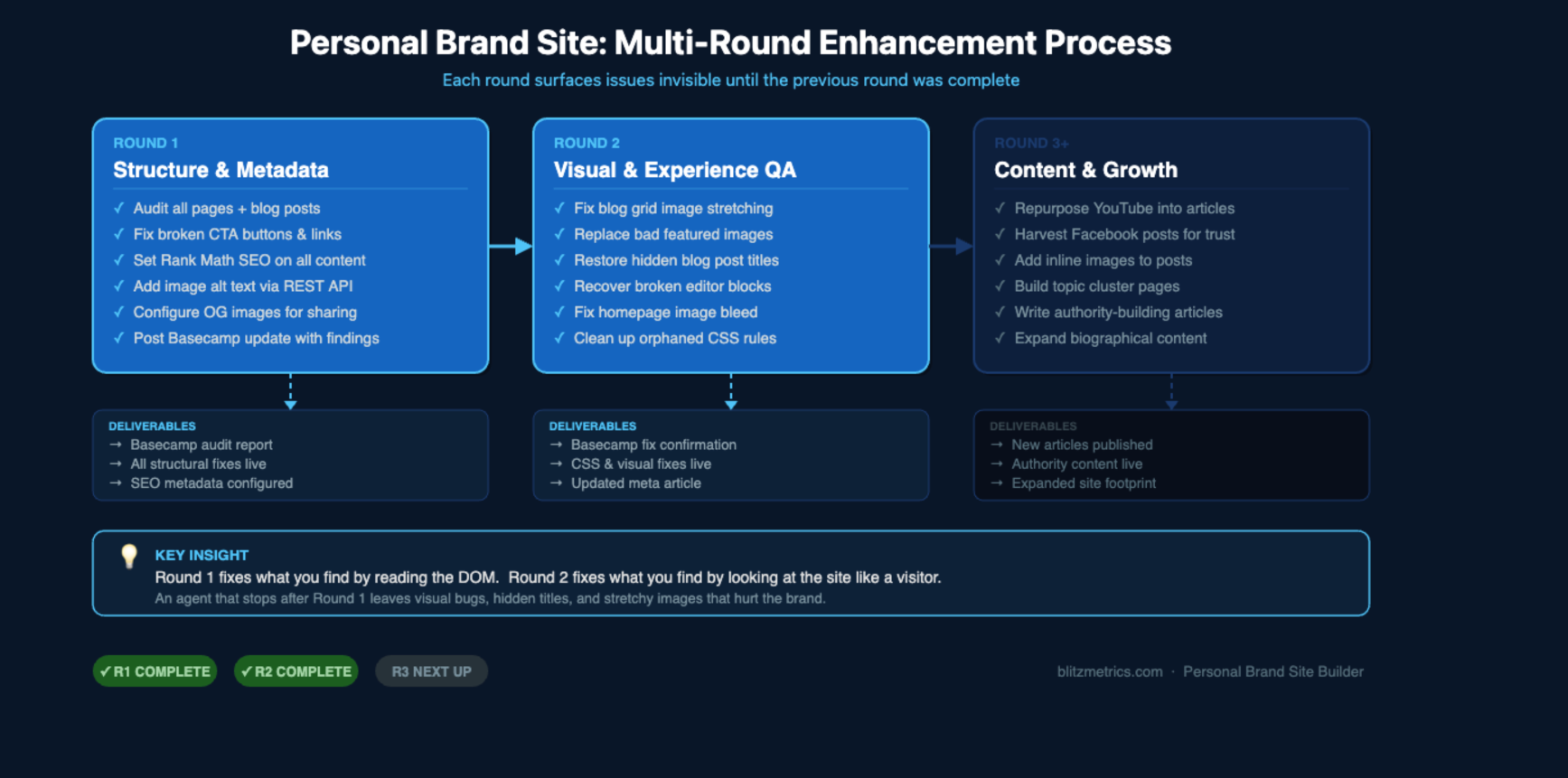
This is the definitive guide to QA-ing any personal brand website. It covers what to check, how to check it, and what to fix — organized into three useful QA areas: Digital Plumbing, Content Architecture, and Authority Signals. Keep this checklist’s per-row evidence separate from the SEO and brand-audit scoring systems.
Why QA Matters for Personal Brand Websites
Personal brand sites are different from company sites. They represent one person. Every error — a broken link, a stock photo, a third-person paragraph on what should be a first-person site — damages that person’s credibility. The QA process catches these issues before visitors do.
Most personal brand sites we audit have the same pattern of failures. The site was built quickly to get something live, and nobody went back to check whether the analytics were installed, the meta descriptions were under 160 characters, or the CTAs actually led somewhere useful. The QA audit fixes this by providing a repeatable checklist that any team member or AI agent can run.
The Three Layers of a Website QA Audit
This website checklist groups its checks into three layers. Other audits have their own rubric and scope; similar terms do not make their scores or pass criteria interchangeable. Layer one is Digital Plumbing — the technical foundation. Layer two is Content Architecture — whether the right content exists in the right structure. Layer three is Authority and Trust Signals — whether the site has the credibility markers that Google and visitors expect.
Layer 1: Digital Plumbing
Digital Plumbing is the technical setup that supports the site’s agreed goals. A broken form can lose a lead; failed tracking can hide results; an indexing block can prevent discovery. Test each issue and its actual effect instead of assuming that one missing tool prevents every other part of the site from working.
Begin with the measurement plan for this site and the access actually available. If Google Tag Manager is used, check the container separately from the intended tags and test events: container presence does not prove data reached the correct destination. Google’s tag can also be installed directly or through a supported site integration. For in-scope GA4 or Meta tracking, verify the intended account, expected events and test receipts without creating duplicate tracking; configure internal-traffic handling only from a tested plan. Then check HTTPS and mixed content, measured mobile performance, the actual sitemap and indexing controls, and truthful identity markup. Keep the house under-three-second target tied to a named metric and test conditions. Person sameAs links identify verified pages for the same person, not every URL or organization mentioned on the site. Google’s direct tag setup documents an alternative to Tag Manager.
The most common plumbing failure we find on personal brand sites is the complete absence of analytics. The site was built, published, and never connected to any measurement tool. This means the site owner has no idea whether anyone visits, where they come from, or what they do when they arrive. Confirm the missing measurement need and the existing implementation first. Add or repair only the agreed setup through its supported route, then verify the actual expected event and destination; do not install another container merely to satisfy a tool-name checkbox.
Layer 2: Content Architecture
Content architecture is where most personal brand sites fail their QA audit. The issues fall into several categories.
Point of view is the first and most important check. The BlitzMetrics blog posting guidelines use the person’s own voice for their first-person account, while preserving justified guest, interview, organizational or locked third-person biography contexts. If the site is jasongamato.com, the content should say “I captivate audiences” not “Jason captivates audiences.” For owner-authored personal copy, an unexplained third-person voice can feel detached. Use the actual voice plan and source record rather than changing every guest quote or legitimate biography into invented first-person experience.
Authorship is equally important. Check the real authorship record against the stored author and visible byline. Owner-authored work should use the owner’s approved public identity rather than a default admin label; a real guest, joint or organizational author keeps truthful credit. On tannerlaycock.com, an article actually authored by Tanner Laycock should name him, while a genuine guest article should name its author. The login that uploaded the post does not establish authorship. Correct exact assignments and display fields within scope, preserving account roles, privacy and legitimate exceptions.
Write concise, accurate titles and descriptions that match each page’s purpose, using the main topic naturally. Under 60 title characters and under 160 description characters are our editorial targets, not Google display limits or guarantees. Google may choose title and snippet text and truncate it for the device. If this site uses Rank Math, inspect its actual failed tests and the applicable house score target, normally 70/100; a plugin score does not prove search performance, source accuracy or complete QA. Review the real content and normal output alongside any preview. Primary guidance: Google title links and Google snippets.
CTA buttons must lead to distinct, appropriate destinations. A common failure is every button on the homepage pointing to the same generic page. “Book for an Event” should lead to a booking form. “Download the Guide” should lead to an email opt-in that delivers the guide. “Schedule a Session” should lead to a calendar booking tool. If all buttons go to the same page, visitors have no clear conversion path.
Choose the text alternative by the image’s purpose. Informative images need the useful information in context; purely decorative images normally use an empty alt attribute, and functional images need an accessible name for their action or destination. Complex diagrams need a useful nearby explanation as well. A missing alt attribute and an intentionally empty decorative alternative are different cases. See W3C’s decorative-image guidance and functional-image guidance.
The same goes for the accessibility statement: every personal brand site needs one at /accessibility-statement/, linked in the footer next to the privacy policy. It is a named check in this QA pass — see the BlitzMetrics accessibility statement standard for the five acceptance criteria and the copy-paste template.
Internal linking between blog posts must create a connected content tree, not a collection of orphan pages. Each useful post needs an appropriate incoming path and relevant links to its owning method or offer where they help the reader. Adding an outgoing link alone does not repair an orphan; do not force an unrelated service link merely to meet a quota. The entity linking decision tree in the blog posting guidelines covers exactly how to determine where each link should point.
Featured images on blog posts should be unique to each article — screenshots from the source video, real photos from the event, not the same headshot repeated on every post. The blog posting guidelines are clear: no stock images, no repeated images.
The email opt-in form must actually exist and work. If the homepage promises a free guide, there must be a real form that collects an email address and delivers the guide. A button labeled “Download the Free Guide” that links to a generic services page is a broken promise that destroys trust.
Visual Design and Imagery
Visual design is the most commonly missed layer in personal brand site QA because it is the hardest to check with automated tools and the easiest to skip when building quickly. A personal brand site with no images looks like a Word document. It communicates zero personality, zero social proof, and zero credibility at first glance. Compare jasongamato.com before its visual audit to davidmeermanscott.com, where the very first thing you see is a full-bleed action photo of David on stage. The difference in perceived authority is instant and decisive.
In Episode 5 of The Marketing Mechanic, Dennis describes what good personal brand sites look like: most people for their personal brand site, they have this beautiful picture of them, maybe there is a carousel. This visual expectation was taught but never codified into the QA checklist until now. The result was sites that passed every technical and content check but still looked lifeless because they had no imagery.
The visual design audit checks the following areas.
First, the hero section must contain a large, prominent photo of the person. This should be a real photo showing the person in a professional context: on stage, leading a workshop, in their work environment, or in a professional portrait. A solid-color background with text-only is a visual design failure, even if the copy is perfect. The hero image should be full-width or near full-width, high resolution, and should communicate who this person is before the visitor reads a single word. Reference davidmeermanscott.com, where the hero is a dynamic shot of David gesturing on stage with bold text overlaid.
Second, each major section of the homepage must include at least one relevant photo alongside the text. A Speaking section should show the person on stage. A Consulting section should show the person in a meeting or workshop setting. A Workshops section should show the person leading a hands-on session. Text-only sections that span an entire viewport height are a visual design failure. No visitor should have to scroll through more than one full screen of unbroken text without encountering a visual element.
Third, social proof photos must be present. These are photos of the person with recognized peers, industry leaders, clients, or at notable events. For someone in home services, this might be photos with Tommy Mello, photos at Home Service Freedom events, photos at industry conferences, or photos receiving awards like the Home Services Hall of Fame. These images are not decoration. Caption each photo for the event, people and context it actually shows, with permission and attribution. A stage image may support a speaking claim when the event and role are verified; a shared photo alone does not establish an endorsement, client relationship, award or achievement. Keep the strongest relevant proof first, and link the source that establishes any broader claim.
Fourth, testimonials must include headshot photos of the person giving the testimonial, along with their full name, title, and company. A text-only testimonial with no photo and no attribution looks fabricated. Reference davidmeermanscott.com, where every testimonial card includes a headshot, name, title, and company name. The BlitzMetrics QA standard is: every testimonial must have a name, title, company, and photo.
Fifth, if the site offers a lead magnet such as a free guide, ebook, or checklist, that section must include a visual mockup of the deliverable. A 3D book cover rendering, a PDF mockup, or a flat-lay style image of the guide makes the offer tangible. A text-only Download the Free Guide section with no visual representation of what is being downloaded reduces conversion and looks unfinished.
Sixth, at least one embedded video or video thumbnail with a play button should be present on the homepage. If the person has speaking clips, podcast appearances, YouTube content, or customer testimonial videos, a video section on the homepage creates engagement and provides dynamic social proof. Reference davidmeermanscott.com Fandom in Action video carousel with multiple video thumbnails.
Seventh, all images must be real. No AI-generated portraits, no generic stock photos, no repeated use of the same headshot across multiple sections. The raw material for these images comes from the person’s existing content: photos from their iPhone or iCloud, Google Photos, event photography from Eventbrite or conference organizers, screenshots from speaking videos, photos taken at industry events, and professional headshots. As Dennis explains in Episode 5, there is an enormous amount of raw visual material that already exists in people’s photo libraries, social media, event sites, and video recordings. The job is to collect and deploy it, not to use stock images as a substitute.
The most common visual design failure we find is the zero-image homepage. The site was built with a dark background, white text, and CTA buttons, but nobody added any photos. This happens because the content team focuses on getting the copy right, getting the SEO titles optimized, and getting the CTAs pointed to the right pages, and nobody checks whether the homepage actually has any images at all. The visual design audit catches this before launch.
Layer 3: Authority and Trust Signals
Authority signals tell Google and visitors that this person is real, credible, and worth paying attention to. For personal brand sites, the key signals include testimonials with full attribution (name, title, company, and ideally a photo), social media profile links that are prominent and functional, evidence of achievements mentioned on the site (if the site claims “Hall of Fame inductee,” there should be an attributable source that establishes that honor; a photo needs verified event and role context), and proper schema markup that connects the person entity to their verified profiles across the web.
For an eligible in-person business or practitioner, check the actual Google Business Profile ownership, verification state and accurate public facts when this is in scope. A personal brand does not automatically qualify for a Business Profile. Keep eligibility, profile verification and a person’s Knowledge Panel separate, and retain unavailable account evidence as UNKNOWN. See Google’s business eligibility rules for the actual requirements and exceptions.
The QA Checklist
Run this checklist on every personal brand site before launch and after every major update.
Technical checks: the agreed tracking implementation is present, and intended events reach the correct destination; GTM, GA4 and Meta checks apply to the actual plan and access, without duplicate tags. HTTPS has no mixed content. Mobile performance records the metric, device and conditions against the house target. The actual sitemap and intended indexing controls work. Person markup uses truthful identity links where appropriate. Check the favicon. Record unknown and not-applicable cases with reasons.
Content checks: the page follows its truthful voice and authorship plan, including legitimate guest or organizational exceptions. Titles and descriptions match the content and the house length targets without a search-display promise. On sites using Rank Math, review the actual tests and relevant score target rather than treating the score as full QA. Informative, decorative and functional images have appropriate alternatives. Use authentic relevant photos, no stock images, and distinct featured images for the actual articles. Buttons lead to the destinations their labels promise; an offered email opt-in exists, works and delivers the promised asset. Relevant incoming and outgoing links follow the entity decision tree, with broken-link and footer checks in the agreed scope.
Visual checks: Hero section contains a real photo of the person in a professional context. Each major homepage section includes at least one relevant image. Social proof photos present showing the person with peers, at events, or in industry settings. Testimonials include headshot photos with full name, title, and company. Lead magnet or free guide section includes a visual mockup of the deliverable. At least one video embed or video thumbnail present on the homepage. No text-only sections spanning more than one full viewport height without a visual element. All images are real photos, not AI-generated or stock. Image alternatives match their informative, decorative or functional purpose. Minimum five distinct images on the homepage.
Authority checks: testimonials have truthful attribution and permission. Relevant verified social profiles are linked. Achievements have source evidence beyond an unexplained photo. Check an eligible Business Profile’s actual verification when applicable. Identity markup links only pages verified to represent the same entity.
Real QA Audit Examples
Every personal brand site built through the BlitzMetrics Content Factory is required to go through this QA process. The following historical example was recorded in this article, first published March 22, 2026. Retain its reported observations as that account’s evidence; it is not a fresh audit of the site today.
Jason Amato’s site at jasongamato.com was audited using this framework. The audit found the homepage was written entirely in third person (29 mentions of “Jason” with zero first-person references), all four CTA buttons pointed to the same page, the Rank Math SEO score was 21/100, Google Analytics and the Meta pixel were completely absent, and the “Download the Free Guide” button linked to a services page with no actual guide or email form. After applying the fixes from this QA process, the Rank Math score rose to 85/100, all copy was converted to first person, and the SEO title and meta descriptions were optimized across every page.
How the Website QA Audit Connects to Other Concepts
The website QA audit sits at the intersection of several BlitzMetrics frameworks, and understanding those connections is what makes the audit effective rather than just a checklist someone runs through mechanically.
This checklist uses Digital Plumbing, Content Architecture, and Authority Signals to organize its checks. Use the linked audit-selection guide for other exams; their scoring, evidence and pass lines are not interchangeable with this website checklist. This website checklist focuses on personal brand sites, including their truthful voice, imagery and individual credibility.
Layer 1 of this audit is effectively the Digital Plumbing checklist applied to a personal brand context. If you want the full technical foundation beyond what this QA covers, the Digital Plumbing definitive article goes deeper into analytics configuration, social profile ownership, domain health, and the full Nine Triangles context for why plumbing comes first.
Layer 2 draws its content standards directly from the blog posting guidelines, particularly the rules around point of view, heading structure, and the entity linking decision tree that governs how every link in every article should be structured.
Within the SEO Tree (how content links to its main topic), this article functions as a branch — the canonical reference for website QA. Every case study that documents a specific site audit is a leaf that links back here. And this branch connects laterally to the SEO audit branch, the Digital Plumbing branch, and the Content Factory branch because the QA process touches all of them.
The Content Factory produces the assets that populate a personal brand site — the blog posts, the video embeds, the social proof sections. But production without quality control creates the pattern of failures this audit is designed to catch. The QA audit is the quality gate between Content Factory output and a site that actually builds authority.
Finally, the MAA loop (results, meaning, and next steps) turns audit findings into measurable improvement. Each issue this QA surfaces becomes a metric, gets analyzed for priority, and triggers a specific action. The audit is not a one-time event — it runs after every major site update, feeding the MAA cycle that drives continuous improvement.
This is a definitive article, following the standard for how every major BlitzMetrics concept is documented and maintained. All supporting content — case studies of specific site audits, meta-articles documenting the QA process, and related guides — links back here as the canonical reference for website QA.
Case Study: Applying These Standards
For a real-world example of how these QA standards were applied to catch and fix a text-only homepage, see How We Built Jason Amato’s Personal Brand Website. That case study documents the visual audit process, what was found, what was added, and the technical implementation details for each fix. It serves as a reference implementation that AI agents and team members can follow when building or auditing any personal brand site.
The skill files for this page
These 36 skill files give a worker the steps for the checks below. Expand a file to copy its instructions. Each copy is bound to reviewed Task Library source revision 7822192; its status field is the contributor’s document label, not proof of a completed site audit. Loading a file does not grant tools, account access, memory or a schedule. Use the current Task Library to check the maintained source and ZIP, with the Task Library guide for context and our publishing standard for the source rule. Real run records and certification stay separate.
audit-internal-links-between-all-blog-posts.skill.md — Help readers find the next useful page. Check links in each post and fix gaps in the site map.
START

---
name: audit-internal-links-between-all-blog-posts
description: "Help readers find the next useful page. Check links in each post and fix gaps in the site map."
category: Website QA Audit
stage: —
definitive_article: /website-qa-audit
status: complete
---

# Audit internal links between all blog posts

Your best post is less useful if no one can find it. This guide helps you link each post to the next useful page. Start with a full list of live posts, not just the pages a tool found.

**The path:** Full post list → Link map → Relevant fixes → Fresh check.

**Use this when:** A site launch, content review or defined batch of posts needs its internal links checked.

## Inputs
- The exact site, published post inventory and scope of pages to inspect. Include posts known to the CMS even if a crawl cannot reach them.
- The site’s [SEO Tree](https://blitzmetrics.com/seo-tree/): the main guide for each topic and the actual service or offer pages.
- A browser and a link report from an available crawler or supported CMS tool. Link Whisper is optional; a report is useful only when its scan date and coverage are known.
- Access for authorized edits, the current page source, and a tracker for unresolved inbound links owned by another editor.

## First-run prompt

> Use the supplied site, published inventory and topic map. Reconcile them with a fresh link report. Check relevant body links and incoming links separately. Perform already-authorized edits, verify canonical destinations, and return coverage, exact remaining gaps and next owners.

## Steps
1. Join the published post inventory with the crawl list by final canonical URL. Record exclusions such as private drafts and identify published pages absent from the crawl. A crawler that starts at the home page cannot alone prove that it found every orphan.
2. For each post, list body links to other posts, its main topic guide and any genuinely useful service page. Separate navigation/footer links from contextual links in the article. Record live status and named-anchor destinations.
3. Build inbound links from the same inventory. An orphan has no known incoming link in the defined scope; it is not the same as a page with no outgoing links. Mark missing coverage as unknown instead of asserting a site-wide zero.
4. Read each page’s purpose. Add a link to the maintained guide where the reader needs that explanation. Add another post or service link when it answers the next question; a policy or reference page does not need a forced sales link.
5. Choose an existing relevant article or hub for each missing inbound link. Write the exact sentence and descriptive anchor. Follow [entity linking](https://blitzmetrics.com/entity-linking/) for people, brands, owned explainers and primary proof. Do not turn every mention into a link.
6. Make the edits already authorized through the supported page source. Preserve the canonical URL and check for concurrent changes. If the inbound source is outside this job, give its owner the exact proposed placement and keep that link pending.
7. Refresh the report after the edits and open the changed canonical pages as a visitor. Confirm the intended body links, final targets and fragments. A plugin’s count from yesterday does not verify today’s links.
8. Save the inspected denominator, relevant link additions, remaining orphans, unknown pages and next owners. Report coverage separately from findings; do not promise rankings or traffic from link counts.

## Definition of done (QA checklist)

- [ ] The published inventory and crawl are reconciled, with scope, date and missing coverage stated.
- [ ] Body links follow the page’s role and lead to relevant working canonical targets.
- [ ] Inbound and outbound gaps are separate; no page is called an orphan merely because it lacks outgoing links.
- [ ] Authorized repairs are visible on the canonical pages; other-owner placements remain pending.
- [ ] A fresh report and exact unresolved list support the result.

## Example(s)

**Fictional teaching example — no site was scanned or edited.** Maple Cycle’s CMS lists three posts: “Repair quote,” “Photos to send,” and “Brake wear.” The crawler finds the first two. The CMS list reveals that “Brake wear” still needs an inbound-link check.

“Repair quote” already links to “Photos to send.” The proposed new sentence in “Photos to send” is “Use the brake-wear guide if you are not sure which close-up to take.” That is a relevant inbound placement for the third post. The audit still checks the target and public source after saving.

The teaching result is “3 known posts; 1 newly proposed inbound placement; public repair not yet verified.” It is not “all orphan pages fixed” based on a two-page crawl.

## Handoff and Content Factory context

The content owner receives the updated topic map and unresolved placements. [Check broken links](https://local-service-spotlight.github.io/task-library/?task=check-for-broken-links#task-check-for-broken-links) verifies link destinations; it does not decide the editorial relevance of every link.

This is a supporting quality check for the [Content Factory](https://blitzmetrics.com/content-factory/). Produce gathers real source material; Process makes useful assets; Post places and checks them; Promote distributes suitable work within its own scope. This check does not automatically execute all four stages. Use the actual next step above; catalog neighbors are not prerequisites.

## When this runs

Run for a launch or a defined content audit, then after relevant new posts or link changes. Use an existing recurring review only if it is configured for this site.

## First-run setup and continuity

Open the supplied task file and its linked source. Verify the project’s real inputs, account, access and output folder before work. This Markdown file is a guide; it does not install an app, connect an account, supply a subscription or create a schedule. Carry out work already authorized; do not ask for the same approval again. Keep any unsupplied destination or new action outside that scope clearly pending.

Save source IDs, versions, decisions, checked outputs and next owner in the project tracker. Before a retry, check the saved state and other workers’ changes. A model name does not guarantee memory or a running timer. Repeated work needs an actual configured trigger and durable state; one-off work can be started by the prompt above.

Keep agent media muted with volume zero before playback. If mute cannot be verified, use captions, metadata or still frames. State the limit: silent visual checks do not prove spoken-word accuracy or audio quality. Do not start sound through the user’s speakers unless explicitly asked.

## Write up the real run

For every actual attempt, [write its meta article](https://blitzmetrics.com/meta-article-prompt/) with this recipe and revision, trigger, steps performed, output evidence, measured result, gaps and next owner. Failed, blocked and partial attempts also get a written record. A draft can satisfy writing; publishing it follows the existing job scope.

Keep one stable execution ID across retries and edits. A separately scoped child task may have its own ID linked to its parent. Writing the parent’s meta record is part of that run, not an endless new chain. The [recipe and meta-article guide](https://localservicespotlight.com/meta-articles/) explains this distinction. Teaching examples are not real executions and must not enter the run count.

## Definitive article & links

- Canonical article: https://blitzmetrics.com/website-qa-audit
- Exact task: [Audit internal links between all blog posts](https://local-service-spotlight.github.io/task-library/?task=audit-internal-links-between-all-blog-posts#task-audit-internal-links-between-all-blog-posts)
- Writing standard: [Article Guidelines](https://localservicespotlight.com/article-guidelines/)
- [Website QA Audit](https://blitzmetrics.com/website-qa-audit/)
- [SEO Tree](https://blitzmetrics.com/seo-tree/)
- [Entity linking](https://blitzmetrics.com/entity-linking/)

## Review and evidence still needed

The source contributor status is preserved. It is not certification of this draft or proof of account access, completed work or a live outcome. The worked example teaches the method and is explicitly fictional.
- The actual published inventory, current crawl coverage, edit access and public before/after evidence require the site.

END
check-all-cta-buttons-lead-to-correct-destinations.skill.md — Check that each button does what its words say. Find wrong links before a customer gets stuck.
START

---
name: check-all-cta-buttons-lead-to-correct-destinations
description: "Check that each button does what its words say. Find wrong links before a customer gets stuck."
category: Website QA Audit
stage: —
definitive_article: /website-qa-audit
status: needs-work
---

# Check all CTA buttons lead to correct destinations

A wrong button can stop a customer from taking the next step. This guide helps you check each button on a phone and a large screen. Start by writing down what the button should do.

**The path:** Button promise → Expected action → Safe check → Fixed or pending result.

**Use this when:** A site, landing page or changed form needs its call-to-action buttons checked. A call to action is the next step you ask a visitor to take.

## Inputs
- The exact pages and button inventory, including menus, sticky bars, forms and mobile-only versions.
- The intended destination or action for each button, plus the correct public phone/email details where applicable.
- Desktop and phone browser views, supported page-edit access, and the existing scope for repairs and any real submissions.
- A designated test receiver and authorized test details only when a form, booking or other submitted action is part of the job.

## First-run prompt

> Use the provided pages and expected button actions. Check targets and desktop/phone behavior, perform only the real submissions already in scope, and verify their receipts. Fix authorized issues and return a button-by-button result that separates navigation from actual delivery or transactions.

## Steps
1. List every button in scope with its page, visible words, location and expected result. Distinguish links, local section jumps, script-driven dialogs and actual submitted actions.
2. Inspect each link target before interacting. Check final URLs and named anchors. A “Home” button can correctly lead home; a # link can correctly open a real dialog or jump to an existing section. Decide by the stated purpose, not by a blanket URL rule.
3. Open ordinary page links and harmless dialogs, then verify the visible destination and close behavior. Check redirects, accidental draft URLs, overlays and buttons that appear active but do nothing.
4. For phone and email buttons, inspect the tel: or mailto: value and confirm the intended receiver. A correctly formatted link or opened handler does not prove a completed call or delivered email. Do not place a call or send a message merely to check the link.
5. For forms, checkout, booking, downloads behind an opt-in and other state-changing actions, use the real authorized test scope. If submission is not included, finish link/layout checks and mark delivery or transaction behavior untested. If included, use the designated receiver and verify the resulting record and receipt without inventing a customer action.
6. Repeat the relevant check at 1440×860 and 390×844. Confirm the visible button is usable, is not hidden by a banner and has a meaningful accessible name. Record mobile-specific targets separately when they differ.
7. Repair exact wrong targets or broken behavior already in scope through the supported source. Preserve existing working targets and recheck changed buttons on the normal canonical page.
8. Log a row per button: expected action, inspected target, interaction performed, observed outcome, result and next owner. Separate link pass, submission pass and receiver confirmation.

## Definition of done (QA checklist)

- [ ] Every in-scope visible button has an expected action and an observed result on the intended viewports.
- [ ] Targets, anchors and dialogs match the button promise; legitimate local actions are not falsely failed.
- [ ] No call, send, booking, subscription or payment is inferred from a link check.
- [ ] Authorized repairs are rechecked; delivery and transaction tests outside scope remain explicitly untested.
- [ ] Failures and unknown results name the exact button and next owner.

## Example(s)

**Fictional teaching example — no button was clicked or request sent.** Maple Cycle has “Get a repair quote,” “Call the shop,” and “See our work.”

The sample quote button opens the correct form. Its layout passes, but delivery remains untested without a submitted test and receiver receipt. The call button contains the wrong phone number, so it fails the target check without placing a call. “See our work” points to `#work`, and that section exists; the local jump is valid.

The report separates these outcomes instead of calling all three buttons “working” because they look blue.

## Handoff and Content Factory context

The page owner receives exact target fixes. [Verify the opt-in form](https://local-service-spotlight.github.io/task-library/?task=verify-email-opt-in-form-exists-and-works#task-verify-email-opt-in-form-exists-and-works) owns a required form test, while the designated business receiver confirms delivery when that test is in scope.

This is a supporting quality check for the [Content Factory](https://blitzmetrics.com/content-factory/). Produce gathers real source material; Process makes useful assets; Post places and checks them; Promote distributes suitable work within its own scope. This check does not automatically execute all four stages. Use the actual next step above; catalog neighbors are not prerequisites.

## When this runs

Run before launch and after a relevant button, form or destination change. This guide does not schedule calls, messages or repeat submissions.

## First-run setup and continuity

Open the supplied task file and its linked source. Verify the project’s real inputs, account, access and output folder before work. This Markdown file is a guide; it does not install an app, connect an account, supply a subscription or create a schedule. Carry out work already authorized; do not ask for the same approval again. Keep any unsupplied destination or new action outside that scope clearly pending.

Save source IDs, versions, decisions, checked outputs and next owner in the project tracker. Before a retry, check the saved state and other workers’ changes. A model name does not guarantee memory or a running timer. Repeated work needs an actual configured trigger and durable state; one-off work can be started by the prompt above.

Keep agent media muted with volume zero before playback. If mute cannot be verified, use captions, metadata or still frames. State the limit: silent visual checks do not prove spoken-word accuracy or audio quality. Do not start sound through the user’s speakers unless explicitly asked.

## Write up the real run

For every actual attempt, [write its meta article](https://blitzmetrics.com/meta-article-prompt/) with this recipe and revision, trigger, steps performed, output evidence, measured result, gaps and next owner. Failed, blocked and partial attempts also get a written record. A draft can satisfy writing; publishing it follows the existing job scope.

Keep one stable execution ID across retries and edits. A separately scoped child task may have its own ID linked to its parent. Writing the parent’s meta record is part of that run, not an endless new chain. The [recipe and meta-article guide](https://localservicespotlight.com/meta-articles/) explains this distinction. Teaching examples are not real executions and must not enter the run count.

## Definitive article & links

- Canonical article: https://blitzmetrics.com/website-qa-audit
- Exact task: [Check all CTA buttons lead to correct destinations](https://local-service-spotlight.github.io/task-library/?task=check-all-cta-buttons-lead-to-correct-destinations#task-check-all-cta-buttons-lead-to-correct-destinations)
- Writing standard: [Article Guidelines](https://localservicespotlight.com/article-guidelines/)
- [Website QA Audit](https://blitzmetrics.com/website-qa-audit/)

## Review and evidence still needed

The source contributor status is preserved. It is not certification of this draft or proof of account access, completed work or a live outcome. The worked example teaches the method and is explicitly fictional.
- The intended action map, actual receiver and authorized submission scope must come from the site’s project.

END
check-each-homepage-section-includes-relevant-image.skill.md — Give each main home page section a useful visual. Check that it helps readers on a phone too.
START

---
name: check-each-homepage-section-includes-relevant-image
description: "Give each main home page section a useful visual. Check that it helps readers on a phone too."
category: Website QA Audit
stage: —
definitive_article: /website-qa-audit
status: complete
---

# Check each homepage section includes relevant image

People should see what your business does, not just read a wall of text. This guide helps you check the pictures in each main part of your home page. Start with the live page on a phone and a large screen.

**The path:** Main sections → Useful visuals → Two screen sizes → Exact fixes.

**Use this when:** A home page is being built, changed or audited for the owned visual standard.

## Inputs
- The exact canonical home page, current page source and a list of major sections.
- Real approved photos, screenshots, diagrams or embedded media that support each section’s point, with source and use rights.
- Browser views at 1440×860 and 390×844, and access to repair visuals or a named page owner.
- The current [Article Guidelines](https://localservicespotlight.com/article-guidelines/) and the page’s intended reader and result.

## First-run prompt

> Review the supplied home page at 1440×860 and 390×844. List major sections, their main point and the useful visual actually visible. Fix authorized layout issues with real approved assets. Record missing proof and exact section results; do not replace gaps with invented images or claims.

## Steps
1. Open the normal public home page at both viewports. Record the date, URL and visible first screen. Identify the hero, service, about, proof, offer and other major content sections actually present.
2. For each major section, state its main point in one line and identify the visual that helps explain or prove it. Utility links, a small legal footer or a simple spacer are not reasons to invent another picture; record a reason when the section rule does not apply.
3. Inspect the visual itself. A real job photo, useful diagram, source screenshot or relevant player can qualify. A blank colored box, decorative icon row or unrelated landscape does not establish the section’s meaning.
4. Check that the first desktop and phone viewports contain meaningful visible visual content. A border, offscreen image, broken asset or tiny unreadable diagram label is not enough. A longer diagram can continue below the fold if the visible part communicates a useful complete point.
5. Scroll through both layouts and check each major section. Confirm the image is not hidden on mobile, stretched, covered by an overlay or separated so far from the relevant text that the relationship is lost.
6. Check factual fit and rights. A photo of one event proves that scene; it does not by itself prove a client relationship, award or speaking role. For missing proof, specify a real asset to obtain rather than inventing an experience or using a stock stand-in.
7. Add or repair relevant visuals already in scope using the supported builder. Preserve existing useful media and its aspect ratio. Give informative images suitable alt text; decorative elements follow their own accessibility treatment.
8. Reopen the normal canonical page after saving. Keep per-section evidence and a short list of missing assets or fixes with the responsible owner. A source edit alone does not prove visitor visibility.

## Definition of done (QA checklist)

- [ ] Each major section has a relevant useful visual or a documented reason the section rule does not apply.
- [ ] Both first viewports show meaningful readable content, not only an image container.
- [ ] Mobile visibility, aspect ratio and surrounding layout are checked on the canonical page.
- [ ] Visuals have appropriate provenance, context and text alternatives.
- [ ] Any missing real asset remains a specific request, not fictional proof.

## Example(s)

**Fictional teaching example — no page was changed.** Maple Cycle’s home page has a hero, repair service section, about section, quote offer and a small legal footer.

The hero’s real workshop photo supports the business. The repair section has only a gray rectangle, so its visual check fails. The proposed fix is an approved close-up of an actual repair with a caption explaining the work. The quote section uses a real preview of the photo checklist. The legal footer needs usable links, not an invented stock picture.

If the workshop photo is hidden at phone width, desktop success does not pass the phone check.

## Handoff and Content Factory context

The page owner receives the section map and real asset requests. [Check long stretches of text](https://local-service-spotlight.github.io/task-library/?task=ensure-no-text-only-sections-spanning-full-viewport#task-ensure-no-text-only-sections-spanning-full-viewport) reviews the broader visual rhythm; [Check image text alternatives](https://local-service-spotlight.github.io/task-library/?task=verify-all-images-have-descriptive-alt-text#task-verify-all-images-have-descriptive-alt-text) covers accessibility.

This is a supporting quality check for the [Content Factory](https://blitzmetrics.com/content-factory/). Produce gathers real source material; Process makes useful assets; Post places and checks them; Promote distributes suitable work within its own scope. This check does not automatically execute all four stages. Use the actual next step above; catalog neighbors are not prerequisites.

## When this runs

Run for a new home page and after material section or layout changes. Recurring review uses only the site’s existing agreed schedule.

## First-run setup and continuity

Open the supplied task file and its linked source. Verify the project’s real inputs, account, access and output folder before work. This Markdown file is a guide; it does not install an app, connect an account, supply a subscription or create a schedule. Carry out work already authorized; do not ask for the same approval again. Keep any unsupplied destination or new action outside that scope clearly pending.

Save source IDs, versions, decisions, checked outputs and next owner in the project tracker. Before a retry, check the saved state and other workers’ changes. A model name does not guarantee memory or a running timer. Repeated work needs an actual configured trigger and durable state; one-off work can be started by the prompt above.

Keep agent media muted with volume zero before playback. If mute cannot be verified, use captions, metadata or still frames. State the limit: silent visual checks do not prove spoken-word accuracy or audio quality. Do not start sound through the user’s speakers unless explicitly asked.

## Write up the real run

For every actual attempt, [write its meta article](https://blitzmetrics.com/meta-article-prompt/) with this recipe and revision, trigger, steps performed, output evidence, measured result, gaps and next owner. Failed, blocked and partial attempts also get a written record. A draft can satisfy writing; publishing it follows the existing job scope.

Keep one stable execution ID across retries and edits. A separately scoped child task may have its own ID linked to its parent. Writing the parent’s meta record is part of that run, not an endless new chain. The [recipe and meta-article guide](https://localservicespotlight.com/meta-articles/) explains this distinction. Teaching examples are not real executions and must not enter the run count.

## Definitive article & links

- Canonical article: https://blitzmetrics.com/website-qa-audit
- Exact task: [Check each homepage section includes relevant image](https://local-service-spotlight.github.io/task-library/?task=check-each-homepage-section-includes-relevant-image#task-check-each-homepage-section-includes-relevant-image)
- Writing standard: [Article Guidelines](https://localservicespotlight.com/article-guidelines/)
- [Website QA Audit](https://blitzmetrics.com/website-qa-audit/)
- [W3C image text alternatives](https://www.w3.org/WAI/tutorials/images/decision-tree/)

## Review and evidence still needed

The source contributor status is preserved. It is not certification of this draft or proof of account access, completed work or a live outcome. The worked example teaches the method and is explicitly fictional.
- Actual assets, use rights and rendered evidence are still required for the target site.

END
check-favicon-is-set.skill.md — Check the small icon next to your site’s name. Make sure it is clear and uses the right brand.
START

---
name: check-favicon-is-set
description: "Check the small icon next to your site’s name. Make sure it is clear and uses the right brand."
category: Website QA Audit
stage: —
definitive_article: /website-qa-audit
status: needs-work
---

# Check favicon is set

The small icon in a browser tab helps people spot your site. This guide helps you check that it loads and uses your brand. Start with the live home page and the icon it declares.

**The path:** Declared icon → Real image → Browser view → Search eligibility.

**Use this when:** A site launch, brand change or audit needs the browser/site icon checked.

## Inputs
- The canonical home page and approved square brand icon or clear identity mark.
- Public page source, icon response and browser tab view; supported site settings access if a correction is in scope.
- The expected hostname and any deliberately separate subdomain icons.
- A record of the prior icon source and declared icon links for safe comparison.

## First-run prompt

> Inspect the supplied home page’s declared icons, actual image responses and browser display. Fix authorized icon settings through the supported source. Report exact asset dimensions, desktop/mobile observations and Google eligibility separately from any observed search result.

## Steps
1. Read the home page’s icon declarations, such as link rel="icon", and resolve the href to its real URL. A relative path, absolute path or supported CDN URL can be valid. Do not require /favicon.ico when the page correctly declares another path.
2. Fetch or inspect the declared asset as an image. Confirm it is not a 200 response containing an HTML error page. Record format, dimensions and square aspect ratio, and check that the mark remains clear at tab size.
3. Open the canonical home page in a fresh browser context and inspect the actual tab icon. Compare it with the declared file. Check the mobile browser’s displayed site identity where available; installing a home-screen shortcut is not required for this audit.
4. Inspect competing icon declarations and relevant supported site settings if the wrong icon persists. In WordPress, use the current Site Icon control supported by that site’s version/theme; do not assume an old menu path is universal.
5. Apply the authorized icon or declaration correction. Preserve the approved brand and a stable asset URL where appropriate. Recheck the normal page and browser after the supported cache refresh, rather than treating a cache-busted asset alone as success.
6. For Google eligibility, follow its current favicon rules: a square image at least 8×8 pixels, with a larger image than 48×48 recommended; home page and icon must be crawlable by the relevant Google crawlers. Keep this separate from the larger dimensions a CMS may request for its Site Icon upload.
7. Record browser display and search eligibility separately. Google can take days or weeks to recrawl and does not guarantee favicon display even when the rules are met. An old search icon is not proof the saved icon change failed.
8. Save the actual icon URL, dimensions, checks, date and any unresolved browser/cache or search observation. Do not create a new app manifest or install anything just to complete this single check.

## Definition of done (QA checklist)

- [ ] The declared icon resolves to the correct real square image and is legible at small size.
- [ ] The normal browser view uses the intended icon, or a specific cache/display gap remains.
- [ ] A missing undeclared /favicon.ico is not falsely reported as the declared icon failing.
- [ ] Google eligibility and observed search display are recorded as different results.
- [ ] No app install or unrelated global theme change was added to the task.

## Example(s)

**Fictional teaching example — no site settings were changed.** Maple Cycle declares `/media/maple-icon.png`, a 192×192 square icon. That file loads as an image and appears in the browser tab. `/favicon.ico` returns 404.

The browser icon check passes because the declared valid file is what the browser uses. The missing optional root path is not a failure. If a Google result still shows an older icon, record “browser correct; search still shows prior icon as of this check” and recheck under the agreed scope. Do not claim that requesting a recrawl guarantees replacement.

## Handoff and Content Factory context

The site owner receives the icon evidence and any supported settings/cache fix. If only search display is pending, a future observation belongs to the existing search review owner, not a new guaranteed timer.

This is a supporting quality check for the [Content Factory](https://blitzmetrics.com/content-factory/). Produce gathers real source material; Process makes useful assets; Post places and checks them; Promote distributes suitable work within its own scope. This check does not automatically execute all four stages. Use the actual next step above; catalog neighbors are not prerequisites.

## When this runs

Run at launch and when branding or icon delivery changes. A search recrawl follow-up is optional and needs an actual owner or configured schedule.

## First-run setup and continuity

Open the supplied task file and its linked source. Verify the project’s real inputs, account, access and output folder before work. This Markdown file is a guide; it does not install an app, connect an account, supply a subscription or create a schedule. Carry out work already authorized; do not ask for the same approval again. Keep any unsupplied destination or new action outside that scope clearly pending.

Save source IDs, versions, decisions, checked outputs and next owner in the project tracker. Before a retry, check the saved state and other workers’ changes. A model name does not guarantee memory or a running timer. Repeated work needs an actual configured trigger and durable state; one-off work can be started by the prompt above.

Keep agent media muted with volume zero before playback. If mute cannot be verified, use captions, metadata or still frames. State the limit: silent visual checks do not prove spoken-word accuracy or audio quality. Do not start sound through the user’s speakers unless explicitly asked.

## Write up the real run

For every actual attempt, [write its meta article](https://blitzmetrics.com/meta-article-prompt/) with this recipe and revision, trigger, steps performed, output evidence, measured result, gaps and next owner. Failed, blocked and partial attempts also get a written record. A draft can satisfy writing; publishing it follows the existing job scope.

Keep one stable execution ID across retries and edits. A separately scoped child task may have its own ID linked to its parent. Writing the parent’s meta record is part of that run, not an endless new chain. The [recipe and meta-article guide](https://localservicespotlight.com/meta-articles/) explains this distinction. Teaching examples are not real executions and must not enter the run count.

## Definitive article & links

- Canonical article: https://blitzmetrics.com/website-qa-audit
- Exact task: [Check favicon is set](https://local-service-spotlight.github.io/task-library/?task=check-favicon-is-set#task-check-favicon-is-set)
- Writing standard: [Article Guidelines](https://localservicespotlight.com/article-guidelines/)
- [Website QA Audit](https://blitzmetrics.com/website-qa-audit/)
- [Google favicon guidelines](https://developers.google.com/search/docs/appearance/favicon-in-search)

## Review and evidence still needed

The source contributor status is preserved. It is not certification of this draft or proof of account access, completed work or a live outcome. The worked example teaches the method and is explicitly fictional.
- The actual site icon, current CMS control, cache behavior and browser observation require the target site.

END
check-for-broken-links.skill.md — Find links that leave readers stuck. Check the cause and fix the right target.
START

---
name: check-for-broken-links
description: "Find links that leave readers stuck. Check the cause and fix the right target."
category: Website QA Audit
stage: —
definitive_article: /website-qa-audit
status: complete
---

# Check for broken links

A dead link wastes a reader’s time. This guide helps you find links that fail and choose the right fix. Start with a clear list of pages so you know what the check covers.

**The path:** Known pages → Link results → Cause and fix → Fresh evidence.

**Use this when:** A launch, migration, content update or defined audit needs link destinations checked.

## Inputs
- The canonical site, full published URL list where available, and the agreed internal/external link scope.
- An available crawler or supported link report, a browser and the ability to inspect response status and final destinations.
- The current topic/URL map and edit scope, including any authorized redirects.
- An issue tracker with exact source pages, anchor text, target URLs and owners.

## First-run prompt

> Use the supplied published inventory and link scope. Build a dated report, verify each failure’s cause, fix already-authorized exact targets and recheck normal canonical pages. Separate broken, restricted, transient and untested results, and return remaining issues with owners.

## Steps
1. Record the known page inventory and crawl settings. Reconcile crawl coverage with the published list; list restricted or unvisited pages. Save the scan date and avoid claiming the whole site was checked from a small sample.
2. Collect each source page and outgoing target, separating internal links, external links and named fragments. Exclude actions such as tel:, mailto: and state-changing submissions from an ordinary HTTP crawl; send them to their relevant safe test.
3. Review reported failures. A 404 or 410 differs from a 401/403 access block, 429 rate limit or temporary 5xx response. Some targets reject HEAD requests or bots but work for a normal visitor. Verify with the appropriate safe page read rather than repeatedly hammering the server.
4. Inspect apparent successes too: a 200 status can contain an error or unrelated page. Check that the destination answers the anchor’s promise and that a #fragment exists. A redirect is not automatically broken; note its final destination, loops and unnecessary internal chains.
5. For an internal stale link, identify the exact equivalent current page and update the source link directly within scope. Use a redirect only when the actual URL migration warrants it. Do not send every missing page to the home page.
6. For an external failure, verify whether the source moved or an authoritative replacement supports the same claim. Update it or remove/rewrite the unsupported sentence as appropriate. A login-blocked valid primary source is an access limitation, not automatic evidence that the link is dead.
7. Apply authorized repairs with the supported page or redirect source. Preserve unrelated links and concurrent edits. Stage any unresolved content decision with the exact owner and proposed replacement.
8. Rerun the relevant scan after changes and inspect changed canonical source pages. Log checked links, confirmed failures, repaired/verified links and remaining unknowns. Zero known failures within a stated scope is not a promise that all future links will work.

## Definition of done (QA checklist)

- [ ] Scope, scan date and missing coverage are explicit.
- [ ] Each failure records its exact source, target, observed response and actual cause where known.
- [ ] Access restrictions, rate limits, transient errors and broken destinations are not collapsed into one result.
- [ ] Repairs point to relevant canonical equivalents and survive a fresh public check.
- [ ] Unresolved issues have owners and no unsupported site-wide zero claim.

## Example(s)

**Fictional teaching example — no links were requested.** Maple Cycle’s sample scan reports three problems. `/old-quote/` redirects twice to the current quote guide; an internal body link should use that final guide directly. A parts supplier returns 403 to the crawler but opens for a normal visitor, so the result is “crawler restricted,” not “dead supplier.” `/brake-photo/#rear-view` opens a real page but has no matching section, so the fragment needs correction.

The useful report keeps those three causes separate. Redirecting all three targets to the home page would hide the problem and mislead the reader.

## Handoff and Content Factory context

The site/content owner receives verified fixes and unresolved targets. [Review internal link relevance](https://local-service-spotlight.github.io/task-library/?task=audit-internal-links-between-all-blog-posts#task-audit-internal-links-between-all-blog-posts) handles missing editorial connections that a status-code check cannot judge.

This is a supporting quality check for the [Content Factory](https://blitzmetrics.com/content-factory/). Produce gathers real source material; Process makes useful assets; Post places and checks them; Promote distributes suitable work within its own scope. This check does not automatically execute all four stages. Use the actual next step above; catalog neighbors are not prerequisites.

## When this runs

Run for defined audits and after relevant migrations or edits. A scheduled crawl is optional and must use the site’s real configured cadence and rate limits.

## First-run setup and continuity

Open the supplied task file and its linked source. Verify the project’s real inputs, account, access and output folder before work. This Markdown file is a guide; it does not install an app, connect an account, supply a subscription or create a schedule. Carry out work already authorized; do not ask for the same approval again. Keep any unsupplied destination or new action outside that scope clearly pending.

Save source IDs, versions, decisions, checked outputs and next owner in the project tracker. Before a retry, check the saved state and other workers’ changes. A model name does not guarantee memory or a running timer. Repeated work needs an actual configured trigger and durable state; one-off work can be started by the prompt above.

Keep agent media muted with volume zero before playback. If mute cannot be verified, use captions, metadata or still frames. State the limit: silent visual checks do not prove spoken-word accuracy or audio quality. Do not start sound through the user’s speakers unless explicitly asked.

## Write up the real run

For every actual attempt, [write its meta article](https://blitzmetrics.com/meta-article-prompt/) with this recipe and revision, trigger, steps performed, output evidence, measured result, gaps and next owner. Failed, blocked and partial attempts also get a written record. A draft can satisfy writing; publishing it follows the existing job scope.

Keep one stable execution ID across retries and edits. A separately scoped child task may have its own ID linked to its parent. Writing the parent’s meta record is part of that run, not an endless new chain. The [recipe and meta-article guide](https://localservicespotlight.com/meta-articles/) explains this distinction. Teaching examples are not real executions and must not enter the run count.

## Definitive article & links

- Canonical article: https://blitzmetrics.com/website-qa-audit
- Exact task: [Check for broken links](https://local-service-spotlight.github.io/task-library/?task=check-for-broken-links#task-check-for-broken-links)
- Writing standard: [Article Guidelines](https://localservicespotlight.com/article-guidelines/)
- [Website QA Audit](https://blitzmetrics.com/website-qa-audit/)
- [SEO Tree](https://blitzmetrics.com/seo-tree/)
- [Entity linking](https://blitzmetrics.com/entity-linking/)

## Review and evidence still needed

The source contributor status is preserved. It is not certification of this draft or proof of account access, completed work or a live outcome. The worked example teaches the method and is explicitly fictional.
- Current site coverage, actual destination responses and authorized repair/readback evidence remain site-specific.

END
check-lead-magnet-section-has-visual-mockup.skill.md — Show people what they will get from your free offer. Check that the preview matches the real file.
START

---
name: check-lead-magnet-section-has-visual-mockup
description: "Show people what they will get from your free offer. Check that the preview matches the real file."
category: Website QA Audit
stage: —
definitive_article: /website-qa-audit
status: complete
---

# Check lead magnet section has visual mockup

People should know what your free offer gives them. This guide helps you check the picture beside the offer. Start with the real file so the preview does not promise something else.

**The path:** Actual offer → Honest preview → Page and phone check → Delivery handoff.

**Use this when:** A page offers a downloadable guide, checklist or similar opt-in resource. A lead magnet is the useful resource offered in return for contact details.

## Inputs
- The canonical offer pages, current downloadable file or approved resource, and its version/title.
- The approved cover, real preview or accurate visual mockup, with source rights and any private details removed.
- The offer text, form/CTA and expected delivery path; submission scope and test receiver if delivery testing is included.
- Supported page/media edit access and the owner of the actual offer file.

## First-run prompt

> Compare the supplied offer file with every scoped page preview and promise. Fix authorized visual mismatches using real approved assets. Check desktop and phone visibility, then report visual accuracy separately from form and delivery tests.

## Steps
1. List the offer’s live placements in scope, including a landing page, home-page section or active popup if present. If the site has no such offer, record not applicable with the reason; do not invent a resource just to pass the check.
2. Open the actual supplied resource and read its title and main contents. Confirm the version and whether it is a PDF, checklist, video or something else. A cover image alone does not verify the promised contents.
3. Compare the preview with that resource. Use a real cover or page view, or a clearly honest mockup of the digital file. Do not imply a physical book, extra chapters or proven results the offer does not provide.
4. Check that the preview sits with the relevant promise and CTA on desktop and phone. Its useful text or shape should be recognizable, not a tiny unreadable stamp. Confirm it loads, preserves aspect ratio and does not obscure form controls.
5. Read the visible title, description, file format and CTA together. They should describe the same offer. Remove exposed client/contact details from a preview before it becomes public; do not upload private source pages to a design service without the job’s authority.
6. Repair the preview or placement already in scope using the actual source asset and supported editor. Keep a useful existing image if it already fits. If the real resource is unavailable, specify the missing file/version rather than drawing an invented cover as proof.
7. Recheck the normal canonical placements after saving. Keep visual/offer accuracy separate from form submission, email arrival and download access; perform those tests only under their actual scope and receipts.
8. Record the asset version, checked placements, screenshot evidence and any delivery handoff. Do not claim better conversion from this image audit without an actual measured comparison.

## Definition of done (QA checklist)

- [ ] The preview matches a real available resource and its current promise.
- [ ] Every in-scope offer placement has a useful visible preview on desktop and phone.
- [ ] No private data, fake physical format or unsupported result is implied.
- [ ] Canonical visual changes are checked; delivery remains separately measured or explicitly untested.
- [ ] Missing resource or rights evidence has an exact owner.

## Example(s)

**Fictional teaching example — no offer was created.** Maple Cycle’s sample free resource is a two-page “Photos for a repair quote” PDF. Its old picture says “Complete bike care handbook.” That preview fails because it promises a different resource.

The teaching fix uses a real preview of the two-page checklist and the words “Two-page photo checklist.” The image check can pass once the correct preview is visible. It does not prove that a submitted email receives the file; the opt-in test needs its own receiver evidence.

## Handoff and Content Factory context

The page owner receives the verified visual and file version. [Verify the opt-in form and delivery](https://local-service-spotlight.github.io/task-library/?task=verify-email-opt-in-form-exists-and-works#task-verify-email-opt-in-form-exists-and-works) owns the next functional check when included in the project.

This is a supporting quality check for the [Content Factory](https://blitzmetrics.com/content-factory/). Produce gathers real source material; Process makes useful assets; Post places and checks them; Promote distributes suitable work within its own scope. This check does not automatically execute all four stages. Use the actual next step above; catalog neighbors are not prerequisites.

## When this runs

Run when an offer or its placement changes. There is no need to create a new offer, email sequence or recurring campaign for this check.

## First-run setup and continuity

Open the supplied task file and its linked source. Verify the project’s real inputs, account, access and output folder before work. This Markdown file is a guide; it does not install an app, connect an account, supply a subscription or create a schedule. Carry out work already authorized; do not ask for the same approval again. Keep any unsupplied destination or new action outside that scope clearly pending.

Save source IDs, versions, decisions, checked outputs and next owner in the project tracker. Before a retry, check the saved state and other workers’ changes. A model name does not guarantee memory or a running timer. Repeated work needs an actual configured trigger and durable state; one-off work can be started by the prompt above.

Keep agent media muted with volume zero before playback. If mute cannot be verified, use captions, metadata or still frames. State the limit: silent visual checks do not prove spoken-word accuracy or audio quality. Do not start sound through the user’s speakers unless explicitly asked.

## Write up the real run

For every actual attempt, [write its meta article](https://blitzmetrics.com/meta-article-prompt/) with this recipe and revision, trigger, steps performed, output evidence, measured result, gaps and next owner. Failed, blocked and partial attempts also get a written record. A draft can satisfy writing; publishing it follows the existing job scope.

Keep one stable execution ID across retries and edits. A separately scoped child task may have its own ID linked to its parent. Writing the parent’s meta record is part of that run, not an endless new chain. The [recipe and meta-article guide](https://localservicespotlight.com/meta-articles/) explains this distinction. Teaching examples are not real executions and must not enter the run count.

## Definitive article & links

- Canonical article: https://blitzmetrics.com/website-qa-audit
- Exact task: [Check lead magnet section has visual mockup](https://local-service-spotlight.github.io/task-library/?task=check-lead-magnet-section-has-visual-mockup#task-check-lead-magnet-section-has-visual-mockup)
- Writing standard: [Article Guidelines](https://localservicespotlight.com/article-guidelines/)
- [Website QA Audit](https://blitzmetrics.com/website-qa-audit/)

## Review and evidence still needed

The source contributor status is preserved. It is not certification of this draft or proof of account access, completed work or a live outcome. The worked example teaches the method and is explicitly fictional.
- The real resource, rights, page placements and delivery evidence require the actual project.

END
check-meta-description-under-160-chars.skill.md — Give each page a clear short search summary. Check what the live page actually sends.
START

---
name: check-meta-description-under-160-chars
description: "Give each page a clear short search summary. Check what the live page actually sends."
category: Website QA Audit
stage: —
definitive_article: /website-qa-audit
status: complete
---

# Check meta description under 160 chars

A clear search summary helps people know what a page offers. This guide helps you check that summary and trim weak words. Start with the live page, since a saved draft may say something else.

**The path:** Page purpose → Served summary → Useful wording → Saved and live check.

**Use this when:** A defined set of public pages needs its meta descriptions checked. A meta description is the page’s suggested search summary.

## Inputs
- The exact public pages and intended search topics, with intentional private/non-indexable pages identified.
- Public source inspection and supported CMS/SEO metadata access for authorized changes.
- The actual page content and any current house length target.
- A report with URL, served description, character-count method and result.

## First-run prompt

> Read each supplied page and its actual served description. Draft or apply authorized specific summaries, record the house length target separately from Google behavior, and verify the canonical result. Return exact text, count method and unresolved delivery issues without promising search display.

## Steps
1. Define the page set. A page listed by a crawler is not proof that Google indexed it. Separate intended public search pages from private or deliberately excluded pages.
2. Read the actual meta name="description" content in the served page and compare it with the saved source setting where access is available. Note blank, duplicate or conflicting declarations and site templates that generate unexpected text.
3. Read the page’s purpose and proposed summary together. Write a specific truthful sentence or two that tells the reader what is useful. Use the topic’s normal words naturally; a plugin’s focus keyword is not a compulsory phrase in every description.
4. Treat roughly 160 characters as the existing house brevity target, not a Google technical maximum. Google has no fixed meta-description length limit and may use page text or truncate a snippet to the display width. Keep any justified longer description distinct from a factual failure.
5. Count the decoded text using a stated method, then review clarity, repeated boilerplate and misleading claims. Duplicate summaries deserve page-context review; do not force meaningless unique wording on equivalent variants just to satisfy a count.
6. Update the correct supported metadata source for authorized pages. Preserve canonical URLs, titles and visibility unless those changes are separately part of the job. Avoid writing a second description tag into body content.
7. Reopen the canonical page and verify the actual served description. Record saved-but-stale delivery separately if a cache or static layer still shows the old tag.
8. Save the before/after summary, count, reason for any house-target exception and public check date. Observed search snippets are a separate dated observation; this edit cannot promise a specific snippet or click-through increase.

## Definition of done (QA checklist)

- [ ] Each intended page has a truthful useful served description or a precise unresolved issue.
- [ ] The house length target is recorded separately from Google requirements.
- [ ] Descriptions fit page content and are not keyword-stuffed or copied blindly.
- [ ] Changes preserve unrelated URL/visibility settings and are checked on canonical source.
- [ ] Search display and traffic claims are not inferred from the metadata edit.

## Example(s)

**Fictional teaching example — no search metadata was saved.** Maple Cycle’s quote guide has the summary “Welcome to our website, the best service for everyone.” It says little about this page.

The teaching replacement is “See which bike photos to send for a repair quote, what details to include, and when the shop needs to inspect it.” The editor counts the actual decoded string and checks the house target. The main test is that the sentence accurately describes the guide.

If Google later shows a different excerpt for one query, that alone does not mean the description tag was missing or broken.

## Handoff and Content Factory context

The content owner receives the metadata report. [Check page titles](https://local-service-spotlight.github.io/task-library/?task=check-seo-title-under-60-chars-with-focus-keyword#task-check-seo-title-under-60-chars-with-focus-keyword) is a related check, not evidence that descriptions have been tested.

This is a supporting quality check for the [Content Factory](https://blitzmetrics.com/content-factory/). Produce gathers real source material; Process makes useful assets; Post places and checks them; Promote distributes suitable work within its own scope. This check does not automatically execute all four stages. Use the actual next step above; catalog neighbors are not prerequisites.

## When this runs

Run at page launch or when its purpose or summary changes. Search-result observations follow an existing review cadence rather than a guaranteed instant update.

## First-run setup and continuity

Open the supplied task file and its linked source. Verify the project’s real inputs, account, access and output folder before work. This Markdown file is a guide; it does not install an app, connect an account, supply a subscription or create a schedule. Carry out work already authorized; do not ask for the same approval again. Keep any unsupplied destination or new action outside that scope clearly pending.

Save source IDs, versions, decisions, checked outputs and next owner in the project tracker. Before a retry, check the saved state and other workers’ changes. A model name does not guarantee memory or a running timer. Repeated work needs an actual configured trigger and durable state; one-off work can be started by the prompt above.

Keep agent media muted with volume zero before playback. If mute cannot be verified, use captions, metadata or still frames. State the limit: silent visual checks do not prove spoken-word accuracy or audio quality. Do not start sound through the user’s speakers unless explicitly asked.

## Write up the real run

For every actual attempt, [write its meta article](https://blitzmetrics.com/meta-article-prompt/) with this recipe and revision, trigger, steps performed, output evidence, measured result, gaps and next owner. Failed, blocked and partial attempts also get a written record. A draft can satisfy writing; publishing it follows the existing job scope.

Keep one stable execution ID across retries and edits. A separately scoped child task may have its own ID linked to its parent. Writing the parent’s meta record is part of that run, not an endless new chain. The [recipe and meta-article guide](https://localservicespotlight.com/meta-articles/) explains this distinction. Teaching examples are not real executions and must not enter the run count.

## Definitive article & links

- Canonical article: https://blitzmetrics.com/website-qa-audit
- Exact task: [Check meta description under 160 chars](https://local-service-spotlight.github.io/task-library/?task=check-meta-description-under-160-chars#task-check-meta-description-under-160-chars)
- Writing standard: [Article Guidelines](https://localservicespotlight.com/article-guidelines/)
- [Website QA Audit](https://blitzmetrics.com/website-qa-audit/)
- [Google snippets](https://developers.google.com/search/docs/appearance/snippet)

## Review and evidence still needed

The source contributor status is preserved. It is not certification of this draft or proof of account access, completed work or a live outcome. The worked example teaches the method and is explicitly fictional.
- The actual page set, current metadata and canonical readback require the site.

END
check-schema-connects-to-all-verified-profiles.skill.md — Check that each profile link points to the right person or firm.
START

---
name: check-schema-connects-to-all-verified-profiles
description: "Check that each profile link points to the right person or firm."
category: Website QA Audit
stage: —
definitive_article: /website-qa-audit
status: complete
---

# Check schema connects to all verified profiles

Your site should link to the right person or firm. This guide helps you check the data that tells search tools who you are. Start with public pages whose owner you can prove.

**The path:** Verified identity → Right schema node → Relevant profiles → Source and tool checks.

**Use this when:** A site’s structured identity data is being added, changed or audited. Schema is machine-readable information about the page; sameAs links identify that same person or organization elsewhere.

## Inputs
- The exact site and visible person/business identity, with a verified public-profile list and evidence for each owner.
- The served structured data, supported schema source and edit scope. A plugin is optional; existing custom code may be the correct source.
- An appropriate structured-data validator and Google’s Rich Results Test where a supported feature is involved.
- An issue log that separates syntax, entity identity, profile access and Google feature eligibility.

## First-run prompt

> Inspect the supplied site’s visible identity, served schema and verified public-profile inventory. Map sameAs URLs to the correct entity nodes, fix authorized exact-source issues, and record facts, syntax, access limitations and Google feature checks separately.

## Steps
1. Write down which entity each page describes: a person, company, local business or several linked entities. Give each existing node its correct identity; do not combine the owner’s personal profiles and company profiles into one list by convenience.
2. Inspect the served schema and its @id links. Find the applicable Person, Organization or LocalBusiness node and its sameAs values. Record duplicate/conflicting nodes generated by separate plugins or code.
3. For each sameAs URL, check that it unambiguously identifies that same entity. A person’s LinkedIn profile can belong on that person’s node; the company’s Facebook page belongs on the company node. A business listing is not automatically the individual’s identity page.
4. Compare against the applicable verified public-profile inventory. Include relevant identity references missing from that node, using canonical URLs. “All verified profiles” means the right approved identity set, not every private account, social post or page linked anywhere on the site.
5. Inspect redirects and visible profile identity where accessible. A login wall or rate limit is an access limitation, not proof the profile is deleted. If identity cannot be checked, keep that specific URL unknown and request the actual owner evidence.
6. Update the supported schema source within scope. Keep identity consistent with visible page content. Do not manufacture a profile or relationship to fill a schema field, and do not install another SEO plugin solely to edit a graph that already has a supported source.
7. Validate syntax and applicable vocabulary, then test Google-supported features where relevant. A generic Person or Organization graph may not produce a rich-result feature. Zero tool errors does not certify that the identities are true or guarantee a Knowledge Panel.
8. Recheck the served canonical graph and save the exact node-to-profile map, evidence and remaining gaps. Hand off only the result of this check, not a claimed completed full-site audit.

## Definition of done (QA checklist)

- [ ] Each profile maps to the same actual entity as its schema node.
- [ ] Applicable verified public profiles and @id relationships are recorded without personal/company conflation.
- [ ] Source facts, syntax and Google feature eligibility have separate results.
- [ ] The canonical served graph matches authorized edits, with access-limited targets marked unknown.
- [ ] No new profile, relationship or Knowledge Panel result is invented.

## Example(s)

**Fictional teaching example — no structured data was changed.** Alex owns Maple Cycle. The sample Person node points to Alex’s personal profile; the Organization node points to Maple Cycle’s company page.

An old graph puts the shop’s business listing in Alex’s sameAs array. The proposed correction moves that identity reference to the business node and preserves the supported relationship between Alex and the shop. It does not delete the business profile from the site.

A clean syntax check plus “no supported rich results detected” can still be consistent with useful identity markup. The reviewer must verify the facts separately.

## Handoff and Content Factory context

The technical owner receives the served identity map and exact unresolved profile evidence. [Verify Person schema](https://local-service-spotlight.github.io/task-library/?task=verify-person-schema-with-sameas-links#task-verify-person-schema-with-sameas-links) is appropriate only when a real Person node is in scope; business profiles stay with the correct business entity.

This is a supporting quality check for the [Content Factory](https://blitzmetrics.com/content-factory/). Produce gathers real source material; Process makes useful assets; Post places and checks them; Promote distributes suitable work within its own scope. This check does not automatically execute all four stages. Use the actual next step above; catalog neighbors are not prerequisites.

## When this runs

Run at launch and when verified identities, profiles or schema sources change. Do not create profile-monitoring schedules without an existing defined job.

## First-run setup and continuity

Open the supplied task file and its linked source. Verify the project’s real inputs, account, access and output folder before work. This Markdown file is a guide; it does not install an app, connect an account, supply a subscription or create a schedule. Carry out work already authorized; do not ask for the same approval again. Keep any unsupplied destination or new action outside that scope clearly pending.

Save source IDs, versions, decisions, checked outputs and next owner in the project tracker. Before a retry, check the saved state and other workers’ changes. A model name does not guarantee memory or a running timer. Repeated work needs an actual configured trigger and durable state; one-off work can be started by the prompt above.

Keep agent media muted with volume zero before playback. If mute cannot be verified, use captions, metadata or still frames. State the limit: silent visual checks do not prove spoken-word accuracy or audio quality. Do not start sound through the user’s speakers unless explicitly asked.

## Write up the real run

For every actual attempt, [write its meta article](https://blitzmetrics.com/meta-article-prompt/) with this recipe and revision, trigger, steps performed, output evidence, measured result, gaps and next owner. Failed, blocked and partial attempts also get a written record. A draft can satisfy writing; publishing it follows the existing job scope.

Keep one stable execution ID across retries and edits. A separately scoped child task may have its own ID linked to its parent. Writing the parent’s meta record is part of that run, not an endless new chain. The [recipe and meta-article guide](https://localservicespotlight.com/meta-articles/) explains this distinction. Teaching examples are not real executions and must not enter the run count.

## Definitive article & links

- Canonical article: https://blitzmetrics.com/website-qa-audit
- Exact task: [Check schema connects to all verified profiles](https://local-service-spotlight.github.io/task-library/?task=check-schema-connects-to-all-verified-profiles#task-check-schema-connects-to-all-verified-profiles)
- Writing standard: [Article Guidelines](https://localservicespotlight.com/article-guidelines/)
- [Website QA Audit](https://blitzmetrics.com/website-qa-audit/)
- [Entity linking](https://blitzmetrics.com/entity-linking/)
- [Schema.org sameAs](https://schema.org/sameAs)
- [Google structured-data introduction](https://developers.google.com/search/docs/appearance/structured-data/intro-structured-data)

## Review and evidence still needed

The source contributor status is preserved. It is not certification of this draft or proof of account access, completed work or a live outcome. The worked example teaches the method and is explicitly fictional.
- The actual public-profile identity proof, schema source and canonical validation evidence require the project.

END
check-seo-title-under-60-chars-with-focus-keyword.skill.md — Check that each page has a clear title. Use words that fit the page and help people choose it.
START

---
name: check-seo-title-under-60-chars-with-focus-keyword
description: "Check that each page has a clear title. Use words that fit the page and help people choose it."
category: Website QA Audit
stage: —
definitive_article: /website-qa-audit
status: complete
---

# Check SEO title under 60 chars with focus keyword

A clear title tells people what they will find. This guide helps you check the page name used by browsers and search. Start by reading the live page and its real title tag.

**The path:** Page purpose → Served title → Clear wording → Canonical recheck.

**Use this when:** A page set needs its browser/search titles reviewed before launch or after content changes.

## Inputs
- The exact public pages, actual content and intended topics.
- The served title tags, visible H1 headings and supported CMS/SEO template settings if edits are in scope.
- The current house title-length target and brand naming rules.
- A dated report with URL, before/after title and counting method.

## First-run prompt

> Read the supplied pages and served title tags. Correct misleading or weak titles within the authorized scope, use the house length target as guidance, and verify live source without changing stable URLs. Report exact text, count and any template or delivery gap.

## Steps
1. Read each page’s purpose. Identify what a reader should expect there and whether it is a guide, service page, story or reference. Choose specific words that reflect the content.
2. Inspect the served HTML title, the visible main heading and the CMS value. These can differ because of templates or stale delivery. Record blank titles, duplicate declarations and misleading generated text.
3. Review concision and useful topic wording. The old task name’s 60-character target is a house guideline, not a Google limit. Google may truncate by display width and may construct a different title link from other page signals.
4. Use the natural main topic where it helps clarity. A Rank Math focus-keyword field is an editorial aid, not a required search-engine input. Avoid repetitive keyword lists or a promise that the page cannot support.
5. Assess repeated titles in context. Distinct useful pages usually need distinct clear titles; similar variants may have another canonicalization issue. A normal “Page title | Brand” format can be valid and is not automatically unfinished.
6. Write or apply the authorized title through the supported source. Keep the page’s existing URL and content type. Do not change a stable slug merely to satisfy the keyword phrase or character target.
7. Reopen the normal canonical source and browser tab to verify the actual title. Record H1 consistency without forcing exact duplication where a useful editorial variation makes sense.
8. Save before/after text, character count, house-target exceptions and checked date. A search preview is a simulation; only a dated actual search result shows what Google displayed then, and neither promises future ranking.

## Definition of done (QA checklist)

- [ ] The actual served title clearly and truthfully represents the page.
- [ ] The approximate 60-character house target is not labeled a Google requirement.
- [ ] Topic wording is natural and template/duplicate issues are reviewed in context.
- [ ] Authorized changes preserve the canonical URL and survive public source readback.
- [ ] Browser title, H1 and observed Google title link remain distinct evidence fields.

## Example(s)

**Fictional teaching example — no title was saved.** Maple Cycle’s quote guide uses “Home | Maple Cycle” because an old template value was copied.

The teaching title is “Bike repair photos to send | Maple Cycle.” It names the guide and retains the real brand. The editor checks the decoded character count and the actual served tag. There is no need to rename the established `/repair-quote/` URL.

A separate brake-wear guide should use its own specific title; forcing “bike repair quote” into both titles would make their purposes less clear.

## Handoff and Content Factory context

The content owner receives the title report. [Check search summaries](https://local-service-spotlight.github.io/task-library/?task=check-meta-description-under-160-chars#task-check-meta-description-under-160-chars) follows as a related metadata task; the title check alone does not complete it.

This is a supporting quality check for the [Content Factory](https://blitzmetrics.com/content-factory/). Produce gathers real source material; Process makes useful assets; Post places and checks them; Promote distributes suitable work within its own scope. This check does not automatically execute all four stages. Use the actual next step above; catalog neighbors are not prerequisites.

## When this runs

Run for new pages and material topic/template changes. An existing search review can observe later title links; this guide does not schedule one automatically.

## First-run setup and continuity

Open the supplied task file and its linked source. Verify the project’s real inputs, account, access and output folder before work. This Markdown file is a guide; it does not install an app, connect an account, supply a subscription or create a schedule. Carry out work already authorized; do not ask for the same approval again. Keep any unsupplied destination or new action outside that scope clearly pending.

Save source IDs, versions, decisions, checked outputs and next owner in the project tracker. Before a retry, check the saved state and other workers’ changes. A model name does not guarantee memory or a running timer. Repeated work needs an actual configured trigger and durable state; one-off work can be started by the prompt above.

Keep agent media muted with volume zero before playback. If mute cannot be verified, use captions, metadata or still frames. State the limit: silent visual checks do not prove spoken-word accuracy or audio quality. Do not start sound through the user’s speakers unless explicitly asked.

## Write up the real run

For every actual attempt, [write its meta article](https://blitzmetrics.com/meta-article-prompt/) with this recipe and revision, trigger, steps performed, output evidence, measured result, gaps and next owner. Failed, blocked and partial attempts also get a written record. A draft can satisfy writing; publishing it follows the existing job scope.

Keep one stable execution ID across retries and edits. A separately scoped child task may have its own ID linked to its parent. Writing the parent’s meta record is part of that run, not an endless new chain. The [recipe and meta-article guide](https://localservicespotlight.com/meta-articles/) explains this distinction. Teaching examples are not real executions and must not enter the run count.

## Definitive article & links

- Canonical article: https://blitzmetrics.com/website-qa-audit
- Exact task: [Check SEO title under 60 chars with focus keyword](https://local-service-spotlight.github.io/task-library/?task=check-seo-title-under-60-chars-with-focus-keyword#task-check-seo-title-under-60-chars-with-focus-keyword)
- Writing standard: [Article Guidelines](https://localservicespotlight.com/article-guidelines/)
- [Website QA Audit](https://blitzmetrics.com/website-qa-audit/)
- [Google title links](https://developers.google.com/search/docs/appearance/title-link)

## Review and evidence still needed

The source contributor status is preserved. It is not certification of this draft or proof of account access, completed work or a live outcome. The worked example teaches the method and is explicitly fictional.
- The actual title template, page topics and canonical served checks remain site-specific.

END
check-social-profiles-linked-and-prominent.skill.md — Help people find your real public profiles. Check the links and make them easy to use.
START

---
name: check-social-profiles-linked-and-prominent
description: "Help people find your real public profiles. Check the links and make them easy to use."
category: Website QA Audit
stage: —
definitive_article: /website-qa-audit
status: complete
---

# Check social profiles linked and prominent

Visitors may want to see your work on another site. This guide helps you link to the right public profiles. Start with a checked list so you do not send people to someone else.

**The path:** Verified profiles → Clear placement → Right destinations → Phone check.

**Use this when:** A site launch, identity change or social-link audit needs public profile navigation checked.

## Inputs
- The exact site and approved public-profile inventory with person/company identity evidence.
- The current home, about and footer layouts, including mobile navigation.
- Supported edit access and the scope for link/label changes.
- A record of restricted or retired profiles and the actual owner who can resolve identity gaps.

## First-run prompt

> Use the supplied site and verified public-profile list. Check the right entity, visible placement and labels at desktop and phone widths. Fix already-authorized link issues, preserve private-account limits, and return exact public destinations with unresolved identity evidence.

## Steps
1. Review the public-profile inventory and classify each owner as the person or business. Include useful public accounts approved for this site; do not expose private accounts or create new ones to fill an icon row.
2. Inspect the home page, about page and footer on desktop and phone. Record where visitors can find the relevant profiles. The house goal is clear discovery, not repeating every icon in every section.
3. Check each link’s exact destination and visible owner where accessible. Use canonical profile URLs instead of search-result links or unrelated posts. A shared display name alone is not enough to establish identity.
4. Read the link or icon’s accessible name and visible context. A visitor should know whether it leads to the founder’s LinkedIn or the company’s page. Icons that depend only on color or an absent label need correction.
5. Verify phone placement, tap usability and overlays. A footer icon hidden on mobile is not a passed phone check. Keep ordinary profile navigation separate from logging in, following, messaging or claiming an account.
6. Review schema consistency with the applicable entity map. Do not require a business footer link to appear in the owner’s personal sameAs array. Use [Check schema profile identity](https://local-service-spotlight.github.io/task-library/?task=check-schema-connects-to-all-verified-profiles#task-check-schema-connects-to-all-verified-profiles) for that distinct check.
7. Apply authorized destination, label or placement repairs through the supported source. Preserve valid profile links and record any owner evidence still missing rather than guessing an account.
8. Reopen the canonical pages at both viewports and save the actual link inventory, checked date and remaining access limitations. A login-restricted profile can remain unknown without being called dead.

## Definition of done (QA checklist)

- [ ] Useful approved public profiles are easy to find on desktop and phone.
- [ ] Each destination is the intended person or company, with evidence or a precise unknown.
- [ ] Labels explain the destination, and icons remain usable on mobile.
- [ ] Navigation checks do not imply follows, messages, login success or account ownership.
- [ ] Schema identity and navigation are related but not falsely forced to have identical lists.

## Example(s)

**Fictional teaching example — no profile was opened or linked.** Maple Cycle’s footer has two LinkedIn icons. One belongs to founder Alex; the other belongs to the company, but both are labeled only “LinkedIn.”

The teaching fix labels them “Alex on LinkedIn” and “Maple Cycle on LinkedIn,” uses their verified canonical profile URLs and checks the phone layout. A third profile with a similar name lacks owner evidence, so it remains pending rather than being added to complete a row.

## Handoff and Content Factory context

The site owner receives the profile map and any identity questions. [Review footer navigation](https://local-service-spotlight.github.io/task-library/?task=verify-footer-includes-social-links-and-secondary-nav#task-verify-footer-includes-social-links-and-secondary-nav) covers the broader footer layout when that task is in scope.

This is a supporting quality check for the [Content Factory](https://blitzmetrics.com/content-factory/). Produce gathers real source material; Process makes useful assets; Post places and checks them; Promote distributes suitable work within its own scope. This check does not automatically execute all four stages. Use the actual next step above; catalog neighbors are not prerequisites.

## When this runs

Run at launch and when public profile identity or navigation changes. Any periodic check needs the real site cadence; no follows or outreach are created by this guide.

## First-run setup and continuity

Open the supplied task file and its linked source. Verify the project’s real inputs, account, access and output folder before work. This Markdown file is a guide; it does not install an app, connect an account, supply a subscription or create a schedule. Carry out work already authorized; do not ask for the same approval again. Keep any unsupplied destination or new action outside that scope clearly pending.

Save source IDs, versions, decisions, checked outputs and next owner in the project tracker. Before a retry, check the saved state and other workers’ changes. A model name does not guarantee memory or a running timer. Repeated work needs an actual configured trigger and durable state; one-off work can be started by the prompt above.

Keep agent media muted with volume zero before playback. If mute cannot be verified, use captions, metadata or still frames. State the limit: silent visual checks do not prove spoken-word accuracy or audio quality. Do not start sound through the user’s speakers unless explicitly asked.

## Write up the real run

For every actual attempt, [write its meta article](https://blitzmetrics.com/meta-article-prompt/) with this recipe and revision, trigger, steps performed, output evidence, measured result, gaps and next owner. Failed, blocked and partial attempts also get a written record. A draft can satisfy writing; publishing it follows the existing job scope.

Keep one stable execution ID across retries and edits. A separately scoped child task may have its own ID linked to its parent. Writing the parent’s meta record is part of that run, not an endless new chain. The [recipe and meta-article guide](https://localservicespotlight.com/meta-articles/) explains this distinction. Teaching examples are not real executions and must not enter the run count.

## Definitive article & links

- Canonical article: https://blitzmetrics.com/website-qa-audit
- Exact task: [Check social profiles linked and prominent](https://local-service-spotlight.github.io/task-library/?task=check-social-profiles-linked-and-prominent#task-check-social-profiles-linked-and-prominent)
- Writing standard: [Article Guidelines](https://localservicespotlight.com/article-guidelines/)
- [Website QA Audit](https://blitzmetrics.com/website-qa-audit/)
- [Entity linking](https://blitzmetrics.com/entity-linking/)

## Review and evidence still needed

The source contributor status is preserved. It is not certification of this draft or proof of account access, completed work or a live outcome. The worked example teaches the method and is explicitly fictional.
- The verified public-profile inventory and actual desktop/phone checks require the site.

END
ensure-no-stock-images-used.skill.md — Use real proof and honest visuals on the site. Find stock stand-ins and photos whose source is not known.
START

---
name: ensure-no-stock-images-used
description: "Use real proof and honest visuals on the site. Find stock stand-ins and photos whose source is not known."
category: Website QA Audit
stage: —
definitive_article: /website-qa-audit
status: complete
---

# Ensure no stock images used

Your site should show the work and people it claims to show. This guide helps you check where each photo came from. Start with the source files, so a guess about a picture does not become a fact.

**The path:** Image inventory → Source and rights → Honest use → Verified replacement.

**Use this when:** A site’s visuals need review against the owned no-stock proof-photo rule.

## Inputs
- The scoped pages and image inventory, including backgrounds, thumbnails, decorative assets and repeated files.
- Original approved media, project/event records, licenses or permissions and the owner who can resolve missing provenance.
- The current [Article Guidelines](https://localservicespotlight.com/article-guidelines/) and the factual claim each image is meant to support.
- Supported media/page edit access and authorized replacement scope.

## First-run prompt

> Inventory the supplied site images and trace their source, rights and implied claims. Distinguish real proof, stock stand-ins, honest diagrams and unknown assets. Complete authorized replacements with approved material, then return evidence and exact unresolved source requests without inventing authenticity.

## Steps
1. List each distinct asset and every placement in scope. Record its file/URL, visible caption, alt text and the claim implied by its context. Separate proof photos, diagrams, real screenshots and decorative artwork.
2. Trace proof photos to original files or a reliable source record. Confirm who/what is actually shown, when relevant, and permission for this use. A plausible-looking workshop is not proof that it is this business’s workshop.
3. Classify the evidence: verified real source, confirmed stock stand-in, honest illustration/diagram, or unknown. A diagram can teach a process without pretending to be a photo of real work. Do not pass an AI-generated person or event as documentary proof.
4. Use reverse-image search only as a permitted supporting lead on already-public assets. Multiple matches can be legitimate reuse or copying; no matches do not prove authenticity. Do not upload private customer photos to a third-party search or design tool without existing authority.
5. For confirmed stock stand-ins, write a replacement brief tied to the section’s point: the actual team member, real job scene or accurate diagram needed. For unknown images, request the precise source/rights evidence instead of asserting stock by appearance.
6. Select an approved real replacement or honest teaching visual within scope. Preserve context, crop and rights; do not label a supplied job photo as a different customer’s result. Keep a valid existing asset when the evidence supports it.
7. Apply authorized replacements through the supported source and check desktop/phone placement, aspect ratio, alt text and captions. Do not delete a public asset just to hide an unknown before the replacement and scope are resolved.
8. Save the asset inventory with classifications, evidence, changed placements and remaining gaps. This task verifies visual truthfulness and house policy; it does not establish a Google penalty or ranking effect from the mere presence of stock.

## Definition of done (QA checklist)

- [ ] Every scoped visual has a documented role and source classification.
- [ ] Proof photos match the actual people/work claimed, with appropriate rights.
- [ ] Stock, unknown and honest illustrative visuals are not conflated.
- [ ] Replacement briefs and completed fixes are exact and rechecked publicly when changed.
- [ ] Private uploads, invented events and unsupported SEO penalty claims are absent.

## Example(s)

**Fictional teaching example — no asset was replaced.** Maple Cycle’s “Our team” section uses a licensed stock photo of strangers. A repair-step diagram was drawn from the shop’s real method. A third workshop photo has no source record.

The first fails the owned proof-photo policy despite having a license. The diagram can remain if its labels are accurate and it is clearly a diagram. The third stays “source unknown” until the owner supplies evidence; its appearance alone does not prove that it is stock.

The teaching replacement request asks for an approved photo of the actual team, not an invented claim that a photo shoot already took place.

## Handoff and Content Factory context

The content owner receives the source register and real replacement requests. [Review section visuals](https://local-service-spotlight.github.io/task-library/?task=check-each-homepage-section-includes-relevant-image#task-check-each-homepage-section-includes-relevant-image) checks placement after approved replacements exist.

This is a supporting quality check for the [Content Factory](https://blitzmetrics.com/content-factory/). Produce gathers real source material; Process makes useful assets; Post places and checks them; Promote distributes suitable work within its own scope. This check does not automatically execute all four stages. Use the actual next step above; catalog neighbors are not prerequisites.

## When this runs

Run before first publication and when new assets or claims are added. Recurring review uses the site’s actual policy; a model does not maintain an asset register by itself.

## First-run setup and continuity

Open the supplied task file and its linked source. Verify the project’s real inputs, account, access and output folder before work. This Markdown file is a guide; it does not install an app, connect an account, supply a subscription or create a schedule. Carry out work already authorized; do not ask for the same approval again. Keep any unsupplied destination or new action outside that scope clearly pending.

Save source IDs, versions, decisions, checked outputs and next owner in the project tracker. Before a retry, check the saved state and other workers’ changes. A model name does not guarantee memory or a running timer. Repeated work needs an actual configured trigger and durable state; one-off work can be started by the prompt above.

Keep agent media muted with volume zero before playback. If mute cannot be verified, use captions, metadata or still frames. State the limit: silent visual checks do not prove spoken-word accuracy or audio quality. Do not start sound through the user’s speakers unless explicitly asked.

## Write up the real run

For every actual attempt, [write its meta article](https://blitzmetrics.com/meta-article-prompt/) with this recipe and revision, trigger, steps performed, output evidence, measured result, gaps and next owner. Failed, blocked and partial attempts also get a written record. A draft can satisfy writing; publishing it follows the existing job scope.

Keep one stable execution ID across retries and edits. A separately scoped child task may have its own ID linked to its parent. Writing the parent’s meta record is part of that run, not an endless new chain. The [recipe and meta-article guide](https://localservicespotlight.com/meta-articles/) explains this distinction. Teaching examples are not real executions and must not enter the run count.

## Definitive article & links

- Canonical article: https://blitzmetrics.com/website-qa-audit
- Exact task: [Ensure no stock images used](https://local-service-spotlight.github.io/task-library/?task=ensure-no-stock-images-used#task-ensure-no-stock-images-used)
- Writing standard: [Article Guidelines](https://localservicespotlight.com/article-guidelines/)
- [Website QA Audit](https://blitzmetrics.com/website-qa-audit/)

## Review and evidence still needed

The source contributor status is preserved. It is not certification of this draft or proof of account access, completed work or a live outcome. The worked example teaches the method and is explicitly fictional.
- Original asset provenance, use rights and authorized replacements require the actual project.

END
ensure-no-text-only-sections-spanning-full-viewport.skill.md — Break up long walls of text with useful visuals. Check that the page is clear on a phone too.
START

---
name: ensure-no-text-only-sections-spanning-full-viewport
description: "Break up long walls of text with useful visuals. Check that the page is clear on a phone too."
category: Website QA Audit
stage: —
definitive_article: /website-qa-audit
status: complete
---

# Ensure no text-only sections spanning full viewport

A wall of text can make a useful page hard to follow. This guide helps you give readers clear breaks and useful pictures. Start at the top, then check the long sections on a phone and a large screen.

**The path:** First screen → Long text stretches → Useful visual or edit → Two-width check.

**Use this when:** A public page or defined page set needs first-screen visuals and long text sections reviewed.

## Inputs
- The canonical pages in scope, their intended readers and current full content.
- Real relevant photos, diagrams or source screenshots with appropriate rights.
- Views at 1280×800 and 390×844, the supported editor and authorized layout/edit scope.
- The current [Article Guidelines](https://localservicespotlight.com/article-guidelines/) and an issue log for exact sections and missing assets.

## First-run prompt

> Review the supplied canonical pages at desktop and phone sizes. Check the first meaningful visual and full-body text stretches. Make authorized clarity/layout fixes with accurate visuals, then report exact before/after observations and missing assets without claiming unmeasured engagement results.

## Steps
1. Open each normal canonical URL at both viewports. Capture the initial screen before scrolling and identify the useful visual content actually visible. A blank box, loading border or offscreen image does not satisfy the opening rule.
2. Read the opening. It should explain who the page helps, why and the useful result at grade 5 or below. Confirm the visual reinforces that point rather than adding unrelated decoration to pass a box.
3. Scroll the full in-scope body at each width and identify continuous stretches of unbroken text that fill a screen. Record section names and approximate start/end positions. A few short paragraphs separated by a clear relevant visual differ from a large uninterrupted slab.
4. Use judgment on necessary utility or reference material, with an explicit reason where the visual rule does not apply. Do not insert random pictures into a legal clause or data table simply to interrupt every possible scrolling window. Keep the main article’s first-screen rule intact.
5. Choose a fix tied to meaning: shorten repetition, divide the explanation into clear steps, add a real source photo, or draw a small accurate diagram of the process. A decorative band or meaningless icon row does not make the explanation clearer.
6. Keep visuals readable at phone size. Check actual labels, image content, width and aspect ratio. A long diagram may continue below the fold if the visible part already communicates a useful complete point; a tiny full-figure thumbnail is not automatically better.
7. Apply authorized text/layout changes in the supported source, preserving useful media and factual meaning. Give any missing real asset an owner rather than inventing proof.
8. Recheck the first screen and repaired sections on normal canonical desktop and phone pages. Save exact observations and remaining gaps. This house layout check does not by itself measure bounce rate, engagement or conversion.

## Required first-screen visual gate

Every visitor-facing page, including home, money, relationship, archive and
utility pages, must show a relevant authentic photograph, source-video poster
or useful diagram above the fold. At 390x844 and 1280x800, test the anonymous
unscrolled first visit with JavaScript on and off. A logo, social icon, decorative
background, thin strip, broken image or empty player rectangle fails.

Use the [canonical numeric standard](https://github.com/dennisyu/local-service-spotlight-skills/blob/main/standards/visuals-above-the-fold.md) and its
[shared browser checker](https://github.com/dennisyu/local-service-spotlight-skills/blob/main/scripts/rendered_visual_check.mjs) in the real builder/publisher:
`rendered_visual_check.mjs --url URL --selector CSS --output DIRECTORY`.
Measure the complete preview with site chrome before release and the ordinary
public URL after the authorized release. Save both screenshot/JSON receipts.
The checker can measure a loaded photographic CSS background as well as images,
diagrams and video posters. Its geometry pass remains `REVIEW_REQUIRED` until
an independent reviewer opens the actual screenshots and source evidence and
accepts the relevance, authentic moment, useful crop, labels and permission.
A source-order regex or an `<img>` count cannot mark this gate complete.

YouTube uses youtube-nocookie.com with rel=0, cc_load_policy=1 and cc_lang_pref.
No media autoplays on first paint. Before any separate playback verification,
mute and set volume zero; if that cannot be verified, use metadata, captions,
frames or a loaded poster and record playback NOT_TESTED. Never play through
the user's speakers without their explicit current request.

## Definition of done (QA checklist)

- [ ] The opening earns attention and explains this reader's situation, reason to care, useful outcome and mechanism under `step-7-write-hook-and-establish-context`; saved quoted meaning review is separate from image geometry
- [ ] Preview and ordinary-live first-screen geometry plus source-backed screenshot review pass on both viewports; actual evidence stored

- [ ] Both first viewports show a meaningful readable visual with clear opening context.
- [ ] The full scoped body is reviewed for long unbroken text stretches at both widths.
- [ ] Fixes help explain the section and preserve source facts and useful existing media.
- [ ] Phone labels/content are readable with no sideways overflow.
- [ ] Exceptions and missing assets are specific, and no unmeasured behavior improvement is claimed.

## Example(s)

**Fictional teaching example — no layout was changed.** Maple Cycle’s quote guide opens with a useful workshop photo, but the phone view then shows two full screens of dense instructions.

The teaching revision removes repeated advice and adds a four-step diagram: “Take clear photos → Add the bike issue → Send to the shop → Receive the next step.” Each label fits at phone width. The diagram describes the guide’s actual process and does not claim that a quote or sale has happened.

The reviewer still checks the normal phone page after saving; an image tag in the source is not proof that readers can see it.

## Handoff and Content Factory context

The page owner receives the repaired-section evidence. [Review major home-page visuals](https://local-service-spotlight.github.io/task-library/?task=check-each-homepage-section-includes-relevant-image#task-check-each-homepage-section-includes-relevant-image) is a companion check for home pages; broader page QA uses its own defined scope.

This is a supporting quality check for the [Content Factory](https://blitzmetrics.com/content-factory/). Produce gathers real source material; Process makes useful assets; Post places and checks them; Promote distributes suitable work within its own scope. This check does not automatically execute all four stages. Use the actual next step above; catalog neighbors are not prerequisites.

## When this runs

Run before publishing or after significant content/layout changes. An ongoing layout monitor requires a configured site-specific job; this guide creates none.

## First-run setup and continuity

Open the supplied task file and its linked source. Verify the project’s real inputs, account, access and output folder before work. This Markdown file is a guide; it does not install an app, connect an account, supply a subscription or create a schedule. Carry out work already authorized; do not ask for the same approval again. Keep any unsupplied destination or new action outside that scope clearly pending.

Save source IDs, versions, decisions, checked outputs and next owner in the project tracker. Before a retry, check the saved state and other workers’ changes. A model name does not guarantee memory or a running timer. Repeated work needs an actual configured trigger and durable state; one-off work can be started by the prompt above.

Keep agent media muted with volume zero before playback. If mute cannot be verified, use captions, metadata or still frames. State the limit: silent visual checks do not prove spoken-word accuracy or audio quality. Do not start sound through the user’s speakers unless explicitly asked.

## Write up the real run

For every actual attempt, [write its meta article](https://blitzmetrics.com/meta-article-prompt/) with this recipe and revision, trigger, steps performed, output evidence, measured result, gaps and next owner. Failed, blocked and partial attempts also get a written record. A draft can satisfy writing; publishing it follows the existing job scope.

Keep one stable execution ID across retries and edits. A separately scoped child task may have its own ID linked to its parent. Writing the parent’s meta record is part of that run, not an endless new chain. The [recipe and meta-article guide](https://localservicespotlight.com/meta-articles/) explains this distinction. Teaching examples are not real executions and must not enter the run count.

## Definitive article & links

- Canonical article: https://blitzmetrics.com/website-qa-audit
- Exact task: [Ensure no text-only sections spanning full viewport](https://local-service-spotlight.github.io/task-library/?task=ensure-no-text-only-sections-spanning-full-viewport#task-ensure-no-text-only-sections-spanning-full-viewport)
- Writing standard: [Article Guidelines](https://localservicespotlight.com/article-guidelines/)
- [Website QA Audit](https://blitzmetrics.com/website-qa-audit/)

## Review and evidence still needed

The source contributor status is preserved. It is not certification of this draft or proof of account access, completed work or a live outcome. The worked example teaches the method and is explicitly fictional.
- Actual viewport observations, supported editor behavior and missing real assets require the target pages.

END
ensure-robots-meta-not-blocking-indexing.skill.md — Check that public pages can be found by search tools. Keep private pages out on purpose.
START

---
name: ensure-robots-meta-not-blocking-indexing
description: "Check that public pages can be found by search tools. Keep private pages out on purpose."
category: Digital Plumbing
stage: —
definitive_article: GAP — to be written
status: needs-work
---

# Ensure Robots Meta Not Blocking Indexing

A page can be live and still tell search tools to leave it out. This guide helps a site owner find and fix that mistake. Start with the pages you want people to find.

**The path:** Page intent → Crawl and index rules → Scoped fix → Eligibility check.

**Use this when:** a launch or migration may have carried over staging rules, or intended public pages have unexpected indexing restrictions.

## Inputs
- The intended indexable page list and deliberate exclusions such as private, staging or thank-you pages.
- Read access to served HTML, HTTP headers and robots.txt, plus editing access to the actual CMS, plugin or host source involved.
- The correct Search Console property and inspection access if account verification is in scope.

## First-run prompt

> Check the supplied pages for unintended crawl and index restrictions. Preserve deliberate exclusions. Fix the actual owning source within scope and verify the served result. Keep indexing eligibility separate from a promise that Google will index or rank the page.

## Steps
1. Record each page’s intent: meant for search or deliberately excluded. Include representative home, service and article pages, but do not assume that every page on a live domain should be indexed.
2. On WordPress, inspect the Reading setting that discourages search engines only when WordPress owns the site. Check the current SEO plugin defaults and per-page rules; other platforms have different sources.
3. Read served HTML for robots and crawler-specific directives, and inspect HTTP X-Robots-Tag headers. A noindex rule concerns indexing; nofollow concerns following links. They are not interchangeable, and restrictive rules can combine across sources.
4. Read robots.txt for relevant crawl disallows. Crawl blocking may prevent Google from seeing a page’s noindex rule and does not reliably keep its URL out of search. Do not add unsupported noindex text to robots.txt.
5. Trace each unintended rule to the setting, template, plugin or host response that supplies it. Save the before state, then make the smallest authorized correction at that source. Preserve intentional private or duplicate-page exclusions.
6. Fetch the ordinary public response again after the supported cache process. Check both HTML and headers; a corrected editor checkbox alone does not prove the served page changed. Keep crawler-specific and page-specific tests explicit.
7. If Search Console access is included, compare the last indexed snapshot with a live inspection. Record whether the current page allows indexing and any other reported obstacle. Request indexing only within the actual scope; submitting a request is not a guaranteed index event.
8. Save the page-by-page result, intended exclusions, source changes and remaining search status. If a rule returned from a deployment template, give its source owner the exact recurrence cause for a durable fix.

## Definition of done (QA checklist)

- [ ] Every checked page has a recorded search intent.
- [ ] No unintended restrictive rule remains in the served HTML, headers or crawl policy for those pages.
- [ ] Intentional exclusions remain intact and have a reason.
- [ ] Public response and any Search Console checks are dated and distinguished from older snapshots.
- [ ] Eligibility, request submission, actual indexing and ranking are not collapsed into one pass.

## Example(s)

**Fictional teaching example.** A new repair page should be searchable but returns X-Robots-Tag: noindex from a staging rule. The site’s thank-you page is intentionally excluded. The guide removes the inherited staging header from the public repair page and preserves the thank-you rule. The follow-up response shows indexing allowed for the repair page. The lesson result is “restriction fixed,” not “Google now ranks this page.”

## Handoff and Content Factory context

Give the exact policy and changed source to the site/search owner. Use [create xml sitemap and reference in robots txt](https://local-service-spotlight.github.io/task-library/?task=create-xml-sitemap-and-reference-in-robots-txt#task-create-xml-sitemap-and-reference-in-robots-txt) to check page discovery or the configured deployment owner to prevent a staging-rule recurrence.

This setup supports the [Content Factory](https://blitzmetrics.com/content-factory/). Produce gathers real source material; Process makes useful assets; Post places and checks them; Promote distributes suitable work within its own scope. This check does not automatically execute all four stages. Use the actual next step above; catalog neighbors are not prerequisites.

## When this runs

Run at launch, after migrations or template changes, and when a real indexing issue is reported. A recurring check needs the intended-page policy and a configured trigger.

## First-run setup and continuity

Open the supplied task file and its linked source. Verify the project’s real inputs, account, access and output folder before work. This Markdown file is a guide; it does not install an app, connect an account, supply a subscription or create a schedule. Carry out work already authorized; do not ask for the same approval again. Keep any unsupplied destination or new action outside that scope clearly pending.

Save source IDs, versions, decisions, checked outputs and next owner in the project tracker. Before a retry, check the saved state and other workers’ changes. A model name does not guarantee memory or a running timer. Repeated work needs an actual configured trigger and durable state; one-off work can be started by the prompt above.

Keep agent media muted with volume zero before playback. If mute cannot be verified, use captions, metadata or still frames. State the limit: silent visual checks do not prove spoken-word accuracy or audio quality. Do not start sound through the user’s speakers unless explicitly asked.

## Write up the real run

For every actual attempt, [write its meta article](https://blitzmetrics.com/meta-article-prompt/) with this recipe and revision, trigger, steps performed, output evidence, measured result, gaps and next owner. Failed, blocked and partial attempts also get a written record. A draft can satisfy writing; publishing it follows the existing job scope.

Keep one stable execution ID across retries and edits. A separately scoped child task may have its own ID linked to its parent. Writing the parent’s meta record is part of that run, not an endless new chain. The [recipe and meta-article guide](https://localservicespotlight.com/meta-articles/) explains this distinction. Teaching examples are not real executions and must not enter the run count.

## Definitive article & links

- Dedicated canonical article: not mapped in this source record. Use the maintained owned training below until that article gap is reviewed.
- Exact task: [Ensure Robots Meta Not Blocking Indexing](https://local-service-spotlight.github.io/task-library/?task=ensure-robots-meta-not-blocking-indexing#task-ensure-robots-meta-not-blocking-indexing)
- Writing standard: [Article Guidelines](https://localservicespotlight.com/article-guidelines/)
- [Digital Plumbing training](https://blitzmetrics.com/digital-plumbing/)
- [Google robots meta and headers](https://developers.google.com/search/docs/crawling-indexing/robots-meta-tag)
- [Google sitemap creation and submission](https://developers.google.com/search/docs/crawling-indexing/sitemaps/build-sitemap)

## Review and evidence still needed

The source contributor status is preserved. It is not certification of this draft or proof of account access, completed work or a live outcome. The worked example teaches the method and is explicitly fictional.
- No dedicated canonical article is mapped. Actual intended-page policy and optional Search Console evidence are required for execution.

END
test-mobile-load-time-under-3-seconds.skill.md — Find slow pages on a phone. Save clear speed results and the next fix to check.
START

---
name: test-mobile-load-time-under-3-seconds
description: "Find slow pages on a phone. Save clear speed results and the next fix to check."
category: Website QA Audit
stage: —
definitive_article: /website-qa-audit
status: complete
---

# Test mobile load time under 3 seconds

A slow page can make a customer wait for the useful part. This guide helps you check mobile speed and find the cause of a delay. Start with the pages people need most, then record what the test measured.

**The path:** Known pages → Lab and real-user data → Cause → Measured fix.

**Use this when:** A launch, template change or defined performance audit needs mobile page-speed evidence.

## Inputs
- The canonical page list and priority templates, with traffic evidence when it exists. Do not assume most traffic is mobile without the actual report.
- PageSpeed Insights or an available Lighthouse setup, plus a place to save full reports and test conditions.
- The site’s house target, repair scope and actual technical owner.
- Existing baseline reports, source revisions and any real-user data available for the page or origin.

## First-run prompt

> Measure the supplied page set with mobile reports. Keep lab, house target and real-user metrics separate, preserve test conditions and coverage, and diagnose actual reported causes. Complete authorized fixes and return comparable before/after evidence plus remaining owners.

## Steps
1. Define the sample or full page set. Start with the home page, important service pages and representative articles from the requested scope. Record the denominator; a template sample is not every page.
2. Run a mobile PageSpeed or Lighthouse test and retain the report, date, URL and environment. Read its mobile result rather than desktop. LCP, Largest Contentful Paint, measures when the largest visible content element renders; it is not the moment every page function has finished loading.
3. Record lab LCP and the performance score separately. For the source’s house check, compare mobile lab LCP with under 3.0 seconds. Label that target explicitly; a 2.8-second result is not automatically a good Core Web Vitals result.
4. Read real-user data separately when available. Record whether it describes this URL or the entire origin and its time window. No field data means insufficient evidence, not zero delay or an automatic failure.
5. For current Core Web Vitals, evaluate the reported 75th-percentile LCP, INP and CLS together. Good thresholds are LCP at most 2.5 seconds, INP at most 200 milliseconds and CLS at most 0.1. Do not substitute a single lab score for that field assessment.
6. Repeat a suspect or failing lab test under the same conditions once and retain both results. The source’s conservative house comparison may use the worse run, labeled as such. Do not repeatedly retest until a lucky pass replaces the original evidence.
7. Read the report’s actual diagnostics. Match the suggested issue to the page: oversized lead image, delayed server response or blocking work, for example. Prepare or perform the exact authorized supported-source fix without removing useful first-screen content just to improve a score.
8. Recheck changed pages under comparable conditions and save before/after reports plus visual/function regression results. Field history will not instantly reflect a new deployment. Hand remaining causes to the technical owner with an actual next check.

## Definition of done (QA checklist)

- [ ] Each scoped page has a dated mobile report and stated coverage.
- [ ] Lab LCP, house under-3-second target, performance score and field Core Web Vitals are separate results.
- [ ] URL/origin field scope and missing data are explicit.
- [ ] Repeated measurements are retained without cherry-picking.
- [ ] Repairs have comparable evidence and preserve useful content and function.

## Example(s)

**Fictional teaching example — no speed test was run.** Maple Cycle’s sample home page has lab LCP readings of 2.8 and 3.2 seconds. Its origin-level field report shows LCP 2.7 seconds, INP 150 milliseconds and CLS 0.06.

Using the house’s worse-run rule, the lab check fails the under-3-second target. The field LCP is also outside the good threshold, even though the other two metrics are good. The origin report cannot prove this one URL’s field result.

The next action is to inspect the delayed hero-image load shown in the sample diagnostic, then retain a comparable new report. It is not to declare the page fixed because one run was 2.8 seconds.

## Handoff and Content Factory context

The technical owner receives the exact diagnostic and source revision. [Recheck useful home-page visuals](https://local-service-spotlight.github.io/task-library/?task=check-each-homepage-section-includes-relevant-image#task-check-each-homepage-section-includes-relevant-image) catches a speed fix that accidentally hides or degrades the lead visual.

This is a supporting quality check for the [Content Factory](https://blitzmetrics.com/content-factory/). Produce gathers real source material; Process makes useful assets; Post places and checks them; Promote distributes suitable work within its own scope. This check does not automatically execute all four stages. Use the actual next step above; catalog neighbors are not prerequisites.

## When this runs

Run at launch and after material performance changes. An ongoing monitor requires the existing page set, rate limits and configured cadence; this task does not schedule unlimited whole-site tests.

## First-run setup and continuity

Open the supplied task file and its linked source. Verify the project’s real inputs, account, access and output folder before work. This Markdown file is a guide; it does not install an app, connect an account, supply a subscription or create a schedule. Carry out work already authorized; do not ask for the same approval again. Keep any unsupplied destination or new action outside that scope clearly pending.

Save source IDs, versions, decisions, checked outputs and next owner in the project tracker. Before a retry, check the saved state and other workers’ changes. A model name does not guarantee memory or a running timer. Repeated work needs an actual configured trigger and durable state; one-off work can be started by the prompt above.

Keep agent media muted with volume zero before playback. If mute cannot be verified, use captions, metadata or still frames. State the limit: silent visual checks do not prove spoken-word accuracy or audio quality. Do not start sound through the user’s speakers unless explicitly asked.

## Write up the real run

For every actual attempt, [write its meta article](https://blitzmetrics.com/meta-article-prompt/) with this recipe and revision, trigger, steps performed, output evidence, measured result, gaps and next owner. Failed, blocked and partial attempts also get a written record. A draft can satisfy writing; publishing it follows the existing job scope.

Keep one stable execution ID across retries and edits. A separately scoped child task may have its own ID linked to its parent. Writing the parent’s meta record is part of that run, not an endless new chain. The [recipe and meta-article guide](https://localservicespotlight.com/meta-articles/) explains this distinction. Teaching examples are not real executions and must not enter the run count.

## Definitive article & links

- Canonical article: https://blitzmetrics.com/website-qa-audit
- Exact task: [Test mobile load time under 3 seconds](https://local-service-spotlight.github.io/task-library/?task=test-mobile-load-time-under-3-seconds#task-test-mobile-load-time-under-3-seconds)
- Writing standard: [Article Guidelines](https://localservicespotlight.com/article-guidelines/)
- [Website QA Audit](https://blitzmetrics.com/website-qa-audit/)
- [Google PageSpeed Insights data](https://developers.google.com/speed/docs/insights/v5/about)
- [Google Core Web Vitals](https://web.dev/articles/vitals)

## Review and evidence still needed

The source contributor status is preserved. It is not certification of this draft or proof of account access, completed work or a live outcome. The worked example teaches the method and is explicitly fictional.
- Actual reports, traffic mix, repair source and comparable runtime evidence require the site.

END
verify-achievements-are-evidenced-not-just-claimed.skill.md — Check the proof behind each claim. Keep real stories and remove claims the facts cannot support.
START

---
name: verify-achievements-are-evidenced-not-just-claimed
description: "Check the proof behind each claim. Keep real stories and remove claims the facts cannot support."
category: Website QA Audit
stage: —
definitive_article: /website-qa-audit
status: complete
---

# Verify achievements are evidenced, not just claimed

People should be able to check the claims on your site. This guide helps you match each claim to real proof. Start with what the page says, then find the source that backs it up.

**The path:** Exact claim → Primary proof → Honest public wording → Checked result.

**Use this when:** A site or page set needs its achievements, results, praise and relationship language reviewed.

## Inputs
- The scoped pages, including home/about, bios, logo walls, results and testimonials.
- The actual proof inventory: primary features, dated result records, named quotes, certificates and source media with appropriate use rights.
- The page role and site voice, plus supported edit scope and the responsible content owner.
- An internal claim-to-source table; private evidence and review labels remain in that record.

## First-run prompt

> Review the supplied pages and primary proof. Map exact claims to evidence, preserve source-supported first-person scenes where appropriate, and narrow unsupported relationship or result wording. Complete authorized edits; retain HOLD and internal records without publishing verification theater or invented praise.

## Steps
1. Read the full scoped copy and list each achievement or result claim with its exact sentence and location. Include numerical results, dates, awards, credentials, logos, client/partner wording and implied endorsements.
2. Inspect the primary evidence for each claim. A press link must identify the subject and actual feature; a metric must have its period, denominator and source. An undated screenshot or logo by itself may not support the stated result.
3. On a personal-brand site, tell the supported moment in the owner’s real voice: what happened, why it mattered and a relevant human detail, with a compact source link. Do not invent a memory to satisfy style. Fail a trophy-name paragraph that piles up famous people, brands or titles without a specific shared scene and useful lesson.
4. Make relationship language no stronger than the evidence. A photo, interview or co-appearance does not alone establish friend, client, partner, mentor or endorsement. Narrow the noun and verb to the actual source or keep the stronger claim HOLD.
5. Check praise against the exact source quote, named person and applicable role/company or city, with permission where required. Anonymous praise or attribution only to a domain/company remains HOLD; do not replace the missing speaker with a guessed owner.
6. Keep the public page natural. Remove repeated defensive caveats, confidence scores, proof-record IDs, internal verification process labels and repurposing instructions unless that system is the actual subject. Preserve a materially necessary legal, regulatory, or compliance disclosure, limited to the claim that requires it.
7. Prepare the supported wording, source link or removal for each failed claim. Carry out authorized edits through the current source. Missing proof stays HOLD for public publication and repurposing; a caveat is not a workaround for an unsupported claim.
8. Recheck the canonical public wording, evidence links and visual context after changes. Keep the internal claim table private as appropriate, record exact unresolved evidence and hand it to the owner. Do not call the entire site verified if only the about page was reviewed.

## Definition of done (QA checklist)

- [ ] Every claim in the stated scope has sufficient evidence or an explicit unresolved HOLD/removal.
- [ ] Personal-brand proof uses supported scenes and lessons rather than trophy-name lists.
- [ ] Relationship nouns and numerical scope match the record; named praise is exact and properly sourced.
- [ ] Public copy omits internal review/repurposing metadata and repeated defensive caveats, while retaining necessary scoped compliance disclosure.
- [ ] Authorized public edits and source links are rechecked; the internal audit table is retained separately.

## Example(s)

**Fictional teaching example — no real person’s claim was checked.** Alex’s sample page says, “I partner with the city’s top bike shop.” The supplied fictional record shows only that Alex appeared in a shop’s repair workshop video.

The supported scene is: “At the repair workshop, I showed how a clear brake photo helps the shop decide what to inspect next.” The real execution would link the actual source segment. “Partner” remains HOLD unless a separate record supports that relationship.

Do not append “This does not prove partnership” to the public paragraph. Use the accurate sentence. The stronger claim stays out of derivative posts too until its proof exists.

## Handoff and Content Factory context

The content owner receives exact accepted wording and missing proof. [Verify social-proof photos](https://local-service-spotlight.github.io/task-library/?task=verify-social-proof-photos-present#task-verify-social-proof-photos-present) checks photo context. Any later repurposing must inherit these evidence limits, not restore a stronger claim.

This is a supporting quality check for the [Content Factory](https://blitzmetrics.com/content-factory/). Produce gathers real source material; Process makes useful assets; Post places and checks them; Promote distributes suitable work within its own scope. This check does not automatically execute all four stages. Use the actual next step above; catalog neighbors are not prerequisites.

## When this runs

Run before publication and when claims or supporting evidence change. Recurring rechecks use a real defined scope and tracker; no automatic lifetime verification is promised.

## First-run setup and continuity

Open the supplied task file and its linked source. Verify the project’s real inputs, account, access and output folder before work. This Markdown file is a guide; it does not install an app, connect an account, supply a subscription or create a schedule. Carry out work already authorized; do not ask for the same approval again. Keep any unsupplied destination or new action outside that scope clearly pending.

Save source IDs, versions, decisions, checked outputs and next owner in the project tracker. Before a retry, check the saved state and other workers’ changes. A model name does not guarantee memory or a running timer. Repeated work needs an actual configured trigger and durable state; one-off work can be started by the prompt above.

Keep agent media muted with volume zero before playback. If mute cannot be verified, use captions, metadata or still frames. State the limit: silent visual checks do not prove spoken-word accuracy or audio quality. Do not start sound through the user’s speakers unless explicitly asked.

## Write up the real run

For every actual attempt, [write its meta article](https://blitzmetrics.com/meta-article-prompt/) with this recipe and revision, trigger, steps performed, output evidence, measured result, gaps and next owner. Failed, blocked and partial attempts also get a written record. A draft can satisfy writing; publishing it follows the existing job scope.

Keep one stable execution ID across retries and edits. A separately scoped child task may have its own ID linked to its parent. Writing the parent’s meta record is part of that run, not an endless new chain. The [recipe and meta-article guide](https://localservicespotlight.com/meta-articles/) explains this distinction. Teaching examples are not real executions and must not enter the run count.

## Definitive article & links

- Canonical article: https://blitzmetrics.com/website-qa-audit
- Exact task: [Verify achievements are evidenced, not just claimed](https://local-service-spotlight.github.io/task-library/?task=verify-achievements-are-evidenced-not-just-claimed#task-verify-achievements-are-evidenced-not-just-claimed)
- Writing standard: [Article Guidelines](https://localservicespotlight.com/article-guidelines/)
- [Website QA Audit](https://blitzmetrics.com/website-qa-audit/)

## Review and evidence still needed

The source contributor status is preserved. It is not certification of this draft or proof of account access, completed work or a live outcome. The worked example teaches the method and is explicitly fictional.
- Actual primary evidence, exact quote permission, site-wide coverage and public change receipts require the project.

END
verify-all-images-have-descriptive-alt-text.skill.md — Help people who cannot see an image get its point. Check each image where it is used.
START

---
name: verify-all-images-have-descriptive-alt-text
description: "Help people who cannot see an image get its point. Check each image where it is used."
category: Website QA Audit
stage: —
definitive_article: /website-qa-audit
status: complete
---

# Verify all images have descriptive alt text

Some readers hear a page read by a screen reader. This guide helps you give each useful image the right words. Start with what the image does on that page, not just its file name.

**The path:** Image placement → Purpose → Right text alternative → Served check.

**Use this when:** A page set needs image text alternatives reviewed for accessibility.

## Inputs
- The scoped page inventory and image placements, including linked images, background visuals and diagrams.
- The actual images and surrounding text, an available crawl/report and rendered page inspection.
- Supported page/media edit access and the current [Article Guidelines](https://localservicespotlight.com/article-guidelines/).
- A log that distinguishes missing attributes, intentional empty alternatives and descriptions that need correction.

## First-run prompt

> Review each supplied image placement and its role. Draft or apply authorized text alternatives based on what the image actually communicates. Preserve intentional decorative empties, name functional links correctly, and verify served content with a clear coverage and exception log.

## Steps
1. Inventory image placements as well as distinct files. The same file can do different jobs on different pages, so a media-library row alone is not enough.
2. Classify each image by its purpose. An informative photo needs the useful information in context; a decorative image normally uses an empty alt value. Missing alt is not the same as an intentionally empty attribute.
3. For an image that is the only content of a link or button, provide an accessible name that explains its destination or action. Do not merely describe “blue arrow” when the reader needs to know “Next repair step.”
4. For text embedded in an image, make the meaningful words available as text. For a complex diagram, give a brief identifying alternative and a nearby equivalent explanation or accessible detail. Do not stuff all chart values into an unreadable alt sentence.
5. Review existing alternatives against the actual visual and source facts. Replace file names, vague “image” text and keyword lists. Do not identify an unknown person or invent an achievement from appearance. A universal 100-character cutoff is not the accessibility rule.
6. Fix each affected placement through the supported source. In WordPress, confirm how that site stores existing block/builder alt values; changing a media-library default alone may leave old placements unchanged.
7. Inspect the served page and accessible names after saving. Check linked images, lazy-loaded content and mobile variants. Decorative CSS backgrounds need no duplicated prose, but a meaningful background-only message needs an accessible equivalent.
8. Save placement counts, purpose decisions, before/after alternatives and remaining unknown visual facts. A clean crawler report is one input, not proof that the wording communicates the right thing.

## Definition of done (QA checklist)

- [ ] All scoped image placements have a purpose-based text-alternative decision.
- [ ] Informative, decorative, functional and complex images are treated appropriately.
- [ ] Descriptions match source facts without keyword stuffing or invented identity.
- [ ] Actual served placements reflect authorized changes; media defaults alone are not the final check.
- [ ] Coverage, deliberate empty alternatives and unresolved source facts are explicit.

## Example(s)

**Fictional teaching example — no alt text was changed.** Maple Cycle uses a brake photo beside instructions. The teaching alternative is “Brake pad worn close to its wear line,” if that is what the source photo truly shows.

A repeated decorative chain pattern uses `alt=""`. A logo that is the only link back home needs an accessible name such as “Maple Cycle home.” A four-step repair diagram has a short label plus the full steps in nearby text.

Writing “bike repair shop best bike repair” on all four images would not help the reader understand their different roles.

## Handoff and Content Factory context

The page/accessibility owner receives exact placement fixes and unresolved visual facts. [Check image provenance](https://local-service-spotlight.github.io/task-library/?task=ensure-no-stock-images-used#task-ensure-no-stock-images-used) handles source authenticity, which alt wording cannot establish.

This is a supporting quality check for the [Content Factory](https://blitzmetrics.com/content-factory/). Produce gathers real source material; Process makes useful assets; Post places and checks them; Promote distributes suitable work within its own scope. This check does not automatically execute all four stages. Use the actual next step above; catalog neighbors are not prerequisites.

## When this runs

Run before publishing and when images, links or surrounding context change. A repeated file can need another review if its use changes.

## First-run setup and continuity

Open the supplied task file and its linked source. Verify the project’s real inputs, account, access and output folder before work. This Markdown file is a guide; it does not install an app, connect an account, supply a subscription or create a schedule. Carry out work already authorized; do not ask for the same approval again. Keep any unsupplied destination or new action outside that scope clearly pending.

Save source IDs, versions, decisions, checked outputs and next owner in the project tracker. Before a retry, check the saved state and other workers’ changes. A model name does not guarantee memory or a running timer. Repeated work needs an actual configured trigger and durable state; one-off work can be started by the prompt above.

Keep agent media muted with volume zero before playback. If mute cannot be verified, use captions, metadata or still frames. State the limit: silent visual checks do not prove spoken-word accuracy or audio quality. Do not start sound through the user’s speakers unless explicitly asked.

## Write up the real run

For every actual attempt, [write its meta article](https://blitzmetrics.com/meta-article-prompt/) with this recipe and revision, trigger, steps performed, output evidence, measured result, gaps and next owner. Failed, blocked and partial attempts also get a written record. A draft can satisfy writing; publishing it follows the existing job scope.

Keep one stable execution ID across retries and edits. A separately scoped child task may have its own ID linked to its parent. Writing the parent’s meta record is part of that run, not an endless new chain. The [recipe and meta-article guide](https://localservicespotlight.com/meta-articles/) explains this distinction. Teaching examples are not real executions and must not enter the run count.

## Definitive article & links

- Canonical article: https://blitzmetrics.com/website-qa-audit
- Exact task: [Verify all images have descriptive alt text](https://local-service-spotlight.github.io/task-library/?task=verify-all-images-have-descriptive-alt-text#task-verify-all-images-have-descriptive-alt-text)
- Writing standard: [Article Guidelines](https://localservicespotlight.com/article-guidelines/)
- [Website QA Audit](https://blitzmetrics.com/website-qa-audit/)
- [W3C image text alternatives](https://www.w3.org/WAI/tutorials/images/decision-tree/)

## Review and evidence still needed

The source contributor status is preserved. It is not certification of this draft or proof of account access, completed work or a live outcome. The worked example teaches the method and is explicitly fictional.
- The real image content, supported builder behavior and accessible page evidence require the site.

END
verify-all-pages-written-in-first-person.skill.md — Help a personal site sound like its owner. Keep quotes and formal bios in their proper voice.
START

---
name: verify-all-pages-written-in-first-person
description: "Help a personal site sound like its owner. Keep quotes and formal bios in their proper voice."
category: Website QA Audit
stage: —
definitive_article: /website-qa-audit
status: complete
---

# Verify all pages written in first person

Your personal site should sound like you. This guide helps you find copy that talks about you like a brochure. Start with the page’s purpose, so you do not rewrite a quote or formal bio by mistake.

**The path:** Page role → Exact wording → Source-backed voice → Checked copy.

**Use this when:** A personal-brand site’s editorial voice is being audited. A company site or a deliberately third-person executive bio needs its own stated voice decision.

## Inputs
- The scoped page inventory, site owner identity and agreed personal-brand voice.
- Actual interviews, approved first-person statements and facts needed to support a rewrite.
- A list of legitimate quoted, third-party, legal or executive-bio content and its owner-approved role.
- Supported edit scope and a report for exact sentences, decisions and source references.

## First-run prompt

> Review the supplied personal-site pages, intended roles and real source statements. Find exact voice mismatches, preserve quotes and formal exceptions, and make authorized source-backed revisions with grade-5 openings. Report remaining proof or voice decisions without inventing the owner’s experience.

## Steps
1. Classify the site and page roles before checking pronouns. A personal editorial page normally speaks as “I” or “my”; a company may truthfully use “we.” A designated formal executive bio can intentionally remain third person.
2. Read the home/about and every other page in scope silently. Search for the owner’s name and third-person constructions to find candidates, then read the surrounding passage. A pattern match is a lead, not a verdict.
3. Separate the owner’s narrative from exact testimonials, press quotes, captions and third-party bios. Do not change another speaker’s quote into “I” or manufacture the owner’s speech.
4. For a real voice mismatch, rewrite with the actual speaker’s facts and tone. Use a specific supported scene and useful lesson rather than a trophy-name resume paragraph. Changing “Alex has advised” to “I have advised” does not verify the claim.
5. Check relationship words and praise under the maintained credibility rules. Keep unsupported friend/client/partner claims and anonymous praise HOLD. Source limits follow the content into repurposing; a voice edit does not make stronger claims true.
6. Check the opening at grade 5 or below and explain the useful result in plain words. Keep internal confidence scores, production labels and repeated defensive caveats out of public copy, while preserving a necessary scoped compliance disclosure.
7. Apply authorized exact-source edits. Preserve deliberate third-person exceptions with their reason in the internal report. Do not read media aloud or play a speaker’s clip through the user’s speakers to complete a voice review.
8. Recheck the canonical page after saving. Record page-level results, exact changed sentences and remaining source/voice decisions; a search-engine query is not proof that every page has been read.

## Definition of done (QA checklist)

- [ ] The personal-brand or other intended voice is defined for each scoped page.
- [ ] Exact quotes and legitimate formal/third-party exceptions are preserved.
- [ ] First-person rewrites are source-supported and retain credibility/HOLD limits.
- [ ] Openings meet the grade-5 rule and public copy avoids internal review theater.
- [ ] Authorized changes are checked publicly with an exact scope and exception list.

## Example(s)

**Fictional teaching example — no copy was rewritten.** Alex’s personal about page says, “Alex helps riders take useful repair photos.” The supplied fictional interview contains the same point in Alex’s own words.

The teaching rewrite is “I help riders take clear photos so the shop can plan the next step.” A separate downloadable speaker bio remains “Alex teaches…” because its declared purpose is a formal third-person introduction. A customer’s exact quote stays in the customer’s voice.

The correct audit does not replace every occurrence of Alex’s name with “I.”

## Handoff and Content Factory context

The content owner receives exact voice changes and exceptions. [Verify achievement evidence](https://local-service-spotlight.github.io/task-library/?task=verify-achievements-are-evidenced-not-just-claimed#task-verify-achievements-are-evidenced-not-just-claimed) checks the truth of claims that a pronoun edit cannot prove.

This is a supporting quality check for the [Content Factory](https://blitzmetrics.com/content-factory/). Produce gathers real source material; Process makes useful assets; Post places and checks them; Promote distributes suitable work within its own scope. This check does not automatically execute all four stages. Use the actual next step above; catalog neighbors are not prerequisites.

## When this runs

Run before publication and after material copy changes. The default does not convert company sites or locked executive bios into personal first-person pages.

## First-run setup and continuity

Open the supplied task file and its linked source. Verify the project’s real inputs, account, access and output folder before work. This Markdown file is a guide; it does not install an app, connect an account, supply a subscription or create a schedule. Carry out work already authorized; do not ask for the same approval again. Keep any unsupplied destination or new action outside that scope clearly pending.

Save source IDs, versions, decisions, checked outputs and next owner in the project tracker. Before a retry, check the saved state and other workers’ changes. A model name does not guarantee memory or a running timer. Repeated work needs an actual configured trigger and durable state; one-off work can be started by the prompt above.

Keep agent media muted with volume zero before playback. If mute cannot be verified, use captions, metadata or still frames. State the limit: silent visual checks do not prove spoken-word accuracy or audio quality. Do not start sound through the user’s speakers unless explicitly asked.

## Write up the real run

For every actual attempt, [write its meta article](https://blitzmetrics.com/meta-article-prompt/) with this recipe and revision, trigger, steps performed, output evidence, measured result, gaps and next owner. Failed, blocked and partial attempts also get a written record. A draft can satisfy writing; publishing it follows the existing job scope.

Keep one stable execution ID across retries and edits. A separately scoped child task may have its own ID linked to its parent. Writing the parent’s meta record is part of that run, not an endless new chain. The [recipe and meta-article guide](https://localservicespotlight.com/meta-articles/) explains this distinction. Teaching examples are not real executions and must not enter the run count.

## Definitive article & links

- Canonical article: https://blitzmetrics.com/website-qa-audit
- Exact task: [Verify all pages written in first person](https://local-service-spotlight.github.io/task-library/?task=verify-all-pages-written-in-first-person#task-verify-all-pages-written-in-first-person)
- Writing standard: [Article Guidelines](https://localservicespotlight.com/article-guidelines/)
- [Website QA Audit](https://blitzmetrics.com/website-qa-audit/)

## Review and evidence still needed

The source contributor status is preserved. It is not certification of this draft or proof of account access, completed work or a live outcome. The worked example teaches the method and is explicitly fictional.
- The actual approved voice, source statements and declared formal-bio exceptions require the project.

END
verify-at-least-one-video-embed-on-homepage.skill.md — Check the real video on the home page. Make sure people can view it there and read its captions.
START

---
name: verify-at-least-one-video-embed-on-homepage
description: "Check the real video on the home page. Make sure people can view it there and read its captions."
category: Website QA Audit
stage: —
definitive_article: /website-qa-audit
status: complete
---

# Verify at least one video embed on homepage

A real video can help people meet the person behind the site. This guide helps you check that the player works on the page. Start with the right source video and keep all agent tests silent.

**The path:** Real source → Actual player → Silent two-width check → Evidence.

**Use this when:** A personal-brand home page is being checked for the owned real-video requirement. For another page role, use the agreed relevant source rather than assuming every site is one person’s brand.

## Inputs
- The canonical home page, actual source video and evidence that it features the intended owner or relevant approved representative.
- The current embed/host settings and permission to embed the source, including a third-party host when that is legitimate.
- Desktop and phone views plus a way to verify player mute and volume zero before playback.
- Available caption track, supported page edit access and a place for player/layout evidence.

## First-run prompt

> Use the supplied home page and source video. Inspect autoplay first, verify an actual relevant embed at both viewports, and test playback only after mute and volume zero are proven. Apply authorized fixes and report source, captions, visible layout and actual playback evidence separately.

## Steps
1. Inspect the page source for autoplay before opening a player. Ensure agent previews cannot emit sound; if mute and volume zero cannot be controlled before playback, use captions, frames and metadata and leave playback untested.
2. Locate the actual embedded player in the page body. A static thumbnail or link to another site is useful navigation but does not meet the in-page player requirement.
3. Confirm the source video and its factual role from the approved inventory. Do not require that every valid source be uploaded to the owner’s own channel; an authorized third-party interview can be the correct source if embedding is permitted.
4. Check that at least one relevant player is present and usable at 1440×860 and 390×844. Preserve the intended aspect ratio and a useful first-screen visual; the player need not displace an existing good lead photo.
5. For YouTube, apply [captions by default](https://local-service-spotlight.github.io/task-library/?task=enable-youtube-captions-by-default#task-enable-youtube-captions-by-default) through the supported embed. Use the page’s caption language and disable first-load autoplay. Caption preferences do not create missing captions; rel=0 restricts related videos to the same channel rather than removing them all.
6. When verified muted playback is possible and in scope, start the player briefly on each viewport, confirm time advances and no blocking error appears, then stop it. Record player error codes or source restrictions rather than attributing every unrelated console warning to the embed.
7. Check actual captions for availability and useful visible text without claiming a full transcript/audio review from a short silent test. Repair authorized source/embed/caption settings; missing source-owner permission or captions gets a concrete handoff.
8. Recheck the normal canonical page after changes and save source ID, location, viewport, mute state, caption result and playback scope. A poster loaded or a player script present alone is not verified playback.

## Definition of done (QA checklist)

- [ ] At least one actual in-page player uses the intended legitimate source for this page role.
- [ ] Desktop and phone layout fit and first-load autoplay is disabled.
- [ ] Any playback was muted at volume zero before start; unavailable control leaves playback untested.
- [ ] Captions are actually available or a precise caption gap remains.
- [ ] Loaded, playable, source-verified and fully reviewed are distinct evidence states.

## Example(s)

**Fictional teaching example — no video was played.** Maple Cycle’s page has a picture with a play triangle that opens YouTube in another tab. It also has an interview player farther down the page, but the phone layout hides it.

The picture does not count as an embed. The teaching fix restores the real interview player in the phone layout and checks its legitimate source, captions and silent playback controls. If the tester cannot verify mute before start, the report says “player visible; playback untested,” not “video works.”

## Handoff and Content Factory context

The page owner receives the player evidence. [Embed the source video](https://local-service-spotlight.github.io/task-library/?task=step-10-embed-source-video#task-step-10-embed-source-video) handles a missing/incorrect player, while the source owner supplies any required caption or embedding permission.

This is a supporting quality check for the [Content Factory](https://blitzmetrics.com/content-factory/). Produce gathers real source material; Process makes useful assets; Post places and checks them; Promote distributes suitable work within its own scope. This check does not automatically execute all four stages. Use the actual next step above; catalog neighbors are not prerequisites.

## When this runs

Run at launch and when the source, visibility, player or layout changes. A recurring check needs an actual configured owner and cadence; no silent failure monitor is created by this file.

## First-run setup and continuity

Open the supplied task file and its linked source. Verify the project’s real inputs, account, access and output folder before work. This Markdown file is a guide; it does not install an app, connect an account, supply a subscription or create a schedule. Carry out work already authorized; do not ask for the same approval again. Keep any unsupplied destination or new action outside that scope clearly pending.

Save source IDs, versions, decisions, checked outputs and next owner in the project tracker. Before a retry, check the saved state and other workers’ changes. A model name does not guarantee memory or a running timer. Repeated work needs an actual configured trigger and durable state; one-off work can be started by the prompt above.

Keep agent media muted with volume zero before playback. If mute cannot be verified, use captions, metadata or still frames. State the limit: silent visual checks do not prove spoken-word accuracy or audio quality. Do not start sound through the user’s speakers unless explicitly asked.

## Write up the real run

For every actual attempt, [write its meta article](https://blitzmetrics.com/meta-article-prompt/) with this recipe and revision, trigger, steps performed, output evidence, measured result, gaps and next owner. Failed, blocked and partial attempts also get a written record. A draft can satisfy writing; publishing it follows the existing job scope.

Keep one stable execution ID across retries and edits. A separately scoped child task may have its own ID linked to its parent. Writing the parent’s meta record is part of that run, not an endless new chain. The [recipe and meta-article guide](https://localservicespotlight.com/meta-articles/) explains this distinction. Teaching examples are not real executions and must not enter the run count.

## Definitive article & links

- Canonical article: https://blitzmetrics.com/website-qa-audit
- Exact task: [Verify at least one video embed on homepage](https://local-service-spotlight.github.io/task-library/?task=verify-at-least-one-video-embed-on-homepage#task-verify-at-least-one-video-embed-on-homepage)
- Writing standard: [Article Guidelines](https://localservicespotlight.com/article-guidelines/)
- [Website QA Audit](https://blitzmetrics.com/website-qa-audit/)
- [YouTube player parameters](https://developers.google.com/youtube/player_parameters)

## Review and evidence still needed

The source contributor status is preserved. It is not certification of this draft or proof of account access, completed work or a live outcome. The worked example teaches the method and is explicitly fictional.
- Actual player controls, source rights, caption availability and rendered playback evidence require the page.

END
verify-email-opt-in-form-exists-and-works.skill.md — Check that a sign-up form does what it promises. Trace a test from the page to the right inbox.
START

---
name: verify-email-opt-in-form-exists-and-works
description: "Check that a sign-up form does what it promises. Trace a test from the page to the right inbox."
category: Website QA Audit
stage: —
definitive_article: /website-qa-audit
status: complete
---

# Verify email opt-in form exists and works

A sign-up box should do more than show a success message. This guide helps you check that the right list and promised email receive a test. Start with the real form, its offer and a test inbox you control.

**The path:** Offer and form → Authorized test → List and email evidence → Exact result.

**Use this when:** A site’s agreed email-sign-up offer needs an end-to-end test before launch or after a relevant change.

## Inputs
- The scoped form placements and actual promised outcome, including whether an opt-in is part of this site’s plan.
- The connected email platform/list, supported form settings, relevant access and exact designated test receiver.
- Existing authority for the test submission and its expected downstream messages; the duplicate/cleanup plan for test records.
- The actual offered file/link, expected notifications and current consent/confirmation flow.

## First-run prompt

> Review the supplied form, offer, platform and test plan. Complete already-authorized tests on desktop and phone, verify list/confirmation/message states separately, and fix scoped faults. Return exact evidence and remaining access or delivery issues without exposing private addresses or creating duplicate tests.

## Steps
1. List every distinct form and placement in scope, including mobile-only versions. If the approved site plan has no email opt-in, record the product decision rather than creating a form to satisfy an old universal checklist.
2. Read the promise and current flow. Record the expected list, confirmation step, owner notification if configured, and lead-magnet delivery. Do not assume every form uses immediate single opt-in or must send an owner notification.
3. Check the page layout, labels, validation and privacy/consent text. Verify the actual connected destination in the supported settings before a live test. If the job is read-only, complete those checks and leave submission/delivery explicitly untested.
4. For an authorized end-to-end test, use the designated controlled address and a recognizable test reference. Confirm no other worker has just submitted the same test. Submit once from the specified desktop flow and record its actual success/error state.
5. Read back the platform record and its exact subscription state. A pending double-opt-in contact is not an active subscriber until the intended confirmation is completed. Keep API/form success separate from the actual list record.
6. Check the test inbox for the promised message, working resource link and any configured owner notification. Record delay, bounce, spam placement or missing delivery. Do not call dispatch or a thank-you screen delivered email.
7. Repeat the required phone flow with a planned separate test identity or the platform’s known existing-contact behavior, so duplicate suppression does not look like a new delivery failure. Fix already-authorized settings and re-test the changed step without flooding the list.
8. Record each placement/flow result, actual recipient/list evidence, checked time and test-record cleanup under the existing plan. Any follow-up timer or cleanup send must be part of that plan; do not unsubscribe or remove a real customer.

## Definition of done (QA checklist)

- [ ] The actual offer and expected form flow are stated, with no invented universal opt-in requirement.
- [ ] Each in-scope test distinguishes page success, platform record, confirmation state and delivered message.
- [ ] Desktop and phone evidence use a controlled duplicate-aware test plan.
- [ ] Failures, spam placement and missing access remain specific, not passed by a screenshot of the form.
- [ ] Test identities and cleanup stay within authorized scope and public reports contain no private recipient data.

## Example(s)

**Fictional teaching example — no form was submitted.** Maple Cycle offers a photo checklist. Its sample flow requires the user to confirm an email address before receiving the file.

The page says success and the platform shows “pending confirmation.” That is the expected intermediate state. After the controlled test inbox receives the confirmation and the authorized tester confirms it, the subscriber becomes active and the checklist message should arrive.

If the checklist is missing, the task remains partial even though the form and list record worked. The report names the failed delivery step instead of adding repeated test subscribers.

## Handoff and Content Factory context

The form/email owner receives the exact failed step and test reference. [Check the offer preview](https://local-service-spotlight.github.io/task-library/?task=check-lead-magnet-section-has-visual-mockup#task-check-lead-magnet-section-has-visual-mockup) is a companion visual check, not proof of delivery.

This is a supporting quality check for the [Content Factory](https://blitzmetrics.com/content-factory/). Produce gathers real source material; Process makes useful assets; Post places and checks them; Promote distributes suitable work within its own scope. This check does not automatically execute all four stages. Use the actual next step above; catalog neighbors are not prerequisites.

## When this runs

Run at launch and after form, list or delivery-flow changes. A recurring submission test needs a configured cadence, controlled identity and cleanup plan; this guide does not start perpetual live sign-ups.

## First-run setup and continuity

Open the supplied task file and its linked source. Verify the project’s real inputs, account, access and output folder before work. This Markdown file is a guide; it does not install an app, connect an account, supply a subscription or create a schedule. Carry out work already authorized; do not ask for the same approval again. Keep any unsupplied destination or new action outside that scope clearly pending.

Save source IDs, versions, decisions, checked outputs and next owner in the project tracker. Before a retry, check the saved state and other workers’ changes. A model name does not guarantee memory or a running timer. Repeated work needs an actual configured trigger and durable state; one-off work can be started by the prompt above.

Keep agent media muted with volume zero before playback. If mute cannot be verified, use captions, metadata or still frames. State the limit: silent visual checks do not prove spoken-word accuracy or audio quality. Do not start sound through the user’s speakers unless explicitly asked.

## Write up the real run

For every actual attempt, [write its meta article](https://blitzmetrics.com/meta-article-prompt/) with this recipe and revision, trigger, steps performed, output evidence, measured result, gaps and next owner. Failed, blocked and partial attempts also get a written record. A draft can satisfy writing; publishing it follows the existing job scope.

Keep one stable execution ID across retries and edits. A separately scoped child task may have its own ID linked to its parent. Writing the parent’s meta record is part of that run, not an endless new chain. The [recipe and meta-article guide](https://localservicespotlight.com/meta-articles/) explains this distinction. Teaching examples are not real executions and must not enter the run count.

## Definitive article & links

- Canonical article: https://blitzmetrics.com/website-qa-audit
- Exact task: [Verify email opt-in form exists and works](https://local-service-spotlight.github.io/task-library/?task=verify-email-opt-in-form-exists-and-works#task-verify-email-opt-in-form-exists-and-works)
- Writing standard: [Article Guidelines](https://localservicespotlight.com/article-guidelines/)
- [Website QA Audit](https://blitzmetrics.com/website-qa-audit/)

## Review and evidence still needed

The source contributor status is preserved. It is not certification of this draft or proof of account access, completed work or a live outcome. The worked example teaches the method and is explicitly fictional.
- Actual platform settings, test authority/receiver, delivered messages and cleanup state require the project.

END
verify-entity-linking-follows-decision-tree.skill.md — Send readers to the right source for each name or idea. Keep each topic tied to its main guide.
START

---
name: verify-entity-linking-follows-decision-tree
description: "Send readers to the right source for each name or idea. Keep each topic tied to its main guide."
category: Website QA Audit
stage: —
definitive_article: /website-qa-audit
status: complete
---

# Verify entity linking follows decision tree

A useful link should take readers where they expect to go. This guide helps you check links for people, firms and ideas. Start with the site’s trusted topic map, then read the target page.

**The path:** Mention and purpose → Verified owner → Exact target → Public recheck.

**Use this when:** A page set needs its first-mention links checked against the maintained entity decision tree.

## Inputs
- The full scoped body-link inventory with page, anchor text, destination and surrounding sentence.
- The maintained [entity-linking guide](https://blitzmetrics.com/entity-linking/) and verified person/network-company destinations.
- The [SEO Tree](https://blitzmetrics.com/seo-tree/) map of maintained owned explainers and current canonical URLs.
- Supported edit scope and a tracker for missing owned guides or unresolved identities.

## First-run prompt

> Use the supplied page set, current entity decision tree and owned topic map. Classify each link’s purpose, preserve exact primary-proof/action links, and fix authorized first-mention routes. Verify canonical targets and return precise missing-guide or identity gaps.

## Steps
1. Read each linked mention in context. Identify whether it names a person, a network organization, an outside tool/entity, a concept, or a specific proof/action destination. A string alone does not reveal the link’s purpose.
2. For a person, use the verified personal entity home. For an organization in our network, use its verified entity home. Do not invent a domain from a name or treat a similar search result as identity proof.
3. For a BlitzMetrics concept, choose its one maintained canonical guide. For an outside tool, concept or well-known entity used as an explanation, link the first meaningful mention to our maintained guide when it exists. If it does not, leave plain text and record the real guide gap.
4. Keep direct external links when the exact destination supplies primary evidence or a needed sign-in, installation or download action. Label that purpose clearly. Replacing a necessary download with a generic owned article can break the task just as indiscriminate outbound explanations weaken the tree.
5. Read the selected target and resolve its canonical URL and any #anchor. Confirm it teaches the same topic or establishes the named identity. Do not route to a competing duplicate, unrelated support story or empty task search.
6. Use the actual entity name or a short descriptive phrase as the anchor. Link the first meaningful body mention rather than every occurrence. Three to six words is a useful house preference, not a reason to distort a person’s two-word name.
7. Apply the authorized exact-source changes. Preserve necessary proof and action links, and give missing owned destinations a named owner rather than creating an unreviewed rival hub.
8. Recheck changed links on the normal canonical pages and save the internal routing table with scope, purposes, targets, exceptions and remaining gaps. Do not claim rankings or full-site routing coverage from a sample.

## Definition of done (QA checklist)

- [ ] People, network organizations and owned concepts use their verified canonical destinations.
- [ ] Outside explanatory mentions use the maintained owned guide or a recorded gap.
- [ ] Precise external proof and execution links retain their actual purpose.
- [ ] First-mention anchors are descriptive and resolve correctly, including fragments.
- [ ] Scope, unresolved identity and missing guide work are recorded without inventing routes.

## Example(s)

**Fictional teaching example — no link was changed.** Maple Cycle’s article explains how a video becomes a guide. The first explanatory mention of an editing tool points to the maintained owned training when one exists. A later “Download the editor” step may still need the provider’s real download page.

The founder’s name links to the verified personal home, while the business name links to Maple Cycle’s verified company home. An unmapped concept remains plain text with an internal guide request; it does not get an invented `/best-guide/` target.

## Handoff and Content Factory context

The content owner receives the accepted routing table. [Follow the canonical entity decision tree](https://local-service-spotlight.github.io/task-library/?task=follow-entity-linking-decision-tree#task-follow-entity-linking-decision-tree) owns the policy; [Check broken targets](https://local-service-spotlight.github.io/task-library/?task=check-for-broken-links#task-check-for-broken-links) verifies destination failures separately.

This is a supporting quality check for the [Content Factory](https://blitzmetrics.com/content-factory/). Produce gathers real source material; Process makes useful assets; Post places and checks them; Promote distributes suitable work within its own scope. This check does not automatically execute all four stages. Use the actual next step above; catalog neighbors are not prerequisites.

## When this runs

Run before publication and when named entities, guide owners or URLs change. A reused mapping must be checked against the current source rather than assumed remembered by a model.

## First-run setup and continuity

Open the supplied task file and its linked source. Verify the project’s real inputs, account, access and output folder before work. This Markdown file is a guide; it does not install an app, connect an account, supply a subscription or create a schedule. Carry out work already authorized; do not ask for the same approval again. Keep any unsupplied destination or new action outside that scope clearly pending.

Save source IDs, versions, decisions, checked outputs and next owner in the project tracker. Before a retry, check the saved state and other workers’ changes. A model name does not guarantee memory or a running timer. Repeated work needs an actual configured trigger and durable state; one-off work can be started by the prompt above.

Keep agent media muted with volume zero before playback. If mute cannot be verified, use captions, metadata or still frames. State the limit: silent visual checks do not prove spoken-word accuracy or audio quality. Do not start sound through the user’s speakers unless explicitly asked.

## Write up the real run

For every actual attempt, [write its meta article](https://blitzmetrics.com/meta-article-prompt/) with this recipe and revision, trigger, steps performed, output evidence, measured result, gaps and next owner. Failed, blocked and partial attempts also get a written record. A draft can satisfy writing; publishing it follows the existing job scope.

Keep one stable execution ID across retries and edits. A separately scoped child task may have its own ID linked to its parent. Writing the parent’s meta record is part of that run, not an endless new chain. The [recipe and meta-article guide](https://localservicespotlight.com/meta-articles/) explains this distinction. Teaching examples are not real executions and must not enter the run count.

## Definitive article & links

- Canonical article: https://blitzmetrics.com/website-qa-audit
- Exact task: [Verify entity linking follows decision tree](https://local-service-spotlight.github.io/task-library/?task=verify-entity-linking-follows-decision-tree#task-verify-entity-linking-follows-decision-tree)
- Writing standard: [Article Guidelines](https://localservicespotlight.com/article-guidelines/)
- [Website QA Audit](https://blitzmetrics.com/website-qa-audit/)
- [Current owned entity decision tree](https://blitzmetrics.com/entity-linking/)
- [SEO Tree](https://blitzmetrics.com/seo-tree/)

## Review and evidence still needed

The source contributor status is preserved. It is not certification of this draft or proof of account access, completed work or a live outcome. The worked example teaches the method and is explicitly fictional.
- The actual verified entity map and any missing maintained owned guide remain project-specific.

END
verify-featured-images-unique-per-blog-post.skill.md — Give each post its own clear image. Find blank cards and covers that all look the same.
START

---
name: verify-featured-images-unique-per-blog-post
description: "Give each post its own clear image. Find blank cards and covers that all look the same."
category: Website QA Audit
stage: —
definitive_article: /website-qa-audit
status: complete
---

# Verify featured images unique per blog post

A row of the same picture makes posts hard to tell apart. This guide helps you give each post a useful cover. Start with the full post list and the images readers really see.

**The path:** Post list → Asset and archive map → Relevant cover → Canonical check.

**Use this when:** A blog/archive or new post batch needs its featured images checked under the owned editorial standard.

## Inputs
- The exact published post inventory and archive/card templates in scope.
- Featured-media settings or equivalent supported cover source, actual image files and their provenance.
- Approved real photos, source screenshots or meaningful accurate diagrams tied to each post.
- Supported edit access and a post-to-asset report with actual public placement evidence.

## First-run prompt

> Map the supplied posts to their actual cover sources and visible cards. Identify missing or repeated visuals, choose truthful relevant assets within scope, and verify canonical desktop/phone layouts. Return the post-to-asset table and any real source requests or reviewed exceptions.

## Steps
1. Join the published post list with its stored featured-media ID/URL and live archive card. Record where the theme intentionally uses another supported cover source; a missing WP featured-media field alone does not prove the public card is blank.
2. Inspect the archive grid and individual post pages on desktop and phone. Identify missing covers, unrelated fallbacks and visual repeats that obscure the topics.
3. Compare distinct files and visual content, not only file names. Different IDs or crops can still reuse the same underlying picture. The same source frame with a new filename is not a genuinely distinct proof asset.
4. Apply the house standard of a useful article-specific cover. Prefer real relevant photos or approved accurate visuals. A process diagram can be appropriate; the no-stock proof rule does not require an invented photo when the article explains a method.
5. For each missing or repeated cover, choose an actual relevant asset or write an exact source request. Do not distort a real scene, label it as another job or claim search results must show the chosen cover.
6. Set the authorized cover through the correct source, preserving existing body media and canonical URL. Check crop, focal subject, aspect ratio and accessible text in the actual template.
7. Verify the normal archive and post after saving, plus the served social-image setting if it is in scope. Archive cover, body lead image and social preview can be different fields; record their actual relationship instead of assuming one edit changes all three.
8. Save each post’s final asset, source/rights, visual-distinctness result and remaining exceptions. A permitted special-case reuse needs an explicit editorial reason; do not silently pass a wall of defaults.

## Definition of done (QA checklist)

- [ ] The full scoped post inventory is mapped to stored and visibly served covers.
- [ ] Article covers are relevant and visually distinct under the house standard or have an explicit reviewed exception.
- [ ] Assets retain truthful provenance and appropriate rights.
- [ ] Desktop/phone crops and canonical archive/post rendering are checked after edits.
- [ ] Social/search preview outcomes are not inferred from a featured-media ID.

## Example(s)

**Fictional teaching example — no cover image was assigned.** Maple Cycle has three posts about quote photos, worn brake pads and preparing for a visit. Each currently uses the same shop-logo card.

The teaching plan uses an approved quote-photo example, a real brake close-up and a useful preparation checklist diagram. Copying the logo into three new filenames would not make the covers meaningfully distinct. The reviewer checks each actual archive crop after assignment rather than only inspecting the media-library IDs.

## Handoff and Content Factory context

The editor receives the cover map. [Prepare article photos and featured media](https://local-service-spotlight.github.io/task-library/?task=step-8-add-photos-and-featured-image#task-step-8-add-photos-and-featured-image) supplies missing article assets; [Check home-page article cards](https://local-service-spotlight.github.io/task-library/?task=add-homepage-blog-card-thumbnails#task-add-homepage-blog-card-thumbnails) covers a separate home-page module.

This is a supporting quality check for the [Content Factory](https://blitzmetrics.com/content-factory/). Produce gathers real source material; Process makes useful assets; Post places and checks them; Promote distributes suitable work within its own scope. This check does not automatically execute all four stages. Use the actual next step above; catalog neighbors are not prerequisites.

## When this runs

Run for a new post batch and after archive or cover-source changes. No media generation, upload or continuing scheduler is automatically installed.

## First-run setup and continuity

Open the supplied task file and its linked source. Verify the project’s real inputs, account, access and output folder before work. This Markdown file is a guide; it does not install an app, connect an account, supply a subscription or create a schedule. Carry out work already authorized; do not ask for the same approval again. Keep any unsupplied destination or new action outside that scope clearly pending.

Save source IDs, versions, decisions, checked outputs and next owner in the project tracker. Before a retry, check the saved state and other workers’ changes. A model name does not guarantee memory or a running timer. Repeated work needs an actual configured trigger and durable state; one-off work can be started by the prompt above.

Keep agent media muted with volume zero before playback. If mute cannot be verified, use captions, metadata or still frames. State the limit: silent visual checks do not prove spoken-word accuracy or audio quality. Do not start sound through the user’s speakers unless explicitly asked.

## Write up the real run

For every actual attempt, [write its meta article](https://blitzmetrics.com/meta-article-prompt/) with this recipe and revision, trigger, steps performed, output evidence, measured result, gaps and next owner. Failed, blocked and partial attempts also get a written record. A draft can satisfy writing; publishing it follows the existing job scope.

Keep one stable execution ID across retries and edits. A separately scoped child task may have its own ID linked to its parent. Writing the parent’s meta record is part of that run, not an endless new chain. The [recipe and meta-article guide](https://localservicespotlight.com/meta-articles/) explains this distinction. Teaching examples are not real executions and must not enter the run count.

## Definitive article & links

- Canonical article: https://blitzmetrics.com/website-qa-audit
- Exact task: [Verify featured images unique per blog post](https://local-service-spotlight.github.io/task-library/?task=verify-featured-images-unique-per-blog-post#task-verify-featured-images-unique-per-blog-post)
- Writing standard: [Article Guidelines](https://localservicespotlight.com/article-guidelines/)
- [Website QA Audit](https://blitzmetrics.com/website-qa-audit/)

## Review and evidence still needed

The source contributor status is preserved. It is not certification of this draft or proof of account access, completed work or a live outcome. The worked example teaches the method and is explicitly fictional.
- The actual post inventory, cover-source mapping and approved replacement assets require the site.

END
verify-footer-includes-social-links-and-secondary-nav.skill.md — Give readers useful links at the end of a page. Check the footer on a phone and a large screen.
START

---
name: verify-footer-includes-social-links-and-secondary-nav
description: "Give readers useful links at the end of a page. Check the footer on a phone and a large screen."
category: Website QA Audit
stage: —
definitive_article: /website-qa-audit
status: complete
---

# Verify footer includes social links and secondary nav

People who reach the end of a page still need a next step. This guide helps you check the links in the footer. Start with the pages and public profiles your visitors should be able to find.

**The path:** Expected destinations → Template coverage → Link and phone checks → Verified footer.

**Use this when:** A site launch, footer redesign or navigation audit needs its shared footer reviewed.

## Inputs
- The canonical site, known page templates and any deliberately distinct landing-page footers.
- The actual key pages and approved public-profile inventory, with person/company identity.
- Desktop/phone views, supported menu/theme/builder access and authorized changes.
- A footer map recording templates, link text, exact destinations and justified exceptions.

## First-run prompt

> Use the supplied template and destination map. Check the footer’s real links, labels and desktop/phone layout on each template, make authorized shared-source fixes, and return exact coverage and exceptions without inventing pages or profile identities.

## Steps
1. List the site’s useful secondary destinations, such as about, services, articles and contact, plus applicable existing policy links. Do not create a nonexistent service page or legal text simply because a generic checklist names it.
2. Inspect the footer on the home page and representative examples of every actual template. Record intentional landing-page differences rather than assuming one home-page check covers all pages.
3. Check that navigation labels and social links are visible and understandable. Use meaningful accessible names for icons, and separate the person’s public profile from the company’s where both are shown.
4. Read each ordinary target and confirm the intended canonical page/profile. Check named anchors and redirects. Do not place calls, send messages or follow accounts merely to test a footer link.
5. Review the relevant identity map without forcing every footer profile into one Person sameAs array. A company footer destination can belong to an Organization node while remaining a useful navigation link.
6. Repeat at 1440×860 and 390×844 after scrolling to the footer. Check wrapping, tap usability, collapsed sections and overlaps with sticky banners. Record which template and width fail.
7. Repair authorized menu, label or layout issues through the supported shared source, and check for effects on all affected templates. Preserve intentional variations and unrelated site settings.
8. Reopen normal canonical pages and save per-template results with exact remaining link or layout gaps. One shared menu definition does not prove every template actually renders it.

## Definition of done (QA checklist)

- [ ] Applicable key destinations and approved public profiles are easy to find in the actual footer.
- [ ] Each checked link resolves to the right page or entity, with limitations stated.
- [ ] Every known template is represented or explicitly untested.
- [ ] Desktop/phone wrapping and controls work without overflow or overlays.
- [ ] Intentional exceptions and authorized changes are documented and publicly rechecked.

## Example(s)

**Fictional teaching example — no footer was changed.** Maple Cycle’s home and article templates share one footer, but its quote landing page uses another. The home footer works on a phone; the landing footer hides the contact link under a sticky bar.

The audit records a landing-template phone failure instead of passing the whole site from the home page. The teaching fix adjusts that supported footer’s spacing and rechecks it. The company social link remains labeled as the company, not inserted into the founder’s personal identity array.

## Handoff and Content Factory context

The site owner receives the template/link map. [Review public profile links](https://local-service-spotlight.github.io/task-library/?task=check-social-profiles-linked-and-prominent#task-check-social-profiles-linked-and-prominent) verifies broader profile discovery; [Check broken destinations](https://local-service-spotlight.github.io/task-library/?task=check-for-broken-links#task-check-for-broken-links) can supply current response evidence.

This is a supporting quality check for the [Content Factory](https://blitzmetrics.com/content-factory/). Produce gathers real source material; Process makes useful assets; Post places and checks them; Promote distributes suitable work within its own scope. This check does not automatically execute all four stages. Use the actual next step above; catalog neighbors are not prerequisites.

## When this runs

Run at launch and after shared menu, template or destination changes. Recurrence uses an actual defined site review, not a model’s assumed memory.

## First-run setup and continuity

Open the supplied task file and its linked source. Verify the project’s real inputs, account, access and output folder before work. This Markdown file is a guide; it does not install an app, connect an account, supply a subscription or create a schedule. Carry out work already authorized; do not ask for the same approval again. Keep any unsupplied destination or new action outside that scope clearly pending.

Save source IDs, versions, decisions, checked outputs and next owner in the project tracker. Before a retry, check the saved state and other workers’ changes. A model name does not guarantee memory or a running timer. Repeated work needs an actual configured trigger and durable state; one-off work can be started by the prompt above.

Keep agent media muted with volume zero before playback. If mute cannot be verified, use captions, metadata or still frames. State the limit: silent visual checks do not prove spoken-word accuracy or audio quality. Do not start sound through the user’s speakers unless explicitly asked.

## Write up the real run

For every actual attempt, [write its meta article](https://blitzmetrics.com/meta-article-prompt/) with this recipe and revision, trigger, steps performed, output evidence, measured result, gaps and next owner. Failed, blocked and partial attempts also get a written record. A draft can satisfy writing; publishing it follows the existing job scope.

Keep one stable execution ID across retries and edits. A separately scoped child task may have its own ID linked to its parent. Writing the parent’s meta record is part of that run, not an endless new chain. The [recipe and meta-article guide](https://localservicespotlight.com/meta-articles/) explains this distinction. Teaching examples are not real executions and must not enter the run count.

## Definitive article & links

- Canonical article: https://blitzmetrics.com/website-qa-audit
- Exact task: [Verify footer includes social links and secondary nav](https://local-service-spotlight.github.io/task-library/?task=verify-footer-includes-social-links-and-secondary-nav#task-verify-footer-includes-social-links-and-secondary-nav)
- Writing standard: [Article Guidelines](https://localservicespotlight.com/article-guidelines/)
- [Website QA Audit](https://blitzmetrics.com/website-qa-audit/)
- [Entity linking](https://blitzmetrics.com/entity-linking/)

## Review and evidence still needed

The source contributor status is preserved. It is not certification of this draft or proof of account access, completed work or a live outcome. The worked example teaches the method and is explicitly fictional.
- The actual template inventory and approved navigation/profile destinations require the project.

END
verify-ga4-configured-with-internal-traffic-filtered.skill.md — Keep team visits from skewing site reports. Check the right data source and test the filter with care.
START

---
name: verify-ga4-configured-with-internal-traffic-filtered
description: "Keep team visits from skewing site reports. Check the right data source and test the filter with care."
category: Website QA Audit
stage: —
definitive_article: /website-qa-audit
status: complete
---

# Verify GA4 configured with internal traffic filtered

Your own visits can change the numbers in a site report. This guide helps you check how team traffic is marked and kept out. Start with the right account and the real rule the team uses.

**The path:** Right property → Real events → Tested internal rule → Verified report state.

**Use this when:** A site’s Google Analytics 4 measurement and internal-traffic treatment need verification. GA4 is the site’s visitor/event reporting tool.

## Inputs
- The canonical site, expected GA4 property/web stream and measurement IDs from the actual measurement plan.
- Read access for checks and appropriate Editor access for authorized filter changes; supported tag/container configuration access as needed.
- Approved current internal network definitions and controlled internal/external test sessions, kept in the private project record.
- Existing filter state, event/consent requirements, change scope and a dated before-state snapshot.

## First-run prompt

> Use the supplied measurement plan, GA4 access and authorized filter scope. Verify actual event destinations and internal/external classification, preserve Testing until the real evidence supports an authorized activation, and return exact state and gaps without exposing private networks or bypassing consent.

## Steps
1. Confirm the intended property and stream IDs against the project plan and served implementation. Multiple streams or a multi-domain setup can be legitimate; investigate unexpected duplicate event delivery rather than enforcing exactly one web stream per property.
2. Trace an authorized controlled visit to an actual received event using the supported tools. Record the page, consent state, measurement destination and timestamp. A tag found in HTML or fired in a preview does not alone prove that this property received the event.
3. Inspect the actual internal-traffic rule and its traffic_type value. Check relevant current IPv4/IPv6 ranges or the approved alternative classification method. A home/office IP list will not automatically cover travel, changed networks or every remote team member.
4. Record whether the data filter is Testing, Active or Inactive. For a new or changed rule, use the documented Testing state to verify classification before an authorized activation. Active exclusions permanently remove matching incoming data from processing; they do not clean old reports.
5. Use controlled internal and external sessions to check the intended classification. In Testing, the Test data filter name dimension in an exploration provides evidence while retaining the data. Allow documented processing delay; immediate absence in Realtime alone cannot prove a correct exclusion.
6. If activation is part of the already-authorized measurement change and the test demonstrates the correct scope, apply it and record the exact filter state. Otherwise keep the tested/pending state truthful; do not activate merely to make the checklist green.
7. Check the continuing expected external event flow and any observed internal behavior with timestamps and consent context. DebugView can be affected by privacy/consent settings; do not disable those controls to force an event through. Label delayed or unavailable evidence as pending.
8. Save configuration and test evidence privately, then report coverage and remaining gaps without exposing team IPs or personal test data. Recheck authorized changes using actual received/report evidence rather than a missing dot in Realtime.

## Definition of done (QA checklist)

- [ ] The intended property/stream and actual received events are identified without a false one-stream requirement.
- [ ] Internal rules match the real approved network/classification scope and unknown coverage is stated.
- [ ] Testing and Active are separate states; permanent exclusions are activated only within the actual authorized change after evidence.
- [ ] Internal/external test evidence and processing delay are recorded without using absence alone as proof.
- [ ] Consent controls and private team/network details are preserved.

## Example(s)

**Fictional teaching example — no Analytics account was changed.** Maple Cycle’s team works from an office and a changing mobile hotspot. The sample rule covers the office network only.

A controlled office session receives the test-filter label in the expected exploration; an external session does not. The hotspot coverage remains unknown until its approved classification is defined. That result supports the office rule, not a claim that all team visits are excluded.

If the filter is still Testing, the report says so. A zero in Realtime is not enough reason to activate permanent exclusion or claim the old reports were cleaned.

## Handoff and Content Factory context

The measurement owner receives private configuration evidence and remaining classification work. [Verify the tag container](https://local-service-spotlight.github.io/task-library/?task=verify-gtm-installed-and-firing-on-every-page#task-verify-gtm-installed-and-firing-on-every-page) is relevant if GTM actually delivers these tags; direct supported Google-tag setups are not automatically failures.

This is a supporting quality check for the [Content Factory](https://blitzmetrics.com/content-factory/). Produce gathers real source material; Process makes useful assets; Post places and checks them; Promote distributes suitable work within its own scope. This check does not automatically execute all four stages. Use the actual next step above; catalog neighbors are not prerequisites.

## When this runs

Run at initial measurement QA and after relevant stream, tag, consent, filter or team-network changes. Repeated work needs a defined state source and actual trigger; no automatic IP-change detection is promised.

## First-run setup and continuity

Open the supplied task file and its linked source. Verify the project’s real inputs, account, access and output folder before work. This Markdown file is a guide; it does not install an app, connect an account, supply a subscription or create a schedule. Carry out work already authorized; do not ask for the same approval again. Keep any unsupplied destination or new action outside that scope clearly pending.

Save source IDs, versions, decisions, checked outputs and next owner in the project tracker. Before a retry, check the saved state and other workers’ changes. A model name does not guarantee memory or a running timer. Repeated work needs an actual configured trigger and durable state; one-off work can be started by the prompt above.

Keep agent media muted with volume zero before playback. If mute cannot be verified, use captions, metadata or still frames. State the limit: silent visual checks do not prove spoken-word accuracy or audio quality. Do not start sound through the user’s speakers unless explicitly asked.

## Write up the real run

For every actual attempt, [write its meta article](https://blitzmetrics.com/meta-article-prompt/) with this recipe and revision, trigger, steps performed, output evidence, measured result, gaps and next owner. Failed, blocked and partial attempts also get a written record. A draft can satisfy writing; publishing it follows the existing job scope.

Keep one stable execution ID across retries and edits. A separately scoped child task may have its own ID linked to its parent. Writing the parent’s meta record is part of that run, not an endless new chain. The [recipe and meta-article guide](https://localservicespotlight.com/meta-articles/) explains this distinction. Teaching examples are not real executions and must not enter the run count.

## Definitive article & links

- Canonical article: https://blitzmetrics.com/website-qa-audit
- Exact task: [Verify GA4 configured with internal traffic filtered](https://local-service-spotlight.github.io/task-library/?task=verify-ga4-configured-with-internal-traffic-filtered#task-verify-ga4-configured-with-internal-traffic-filtered)
- Writing standard: [Article Guidelines](https://localservicespotlight.com/article-guidelines/)
- [Website QA Audit](https://blitzmetrics.com/website-qa-audit/)
- [Google Analytics internal-traffic filters](https://support.google.com/analytics/answer/10104470?hl=en)
- [Google Analytics DebugView](https://support.google.com/analytics/answer/7201382?hl=en)

## Review and evidence still needed

The source contributor status is preserved. It is not certification of this draft or proof of account access, completed work or a live outcome. The worked example teaches the method and is explicitly fictional.
- Actual account access, approved internal classification, activation scope and received/report evidence require the project.

END
verify-google-business-profile-is-verified.skill.md — Check your firm’s profile. Find out who owns it and if the public facts are right.
START

---
name: verify-google-business-profile-is-verified
description: "Check your firm’s profile. Find out who owns it and if the public facts are right."
category: Website QA Audit
stage: —
definitive_article: /website-qa-audit
status: complete
---

# Verify Google Business Profile is verified

Your firm’s profile should show the right facts. This guide helps you check its status and who can edit it. Start with the exact page and the right account.

**The path:** Exact profile → Account status → Public facts → Specific next owner.

**Use this when:** An eligible business’s Google Business Profile needs its verification, control and public details audited.

## Inputs
- The exact Business Profile ID/link, site URL and known business identity from the project.
- Authorized manager/owner access or a current trustworthy account-status receipt; the business-controlled primary owner record.
- The actual name, contact details, operating status, category and storefront/service-area model.
- The existing scope for any profile edit or verification action and a private evidence log.

## First-run prompt

> Inspect the supplied exact Business Profile using authorized access. Record verification, owner/control and public-fact consistency separately, preserve address privacy and real operating state, and complete only the profile actions already in scope. Return the actual pending owner or Google review step without promising ranking.

## Steps
1. Confirm this is an eligible actual business and the correct profile, not a duplicate or similarly named listing. A personal online brand without an eligible local business should not get a fictional address or new listing to satisfy the check.
2. Open the exact managed profile through the authorized account and inspect its current status. Record verified, verification pending, needs verification, suspended or unavailable exactly as observed. Public Search/Maps visibility alone does not establish account verification or control.
3. Inspect the owner/manager roles available to this account. Confirm the business’s intended primary owner and flag an old agency or unknown owner for a separate ownership resolution. Do not transfer ownership or remove managers during a read-only status audit.
4. Compare the public listing with the actual site/business record: website destination, name, phone, category and operating state. Check factual consistency, not meaningless punctuation equality. A legitimate temporarily closed state should not be “fixed” to open without current business evidence.
5. Respect the actual service-area/storefront policy. Do not expose a home or hidden service-area address simply to make a footer and listing match. Record the approved public contact details and any policy/identity question for the owner.
6. If a verification action is already in scope, follow only the methods Google actually offers for this profile. Submitted evidence, pending review and a received verified confirmation are different states. The method and approval timing are not guaranteed by the guide.
7. Check the actual public profile and website link separately after any authorized changes. A verified account does not guarantee a map-pack rank, Knowledge Panel appearance or visibility for every query.
8. Save status, role and public-fact evidence with timestamps, redact private account details in public summaries, and hand off the exact pending verification/control issue. Do not call a submitted request complete before confirmation.

## Definition of done (QA checklist)

- [ ] The exact eligible business/profile and observed account status are recorded.
- [ ] Business control and primary-owner intent have evidence or a precise access gap.
- [ ] Public facts match the real business without exposing intentionally hidden addresses.
- [ ] Verification submitted, approved and publicly observed are distinct states.
- [ ] No ranking, ownership transfer or automatic verification outcome is invented.

## Example(s)

**Fictional teaching example — no Business Profile was opened.** Maple Cycle appears in Maps, but the available management record still says verification pending. The agency has manager access; the business owner retains primary ownership.

The report says “public listing visible; verification pending; business control confirmed from current roles.” It does not infer verified status from the Maps result. For a separate mobile repair business, a correctly hidden service-area address would remain hidden rather than being copied into the public footer.

## Handoff and Content Factory context

The business/profile owner receives any exact access, ownership or verification issue. [Check schema profile links](https://local-service-spotlight.github.io/task-library/?task=check-schema-connects-to-all-verified-profiles#task-check-schema-connects-to-all-verified-profiles) follows only after the correct public identity destination is established.

This is a supporting quality check for the [Content Factory](https://blitzmetrics.com/content-factory/). Produce gathers real source material; Process makes useful assets; Post places and checks them; Promote distributes suitable work within its own scope. This check does not automatically execute all four stages. Use the actual next step above; catalog neighbors are not prerequisites.

## When this runs

Run at launch and after relevant identity, account-control or status changes. Continued monitoring requires a real defined job; verification is not guaranteed to remain unchanged forever.

## First-run setup and continuity

Open the supplied task file and its linked source. Verify the project’s real inputs, account, access and output folder before work. This Markdown file is a guide; it does not install an app, connect an account, supply a subscription or create a schedule. Carry out work already authorized; do not ask for the same approval again. Keep any unsupplied destination or new action outside that scope clearly pending.

Save source IDs, versions, decisions, checked outputs and next owner in the project tracker. Before a retry, check the saved state and other workers’ changes. A model name does not guarantee memory or a running timer. Repeated work needs an actual configured trigger and durable state; one-off work can be started by the prompt above.

Keep agent media muted with volume zero before playback. If mute cannot be verified, use captions, metadata or still frames. State the limit: silent visual checks do not prove spoken-word accuracy or audio quality. Do not start sound through the user’s speakers unless explicitly asked.

## Write up the real run

For every actual attempt, [write its meta article](https://blitzmetrics.com/meta-article-prompt/) with this recipe and revision, trigger, steps performed, output evidence, measured result, gaps and next owner. Failed, blocked and partial attempts also get a written record. A draft can satisfy writing; publishing it follows the existing job scope.

Keep one stable execution ID across retries and edits. A separately scoped child task may have its own ID linked to its parent. Writing the parent’s meta record is part of that run, not an endless new chain. The [recipe and meta-article guide](https://localservicespotlight.com/meta-articles/) explains this distinction. Teaching examples are not real executions and must not enter the run count.

## Definitive article & links

- Canonical article: https://blitzmetrics.com/website-qa-audit
- Exact task: [Verify Google Business Profile is verified](https://local-service-spotlight.github.io/task-library/?task=verify-google-business-profile-is-verified#task-verify-google-business-profile-is-verified)
- Writing standard: [Article Guidelines](https://localservicespotlight.com/article-guidelines/)
- [Website QA Audit](https://blitzmetrics.com/website-qa-audit/)
- [Google Business Profile verification](https://support.google.com/business/answer/7107242?hl=en)
- [Google business representation rules](https://support.google.com/business/answer/3038177?hl=en)

## Review and evidence still needed

The source contributor status is preserved. It is not certification of this draft or proof of account access, completed work or a live outcome. The worked example teaches the method and is explicitly fictional.
- Actual manager status, business-controlled ownership evidence and any Google verification outcome require the real profile.

END
verify-gtm-installed-and-firing-on-every-page.skill.md — Check that the site loads the right tag tool. Then check the tags and where their data goes.
START

---
name: verify-gtm-installed-and-firing-on-every-page
description: "Check that the site loads the right tag tool. Then check the tags and where their data goes."
category: Website QA Audit
stage: —
definitive_article: /website-qa-audit
status: complete
---

# Verify GTM installed and firing on every page

A code snippet alone does not prove your site reports visits. This guide helps you check the tag tool and the data it sends. Start with the real tracking plan and the pages it covers.

**The path:** Expected container → Loaded code → Intended tag events → Real destination evidence.

**Use this when:** A site that uses Google Tag Manager needs its installation and intended tag behavior audited. GTM loads configured tags according to their triggers and consent rules.

## Inputs
- The exact site/page inventory, expected web-container IDs and intended measurement plan.
- Authorized read access to the relevant GTM container/version plus supported page and tag tools.
- The actual required tags, triggers, consent behavior and downstream destination IDs.
- A scope for repairs, publication and test interactions, plus a record of source and live versions.

## First-run prompt

> Use the supplied tracking plan, container and page inventory. Check source presence, actual container load, intended tag behavior and downstream evidence separately. Preserve consent and version boundaries, complete already-authorized fixes/publication, and return exact coverage and remaining test gaps.

## Steps
1. Confirm the actual architecture and expected container. A site may use a direct Google tag or another supported setup; missing GTM is not automatically a failure when the measurement plan does not require it. Do not install a new container just to satisfy this task label.
2. Reconcile the scoped published page list with crawl coverage. Inspect expected web snippets and IDs in the normal served source, using the supported integration. For a standard web container, the documented script belongs high in head and the noscript fallback after the opening body.
3. Check the running page with Tag Assistant or supported diagnostics. Record container loading separately from source presence. A static fetch that finds GTM- text does not prove a browser loaded the container.
4. Inspect each intended tag’s trigger and consent condition. Run only the test interactions already in scope and record fired/not-fired reasons. A lead tag should not be forced to fire on every page load; a legitimate consent block is not an instruction to bypass consent.
5. Distinguish preview from normal live delivery. GTM Preview may run an unpublished draft. Record the previewed version and check the actual published configuration used by a normal visitor before claiming production behavior.
6. Look for unintended duplicate installations or events. Exactly one expected path is a useful simple-site design, but multiple intentionally documented containers are not automatically wrong. Follow the real architecture and avoid removing another valid owner’s tag.
7. Where the job includes end-to-end measurement, verify the intended destination received the controlled event with matching context. Container loaded, tag fired and destination received are three separate evidence fields.
8. Repair authorized exact-source/tag issues, publish only when that change is already in scope, and recheck normal canonical pages and relevant destinations. Report page coverage and every remaining unknown instead of saying every downstream tag works because GTM is present.

## Definition of done (QA checklist)

- [ ] The actual required architecture, IDs and page coverage are documented.
- [ ] Snippet presence, container load, tag firing and destination receipt are separate checks.
- [ ] Preview success is not mistaken for the published normal-visitor result.
- [ ] Trigger/consent rules and intentional multi-container designs are preserved.
- [ ] Authorized changes have actual canonical/version evidence; untested pages/events remain explicit.

## Example(s)

**Fictional teaching example — no tag was executed.** Maple Cycle’s source contains the expected GTM ID, and the browser loads that container. In Preview, a new quote event fires, but the normal published version does not contain it yet.

The installation check can pass while the new event remains preview-only. The report still needs an authorized published version and actual receiver evidence before claiming the new quote event works live. It must not generate a fake customer quote just to make an event appear.

## Handoff and Content Factory context

The measurement owner receives the page/version/tag map. [Verify GA4 receipt and internal-traffic treatment](https://local-service-spotlight.github.io/task-library/?task=verify-ga4-configured-with-internal-traffic-filtered#task-verify-ga4-configured-with-internal-traffic-filtered) handles the Analytics-specific destination checks; other tags use their own scoped tests.

This is a supporting quality check for the [Content Factory](https://blitzmetrics.com/content-factory/). Produce gathers real source material; Process makes useful assets; Post places and checks them; Promote distributes suitable work within its own scope. This check does not automatically execute all four stages. Use the actual next step above; catalog neighbors are not prerequisites.

## When this runs

Run at installation and after relevant templates, container versions, triggers or consent rules change. Repeated checks need an actual configured job and stored version map, not guaranteed model persistence.

## First-run setup and continuity

Open the supplied task file and its linked source. Verify the project’s real inputs, account, access and output folder before work. This Markdown file is a guide; it does not install an app, connect an account, supply a subscription or create a schedule. Carry out work already authorized; do not ask for the same approval again. Keep any unsupplied destination or new action outside that scope clearly pending.

Save source IDs, versions, decisions, checked outputs and next owner in the project tracker. Before a retry, check the saved state and other workers’ changes. A model name does not guarantee memory or a running timer. Repeated work needs an actual configured trigger and durable state; one-off work can be started by the prompt above.

Keep agent media muted with volume zero before playback. If mute cannot be verified, use captions, metadata or still frames. State the limit: silent visual checks do not prove spoken-word accuracy or audio quality. Do not start sound through the user’s speakers unless explicitly asked.

## Write up the real run

For every actual attempt, [write its meta article](https://blitzmetrics.com/meta-article-prompt/) with this recipe and revision, trigger, steps performed, output evidence, measured result, gaps and next owner. Failed, blocked and partial attempts also get a written record. A draft can satisfy writing; publishing it follows the existing job scope.

Keep one stable execution ID across retries and edits. A separately scoped child task may have its own ID linked to its parent. Writing the parent’s meta record is part of that run, not an endless new chain. The [recipe and meta-article guide](https://localservicespotlight.com/meta-articles/) explains this distinction. Teaching examples are not real executions and must not enter the run count.

## Definitive article & links

- Canonical article: https://blitzmetrics.com/website-qa-audit
- Exact task: [Verify GTM installed and firing on every page](https://local-service-spotlight.github.io/task-library/?task=verify-gtm-installed-and-firing-on-every-page#task-verify-gtm-installed-and-firing-on-every-page)
- Writing standard: [Article Guidelines](https://localservicespotlight.com/article-guidelines/)
- [Website QA Audit](https://blitzmetrics.com/website-qa-audit/)
- [Google Tag Manager web-container installation](https://support.google.com/tagmanager/answer/14847097?hl=en-AU)
- [Google Tag Manager preview and debug](https://support.google.com/tagmanager/answer/6107056?hl=en)
- [Google Analytics DebugView](https://support.google.com/analytics/answer/7201382?hl=en)

## Review and evidence still needed

The source contributor status is preserved. It is not certification of this draft or proof of account access, completed work or a live outcome. The worked example teaches the method and is explicitly fictional.
- Actual tracking architecture, current published version, event test scope and destination evidence require the project.

END
verify-hero-section-contains-real-photo-of-person.skill.md — Let people see who is behind a personal site. Check that the real photo stays clear on a phone.
START

---
name: verify-hero-section-contains-real-photo-of-person
description: "Let people see who is behind a personal site. Check that the real photo stays clear on a phone."
category: Website QA Audit
stage: —
definitive_article: /website-qa-audit
status: complete
---

# Verify hero section contains real photo of person

People should see the person behind a personal site right away. This guide helps you check the main photo at the top. Start with a real approved photo and its source record.

**The path:** Approved source → Real person in context → First-screen crop → Canonical evidence.

**Use this when:** A personal-brand home-page hero needs its real-owner-photo requirement checked. Other site roles use their own relevant visual plan.

## Inputs
- The canonical personal-site home page and its current hero source/layout.
- The approved original photo and a source record or owner confirmation of who it depicts and permitted use.
- Desktop/phone views at 1440×860 and 390×844, with supported page/media edit scope.
- An asset/viewport report and the actual owner who can resolve missing source evidence.

## First-run prompt

> Review the supplied personal-site hero and approved photo record. Verify source identity, honest context and first-screen desktop/phone crops, perform authorized layout repairs, and return exact visual evidence or a specific missing-asset request without guessing who a face belongs to.

## Steps
1. Confirm the site role and intended person. The personal-brand hero should use that real person’s approved photograph; do not automatically apply the same single-founder rule to a company or another declared page role.
2. Trace the selected photo to its source record and approved identity/use information. Do not guess identity from a face comparison or treat a similar-looking stock model as the owner.
3. Inspect the initial canonical desktop viewport. Confirm useful photo content is visible with the opening, not only a blank frame, background sliver, logo or illustration substituted for the required real-owner photo.
4. Repeat on the phone viewport. Check that the crop retains the person, the face is not covered by text/banner controls, and the photo is large and clear enough to register. Preserve aspect ratio and choose a suitable crop rather than stretching the image.
5. Check the implied scene and caption against the source. A photo can show the person at a place without proving a client, partner or endorsement relationship. Keep stronger unsupported claims HOLD rather than using a photo as a shortcut to credibility.
6. Use reverse-image search only as an authorized clue on public assets if needed. A reused photo is not automatically stock, and no search match does not prove authenticity. Private originals stay out of third-party uploads unless that use is already authorized.
7. Apply authorized asset/crop/layout fixes through the supported source and preserve useful existing media. If no approved real-owner photo exists, give the owner an exact asset request; do not invent a photo shoot or pass an AI avatar as proof.
8. Reopen the normal home page at both widths and save the actual asset, source evidence, visible bounds/crop and remaining gaps. A changed image setting is not enough if a public cache still shows the old hero.

## Definition of done (QA checklist)

- [ ] The task applies to the declared personal-brand role and intended owner.
- [ ] The real photograph has source-backed identity and use rights, not a visual guess.
- [ ] Meaningful owner-photo content is clear in both first viewports with a valid crop.
- [ ] Photo context does not create an unsupported relationship or achievement claim.
- [ ] Authorized changes are publicly checked or the exact asset/delivery gap remains.

## Example(s)

**Fictional teaching example — no hero image was inspected.** Alex supplies an approved original workshop photo for a personal site. The desktop hero shows Alex clearly, but the phone crop displays only the workbench.

The teaching fix changes the supported focal crop so Alex remains visible at 390×844, then checks the canonical page. The source photo can support “At my workshop” if the source record says that; it does not establish a partnership with a brand whose logo happens to be in the scene.

## Handoff and Content Factory context

The page owner receives source and viewport evidence. [Check major home-page visuals](https://local-service-spotlight.github.io/task-library/?task=check-each-homepage-section-includes-relevant-image#task-check-each-homepage-section-includes-relevant-image) reviews the sections below; the hero result alone does not pass them.

This is a supporting quality check for the [Content Factory](https://blitzmetrics.com/content-factory/). Produce gathers real source material; Process makes useful assets; Post places and checks them; Promote distributes suitable work within its own scope. This check does not automatically execute all four stages. Use the actual next step above; catalog neighbors are not prerequisites.

## When this runs

Run at launch and after hero, crop or template changes. Other landing-page heroes are included only in the actual scope, not silently added as a lifetime monitor.

## First-run setup and continuity

Open the supplied task file and its linked source. Verify the project’s real inputs, account, access and output folder before work. This Markdown file is a guide; it does not install an app, connect an account, supply a subscription or create a schedule. Carry out work already authorized; do not ask for the same approval again. Keep any unsupplied destination or new action outside that scope clearly pending.

Save source IDs, versions, decisions, checked outputs and next owner in the project tracker. Before a retry, check the saved state and other workers’ changes. A model name does not guarantee memory or a running timer. Repeated work needs an actual configured trigger and durable state; one-off work can be started by the prompt above.

Keep agent media muted with volume zero before playback. If mute cannot be verified, use captions, metadata or still frames. State the limit: silent visual checks do not prove spoken-word accuracy or audio quality. Do not start sound through the user’s speakers unless explicitly asked.

## Write up the real run

For every actual attempt, [write its meta article](https://blitzmetrics.com/meta-article-prompt/) with this recipe and revision, trigger, steps performed, output evidence, measured result, gaps and next owner. Failed, blocked and partial attempts also get a written record. A draft can satisfy writing; publishing it follows the existing job scope.

Keep one stable execution ID across retries and edits. A separately scoped child task may have its own ID linked to its parent. Writing the parent’s meta record is part of that run, not an endless new chain. The [recipe and meta-article guide](https://localservicespotlight.com/meta-articles/) explains this distinction. Teaching examples are not real executions and must not enter the run count.

## Definitive article & links

- Canonical article: https://blitzmetrics.com/website-qa-audit
- Exact task: [Verify hero section contains real photo of person](https://local-service-spotlight.github.io/task-library/?task=verify-hero-section-contains-real-photo-of-person#task-verify-hero-section-contains-real-photo-of-person)
- Writing standard: [Article Guidelines](https://localservicespotlight.com/article-guidelines/)
- [Website QA Audit](https://blitzmetrics.com/website-qa-audit/)

## Review and evidence still needed

The source contributor status is preserved. It is not certification of this draft or proof of account access, completed work or a live outcome. The worked example teaches the method and is explicitly fictional.
- Actual approved photo/source identity, use rights and canonical viewport evidence require the project.

END
verify-https-with-no-mixed-content.skill.md — Check that pages and their files use safe web links. Find the exact source of a browser warning.
START

---
name: verify-https-with-no-mixed-content
description: "Check that pages and their files use safe web links. Find the exact source of a browser warning."
category: Website QA Audit
stage: —
definitive_article: /website-qa-audit
status: complete
---

# Verify HTTPS with no mixed content

A browser warning can keep people from using your site. This guide helps you check that pages and their files load over HTTPS. Start with the real public URLs and the host names the site uses.

**The path:** Canonical page → Host variants → Loaded resources → Exact fix and recheck.

**Use this when:** A launch, migration or defined site audit needs HTTPS delivery and mixed-content checks.

## Inputs
- The canonical URL list and actual supported host variants, plus known embedded forms/media/widgets.
- A browser with connection, network and console diagnostics, and an available scoped crawl report.
- The supported page/server configuration sources and authorized repair scope.
- A before-state record and the technical owner for certificate, DNS or delivery issues outside the current edit.

## First-run prompt

> Inspect the supplied canonical pages and configured host variants. Record connection, redirect and actual insecure-resource evidence. Make authorized supported-source fixes, preserve browser protections, and return normal visitor rechecks plus exact remaining technical owners.

## Steps
1. Define the canonical HTTPS host and scoped URL set. Record which www/non-www and old host aliases are actually configured; do not invent new DNS records merely to test a hypothetical variant.
2. Open the normal HTTPS page and inspect the browser’s connection details and any certificate error. Modern browsers may use a site-controls icon instead of a padlock. A familiar icon is not the whole evidence record, and an HTTPS connection does not certify the content or business.
3. Check the configured HTTP and alternate-host variants for the intended permanent canonical redirect, preserving page path where appropriate. A valid 308 can be appropriate as well as 301; record loops, wrong targets and unnecessary chains instead of enforcing one status code universally.
4. Inspect actual resource requests and relevant console messages while viewing representative templates and the rest of the agreed scope. HTTPS pages that load insecure subresources can have mixed content even when the main page uses HTTPS.
5. Record each insecure resource, its initiating page/source and browser behavior. Some requests are auto-upgraded, others blocked. A plain text http URL or top-level navigation link is not automatically the same as an insecure loaded script or image.
6. Trace the issue to the supported markup, theme setting, stylesheet or integration. Confirm a valid HTTPS resource exists before changing it. Do not blindly replace every string in serialized builder data or change global security controls to suppress a warning.
7. Apply exact authorized repairs and use the supported publishing/cache route if needed. For a certificate or host problem beyond the current scope, provide the responsible owner the exact hostname and observed failure rather than bypassing the warning.
8. Recheck normal canonical pages, redirects and affected resources in the browser after saving. Retain coverage, source revision and unresolved warnings; a static scan alone cannot prove all scripts/widgets executed safely.

## Definition of done (QA checklist)

- [ ] Scoped pages have valid HTTPS connection evidence and intended canonical redirects.
- [ ] Actual loaded subresources and browser behavior are checked, with literal text/ordinary links distinguished.
- [ ] Repairs use valid secure targets and preserve supported data formats and controls.
- [ ] Changed canonical responses and resource loads are rechecked after publication.
- [ ] Coverage and remaining certificate/host/resource gaps are explicit without a whole-site security guarantee.

## Example(s)

**Fictional teaching example — no server was tested.** Maple Cycle’s guide loads over HTTPS. Its logo request uses HTTP and is upgraded by the browser, while an old booking iframe is blocked. A body link to an old historical article is ordinary navigation, not a loaded iframe.

The teaching repair checks the correct secure logo and booking endpoints, updates their supported sources and verifies the actual requests. Changing a browser setting to allow insecure content would not fix the visitor’s page.

## Handoff and Content Factory context

The site technical owner receives certificate, redirect or resource issues. [Check mobile performance](https://local-service-spotlight.github.io/task-library/?task=test-mobile-load-time-under-3-seconds#task-test-mobile-load-time-under-3-seconds) can verify a relevant delivery change without substituting a speed score for HTTPS checks.

This is a supporting quality check for the [Content Factory](https://blitzmetrics.com/content-factory/). Produce gathers real source material; Process makes useful assets; Post places and checks them; Promote distributes suitable work within its own scope. This check does not automatically execute all four stages. Use the actual next step above; catalog neighbors are not prerequisites.

## When this runs

Run at launch and after relevant host, certificate, resource or template changes. A continuing monitor requires its real configured scope and cadence.

## First-run setup and continuity

Open the supplied task file and its linked source. Verify the project’s real inputs, account, access and output folder before work. This Markdown file is a guide; it does not install an app, connect an account, supply a subscription or create a schedule. Carry out work already authorized; do not ask for the same approval again. Keep any unsupplied destination or new action outside that scope clearly pending.

Save source IDs, versions, decisions, checked outputs and next owner in the project tracker. Before a retry, check the saved state and other workers’ changes. A model name does not guarantee memory or a running timer. Repeated work needs an actual configured trigger and durable state; one-off work can be started by the prompt above.

Keep agent media muted with volume zero before playback. If mute cannot be verified, use captions, metadata or still frames. State the limit: silent visual checks do not prove spoken-word accuracy or audio quality. Do not start sound through the user’s speakers unless explicitly asked.

## Write up the real run

For every actual attempt, [write its meta article](https://blitzmetrics.com/meta-article-prompt/) with this recipe and revision, trigger, steps performed, output evidence, measured result, gaps and next owner. Failed, blocked and partial attempts also get a written record. A draft can satisfy writing; publishing it follows the existing job scope.

Keep one stable execution ID across retries and edits. A separately scoped child task may have its own ID linked to its parent. Writing the parent’s meta record is part of that run, not an endless new chain. The [recipe and meta-article guide](https://localservicespotlight.com/meta-articles/) explains this distinction. Teaching examples are not real executions and must not enter the run count.

## Definitive article & links

- Canonical article: https://blitzmetrics.com/website-qa-audit
- Exact task: [Verify HTTPS with no mixed content](https://local-service-spotlight.github.io/task-library/?task=verify-https-with-no-mixed-content#task-verify-https-with-no-mixed-content)
- Writing standard: [Article Guidelines](https://localservicespotlight.com/article-guidelines/)
- [Website QA Audit](https://blitzmetrics.com/website-qa-audit/)
- [MDN mixed content](https://developer.mozilla.org/en-US/docs/Web/Security/Defenses/Mixed_content)

## Review and evidence still needed

The source contributor status is preserved. It is not certification of this draft or proof of account access, completed work or a live outcome. The worked example teaches the method and is explicitly fictional.
- Actual host/certificate state, supported repair access and canonical resource evidence require the site.

END
verify-meta-pixel-installed-with-lead-events.skill.md — Check that the right site events reach the right ad account. Keep a click separate from a real lead.
START

---
name: verify-meta-pixel-installed-with-lead-events
description: "Check that the right site events reach the right ad account. Keep a click separate from a real lead."
category: Website QA Audit
stage: —
definitive_article: /website-qa-audit
status: complete
---

# Verify Meta pixel installed with lead events

An ad report should count the action that really happened. This guide helps you check the site’s event signals and where they go. Start with the agreed event map, not a guess that every click is a lead.

**The path:** Event plan → Browser behavior → Received event → Real business result.

**Use this when:** A site with an authorized Meta measurement setup needs its Pixel and intended lead-event behavior audited. A Pixel is browser-side event code; a separate server integration needs its own evidence.

## Inputs
- The exact site, expected business-controlled Pixel/data source and intended event map.
- Authorized read access to its current diagnostic tools and supported tag source; edit scope if repairs are included.
- The required consent behavior and controlled test receiver/identity for any real form, booking or other action.
- The current accessible provider event definitions and an event log recording browser/server origin, duplicates and actual business outcomes.

## First-run prompt

> Use the supplied Meta measurement plan and actual data-source access. Check event meaning, browser behavior, received origin and business outcome separately. Perform only authorized controlled actions, fix scoped faults using current supported guidance, and report consent, duplicate and evidence gaps without launching ads.

## Steps
1. Confirm the measurement setup is actually part of the site’s plan and belongs to the intended business. Do not install ad tracking on every audited site or create an ad campaign merely to satisfy this task.
2. Map each business action to its intended event and firing condition. A page view, phone-link click, accepted inquiry and completed booking are different outcomes. Use Lead only where the current event definition and measurement plan support it, not for every button or page visit.
3. Inspect the existing public tag source and controlled browser diagnostics for expected IDs and consent behavior. Record code presence and observed event attempts separately. Honor the site’s actual privacy controls rather than forcing blocked tags to run.
4. Use current supported provider diagnostics to inspect received events in the exact data source. An event shown in Events Manager is not automatically server-side evidence; record its actual reported connection/origin. The browser Pixel and Conversions API are distinct delivery paths.
5. Perform the real business-action test only when it is already authorized and has a controlled receiver. Verify the form/list/booking outcome separately from the event. A fired Lead event cannot prove the business received an inquiry.
6. Check whether one action is counted as intended. Unexpected repeated browser events or browser/server duplicates need investigation against the real integration’s deduplication design. Do not delete a valid second data source solely because the old checklist said exactly one Pixel.
7. Repair only the authorized event/source issue with the current supported implementation and documented event semantics. Inspect parameters and URLs for unintended private form data, preserve consent, and avoid fabricated customer records or paid actions.
8. Recheck the normal published configuration and actual received event evidence after changes. Save coverage, test identity privately, timestamps, expected/observed event and business result. If current provider docs or account access cannot be read, finish the bounded evidence review and keep the exact implementation question pending.

## Definition of done (QA checklist)

- [ ] The intended business-controlled source and event meanings are defined.
- [ ] Code presence, browser firing, received browser/server evidence and business delivery are separate results.
- [ ] Consent, controlled test scope and private data handling are preserved.
- [ ] One action’s actual counting/deduplication is checked under the real integration.
- [ ] Unverified current provider instructions or missing account evidence remain explicit, not a claimed live pass.

## Example(s)

**Fictional teaching example — no event or lead was created.** Maple Cycle’s sample quote button fires Lead when the form opens. The customer can close it without sending anything, so the event does not match the plan’s “accepted inquiry” definition.

The teaching repair waits for the actual accepted form result, then checks both the business receiver and the measured event. If the diagnostics show a browser event only, record browser receipt; do not label it a working server integration. A closed form should not be counted as a completed inquiry.

## Handoff and Content Factory context

The measurement owner receives the exact event/source issue. [Verify the actual form flow](https://local-service-spotlight.github.io/task-library/?task=verify-email-opt-in-form-exists-and-works#task-verify-email-opt-in-form-exists-and-works) supplies delivery evidence where relevant. A Conversions API implementation is separate work unless already in this job.

This is a supporting quality check for the [Content Factory](https://blitzmetrics.com/content-factory/). Produce gathers real source material; Process makes useful assets; Post places and checks them; Promote distributes suitable work within its own scope. This check does not automatically execute all four stages. Use the actual next step above; catalog neighbors are not prerequisites.

## When this runs

Run at setup and after relevant tag, consent or conversion-flow changes. Recurring live tests require a controlled identity, receiver and configured cadence; no campaign or repeat lead submission is started by this guide.

## First-run setup and continuity

Open the supplied task file and its linked source. Verify the project’s real inputs, account, access and output folder before work. This Markdown file is a guide; it does not install an app, connect an account, supply a subscription or create a schedule. Carry out work already authorized; do not ask for the same approval again. Keep any unsupplied destination or new action outside that scope clearly pending.

Save source IDs, versions, decisions, checked outputs and next owner in the project tracker. Before a retry, check the saved state and other workers’ changes. A model name does not guarantee memory or a running timer. Repeated work needs an actual configured trigger and durable state; one-off work can be started by the prompt above.

Keep agent media muted with volume zero before playback. If mute cannot be verified, use captions, metadata or still frames. State the limit: silent visual checks do not prove spoken-word accuracy or audio quality. Do not start sound through the user’s speakers unless explicitly asked.

## Write up the real run

For every actual attempt, [write its meta article](https://blitzmetrics.com/meta-article-prompt/) with this recipe and revision, trigger, steps performed, output evidence, measured result, gaps and next owner. Failed, blocked and partial attempts also get a written record. A draft can satisfy writing; publishing it follows the existing job scope.

Keep one stable execution ID across retries and edits. A separately scoped child task may have its own ID linked to its parent. Writing the parent’s meta record is part of that run, not an endless new chain. The [recipe and meta-article guide](https://localservicespotlight.com/meta-articles/) explains this distinction. Teaching examples are not real executions and must not enter the run count.

## Definitive article & links

- Canonical article: https://blitzmetrics.com/website-qa-audit
- Exact task: [Verify Meta pixel installed with lead events](https://local-service-spotlight.github.io/task-library/?task=verify-meta-pixel-installed-with-lead-events#task-verify-meta-pixel-installed-with-lead-events)
- Writing standard: [Article Guidelines](https://localservicespotlight.com/article-guidelines/)
- [Website QA Audit](https://blitzmetrics.com/website-qa-audit/)
- [Meta Pixel event reference — check current accessible version before implementation](https://developers.facebook.com/docs/meta-pixel/reference/)
- [Meta Conversions API — separate from browser Pixel evidence](https://developers.facebook.com/docs/marketing-api/conversions-api/using-the-api/)

## Review and evidence still needed

The source contributor status is preserved. It is not certification of this draft or proof of account access, completed work or a live outcome. The worked example teaches the method and is explicitly fictional.
- Meta event/reference and Conversions API pages returned 429 during this authoring pass; their contents and current menus were not verified. Recheck accessible current official instructions before an implementation change.
- The actual measurement plan, test receiver, privacy requirements, integration source and live event receipts require the project.

END
verify-minimum-5-distinct-images-on-homepage.skill.md — Count the useful images on a personal home page. Make sure five real visuals can be seen on a phone too.
START

---
name: verify-minimum-5-distinct-images-on-homepage
description: "Count the useful images on a personal home page. Make sure five real visuals can be seen on a phone too."
category: Website QA Audit
stage: —
definitive_article: /website-qa-audit
status: complete
---

# Verify minimum 5 distinct images on homepage

A personal home page should show real people and work. This guide helps you count useful images without counting the same photo twice. Start with the full page on a phone and a large screen.

**The path:** Full page → Qualifying visuals → Distinct counts → Real gap list.

**Use this when:** A personal-brand home page is checked against the owned minimum-five-content-visuals house standard.

## Inputs
- The canonical home page and declared site role.
- The actual rendered visual inventory on desktop/phone and asset provenance records.
- Results from the relevant source/relevance checks, or access to perform them.
- Supported layout/media edit scope and approved real assets for missing sections.

## First-run prompt

> Count the supplied personal home page’s real useful visuals at desktop and phone widths. Deduplicate underlying content, exclude decoration, verify sources and the separate lead visual, then fix authorized gaps or return exact asset requests. State counts as house-policy results, not ranking proof.

## Steps
1. Confirm the personal-brand house standard applies. Five is a minimum editorial target for that page role, not a Google ranking rule or a reason to force five portraits onto every kind of site.
2. Inspect the entire home page at 1440×860 and 390×844, scrolling through lazy-loaded sections. Record what visitors can actually see, not every downloaded network image.
3. Identify useful content visuals: relevant real photos, real source screenshots or meaningful accurate diagrams allowed by the maintained article standard. Exclude logos, tiny icons, textures, spacers and favicons from this content count.
4. Deduplicate by underlying content. The same photo in two sizes or minor crops counts once; several nodes in one diagram count as one diagram. Distinct actual scenes or useful independent diagrams can count separately.
5. Verify each candidate’s relevance and provenance. Confirmed stock stand-ins or unknown-source proof photos cannot silently fill the total. A declared diagram teaches a concept; it does not pretend to prove a real event.
6. Count qualifying visuals separately for desktop and phone. A useful image hidden on mobile does not count for mobile. The five images can occur across the full page; the first viewport separately needs a meaningful readable lead visual.
7. For a shortfall, specify the actual section and source asset needed. Apply authorized useful asset/layout changes, preserving truthful context and reasonable load behavior. Do not generate cosmetic variants solely to inflate the number.
8. Recheck the normal canonical page and save the itemized counts, sources, viewports and remaining gaps. Passing five does not pass every visual-quality or site-audit check.

## Definition of done (QA checklist)

- [ ] The minimum-five house rule is applied to the intended page role.
- [ ] The counted list excludes decoration and repeats and includes only relevant supported visuals.
- [ ] Desktop and phone totals are based on actual visible full-page content.
- [ ] The first meaningful visual is checked separately from the full-page total.
- [ ] Shortfalls name real assets/sections, and no ranking or completed-proof claim comes from the count alone.

## Example(s)

**Fictional teaching example — no page was counted.** Maple Cycle’s founder page shows a workshop photo twice, a repair close-up, a source interview frame, a useful quote-process diagram and four social icons.

The count is four qualifying visuals: the repeated workshop scene counts once and the icons do not count. If the repair close-up is hidden on the phone, the phone count is three. The teaching fix requests another relevant real scene and restores the missing mobile visual; it does not duplicate the workshop photo again.

## Handoff and Content Factory context

The page owner receives the itemized count and missing assets. [Check section relevance](https://local-service-spotlight.github.io/task-library/?task=check-each-homepage-section-includes-relevant-image#task-check-each-homepage-section-includes-relevant-image) and [Check image provenance](https://local-service-spotlight.github.io/task-library/?task=ensure-no-stock-images-used#task-ensure-no-stock-images-used) provide the supporting quality checks.

This is a supporting quality check for the [Content Factory](https://blitzmetrics.com/content-factory/). Produce gathers real source material; Process makes useful assets; Post places and checks them; Promote distributes suitable work within its own scope. This check does not automatically execute all four stages. Use the actual next step above; catalog neighbors are not prerequisites.

## When this runs

Run when building or materially changing the home page. A continuing count monitor needs a real configured job and current asset record.

## First-run setup and continuity

Open the supplied task file and its linked source. Verify the project’s real inputs, account, access and output folder before work. This Markdown file is a guide; it does not install an app, connect an account, supply a subscription or create a schedule. Carry out work already authorized; do not ask for the same approval again. Keep any unsupplied destination or new action outside that scope clearly pending.

Save source IDs, versions, decisions, checked outputs and next owner in the project tracker. Before a retry, check the saved state and other workers’ changes. A model name does not guarantee memory or a running timer. Repeated work needs an actual configured trigger and durable state; one-off work can be started by the prompt above.

Keep agent media muted with volume zero before playback. If mute cannot be verified, use captions, metadata or still frames. State the limit: silent visual checks do not prove spoken-word accuracy or audio quality. Do not start sound through the user’s speakers unless explicitly asked.

## Write up the real run

For every actual attempt, [write its meta article](https://blitzmetrics.com/meta-article-prompt/) with this recipe and revision, trigger, steps performed, output evidence, measured result, gaps and next owner. Failed, blocked and partial attempts also get a written record. A draft can satisfy writing; publishing it follows the existing job scope.

Keep one stable execution ID across retries and edits. A separately scoped child task may have its own ID linked to its parent. Writing the parent’s meta record is part of that run, not an endless new chain. The [recipe and meta-article guide](https://localservicespotlight.com/meta-articles/) explains this distinction. Teaching examples are not real executions and must not enter the run count.

## Definitive article & links

- Canonical article: https://blitzmetrics.com/website-qa-audit
- Exact task: [Verify minimum 5 distinct images on homepage](https://local-service-spotlight.github.io/task-library/?task=verify-minimum-5-distinct-images-on-homepage#task-verify-minimum-5-distinct-images-on-homepage)
- Writing standard: [Article Guidelines](https://localservicespotlight.com/article-guidelines/)
- [Website QA Audit](https://blitzmetrics.com/website-qa-audit/)

## Review and evidence still needed

The source contributor status is preserved. It is not certification of this draft or proof of account access, completed work or a live outcome. The worked example teaches the method and is explicitly fictional.
- Actual full-page visible assets, their rights/provenance and rendered counts require the site.

END
verify-person-schema-with-sameas-links.skill.md — Check the site data about a real person. Link it to the same person’s trusted public pages.
START

---
name: verify-person-schema-with-sameas-links
description: "Check the site data about a real person. Link it to the same person’s trusted public pages."
category: Website QA Audit
stage: —
definitive_article: /website-qa-audit
status: needs-work
---

# Verify Person schema with sameAs links

Your personal site should describe the right person to search tools. This guide helps you check that data and its profile links. Start with the real page, the person’s known facts and trusted public sources.

**The path:** Visible person → Correct data node → Same-identity links → Source and tool checks.

**Use this when:** A personal site or another page genuinely about a person needs its Person structured data checked.

## Inputs
- The exact page set that emits or should emit Person data, plus the visible person’s source-backed facts.
- Verified public identity URLs and the supported schema source, including existing plugin/custom graph relationships.
- A general schema validator and a Google-supported feature test only where that feature applies.
- Read/edit scope and a record of current nodes, IDs and unresolved identity evidence.

## First-run prompt

> Inspect the supplied pages, person facts and identity map. Verify the appropriate Person node, sameAs targets and graph relationships, correct authorized supported-source faults, and report syntax, facts, access limits and Google feature eligibility separately.

## Steps
1. Confirm Person is the correct subject. A local-business home page may primarily describe an Organization or LocalBusiness. Do not rename a business to match its owner or force Person markup onto every site.
2. Inspect the normal served structured data and identify the actual Person node, stable @id and relevant links from other nodes. Record duplicate/conflicting identities rather than deleting all but one without understanding the graph.
3. Compare the name, URL and any additional facts with the visible page and approved source record. Job title, image and other properties are not universally mandatory simply because an old checklist lists them; do not invent values to remove a generic warning.
4. Review sameAs references as identity claims. Use canonical public pages that identify the same person unambiguously, not the company’s profile, an unrelated article or an unverified similar name.
5. Open or otherwise verify each applicable profile with permitted read access. A restricted profile is a precise access/identity gap, not automatic proof it is dead. Confirm actual source identity rather than matching a face by appearance.
6. Validate the graph’s syntax and vocabulary. Use Google’s test for supported rich-result features when relevant, but do not require generic Person markup to appear as a standalone rich result. No detected Google feature is not the same as malformed schema.
7. Apply authorized corrections through the supported owner of that graph. Preserve real @id relationships and visible factual consistency; do not add a second plugin simply to create another Person block.
8. Recheck the actual canonical served data, relevant profiles and validator results. Save separate syntax, facts, identity and feature-eligibility findings. A clean graph does not guarantee a Knowledge Panel or search ranking.

## Definition of done (QA checklist)

- [ ] Person is the correct entity for the declared page role and has source-backed visible facts.
- [ ] sameAs URLs identify the same person without company/profile conflation.
- [ ] Existing graph relationships and supported implementation source are preserved.
- [ ] Generic schema validity and Google feature eligibility remain separate results.
- [ ] Canonical readback and exact unresolved identity evidence support the outcome.

## Example(s)

**Fictional teaching example — no markup was deployed.** Alex’s personal about page has a Person node linked to Alex’s verified personal home and public profile. Maple Cycle’s business listing belongs to a separate business node.

The sample Person node omits jobTitle because the source record does not establish a current title. The reviewer does not invent “CEO” to complete a field. Syntax can pass while a restricted profile remains unverified and Google reports no supported rich-result feature. Those are three separate findings.

## Handoff and Content Factory context

The technical/content owner receives the served graph and remaining identity proof. [Review all applicable profile links](https://local-service-spotlight.github.io/task-library/?task=check-schema-connects-to-all-verified-profiles#task-check-schema-connects-to-all-verified-profiles) handles the broader person-and-business map without combining their identities.

This is a supporting quality check for the [Content Factory](https://blitzmetrics.com/content-factory/). Produce gathers real source material; Process makes useful assets; Post places and checks them; Promote distributes suitable work within its own scope. This check does not automatically execute all four stages. Use the actual next step above; catalog neighbors are not prerequisites.

## When this runs

Run at identity setup and after relevant source, profile or schema changes. No profile creation or automatic lifetime monitoring is implied.

## First-run setup and continuity

Open the supplied task file and its linked source. Verify the project’s real inputs, account, access and output folder before work. This Markdown file is a guide; it does not install an app, connect an account, supply a subscription or create a schedule. Carry out work already authorized; do not ask for the same approval again. Keep any unsupplied destination or new action outside that scope clearly pending.

Save source IDs, versions, decisions, checked outputs and next owner in the project tracker. Before a retry, check the saved state and other workers’ changes. A model name does not guarantee memory or a running timer. Repeated work needs an actual configured trigger and durable state; one-off work can be started by the prompt above.

Keep agent media muted with volume zero before playback. If mute cannot be verified, use captions, metadata or still frames. State the limit: silent visual checks do not prove spoken-word accuracy or audio quality. Do not start sound through the user’s speakers unless explicitly asked.

## Write up the real run

For every actual attempt, [write its meta article](https://blitzmetrics.com/meta-article-prompt/) with this recipe and revision, trigger, steps performed, output evidence, measured result, gaps and next owner. Failed, blocked and partial attempts also get a written record. A draft can satisfy writing; publishing it follows the existing job scope.

Keep one stable execution ID across retries and edits. A separately scoped child task may have its own ID linked to its parent. Writing the parent’s meta record is part of that run, not an endless new chain. The [recipe and meta-article guide](https://localservicespotlight.com/meta-articles/) explains this distinction. Teaching examples are not real executions and must not enter the run count.

## Definitive article & links

- Canonical article: https://blitzmetrics.com/website-qa-audit
- Exact task: [Verify Person schema with sameAs links](https://local-service-spotlight.github.io/task-library/?task=verify-person-schema-with-sameas-links#task-verify-person-schema-with-sameas-links)
- Writing standard: [Article Guidelines](https://localservicespotlight.com/article-guidelines/)
- [Website QA Audit](https://blitzmetrics.com/website-qa-audit/)
- [Schema.org sameAs](https://schema.org/sameAs)
- [Google structured-data introduction](https://developers.google.com/search/docs/appearance/structured-data/intro-structured-data)

## Review and evidence still needed

The source contributor status is preserved. It is not certification of this draft or proof of account access, completed work or a live outcome. The worked example teaches the method and is explicitly fictional.
- The actual graph, approved identity facts, accessible profiles and served validation evidence require the site.

END
verify-rank-math-score-above-70-on-every-page.skill.md — Use the SEO score to find useful fixes. Keep facts and clear writing ahead of points.
START

---
name: verify-rank-math-score-above-70-on-every-page
description: "Use the SEO score to find useful fixes. Keep facts and clear writing ahead of points."
category: Website QA Audit
stage: —
definitive_article: /website-qa-audit
status: complete
---

# Verify Rank Math score above 70 on every page

An SEO score can help you spot things to check. This guide helps you use it without adding weak words just for points. Start with what each page is for and what the live page really shows.

**The path:** Page purpose → Actual plugin tests → Useful corrections → Score and page evidence.

**Use this when:** A WordPress site that uses Rank Math needs its in-scope on-page test results reviewed against the house target.

## Inputs
- The exact published post/page set and actual supported Rank Math version/integration.
- Editor read access for scores/tests and authorized content/metadata edits.
- Each page’s intended reader/topic, source facts and current house standard.
- A per-page report with actual score, failed tests, editor limitations and public evidence.

## First-run prompt

> Use the supplied Rank Math site and page scope. Capture actual scores and failed tests, make authorized changes that help the reader and match source facts, and document conflicts or tooling gaps. Verify public content separately and do not treat a score as proof of ranking or full QA.

## Steps
1. Confirm the site actually uses Rank Math and that its supported editor can read these pages. Do not install or replace an SEO plugin solely to generate a score for a read-only audit.
2. Collect the current score and test details for every scoped page, including a no-score state. An unreadable builder body or absent score is a specific tooling gap, not automatically poor live content.
3. Record the legacy house threshold as at least 70/100 where it applies. Rank Math’s own color bands and tests may differ. The score is neither Google’s grade nor a complete site-health or semantic-certification score.
4. Check that the selected focus topic reflects the actual page and supporting search evidence when available. Do not invent demand or choose a meaningless phrase that happens to earn points.
5. Review each failed test against the maintained guidelines and current platform rules. Fix a misleading title or genuinely useful missing link. Do not pad word count, stuff keywords into image alt text, invent an experience or force an external link to win points.
6. Record justified exceptions where a plugin test conflicts with the page role, accessibility or facts. A concise contact page need not become a long article. A high score cannot override failed proof, wrong identity, unreadable layout or a broken lead path.
7. Apply authorized meaningful corrections in the supported source, recheck the plugin result and verify the actual canonical metadata/content. Do not assume a green editor score proves the changed page is publicly served.
8. Save scores and useful corrections separately from unresolved exceptions. The task is a documented on-page review; a promise to loop until every URL reaches a number would hide legitimate conflicts and tooling gaps.

## Definition of done (QA checklist)

- [ ] Actual scores/test details and unavailable states are recorded for the stated scope.
- [ ] The at-least-70 house target is distinct from Google outcomes and plugin color bands.
- [ ] Corrections improve the actual page without proof fabrication, padding or accessibility damage.
- [ ] Below-target justified exceptions remain visible; high scores do not overrule substantive failures.
- [ ] Canonical content and plugin values are checked separately after edits.

## Example(s)

**Fictional teaching example — no plugin score was read.** Maple Cycle’s contact page has a sample score of 68. The plugin wants more text and the focus phrase in every image description. Its current phone, hours and contact instructions are clear.

The reviewer fixes a genuinely misleading title but records why padding the contact page or stuffing a decorative image’s alt text is wrong. If the score remains below the house target, the report keeps the exception visible. It does not claim Google failed the page or fabricate extra copy to cross 70.

## Handoff and Content Factory context

The content owner receives useful fixes and exact scoring exceptions. [Configure supported search metadata](https://local-service-spotlight.github.io/task-library/?task=step-14a-configure-rankmath-seo-plugin#task-step-14a-configure-rankmath-seo-plugin) addresses setup defects when that is the actual next need.

This is a supporting quality check for the [Content Factory](https://blitzmetrics.com/content-factory/). Produce gathers real source material; Process makes useful assets; Post places and checks them; Promote distributes suitable work within its own scope. This check does not automatically execute all four stages. Use the actual next step above; catalog neighbors are not prerequisites.

## When this runs

Run before publication or after material content/plugin changes. A score monitor requires a configured job; it must not rewrite pages indefinitely to game a threshold.

## First-run setup and continuity

Open the supplied task file and its linked source. Verify the project’s real inputs, account, access and output folder before work. This Markdown file is a guide; it does not install an app, connect an account, supply a subscription or create a schedule. Carry out work already authorized; do not ask for the same approval again. Keep any unsupplied destination or new action outside that scope clearly pending.

Save source IDs, versions, decisions, checked outputs and next owner in the project tracker. Before a retry, check the saved state and other workers’ changes. A model name does not guarantee memory or a running timer. Repeated work needs an actual configured trigger and durable state; one-off work can be started by the prompt above.

Keep agent media muted with volume zero before playback. If mute cannot be verified, use captions, metadata or still frames. State the limit: silent visual checks do not prove spoken-word accuracy or audio quality. Do not start sound through the user’s speakers unless explicitly asked.

## Write up the real run

For every actual attempt, [write its meta article](https://blitzmetrics.com/meta-article-prompt/) with this recipe and revision, trigger, steps performed, output evidence, measured result, gaps and next owner. Failed, blocked and partial attempts also get a written record. A draft can satisfy writing; publishing it follows the existing job scope.

Keep one stable execution ID across retries and edits. A separately scoped child task may have its own ID linked to its parent. Writing the parent’s meta record is part of that run, not an endless new chain. The [recipe and meta-article guide](https://localservicespotlight.com/meta-articles/) explains this distinction. Teaching examples are not real executions and must not enter the run count.

## Definitive article & links

- Canonical article: https://blitzmetrics.com/website-qa-audit
- Exact task: [Verify Rank Math score above 70 on every page](https://local-service-spotlight.github.io/task-library/?task=verify-rank-math-score-above-70-on-every-page#task-verify-rank-math-score-above-70-on-every-page)
- Writing standard: [Article Guidelines](https://localservicespotlight.com/article-guidelines/)
- [Website QA Audit](https://blitzmetrics.com/website-qa-audit/)
- [Rank Math post tests](https://rankmath.com/kb/score-100-in-tests/)
- [Google title links](https://developers.google.com/search/docs/appearance/title-link)
- [Google snippets](https://developers.google.com/search/docs/appearance/snippet)
- [W3C image text alternatives](https://www.w3.org/WAI/tutorials/images/decision-tree/)

## Review and evidence still needed

The source contributor status is preserved. It is not certification of this draft or proof of account access, completed work or a live outcome. The worked example teaches the method and is explicitly fictional.
- Actual current plugin results, builder compatibility and canonical content evidence require the site.

END
verify-social-proof-photos-present.skill.md — Show the real source behind a proof section. Keep photos and claims tied to what actually happened.
START

---
name: verify-social-proof-photos-present
description: "Show the real source behind a proof section. Keep photos and claims tied to what actually happened."
category: Website QA Audit
stage: —
definitive_article: /website-qa-audit
status: complete
---

# Verify social proof photos present

A proof section should show something real that readers can check. This guide helps you match each claim with an honest visual and source. Start with the actual record, not a picture chosen just to fill space.

**The path:** Claim and scene → Real visual source → Accurate caption → Publication gate.

**Use this when:** A site’s testimonial, results, event, review or press sections need their visual evidence and public captions reviewed.

## Inputs
- All scoped proof placements, including slides, result cards, press logos and review embeds.
- Original approved photos, exact primary quotes, review/metric sources and permitted visual captures.
- The maintained credibility/attribution standard, supported edit scope and the actual content owner.
- An internal proof record separate from client-facing/public copy.

## First-run prompt

> Review the supplied proof blocks, real assets and primary evidence. Match visual scope, exact quotes and relationship wording, complete authorized truthful changes, and retain HOLD for missing evidence. Keep private scoring/repurposing metadata out of public copy while preserving necessary compliance disclosure.

## Steps
1. Inventory every scoped proof block and state the exact claim it makes. A source-backed text quote can be evidence, but the owned page standard also requires a meaningful real visual for the proof section; these are separate checks.
2. Find the actual relevant photo or artifact: a permitted reviewer portrait, real job scene, primary-review capture or correctly scoped results screenshot. A stock face, unrelated logo or synthetic event image cannot stand in for missing evidence.
3. Trace the asset to its source and rights. Reverse-image results can provide leads, not prove identity or authenticity. Do not upload private source images to a third party without authority, and do not guess a person’s identity from their face.
4. Match the image, caption and claim. A results capture needs the right metric and period; an event photo supports the depicted moment, not an automatic friend, partner, client or mentor relationship. Stronger unsupported relationship wording stays HOLD.
5. Write a compact source-supported scene and useful lesson, with the relevant identity/date/source when known. Reject a trophy-name wall or name-dropping caption that substitutes familiar people and brands for an actual shared moment.
6. Check attached praise against the exact named person’s source quote and applicable attribution/permission. A logo, domain, initials or “happy customer” is not a named speaker. Incomplete praise remains HOLD for publication and repurposing.
7. Keep internal scores, proof IDs, inventory/harvester labels, repurposing instructions and repeated “this does not prove” caveats out of unrelated public copy. Preserve a materially necessary legal, regulatory, or compliance disclosure scoped to the triggering claim.
8. Apply authorized accurate visual/caption changes or remove held public proof within scope. Recheck canonical desktop/phone readability and source links. Save the internal evidence table and missing-source requests without publishing its confidence/status fields.

## Definition of done (QA checklist)

- [ ] Every scoped proof section has a relevant real visual plus sufficient underlying claim evidence.
- [ ] Photo provenance, factual scope and rights are established or explicitly unresolved.
- [ ] Captions show a real scene and lesson without trophy-name or inflated relationship claims.
- [ ] Quotes are exact and fully attributed; incomplete proof remains HOLD across repurposing.
- [ ] Public copy avoids internal review theater and preserves necessary scoped compliance disclosure.

## Example(s)

**Fictional teaching example — no proof block was changed.** A sample photo shows Alex explaining a repair checklist at a workshop. The draft caption says “My trusted partner endorses my system.” The source record supports only that workshop scene.

The teaching caption describes the real demonstration and its useful lesson, then links the actual source when one exists. The partnership/endorsement claim remains HOLD. Adding “This is not proof of endorsement” would leave the wrong framing in place; the better fix is to use the accurate scene.

An attached quote signed only “maplecycle.example” still needs a named speaker and its exact source before becoming a testimonial.

## Handoff and Content Factory context

The content owner receives accurate visual/caption changes and held proof requests. [Check testimonial headshots](https://local-service-spotlight.github.io/task-library/?task=verify-testimonials-include-headshots-with-attribution#task-verify-testimonials-include-headshots-with-attribution) and [Check full attribution](https://local-service-spotlight.github.io/task-library/?task=verify-testimonials-with-full-attribution#task-verify-testimonials-with-full-attribution) apply to actual praise blocks.

This is a supporting quality check for the [Content Factory](https://blitzmetrics.com/content-factory/). Produce gathers real source material; Process makes useful assets; Post places and checks them; Promote distributes suitable work within its own scope. This check does not automatically execute all four stages. Use the actual next step above; catalog neighbors are not prerequisites.

## When this runs

Run before proof is published or repurposed and when sources, captions or visual placements change. Stored prior verdicts need source/version comparison; no automatic perpetual verification is promised.

## First-run setup and continuity

Open the supplied task file and its linked source. Verify the project’s real inputs, account, access and output folder before work. This Markdown file is a guide; it does not install an app, connect an account, supply a subscription or create a schedule. Carry out work already authorized; do not ask for the same approval again. Keep any unsupplied destination or new action outside that scope clearly pending.

Save source IDs, versions, decisions, checked outputs and next owner in the project tracker. Before a retry, check the saved state and other workers’ changes. A model name does not guarantee memory or a running timer. Repeated work needs an actual configured trigger and durable state; one-off work can be started by the prompt above.

Keep agent media muted with volume zero before playback. If mute cannot be verified, use captions, metadata or still frames. State the limit: silent visual checks do not prove spoken-word accuracy or audio quality. Do not start sound through the user’s speakers unless explicitly asked.

## Write up the real run

For every actual attempt, [write its meta article](https://blitzmetrics.com/meta-article-prompt/) with this recipe and revision, trigger, steps performed, output evidence, measured result, gaps and next owner. Failed, blocked and partial attempts also get a written record. A draft can satisfy writing; publishing it follows the existing job scope.

Keep one stable execution ID across retries and edits. A separately scoped child task may have its own ID linked to its parent. Writing the parent’s meta record is part of that run, not an endless new chain. The [recipe and meta-article guide](https://localservicespotlight.com/meta-articles/) explains this distinction. Teaching examples are not real executions and must not enter the run count.

## Definitive article & links

- Canonical article: https://blitzmetrics.com/website-qa-audit
- Exact task: [Verify social proof photos present](https://local-service-spotlight.github.io/task-library/?task=verify-social-proof-photos-present#task-verify-social-proof-photos-present)
- Writing standard: [Article Guidelines](https://localservicespotlight.com/article-guidelines/)
- [Website QA Audit](https://blitzmetrics.com/website-qa-audit/)

## Review and evidence still needed

The source contributor status is preserved. It is not certification of this draft or proof of account access, completed work or a live outcome. The worked example teaches the method and is explicitly fictional.
- Actual primary proof, asset rights, complete quote attribution and canonical visual evidence require the site.

END
verify-testimonials-include-headshots-with-attribution.skill.md — Check the person behind each quote. Use a real approved photo and a full name.
START

---
name: verify-testimonials-include-headshots-with-attribution
description: "Check the person behind each quote. Use a real approved photo and a full name."
category: Website QA Audit
stage: —
definitive_article: /website-qa-audit
status: complete
---

# Verify testimonials include headshots with attribution

A quote should come from a real named person. This guide helps you check the face and name shown with each quote. Start with the person’s source record, not a stock photo or a guess.

**The path:** Every placement → Named source → Approved headshot → Visible or held result.

**Use this when:** A site’s testimonial blocks need the owned headshot-and-name presentation gate checked.

## Inputs
- The full scoped testimonial inventory, including carousel slides and responsive variants.
- Each exact quote’s primary source, speaker identity, approved portrait and applicable use permission.
- Supported page/widget edit access and scope for correcting or removing incomplete blocks.
- A private attribution/asset register and the real owner for missing evidence requests.

## First-run prompt

> Use the supplied testimonial source records and placement list. Verify full names, actual approved portraits, exact quote associations and permission. Fix authorized complete blocks, hold incomplete ones, and return precise missing evidence without guessing identity or sending unrequested outreach.

## Steps
1. List each distinct testimonial and every placement. Inspect static copies and slides; advance only silent text/image carousels where safe. A hidden slide is still a public placement even when the first slide looks complete.
2. Read the displayed full name and compare it with the primary quote/source record. Initials, a first name alone, “happy customer” or a domain/company are incomplete speaker attribution under this standard.
3. Trace the headshot to the approved source and the named speaker’s identity record. Do not assign a similar face, avatar, logo, stock person or generated portrait to make a quote look real.
4. Check the exact words and use permission alongside the photo. A name and portrait do not establish that the person supplied this quote. A public profile image is not automatically permission for every testimonial use.
5. Keep missing name, portrait, source or required permission HOLD and outside the public testimonial block. Write the exact evidence request for the owner. Do not contact the speaker unless outreach is already part of the job.
6. If an asset is questioned, use reliable original records and owner confirmation; an authorized reverse search is only a supporting lead. Multiple appearances online do not prove stock, and a clean search does not certify identity.
7. Apply authorized complete assets/attribution or held-block removal through the supported source. Check desktop and phone portrait crop, name/quote pairing and carousel behavior. Do not pair one person’s photo with another slide’s quote.
8. Record the visible result for every placement and hand the verified name/portrait evidence to the full-attribution check. Passing this visual gate alone does not certify the role/company, source quote or every other trust requirement.

## Definition of done (QA checklist)

- [ ] Every public testimonial placement pairs the correct named speaker with an approved real portrait.
- [ ] Exact quote/source and required permission support the association.
- [ ] Incomplete or uncertain blocks remain HOLD without invented replacements.
- [ ] Desktop/phone and slide pairing are checked on canonical pages after changes.
- [ ] The full-attribution review remains distinct from this portrait/name gate.

## Example(s)

**Fictional teaching example — no person’s photo or quote was used.** A sample slider shows “Alex Rivera” beside a shop logo. The supplied record includes Alex’s exact words and permission for an actual portrait, but the portrait is missing from the folder.

The task remains HOLD for that testimonial until the approved portrait is obtained and paired correctly. Searching for another Alex Rivera and copying a face would not solve the gap. A teaching mockup must never be published as customer praise.

## Handoff and Content Factory context

The content owner receives the portrait/name inventory and held requests. [Verify full testimonial attribution](https://local-service-spotlight.github.io/task-library/?task=verify-testimonials-with-full-attribution#task-verify-testimonials-with-full-attribution) uses those source records for the remaining trust fields.

This is a supporting quality check for the [Content Factory](https://blitzmetrics.com/content-factory/). Produce gathers real source material; Process makes useful assets; Post places and checks them; Promote distributes suitable work within its own scope. This check does not automatically execute all four stages. Use the actual next step above; catalog neighbors are not prerequisites.

## When this runs

Run before a testimonial is published and when its source, image or placement changes. Recurring review does not automatically authorize contacting every speaker again.

## First-run setup and continuity

Open the supplied task file and its linked source. Verify the project’s real inputs, account, access and output folder before work. This Markdown file is a guide; it does not install an app, connect an account, supply a subscription or create a schedule. Carry out work already authorized; do not ask for the same approval again. Keep any unsupplied destination or new action outside that scope clearly pending.

Save source IDs, versions, decisions, checked outputs and next owner in the project tracker. Before a retry, check the saved state and other workers’ changes. A model name does not guarantee memory or a running timer. Repeated work needs an actual configured trigger and durable state; one-off work can be started by the prompt above.

Keep agent media muted with volume zero before playback. If mute cannot be verified, use captions, metadata or still frames. State the limit: silent visual checks do not prove spoken-word accuracy or audio quality. Do not start sound through the user’s speakers unless explicitly asked.

## Write up the real run

For every actual attempt, [write its meta article](https://blitzmetrics.com/meta-article-prompt/) with this recipe and revision, trigger, steps performed, output evidence, measured result, gaps and next owner. Failed, blocked and partial attempts also get a written record. A draft can satisfy writing; publishing it follows the existing job scope.

Keep one stable execution ID across retries and edits. A separately scoped child task may have its own ID linked to its parent. Writing the parent’s meta record is part of that run, not an endless new chain. The [recipe and meta-article guide](https://localservicespotlight.com/meta-articles/) explains this distinction. Teaching examples are not real executions and must not enter the run count.

## Definitive article & links

- Canonical article: https://blitzmetrics.com/website-qa-audit
- Exact task: [Verify testimonials include headshots with attribution](https://local-service-spotlight.github.io/task-library/?task=verify-testimonials-include-headshots-with-attribution#task-verify-testimonials-include-headshots-with-attribution)
- Writing standard: [Article Guidelines](https://localservicespotlight.com/article-guidelines/)
- [Website QA Audit](https://blitzmetrics.com/website-qa-audit/)

## Review and evidence still needed

The source contributor status is preserved. It is not certification of this draft or proof of account access, completed work or a live outcome. The worked example teaches the method and is explicitly fictional.
- Real approved portraits, primary quotes, identity/use permission and canonical placement checks require the project.

END
verify-testimonials-with-full-attribution.skill.md — Check who said each quote and where it came from. Hold praise that lacks the facts readers need.
START

---
name: verify-testimonials-with-full-attribution
description: "Check who said each quote and where it came from. Hold praise that lacks the facts readers need."
category: Website QA Audit
stage: —
definitive_article: /website-qa-audit
status: complete
---

# Verify testimonials with full attribution

Readers should know who gave the praise on your site. This guide helps you check the quote, the name and the source behind it. Start with the original words, then fill the real facts without guessing.

**The path:** Exact quote → Named speaker → Relevant context and rights → Verified publication.

**Use this when:** A testimonial needs its complete attribution and source reviewed before publication or reuse.

## Inputs
- The complete scoped testimonial/placement inventory and prior name/headshot review if available.
- Primary source for each exact quote, full name and source-backed role/company or consumer context such as city.
- Approved real portrait and any required permission for quote, name, photo and link use.
- Supported edit scope and an internal field-by-field record with the responsible content owner.

## First-run prompt

> Audit the supplied testimonial records field by field. Compare exact quotes, verify speaker/context and use rights, preserve consumer and dated-role truth, and complete authorized changes. Return accepted versus HOLD items with exact evidence gaps and no private-data exposure or invented praise.

## Steps
1. List the fields for each item: exact quote, full name, relevant role, company or appropriate consumer city/context, real portrait, primary source and permission state. Apply the actual speaker context; do not invent a corporate title for a household customer.
2. Compare the public words with the original source. Do not put a paraphrase, composite or strengthened result inside quotation marks. Retain any omission or editorial treatment accurately under the source’s permission.
3. Verify the named speaker and relevant context from reliable source records. A same-name profile is not sufficient, and face resemblance is not an identity test. A current title may differ from the title at the time of the quote; label dates/context truthfully.
4. Check portrait/source association and use rights. A public quote or profile image does not automatically supply every permission needed for the planned use; use the existing documented scope instead of assuming or asking redundantly.
5. Keep anonymous, initials-only, first-name-only, domain/company-only and otherwise incomplete praise HOLD. A plausible business logo does not identify the person who spoke. Prepare exact missing-field requests for the real owner; no unrequested outreach is part of this check.
6. Link the accepted source or permitted verified attribution where appropriate. Preserve privacy limits and avoid exposing private correspondence or contact details as a public proof URL. If only private evidence supports the claim, use the approved public presentation or keep publication pending.
7. Apply authorized exact corrections or remove held public blocks through the supported source. Check the name, portrait, quote and role remain paired at all placements and on desktop/phone.
8. Save the internal field scorecard and exact publication/repurposing decision for every item. Do not let a photo/name pass override a missing quote source, and do not turn a completed draft review into a claim that the praise was published.

## Definition of done (QA checklist)

- [ ] Each public testimonial has exact words, a verified full name, appropriate context, real portrait, primary evidence and required permission.
- [ ] Consumer context and dated roles are truthful rather than padded with invented fields.
- [ ] Incomplete or uncertain praise remains HOLD across publication and repurposing.
- [ ] Private evidence and personal contact details are not exposed by public source links.
- [ ] Authorized canonical placements are rechecked with the full attribution intact.

## Example(s)

**Fictional teaching example — no real endorsement was created.** The sample source quote is “The photo checklist helped me show the brake issue.” The invented speaker is Alex Rivera, a consumer customer in a stated sample city, with an approved portrait in this teaching scenario.

The guide does not add “CEO” or a company merely to fill four boxes. It also does not rewrite the quote as “The system saved me $500.” If the portrait permission or primary quote record were missing in a real run, the item would stay HOLD rather than becoming publishable because the name looks complete.

## Handoff and Content Factory context

The content owner receives the full scorecard and publication decision. [Review surrounding achievement claims](https://local-service-spotlight.github.io/task-library/?task=verify-achievements-are-evidenced-not-just-claimed#task-verify-achievements-are-evidenced-not-just-claimed) checks any stronger result or relationship language built around the quote.

This is a supporting quality check for the [Content Factory](https://blitzmetrics.com/content-factory/). Produce gathers real source material; Process makes useful assets; Post places and checks them; Promote distributes suitable work within its own scope. This check does not automatically execute all four stages. Use the actual next step above; catalog neighbors are not prerequisites.

## When this runs

Run before each testimonial is published or materially repurposed and when evidence/use scope changes. Record a real new execution separately from mere copy revisions.

## First-run setup and continuity

Open the supplied task file and its linked source. Verify the project’s real inputs, account, access and output folder before work. This Markdown file is a guide; it does not install an app, connect an account, supply a subscription or create a schedule. Carry out work already authorized; do not ask for the same approval again. Keep any unsupplied destination or new action outside that scope clearly pending.

Save source IDs, versions, decisions, checked outputs and next owner in the project tracker. Before a retry, check the saved state and other workers’ changes. A model name does not guarantee memory or a running timer. Repeated work needs an actual configured trigger and durable state; one-off work can be started by the prompt above.

Keep agent media muted with volume zero before playback. If mute cannot be verified, use captions, metadata or still frames. State the limit: silent visual checks do not prove spoken-word accuracy or audio quality. Do not start sound through the user’s speakers unless explicitly asked.

## Write up the real run

For every actual attempt, [write its meta article](https://blitzmetrics.com/meta-article-prompt/) with this recipe and revision, trigger, steps performed, output evidence, measured result, gaps and next owner. Failed, blocked and partial attempts also get a written record. A draft can satisfy writing; publishing it follows the existing job scope.

Keep one stable execution ID across retries and edits. A separately scoped child task may have its own ID linked to its parent. Writing the parent’s meta record is part of that run, not an endless new chain. The [recipe and meta-article guide](https://localservicespotlight.com/meta-articles/) explains this distinction. Teaching examples are not real executions and must not enter the run count.

## Definitive article & links

- Canonical article: https://blitzmetrics.com/website-qa-audit
- Exact task: [Verify testimonials with full attribution](https://local-service-spotlight.github.io/task-library/?task=verify-testimonials-with-full-attribution#task-verify-testimonials-with-full-attribution)
- Writing standard: [Article Guidelines](https://localservicespotlight.com/article-guidelines/)
- [Website QA Audit](https://blitzmetrics.com/website-qa-audit/)

## Review and evidence still needed

The source contributor status is preserved. It is not certification of this draft or proof of account access, completed work or a live outcome. The worked example teaches the method and is explicitly fictional.
- Actual primary quote records, appropriate identity/context, portrait rights and canonical publication evidence require the project.

END
verify-wordpress-author-set-to-site-owner-name.skill.md — Check that each byline names the right author. Keep real guest writers and fix default account names.
START

---
name: verify-wordpress-author-set-to-site-owner-name
description: "Check that each byline names the right author. Keep real guest writers and fix default account names."
category: Website QA Audit
stage: —
definitive_article: /website-qa-audit
status: complete
---

# Verify WordPress author set to site owner name

A byline should name the person behind the work. This guide helps you check the names readers see on posts. Start with the real author record, so you do not give someone credit by mistake.

**The path:** Real authorship → Stored author → Visible byline → Verified correction.

**Use this when:** A personal-brand WordPress site needs its author-account assignments and public bylines audited.

## Inputs
- The complete scoped published-post inventory and actual authorship/voice plan for each post.
- The approved public author identities, bios and portraits, with supported WordPress/user read access.
- Authorized scope for byline assignments/profile edits and the current source revision.
- The live post/author-template behavior, including any legitimate guest or team authors.

## First-run prompt

> Use the supplied post inventory and actual authorship records. Reconcile stored authors with public bylines, fix authorized default or mistaken assignments, and preserve genuine guest/team exceptions and account roles. Verify canonical output and return exact counts and unresolved source decisions.

## Steps
1. Confirm who the content represents. Owner-authored personal-brand work should normally use the owner’s public identity; real guest posts or a genuine multi-author site retain truthful attribution. The login that uploaded a post is not necessarily its public author.
2. Build a complete post-to-author map from the supported CMS or paginated API. The posts endpoint defaults to a limited first page; a single response is not a complete inventory. Reconcile the result with the known published count.
3. Inspect the existing author account and public display name, bio and approved image. Avoid default “admin” or misspellings in the public byline, but do not expose login names or create a privileged account just for display.
4. Compare stored author IDs with the actual visible bylines and any author archive/bio link. Theme/builder output may not match the field, or may deliberately suppress an archive. Record the actual intended behavior rather than creating thin archives automatically.
5. Review each mismatch against the authorship record. Do not bulk-assign all posts to the owner solely because the old task name says so. Preserve guest speakers, joint/organizational attribution and accurate published source context.
6. Apply authorized exact assignments or profile-display corrections through the supported route, checking current revisions before saving. Keep user roles, access, passwords, URLs and other account settings outside an ordinary byline correction.
7. Reopen the canonical changed posts and intended author pages on desktop/phone. Verify the correct public name, source-supported bio/image and working destinations; saved author IDs alone do not prove the visible output.
8. Save the count checked, corrected, legitimately excepted and still unresolved with evidence. No authorship or E-E-A-T gain is inferred from changing a display name.

## Definition of done (QA checklist)

- [ ] Each scoped post has source-backed intended authorship, including legitimate exceptions.
- [ ] Inventory pagination/coverage and stored author IDs are recorded.
- [ ] Public bylines and intended author links match the actual content owner and source facts.
- [ ] Authorized corrections preserve access roles, account privacy and stable URLs.
- [ ] Canonical readback supports the result; no false owner credit or automatic bulk reassignment occurs.

## Example(s)

**Fictional teaching example — no author assignment was changed.** Maple Cycle’s founder wrote two personal guides, and a named mechanic supplied a guest article. The founder guides show “admin” because an editor uploaded them; the guest article already names its actual writer.

The teaching correction assigns the two owner guides to the approved public author identity and preserves the guest writer. Changing all three to the founder would make the audit less truthful. A first API response with only ten posts would also need pagination before a site-wide claim.

## Handoff and Content Factory context

The content owner receives the attribution map. [Check intended page voice](https://local-service-spotlight.github.io/task-library/?task=verify-all-pages-written-in-first-person#task-verify-all-pages-written-in-first-person) is related, but a first-person passage does not by itself determine authorship.

This is a supporting quality check for the [Content Factory](https://blitzmetrics.com/content-factory/). Produce gathers real source material; Process makes useful assets; Post places and checks them; Promote distributes suitable work within its own scope. This check does not automatically execute all four stages. Use the actual next step above; catalog neighbors are not prerequisites.

## When this runs

Run before publication and after relevant imports, author-template or attribution changes. No standing user-account changes or access grants are created by this check.

## First-run setup and continuity

Open the supplied task file and its linked source. Verify the project’s real inputs, account, access and output folder before work. This Markdown file is a guide; it does not install an app, connect an account, supply a subscription or create a schedule. Carry out work already authorized; do not ask for the same approval again. Keep any unsupplied destination or new action outside that scope clearly pending.

Save source IDs, versions, decisions, checked outputs and next owner in the project tracker. Before a retry, check the saved state and other workers’ changes. A model name does not guarantee memory or a running timer. Repeated work needs an actual configured trigger and durable state; one-off work can be started by the prompt above.

Keep agent media muted with volume zero before playback. If mute cannot be verified, use captions, metadata or still frames. State the limit: silent visual checks do not prove spoken-word accuracy or audio quality. Do not start sound through the user’s speakers unless explicitly asked.

## Write up the real run

For every actual attempt, [write its meta article](https://blitzmetrics.com/meta-article-prompt/) with this recipe and revision, trigger, steps performed, output evidence, measured result, gaps and next owner. Failed, blocked and partial attempts also get a written record. A draft can satisfy writing; publishing it follows the existing job scope.

Keep one stable execution ID across retries and edits. A separately scoped child task may have its own ID linked to its parent. Writing the parent’s meta record is part of that run, not an endless new chain. The [recipe and meta-article guide](https://localservicespotlight.com/meta-articles/) explains this distinction. Teaching examples are not real executions and must not enter the run count.

## Definitive article & links

- Canonical article: https://blitzmetrics.com/website-qa-audit
- Exact task: [Verify WordPress author set to site owner name](https://local-service-spotlight.github.io/task-library/?task=verify-wordpress-author-set-to-site-owner-name#task-verify-wordpress-author-set-to-site-owner-name)
- Writing standard: [Article Guidelines](https://localservicespotlight.com/article-guidelines/)
- [Website QA Audit](https://blitzmetrics.com/website-qa-audit/)
- [WordPress post fields and list pagination](https://developer.wordpress.org/rest-api/reference/posts/)

## Review and evidence still needed

The source contributor status is preserved. It is not certification of this draft or proof of account access, completed work or a live outcome. The worked example teaches the method and is explicitly fictional.
- The real authorship record, existing public profiles and canonical template behavior require the site.

END
verify-xml-sitemap-exists-and-in-robotstxt.skill.md — Check the map that helps search tools find pages. Use the real map address and the right page list.
START

---
name: verify-xml-sitemap-exists-and-in-robotstxt
description: "Check the map that helps search tools find pages. Use the real map address and the right page list."
category: Website QA Audit
stage: —
definitive_article: /website-qa-audit
status: complete
---

# Verify XML sitemap exists and in robots.txt

Search tools need a clear list of the pages you want found. This guide helps you check that list and where it is shared. Start with the site’s real sitemap address, not a file name guessed from another site.

**The path:** Actual sitemap → Intended canonical URLs → Discovery records → Exact gaps.

**Use this when:** A launch, migration or search audit needs sitemap discovery, contents and recorded submission checked.

## Inputs
- The canonical site, intended public/indexable URL inventory and deliberate exclusions.
- The actual sitemap provider/configuration, robots.txt and current sitemap/index URLs.
- Supported source access for repairs, plus Search Console access when its processing/submission evidence is in scope.
- A report for listed URLs, reachable child maps, duplicates, missing intended pages and excluded variants.

## First-run prompt

> Use the supplied site and intended canonical-page inventory. Find and parse the actual configured sitemap, compare its contents and robots reference, and inspect Search Console only with actual access. Make authorized supported-source fixes and return public versus account evidence separately without promising indexing.

## Steps
1. Read robots.txt and the site’s supported sitemap settings to find the actual address. It may be an index, a core WordPress sitemap, a custom path or a query URL. A 404 at /sitemap_index.xml does not fail a site with another valid configured sitemap.
2. Read the real response and parse its contents as the intended sitemap format, not an HTML error behind a 200 status. For an index, follow and check its child sitemaps and count unique page URLs separately from index entries.
3. Compare listed URLs with intended canonical public search pages, not every CMS row. Drafts, private pages, noindexed variants and intentionally excluded archives need not be added just to match a total. Investigate meaningful missing pages and stale/redirecting entries.
4. Check representative or fully scoped listed URLs for actual status, canonical destination and visibility intent, recording coverage. A crawler cannot alone find every unlinked CMS page; use the known inventory too.
5. Verify the robots Sitemap declaration points to the actual accessible map as required by the house checklist. Google also accepts other submission methods, so a missing robots line is a house discovery gap rather than proof the map can never be found.
6. In the correct Search Console property, inspect the actual submission/processing status and last-read date when access exists. An authorized submission can be made under the existing job, but submitted, processed and indexed URLs are different states. Without access, finish public checks and leave this account result unknown.
7. Repair the exact supported sitemap/robots source already in scope. Do not cycle an unrelated SEO plugin or replace a valid map path by habit. Preserve private exclusions and intentional verified cross-site configurations.
8. Recheck the normal sitemap and robots responses after changes and record current Search Console evidence separately. A successful submission is a hint, not a guarantee Google downloads, indexes or ranks every listed page.

## Definition of done (QA checklist)

- [ ] The real configured sitemap and child maps parse and are accessible in the scoped checks.
- [ ] Contents match intended canonical public pages, with exclusions and coverage explicit.
- [ ] The house robots declaration uses the actual map, while alternative Google discovery methods remain recognized.
- [ ] Search Console submission, processing and actual indexing remain separate evidence states.
- [ ] Authorized source changes are publicly rechecked without inventing path or plugin requirements.

## Example(s)

**Fictional teaching example — no sitemap was requested.** Maple Cycle’s robots file names `https://maplecycle.example/?sitemap=1`. That map contains the intended public pages. The familiar `/sitemap_index.xml` URL returns 404.

The audit follows the declared valid map, rather than disabling and re-enabling a plugin to force another path. A private staff page is correctly absent. If Search Console access is missing, the public-map result can be recorded while processing status remains unknown.

## Handoff and Content Factory context

The search/site owner receives exact missing or stale URL findings. [Check index visibility rules](https://local-service-spotlight.github.io/task-library/?task=ensure-robots-meta-not-blocking-indexing--qa-audit#task-ensure-robots-meta-not-blocking-indexing--qa-audit) verifies a separate reason a listed page may still be excluded.

This is a supporting quality check for the [Content Factory](https://blitzmetrics.com/content-factory/). Produce gathers real source material; Process makes useful assets; Post places and checks them; Promote distributes suitable work within its own scope. This check does not automatically execute all four stages. Use the actual next step above; catalog neighbors are not prerequisites.

## When this runs

Run at launch and after content-visibility, sitemap or migration changes. A new sitemap read/index observation needs the existing configured review or a named manual owner.

## First-run setup and continuity

Open the supplied task file and its linked source. Verify the project’s real inputs, account, access and output folder before work. This Markdown file is a guide; it does not install an app, connect an account, supply a subscription or create a schedule. Carry out work already authorized; do not ask for the same approval again. Keep any unsupplied destination or new action outside that scope clearly pending.

Save source IDs, versions, decisions, checked outputs and next owner in the project tracker. Before a retry, check the saved state and other workers’ changes. A model name does not guarantee memory or a running timer. Repeated work needs an actual configured trigger and durable state; one-off work can be started by the prompt above.

Keep agent media muted with volume zero before playback. If mute cannot be verified, use captions, metadata or still frames. State the limit: silent visual checks do not prove spoken-word accuracy or audio quality. Do not start sound through the user’s speakers unless explicitly asked.

## Write up the real run

For every actual attempt, [write its meta article](https://blitzmetrics.com/meta-article-prompt/) with this recipe and revision, trigger, steps performed, output evidence, measured result, gaps and next owner. Failed, blocked and partial attempts also get a written record. A draft can satisfy writing; publishing it follows the existing job scope.

Keep one stable execution ID across retries and edits. A separately scoped child task may have its own ID linked to its parent. Writing the parent’s meta record is part of that run, not an endless new chain. The [recipe and meta-article guide](https://localservicespotlight.com/meta-articles/) explains this distinction. Teaching examples are not real executions and must not enter the run count.

## Definitive article & links

- Canonical article: https://blitzmetrics.com/website-qa-audit
- Exact task: [Verify XML sitemap exists and in robots.txt](https://local-service-spotlight.github.io/task-library/?task=verify-xml-sitemap-exists-and-in-robotstxt#task-verify-xml-sitemap-exists-and-in-robotstxt)
- Writing standard: [Article Guidelines](https://localservicespotlight.com/article-guidelines/)
- [Website QA Audit](https://blitzmetrics.com/website-qa-audit/)
- [Google sitemap creation and submission](https://developers.google.com/search/docs/crawling-indexing/sitemaps/build-sitemap)
- [Google robots meta and headers](https://developers.google.com/search/docs/crawling-indexing/robots-meta-tag)

## Review and evidence still needed

The source contributor status is preserved. It is not certification of this draft or proof of account access, completed work or a live outcome. The worked example teaches the method and is explicitly fictional.
- Actual sitemap provider, intended public inventory and Search Console readback require the site.

END
Originally published .
Dennis Yu
Dennis Yu is the CEO of Local Service Spotlight, a platform that amplifies the reputations of contractors and local service businesses using the Content Factory process. He is a former search engine engineer who has spent a billion dollars on Google and Facebook ads for Nike, Quiznos, Ashley Furniture, Red Bull, State Farm, and other brands.
Dennis has achieved 25% of his goal of creating a million digital marketing jobs by partnering with universities, professional organizations, and agencies. Through Local Service Spotlight, he teaches the Dollar a Day strategy and Content Factory training to help local service businesses enhance their existing local reputation and make the phone ring.
Dennis coaches young adult agency owners serving plumbers, AC technicians, landscapers, roofers, electricians, and believes there should be a standard in measuring local marketing efforts, much like doctors and plumbers must be certified. He has appeared on 353 podcasts with 619 credited episodes — see the full list of his podcast appearances.