
 by
by
Canonical for Dollar a Day is blitzmetrics.com/dollar-a-day/. This older /dad/ URL is an alias. Do not write a third Dollar a Day master. Directory: /canonical/.
How to grow revenue, authority, and demand for as little as $1 per day.
You may have heard of Dollar a Day as an advertising tactic. That description misses the point.
Dollar a Day is a proven amplification strategy used to turn existing credibility, content, and customer trust into consistent visibility, leads, and sales — without gambling on large ad budgets or guessing what works. It only works when the fundamentals are in place.
Dennis Yu developed this strategy as a former search engine engineer who has managed over a billion dollars in ad spend for brands like Nike, Quiznos, Ashley Furniture, Red Bull, and State Farm. He has taught it on CNN, at HubSpot (where he recorded a video on Dollar a Day for their audience), on the James Dooley Podcast, at Social Media Marketing World, and across hundreds of stages worldwide. Facebook even published an official case study on the strategy. The Dollar a Day approach has been applied to hundreds of businesses — from global brands like Nike, Red Bull, and the Golden State Warriors to local service companies across the U.S. All starting with a dollar.
What Dollar a Day Is
Dollar a Day is a system for amplifying what is already working. Instead of launching campaigns from scratch and hoping they perform, Dollar a Day focuses on reinforcing proven content, existing authority, and real-world trust. The strategy compounds results over time by pushing the right signals to the right people in a controlled, measurable way.
At its core, the strategy follows a simple principle: spend a dollar a day to boost your best-performing content to carefully targeted audiences. By testing at small budgets, you identify winners without risk. Then you scale only what works. The compounding effect means that over weeks and months, even small daily spends accumulate into significant reach, authority, and conversions — often several times faster than traditional ad approaches.
Dollar a Day is not limited to a single platform. The methodology works across Facebook, Instagram, YouTube, TikTok, Twitter/X, and any platform that allows paid amplification of organic content. The underlying logic is the same everywhere: find what resonates, put a dollar behind it, measure the signal, and scale the winners.
What Dollar a Day Is Not
Dollar a Day is not a shortcut. It does not fix weak products, unhappy customers, or missing credibility. It does not manufacture authority. It does not replace fundamentals. What it does is amplify reality. If people already trust you, Dollar a Day makes that trust visible at scale. If they do not, it exposes the gap faster.
Dollar a Day is also not a “cheap ads” trick. The dollar is the minimum viable test — a way to collect data without waste. Businesses that succeed with Dollar a Day regularly scale their spend as winning ads are identified. The discipline of starting small is what makes the strategy reliable, not a limitation of it.
The Dollar a Day Framework
The Dollar a Day strategy operates within a clear framework that connects content creation, audience targeting, testing, and optimization. This is the same framework taught in the Dollar a Day Course and applied inside agency retainers. Here is how it works.
1. Start with the Right Ingredients
Before running any Dollar a Day campaign, you need three things: a product or service people genuinely value, customers who are willing to speak positively about their experience, and at least one strong piece of content that demonstrates expertise. Without these ingredients, paid amplification only accelerates failure. The Content Factory process is how you build that content engine — turning one-minute videos into dozens of short clips and creatives ready to boost.
2. Set Up Your Digital Plumbing
Dollar a Day works best when the Digital Plumbing is in place — verified profiles, working pixels, proper conversion tracking, and connected analytics. Without this infrastructure, you cannot measure what matters. Many businesses waste money on ads not because the ads are bad, but because the tracking is broken. Fix the plumbing first.
3. Identify Signals Worth Amplifying
Not every post deserves a dollar behind it. Dollar a Day teaches you to read the signals — engagement, watch time, shares, comments, and saves — to identify which content has organic proof of resonance. These winners become your ad candidates. You are not guessing. You are amplifying what the audience has already validated. The Topic Wheel framework helps organize your content around core topics so that every piece you create feeds the system.
4. Target with Precision
Dollar a Day targeting is built on layers: location, age, demographics, interests, and custom audiences. Rather than casting a wide net, you build audiences around the people most likely to respond — past customers, website visitors, people who watched your videos, and lookalikes of your best buyers. This precision is why Richard Kaufman compares Dollar a Day to being a sniper rather than spraying and praying with ads.
5. Test at a Dollar a Day
Once you have content and targeting, you set your budget at one dollar per day per ad set. This is the minimum viable spend that generates enough data to make decisions without financial risk. You run multiple tests simultaneously — different creatives, different audiences, different placements — and let the data reveal what works. Most ads will not perform. That is expected. The ones that do become the foundation for scaling.
6. Analyze Results and Find Winners
After running tests, you analyze cost per result, relevance scores, engagement rates, and downstream conversions. Winners are ads that deliver results at or below your target cost. The course teaches specific frameworks for reading these results and deciding what to keep, what to adjust, and what to kill. When to kill underperforming ads is one of the most important skills in the entire strategy — letting losers run is the most common mistake beginners make.
7. Scale What Works
Winners get more budget. You can increase spend gradually, duplicate winning ad sets to new audiences using a technique called “switch boost,” or sequence your content so that cold audiences see introductory content first and warm audiences see conversion-focused content later. This sequencing — moving people from awareness to trust to action — is what turns Dollar a Day from a tactic into a system. The Social Amplification Engine describes how this entire cycle connects.
Dollar a Day Across Platforms
While Dollar a Day originated on Facebook, the strategy applies everywhere paid amplification is available. The Dollar a Day Course covers implementation across four major platforms.
Dollar a Day on Facebook and Instagram
Facebook remains the most mature platform for Dollar a Day execution. The course covers strategy breakdown, creating video for your Topic Wheel, location and demographic targeting, budget allocation, amplifying authority, using Dollar a Day to influence media coverage, content strategy, identifying signals and testing, analyzing results, setting up Meta Business Manager and Public Figure Pages, and finding winners to scale. Facebook’s robust targeting and measurement tools make it the ideal starting platform for Dollar a Day campaigns.
Dollar a Day on YouTube
YouTube Dollar a Day campaigns use the ADUCATE model to create engaging long-form ads. ADUCATE stands for Aim, Difficulty, Understand, Credibility, Action Plan, Teach, and Exit — a framework for structuring video content that holds attention and drives action. By boosting high-performing YouTube content at a dollar a day, you build watch time, subscribers, and authority in your niche.
Dollar a Day on TikTok
TikTok Dollar a Day follows the same fundamentals but adapts to the platform’s unique characteristics. The course covers digital plumbing for TikTok, goal setting, content creation, targeting, amplification, and optimization specific to TikTok’s algorithm and audience behavior.
Dollar a Day on Twitter/X
Twitter/X Dollar a Day is particularly effective for thought leaders and business owners who want to amplify their best threads and insights. The course covers how to leverage Twitter as a business owner and how to use paid promotion to extend the life and reach of organic content that has already shown engagement.
Why Third-Party Endorsements Matter: E-E-A-T and Dollar a Day
Any strategy can sound good when the creator describes it. What separates Dollar a Day from the thousands of advertising tactics promoted online is the depth and breadth of third-party validation behind it. Google evaluates content through the lens of E-E-A-T — Experience, Expertise, Authoritativeness, and Trustworthiness. For Dollar a Day, each of these is documented not just by Dennis Yu, but by independent practitioners, major media outlets, marketing conferences, podcast hosts, agency owners, and the advertising platforms themselves.
Experience means showing that real people have actually used the strategy and gotten results. Below, you will find testimonials from practitioners across industries — podcast hosts, agency owners, personal brand builders, coaches, and local service businesses — who applied Dollar a Day and shared what happened. Expertise is demonstrated by the strategy being taught at HubSpot, presented at Social Media Marketing World and Digimarcon, and featured on CNN. Authoritativeness comes from Facebook itself publishing a case study on the approach, and from dozens of independent podcasts and channels covering it. Trustworthiness is proven by the consistency of results across hundreds of implementations over nearly a decade.
A training course can be accurate, thorough, and logically sound — but without third-party endorsements from real people, conferences, and media, it does not carry the same weight. That is why we document every endorsement, every testimonial, and every third-party mention here on this definitive article. The praise below is not curated from a cherry-picked few. It represents a fraction of the hundreds of practitioners who have benefited from Dollar a Day and chosen to share their results publicly.
What People Say About Dollar a Day
Hundreds of practitioners, agency owners, and business operators have implemented Dollar a Day and shared their results. Here are endorsements from some of the most notable voices, organized by the highest-authority sources first.
HubSpot Marketing — 19K+ Views on Their Official Channel
HubSpot Marketing, one of the largest and most respected inbound marketing platforms in the world, published a dedicated video on their verified YouTube channel titled “Dennis Yu’s Dollar-a-Day Facebook Ad Strategy.” With over 19,000 views, this video reached HubSpot’s massive audience of marketers, entrepreneurs, and agencies. HubSpot does not feature just anyone — their editorial team selected Dollar a Day as a strategy worth teaching to their audience, which is one of the strongest third-party endorsements in digital marketing.
Facebook (Meta) Official Case Study
Facebook (now Meta) published an official case study on the Dollar a Day strategy, documenting how small daily budgets could be used to systematically test and scale ad performance. When the advertising platform itself validates your methodology, that is about as authoritative as it gets. This case study remains one of the strongest pieces of third-party proof that Dollar a Day works — the platform’s own team examined the approach and published their findings.
CNN
Dennis Yu has appeared on CNN to discuss digital marketing strategy, including the core principles behind Dollar a Day — reaching targeted audiences affordably, using data to make decisions, and measuring real results rather than vanity metrics. National television coverage from CNN demonstrates the strategy’s relevance beyond the marketing industry and into mainstream business conversation.
The Better Business Bureau
The Better Business Bureau brought Dennis in to teach Dollar a Day to its accredited business owners. He did not present slides about it. He opened Facebook on the call and spent seven dollars twice, live, walking the room through which objective to choose, the five-mile radius to target, and the seven-day budget — then answered the room’s questions about it for the next hour. The session was booked for sixty minutes and ran eighty-eight.
BBB host Jeff Niebaum, at the close: “I was just looking at the participant count and it literally did not drop… I tweeted out, my mind has been blown.”
Watch the full BBB workshop and get the ten-step checklist.
Frankie Fihn — Beyond Agency Profits — 71K+ Views
Frankie Fihn featured Dennis Yu on his Beyond Agency Profits channel in an episode titled “Dollar Per Day Ads Secret” that has accumulated over 71,000 views. Frankie’s audience consists of agency owners looking for proven strategies to grow their clients’ businesses, and his endorsement of Dollar a Day reached tens of thousands of practitioners who then applied the strategy in their own agencies. This is one of the highest-viewed third-party videos about Dollar a Day on YouTube.
StartCon — Let’s Talk Growth — 11K+ Views
StartCon, the major entrepreneurship conference, featured Dennis Yu in their Let’s Talk Growth series with a presentation titled “Dennis Yu on Facebook as your PR machine by spending only $1 per day.” With over 11,000 views, this talk reached a global audience of startup founders and growth marketers. StartCon’s decision to feature Dollar a Day as a growth strategy alongside other major marketing frameworks validates its place in the startup growth playbook.
Social Media Marketing World
Dennis Yu has presented Dollar a Day strategy at Social Media Marketing World, one of the largest social media marketing conferences in the world, organized by Social Media Examiner. The sessions demonstrated live how to identify winning content, set up Dollar a Day campaigns, and scale results — reaching thousands of marketers looking for practical, budget-conscious strategies. Being selected to speak at SMMW is itself a form of peer endorsement, as their speaker selection process evaluates expertise and audience demand.
Digimarcon
Dennis Yu presented the Dollar a Day strategy at Digimarcon in Los Angeles in April 2024, one of the largest digital marketing conferences in North America. The presentation focused on using Dollar a Day to win in local SEO while leveraging AI — demonstrating how the strategy continues to evolve with new technology while the core principles remain the same.
James Dooley Podcast
In February 2026, James Dooley, one of the most respected voices in the SEO community, invited Dennis Yu onto his podcast to break down the mechanics of Dollar a Day for an audience of SEO professionals and agency owners. The conversation reinforced that Dollar a Day is a testing methodology — not tied to any single channel — and that the principle of spending small to identify winners before scaling applies across all forms of digital marketing. James Dooley’s endorsement carries significant weight in the SEO and digital marketing community.
Dan Leibrandt — Local Marketing Secrets — 875+ Views
Dan Leibrandt featured Dennis Yu on his Local Marketing Secrets podcast in an episode titled “Dennis Yu on Spending $1 BILLION on Ads, His ‘Dollar a Day’ Strategy, and Dominating Locally.” Dan’s audience consists of local marketing professionals and business owners, and the episode provided a deep dive into how Dollar a Day applies specifically to local service businesses — the exact market where the strategy is now most actively deployed through agency retainers.
The Content Capitalists Podcast — 410+ Views
The Content Capitalists Podcast featured Dennis Yu in an episode titled “Dollar A Day Digital Marketing” that covered how Dollar a Day connects digital marketing strategies with content creation. The episode description notes that listeners will hear “digital marketing strategies from someone who spent over a BILLION dollars in Facebook Ads” — underscoring the depth of experience behind the strategy.
Power Up Strategy
Power Up Strategy featured Dennis Yu in an episode titled “The $1 a Day Marketing Hack That Built Big Brands” in late 2025. The host described sitting down with Dennis to unpack “the real Dollar a Day strategy. No hacks. No fluff. Just the simple system” — a testament to how the strategy’s reputation has grown to the point where other marketing channels specifically seek it out to feature.
RepStack with Azhar Siddiqui — 390+ Views
Azhar Siddiqui featured Dennis Yu on the RepStack podcast in an episode titled “Get More Clients with Dollar A Day.” RepStack’s audience is agency owners and service providers looking for client acquisition strategies. The episode walked through how Dollar a Day can be used not just for advertising but as a systematic client acquisition tool for agencies themselves.
Jaryd Krause — Buying Online Businesses — 322+ Views
Jaryd Krause, host of the Buying Online Businesses podcast, featured Dennis Yu in an episode titled “What A Billionaire Mindset Looks Like, AI & Mentorship with Dennis Yu.” The episode includes a dedicated chapter on the Dollar a Day strategy, bringing the methodology to an audience of online business buyers and investors who understand the value of scalable, data-driven marketing systems.
Valorous Circle Marketing with Jonathan Mast — 231+ Views
Jonathan Mast of Valorous Circle Marketing hosted a live Dollar a Day training session with Dennis Yu, drawing an audience of marketing practitioners who participated in real-time Q&A about implementation. Jonathan described the session as teaching “Dennis Yu’s Famous Dollar a Day” strategy, demonstrating how the methodology has become well-known enough in the marketing community that practitioners reference it by name.
Tom Shipley
Tom Shipley featured Dennis Yu in an episode titled “How to Build an Agency Without Sales Calls with Dennis Yu” with a dedicated chapter on “Exploring the Dollar-a-Day Strategy: Maximizing Impact.” The episode focused on how Dollar a Day can replace traditional sales outreach for agencies — using paid amplification to build authority so that clients come to you rather than you chasing them.
Digital Wichita — 5.1K+ Views
Digital Wichita, a digital marketing community, recorded Dennis Yu’s presentation titled “How to Get Measurable Facebook Ads Results for a Dollar a Day.” The presentation, with over 5,100 views, demonstrated the strategy to a live audience of local business owners and marketers — showing that Dollar a Day resonates not just with sophisticated digital agencies but with everyday business owners looking for affordable, measurable marketing.
MoreBusiness.com — Dennis Yu Dollar a Day Step-by-Step — 3.1K+ Views
MoreBusiness.com published a comprehensive step-by-step walkthrough of the Dollar a Day strategy with Dennis Yu, accumulating over 3,100 views. The video breaks the strategy into chapters including “Capture Client Stories for AI SEO” and “Social Media Facial,” showing how Dollar a Day integrates with broader marketing activities.
Shane Johnston — Independent Case Study Review
Shane Johnston, an independent marketer, published a multi-part video series documenting her real-time experience implementing Dollar a Day. Her “Dollar-A-Day Ad Strategy Review – Dennis Yu of Blitzmetrics Case Study Review” provides an honest, unaffiliated assessment of the strategy. She also published “Surprising Test Results: Week 1 Running Dennis Yu’s Dollar A Day Strategy” — showing what happens when a practitioner applies the methodology for the first time, sharing both wins and learnings transparently.
Ben Dahl — 1.2K+ Views (9 Years Ago)
Ben Dahl published “Facebook Advertising For A Dollar A Day” over nine years ago, making it one of the earliest independent implementations of the strategy. With over 1,200 views, Ben described “taking the dive into what I learned from Dennis Yu” — demonstrating that Dollar a Day was already producing results for independent practitioners nearly a decade ago. The fact that the strategy has continued to work across multiple platform changes, algorithm updates, and industry shifts since then is one of the strongest proofs of its fundamental soundness.
Practitioner Testimonials
Beyond podcast appearances and conference coverage, individual practitioners have shared their personal results with Dollar a Day. These are people who took the course, joined the coaching program, or implemented the strategy independently — and then chose to publicly share what they experienced.
Richard Kaufman
Richard Kaufman, CEO of Vertical Momentum Media Group and known as “The Comeback Coach,” has been one of the most vocal advocates for Dollar a Day. He compares the strategy to being a sniper instead of spraying and praying with ads — emphasizing the precision targeting and data-driven decision making that makes Dollar a Day fundamentally different from traditional ad approaches. Richard has discussed Dollar a Day extensively on his podcast and in video testimonials, consistently recommending the strategy to his audience of entrepreneurs and coaches.
Jeremy Slate
Jeremy Slate, host of the Create Your Own Life podcast, has been a practitioner of Dollar a Day and shared his results publicly. He describes the strategy as a practical system that works for entrepreneurs who have something worth promoting — particularly podcast hosts and personal brands looking to amplify their best episodes and interviews. Jeremy’s endorsement is notable because he reaches a large audience of ambitious entrepreneurs through his podcast, and he chose Dollar a Day as the advertising strategy he recommends to them.
Liana Ling
Liana Ling explains that what started as an interest in learning ads turned into complete control over how her personal brand appears everywhere online. Through Dollar a Day, she was able to systematically amplify her expertise, ensuring that when people search for her or topics in her field, they find content that positions her as an authority. Her results demonstrate how Dollar a Day serves not just direct response advertising, but long-term personal branding and reputation building. Liana’s testimonial is especially compelling because she came in as a student and emerged as someone who fully controls her digital presence.
Chris Scott
Chris Scott experienced firsthand the power of Dollar a Day when he saw how small daily budgets could compound into meaningful business results. His testimonial captures the realization that most businesses overspend on advertising because they skip the testing phase — Dollar a Day eliminates that waste by letting data drive every scaling decision.
Justen Martin
Justen Martin describes Dollar a Day as one of the easiest ways he has found to structure marketing that converts. For Justen, the clarity of the system — test small, find winners, scale what works — removed the guesswork that had previously made advertising feel like a gamble. His experience reflects what many practitioners report: Dollar a Day’s greatest value is not the dollar amount, but the discipline of data-driven decision making it enforces.
David Fox
David Fox went through the Dollar a Day program and shared his top takeaways publicly. His experience demonstrates how the program delivers actionable skills — not just theory — that practitioners can apply immediately. David’s testimonial highlights that the strategy works because it teaches a repeatable process, not a one-time trick.
Landon Poburan
Landon Poburan’s success story is documented in a dedicated video showing how he achieved measurable results using the Dollar a Day advertising strategy. Landon’s case is notable because it shows the strategy working for a practitioner who implemented it independently after learning the methodology — proving that Dollar a Day transfers as a skill, not just as a service.
Ryan Juarez
Ryan Juarez shared his perspective on the Dollar a Day strategy in a video testimonial, adding to the growing library of practitioners who have used the approach and documented their results. Each new practitioner voice reinforces the pattern: Dollar a Day works when the fundamentals are in place, and the results compound over time.
Daniel Goodrich
Daniel Goodrich created a tutorial showing how to implement the Dollar a Day strategy on YouTube using the platform’s Promotion tool — demonstrating that the methodology continues to evolve as platforms add new features. Daniel’s contribution shows how practitioners are not just following the strategy but extending it to new contexts and tools.
More Practitioner Results
The videos below feature additional practitioners sharing their experiences with Dollar a Day. Each represents a real person who applied the strategy and chose to share their results publicly.
How Dollar a Day Connects to the Larger System
Dollar a Day does not exist in isolation. It is one component of an integrated marketing system. The raw material for Dollar a Day ads comes from the Content Factory, which turns one-minute videos into the short clips and creatives you boost. And the Thank You Machine produces some of the highest-performing Dollar a Day creatives — authentic thank-you videos that combine social proof with genuine emotion.
Dollar a Day campaigns work especially well for personal branding — boosting one-minute videos from a founder or expert to build their Knowledge Panel and entity authority. When running Dollar a Day campaigns at scale, an SEO audit reveals which pages are worth sending traffic to and which need fixing first. And when writing up the results of any Dollar a Day campaign, follow the entity linking decision tree so every mention of a person, tool, or concept links to its proper source.
The Social Amplification Engine describes the broader cycle that Dollar a Day fits into — from content creation through amplification, measurement, and optimization. Understanding this larger system is what separates practitioners who get consistent results from those who treat Dollar a Day as a standalone tactic.
How to Use Dollar a Day Today
Dollar a Day remains central to how we build authority and demand. There are three paths to implementation depending on your needs.
The DIY Path: The Dollar a Day Course
For those who want to implement Dollar a Day independently, the Dollar a Day Course provides the full methodology. The course covers Dollar a Day on Facebook (strategy breakdown, video creation for your Topic Wheel, location and demographic targeting, budget allocation, amplifying authority, influencing media, content strategy, identifying signals, analyzing results, Meta Business Manager setup, finding winners, and scaling), Dollar a Day on Twitter/X, Dollar a Day on YouTube using the ADUCATE model, and Dollar a Day on TikTok (digital plumbing, goals, content, targeting, amplification, and optimization). You will also learn when to kill underperforming ads, how to identify posts worth boosting, how to use switch boosts to target new audiences, how to amplify from your page and from Ads Manager, and how to sequence your content. The Dollar a Day Course is available for a one-time purchase of $497.
The Done-For-You Path: Agency Retainers by Vertical
For business owners who want execution rather than another course, Dollar a Day is implemented through ongoing agency retainers. These retainers are structured by vertical and are designed specifically for local service businesses, including roofing, HVAC, plumbing, and concrete coating. This option is for companies that want authority-driven marketing handled by a team that already understands the system and applies it daily.
The Systems Path: The AI Builder Program
For those who want to understand how Dollar a Day fits into a larger operating system, the AI Builder Program is where the strategy now lives. The program trains marketers, operators, agents, and young adults to implement modern marketing systems that combine content, authority, automation, and AI-assisted execution. Dollar a Day is one component inside a broader framework that emphasizes repeatability, leverage, and long-term skill development rather than isolated tactics.
Who Dollar a Day Works For
Dollar a Day works best when there is already something worth amplifying. It is most effective for businesses with real products or services, satisfied customers who are willing to speak positively, and at least one strong piece of content that demonstrates expertise. When those conditions exist, Dollar a Day becomes one of the most reliable amplification tools available. It has worked for global brands managing millions in ad spend and for local service businesses spending less than a hundred dollars a month. The strategy scales because the principles are the same at every level.
Final Thought
If you could reliably reach the right people for a dollar a day, would you?
Dollar a Day is about amplifying trust. It is one branch on the SEO Tree — the content framework that connects every BlitzMetrics concept into a single architecture. This page is the definitive article for Dollar a Day, and every case study, example, and guide about the strategy links back here.
Choose the path that matches how you want to build.
Dollar a Day, Run by AI Agents (2026)
Here’s what changed since we first taught this strategy: you used to need a team — VAs, editors, media buyers — to run stages two through four of the Content Factory. We were those VAs. Now agents do that work.
You put the ingredients in the machine — the real job-site video, the real review, the real result. The machine processes, posts, and promotes. Dollar a Day is the Promote stage: agents rank last week’s content by real engagement, propose the boosts with GCT chains, run the $1/day × 7 tests, and hand you day-7 kill/scale calls with MAA reasoning. You approve the spend. Nobody guesses.
The honesty rule that makes it work: agents process, post, and promote — they never generate the ingredient. If it didn’t happen on a real job with a real customer, it doesn’t go in the machine. That is why this builds credibility at every stage of the funnel — not just conversions. And after every run, the agent documents the receipts with a meta-article, so the system improves itself.
Dollar a Day by Industry: the Vertical Editions
One strategy, many skins — each industry edition carries the same non-negotiable rules, plus that trade’s hooks, seasons, capture lists, and real success stories. Every edition ships with a printable agentic guide (PDF) hosted on its own site:
- Dunkers & Athletes — dunkerspotlight.com/dollar-a-day
- HVAC — hvacspotlight.com/dollar-a-day
- Roofing — roofspotlight.com/dollar-a-day
- Pest Control — pestcontrolspotlight.com/dollar-a-day
- Law Firms — lawfirmspotlight.com/dollar-a-day
- AI Builders & Agencies — aibuilderspotlight.com/dollar-a-day
- Local Services (master) — localservicespotlight.com/dollar-a-day
- Plumbing — localservicespotlight.com/plumbing-dollar-a-day
- Landscaping — localservicespotlight.com/landscaping-dollar-a-day
THE MASTER GUIDE
The Dollar-a-Day Agentic Guide (PDF)
The rules, the week-one calendar, the budget math, and the agent workflow — the master edition every vertical guide is skinned from.
Download the Master Guide (PDF) →See 99+ Real Examples →The Newest Success Stories
The story library keeps growing — the full inventory lives in 99 Killer Examples of Dollar-a-Day in Action. The latest additions:
- Matt Bodnar builds his personal brand by co-creating content — Co-created content carries two audiences’ trust — then a dollar a day puts it in front of both.
- How we got Brady Sticker ranking #1 on his own name — Own your name first; every boosted asset compounds on top of it.
- The Dollar a Day system for B2B: simple cell phone videos outperform big-budget ads — A phone and a real answer beat the showreel — the signal is the story.
- How we used Dollar a Day to promote Kirt Box’s Victory Archery sponsorship — Sponsorship becomes content; content becomes proof for the next sponsor.
- How Marko Sipilä used Dollar-a-Day YouTube content to build a 115K-view mid-funnel engine — Honest answers to buyer questions, compounding at pennies per view.
- Dollar a Day for contractors: what Marko Sipilä learned running ads in the trades — The trades playbook — proven past 300 customers at HVACQuote.
- The Dollar a Day strategy turns small signals into compounding authority — Why the little budget wins: signal detection first, spend second.
- How to boost a Facebook post with Dollar a Day — The mechanical how-to — the button, the budget, the seven days.
The skill files for this page
Every task on this page ships as a runnable skill file you can hand to an AI agent (our publishing standard). Expand any skill to copy its file, or download the whole Task Library pack. 20 skills:
execute-switch-boost-to-target-new-audiences.skill.md — Extend a proven winner to new audience segments by switching the boost's targeting while keeping the same post — social proof compounds on one post object.
START

---
name: execute-switch-boost-to-target-new-audiences
description: Extend a proven winner to new audience segments by switching the boost's targeting while keeping the same post — social proof compounds on one post object.
category: Content Factory — Promote
stage: Promote
definitive_article: /dad
status: needs-work
---

# Execute switch boost to target new audiences

**Use this when** a boosted post or Dollar a Day ad has proven itself on its first audience and you want to test whether the win travels.

## Inputs
- A validated winner: 7+ days of data, cost per result at or better than target
- The audience library: saved audiences, lookalikes, geo and interest segments not yet tested (see create-new-saved-audiences-from-audience-insights)
- The boost/ad-set log from prior Promote runs

## Steps
1. Pick the winning post — the one whose engagement and cost per result survived the kill round.
2. **Switch the targeting, keep the post**: point the boost (or a duplicated $1/day ad set) at one new untested audience segment. Because it's the same post object, every new like, comment, and share stacks onto the existing social proof instead of starting from zero.
3. Change one variable at a time — new audience, same creative, same budget ($1/day). If you change audience and creative together, the result is unreadable.
4. Run 7 days untouched, then compare cost per result against the original audience's baseline.
5. Keep audiences that match or beat baseline; kill the rest. Log every audience-creative pair so you build a map of which messages travel to which segments.
6. Feed surviving audience-creative pairs into the cold → warm → conversion sequence and into scaling (≤2× per step).

## Definition of done (QA checklist)
- [ ] Switch applied to a proven winner only — same post object, social proof preserved
- [ ] One new audience per test, $1/day, 7 untouched days
- [ ] Cost per result compared to original-audience baseline; losers killed, winners logged
- [ ] Audience-creative map updated for sequencing and scaling
- [ ] Linked back to the definitive article and relevant siblings
- [ ] Complies with Blog Posting Guidelines (if it publishes content)

## Example(s)
- Example needed — run the Meta-Article Prompt after first real run. Candidate: switching a winning Superior Fence & Rail (Zach Peyton) post from its home metro to an adjacent service-area audience.

## Run on a persistent agent (Fable 5)
A persistent agent (Fable 5 or a comparable OpenAI/Google model) enforces the one-variable rule mechanically: same post object, one new audience, $1/day, 7 untouched days — then compares against the baseline it stored from the original run and self-verifies every Definition-of-done box before logging the verdict.
The audience-creative map it maintains in memory is the compounding asset: each switch adds a data point on which messages travel to which segments.
It logs a meta-article example per run so the library compounds.
See `boil-the-ocean.md` for the full operating principles.

## Definitive article & links
- Hub: /dad
- Related: /social-amplification (Stage 5–6) · create-new-saved-audiences-from-audience-insights (supplies the segments)
- Run order (Promote stage): run-dollar-a-day-campaign-on-winning-content → **execute-switch-boost-to-target-new-audiences** → sequence-content-cold-warm-conversion

END
run-dollar-a-day-campaign-on-winning-content.skill.md — Put $1/day per ad set behind validated, high-performing content across layered audiences — maximum learning per dollar, then kill losers and scale winners.
START

---
name: run-dollar-a-day-campaign-on-winning-content
description: Put $1/day per ad set behind validated, high-performing content across layered audiences — maximum learning per dollar, then kill losers and scale winners.
category: Content Factory — Promote
stage: Promote
definitive_article: /dad
status: complete
---

# Run Dollar a Day campaign on winning content

**Use this when** content has proven itself organically (or in boosts) and you want systematic, low-risk paid amplification.

## Inputs
- The three prerequisites verified: a valued product, happy customers, and content with proven organic signal
- Digital plumbing live: verified profiles, working pixels, conversion tracking (/digital-plumbing)
- Audience layers built: location, age, demographics, interests, custom audiences (/dad)

## Steps
1. Confirm the content qualifies: it already earned engagement organically. Dollar a Day amplifies winners; it does not rescue losers.
2. Build the test matrix: one ad set per audience layer per creative — multiple simultaneous tests, each isolated so results are readable.
3. Set **$1/day per ad set** — minimum viable spend that buys data without risk. A 20-ad-set matrix costs $20/day, less than one bad "big launch."
4. Run **7 days untouched**. Resist edits; mid-flight changes reset learning.
5. Analyze: cost per result, engagement rate, relevance, and conversions per ad set (use apply-metrics-decomposition to localize why one beats another).
6. **Kill the bottom 90%** without sentiment. The point of cheap tests is cheap funerals.
7. Scale winners gradually — never more than **2× budget per adjustment** — and extend them via switch boosts to new audiences and cold → warm → conversion sequencing.
8. Repeat weekly as a standing MAA loop: measure, analyze, act.

## Definition of done (QA checklist)
- [ ] Every ad set at $1/day against a defined audience layer; multiple simultaneous tests running
- [ ] Full 7-day run before any judgment; no mid-flight edits
- [ ] Bottom 90% killed; winners scaled ≤2× per step with the change logged
- [ ] Cost per result per ad set recorded and fed to Stage 6 optimization skills
- [ ] Linked back to the definitive article and relevant siblings
- [ ] Complies with Blog Posting Guidelines (if it publishes content)

## Example(s)
- Worked example to document: Zach Peyton (Superior Fence & Rail) running $1/day behind winning fence content; Marko Sipila (HVAC Quote) behind one-minute answer videos. Example needed — run the Meta-Article Prompt after first real run.

## Run on a persistent agent (Fable 5)
Dollar a Day is a standing weekly loop, which is exactly what a persistent agent (Fable 5, or comparable OpenAI/Google models) runs without fatigue: build the matrix, hold 7 days untouched, kill the bottom 90% without sentiment, scale ≤2×, repeat — verifying the full Definition of done each cycle rather than stopping at "ads are running."
Memory carries the audience-creative map and every kill/scale decision forward, so each week's matrix starts smarter than the last.
Each cycle logs a meta-article example so the library compounds.
See `boil-the-ocean.md` for the full operating principles.

## Definitive article & links
- Hub: /dad
- Related: /social-amplification · /nine-triangles (MAA, funnel levels) · /content-factory
- Run order (Promote stage): boost-top-3-5-facebook-posts → **run-dollar-a-day-campaign-on-winning-content** → execute-switch-boost-to-target-new-audiences → sequence-content-cold-warm-conversion

END
sequence-content-cold-warm-conversion.skill.md — Arrange winning content into a cold → warm → conversion funnel so strangers meet the WHY first, engagers get depth, and only warm audiences see the offer.
START

---
name: sequence-content-cold-warm-conversion
description: Arrange winning content into a cold → warm → conversion funnel so strangers meet the WHY first, engagers get depth, and only warm audiences see the offer.
category: Content Factory — Promote
stage: Promote
definitive_article: /dad
status: needs-work
---

# Sequence content: cold → warm → conversion

**Use this when** several pieces are winning in isolation and need to be ordered into a funnel instead of blasting offers at strangers.

## Inputs
- Validated content inventory tagged by funnel level (Nine Triangles: Audience, Engagement, Conversion)
- Working pixel + engagement custom audiences (video viewers, page engagers, site visitors)
- Target CPA/ROAS and 90-day goals from SAE Stage 2

## Steps
1. Classify each winning piece by funnel level: **cold/audience** = WHY video, one-minute answers, story content; **warm/engagement** = how-tos, case studies, testimonials, 3×3 grid depth; **conversion** = offer, consult, lead magnet content.
2. Build the audience per level: cold = saved/interest/lookalike audiences; warm = engagement custom audiences (video viewers, page engagers, recent site visitors); conversion = high-intent remarketing (landing page abandoners, lead-form openers).
3. Launch $1/day ad sets per level, matching content to temperature — never run conversion offers at cold audiences; cold traffic gets the WHY.
4. Wire the escalator: people who watch the cold video automatically enter the warm audience; warm engagers automatically enter the conversion remarketing pool. The sequence runs itself once audiences are defined.
5. Watch level-to-level flow weekly: if warm audiences aren't growing, the cold content isn't engaging; if conversions stall with a full warm pool, the offer or landing page is the weak link (apply-metrics-decomposition tells you which).
6. Kill and scale within each level by Dollar a Day rules (kill bottom 90%, scale winners ≤2×), keeping the three levels budgeted in balance (review-budget-allocation-by-channel).

## Definition of done (QA checklist)
- [ ] Every running creative mapped to exactly one funnel level; no conversion offers aimed at cold audiences
- [ ] Engagement custom audiences feed warm; remarketing pool feeds conversion — escalator verified live
- [ ] $1/day ad sets per level; weekly flow check (cold→warm growth, warm→conversion rate) logged
- [ ] Kill/scale decisions applied per level under Dollar a Day rules
- [ ] Linked back to the definitive article and relevant siblings
- [ ] Complies with Blog Posting Guidelines (if it publishes content)

## Example(s)
- Example needed — run the Meta-Article Prompt after first real run. Candidate: a local-service funnel (Marko Sipila, HVAC Quote) from one-minute answer video → install case study → quote offer.

## Run on a persistent agent (Fable 5)
A persistent agent (Fable 5, or comparable OpenAI/Google models) wires the escalator once, then watches it weekly for as long as the funnel runs — checking cold→warm growth and warm→conversion flow, decomposing any stall, and re-verifying the full Definition of done each cycle instead of assuming last week's pass still holds.
It pulls each creative's funnel-level tag and performance history from memory, so re-sequencing is a lookup, not a rebuild.
Every weekly pass logs a meta-article example so the library compounds.
See `boil-the-ocean.md` for the full operating principles.

## Definitive article & links
- Hub: /dad
- Related: /social-amplification (Stages 4–5) · /nine-triangles (funnel levels) · set-up-remarketing-ads-for-landing-page-abandoners (the conversion layer)
- Run order (Promote stage): execute-switch-boost-to-target-new-audiences → **sequence-content-cold-warm-conversion** → set-up-remarketing-ads-for-landing-page-abandoners

END
analyze-cost-per-result-and-engagement.skill.md — Review cost per result, relevance, engagement rate, and conversions per ad set against written targets — the Metrics and Analysis of MAA that turn $7 tests into decisions.
START

---
name: analyze-cost-per-result-and-engagement
description: Review cost per result, relevance, engagement rate, and conversions per ad set against written targets — the Metrics and Analysis of MAA that turn $7 tests into decisions.
category: Dollar a Day Campaigns
stage: Promote
definitive_article: /dad
status: complete
---

# Analyze cost per result and engagement

**Use this when** a 7-day test window closes — every ad set now owes you a verdict, and the verdict comes from numbers, not impressions of impressions.

## Inputs
- Per-ad-set results for the full window: spend, results, cost per result, engagement, relevance/quality diagnostics, conversions
- The target CPA/ROAS and engagement baseline from Goals (GCT)
- The test log with each cell's hypothesis

## Steps
1. Export results per ad set after the full 7-day window — never judge a partial week.
2. Put every number next to its target. Cost per result without a written target is trivia; Goals defined what winning means before launch.
3. Read engagement quality, not just quantity: shares and substantive comments outrank reactions; on video, watch time and completion rate are the truth serum.
4. Check relevance/quality diagnostics per ad set — content–audience mismatch shows up there before it shows up in cost.
5. Decompose differences: when two ad sets share a creative, the audience explains the gap; when they share an audience, the creative does. (Same logic as apply-metrics-decomposition in Stage 6.)
6. Bucket every ad set: **winners** (beat target), **watch list** (near target with improving trend), **losers** (everything else).
7. Write the Action line for each bucket — scale, hold, or kill. Analysis is not finished until every row carries a verb.
8. Archive results and lessons to the running test log so next week's matrix starts from knowledge, not memory.

## Definition of done (QA checklist)
- [ ] Every ad set scored against a written target for cost per result and engagement
- [ ] Winners / watch list / losers buckets assigned, with decomposition notes explaining why winners won
- [ ] An action verb (scale / hold / kill) recorded per ad set
- [ ] Test log updated with results and one-line lessons
- [ ] Linked back to the definitive article and relevant siblings
- [ ] Complies with Blog Posting Guidelines (if it publishes content)

## Example(s)
- Example needed — run the Meta-Article Prompt after first real run (best first candidate: the day-7 readout of a live $1/day matrix showing one audience beating another on the same creative).

## Run on a persistent agent (Fable 5)
Run the day-7 readout on a persistent agent (Claude Fable 5 or comparable OpenAI/Google models) that refuses to finish until every row carries a verb — scored against the written target, bucketed, decomposed, action assigned; a 90% analysis leaves ad sets spending with no verdict, which in Dollar a Day is a missed kill/scale check and therefore a failed run.
It self-verifies that no ad set was judged on a partial window and no target was invented after the fact, and its memory of past readouts turns each week's decomposition into trend instead of anecdote.
Archive each readout as a meta-article example so the library compounds.
See `boil-the-ocean.md` for the full operating principles.

## Definitive article & links
- Hub: /dad
- Related: /social-amplification (Stage 6: Optimization — metrics decomposition, period comparison) · /nine-triangles (MAA cycle)
- Run order (DAD core): run-multiple-simultaneous-tests → **analyze-cost-per-result-and-engagement** → kill-underperforming-ads

END
boost-one-minute-videos-for-personal-branding.skill.md — Run $1/day behind proven one-minute answer videos from the Public Figure page so a person's face and expertise keep showing up for exactly the people who should know them.
START

---
name: boost-one-minute-videos-for-personal-branding
description: Run $1/day behind proven one-minute answer videos from the Public Figure page so a person's face and expertise keep showing up for exactly the people who should know them.
category: Dollar a Day Campaigns
stage: Promote
definitive_article: /dad
status: needs-work
---

# Boost one-minute videos for personal branding

**Use this when** a personal brand has one-minute videos with organic traction and needs reach beyond friends-and-family — a few dollars a day makes a person ambient in their niche.

## Inputs
- One-minute videos produced per /one-minute-video-guide (unscripted phone answers to real customer questions)
- A Public Figure page with Business Manager plumbing complete
- Audience layers for "who should know this person": service area, industry interests, warm customs

## Steps
1. Start from the right raw material: one-minute videos answering real customer questions — the atomic unit of a personal brand. No ads-y scripts, no production gloss.
2. Pick the 3–5 with the strongest organic signal (watch time, shares, comment quality). Boost winners, not hopes.
3. Boost from the **Public Figure page**, not the company page — the person's face must accrue the audience, the engagement, and the entity signal.
4. Target who should know this person: the local service area, industry/interest layers, and warm custom audiences (site visitors, video viewers, email list).
5. Run the standard mechanics: $1/day per ad set, 7 days untouched, kill losers, scale winners ≤2×. Three ad sets ≈ $90/month — a personal brand on a lunch budget, not a media budget.
6. Sequence the brand funnel: cold viewers → video-viewer custom audiences → warm proof (testimonials, WHY video) → the invitation (call, booking, follow, speak).
7. Compound it: every new video that wins organically joins the rotation, and the person becomes "the one who keeps showing up" in their niche's feed.
8. Measure with MAA monthly: name-search impressions, profile follows, and inbound opportunities (clients, speaking, press) — the brand metrics that pay.

## Definition of done (QA checklist)
- [ ] Only proven one-minute videos boosted, from the Public Figure page
- [ ] Audience layers documented (who should know this person, and why)
- [ ] $1/day cells with 7-day windows; kill/scale verdicts logged; rotation refreshed as new winners emerge
- [ ] Monthly MAA on name searches, follows, and inbound opportunities recorded
- [ ] Linked back to the definitive article and relevant siblings
- [ ] Complies with Blog Posting Guidelines (if it publishes content)

## Example(s)
- Worked example to document: Marko Sipila (HVAC Quote) — one-minute answer videos boosted at $1/day, scaled as personal-brand reach in his market. Example needed — run the Meta-Article Prompt after first real run.

## Run on a persistent agent (Fable 5)
Ambient presence is a months-long loop, so run it on a persistent agent (Claude Fable 5 or comparable OpenAI/Google models): rotate proven videos, hold the $1/day cells and 7-day windows, run the monthly MAA on name searches and inbound — looping until the Definition of done fully passes each cycle; a missed kill/scale check on a fatigued ad set is a failed run that quietly bleeds the lunch budget.
Memory makes the brand compound: the agent tracks which videos, audiences, and rotations produced follows and inbound over months, so every cycle starts smarter than the last.
Log each rotation's outcome as a meta-article example so the library compounds.
See `boil-the-ocean.md` for the full operating principles.

## Definitive article & links
- Hub: /dad
- Related: /one-minute-video-guide · /personal-brand (Phases 2–3) · /content-factory (turning the same videos into articles) · /knowledge-panel (the long-game payoff of entity signal)
- Run order (platform setup): run-twitter-x-promotion-for-thought-leader-threads → **boost-one-minute-videos-for-personal-branding** → use-dollar-a-day-to-influence-media-coverage

END
build-audience-layers.skill.md — Layer location, age, demographics, interests, and custom audiences into discrete, one-variable-apart ad-set targets so every $1/day test result is readable.
START

---
name: build-audience-layers
description: Layer location, age, demographics, interests, and custom audiences into discrete, one-variable-apart ad-set targets so every $1/day test result is readable.
category: Dollar a Day Campaigns
stage: Promote
definitive_article: /dad
status: complete
---

# Build audience layers

**Use this when** the content shortlist is set and you need targets to test it against — audiences are the T in GCT, and layers are how you learn who actually responds.

## Inputs
- The winning-content shortlist with its GCT notes
- Seed custom audiences from plumbing (site visitors, video viewers, engagers, email list)
- Knowledge of the real buyer: service area, age range, traits, interests

## Steps
1. Start from Targeting in GCT: who is this content for, and at which funnel level (audience / engagement / conversion)?
2. Layer 1 — **location**: the service area for local businesses (radius or city/ZIP list), market geography for everyone else. Exclude where you don't serve.
3. Layer 2 — **age + demographics**: match the actual buyer (e.g., homeowners 30–65), never default "everyone 18–65."
4. Layer 3 — **interests**: 3–5 interest clusters that proxy the customer — competitors, trade publications, adjacent behaviors. Keep clusters separate, not merged.
5. Layer 4 — **custom audiences**: customer email upload, site visitors, video viewers, page engagers — then lookalikes of the best-performing of these.
6. Keep every layer discrete: one variable difference per ad set, so when results diverge you know why. Name them with a consistent scheme (Geo–Age–Interest–Custom).
7. Size-check each layer: large enough to absorb $1/day without instant frequency fatigue, small enough to stay meaningfully targeted.
8. Map content to layers: cold layers get one-minute videos and proven organic winners; warm custom audiences get deeper proof and offers.

## Definition of done (QA checklist)
- [ ] Audience grid documented — location, age/demo, interest, and custom rows with naming convention applied
- [ ] Each planned ad-set audience differs from its neighbor by exactly one variable
- [ ] Custom audiences and lookalikes created and populating
- [ ] Every audience layer mapped to a content piece and funnel level
- [ ] Linked back to the definitive article and relevant siblings
- [ ] Complies with Blog Posting Guidelines (if it publishes content)

## Example(s)
- Worked example to document: Zach Peyton (Superior Fence & Rail) — territory-by-territory location layers stacked with homeowner demographics for local fence campaigns. Example needed — run the Meta-Article Prompt after first real run.

## Run on a persistent agent (Fable 5)
Give this to a persistent agent (Claude Fable 5 or comparable OpenAI/Google models) and require the full Definition of done — grid documented, customs populating, every layer mapped to content — before it stops; one merged interest cluster makes the whole matrix unreadable, so 90% here is 0%.
It self-verifies by diffing each neighboring ad-set pair for exactly one changed variable, and stores the grid in memory so next quarter's layers extend the tested map instead of rebuilding it blind.
Each run, log the grid and its naming scheme as a meta-article example so the library compounds.
See `boil-the-ocean.md` for the full operating principles.

## Definitive article & links
- Hub: /dad
- Related: /social-amplification (Stage 4: Targeting — custom audiences, lookalikes, remarketing) · /nine-triangles (funnel levels)
- Run order (DAD core): identify-signals-worth-amplifying → **build-audience-layers** → set-1-day-budget-per-ad-set

END
create-facebook-instagram-campaigns-with-location-targeting.skill.md — Build Facebook/Instagram campaigns layered by location, demographics, and interests at $1/day per ad set — the local-service workhorse of the Dollar a Day method.
START

---
name: create-facebook-instagram-campaigns-with-location-targeting
description: Build Facebook/Instagram campaigns layered by location, demographics, and interests at $1/day per ad set — the local-service workhorse of the Dollar a Day method.
category: Dollar a Day Campaigns
stage: Promote
definitive_article: /dad
status: needs-work
---

# Create Facebook/Instagram campaigns with location targeting

**Use this when** a business serves a defined geography — every dollar shown outside the service area is reach you can't sell to.

## Inputs
- GCT written: Goal (leads/booked jobs vs awareness), Content (proven winners), Targeting (the service area)
- Meta Business Manager set up with pixel and pages connected
- The audience grid for this market (geo, demo, interest, custom layers)

## Steps
1. Confirm GCT before structure: which Goal, which proven Content (from identify-signals-worth-amplifying), which Targeting boundary.
2. Draw the **location layer first**: radius around the shop or an explicit city/ZIP list matching the real service area — and exclude where you don't serve. Cheap reach you can't service is expensive.
3. Stack demographics on the geo: age range and attributes matching the actual buyer (for home services, homeowners roughly 30–65+), not platform defaults.
4. Add interest clusters as **separate ad sets**, never merged: each geo + interest combination is its own $1/day test cell, readable on its own.
5. Run placements across Facebook and Instagram feeds/reels with the creative that earned it — one-minute videos and real job photos beat polished agency ads for local service.
6. Launch the matrix at $1/day per ad set, 7 days untouched, then the standard loop: analyze cost per result → kill losers → scale winners ≤2× → switch boosts to the next territory.
7. Harvest locally: leads and engagers feed custom audiences; build the local lookalike for the next round and sequence warm engagers toward the quote/booking offer.

## Definition of done (QA checklist)
- [ ] Location layer matches the true service area, with exclusions applied
- [ ] Demographic and interest layers split one-per-ad-set on top of geo
- [ ] All cells at $1/day across FB + IG; 7-day window held; verdicts logged
- [ ] Local custom audiences and lookalike building from results
- [ ] Linked back to the definitive article and relevant siblings
- [ ] Complies with Blog Posting Guidelines (if it publishes content)

## Example(s)
- Worked example to document: Zach Peyton (Superior Fence & Rail) — location-targeted FB/IG campaigns by territory for fence installation demand. Example needed — run the Meta-Article Prompt after first real run.

## Run on a persistent agent (Fable 5)
Run the local matrix on a persistent agent (Claude Fable 5 or comparable OpenAI/Google models) that owns the whole loop — geo layers with exclusions, $1/day cells, the untouched week, then verdicts — and loops until the Definition of done fully passes; a missed day-7 kill/scale check on any territory equals a failed run, the core Dollar a Day rule.
It self-verifies the location layer against the real service area before any spend, and keeps per-territory results in memory so each new territory launch starts from what the last one proved.
Log one territory's full cycle per run as a meta-article example so the library compounds.
See `boil-the-ocean.md` for the full operating principles.

## Definitive article & links
- Hub: /dad
- Related: /digital-plumbing (GBP + NAP for the same geography) · /social-amplification (Stages 4–5)
- Run order (platform setup): set-up-meta-business-manager-and-public-figure-pages → **create-facebook-instagram-campaigns-with-location-targeting** → create-youtube-campaigns-using-aducate-model

END
create-youtube-campaigns-using-aducate-model.skill.md — Set up YouTube ad campaigns with creative structured on the ADUCATE framework — educate before you ask — targeting layered audiences at minimum viable spend.
START

---
name: create-youtube-campaigns-using-aducate-model
description: Set up YouTube ad campaigns with creative structured on the ADUCATE framework — educate before you ask — targeting layered audiences at minimum viable spend.
category: Dollar a Day Campaigns
stage: Promote
definitive_article: /dad
status: needs-work
---

# Create YouTube campaigns using ADUCATE model

**Use this when** a video has already proven itself (organically or in Meta $1/day tests) and you want it in front of YouTube's intent-rich audiences — only proven content rides.

## Inputs
- A proven one-minute (or longer) video with strong watch-time signal
- Google Ads account linked to the YouTube channel, with conversion tracking imported
- Audience definitions mirroring the Meta grid (geo, in-market/affinity interests, remarketing lists)

## Steps
1. Qualify the creative: it won somewhere first — organic watch time or a Meta $1/day matrix. YouTube spends faster, so it gets winners only.
2. Structure (or re-cut) the creative on the **ADUCATE model** — the /dad YouTube creative framework: hook attention before the 5-second skip point, speak to one real customer question, teach the answer, show proof, and close with a single clear ask. Educate first; the ad earns the pitch. Pull the full ADUCATE breakdown from the /dad hub before scripting.
3. Verify plumbing: channel linked to Google Ads, conversion actions imported, remarketing lists (channel viewers, site visitors) collecting.
4. Build the targeting layers as separate ad groups, one variable apart — geo, in-market and affinity interests, and remarketing — mirroring the Meta audience grid.
5. Apply the Dollar a Day philosophy: minimum viable daily budget per ad group, many simultaneous tests, a full week untouched before judgment.
6. Analyze with video-native metrics: view rate, average watch time, cost per view, and downstream conversions. Kill ad groups missing target; scale winners ≤2× per adjustment.
7. Chain the funnel on-platform: viewers of the cold video get remarketed with proof content, then the offer — cold → warm → conversion, YouTube edition.

## Definition of done (QA checklist)
- [ ] Only proven videos promoted; creative passes the ADUCATE structure (hook before skip, teach, proof, one ask)
- [ ] Channel, conversions, and remarketing lists verified before spend
- [ ] Layered ad groups launched at minimum viable budget, one variable apart, 7 days untouched
- [ ] View rate / watch time / cost per view scored against target; kill–scale verdicts logged; remarketing chain live
- [ ] Linked back to the definitive article and relevant siblings
- [ ] Complies with Blog Posting Guidelines (if it publishes content)

## Example(s)
- Example needed — run the Meta-Article Prompt after first real run (candidate: a Meta-proven one-minute video re-cut to ADUCATE and tested across in-market vs remarketing ad groups).

## Run on a persistent agent (Fable 5)
A persistent agent (Claude Fable 5 or comparable OpenAI/Google models) runs this end-to-end — qualify the proven video, check it against the ADUCATE structure, verify plumbing, launch layered ad groups, hold the week — and loops until the Definition of done fully passes; YouTube spends faster than Meta, so a missed kill/scale review here is a failed run with a real invoice attached.
It self-verifies view rate and watch time against the written targets and remembers which creative–audience pairs cleared them, so cross-platform winners travel on data rather than hunches.
Log each campaign's readout as a meta-article example so the library compounds.
See `boil-the-ocean.md` for the full operating principles.

## Definitive article & links
- Hub: /dad
- Related: /one-minute-video-guide (the source creative) · /social-amplification (Stage 1 plumbing includes Google Ads)
- Run order (platform setup): create-facebook-instagram-campaigns-with-location-targeting → **create-youtube-campaigns-using-aducate-model** → set-up-tiktok-campaigns

END
execute-switch-boosts-to-new-audiences.skill.md — Point an already-winning creative at new untested audience segments via switch boosts — keeping the original post and its social proof — for new reach without new production.
START

---
name: execute-switch-boosts-to-new-audiences
description: Point an already-winning creative at new untested audience segments via switch boosts — keeping the original post and its social proof — for new reach without new production.
category: Dollar a Day Campaigns
stage: Promote
definitive_article: /dad
status: needs-work
---

# Execute switch boosts to new audiences

**Use this when** a creative has proven itself with one audience and you want to find out how far it travels — switch the targeting, never the post.

## Inputs
- A proven winner: creative that beat target cost per result over a full window
- The audience grid with untested segments remaining
- The original post (its post ID and accumulated engagement)

## Steps
1. Qualify the creative: it already won with a first audience. Switch boosts extend winners; they never rescue losers.
2. Preserve the post itself — same post ID — so the accumulated likes, comments, and shares ride along as social proof into every new audience. A re-uploaded copy starts naked.
3. Pick the next untested segment from the audience grid: a new geography, a new interest cluster, a new lookalike. **One new segment per switch**, or the result is unreadable.
4. Switch the boost's targeting (or duplicate the ad set against the new segment) at $1/day, leaving the original winner running untouched where it already wins.
5. Run the standard 7-day untouched window. The creative is proven, so this is a pure audience test — clean data by construction.
6. Compare the new segment's cost per result to the original audience's: beats it or matches → scale (≤2× steps); misses → kill the segment, keep the creative, switch to the next one.
7. Walk the grid until the creative stops clearing target — that boundary is its natural reach limit. Rotate the next proven winner in and repeat.

## Definition of done (QA checklist)
- [ ] Only proven creatives switched; original post ID and social proof preserved
- [ ] One new audience segment per switch, at $1/day, original winner left running
- [ ] Full 7-day window honored; per-segment verdict (scale / kill) logged against the grid
- [ ] Creative's reach limit recorded when found, and the next winner rotated in
- [ ] Linked back to the definitive article and relevant siblings
- [ ] Complies with Blog Posting Guidelines (if it publishes content)

## Example(s)
- Example needed — run the Meta-Article Prompt after first real run (candidate: one winning one-minute video walked across three untested geo/interest segments with the verdict table).

## Run on a persistent agent (Fable 5)
Walking one winner across the audience grid is a multi-week patrol suited to a persistent agent (Claude Fable 5 or comparable OpenAI/Google models): one new segment per switch, full 7-day window, verdict logged, next segment — looping until the Definition of done fully passes on every switch; a segment left running past its window with no kill/scale verdict is a failed run.
Memory makes the grid cumulative: the agent tracks which segments each creative has cleared or failed, records the reach limit when found, and rotates the next proven winner in without re-testing covered ground.
Log each creative's grid-walk and verdict table as a meta-article example so the library compounds.
See `boil-the-ocean.md` for the full operating principles.

## Definitive article & links
- Hub: /dad
- Related: /social-amplification (Stage 5 boost optimization) · /nine-triangles (MAA)
- Run order (DAD core): scale-winners-by-increasing-budget-gradually → **execute-switch-boosts-to-new-audiences** → sequence-content-from-awareness-to-conversion

END
identify-signals-worth-amplifying.skill.md — Read engagement, watch time, shares, and comments across recent organic posts to find the proven winners that deserve $1/day amplification — boost winners, never hopes.
START

---
name: identify-signals-worth-amplifying
description: Read engagement, watch time, shares, and comments across recent organic posts to find the proven winners that deserve $1/day amplification — boost winners, never hopes.
category: Dollar a Day Campaigns
stage: Promote
definitive_article: /dad
status: complete
---

# Identify signals worth amplifying

**Use this when** plumbing is live and you need to choose which content gets budget — the answer is in the organic data, not in anyone's opinion.

## Inputs
- 60–90 days of organic posts across Facebook, Instagram, YouTube, TikTok, LinkedIn
- Per-post metrics: reach, reactions, comments, shares, and watch time for video
- The GCT baseline from the prerequisites gate (Goals tell you what "worth amplifying" means)

## Steps
1. Pull every organic post from the period into one sheet: platform, format, topic, reach, engagement, watch time.
2. Read the four signals: **engagement rate** (reactions + comments + shares ÷ reach), **watch time** (average duration and completion on video), **shares** (the strongest vote — someone staked their reputation on you), and **comment quality** (real questions and stories beat emoji strings).
3. Rank against the account's own baseline. A winner is a post doing 2–3× your median — relative outperformance, not vanity absolutes.
4. Shortlist 3–5 winners and write a one-line GCT for each: which Goal it serves (audience, engagement, or conversion), why the Content worked, and who it resonated with (the Targeting clue).
5. Apply the 90/10 Greatest Hits rule: amplification budget goes to proven content; only ~10% funds untested new ideas.
6. Confirm each shortlisted post is boostable: published by the right page, no music/rights problems, landing path working.
7. Hand the shortlist to audience layering and the $1/day test matrix.

## Definition of done (QA checklist)
- [ ] One sheet covering 60–90 days of posts with all four signals scored
- [ ] Account baseline (median engagement) documented; winners identified as 2–3× outliers
- [ ] 3–5 post shortlist, each with a one-line GCT note
- [ ] Every shortlisted post verified boostable
- [ ] Linked back to the definitive article and relevant siblings
- [ ] Complies with Blog Posting Guidelines (if it publishes content)

## Example(s)
- Worked example to document: Marko Sipila (HVAC Quote) — one-minute answer videos that earned outsized watch time organically were the ones promoted to $1/day. Example needed — run the Meta-Article Prompt after first real run.

## Run on a persistent agent (Fable 5)
A persistent agent (Claude Fable 5 or comparable OpenAI/Google models) runs this as a standing weekly read: pull the full 60–90 days, score all four signals, and loop until the Definition of done fully passes — a shortlist missing its documented baseline or a boostability check is a failed run, not a 90% one.
Memory is the edge: it keeps every prior baseline and shortlist, so it spots a new 2–3× outlier the week it appears and never re-nominates a post that already failed in paid.
Log each week's shortlist and reasoning as a meta-article example so the library compounds.
See `boil-the-ocean.md` for the full operating principles.

## Definitive article & links
- Hub: /dad
- Related: /one-minute-video-guide · /content-factory · /social-amplification (Stage 5 boosting picks from this shortlist) · /nine-triangles (90/10 Content Strategy)
- Run order (DAD core): set-up-digital-plumbing-pixels-tracking → **identify-signals-worth-amplifying** → build-audience-layers

END
kill-underperforming-ads.skill.md — Cut every ad set that misses its target cost per result — on schedule, without sentiment — so budget concentrates on winners and losers cost $7 instead of $700.
START

---
name: kill-underperforming-ads
description: Cut every ad set that misses its target cost per result — on schedule, without sentiment — so budget concentrates on winners and losers cost $7 instead of $700.
category: Dollar a Day Campaigns
stage: Promote
definitive_article: /dad
status: complete
---

# Kill underperforming ads

**Use this when** the day-7 analysis has bucketed losers — the kill is the discipline that makes cheap testing cheap; skipping it quietly converts tests into waste.

## Inputs
- Bucketed day-7 analysis (winners / watch list / losers)
- The kill criteria written before launch (target cost per result, minimum engagement)
- The test log, open for lessons

## Steps
1. Pre-commit kill criteria **before** launch, from Goals: cost per result above target at day 7, near-zero engagement, or falling relevance/quality. Criteria decided after the fact get negotiated.
2. Kill on schedule (the day-7 review), not on mood. The calendar, not your patience, decides when judgment happens.
3. Pause every loser without sentiment — typically the large majority of cells. Cheap tests exist so you can afford cheap funerals.
4. Harvest the lesson before moving on: did the audience, the creative, or the offer fail? One line per kill in the test log — a paid lesson left unwritten is paid twice.
5. Never "fix" a loser mid-flight. Edits reset learning, and a failed combination is information, not a repair project. Build a new test next week instead.
6. Reallocate the freed dollars: winners get gradual increases (≤2× per adjustment), and ~10% keeps funding next week's fresh $1/day tests.
7. Keep killing after the test phase: survivors are reviewed weekly, and rising cost per result or frequency fatigue revokes immunity — yesterday's winner earns no pension.

## Definition of done (QA checklist)
- [ ] Kill criteria documented before launch and applied unmodified at review
- [ ] All below-target ad sets paused at the scheduled review date
- [ ] One-line lesson logged per kill (audience vs creative vs offer)
- [ ] Freed budget reallocated to winners and new tests, with the change logged
- [ ] Linked back to the definitive article and relevant siblings
- [ ] Complies with Blog Posting Guidelines (if it publishes content)

## Example(s)
- Example needed — run the Meta-Article Prompt after first real run (document one kill cycle: the before/after budget table and the lessons column).

## Run on a persistent agent (Fable 5)
This is the discipline a persistent agent (Claude Fable 5 or comparable OpenAI/Google models) exists to enforce: it shows up at the scheduled review, applies the pre-committed criteria unmodified, and pauses every loser without negotiation — in Dollar a Day a missed kill check equals a failed run, full stop.
It loops until the Definition of done fully passes — every below-target set paused, one lesson logged per kill, freed budget reallocated and recorded — and keeps the kill log in memory so the same audience–creative–offer failure is never paid for twice.
Each cycle, log the before/after budget table as a meta-article example so the library compounds.
See `boil-the-ocean.md` for the full operating principles.

## Definitive article & links
- Hub: /dad
- Related: /nine-triangles (kill underperformers, scale winners — the MAA action) · /social-amplification (Stage 6)
- Run order (DAD core): analyze-cost-per-result-and-engagement → **kill-underperforming-ads** → scale-winners-by-increasing-budget-gradually

END
run-multiple-simultaneous-tests.skill.md — Launch many $1/day ad sets at once — different creatives, audiences, and placements, one variable apart — so winners reveal themselves in a week instead of a quarter.
START

---
name: run-multiple-simultaneous-tests
description: Launch many $1/day ad sets at once — different creatives, audiences, and placements, one variable apart — so winners reveal themselves in a week instead of a quarter.
category: Dollar a Day Campaigns
stage: Promote
definitive_article: /dad
status: complete
---

# Run multiple simultaneous tests

**Use this when** the $1/day structure is set and you want maximum learning per week — breadth of parallel tests beats any sequence of one-at-a-time guesses.

## Inputs
- Audience grid and creative shortlist (from the earlier DAD core skills)
- Ad sets structured at $1/day each
- A test log (sheet) ready to record hypothesis and outcome per cell

## Steps
1. Define the matrix from GCT: creatives × audiences × placements. Every cell is a hypothesis — "this video, to this layer, in this placement, will beat target."
2. Enforce one variable per comparison: the same creative across different audiences, or different creatives into the same audience — never both moving at once, or the result reads as noise.
3. Spin up each cell as its own $1/day ad set using the naming scheme (Geo–Age–Interest–Custom + creative ID) so reports self-label.
4. Run 10–30 cells simultaneously. A month of serial testing collapses into one $1/day week — that is the entire economic argument of the method.
5. Launch together and hold discipline: same start time, 7 days untouched, no peeking-and-poking edits.
6. Log every cell before launch — hypothesis, audience, creative, start date. An unrecorded test is wasted spend even when it wins.
7. At day 7, route results to cost-per-result analysis, then issue each cell a verdict: kill, keep, scale, or switch-boost.

## Definition of done (QA checklist)
- [ ] Test matrix documented with a written hypothesis per cell
- [ ] Every comparison isolated to one variable; naming scheme applied throughout
- [ ] All cells launched simultaneously at $1/day and left untouched for 7 days
- [ ] Test log complete; day-7 review held with a verdict recorded per cell
- [ ] Linked back to the definitive article and relevant siblings
- [ ] Complies with Blog Posting Guidelines (if it publishes content)

## Example(s)
- Example needed — run the Meta-Article Prompt after first real run (an ideal candidate: a 12–20 cell matrix for a local service brand, e.g., Superior Fence & Rail territories × two winning videos).

## Run on a persistent agent (Fable 5)
This is a long-horizon loop built for a persistent agent (Claude Fable 5 or comparable OpenAI/Google models): write every hypothesis, launch all cells together, hold the 7-day window, then return for verdicts — and the run only counts when the Definition of done fully passes with a kill/keep/scale/switch verdict per cell; a skipped day-7 review is a failed run.
It self-verifies the one-variable rule on every comparison before launch and carries the test log in memory, so each week's matrix builds on every prior week instead of re-testing known losers.
Log one meta-article example per matrix so the library compounds.
See `boil-the-ocean.md` for the full operating principles.

## Definitive article & links
- Hub: /dad
- Related: /social-amplification (Stage 5: Amplification) · /nine-triangles (MAA — the loop these tests feed)
- Run order (DAD core): set-1-day-budget-per-ad-set → **run-multiple-simultaneous-tests** → analyze-cost-per-result-and-engagement

END
scale-winners-by-increasing-budget-gradually.skill.md — Grow budget on proven winners gradually — never more than 2× per adjustment — so results scale without resetting delivery learning or breaking the economics that made them winners.
START

---
name: scale-winners-by-increasing-budget-gradually
description: Grow budget on proven winners gradually — never more than 2× per adjustment — so results scale without resetting delivery learning or breaking the economics that made them winners.
category: Dollar a Day Campaigns
stage: Promote
definitive_article: /dad
status: complete
---

# Scale winners by increasing budget gradually

**Use this when** an ad set has beaten its target over a full 7-day window — the temptation is to 10× it; the method is to compound it.

## Inputs
- Qualified winners: full-window performance at or better than target, stable or improving engagement
- The target cost per result (the line scaling must not cross)
- The adjustment log (date, budget, cost per result per change)

## Steps
1. Qualify before scaling: a winner beat its target across the whole 7-day window — not one lucky day — with engagement holding.
2. Increase the budget **no more than 2× per adjustment**: $1 → $2 → $4 → $8. Bigger jumps reset the platform's delivery learning and routinely destroy the cost per result that made it a winner.
3. After each increase, wait several days (a fresh learning window) and re-check cost per result before the next step. Scaling is a staircase, not a ramp.
4. If cost per result climbs past target after a bump, step back to the last good budget. The audience just told you its depth — believe it.
5. Scale horizontally in parallel: the same winning creative into new audience layers via switch boosts. New audiences are often cheaper than higher bids on the old one.
6. Watch frequency as spend grows. Rising frequency plus sagging engagement = fatigue → refresh the creative or rotate audiences before costs decay.
7. Preserve the 90/10 split at every size: ~90% of spend behind greatest hits, ~10% funding new $1/day tests so the winner pipeline never runs dry.
8. Log every adjustment — MAA applies to scaling exactly as it does to testing.

## Definition of done (QA checklist)
- [ ] Every budget increase ≤2×, with a re-check window between steps
- [ ] Rollback executed (and logged) wherever cost per result crossed target
- [ ] Horizontal scaling via switch boosts running alongside vertical increases
- [ ] Frequency monitored; 90/10 test budget preserved; adjustment log current
- [ ] Linked back to the definitive article and relevant siblings
- [ ] Complies with Blog Posting Guidelines (if it publishes content)

## Example(s)
- Worked example to document: Marko Sipila (HVAC Quote) — scaled via $1/day by compounding winning one-minute videos instead of betting big on day one. Example needed — run the Meta-Article Prompt after first real run.

## Run on a persistent agent (Fable 5)
Scaling is a staircase a persistent agent (Claude Fable 5 or comparable OpenAI/Google models) climbs over weeks: qualify the winner, bump ≤2×, wait out the learning window, re-check cost per result, repeat — and a missed re-check or skipped rollback is a missed kill/scale check, which in Dollar a Day means a failed run.
It loops until the Definition of done fully passes (every increase ≤2×, rollbacks logged, frequency watched, 90/10 preserved) and holds the adjustment log in memory, so each step starts from the audience's proven depth rather than hope.
Log every scaling arc as a meta-article example so the library compounds.
See `boil-the-ocean.md` for the full operating principles.

## Definitive article & links
- Hub: /dad
- Related: /nine-triangles (90/10 Content Strategy, MAA) · /social-amplification (Stage 5 boost optimization)
- Run order (DAD core): kill-underperforming-ads → **scale-winners-by-increasing-budget-gradually** → execute-switch-boosts-to-new-audiences

END
sequence-content-from-awareness-to-conversion.skill.md — Chain audiences cold → engagement → warm → conversion so $1/day viewers are remarketed down the funnel instead of being pitched on first touch.
START

---
name: sequence-content-from-awareness-to-conversion
description: Chain audiences cold → engagement → warm → conversion so $1/day viewers are remarketed down the funnel instead of being pitched on first touch.
category: Dollar a Day Campaigns
stage: Promote
definitive_article: /dad
status: needs-work
---

# Sequence content from awareness to conversion

**Use this when** individual ad sets are winning and it's time to connect them into a funnel — most ad waste comes from showing the offer to strangers.

## Inputs
- Proven cold creatives (one-minute videos, organic winners) and warm proof content (client stories, testimonials, WHY video)
- Custom audiences live and populating (video viewers, engagers, site visitors)
- The funnel levels from Nine Triangles: Audience → Engagement → Conversion

## Steps
1. Assign every active creative a funnel level — cold (awareness), warm (engagement/trust), or conversion (offer). A creative without a level is a creative without a job.
2. **Cold stage**: run $1/day one-minute videos and proven winners to interest/geo layers. The goal is cheap genuine attention — video views and engagement — never the sale.
3. Harvest the cold stage into audiences: video viewers (weight toward higher-percentage viewers), page engagers, site visitors. The real product of cold ads is these custom audiences.
4. **Warm stage**: retarget those engagers at $1/day with deeper proof — client stories, testimonials, the WHY video. Familiarity first, credibility second.
5. **Conversion stage**: only the warm audience sees the offer — quote, consult, booking, lead form — plus remarketing to recent landing-page abandoners. Strangers never see the pitch.
6. Keep the stages clean with exclusions: warm audiences excluded from cold prospecting, converters excluded from conversion ads. Leaky stages double-spend.
7. Read the funnel weekly with MAA, one metric per stage: cost per view (cold), cost per engaged visitor (warm), cost per lead/sale (conversion). Fix the stage that breaks — not the whole funnel.

## Definition of done (QA checklist)
- [ ] Every active creative assigned a funnel level; no offer creative targeting cold audiences
- [ ] Custom audiences chained cold → warm → conversion with exclusions in place
- [ ] $1/day per ad set maintained at every stage until a winner earns scaling
- [ ] Stage-level metrics reviewed weekly with one corrective action named
- [ ] Linked back to the definitive article and relevant siblings
- [ ] Complies with Blog Posting Guidelines (if it publishes content)

## Example(s)
- Example needed — run the Meta-Article Prompt after first real run (candidate: a local-service funnel — answer video → testimonial retarget → quote offer — with stage costs).

## Run on a persistent agent (Fable 5)
The funnel is a standing system, so run it on a persistent agent (Claude Fable 5 or comparable OpenAI/Google models) that re-verifies the full Definition of done weekly — every creative leveled, exclusions intact, stage metrics read, one corrective action named; a leaky exclusion or a skipped weekly stage review is a missed check, and in Dollar a Day a missed check is a failed run.
It self-verifies that no offer creative can reach a cold audience and keeps stage-cost history in memory, so it fixes the one stage that broke instead of rebuilding the funnel on instinct.
Log each weekly read and its fix as a meta-article example so the library compounds.
See `boil-the-ocean.md` for the full operating principles.

## Definitive article & links
- Hub: /dad
- Related: /nine-triangles (funnel levels: Audience, Engagement, Conversion) · /social-amplification (Stage 5 remarketing) · /one-minute-video-guide (the cold-stage fuel)
- Run order (DAD core): execute-switch-boosts-to-new-audiences → **sequence-content-from-awareness-to-conversion** (the standing end-state of the system)

END
set-1-day-budget-per-ad-set.skill.md — Set the minimum viable spend — $1/day per ad set — so each test buys real performance data with zero meaningful risk, and a 20-cell matrix costs less than one bad boost.
START

---
name: set-1-day-budget-per-ad-set
description: Set the minimum viable spend — $1/day per ad set — so each test buys real performance data with zero meaningful risk, and a 20-cell matrix costs less than one bad boost.
category: Dollar a Day Campaigns
stage: Promote
definitive_article: /dad
status: complete
---

# Set $1/day budget per ad set

**Use this when** content and audience layers are ready and it's time to fund the test matrix — this is the mechanic the whole method is named for.

## Inputs
- Winning-content shortlist and the audience-layer grid
- GCT doc with the Goal per campaign (engagement, traffic, or conversion)
- A funded ad account with budget authority for the full test window

## Steps
1. Accept the premise: $1/day is tuition, not a growth budget. It is the minimum spend that still buys real delivery data — enough to learn, too little to hurt.
2. Structure top-down from GCT: one campaign per Goal, one ad set per audience layer, one proven creative per ad set.
3. Set budgets at the **ad-set level** (not pooled at the campaign level) so the platform cannot starve your tests by funneling spend to one favorite.
4. Set each ad set to exactly **$1/day**. Resist the urge to "give it a real budget" — a winner at $1 is a winner; a loser at $50 is just an expensive loser.
5. Match the objective to the funnel level: video views/engagement for cold layers, conversions for warm layers.
6. Price the matrix before launch: 20 ad sets = $20/day = $140 for the week — less than one bad "big launch." Commit the full 7-day window up front (~$7 per test).
7. Launch and leave: **7 days untouched**. Mid-flight edits reset learning and corrupt the comparison.
8. Calendar the day-7 MAA review before launching, so analysis is scheduled rather than optional.

## Definition of done (QA checklist)
- [ ] Every ad set budgeted at exactly $1/day, set at the ad-set level
- [ ] One audience layer and one proven creative per ad set; objective matches funnel level
- [ ] Total matrix cost computed and approved for a full 7-day window
- [ ] Day-7 review scheduled; no-edit rule communicated to everyone with account access
- [ ] Linked back to the definitive article and relevant siblings
- [ ] Complies with Blog Posting Guidelines (if it publishes content)

## Example(s)
- Worked example to document: Marko Sipila (HVAC Quote) — one-minute videos funded at $1/day per ad set, with winners later scaled. Example needed — run the Meta-Article Prompt after first real run.

## Run on a persistent agent (Fable 5)
A persistent agent (Claude Fable 5 or comparable OpenAI/Google models) runs this launch and loops until the Definition of done passes completely — every ad set at exactly $1/day at the ad-set level, matrix cost approved, day-7 review scheduled; a budget left pooled at the campaign level is a failed run, not a detail.
Long-horizon is the point: the agent holds the 7-day no-edit rule itself, then shows up for the day-7 review on schedule, because in Dollar a Day a missed kill/scale checkpoint equals a failed run.
It keeps each matrix's structure and cost in memory to build on prior launches, and logs a meta-article example per launch so the library compounds.
See `boil-the-ocean.md` for the full operating principles.

## Definitive article & links
- Hub: /dad
- Related: /social-amplification (Stage 2: Goals — target CPA/ROAS and budget) · /nine-triangles (GCT, MAA)
- Run order (DAD core): build-audience-layers → **set-1-day-budget-per-ad-set** → run-multiple-simultaneous-tests

END
set-up-digital-plumbing-pixels-tracking.skill.md — Stand up the tracking layer — verified profiles, working pixels, end-to-end conversion tracking — before the first dollar is spent, so every $1/day test produces readable data.
START

---
name: set-up-digital-plumbing-pixels-tracking
description: Stand up the tracking layer — verified profiles, working pixels, end-to-end conversion tracking — before the first dollar is spent, so every $1/day test produces readable data.
category: Dollar a Day Campaigns
stage: Promote
definitive_article: /dad
status: complete
---

# Set up digital plumbing (pixels, tracking)

**Use this when** prerequisites have passed and campaigns are next — no plumbing, no launch; Dollar a Day without tracking is gambling, not testing.

## Inputs
- Admin access to the website, domain, and all social/ad accounts (owned by the business owner, not an agency)
- The conversion actions that matter (form fill, call, booking, purchase)
- The customer email list and any existing engagement sources for seed audiences

## Steps
1. Audit ownership first: who controls the ad account, page, pixel, and domain? Recover anything held by a past agency or VA before building — see /digital-plumbing for the full standard.
2. Verify the profiles ads will run from: Facebook page claimed, Instagram converted to professional and connected, YouTube channel branded, Google Business Profile verified — one consistent entity everywhere.
3. Install the Meta pixel on every page, then add standard events (Lead, Contact, Purchase) on the actions that matter. PageView-only is plumbing theater.
4. Wire the Google side: Tag Manager container, GA4 property, Search Console connected — paid and organic must read from the same dashboard.
5. Make conversions trackable end-to-end: form notifications delivering, call tracking if the phone is the conversion, purchase events firing with values.
6. Build seed custom audiences now — site visitors, video viewers, page engagers, customer email upload — so warm layers exist on day one, not week six.
7. QA with a live test: submit a test lead and watch it register in the pixel, GA4, and the inbox/CRM before any ad set spends.

## Definition of done (QA checklist)
- [ ] Pixel fires on every page with standard events on key actions (verified with a test event)
- [ ] One test conversion traced end-to-end: pixel → analytics → notification/CRM
- [ ] All ad-bearing profiles verified and owned by the business owner
- [ ] Seed custom audiences created and populating
- [ ] Linked back to the definitive article and relevant siblings
- [ ] Complies with Blog Posting Guidelines (if it publishes content)

## Example(s)
- Example needed — run the Meta-Article Prompt after first real run (a local-service plumbing rescue, e.g., recovering pixel ownership before relaunching $1/day, is the ideal first candidate).

## Run on a persistent agent (Fable 5)
Run this on a persistent agent (Claude Fable 5 or a comparable OpenAI/Google model) that loops until the whole Definition of done passes — pixel events verified, one test conversion traced pixel → analytics → CRM, ownership confirmed — not "pixel installed, probably fine."
It self-verifies with the live test lead rather than trusting setup screens, and records the ownership/access map in memory so the next run detects drift (a pixel quietly reassigned to an agency is a failed run, caught before launch).
Each run, log the setup or rescue as a meta-article example so the library compounds.
See `boil-the-ocean.md` for the full operating principles.

## Definitive article & links
- Hub: /dad
- Related: /digital-plumbing (full infrastructure standard) · /social-amplification (Stage 1: Plumbing) · /website-qa-audit (Layer 1 verification checks)
- Run order (DAD core): verify-prerequisites-product-customers-content → **set-up-digital-plumbing-pixels-tracking** → identify-signals-worth-amplifying

END
set-up-meta-business-manager-and-public-figure-pages.skill.md — Configure Meta Business Manager under the owner's control and stand up a Public Figure page so a personal brand can run Dollar a Day cleanly, with the person — not just the company — accruing the audience.
START

---
name: set-up-meta-business-manager-and-public-figure-pages
description: Configure Meta Business Manager under the owner's control and stand up a Public Figure page so a personal brand can run Dollar a Day cleanly, with the person — not just the company — accruing the audience.
category: Dollar a Day Campaigns
stage: Promote
definitive_article: /dad
status: needs-work
---

# Set up Meta Business Manager and Public Figure pages

**Use this when** a personal brand (founder, owner, expert) needs the Meta-side structure to run $1/day — before campaigns, the accounts themselves must be owned, connected, and seeded.

## Inputs
- The owner's personal Facebook login (Business Manager must hang off their identity, not an agency's)
- Brand assets: real headshot, bio consistent with the personal site, payment method
- Seed content: one-minute videos, the WHY story, endorsements

## Steps
1. Create (or claim) **Meta Business Manager owned by the business owner's own account**. Agencies and VAs get partner/role access; they never get ownership — recovering a hijacked BM later is brutal.
2. Attach the assets inside Business Manager: ad account, pixel, Facebook page(s), Instagram professional account, payment method. Assign roles deliberately and minimally.
3. Create the **Public Figure page** for the person. The human is a separate entity from the company page — real name, real headshot, bio matching the personal brand site, links to it.
4. Connect the plumbing: pixel shared to the ad account, Instagram linked to the page, domain verified in Business Manager.
5. Seed the Public Figure page before spending: a handful of one-minute videos, the WHY story, and proof/endorsements. An ad click landing on a bare page is a dollar refunded to nobody.
6. Verify the machine end-to-end with a $1/day test boost from the Public Figure page — confirm delivery, billing, and pixel attribution.
7. Document access in writing: who owns, who administers, who can spend. File it with the digital-plumbing records.

## Definition of done (QA checklist)
- [ ] Business Manager owned by the owner; agency/VA access role-based only
- [ ] Ad account, pixel, pages, IG, payment, and domain all attached and connected
- [ ] Public Figure page live with consistent headshot, bio, and seed content
- [ ] $1/day test boost delivered and attributed; access map documented
- [ ] Linked back to the definitive article and relevant siblings
- [ ] Complies with Blog Posting Guidelines (if it publishes content)

## Example(s)
- Example needed — run the Meta-Article Prompt after first real run (candidate: standing up a Public Figure page for a local-service owner-operator and running the first $1 boost).

## Run on a persistent agent (Fable 5)
A persistent agent (Claude Fable 5 or comparable OpenAI/Google models) runs this setup to the full Definition of done — ownership under the owner, every asset attached, Public Figure page seeded, the $1 test boost delivered and attributed — and loops on whatever fails; "BM created, rest pending" is a failed run that leaves the brand unable to spend.
It self-verifies with the live test boost rather than the settings screens, and writes the access map to memory so later runs catch ownership drift (an agency quietly added as owner) before it becomes a recovery project.
Log each setup or recovery as a meta-article example so the library compounds.
See `boil-the-ocean.md` for the full operating principles.

## Definitive article & links
- Hub: /dad
- Related: /digital-plumbing (ownership and profile standards) · /personal-brand (Phase 1: plumbing for people)
- Run order (platform setup): **set-up-meta-business-manager-and-public-figure-pages** → create-facebook-instagram-campaigns-with-location-targeting → boost-one-minute-videos-for-personal-branding

END
set-up-tiktok-campaigns.skill.md — Configure TikTok ads through the six-part Dollar a Day sequence — plumbing, goals, content, targeting, amplification, optimization — using native vertical video that already won.
START

---
name: set-up-tiktok-campaigns
description: Configure TikTok ads through the six-part Dollar a Day sequence — plumbing, goals, content, targeting, amplification, optimization — using native vertical video that already won.
category: Dollar a Day Campaigns
stage: Promote
definitive_article: /dad
status: needs-work
---

# Set up TikTok campaigns

**Use this when** the brand's buyers are on TikTok and you have raw, native-feeling vertical video with proven signal — the platform punishes anything that smells like an ad.

## Inputs
- TikTok Business account with admin owned by the business owner
- Proven native vertical videos (organic TikTok winners, or one-minute videos that won elsewhere)
- Target cost per result and budget envelope from GCT

## Steps
1. **Plumbing** — set up the TikTok Business account and install the TikTok pixel with events on the actions that matter; fire a test event before any spend.
2. **Goals** — write the GCT: goal level (views/engagement cold, leads warm), target cost per result, and the weekly budget envelope.
3. **Content** — use native vertical one-minute videos that already earned signal. Raw and unscripted outperforms produced; never upload content carrying another platform's watermark.
4. **Targeting** — layer location, age, interests/behaviors, and custom audiences (engagers, site traffic) into discrete ad groups, one variable apart, mirroring the standard audience grid.
5. **Amplification** — run minimum viable spend per ad group. TikTok enforces higher daily minimums than Meta's $1, so treat the platform minimum as your "dollar": smallest spend, many simultaneous tests, 7 days untouched.
6. **Optimization** — weekly MAA: cost per result, watch time, engagement per ad group; kill losers, scale winners ≤2× per adjustment, switch winning creative to new audience segments.
7. Feed TikTok winners back into the cross-platform library — a TikTok winner is a candidate for FB/IG and YouTube boosts, and vice versa.

## Definition of done (QA checklist)
- [ ] Pixel installed and verified with a test event; account owned by the business owner
- [ ] GCT documented; only proven, native, watermark-free vertical video promoted
- [ ] Ad groups layered one variable apart at the platform-minimum budget, 7 days untouched
- [ ] Weekly MAA running with kill/scale/switch verdicts logged; winners shared to the cross-platform library
- [ ] Linked back to the definitive article and relevant siblings
- [ ] Complies with Blog Posting Guidelines (if it publishes content)

## Example(s)
- Example needed — run the Meta-Article Prompt after first real run (candidate: a local-service brand testing two native videos across three ad groups at platform-minimum spend).

## Run on a persistent agent (Fable 5)
Hand the six-part sequence to a persistent agent (Claude Fable 5 or comparable OpenAI/Google models) that loops until the Definition of done fully passes — pixel test event fired, GCT written, creative verified native and watermark-free, ad groups one variable apart, weekly MAA running; skipping the weekly kill/scale/switch verdicts is a failed run even when everything launched cleanly.
Memory carries the cross-platform library: the agent logs which TikTok winners traveled to Meta or YouTube and which did not, so each platform test builds on the last instead of starting cold.
Log every cycle as a meta-article example so the library compounds.
See `boil-the-ocean.md` for the full operating principles.

## Definitive article & links
- Hub: /dad
- Related: /one-minute-video-guide (native-format production) · /social-amplification (the six-stage engine this sequence mirrors)
- Run order (platform setup): create-youtube-campaigns-using-aducate-model → **set-up-tiktok-campaigns** → run-twitter-x-promotion-for-thought-leader-threads

END
use-dollar-a-day-to-influence-media-coverage.skill.md — Aim $1/day ad sets at the journalists, editors, podcasters, and producers who cover your space, so your proof and stories earn familiarity first and press mentions second.
START

---
name: use-dollar-a-day-to-influence-media-coverage
description: Aim $1/day ad sets at the journalists, editors, podcasters, and producers who cover your space, so your proof and stories earn familiarity first and press mentions second.
category: Dollar a Day Campaigns
stage: Promote
definitive_article: /dad
status: needs-work
---

# Use Dollar a Day to influence media coverage

**Use this when** earned media is the goal — press, podcasts, trade coverage — and cold pitching alone isn't landing; $1/day makes you familiar before you ever ask.

## Inputs
- A named media list: 10–30 journalists, editors, podcasters, producers who cover the beat
- Quotable proof content: client results, contrarian one-minute takes, data, the WHY story
- Press-list custom audiences (site visitors from press pages, engaged media contacts, uploaded press emails)

## Steps
1. Define the Goal precisely (GCT): which coverage — trade press, local news, podcasts, industry newsletters — and name the 10–30 people who write it. "The media" is not a target; a list of names is.
2. Choose Content a journalist could quote, not an ad: strongest client results, a contrarian one-minute take, original data, the founder's WHY. Material that makes their story better.
3. Build narrow layers that proxy the media audience: interest clusters around the publications and the beat, geo around their media markets, custom audiences from your press list and press-page visitors, lookalikes of engaged journalist contacts.
4. Run **$1/day per ad set** into these tiny audiences. At this audience size, a dollar a day buys repeated, familiar presence — the journalist keeps seeing your name until you're "that person everyone in the space is talking about."
5. Pair ads with genuine human touch: thank-you videos to writers whose coverage you appreciated (/thank-you-machine), thoughtful comments, shares of their work. Ads warm the room; humans close it.
6. When coverage lands, amplify the coverage itself with $1/day — publications notice who drives their numbers — and add the mention to the E-E-A-T sections of your definitive articles and personal brand site.
7. Run MAA monthly: media-list engagement, replies, inbound press inquiries, earned mentions. Rotate stories monthly so familiarity builds without fatigue.

## Definition of done (QA checklist)
- [ ] Named media list documented with beat and outlet per person
- [ ] Quotable proof content selected (not promotional creative)
- [ ] Narrow media-proxy layers running at $1/day with monthly story rotation
- [ ] Human outreach paired with the ads; earned mentions logged, re-amplified, and added to E-E-A-T sections
- [ ] Linked back to the definitive article and relevant siblings
- [ ] Complies with Blog Posting Guidelines (if it publishes content)

## Example(s)
- Example needed — run the Meta-Article Prompt after first real run (candidate: a $1/day media-familiarity campaign that preceded a trade-press mention, with the engagement-to-coverage timeline).

## Run on a persistent agent (Fable 5)
Familiarity with 10–30 named journalists is built over months of small checks — exactly what a persistent agent (Claude Fable 5 or comparable OpenAI/Google models) is for: hold the $1/day layers, rotate stories monthly, run the MAA on media-list engagement, and loop until the Definition of done fully passes; a missed monthly kill/rotate check lets fatigue burn the very list you're courting, which by the Dollar a Day rule is a failed run.
It keeps the media list, story rotations, and every earned mention in memory, so each cycle deepens specific relationships instead of re-warming the room from zero, and it self-verifies that mentions actually got re-amplified and added to E-E-A-T sections.
Log each engagement-to-coverage sequence as a meta-article example so the library compounds.
See `boil-the-ocean.md` for the full operating principles.

## Definitive article & links
- Hub: /dad
- Related: /thank-you-machine (gratitude as media outreach) · /personal-brand (Phase 3: get mentioned in publications) · /knowledge-panel (press is third-party validation)
- Run order (platform setup): boost-one-minute-videos-for-personal-branding → **use-dollar-a-day-to-influence-media-coverage** (the earned-media end-game)

END
verify-prerequisites-product-customers-content.skill.md — Gate every Dollar a Day launch on the three prerequisites — a valued product, happy customers, and strong content — so ad spend amplifies a working business instead of subsidizing a broken one.
START

---
name: verify-prerequisites-product-customers-content
description: Gate every Dollar a Day launch on the three prerequisites — a valued product, happy customers, and strong content — so ad spend amplifies a working business instead of subsidizing a broken one.
category: Dollar a Day Campaigns
stage: Promote
definitive_article: /dad
status: complete
---

# Verify prerequisites (product, customers, content)

**Use this when** anyone proposes paid amplification — this is the go/no-go gate before a single dollar is spent.

## Inputs
- Access to sales records, reviews/testimonials, and referral history
- The brand's organic post history (last 60–90 days) with basic metrics
- The owner's honest answers — the gate only works unflinched

## Steps
1. Ask the kill question first: do existing customers buy again and refer others? Ads amplify what is true — a broken offer just gets famous for being broken.
2. Verify prerequisite 1, **valued product**: real sales to strangers (not friends and family), repeat purchases, and enough margin to support a target cost per acquisition.
3. Verify prerequisite 2, **happy customers**: Google/Facebook reviews, named testimonials, unprompted referrals. Collect at least three provable instances of delight.
4. Verify prerequisite 3, **strong content**: posts or one-minute videos that already earned organic signal — engagement, watch time, shares, comments. Something must win small before it can win big.
5. Grade each prerequisite green/yellow/red with evidence linked. One red = no launch.
6. Route failures to the fix, not to ads: weak product → operations; thin proof → /thank-you-machine and review generation; weak content → /content-factory and /one-minute-video-guide.
7. On a three-green verdict, write the GCT baseline (Goals, Content, Targeting) and proceed to digital plumbing setup.

## Definition of done (QA checklist)
- [ ] All three prerequisites graded with linked evidence (sales data, named reviews, post metrics)
- [ ] Written go/no-go verdict; any failing prerequisite routed to its fix skill
- [ ] GCT baseline (Goals, Content, Targeting) documented for the campaign that follows
- [ ] Linked back to the definitive article and relevant siblings
- [ ] Complies with Blog Posting Guidelines (if it publishes content)

## Example(s)
- Worked example to document: Marko Sipila (HVAC Quote) passed all three gates — real installs, happy homeowners, one-minute videos with organic traction — before scaling via $1/day. Example needed — run the Meta-Article Prompt after first real run.

## Run on a persistent agent (Fable 5)
Hand this gate to a persistent, max-effort agent (Claude Fable 5 or a comparable OpenAI/Google model) and have it loop until every Definition-of-done box passes — three graded prerequisites with linked evidence, a written verdict, and the GCT baseline; a 90% gate is a hole in the fence.
It self-verifies by re-reading its own verdict against the evidence (no green grade without sales data, named reviews, or post metrics attached) and keeps each verdict in memory, so a brand re-gated after a fix is checked against its prior reds instead of graded from scratch.
Every run, log one worked example via the Meta-Article Prompt so the library compounds.
See `boil-the-ocean.md` for the full operating principles.

## Definitive article & links
- Hub: /dad
- Related: /content-factory · /one-minute-video-guide · /thank-you-machine (manufactures the proof) · /nine-triangles (GCT)
- Run order (DAD core): **verify-prerequisites-product-customers-content** → set-up-digital-plumbing-pixels-tracking → identify-signals-worth-amplifying

END
The Dollar a Day Funnel — Visual Guide
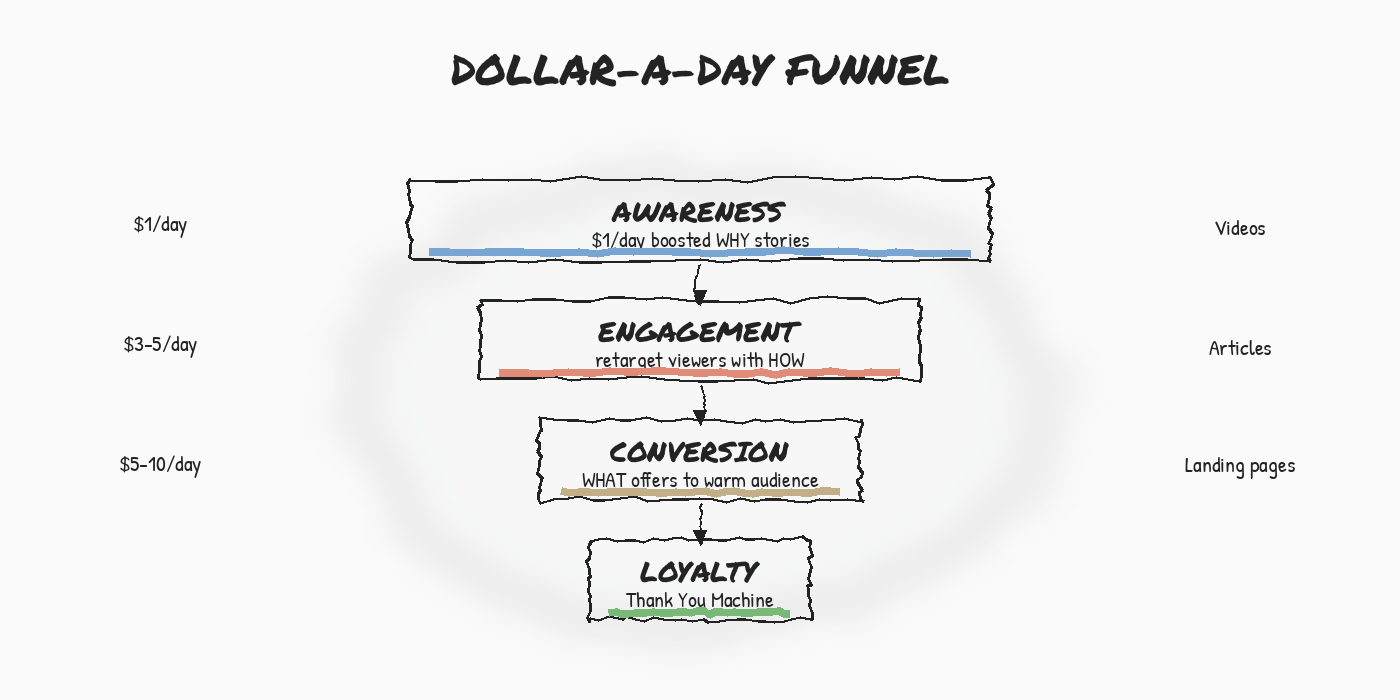
Dollar a Day is the amplification layer of the Lighthouse Strategy. The Content Factory produces the raw material. The 3×3 grid tells you which funnel stage each piece targets. And Digital Plumbing ensures the conversions are tracked so you know which dollar produced a result.
Originally published .
Dennis Yu
Dennis Yu is the CEO of Local Service Spotlight, a platform that amplifies the reputations of contractors and local service businesses using the Content Factory process. He is a former search engine engineer who has spent a billion dollars on Google and Facebook ads for Nike, Quiznos, Ashley Furniture, Red Bull, State Farm, and other brands.
Dennis has achieved 25% of his goal of creating a million digital marketing jobs by partnering with universities, professional organizations, and agencies. Through Local Service Spotlight, he teaches the Dollar a Day strategy and Content Factory training to help local service businesses enhance their existing local reputation and make the phone ring.
Dennis coaches young adult agency owners serving plumbers, AC technicians, landscapers, roofers, electricians, and believes there should be a standard in measuring local marketing efforts, much like doctors and plumbers must be certified. He has appeared on 353 podcasts with 619 credited episodes — see the full list of his podcast appearances.