
 by
by
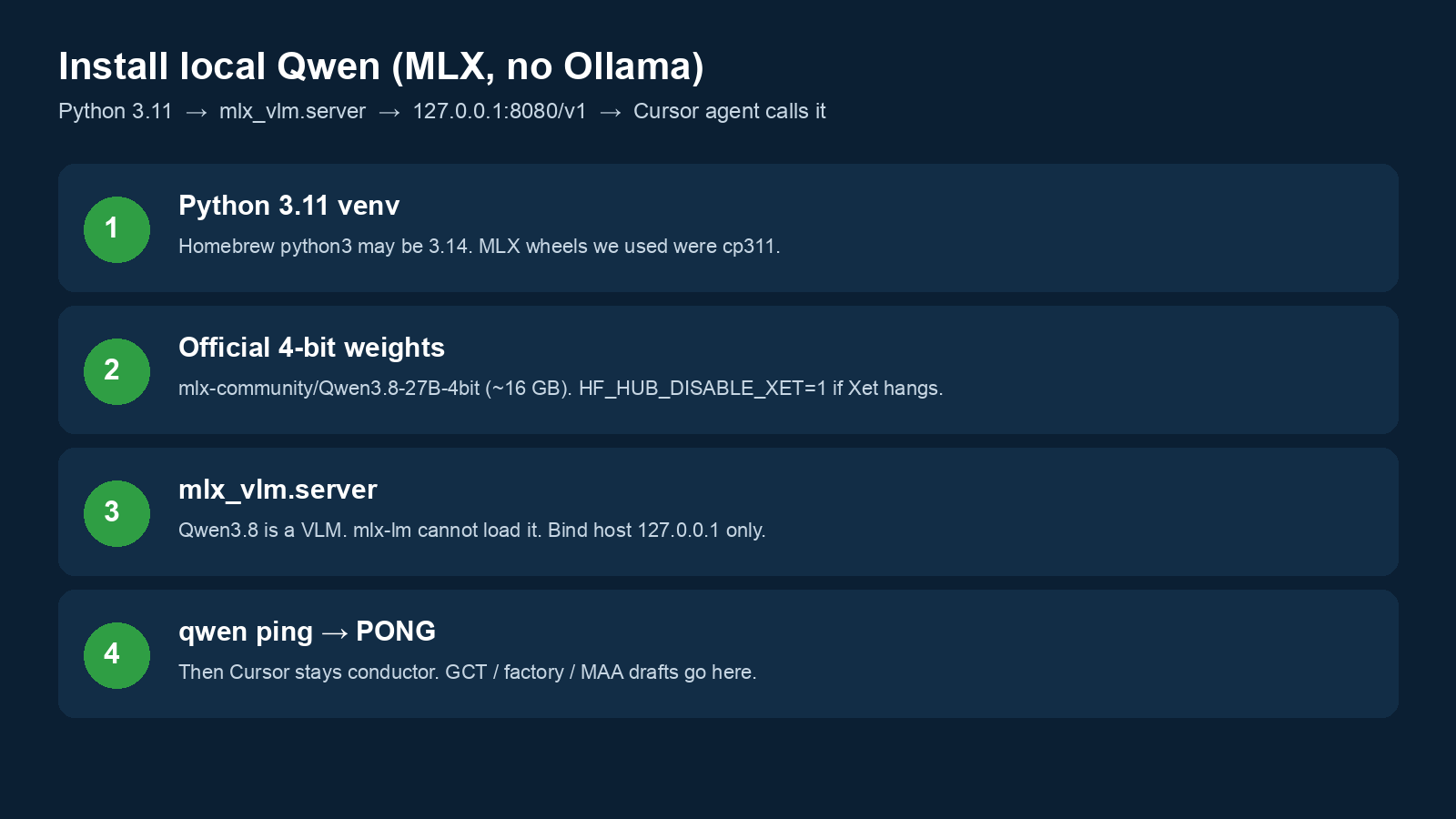
A local Qwen worker can help draft text on your Mac. This guide shows how to set it up and test one small reply. Start by checking your Mac and the model, then have the lead worker check the draft.
This guide is part of Cursor and Local Qwen Are Not the Same Qwen. Next, explore How I Use Local Qwen (Cursor Stays the Conductor), or New Agents Start Here.
Where this task fits in the Content Factory
This task supports work across the Content Factory (our four-stage process for using real content). Its inputs and next handoff determine which stage uses it.
1. ProduceCapture real work
2. ProcessTurn sources into useful assets
3. PostPublish and connect approved assets
4. PromoteShare proven work and measure results
Start, finish, and next step
- Start when
- An authorized Mac user wants the local MLX Qwen worker available for bounded draft work.
- Have ready
- Compatible local hardware and storage
- The documented model and setup files
- Permission for the download
- A terminal-capable conductor
- Follow the steps
- Install the documented local stack
- Start the loopback server
- Run its PONG test
- Configure the conductor to call the worker
- Keep send, publish and spend decisions with the conductor
Use the detailed instructions in this article for each step.
- Finish with
- A local worker whose endpoint returns the verified test response and can receive a bounded draft task.
- Measure the result
- The model and endpoint are identified
- PONG is observed from the local endpoint
- The service stays on loopback
- Cursor’s cloud model picker is not mistaken for this local worker
- Hand off next
- The conductor submits a staged drafting task and checks the result before any outside action.
Reference material for the inputs
Open this article’s tasks in the Task Library (our directory of tasks and recipes; see current Task Library). The library connects the current recipe, its smaller tasks, and the records of work performed.
Close the learning loop. Write a meta article: the record of this execution with the starting state, recipe version, result, checks, failures, and next owner. Link it back to this recipe and register the run under the same Task Library task. Reuse one execution ID for revisions and retries. A partial or failed run stays labeled that way. Public release follows the recorded publication authority; writing the run record is part of doing the task. Writing and revising that record belong to the original execution; they do not start another meta-article task. Use the findings to propose and verify a recipe improvement. See how recipes and execution records work together.
Local Qwen on Apple Silicon is an MLX server on loopback, not Ollama, not LM Studio, and not the Qwen inside Cursor’s model picker. Use Python 3.11, the official 4-bit MLX quant, and mlx_vlm.server on port 8080. Cursor stays your conductor; this install is the worker that drafts GCT (Goals, Content, Targeting: the goal, material, and audience), Content Factory, and weekly MAA (Metrics, Analysis, Action: results, meaning, and next steps) without burning Cursor tokens. Routing lives at Cursor and local Qwen. How Dennis sits at the desk: How I Use Local Qwen.
Who is this for?
Anyone who wants a Qwen on the Mac that a Cursor agent (or any other local agent) can call at http://127.0.0.1:8080/v1. If you came here from a Cursor chat that mixed up “Qwen in settings” with “Qwen on this laptop,” read the routing page first: Cursor and local Qwen.
This is not a Kimi Code install. Kimi is Moonshot’s hosted CLI. This is not a Claude skill-pack zip. Skill packs still start at New agents start here and localservicespotlight.com/install/.
What do you need?
- Apple Silicon Mac. We verified on a MacBook Pro with 128 GB unified memory on 25 August 2026. 27B 4-bit is about 16 GB of weights plus KV cache — 32 GB unified memory is a practical floor; 64 GB+ is comfortable.
- Python 3.11 (Homebrew’s default python3 may be 3.14; MLX wheels we used were cp311). We used
~/.local/bin/python3.11. - Hugging Face access to
mlx-community/Qwen3.8-27B-4bit(~16 GB download). - No Ollama. No LM Studio. Those are other stacks.
What exact stack did we ship?
| Piece | Value (25 Aug 2026) |
|---|---|
| Weights | Official mlx-community/Qwen3.8-27B-4bit (not a homemade 6-bit; no stock uniform 6-bit in that repo at ship time) |
| Why mlx-vlm | Qwen3.8 is a vision-language model. mlx-lm cannot load it. Server is python -m mlx_vlm.server. |
| Packages | mlx 0.32.1, mlx-lm 0.31.3, mlx-vlm 0.6.16, openai 3.3.1, langgraph 1.2.11 |
| Bind | --host 127.0.0.1 --port 8080 only. Do not publish this process to the internet. It has no real auth. |
| API | OpenAI-compatible /v1/chat/completions, model id as listed by GET /v1/models, Bearer token local |
| Download gotcha | Hugging Face Xet hung on this machine. Working env: HF_HUB_DISABLE_XET=1. Unauthenticated Hub was slow (~1 hour). |
How do you install it?
Team copy (private repo): ~/Projects/agent-runtime/local-qwen-agents/ — python3.11 -m venv .venv, then install from that folder’s requirements.txt.
Minimal server start once the quant is in the Hugging Face cache:
HF_HUB_DISABLE_XET=1 \
.venv/bin/python -m mlx_vlm.server \
  --model mlx-community/Qwen3.8-27B-4bit \
  --host 127.0.0.1 \
  --port 8080
Wrapper we use on PATH: qwen up · qwen down · qwen status · qwen ping · qwen gct · qwen factory · qwen maa.
First load into unified memory is slow. qwen ping should return PONG. A sample GCT screen on this Mac returned DISCOVERY_REQUIRED in about 63 seconds at roughly 17 tokens per second decode. Treat those as one machine’s receipts, not a promise.
Confirm the server, not the Cursor picker:
curl -sS http://127.0.0.1:8080/v1/models
You should see mlx-community/Qwen3.8-27B-4bit. If that works and Cursor still “cannot see Qwen,” you are looking at the wrong lane. Read Cursor and local Qwen.
Every completion on this Mac is logged without prompt text. The public meter — tokens, usable vs rejected drafts, Anthropic list-price equivalent — is on the routing page and on How I Use Local Qwen. Same method as the Claude usage log: show the numbers, do not invent an invoice.
How do you point Cursor at it?
You do not paste http://127.0.0.1:8080 into Cursor → Models → Override OpenAI Base URL. Cursor’s cloud cannot call your loopback. You add a Cursor rule that says: I am the conductor; for GCT / factory / MAA first drafts, run qwen (or POST to port 8080) without waiting to be asked.
Save this as an always-apply Cursor rule (team file: local-qwen-agents/cursor-rule.mdc):
---
description: Local MLX Qwen is a cheap worker. Delegate GCT/factory/MAA first drafts without being asked. Not Cursor's chat model. Not Kimi.
alwaysApply: true
---

# Local Qwen worker — auto-delegate

Public map: https://blitzmetrics.com/cursor-and-local-qwen/
Install: https://blitzmetrics.com/install-local-qwen/

Local Qwen is a **worker**. You (Cursor Grok / Claude / Composer) are the **conductor**.

Cursor Auto and the model picker do **not** call localhost. Do not paste 127.0.0.1 into Override OpenAI Base URL. Cloud Qwen in Cursor settings is a different vendor. Kimi Code (`kimi`) is a different hosted CLI.

If the task is GCT, Content Factory (Produce → Process → Post → Promote) first drafts, weekly MAA first drafts, or bulk rewrites after you set the offer: run local Qwen without waiting to be asked. Stage only. Never send, publish, or spend from that worker. If ping fails after up, say so and stay on the Cursor model.
Any other agent (Claude Code, Codex, a Python script, LangGraph) uses the same OpenAI-compatible URL. That is the point of staying on /v1.
What about 6-bit, 8-bit, or a smaller Qwen?
We shipped 4-bit because it is the official mlx-community file and it fits. An 8-bit sibling exists if you later prefer quality over RAM. A smaller Qwen is a different worker: keep the same port convention or you will train agents to guess. Change the model id in one config, not in tribal chat.
FAQ
Why not Ollama?
Dennis asked for a clean MLX path. Ollama is fine for other desks. This page documents the stack we actually ran and verified. Guides that say “paste localhost into Cursor’s Override OpenAI Base URL” are describing a different architecture. Cursor’s cloud cannot open 127.0.0.1. Keep Cursor as conductor; let the agent call this server. Map: Cursor and local Qwen.
Can I use this as my only Cursor model?
Not as the picker model, for the loopback reason on the routing page. You can use it as the only writer of first drafts.
Does local Qwen send email or publish WordPress?
No. Stage only. Conductor keeps Gmail drafts, Basecamp, and Application Passwords.
Where is the agency work defined?
Content Factory (Produce → Process → Post → Promote), GCT, MAA, model judgment.
Should I tunnel port 8080 so Cursor’s picker can see it?
No. The MLX server has no real auth. A tunnel also replaces the conductor. Keep loopback. Let the agent call it.
Parent map: Cursor and local Qwen. Desk playbook: How I Use Local Qwen. Building in public: Building in Public. Everything else: canonical directory.
Originally published .
Dennis Yu
Dennis Yu is the CEO of Local Service Spotlight, a platform that amplifies the reputations of contractors and local service businesses using the Content Factory process. He is a former search engine engineer who has spent a billion dollars on Google and Facebook ads for Nike, Quiznos, Ashley Furniture, Red Bull, State Farm, and other brands.
Dennis has achieved 25% of his goal of creating a million digital marketing jobs by partnering with universities, professional organizations, and agencies. Through Local Service Spotlight, he teaches the Dollar a Day strategy and Content Factory training to help local service businesses enhance their existing local reputation and make the phone ring.
Dennis coaches young adult agency owners serving plumbers, AC technicians, landscapers, roofers, electricians, and believes there should be a standard in measuring local marketing efforts, much like doctors and plumbers must be certified. He has appeared on 353 podcasts with 619 credited episodes — see the full list of his podcast appearances.