
 by
by
Build an agency site that shows whom you help and what you do. This guide gives your team a plan for the founder, services, client proof, and next step. Start with the facts about the agency and the trade it serves.
This guide is part of The Vertical Spotlight Playbook. Next, explore How to QA a Personal Brand Website, or The Client Tracker: Money, Routing, and Accountability.
Where this task fits in the Content Factory
This task supports work across the Content Factory (our four-stage process for using real content). Its inputs and next handoff determine which stage uses it. This playbook coordinates several smaller tasks. Use each linked recipe for its detailed steps.
1. ProduceCapture real work
2. ProcessTurn sources into useful assets
3. PostPublish and connect approved assets
4. PromoteShare proven work and measure results
Start, finish, and next step
- Start when
- A named operator needs an agency website for a specific market or trade.
- Have ready
- Verified founder story and real photos
- Specific market, offer and carve-outs
- Approved service methods and contact route
- Authorized site and hosting access
- Follow the steps
- Confirm the market and agency positioning
- Build the nine required site components
- Connect each service to its maintained method
- Apply the relevant trade-specific details
- Check the live site and its contact path
Use the detailed instructions in this article for each step.
- Finish with
- An agency site whose founder, services, proof and contact path match its actual market.
- Measure the result
- The nine components are present where applicable
- Photos and credentials are real
- Service and method links point to the correct destinations
- The public contact path and layout are checked
- Hand off next
- Use the site’s call or audit path for intake and keep later work connected to its canonical methods.
Reference material for the inputs
- #GCT: Business Strategy (the goal, source material, and audience)
- Digital Plumbing: The Technical Foundation Every Business Needs Before Marketing Can Work
- The SEO Tree Framework: How Every Piece of Content Should Connect (how content links to its main topic)
Open this article’s tasks in the Task Library (our directory of tasks and recipes; see current Task Library). The library connects the current recipe, its smaller tasks, and the records of work performed.
Close the learning loop. Write a meta article: the record of this execution with the starting state, recipe version, result, checks, failures, and next owner. Link it back to this recipe and register the run under the same Task Library task. Reuse one execution ID for revisions and retries. A partial or failed run stays labeled that way. Public release follows the recorded publication authority; writing the run record is part of doing the task. Writing and revising that record belong to the original execution; they do not start another meta-article task. Use the findings to propose and verify a recipe improvement. See how recipes and execution records work together.
This is the definitive playbook for spinning up an agency site on our network — the master teaching, the way the Vertical Spotlight Playbook is the master for spotlight sites. An agency is one component of what we do in a vertical. This page defines the anatomy, the build process, and the rules that keep every agency in the network coherent. Reference implementation: ensitefulmarketing.com, reported as built end to end by an agent in one session in the original July 16, 2026 article. That is the worked example’s history; use current source, access and release receipts for a new build.
4
front doors per vertical — spotlight, agency, personal brand, client proof
9
components every agency site carries, each mapped to its master
~$11 + 1 session
domain and agent time reported in the July 2026 reference build; not a current full-project quote
See Where the Agency Sits in a Vertical
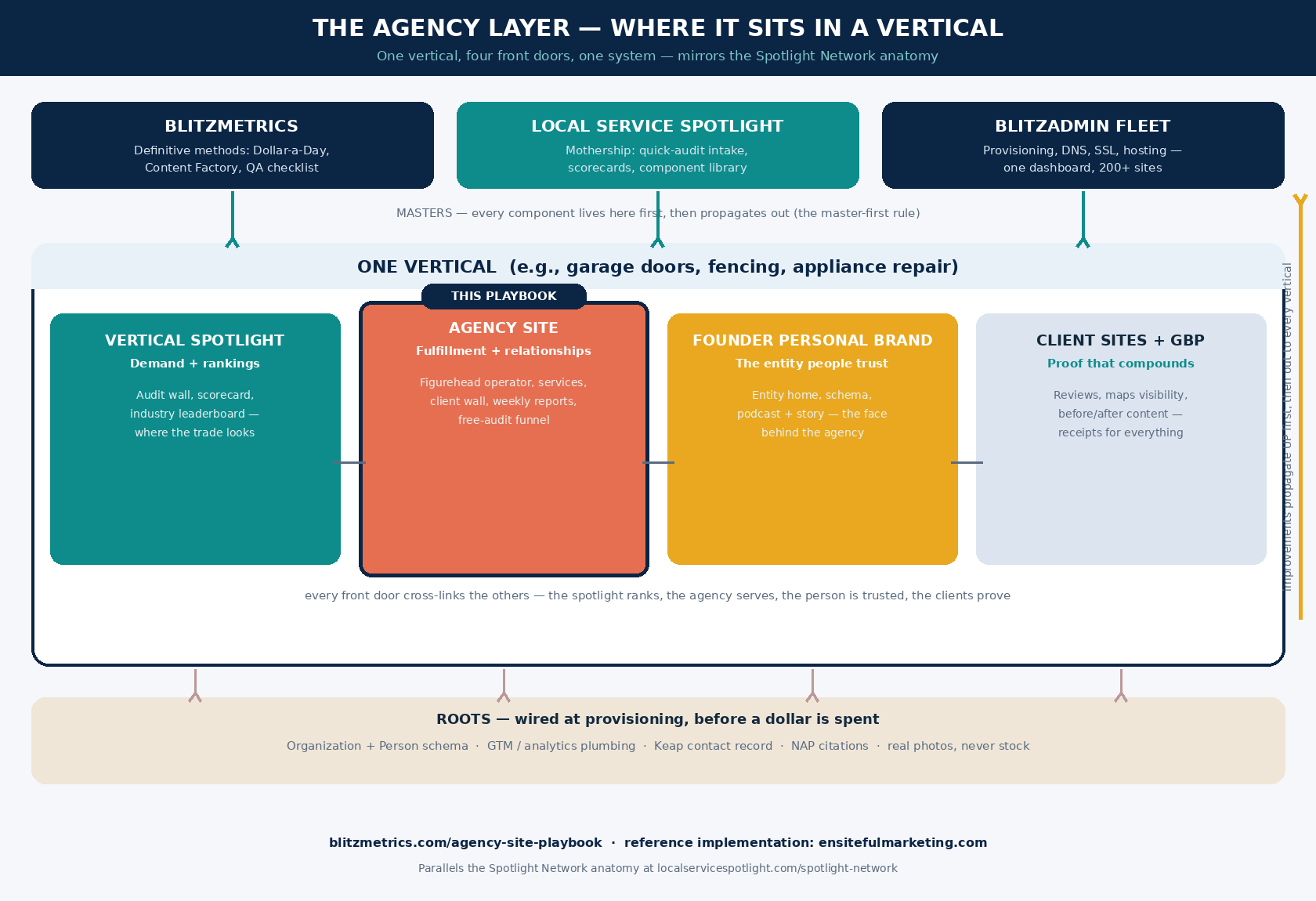
Our network already runs one proven pattern: the Spotlight Network — one mothership, a shared component library, and many industry-skinned vertical sites. The agency layer follows the same anatomy. Each vertical we operate has up to four front doors, and they do different jobs: the vertical spotlight site creates demand and ranks the industry, the agency site is where fulfillment and client relationships live, the founder’s personal brand site is the entity people actually trust, and the client sites and Business Profiles are the compounding proof. The spotlight ranks, the agency serves, the person is trusted, the clients prove.
The propagation rule is identical to the spotlight fleet: the master version of every component lives upstream — on BlitzMetrics for methods, on Local Service Spotlight for tools and intake, on BlitzAdmin for infrastructure. When an agency build improves something, the improvement travels up to the master first, then out to every vertical. Never sideways. This article is itself that rule in action: the first agency build taught us the process, and this page is where the process now lives.
Build the Anatomy: Nine Components of an Agency Site
Every agency site in the network carries these, in the founder’s voice, with real photos and zero stock imagery:
| # | Component | What it does | Master |
|---|---|---|---|
| 1 | Figurehead hero | The founder’s face, the phone number top-right, and one promise in plain English. People hire people. | personal brand website |
| 2 | Founder story About page | The operator credentials that earn trust, with Person schema and the mentorship lineage. | this playbook |
| 3 | Services mapped to methods | Every service links its definitive article — nothing proprietary, the edge is execution discipline. | Dollar-a-Day, Content Factory |
| 4 | Industries grid with carve-outs | Exactly which trades this agency owns — and which it deliberately leaves out. One agency per lane. | this playbook |
| 5 | Client wall from the live tracker | Real clients from the operational tracker — churned accounts never ship. Agents read ops state, not marketing copy. | ClientTracker |
| 6 | Results + weekly-report anatomy | Show the actual reporting format: bottom line, what worked, what needs a decision, what we did. | this playbook |
| 7 | Free-audit funnel | Routes to the shared LSS intake — one set of plumbing for the whole network, never rebuilt per site. | get-my-audit |
| 8 | Entity roots | Organization + Person schema, GTM plumbing, Keap contact, social links — wired before a dollar is spent. | digital plumbing |
| 9 | Launch articles | Three posts in the founder’s voice — origin story, reporting philosophy, methodology — cross-linked to the masters. | posting guidelines |
Run the Six-Step Spin-Up
1. Buy the domain with discipline. Verify the exact spelling against the system of record — the Basecamp thread and tracker, not a voice memo — before money moves. Use the already approved current cart: exact domain, registration term, initial and renewal prices, hosting needs, and relevant security or privacy choices. Decline unwanted add-ons, but do not disable needed protection by default. The reference build used a one-year purchase at roughly eleven dollars; that historical price is not a budget for every domain or the full project. Verify the final receipt within the existing purchase authority.
2. Provision on the fleet. BlitzAdmin → WordPress → New Site: Local Service Spotlight dashboard, vanilla theme, standard Keap contact, operations email. Capture the exact nameservers and site destination returned by the supported provisioner. The reference build returned four AWS nameservers; another approved setup may differ. Keep the site record and actual response as evidence.
3. Apply the returned DNS records. At the registrar, apply the exact approved nameservers from the site’s provisioning response, preserving the required existing DNS services (GoDaddy walkthrough). Confirm the authoritative DNS response, the intended hosting receiver, and a valid HTTPS certificate for the actual domain. Automatic certificate issuance depends on that setup; a saved nameserver change or provisioning message is not proof that DNS, TLS and the public site are ready. Record the observed results and any unresolved dependency without promising propagation time.
4. Build from research, not templates. Ingest the client tracker, the founder’s existing sites and story, and the vertical’s prior coverage before writing a word. The About page is mainly about the founder. The client wall comes from the live tracker. Media is real photos and the founder’s actual podcast or video appearances.
5. QA like an auditor. Reconcile the published URL inventory, then check the ordinary canonical URLs as anonymous visitors against the website QA checklist: working in-scope links, truthful valid schema, appropriate missing-page responses, usable page weight, a clear contact route, relevant available video and social links. Record inspected routes, test conditions and justified exceptions. A cache-busted diagnostic or an internal payload-size target does not replace the normal-page check. Use supported cache tools when needed, then test the ordinary routes again. Then run a forbidden-string sweep for every brand and name that must not appear — carve-outs are enforced with grep, not memory.
6. Document the run. Write the meta article (a record of one task run) with receipts. Public release is separate. Post the authorized summary to the verified existing client thread through its supported rail, and read it back there. Fold a proven method improvement back into this playbook. The system improves itself or it doesn’t improve.
Respect the Gotchas (Historical Reference-Build Lessons)
| Symptom | Cause | Fix |
|---|---|---|
| Every pretty URL serves the homepage (identical byte counts) | REST permalink update saves the option but never flushes rewrite rules | POST the options-permalink admin form with its nonce — that flushes properly |
| Design renders in a squeezed 600px column | Block theme’s is-layout-constrained caps content children | Override the constrained child selector with max-width:none in the page CSS |
| Connection refused mid-build | Repeated wp-login POSTs trip the fleet’s temporary IP ban | Log in once per session and persist the cookie jar to disk |
| Cart total 5× the expected price | Registrar defaults new domains to five-year terms | Check the approved term, renewal price and each add-on in the actual cart before checkout |
| Checkout stalls at payment | Card security codes are a human-only step — agents never type or store them | Stage the entire cart, hand the human exactly one action, verify the receipt |
Keep the Network Coherent
Four rules, non-negotiable. The founder is the brand. An agency site carries its figurehead’s face and voice — clients hire their operator, and our network stays the engine room. One agency per lane. Each agency owns a defined trade set, declared on its Industries page; adjacent trades get their own agency with their own figurehead, and carve-outs are stated on the site and enforced in QA. One set of plumbing. Every agency’s audit funnel routes to the shared LSS intake; we never rebuild forms per site. Every build ships receipts. Write a meta article per run, deliver the client update within the recorded authority and verify it in the intended thread, then fold proven improvements back here — master first, then out.
Proof ledger: Historical reference, published July 16, 2026: the original build account reports all nine components, zero broken links and a clean forbidden-string sweep. Retain those receipts as the evidence for that run; they are not a fresh fleet-wide result. For present registry health, read the owning registry and the configured scan’s scope, trigger, timezone and latest run receipt. A weekly schedule label alone does not establish that the registry was checked. Update this playbook when a reviewed build finding changes the method.
THE DELIVERABLE
See the playbook running in the wild
The July 2026 account records nine components, one figurehead and one session. Open the reference implementation and worked example below for that build’s evidence; verify the normal live site anew before reporting its current state.
Reference Build →The Worked Example →Originally published .
Dennis Yu
Dennis Yu is the CEO of Local Service Spotlight, a platform that amplifies the reputations of contractors and local service businesses using the Content Factory process. He is a former search engine engineer who has spent a billion dollars on Google and Facebook ads for Nike, Quiznos, Ashley Furniture, Red Bull, State Farm, and other brands.
Dennis has achieved 25% of his goal of creating a million digital marketing jobs by partnering with universities, professional organizations, and agencies. Through Local Service Spotlight, he teaches the Dollar a Day strategy and Content Factory training to help local service businesses enhance their existing local reputation and make the phone ring.
Dennis coaches young adult agency owners serving plumbers, AC technicians, landscapers, roofers, electricians, and believes there should be a standard in measuring local marketing efforts, much like doctors and plumbers must be certified. He has appeared on 353 podcasts with 619 credited episodes — see the full list of his podcast appearances.