
 by
by
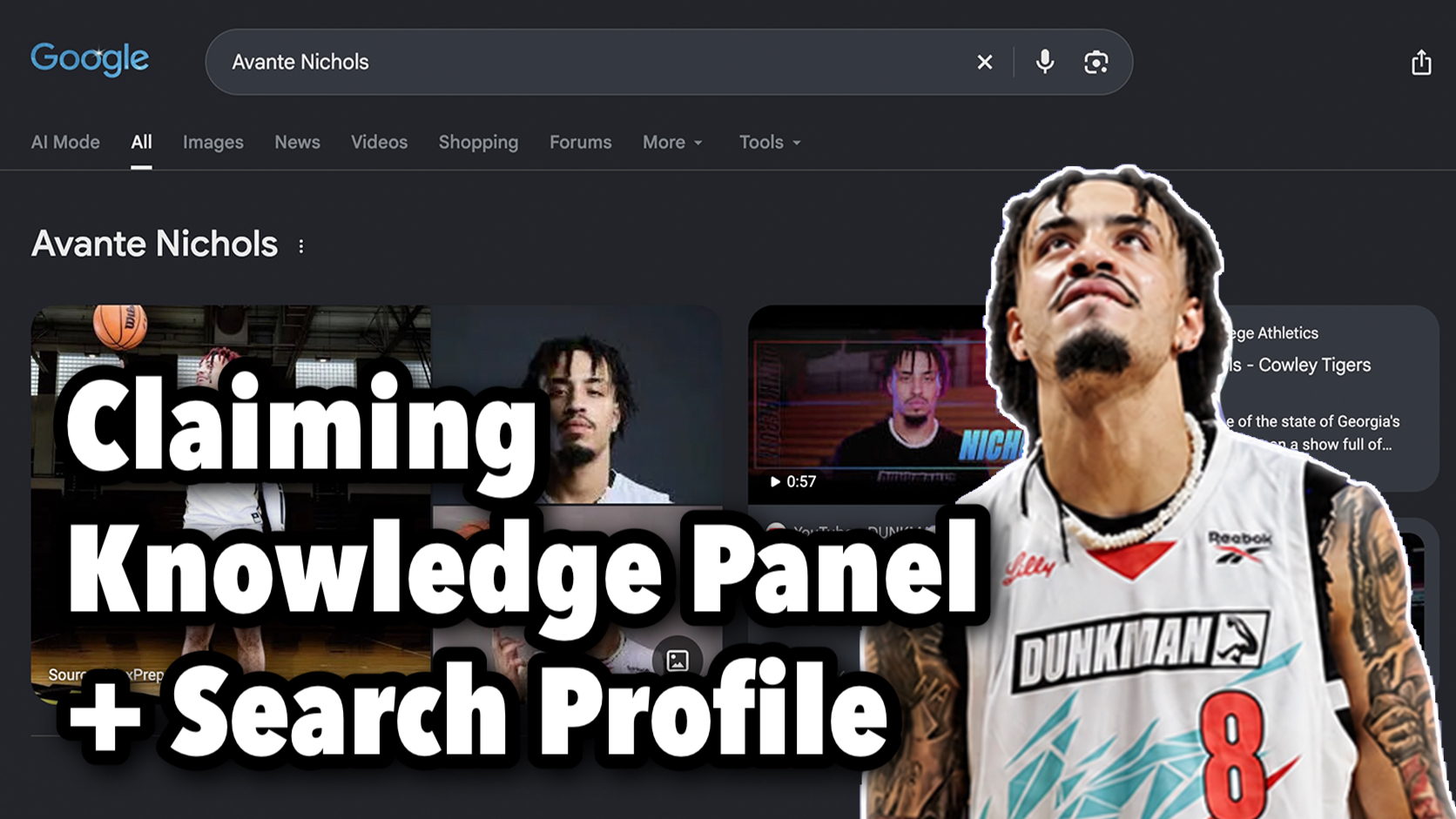
Before DunkMan, almost no professional dunkers had a Google Knowledge Panel. Now they’re showing up across the league, and Avante Nichols is one of them. Avante, who goes by “The Joker,” is an Atlanta-based pro dunker and one of the 24 athletes who competed in season one of DunkMan, the world’s first professional dunking league, started by Shaquille O’Neal. His Knowledge Panel was already there. It just wasn’t claimed.
So right after we recorded his episode of the Dunk Talk Podcast, I (Dylan Haugen) got on a call with Avante Nichols and walked him through claiming his Google Knowledge Panel and setting up his Google Search Profile, live, start to finish. The video above is that call. This article breaks down what we did, why each step matters, and what I’d tell any athlete who wants to do the same thing.
In This Article
Who Avante Nichols Is
I’m not writing about Avante from the outside. We competed in the same league this year. I’m a fellow DunkMan athlete, the youngest pro in the league, and I finished in the top eight. At Group Stage A, Joel Henry even used both of us in one of his dunks: a Tetris over me while I sat on Avante’s shoulders. That’s not a sentence I expected to write on BlitzMetrics, but it’s true.
Avante Nichols has an even better story than mine. On the podcast, he walked me through moving from Georgia to play JUCO basketball in Kansas, the 360 Eastbay off the side of the glass that went viral and put him on the radar, and getting a call from 2K to do dunk animations. He’s still playing college basketball, and he was honest about feeling stuck between chasing basketball and going all in on dunking.
In DunkMan, Avante Nichols competed in Group B. He landed a Toe Touch on his first try in front of Jonathan Clark, one of the dunkers he grew up watching, and was sitting in first going into the group finals. Two days before, his passer disappeared, so his high school point guard stepped in with about an hour and a half of practice. He just missed both of his finals dunks, including a free throw line dunk he’d kept secret the whole time, and he still finished 11th overall in year one. Since then, he won Bulls Fest in Chicago by jumping over Benny the Bull.
That’s a real résumé. The problem is that Google doesn’t read podcasts or watch dunk contests the way a fan does. It needs that information connected to one clear entity, and it needs Avante to confirm he’s the person behind it.
Why DunkMan Is Putting Dunkers on Google’s Radar
When we searched Avante’s name at the start of the call, the results already showed some of his basketball history, and his athlete page on the DunkMan website was doing a lot of the work. It has his photo, his bio, his signature dunks, and his accomplishments all in one place. I’m pretty sure that page is what pulled his panel together.
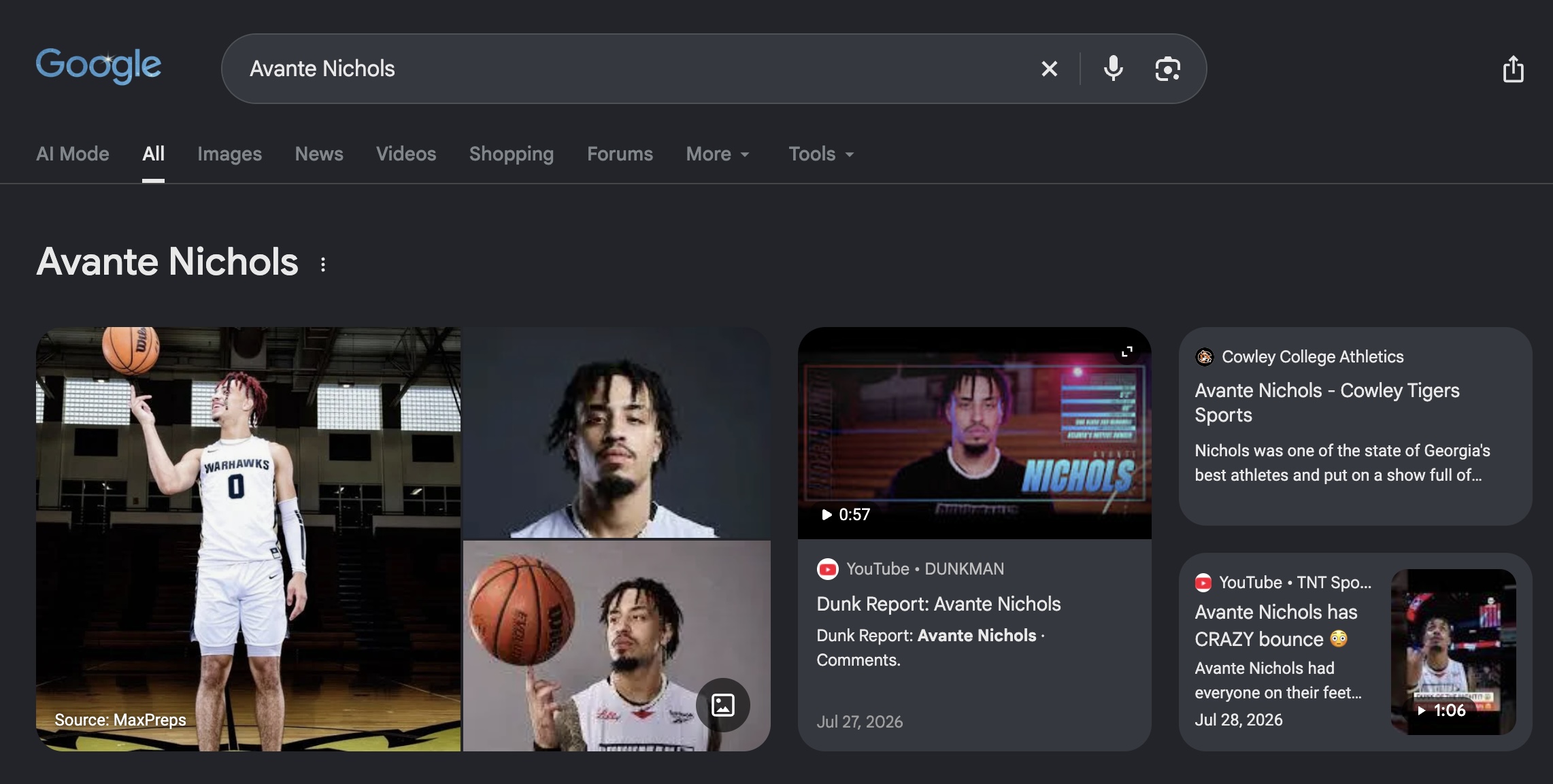
Look at what Google pulls together when you search his name. There’s DunkMan’s Dunk Report on him, a TNT Sports clip of him in the league, and his Cowley College Athletics page from his JUCO days in Kansas. Every one of those is a separate source pointing at the same person, which is exactly how an entity gets stronger.
That matters because of how Google decides who you are. Google indexes entities, which is basically just a noun: a person, place, or thing. Avante is an entity. DunkMan is an entity. Atlanta is an entity. Google stores all of them in its Knowledge Graph, and as more people post about you, your social media grows, and trustworthy sources connect your name to the same facts, your entity gets stronger.
DunkMan is backed by Shaq, TNT Sports, and Authentic Brands. When a source with that kind of authority publishes a page with your name, your photo, and your bio, Google has something solid to anchor on. Them mentioning you by name is pretty authoritative in and of itself. That’s why I’m seeing panels show up across the league that weren’t there before the season, and it’s the same footprint we’ve been building on purpose with Dunker Spotlight, a network of athlete sites designed so each dunker owns his name.
Reading Avante Nichols’ Confidence Score
We started in the BlitzMetrics Knowledge Graph Explorer. BlitzMetrics is one of the sites we manage at Local Service Spotlight, the company I co-founded with Dennis Yu, and the Explorer pulls straight from Google’s Knowledge Graph. You type in a name, and it shows you how confident Google is that this person exists as an entity. We call that number the confidence score.
Here’s how I explained the scale to Avante:
- Around 24 is where a Knowledge Panel starts to appear, usually as a partial panel.
- Over 100, it’s starting to get pretty solid.
- Anything over 200 is strong.
Avante didn’t need any of the early groundwork. When we clicked See on Google, he already had a full Knowledge Panel. It just wasn’t claimed or optimized. A claimed, optimized panel is what you see when you search a celebrity’s name: your pictures, your latest posts, your actual social profiles connected, and People Also Ask questions about you. Anybody can get one. You just need enough out there about you, and Avante already had it.
So the job was simple. Claim the panel, then add his social profiles through suggested edits once he’s verified. Google even asks for some of that during the claim process itself.
How Avante Nichols Claimed His Google Knowledge Panel
I paused my screen share and sent Avante Nichols the link to his panel, because the person whose panel it is has to be the one who claims it. From there we went through seven steps.
1. Start the claim
Next to your name at the top of the panel, click the three dots, then Claim This Knowledge Panel, then either of the big blue Get Verified buttons.
2. Sign in with the Gmail you’ll keep
The top of the page shows which Google account you’re signed into. Check it carefully, because your entity on Google gets permanently linked to that account. There’s probably a way to change it later, but it isn’t easy. Use the Gmail you actually check and plan to keep for years.
3. Select “I am this person”
Google first asks you to confirm the name of the person on the panel, then asks how you’re connected to it. If it’s your panel, the answer is “I am this person.”
4. Write the claim statement
This is the box that says “Tell us why you’re claiming this Knowledge Panel.” It gets its own section below, because it’s the step that decides most claims.
5. Upload a selfie holding your ID
Hold your ID up next to your face, the way the example picture shows. The letters and words need to face the right way, and the whole thing has to be legible. A blurry photo is one of the easiest ways to get rejected.
6. Add at least five web profiles
For each profile, upload a logged-in screenshot and paste the matching URL. Then keep pressing Add Web Profile until you’ve added as many as you can. Avante had his screenshots ready by the time we got here, which is the whole point of preparing before a claim call.
7. Agree to the terms and submit
The last screen is basically just agreeing to the terms. Hit submit, and Google usually emails back within 24 to 48 hours.
Writing Avante’s Claim Statement With AI
The claim statement has two jobs. It gives Google some background on who you are and shows that you’re authoritative in your space, and it answers the actual question, which is why you’re claiming the panel. So it needs real credentials and a real reason.
I drafted the statement for Avante Nichols live with AI, using the statement I wrote for my own panel as a template. I told the AI that DunkMan is the world’s first professional dunking league, started by Shaq, that Avante is one of its 24 athletes and competed in season one, that he’s known as a professional dunker who has done other events too, that he played college basketball, and that he has a presence on a bunch of social platforms he wants connected to his panel. Then I had it research him for more detail and build a statement designed to get approved.
Something I noticed while doing it: when I wrote mine, it wasn’t even as strong as Avante’s is now, because he has DunkMan behind him. A named league with Shaq attached is the kind of credential a reviewer can verify in a few seconds.
The finished statement was too long to come through in an Instagram message, so I dropped it in a Google Doc and had Avante copy it into the form. If you want to write your own, our step-by-step claim walkthrough has the exact claim statement structure we use, real screenshots of every screen, and the most common reasons claims get rejected, like generic statements, blurry IDs, and homepage screenshots instead of logged-in views.
What counts as a logged-in screenshot
While the AI worked on the statement, Avante grabbed his screenshots. They don’t need to be fancy. You can take them on mobile or desktop. All Google needs to see is that you’re logged in and have admin-level control over the account, so anything showing buttons like Edit Profile or Share Profile is good enough. I sent Avante my own screenshots as examples so he knew what to copy.
Put Your Real Name in Your Display Name
While we waited on screenshots, I brought up something that isn’t required for the claim but matters a lot for Google and for people actually finding you. The name on each of your social accounts should include your real name.
That doesn’t mean dropping your nickname. Look at how other pros handle it. Jordan Kilganon pairs his name with something like “professional dunker,” and Joel Henry pairs his with “the Royal Guard.” Real name first, identity second. For Avante, that means “Avante Nichols” sitting right next to “The Joker.”
Because DunkMan mentions him by name, every profile that matches that name exactly helps Google connect the dots between his league page, his socials, and his panel. He was already changing it before I finished explaining.
Setting Up Avante Nichols’ Google Search Profile
Once the claim was in, we moved on to his Google Search Profile, which takes way less time. Search Profiles are newer than Knowledge Panels, and the two go hand in hand. Each one helps the other.
Here’s the process:
- Go to profile.google.com/claim.
- Sign in with the same Gmail account you want the profile linked to.
- Sign in to any social account that has 10,000 or more followers. That’s how Google verifies you.
- Add every other profile you have, not just the one you verified with.
That last step is the one people skip. Google shows a total follower count on your Search Profile. If only your Instagram is connected, someone who clicks on it sees one number, when your real audience across every platform is a lot bigger. Connect all of them so the total reflects your full reach. Avante’s now shows 16.3K total followers across Instagram, YouTube, and X, instead of just his Instagram count. You can have AI draft your About section too.
I couldn’t walk through that screen on my end, so Avante finished it himself after the call, and you can see the result on Avante Nichols’ Google Search Profile. Notice the name at the top: “Avante Nichols (aka. The Joker).” That’s the real-name-plus-nickname setup from the section above, now showing on Google itself.
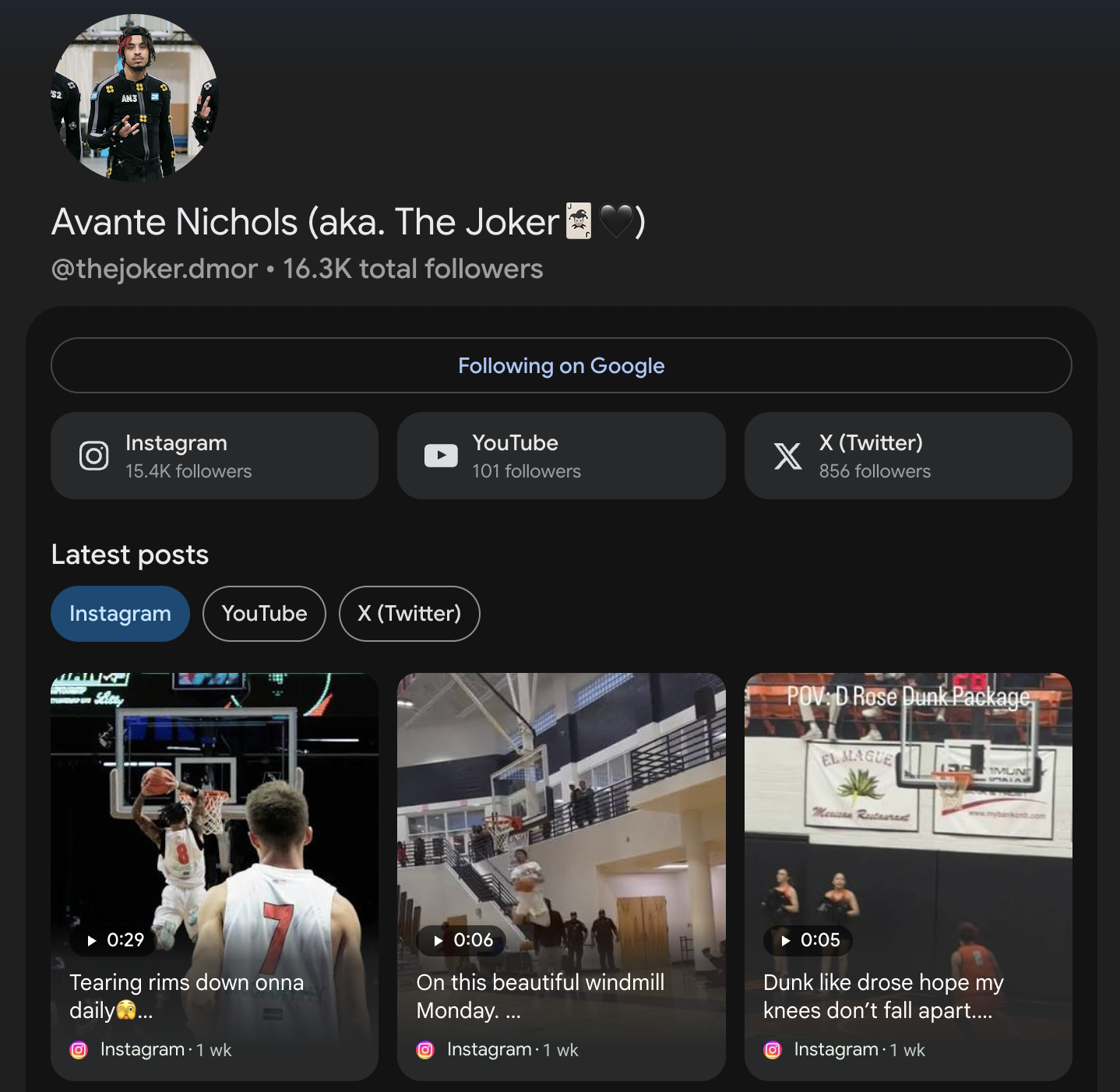
It isn’t hard, and between the Knowledge Panel and the Search Profile, an athlete can own a lot more of what shows up when someone searches their name.
What Happens After Google Approves the Claim
Submitting is not the finish line. Once Google approves a claim, a verified owner can suggest edits to the panel directly from Search, and that’s where we’ll connect the rest of Avante Nichols’ social profiles, fix anything that’s off, and make sure the photo and description match how he wants to be known.
How fast those edits stick depends on the confidence score. A strong entity with a lot of consistent sources behind it gets its changes accepted faster than a weak one. That’s why the claim, the Search Profile, the matching display names, and the podcast content all work together. Each one adds another consistent signal pointing at the same person.
If the claim comes back rejected, it’s almost always fixable. Tighten the claim statement with more verifiable facts, retake a clearer ID photo, swap in true logged-in screenshots, and submit again.
Why I Also Had Avante Nichols on the Dunk Talk Podcast
Claiming a panel gives you control of it. What makes it stronger over time is more trustworthy content connecting your name to the same facts. That’s why, right before the claim call, Avante Nichols and I recorded episode 77 of Dunk Talk, “First Dunk at 12, Now He’s in Shaq’s DunkMan League,” where we went through his whole dunk journey.
That one conversation becomes a lot of content: the long-form episode on the Dunk Talk YouTube channel, shorter clips, a podcast article on dunktalks.com from the show’s perspective, and a personal reflection on my own site. Each one mentions Avante, links back to him, and puts more accurate information about him online, which feeds directly into his Knowledge Panel. It’s the same repurposing system Dennis and I taught 76 athletes at The Dunk Camp, and this article is part of it.
The Same Playbook We’ve Run for Other Dunkers
Avante isn’t the first dunker I’ve done this with. I helped Jordan Kilganon and a group of JumpX athletes and coaches claim their Knowledge Panels on one live call, and I’ve been through the process on my own name too, including how a Wikidata fix restored my Knowledge Panel.
Once a panel is claimed, Wikidata and schema are usually the next layer. We built both for five dunkers at once, and the bigger strategy behind all of it is in my personal branding playbook for dunkers. Dennis and I also put everything we’ve learned about panels into our Knowledge Panel book.
Claim Your Own Knowledge Panel
If you’re an athlete with a growing following, there’s a good chance Google already knows who you are better than you think. Search your name in the Knowledge Graph Explorer, check your confidence score, and if a panel exists, claim it. Then set up your Search Profile and connect every account you have.
The step-by-step walkthrough linked above covers every screen. If you’d rather watch it, here’s the full Knowledge Panel claim walkthrough on YouTube. And go follow Avante Nichols on Instagram. He’s one of the most explosive young dunkers in DunkMan, and now his name on Google is about to look a lot more like him.
Originally published .
Dylan Haugen
Dylan Haugen is a professional dunker, content creator, and editor at the Content Factory, where he transforms podcasts and interviews into strategic brand assets. He collaborates with Dennis Yu to support young entrepreneurs and business owners in building their personal brands through education, transparency, and effective content marketing. As the host of the Dunk Talk podcast and a dedicated advocate for establishing dunking as a recognized sport, Dylan combines athletic expertise, storytelling, and digital strategy to help elevate the next generation of creators.