
 by
by
If you can’t hand someone a document and walk away, you don’t have a business — you have a job.
🎥 Watch the Full Office Hours Session
This article is based on a live Office Hours training. Watch the full session below to see screenshares of every document, template, and checklist in action.
I see this with contractors, agency owners, and SaaS founders all the time. They’re good at what they do. They close deals, deliver results, get referrals. But they can’t scale because everything lives in their head. Every new hire requires them to personally explain how things work. Every new client means starting from scratch. Every task that should take 20 minutes takes an hour because nobody wrote down the process.
What differentiates a lot of entrepreneurs is their ability to communicate — and communicating through documents is something that most people just don’t do. Not because they can’t, but because they think it’s not worth the effort. They’re wrong.
This is a GCT problem — Goals, Content, Targeting — and documentation is how you solve it.
Your Goal is to scale: more clients served, more team members trained, more revenue without more of your personal time. Your Content is the documentation itself — the design guides, checklists, one-pagers, and SOPs that let other people execute at your standard. Your Targeting is knowing exactly who uses each document: is it for a new VA learning how to edit videos? A client being onboarded? A contractor’s first day on the job? A Fiverr freelancer who needs to match your brand?
When your GCT is dialed in, documentation stops being busywork and becomes the engine that runs your business. This framework is eye-opening, simple yet complex, and doable — it doesn’t require having an army of people. It works if you have a huge company and it works if it’s just you doing some freelance side job.
Here’s the 8-part system we use at BlitzMetrics — and I’m going to walk you through actual screenshares of how we document what we do, store it, and turn it into SOPs that anyone can follow.
The 8-Part Document Architecture
1
Design Guide
Fonts, colors, logos
Design Guide
Fonts, colors, logos
2
Templates
Cover pages, layouts
Templates
Cover pages, layouts
3
Checklists
Repeatable quality
Checklists
Repeatable quality
4
Master Document
Ring that rules all rings
Master Document
Ring that rules all rings
5
Asset Tracker
Links, dates, versions
Asset Tracker
Links, dates, versions
6
One-Pagers
Task = one page
One-Pagers
Task = one page
7
1000 Task Library
Building blocks
1000 Task Library
Building blocks
8
Social Amplification
Public → Gated → Paid
Social Amplification
Public → Gated → Paid
Each piece builds on the one before it. Start with a Design Guide, and by the time you reach the Social Amplification Engine, your content machine runs without you. See real examples: spinning up a personal brand website | how to document a task | documenting your expertise
1. Design Guide
You have to have documents that show what you do so people are clear — because when people are unclear, it’s hard for them to buy from you. It’s hard to onboard customers and it’s hard to train people.
We created this thing that we call the design guide. On the surface, a design guide shows the fonts, colors, and logos — your Brand Style Guidelines. But it goes much deeper than that.
If you’re an agency, this means your client deliverables look professional without you reviewing every slide. If you’re a contractor, this means your proposals, invoices, and follow-up emails all reinforce the same brand. If you’re a SaaS company, this means your help docs, onboarding emails, and sales decks are cohesive. The Design Guide is not decoration — it’s delegation infrastructure.
Because if you’re gonna hire an agent, you don’t wanna have to train them on everything every time. You want to be able to give them a brand guidelines document that shows where to find the assets they’ll need — where to download your logo, how you create your presentations, how you turn them into courses, what you do when you take a webinar and turn it into a course. How do we do this in a way that helps us win as entrepreneurs so that we don’t get sucked into the nitty gritty, so that any content we produce is gonna be reusable across any other format?
Design is deeper than just fonts, logos, and colors. When the design is done properly, it communicates the message. So we start with things like the logo. A lot of people go to Fiverr and get a $20 logo, which is great — but how do you have this embody what you stand for?

Here is our logo, for example. We want other people’s light bulbs to go off. The idea of Coach Yu is a play on words — I’m coaching you, aside from the fact that it’s also my name. When we use this everywhere with these colors, especially the light blue for business, people see it differently than if they see it with a lot of orange or pink, which are seen as more entertainment colors.
Color palettes are important — they need to fit together to the overall concept. If you’ve chosen a primary color palette, that’s going to fit into all the related colors you’ll tie with it. There’s the color wheel, and there are lots of tools that will help you choose different colors including the hex code. If you’re not a designer, you don’t need to know any of this, but it’s neat to know that colors convey meaning. That’s why people spend so much effort on the Nike symbol.
You wanna make sure that anyone who’s working on your stuff has access to these components. A lot of people will think, “Well, that should be part of my media kit and it should be consistent across my website and social media and my branding documents and brochures and business cards.” So you want to have a guide that has these things because then anyone who’s on your team has a handy reference. Anytime the media wants to reference you, anytime you’re on a podcast, you can send this out and it’ll be consistent.
We think it’s critical to have a document like this — one that goes through everything, including listing what font you use so that it’s the same every single time.
2. Templates
When we put together courses and presentations, the first page is a cover page. The cover page can be landscape like a PowerPoint presentation, or it can be vertical — what we think of as more like a book.
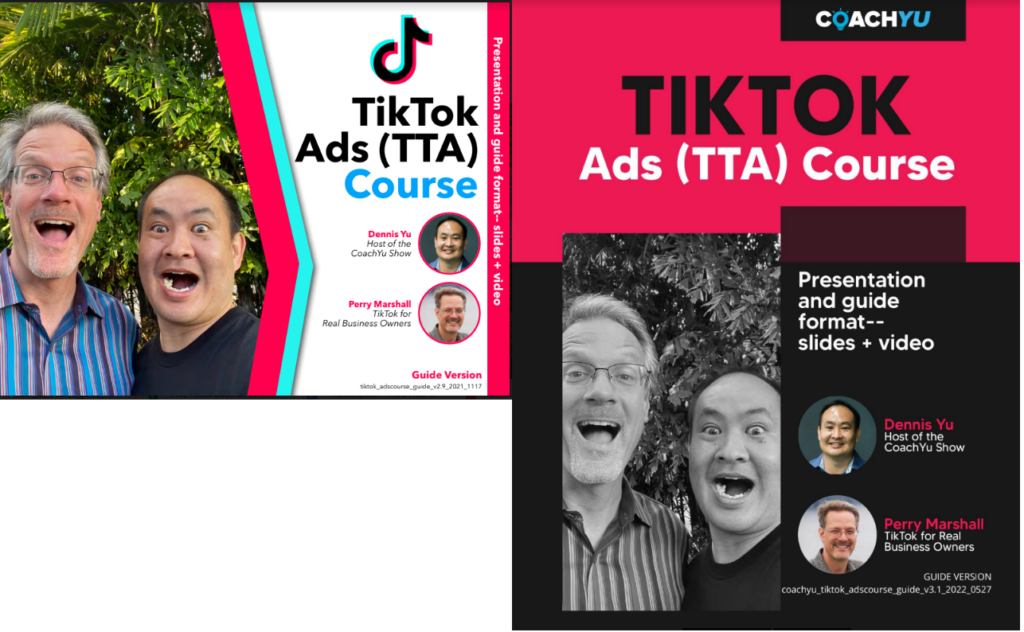
The thing that makes these things look nice is not because there’s a great designer who has to invent something new every time. It’s that there’s a template — but the template isn’t completely non-thinking. A good template means a junior person produces something 80% as good as what you’d produce, in a fraction of the time.
For agencies managing multiple clients, templates mean you’re not building decks from scratch every week. For contractors, your proposals and change orders all look professional without you touching them. For SaaS companies, your knowledge base and onboarding materials stay consistent even as you scale the team writing them.
3. Checklists
While you have your Design Guide and templates in place, you have to make sure those are governed by checklists so that you don’t have to reinvent the wheel every single time you produce a new document. You want consistency — not because you want everything to look cookie cutter the same, but because you wanna make sure it has all the components that actually work.
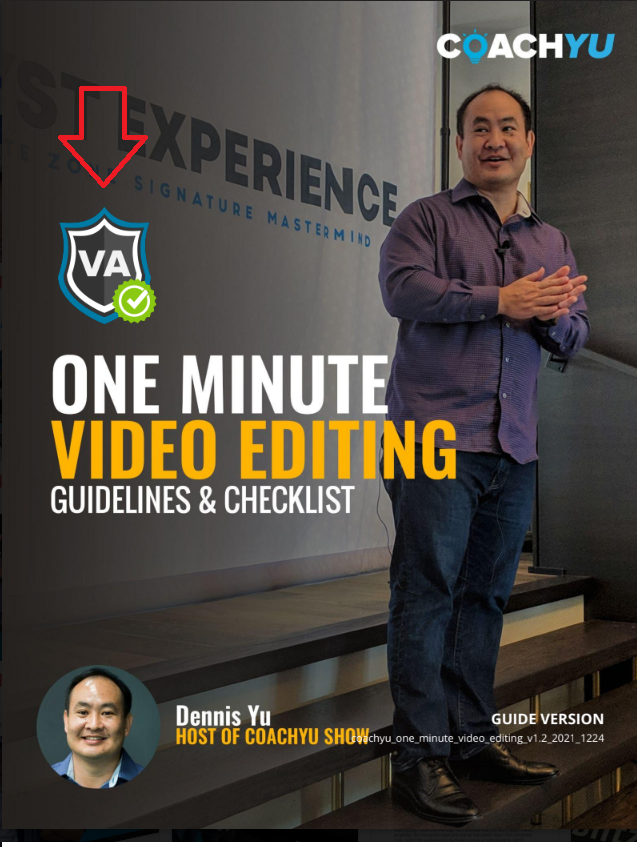
For example, here we have this badge. Everything we put out there with this badge is a course. People should be able to go through it like a recipe. And once they do it, they should be able to earn the badge by following the checklist step by step.
If we don’t have a badge, then either the designer didn’t put the badge there, or we didn’t turn the course into a checklist — which then people can follow and actually assess whether they did all the things — or something else got dropped along the way.
A checklist removes the subjectivity. The task is done, or it’s not. This matters for agencies running multiple clients and contractors managing crews — you need a fast, objective way to know if someone can execute a task to your standard. When you have a checklist for all the items you need in your documents, then you know the rest of these things are functioning and can operate without you having to be there watching every link and piece. And if someone didn’t do their part, someone else can step in and take over.
4. Master Document
We have something we call the master guide and the master presentation. The idea of the “master” is that it is the ring that rules all rings.
Can you imagine if you had to build a presentation from scratch every single time? Have you ever been in that situation where you have to give a presentation on something tomorrow and you waited till the last minute? You had three or four weeks to put it together, but you waited till the last minute, now you have to stay up all night. You’re already tired, it’s midnight, and you’re thinking — should I spend an extra hour or two on this presentation but be exhausted tomorrow, or just go with what I have?
Now you don’t have to make that choice. When you have a template and everything’s already in place, you just pick and choose from the master presentation, reskin it, change up a couple of items, and you have a new document. This is how agencies go from spending 8 hours on a custom deck to spending 45 minutes reskinning what already exists.
The master presentation is visual — meant for when someone is presenting live. So the words aren’t on the page — you’re speaking them. The master guide is text-heavy, vertical like a book — meant for when someone is reading on their own. Same content, two formats.
The beauty of these two being linked together is that when you give a presentation, you can then transcribe it and run it through Descript — our whole book editing process. It’s better to have the guide version first and then present from it, but sometimes we’re not ready or prepared, so we just give the presentation and make the guide afterward based on the Zoom recording. Not the ideal way to do it, but it’s a graceful failure mode.
5. Asset Tracker
For each piece — guides, courses, webpages — we have the latest link indicated in this tracker. We have the date on when it was last iterated. We have a presentation version, an implementation version, and related pieces.
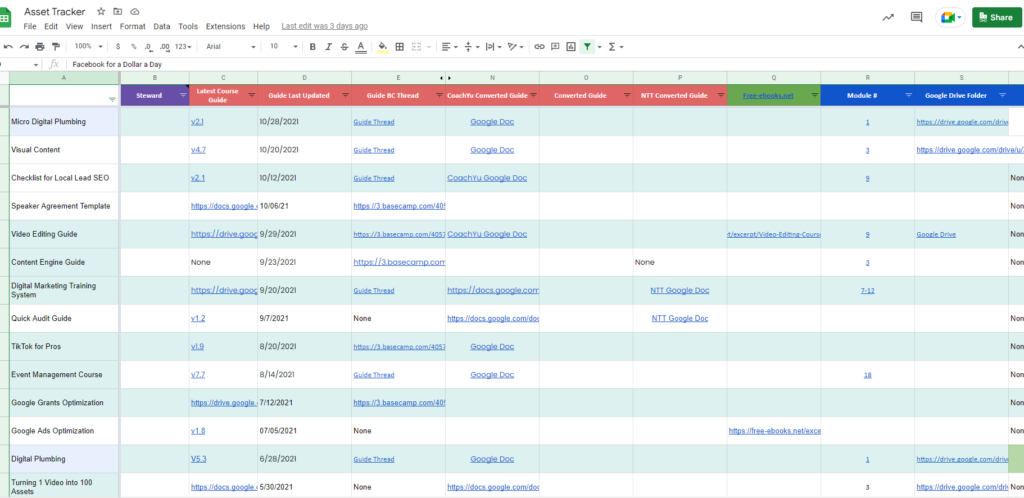
Without an Asset Tracker, agencies end up with five versions of the same document floating around Slack and Google Drive, and nobody knows which one is current. SaaS companies end up with help articles that reference features from two versions ago. Contractors end up sending outdated rate sheets to prospects. The Asset Tracker is your single source of truth.
6. One-Pagers
We have different versions of the same content, which is all part of this checklist architecture — because it’s the same checklist, whether it’s a guide or a presentation or us as an agency implementing it. It’s still the same checklist, just different formats of the same thing. Like a mountain bike that can be painted blue or green or purple — you can put racing tires on it or whatever tires, but it’s still a bike.
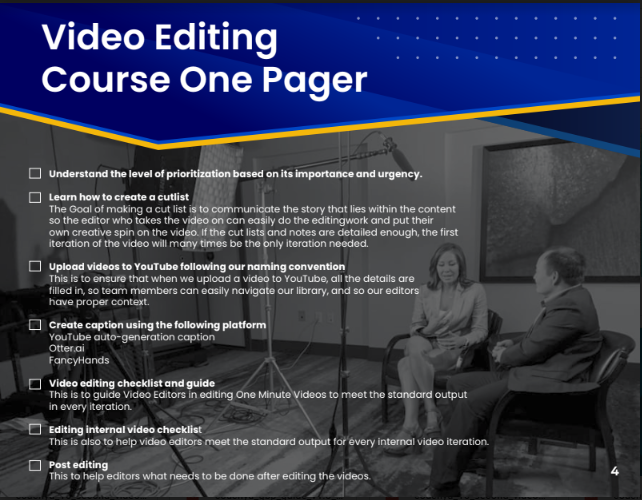
The one-pager is a list of these particular tasks. Anything that is repeatable should have its own one-pager. It’s the process in checklist form — written down where you have documented exactly how to do each component so the business can operate without you.
If you’re a contractor, you should have a one-pager for how your crew does a walkthrough, how they document before-and-after photos, how they handle a punch list. If you’re an agency, you should have a one-pager for how to set up a client’s ad account, how to run a monthly reporting call, how to onboard a new team member. Whether your business is putting people’s faces on socks or fixing teeth or helping them buy a house — you’re still gonna have the stages of making sure things are happening.
Each task within a one-pager is SMART — specific, measurable, attainable, realistic, and time-bound — so you can actually determine whether the thing happened or not. Each task has a superscript that ties back to what we call the thousand task library.
7. 1000 Task Library
Because we have more than a thousand tasks in our library, any of these tasks goes back to the Asset Tracker sheet where you can see the video associated with it, how to audit it, and how to make sure it’s being done the way we want it.
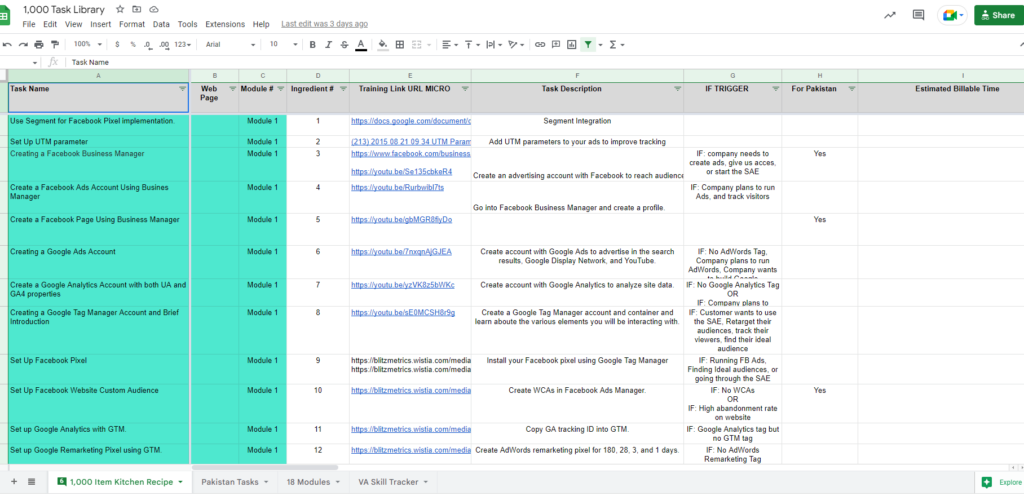
Any checklist is composed of individual building blocks we can audit. If something’s not being done right, we can figure out — did the person not follow directions? Was the training not clear enough? Maybe the task is so big it should be broken into multiple tasks, or it needs to be reordered.
For agencies managing multiple clients across multiple team members, this is the difference between consistent delivery and chaos. For SaaS companies, this is how you build a support and onboarding team that doesn’t require your senior engineers to answer every question. The beauty of a checklist is it can tell you directly — a task is done or it’s not. It’s not subjective.
8. Social Amplification Engine
Once your documentation is solid, you can see what’s already working and driving sales. You can figure out what to troubleshoot, what component needs fixing, and what’s limiting you.

When we’re organizing our content, we think of three levels:
1. Public content is free — blog posts, social media. It’s discoverable and builds trust.
2. Gated content is still free, but they have to give you their email address. They opt in. They fill out a lead form.
3. Paid content — like a trip wire at seven bucks, ten bucks, or programs like our Office Hours. You go from why and how to what.
This is where documentation turns into revenue. The same checklist that trains your team becomes a lead magnet when you gate it. The same master guide that runs your operations becomes a course when you put it in an LMS — whether that’s LearnDash, Infusionsoft, ClickFunnels, or Kajabi. The same one-pager your crew follows becomes proof of expertise when you publish it.
You should always think about maximizing your time — because we only have so much time on this planet. How many times do you find yourself repeating the same thing or doing the same task that you know is repeatable? The answer is usually two to three hours every day. That’s a lot of time. If we just create these documents, turn them into videos, and add them into a learning management system, we reclaim all of that.
Working with Freelancers: Why Documentation Makes or Breaks the Hire
A lot of people use Fiverr, and I know it’s a lot of freelancers — but the hesitation is always finding the right person. You’ve had bad experiences, and that leaves a bad taste in your mouth.
So my question to you is — how are you conducting your screening process? How do you define your requirements? In your screening process, you should share your requirements, get their explicit acknowledgment that they can do it. You have to negotiate with them and get clear on your requirements before you ever press the buy button.
And that’s why you have to document what you’ve done. That way, when you want that Fiverr person to go do it, they have something to reference. If you don’t have anything to reference, let me tell you the cold hard truth — the issue is not the Fiverr person. The issue is you weren’t clear about what you wanted.
If you just say, “Can you edit a video and make it really nice?” they’ll ask how many minutes, you’ll say ten — and then they give you something that isn’t in your style, that isn’t the way you want it. That’s why it’s important to say: “Have it in this style. Here’s the template. Here’s the process. Here are examples of how I’ve done it before. Here are three other examples of how I’ve seen it done the way I like it. Here are the files. Take a look and give me a quote — and don’t just give me a quote, show me in your response that you understand specifically what I’m looking for and have examples where you’ve done work like that before.”
Then at that point, it’s easy. You know it’s gonna be successful when you hire them. Documentation is what makes delegation possible.
Why This Matters for Your GCT
Most people think their scaling problem is a hiring problem or a marketing problem. It’s usually a documentation problem.
When you don’t document, you can’t delegate — and your Goals stall. When you can’t delegate, you can’t produce enough content to stay visible — and your Content dries up. When your content is inconsistent, you attract the wrong people or no one at all — and your Targeting breaks.
This 8-part system fixes the root cause. The whole thing with having these documents is to free us up to do what we as humans should be doing — building relationships. The reason we create documentation is not that we’re inhuman and just want people to read the docs. It’s so that we can spend quality time with people instead of repeating things we’ve already said before.
Start with the Design Guide. Build one template. Write one checklist. Document one task. Stack them over time and you’ll have a machine that runs without you — which is the whole point of building a business.
Ready to Build Your Document System?
Start with just one Design Guide. Then build one template. Write one checklist. Document one task. Stack them over time and you’ll have a machine that runs without you.
Download the Design Style Guide
This episode is one of many live and pre-recorded trainings in the Office Hours program, which Office Hours members have full access to.
How the 8 Parts Connect to Our Knowledge System
Part 7 — the 1,000 Task Library — is what you see at blitzmetrics.com/the-task-library. Each task in that library has its own definitive article that follows the format described in How to Document a Task. The Task Library is the table of contents; each definitive article is the chapter.
The Self-Learning Feedback Loop: When you complete a project, the meta article you write about that project’s results feeds back into the definitive article for that task, making it better for the next person. This is how the system improves itself continuously:
Project work → meta article → improved definitive article → better training → better project work
Every task we perform makes the documentation stronger. Every person who follows a guide and improves it leaves the system better than they found it. The eight parts described above, the Task Library, and the definitive articles together form a knowledge flywheel that compounds over time.
Related Articles
- How to Document a Task — the step-by-step standard for creating task documentation, including the complete spec for what makes a definitive article.
- How to Spin Up a New Personal Brand Website Using BlitzAdmin — a real example of a documented internal task with screenshots, checklists, and verification steps.
- Document Your Expertise and Teach Others — the incentive program ($200/$300/$500 bonuses) for documenting tasks.
- Personal Branding Website Checklist — checklist architecture applied to personal brand website builds.
- Task Library — browse over 1,000 documented tasks.
Originally published .
Dennis Yu
Dennis Yu is the CEO of Local Service Spotlight, a platform that amplifies the reputations of contractors and local service businesses using the Content Factory process. He is a former search engine engineer who has spent a billion dollars on Google and Facebook ads for Nike, Quiznos, Ashley Furniture, Red Bull, State Farm, and other brands.
Dennis has achieved 25% of his goal of creating a million digital marketing jobs by partnering with universities, professional organizations, and agencies. Through Local Service Spotlight, he teaches the Dollar a Day strategy and Content Factory training to help local service businesses enhance their existing local reputation and make the phone ring.
Dennis coaches young adult agency owners serving plumbers, AC technicians, landscapers, roofers, electricians, and believes there should be a standard in measuring local marketing efforts, much like doctors and plumbers must be certified. He has appeared on 353 podcasts with 619 credited episodes — see the full list of his podcast appearances.