
 by
by
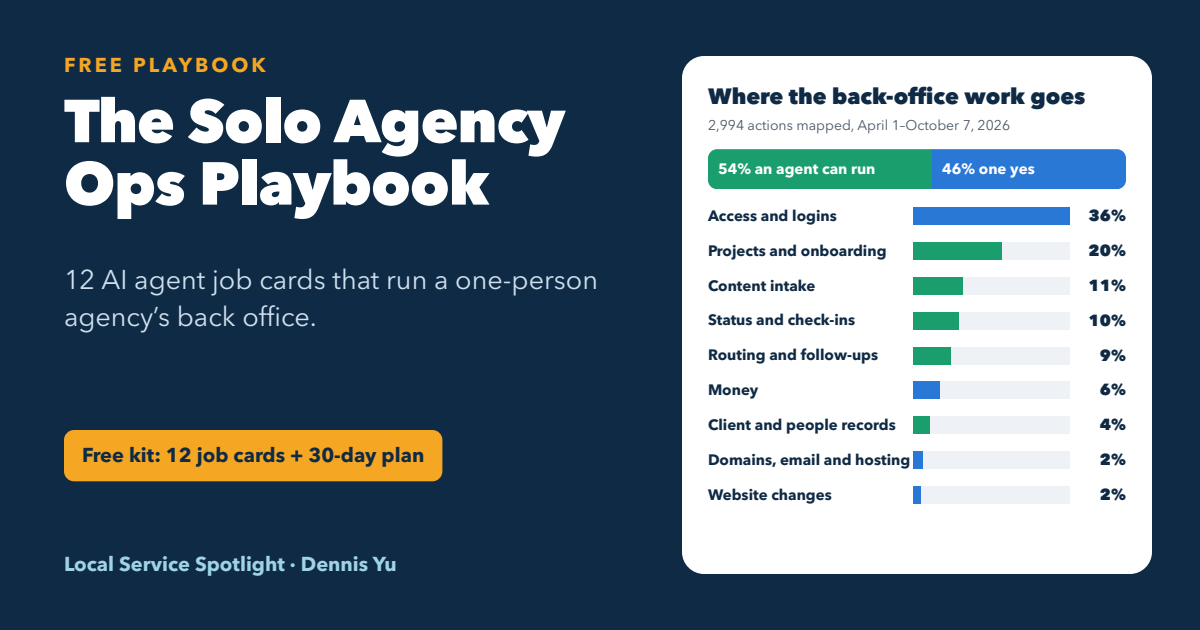
Where the back-office work goes
2,994 hands-on actions in our project system, April 1 to October 7, 2026
A Agent runs itB Agent preps, you say yes
BAccess and logins
36%1,074
AProjects and onboarding
20%604
AContent intake
11%338
AStatus and check-ins
10%312
ARouting and follow-ups
9%260
BMoney
6%182
AClient and people records
4%111
BDomains, email and hosting
2%62
BWebsite changes
2%51
Seven clients at $1,500 a month is $10,500. What sinks a one-person agency is not the marketing. It is the back office: logins, invoices, status updates and follow-ups. We mapped six months of ours, found an agent job in every kind of work, and turned it into 12 jobs you can run from a laptop anywhere.
Option 1 · Free
Take the kit and go it alone
12 agent job cards, a one-page agent policy, the 30-day rollout and our checklists. You learn every detail, keep every file current as your tools change, and fix what breaks.
ZIP, 28 KB · PDF, 99 KB · version 1.0, October 7, 2026Option 2 · With us
Build it inside the AI Builder Program
A real Lighthouse client, a team of AI agents run under the same rules as this kit, weekly calls, coaches who check your receipts and a group of more than 400 people. Get to your goal faster, with less frustration and fewer mistakes.
Selective admission. Outcomes are never promised.The $10K math, and where it breaks
Here is the math behind a $10K month:
Client 1$1,500
Client 2$1,500
Client 3$1,500
Client 4$1,500
Client 5$1,500
Client 6$1,500
Client 7$1,500
=
Per month$10,500
Illustrative math, not a promise. We use a conservative $1,500 retainer; your results depend on your effort, skill and market. Try your own numbers in the AI Builder earnings calculator.
Getting to seven clients is a sales problem. Keeping seven clients while you travel is an operations problem. Every client brings accounts to get into, payments to match, reports to write and questions to answer. As clients add up, that work fills the week, and one login request missed while you are on a plane can cost you a client’s trust.
Agents change that. They do not sell for you and they do not replace your judgment. They take the repeatable back-office work, so your hours go to clients, content and the next sale, from wherever you happen to be.


What we found when we mapped our own back office
On October 7, 2026 we pulled six months of activity out of our Operations function’s project system: 5,016 events across 611 threads. We sorted every hands-on action into nine kinds of work and asked one question about each: can an agent do this, and with how much supervision?
36%of hands-on actions were about access: getting the right person into the right account.
83%of our 2,423 access grants happened on just 2 days, in bulk. Access is rules plus volume, which is agent work.
17 of 25tasks in our own rollout went to agents. People kept 8: credentials, decisions and reviews.
That same day our Access Desk ran its first job: five project memberships, each read back from the system, with a receipt for the team. This playbook is built from that plan, with our names and clients taken out, for one person with a laptop.
Three levels: what an agent may do on its own
Every job in the kit carries one of three levels. The level, not how sure the agent sounds, decides what happens next.
A
Agent runs it
Reversible work inside your own tools. The agent does it and posts a receipt.
Example: File a call recording with its transcript and a five-line summary.
B
Agent preps, you say yes
Anything that touches a client account, money, a domain or a message that leaves your company. The agent prepares the exact change and asks one yes-or-no question.
Example: Add a contractor to a client's Google Business Profile after you tap yes.
C
Only you
Passwords and owner logins, price and scope, contracts, hiring and firing, and anything you cannot undo.
Example: Rotate a leaked password and store the new one in your password manager.
Graduation: a level B job can move to level A after 10 clean runs in a row, with receipts posted and zero corrections, and only if it can be undone. Removals, money, domains, client messages and anything you cannot undo never graduate.
The nine kinds of back-office work
Here is the full map, with what each kind looks like when you run a one-person agency. The shares come from our own six months of data, so treat them as a starting estimate for yours.
| Kind of work | What it looks like for you | Share | Level | Agent job |
|---|---|---|---|---|
| Access and logins | Getting into each client's Google Business Profile, Analytics, Tag Manager, Ads, Meta and website, and giving contractors the right access. | 36% | B | Access Desk, Secret Sweep |
| Projects and onboarding | Setting up each new client the same way: workspace, standard threads, checklists, dates. | 20% | A | Project Builder, Thread Keeper |
| Content intake | Filing every call, interview and video with a link, transcript and summary so it can become content. | 11% | A | Content Intake |
| Status and check-ins | Daily and weekly status, reminders and nudges, so nothing depends on your memory. | 10% | A | Cadence Clerk, Report Drafter |
| Routing and follow-ups | Deciding who owns each request and chasing anything that is late. | 9% | A | Ops Router |
| Money | Matching payments, flagging late ones, drafting invoices and collection notes, monthly profit per client. | 6% | B | Money Desk |
| Client and people records | One accurate list of clients and contractors: who works on what, which accounts, what status. | 4% | A | Roster Keeper |
| Domains, email and hosting | Renewal dates, DNS, mailboxes and hosting for every site you are responsible for. | 2% | B | Web & Domain Desk |
| Website changes | Small edits and fixes on client websites, checked live after they ship. | 2% | B | Web & Domain Desk |
Share of 2,994 hands-on actions. Level A means the agent runs it end to end; level B means the agent prepares it and you say yes. A kind of work can hold jobs at both levels; the level shown is the most common one. The client access checklist we use is public: the Access Checklist.
The 12 agent job cards
Each card is one bounded job: a trigger, the steps, a never-list, a definition of done, a receipt and an instruction you paste into your AI assistant. Eight run end to end at level A. Four prepare the work and wait for your yes.
JOB 01A
Ops Router
Every request gets an owner within the hour, and nothing waits on silence.
Never: Send anything outside your company in your name. It drafts; you send.
Done when: Every ask from the last seven days has an owner, a rescue date and a status, and none waited more than an hour for a claim during your working day.
JOB 02B
Access Desk
Gets the right people into the right accounts with one yes from you, then reads every change back.
Never: Ask for, store or paste a password or two-factor code. Invites and partner access only.
Done when: Ten requests in a row handled with receipts and zero corrections.
JOB 03A
Secret Sweep
Tracks every place a password, two-factor code or key was pasted, until each one is rotated. It sees locations, never values.
Never: Open the export files or any message that holds a secret.
Done when: After rotating, removing and re-exporting, a fresh scan finds zero.
JOB 04A
Project Builder
Builds a new client's whole workspace from your template, the same way every time.
Never: Invite the client directly. Invites go through the Access Desk.
Done when: The next new client is set up with zero hand edits afterward.
JOB 05A
Thread Keeper
Keeps every client workspace tidy: standard threads present, long threads continued, stale to-dos closed or re-dated.
Never: Delete anything.
Done when: A weekly check finds no project missing a standard thread, and you have ten or fewer open to-dos with none overdue.
JOB 06A
Content Intake
Files every call, interview and video with a link, transcript and summary, ready for the Content Factory.
Never: Publish anything publicly.
Done when: Two weeks of recordings arrive filed without anyone touching them.
JOB 07A
Cadence Clerk
Writes the daily and weekly status from your tools' data, nudges what is late, and rolls it up for you.
Never: Nudge anyone outside your project tool.
Done when: One week side by side with your own status shows identical counts. Then you stop writing status yourself.
JOB 08A
Roster Keeper
Keeps one accurate list of every client and contractor: role, accounts, time zone and status.
Never: Guess a status.
Done when: Your client list, billing and project tool agree for two weeks running.
JOB 09B
Report Drafter
Drafts each client's weekly Metrics, Analysis, Action report from live data, for you to check and send.
Never: Send to the client.
Done when: Four Fridays in a row, the drafts need only light edits.
JOB 10B
Money Desk
Matches payments, drafts invoices and collection notes, and builds monthly profit per client, read-only.
Never: Move money.
Done when: Month-end profit per client is posted by the third, with every payment matched.
JOB 11B
Web & Domain Desk
Tracks every domain, mailbox and website you are responsible for, and preps small site fixes for your yes.
Never: Buy, transfer or delete a domain.
Done when: The inventory is complete and nothing expires within 30 days without a plan.
JOB 12A
Fleet Health
Watches your agents: every scheduled job listed with owner, identity and last run, and loud when one stops.
Never: Fix a job by giving it more access.
Done when: Every job is listed, none runs as you, and two weeks pass with no silent misses.
The full cards, with every step, an example receipt and the paste-ready instruction, are in the free kit below.
Six rules that keep agents safe with client accounts
These are the lines in the one-page agent policy you sign on day one.
- Agents draft. You send.Anything that reaches a client, the public or a bank goes out from you, after you read it. Agents prepare it; they never send it.
- No passwords in chat. Ever.Use each platform's invites and partner access. Keep the rest in a password manager. The scanner reports where secrets are, never what they are, and agents only ever see that list.
- Agents get their own identity.Create an ops@ address and an agent user in each tool. Agents never work as you, so you can see what they did and switch them off without locking yourself out.
- Every action ends with a receipt.What changed, where, and a Verified line: what was opened, what it showed, and when. No receipt means it did not happen.
- Add first. Remove with a yes.An agent may add people or create things on your approved list. Removals, payments, DNS and mail changes need your yes every time. Contracts and anything you cannot undo stay with you.
- Silence never stops the work.Every ask carries a rescue date and a fallback. When the date passes, the agent runs the fallback or asks you one yes-or-no question.
We wrote up the longer versions: how a request nobody answers still gets done, how we check that done means done, and how agents run our company day to day.
Your first 30 days
Twenty tasks over four weeks. Agents own twelve. You own eight, and each of yours is a credential, a decision or a review. Shadow mode means the agent posts what it would do and changes nothing, so you can compare it with what you would have done. Every task in the kit has a done-when line, so you always know whether it is finished.
Week 1 · Days 1 to 7
Stop the leaks
- YouRun the location-only scanner on a fresh export
- Agent ASecret Sweep tracks every location until it is rotated
- YouRotate and vault everything on the list
- YouSign your one-page agent policy
- YouCreate the agent identity (ops@ and an agent user in each tool)
- Agent ATurn on the Ops Router in shadow mode
- Agent BTurn on the Access Desk in shadow mode
Week 2 · Days 8 to 14
Agents take the volume
- Agent AProject Builder: finish and test your template
- Agent AThread Keeper goes live
- Agent ACadence Clerk runs side by side with you
- Agent AContent Intake goes live
Week 3 · Days 15 to 21
Money and records
- YouConnect read-only exports for money and records
- Agent ARoster Keeper goes live
- Agent BMoney Desk: first payment check and profit per client
- Agent BWeb & Domain Desk: inventory and 90-day expiry report
Week 4 · Days 22 to 30
You run the fleet
- Agent BReport Drafter: first weekly client reports
- Agent AFleet Health goes live
- YouYour first Friday review
- YouGraduate jobs with ten clean runs
- YouAudit a random 10 percent of agent actions
What stays yours
Agents take the volume. These five never leave your hands.
Passwords and owner loginsRun the scanner, rotate what it finds, grant owner and admin roles yourself, and keep owner access in your own hands.
Price, scope and contractsAgents can prepare numbers. Only you agree to them.
Your name on the outsideClient messages and public posts go out from you, after you read them.
Who works with youBringing on or letting go of a contractor is your call.
The weekly reviewThirty minutes every Friday, plus a random 10 percent audit each month.
Take it free: what is in the kit
Everything on this page, as files you can use today. It is free to use and adapt for your own agency.
README.mdStart here: what is inside, the order to use it, and what keeping it current takes.01-ops-map.mdThe nine kinds of back-office work, with our shares and the level for each.02-agent-policy.mdYour one-page agent policy. Sign it on day one.03-job-cards/Twelve agent job cards with steps, guardrails, receipts and a paste-ready instruction.04-30-day-rollout.csvThe rollout as a task list you can import into any project tool.05-friday-review.mdThe 30-minute weekly review and the monthly 10 percent audit.06-receipts.mdThe receipt and Verified-line standard, with examples.07-secret-sweep.mdHow to find pasted passwords without ever copying one, plus the scanner.08-maintenance-log.mdThe log you keep when tools change: the work that free hands to you.
Free means it is yours to maintain. AI assistants, Google, Meta and your project tool change every month. A job card that works in October can break in December, and when you go it alone, you may find out from a client. Keep the maintenance log, re-test each card monthly and budget the hours for it.
More free material: our skill packs, the Task Library of published SOPs, and the Content Factory, where everything Content Intake files goes next: Produce, Process, Post and Promote.
Or build it with us

The AI Builder Program is where young adults put a team of AI agents to work on a real Lighthouse business, under the same rules as this kit: bounded jobs, approval boundaries and receipts. It is selective: we choose for character before technical skill.
- A real Lighthouse client to prove the system on, often a parent's business, or one we supply.
- An installed team of AI agents working from published SOPs, each with a bounded job, an approval boundary and a definition of done.
- A live group call every Thursday at 2 PM Pacific, and a Metrics, Analysis, Action report you submit every Friday.
- Office Hours and a community of more than 400 people when you are stuck.
- In-person meetups, and a chance to speak at events as you advance.
| Free kit, on your own | AI Builder Program, with us | |
|---|---|---|
| What it costs | $0, plus your time | The program fee shown on the program page |
| The files | Version 1.0, dated October 7, 2026. You update every card as your tools change. | Published SOPs the group keeps improving, and a weekly call on current problems. |
| How you learn | Read, test and debug on your own. | Weekly live calls, Office Hours and a group of more than 400 people. |
| Your first client | You find one. | Start with a Lighthouse: often a parent's business, or a client we supply. |
| Mistakes | You may find them in a client's account. | You submit a weekly Metrics, Analysis, Action report, and coaches can check your agents' receipts. |
| Your pace | As fast as you can figure it out. | One bounded project first, then repeat it in one industry. |
Want to get there faster, with less frustration and fewer mistakes? See how the program works, what it costs and the two admission gates.
See the AI Builder ProgramOutcomes are never promised.
Still deciding? Read why people pay for a working AI system when they could build it themselves, or see what an AI builder does all day.
Questions
Do I need to code?
Not to start. Each job card is a plain-language instruction you paste into an AI assistant that can use your tools, such as Claude with connectors. A project tool with an API helps. The secret scanner is a small script you run from a terminal with one copy-paste command.
Which tools do I need?
A project tool your agents can read and write, a password manager, a shared drive, a client list or CRM, and an AI assistant. We run on Basecamp, and the cards are written to work with most tools that have an API.
How much time does this save?
We started measuring on October 7, 2026. Our Friday reviews track hours returned, time from ask to done, and errors. We will add the numbers here after the first four, instead of guessing.
Is it safe to let agents near client accounts?
Only inside the rules. Agents never handle passwords, never remove anyone without your yes, never send anything in your name, work under their own identity, and end every action with a receipt you can check.
Can I use the kit if I am not in the US?
Yes. The kit is free to use and adapt for your own agency anywhere. The AI Builder Program is for US-based young adults.
What does free really cost?
Your time. Platforms change every month. A card that worked in October can break in December, and on your own you may find out from a client.
About this playbook. Prepared by Dennis Yu, Local Service Spotlight. Version 1.0, October 7, 2026.
How we counted. We exported six months of activity (April 1 to October 7, 2026) from our Operations function’s project system, sorted each event into nine kinds of work with keyword rules, and checked the groupings by hand. Counts are actions, not hours. Two bulk days of access changes are set aside. Names, clients and anything personal were removed for this public version. Example receipts on the job cards are illustrations, not client data.
Related reading
Originally published .
Dennis Yu
Dennis Yu is the CEO of Local Service Spotlight, a platform that amplifies the reputations of contractors and local service businesses using the Content Factory process. He is a former search engine engineer who has spent a billion dollars on Google and Facebook ads for Nike, Quiznos, Ashley Furniture, Red Bull, State Farm, and other brands.
Dennis has achieved 25% of his goal of creating a million digital marketing jobs by partnering with universities, professional organizations, and agencies. Through Local Service Spotlight, he teaches the Dollar a Day strategy and Content Factory training to help local service businesses enhance their existing local reputation and make the phone ring.
Dennis coaches young adult agency owners serving plumbers, AC technicians, landscapers, roofers, electricians, and believes there should be a standard in measuring local marketing efforts, much like doctors and plumbers must be certified. He has appeared on 353 podcasts with 619 credited episodes — see the full list of his podcast appearances.