

You don’t need to be famous. You need to be findable.
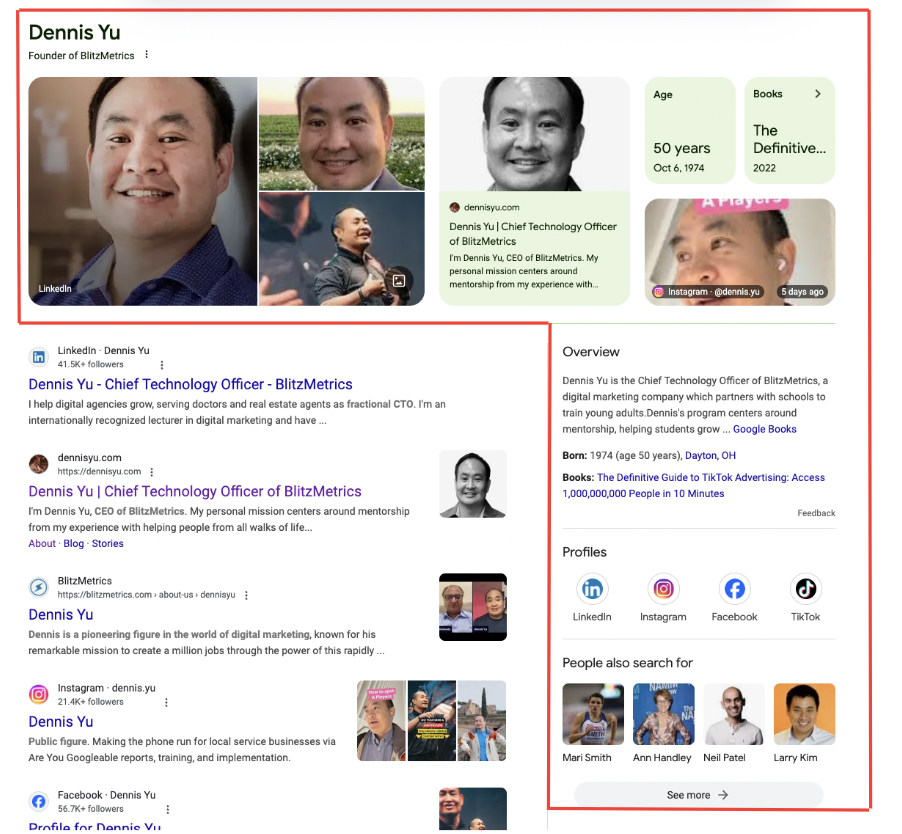
A Google Knowledge Panel is the information box that appears on the right side of search results when someone Googles your name. It pulls your photo, company, social links, and key facts into one verified snapshot. Think of it as Google’s way of saying: “This person is real, and here’s the proof.”
When I Google “Dennis Yu,” my Knowledge Panel shows up before anything else. Event organizers vet me in seconds. Clients know they’re dealing with a real person. My online footprint looks like it belongs to someone who actually does things.
You can get one too. You don’t need to be a celebrity, an author, or a Fortune 500 CEO. Google isn’t handing out trophies for fame — it’s building a map of the world. Every person, business, or organization is a potential entity, if you give Google enough structured proof.
This guide covers the seven steps to trigger your Knowledge Panel from scratch. If you already have a panel and want to claim it, head to our step-by-step Knowledge Panel claiming guide. If you need to merge duplicate panels, we have a dedicated guide for that too.
First, Check If You Already Have One
Before you start building, check what Google already knows about you. Use our Knowledge Graph Explorer to search your name. This tool taps into Google’s Cloud Enterprise Knowledge Graph API and reveals your Knowledge Graph Machine ID (KGMID), your confidence score, and what data Google believes is “you.”
You might be surprised: some people have a panel in the API that doesn’t show up in regular search results because their confidence score isn’t high enough yet. That’s exactly what happened with Scott Shagory — his confidence score was 24, meaning Google kinda knew who he was but wasn’t confident enough to display the panel publicly.
The 7 Steps to Trigger Your Google Knowledge Panel
Step 1: Get Your Name as a Domain
Secure a domain with your name. This becomes your entity home — the single authoritative source Google looks to first when connecting dots about you. My full name is Dennis Yu, so I own DennisYu.com. If your exact name is taken, get as close as possible.
This isn’t just about having a website. It’s about telling Google: “This is the definitive source for information about me.” Every other digital property you own should point back here.
Brady Sticker is a great example. He went from being buried in search results for “Tom Brady sticker” to earning a verified Google Knowledge Panel. How? He consistently published under his name on his personal site, built podcast appearances, and documented real client wins in the church marketing space. Once his digital footprint aligned, Google recognized him as a distinct entity.
Step 2: Test Whether Google Can Already Trigger Your Panel
Conduct increasingly specific searches related to your name. Try “Your Name + your company,” “Your Name + your city,” or “Your Name + your industry.” Watch for any Knowledge Panel triggers in the results.
Use our Knowledge Graph Explorer to check your confidence score and compare it with others who share your name. This tells you how much you need to improve before Google will show your panel publicly.
Step 3: Claim All Your Social Profiles
Claim every social media account — personal and company. LinkedIn, Facebook, Instagram, YouTube, TikTok, Twitter/X, Apple Podcasts. Each one is an “object” that Google connects back to your entity.
Critical detail: use the same name, title, bio, and profile photo across every platform. If you’re a “business coach” on Instagram and a “growth strategist” on LinkedIn, you’re confusing the machine. Google needs consistency to connect the dots.
Step 4: Assess Your SEO Power
Evaluate your search engine authority by checking that you have at least three contributor accounts on websites with a domain rating (DR) of 40+. These could be guest posts, podcast interviews published as articles, or contributor columns on reputable sites.
Why does this matter? Google trusts mentions from high-authority sources. If Forbes, Entrepreneur, or a well-known industry blog mentions you by name and links to your site, that’s a powerful signal. Even niche-authority sites in your specific industry carry weight.
Check out our real Knowledge Panel examples to see how people at various authority levels have triggered their panels.
Step 5: Rank on Your Name
Even without a physical retail location, you need to own page one of Google for your name. Your personal brand website should rank #1, followed by your LinkedIn, social profiles, and any press mentions.
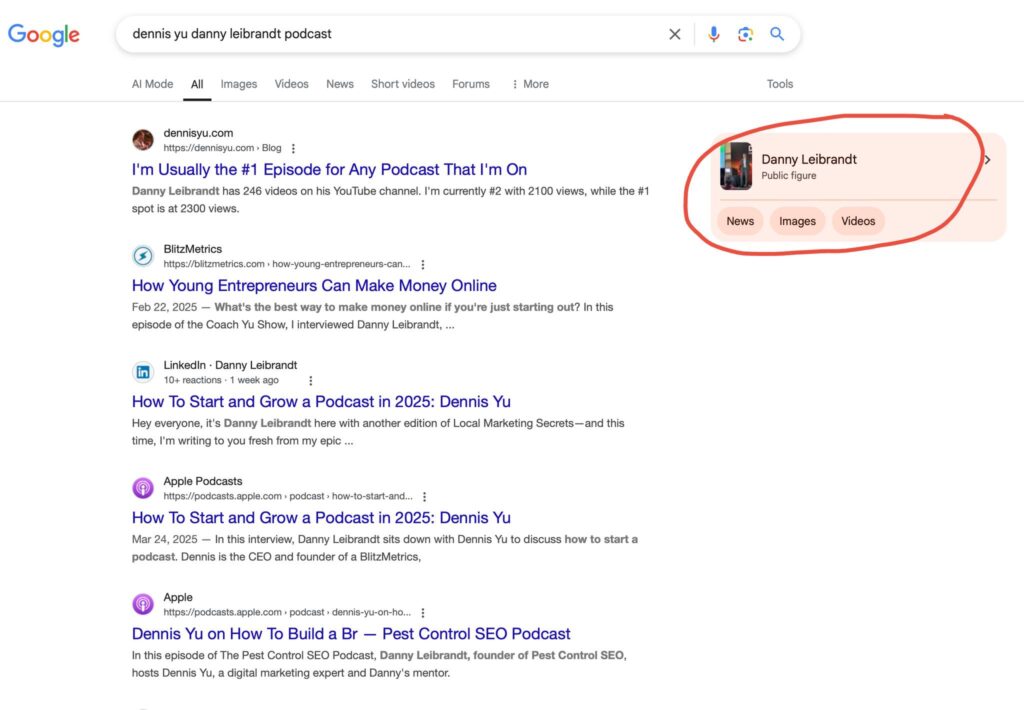
Dan Leibrandt is a perfect example — not only does he have a Knowledge Panel, but he also shows up in “related searches” alongside other recognized entities. That means Google doesn’t just know who he is; it understands how he connects to other people and brands in his space.
Step 6: Establish Your Digital Plumbing
Make sure the technical foundation is right:
- Google Analytics installed and tracking
- Google Search Console verified for your domain
- Schema.org markup (Person or Organization) on your site
- Consistent NAP (Name, Address, Phone) across all directories
- A Crunchbase profile with your key information
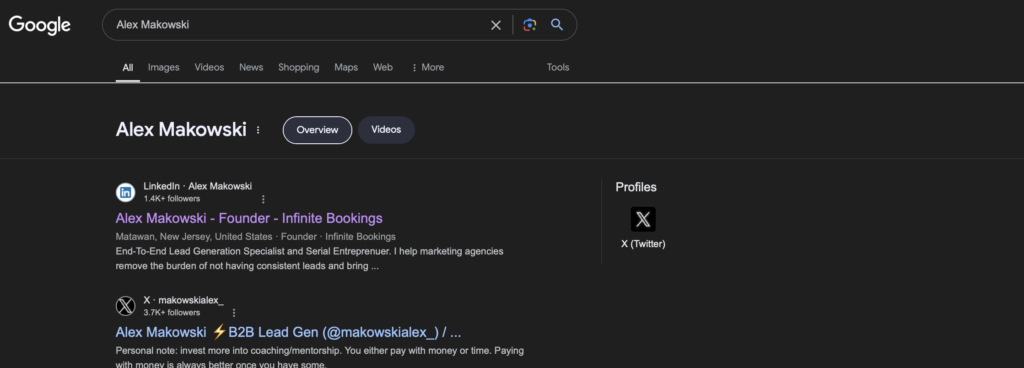
Alex Makowski has a Crunchbase profile plus a dozen news references — guest blog posts, LinkedIn posts, press releases, and mentions from high-authority sites. This creates what we call a corroborative loop: Google sees consistent information across multiple trusted sources and gains confidence that you’re a real, verified entity.
Step 7: Boost With Dollar-a-Day Advertising
Use platforms like Facebook and Twitter/X to promote your personal website and top articles. Running cost-effective advertising campaigns — even just a dollar a day — increases traffic and engagement, which strengthens your online presence signal to Google.
This is especially powerful if you share a name with someone more famous. Anthony Hilb owns a lawn care company in Bloomington, Indiana. No fancy equipment, no marketing team — just his phone. He records short clips of his crew working. That real-world activity, combined with consistent digital signals, helped his company rank #1 in both search engines and AI tools like ChatGPT.
Full Panel vs. Partial Panel: Both Are Wins
When Google can connect all your objects and understands everything about you, it presents a full Knowledge Panel — your image, colored info boxes, social links, an About section, and “People also search for” connections.

But when you’re just starting out, you might only get a partial panel. That’s still a win. Partial panels establish your presence and give you a foundation to build on. With time and effort, a partial panel becomes a full one.
Troubleshooting Common Issues
You Share a Name With Someone Famous
Don’t panic. You can still win by generating more traffic and more signals tied to YOUR name. Strategic Dollar-a-Day campaigns aimed at your personal brand can shift the balance. Brady Sticker proved this — he went from competing with “Tom Brady sticker” searches to owning his own panel.
You Can’t Trigger the Panel
If your panel won’t appear or looks incomplete, try increasingly specific searches to find your Knowledge Graph ID. Use our Knowledge Graph Explorer to locate it. Once you have the ID, the verification process becomes straightforward.
Google Verification Gets Confusing
Name confusion happens when your personal info lives on your company website or vice versa. The fix: maintain separate personal brand and company websites that link to each other but serve distinct purposes. Google needs to be able to tell the difference between you-the-person and your-company-the-business.
What Comes Next
Triggering your Knowledge Panel is step one. Here’s the rest of the journey:
- Claim your Knowledge Panel — Once it exists, verify ownership so you can manage it
- Raise your confidence score — Understand the technical signals that make your panel stronger
- See real examples — Browse before-and-after case studies from real clients
- Understand entity SEO — Learn why Google ranks entities, not websites, and how AI uses the same signals
Do It Yourself or Let Us Do It for You
Follow the seven steps above and you’ll be on your way to triggering a Knowledge Panel that establishes your online authority. If you want expert help, our team handles this end-to-end through our Done-For-You Personal Brand Website and SEO System.
We build your personal brand site to rank, implement structured entity data to trigger your Knowledge Panel, and manage your online credibility so Google recognizes and accurately represents your brand. Whether you’re a business owner, an established expert, or a service professional — if people search your name and you don’t own the first page of Google, now is the time to change that.
Dennis Yu
Dennis Yu is the CEO of Local Service Spotlight, a platform that amplifies the reputations of contractors and local service businesses using the Content Factory process. He is a former search engine engineer who has spent a billion dollars on Google and Facebook ads for Nike, Quiznos, Ashley Furniture, Red Bull, State Farm, and other brands.
Dennis has achieved 25% of his goal of creating a million digital marketing jobs by partnering with universities, professional organizations, and agencies. Through Local Service Spotlight, he teaches the Dollar a Day strategy and Content Factory training to help local service businesses enhance their existing local reputation and make the phone ring.
Dennis coaches young adult agency owners serving plumbers, AC technicians, landscapers, roofers, electricians, and believes there should be a standard in measuring local marketing efforts, much like doctors and plumbers must be certified.