
- 1What a Google Knowledge Panel actually is
- 2Knowledge Panel vs. Google Business Profile vs. Knowledge Card
- 3Why it matters — even if you're not famous
A Google Knowledge Panel is the information box that appears on the right of Google’s search results (or at the top on mobile) when Google is confident it understands who or what you are. It’s the difference between being “another option in a list of blue links” and being the answer Google trusts.
Most guides on this topic — including the well-known ones from Kalicube — explain the theory. This one shows you the proof. We’ve earned Knowledge Panels for 100+ business owners who are not celebrities: garage-door operators, painters, landscapers, lawyers. Below you’ll see their real panels, exactly how to get your own, how to fix one that’s broken, and how it works differently for each industry.
What a Google Knowledge Panel actually is
A Knowledge Panel is Google’s visual summary of an entity — a person, company, place, or thing it has identified as real, with real attributes. When Google has high enough confidence about that entity, it builds a panel from trusted sources and shows it on branded searches (your name or your company name).
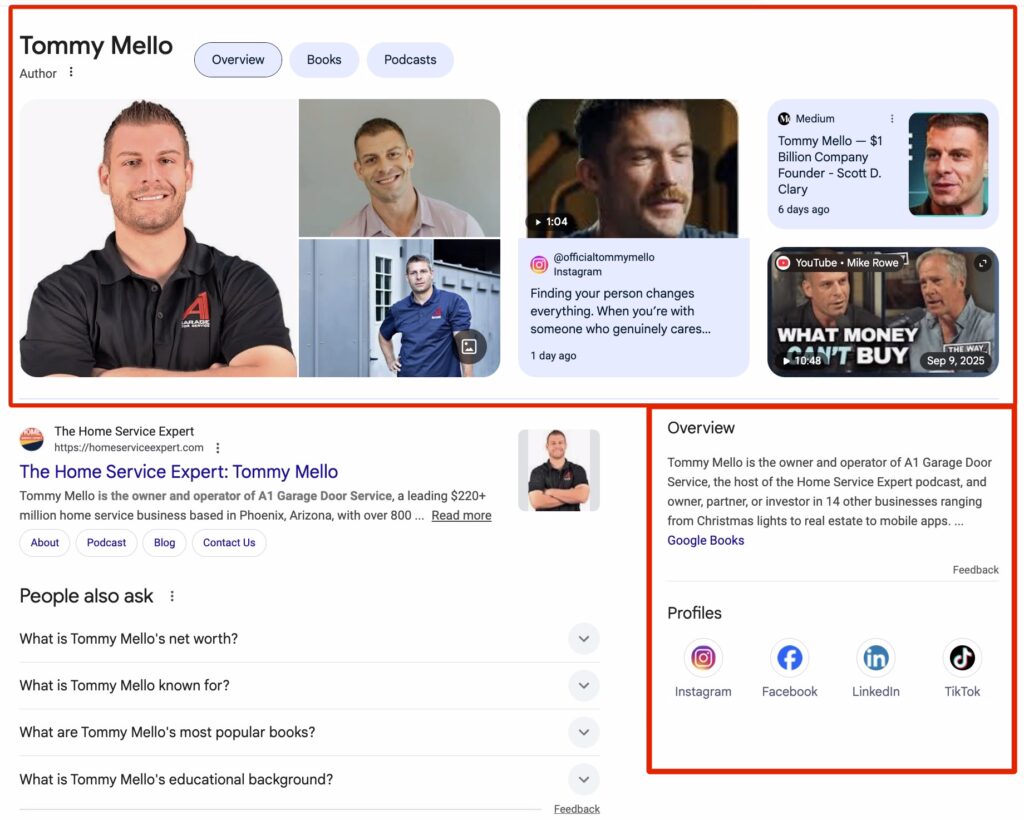
A person’s panel typically contains:
- A photo — the first thing a searcher sees
- Your name and category — e.g. “Entrepreneur · Founder & CEO”
- A description — a trusted summary pulled from your structured sources
- Key facts — founded, location, education, books
- Verified social profiles — the official accounts Google trusts are really you
- “People also search for” — the entities Google connects you to
Knowledge Panel vs. Google Business Profile vs. Knowledge Card
These three get confused constantly. Here’s the clean version:
| Feature | Knowledge Panel | Google Business Profile | Knowledge Card |
|---|---|---|---|
| What it is | An entity summary (person or brand) | A local business listing | A quick factual answer box |
| Where it comes from | Google’s Knowledge Graph | You create and verify it | The Knowledge Graph |
| Triggers on | Your name / brand name | “[service] near me” / your business | Simple factual queries |
| You control it by | Building trusted, consistent entity signals | Editing the dashboard directly | Improving the source entity |
You should have both a Business Profile (for “near me” searches) and a Knowledge Panel (for your name). They reinforce each other.
Why it matters — even if you’re not famous
When you own a local service business, you are the face of the company whether you want to be or not. When a customer searches your name before they hire you, a Knowledge Panel tells them — and Google — that you’re a real, trusted, established entity. Three reasons it’s worth the work:
- Trust. A panel is Google vouching for you. It collapses “is this person legit?” into an instant yes.
- AI citations. ChatGPT, Claude, and Gemini pull from the same Knowledge Graph. Being a clear entity is how you get recommended by AI, not just by search.
- You own your name. No more confusing results, no more other people with your name. One clean answer.
And no — you don’t have to be a celebrity. Google doesn’t care about a blue checkmark or follower count. It cares about clarity and trusted signals. We’ve earned panels for owners with modest social followings because their information was structured and tied together correctly.
What a panel is made of: entity, KGMID, and confidence
Under the hood, your panel is an entity in Google’s Knowledge Graph, identified by a unique ID called a KGMID. Google assigns every entity a confidence score — how sure it is that it understands you. Simple fixes like Person schema lift that score quickly; making it stick at “celebrity-level” confidence is the deeper work. (More on the technical side in our KGMID SEO guide.)
Real examples — owners Google now understands
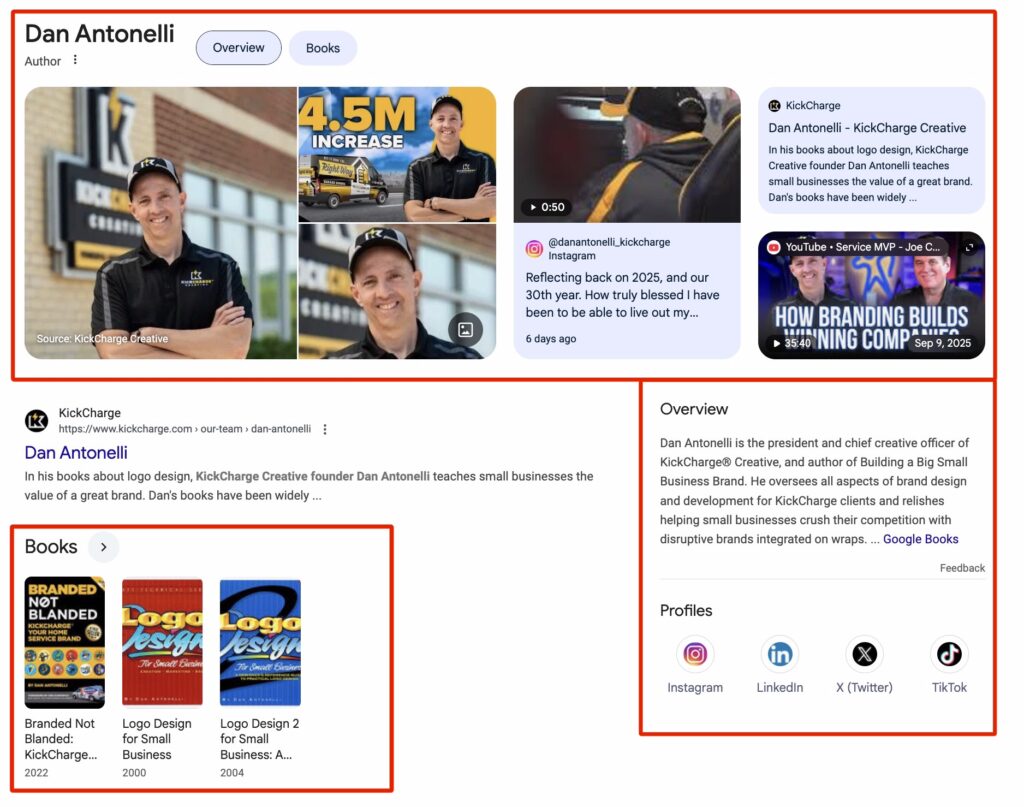
This is the part theory-only guides can’t match. These are real panels we earned for real business owners:
- Tommy Mello — founder of A1 Garage Door Service, a nine-figure home-service company.
- Dan Antonelli — founder & CEO of KickCharge Creative.
- Anthony Hilb — founder of Anthony’s Lawn Care, who grew a push-mower side hustle into four companies across 145 cities.
- …and 100+ more — friends and clients we’ve earned panels for, and counting.
You can see the full wall of earned panels — and the exact done-for-you process — on the Knowledge Panel Package page.
How to get a Google Knowledge Panel
There’s no secret and no checkout button — you can’t buy a panel. You earn it by giving Google enough trusted, consistent signals to be confident about you. The method, in four moves:
- Build an entity home. A personal-brand website that is unmistakably about you, with Person schema, an author/press page, and your achievements.
- Build the topic wheel. Hub and spoke — your site is the hub; your socials, press, podcasts, and citations are spokes, all pointing back to you.
- Establish your geo-vertical grid. Prove you do what you do, where you say you do it — through real, corroborating signals.
- Lift the confidence score. Person schema, consistent profiles, earned media, and shared authority from credible connections.
For the full, step-by-step version, read our deep guide: How to Get a Google Knowledge Panel: the complete 7-step process.
How to claim your Knowledge Panel
Once your panel appears, you can claim it to verify you’re the official representative and request edits. The process — verifying your identity and submitting changes — is laid out in our step-by-step claim walkthrough. Important: to fix incorrect info, you usually have to correct the underlying sources too, or Google re-learns the wrong data.
Troubleshooting: panel disappeared, not showing, or wrong
Knowledge Panels can vanish — usually when Google’s confidence in your entity drops (a source changed, profiles fell out of sync, or conflicting information appeared). The fix is almost always the same: restore consistency and trust across your sources, and re-confirm the signals that defined the entity. We’ve recovered panels that disappeared by collapsing broken redirect chains and re-aligning entity data — the same playbook that earns them in the first place. If yours is gone or wrong, check where your entity stands first, then rebuild the weakest signals.
Knowledge Panels by industry
The fundamentals are the same for everyone, but what moves the confidence score differs by trade — the reviews, the job-site proof, the local signals, and the Local Service Ads tie-in all look different for a roofer than for a restaurant. We build industry-specific Knowledge Panel guidance for each vertical:
- Roofing, HVAC, Plumbing
- Landscaping, Concrete, Painting, Pressure Washing
- Law firms, Real estate, Auto dealers
Check yours — and get help
Two ways forward:
- Do it yourself. Start by seeing how Google understands you today with our free Knowledge Graph Explorer, then work the method above.
- Have us do it. Our done-for-you Knowledge Panel Package runs every step — from audit through the claim. We check your KGMID before you pay: if we take you on, your panel goes live or you get a full refund.
Frequently asked questions
Do I have to be famous to get a Knowledge Panel?
No. Google rewards clarity and trusted signals, not fame. We’ve earned panels for business owners with modest followings by structuring their information correctly.
Can I buy a Google Knowledge Panel?
No — there’s no checkout for a panel. You can hire a team to do the work that makes Google confident enough to show one, but the panel itself is generated by Google’s algorithm.
How long does it take?
Typically 3–9 months depending on how competitive your name is and how much real proof already exists. Competitive names can take longer; the fastest cases happen in under 60 days.
Why did my Knowledge Panel disappear?
Almost always a drop in Google’s confidence — a changed source, inconsistent profiles, or conflicting data. Restore consistency across your sources and the panel typically returns.