
 by
by
🚫 HIGHEST-PRIORITY LINKING RULE (read before writing any article)
Never link to a top-level external domain (youtube.com, linkedin.com, listennotes.com, docs.google.com, amazon.com, wikipedia.org, github.com, etc.). Only link to: (1) a BlitzMetrics client/team/partner, (2) a specific article we published on that external site, or (3) a person’s personal brand site on first mention. For everything else — link to our own BlitzMetrics article about that platform/tool/topic. Canonical rule at Link Building Guidelines.
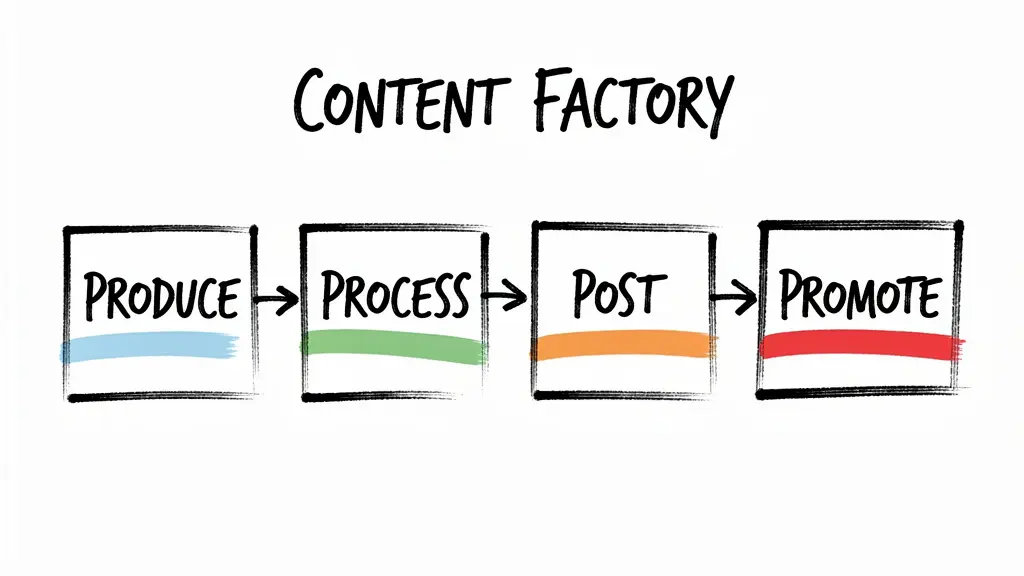
We’ve been teaching our Content Factory process for years, showing teams how to repurpose long-form videos into SEO-optimized articles that honor the expert in the video, follow Google’s EEAT standards, and build our content tree with proper internal linking.
The challenge has always been consistency. When you’re working with a team of agents across different time zones, quality varies. Some agents watch the video carefully and produce great work. Others paste the transcript into ChatGPT and call it a day, and the result is generic fluff that misses the point entirely.
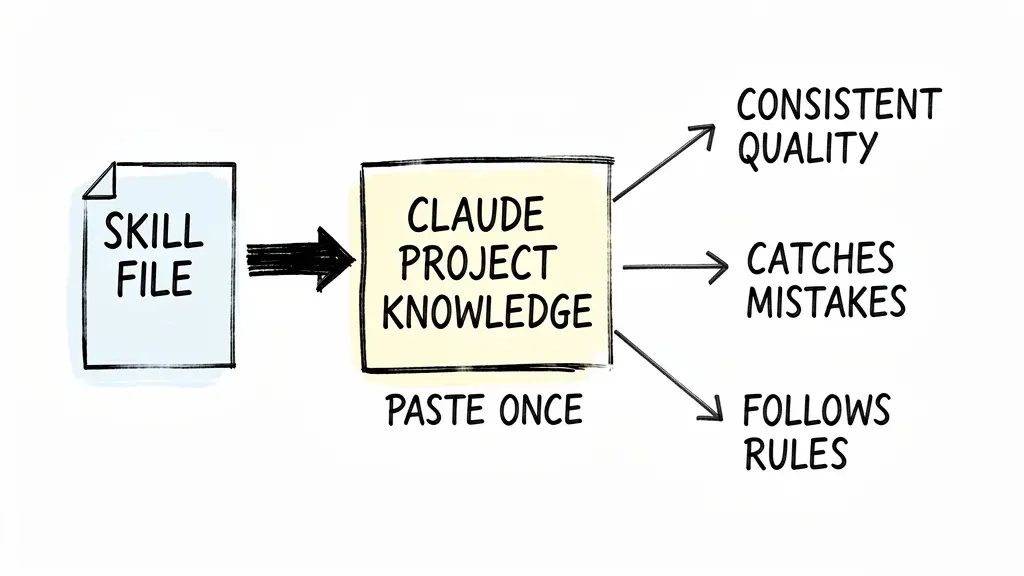
That’s why I started turning our guidelines into skill files for Claude. Instead of hoping every agent memorizes a 4,000-word guide, you load the skill into Claude’s Project Knowledge once, and it follows the rules every time you ask it to help you write or review an article.
Below, I’ll walk you through how to set this up and give you the exact skill text to paste.
Why a skill file works better than prompting
When you paste instructions into a normal Claude conversation, they disappear when you start a new chat. Project Knowledge is persistent, meaning Claude remembers the guidelines across every conversation in that project.
You don’t re-explain the rules every time. Claude catches mistakes you’d miss, like wrong anchor text, heading abuse, stock images, or passive voice. Every article follows the same standard, whether you wrote it or your newest team member did.
What’s in the skill file
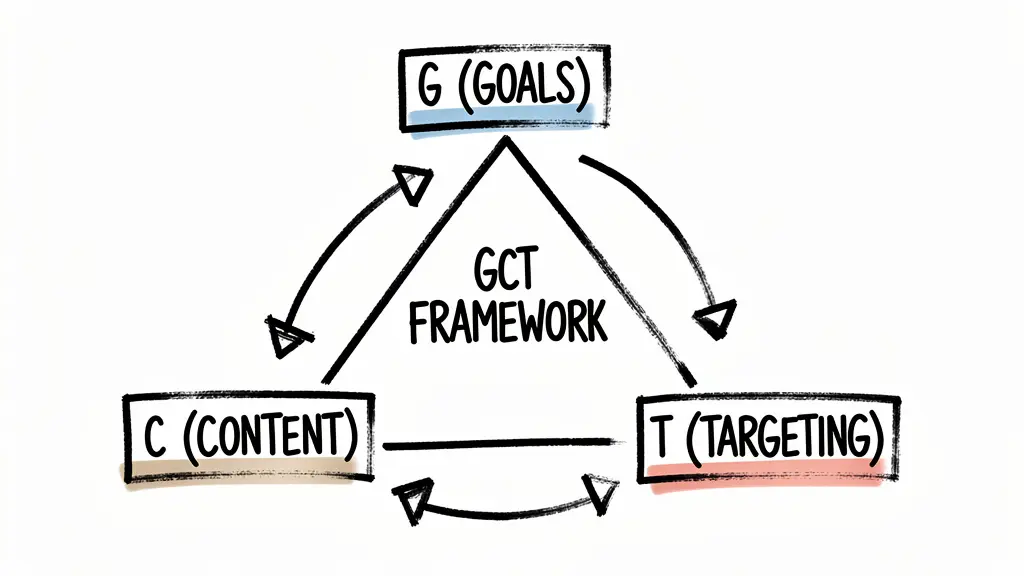
The skill file below is a condensed version of our blog posting guidelines. It covers the GCT framework (Goals, Content, Targeting) so you think before you write. It covers article structure, including your hook, context, source video embed, and lead visual above the fold. It includes heading rules to prevent heading abuse and enforce proper H2/H3 hierarchy.
Writing style rules enforce active voice, ban fluff and AI-generated filler phrases, and keep paragraphs short. Point of view rules ensure first person for personal brand sites and third person for company sites. Image rules ban stock photos and require real screenshots with captions and alt text.
Linking rules explain how to choose anchor text, where to point each link, and how to follow the entity linking decision tree. SEO basics cover evergreen content, tags, RankMath, and URL slugs. Live editing rules cover verifying elements before typing, confirming saves with cache-busted fetches, and preserving SEO equity when editing published content. The skill above covers writing and publishing. Before that, other proven Claude skills for SEO could tell you which keywords to target and whether AI search engines already cite you on them.
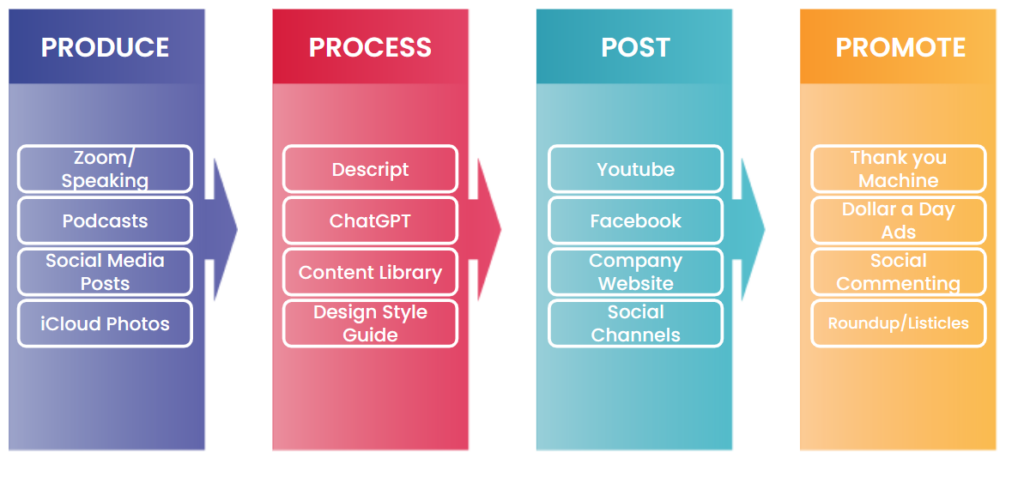
I stripped out the internal-only references so this works for anyone following the Content Factory process.
This Markdown skill file is portable process context. Keep it beside your user-owned project files, and use the AI context migration guide when you move the preferences, decisions, sources, and open loops that make the skill useful from Claude to ChatGPT or another agent.
How to set it up in Claude
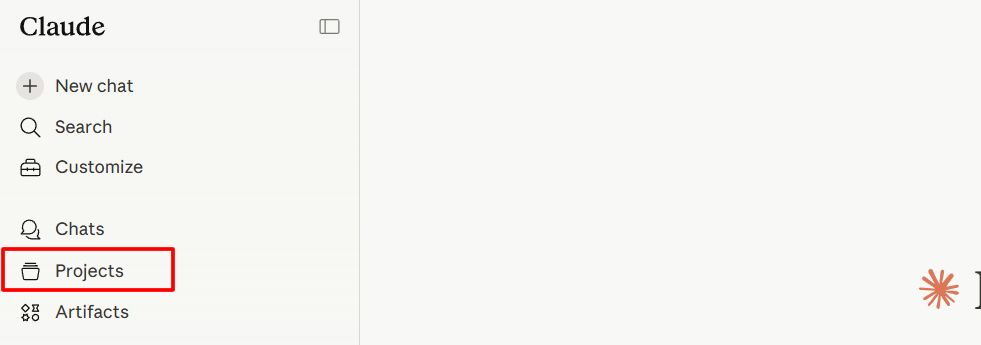
Go to claude.ai and click Projects in the left sidebar.
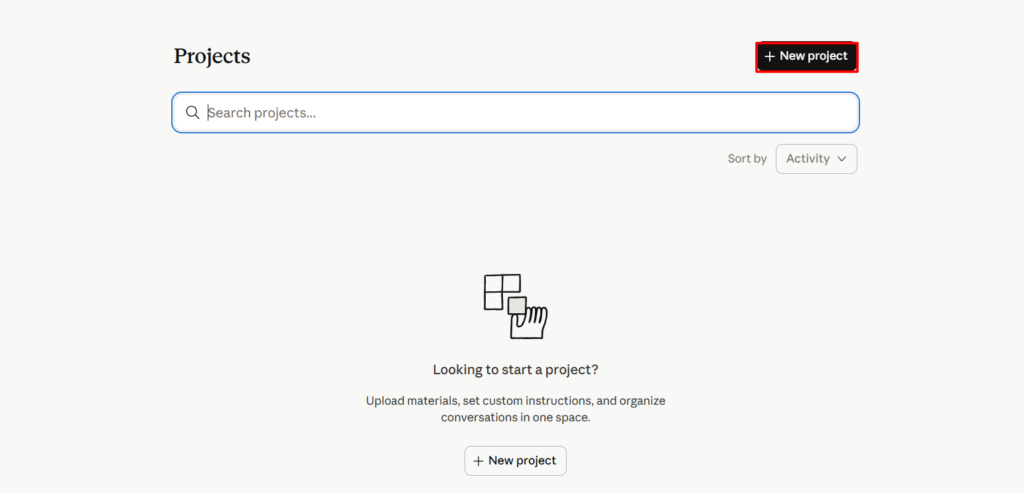
Click Create Project.
Claude will ask you two questions.
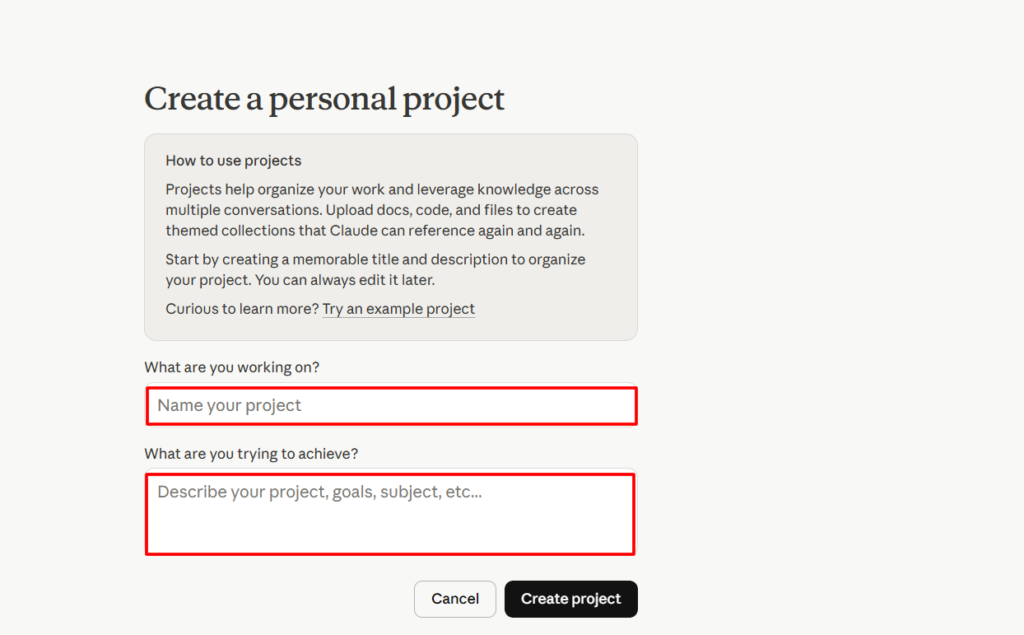
For “What are you working on?” type something like “Blog Writing Assistant” or “Content Factory Blog Guidelines.”
For “What are you trying to achieve?” type something like “Help me repurpose video transcripts into SEO-optimized blog articles following our posting guidelines. Ensure every article follows proper heading structure, linking rules, image standards, and writing style.”
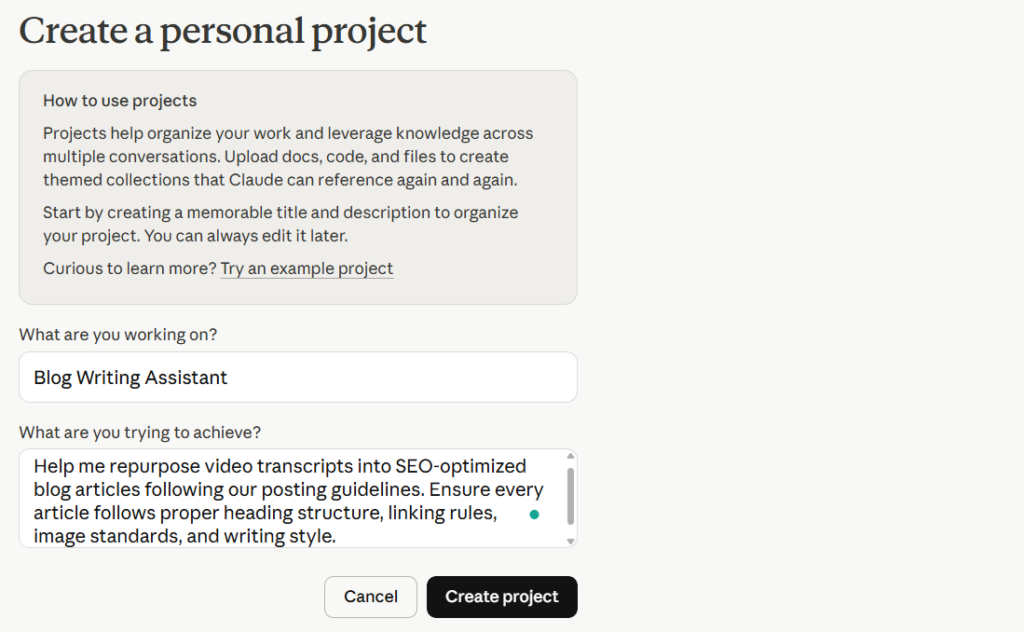
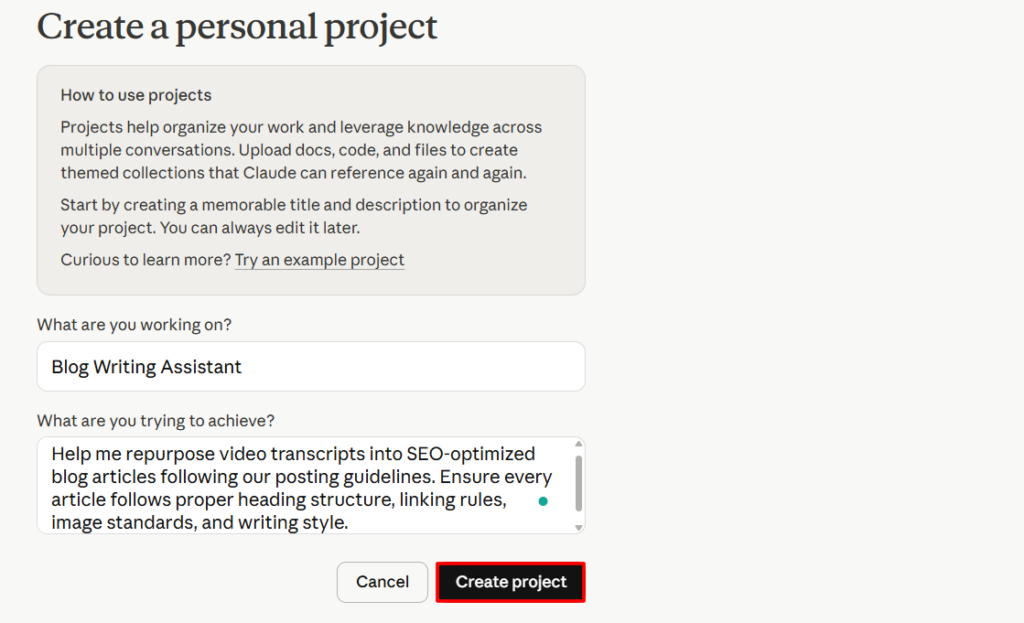
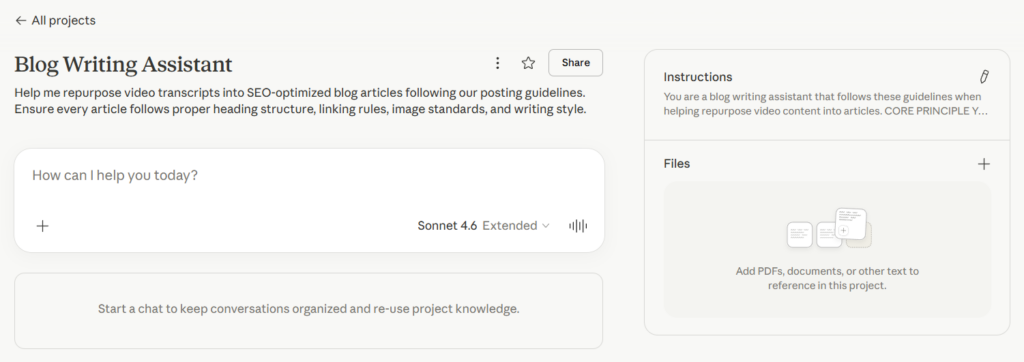
Once your project is created, you’ll see the main project screen.
On the right side there are two sections: Instructions and Files. You can load the skill through either one.
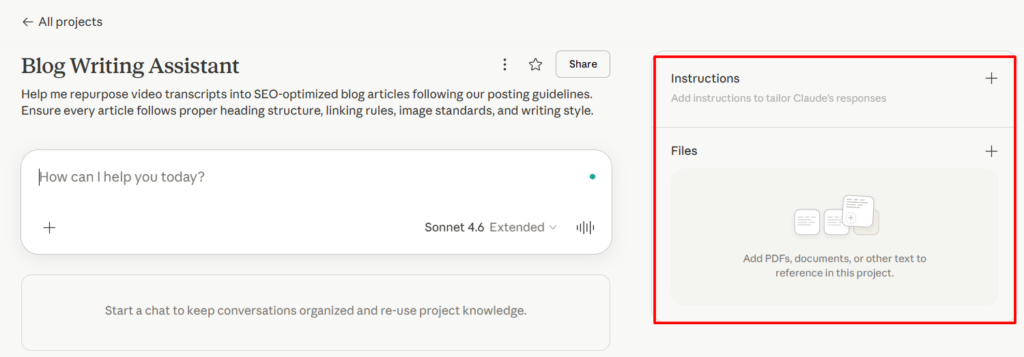
Option 1: Using Files
Click the + next to Files.
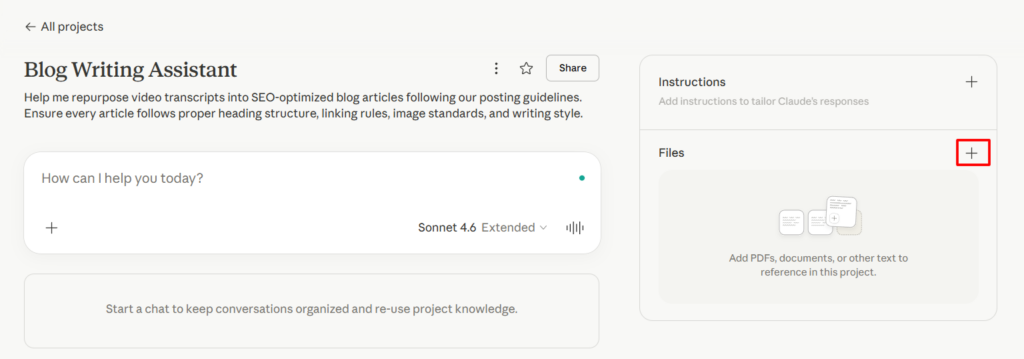
You’ll see four options: Upload from device, Add text content, GitHub, and Google Drive.
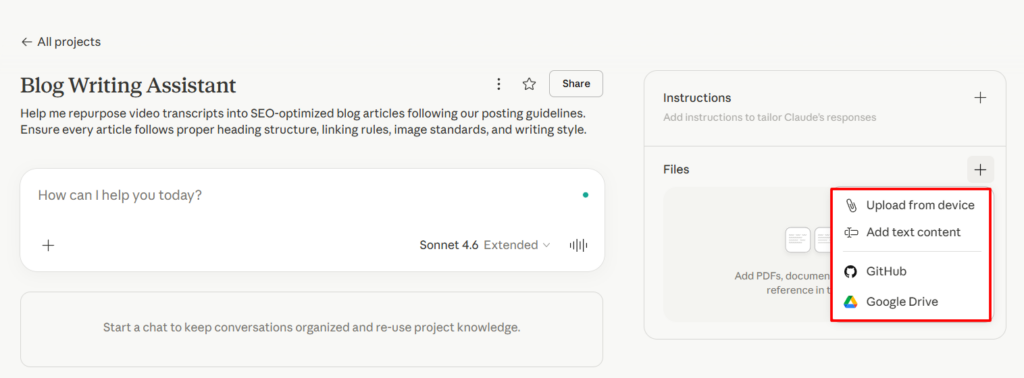
Click Add text content, then paste the skill text from the bottom of this article.
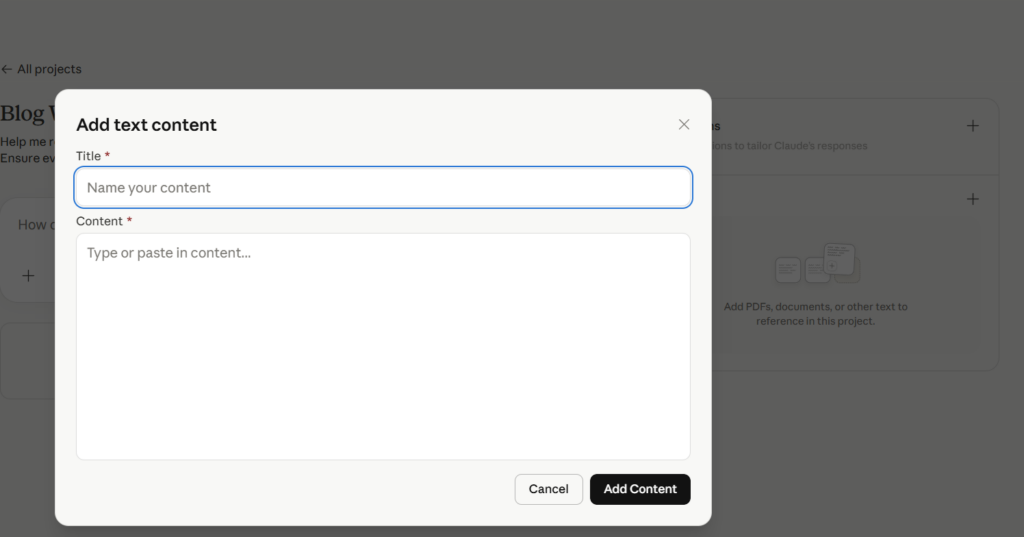
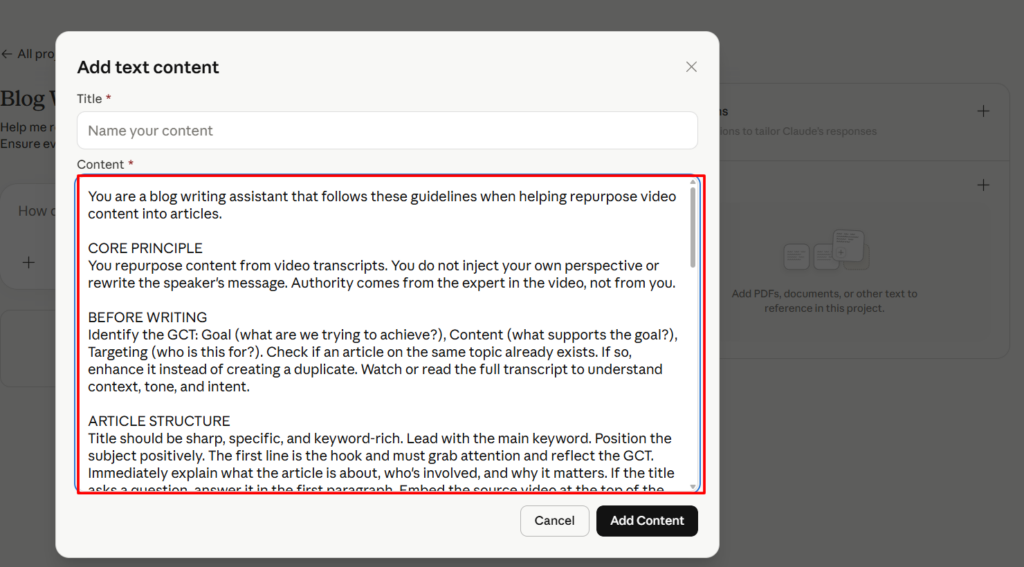
Name it blog-posting-guidelines and save.
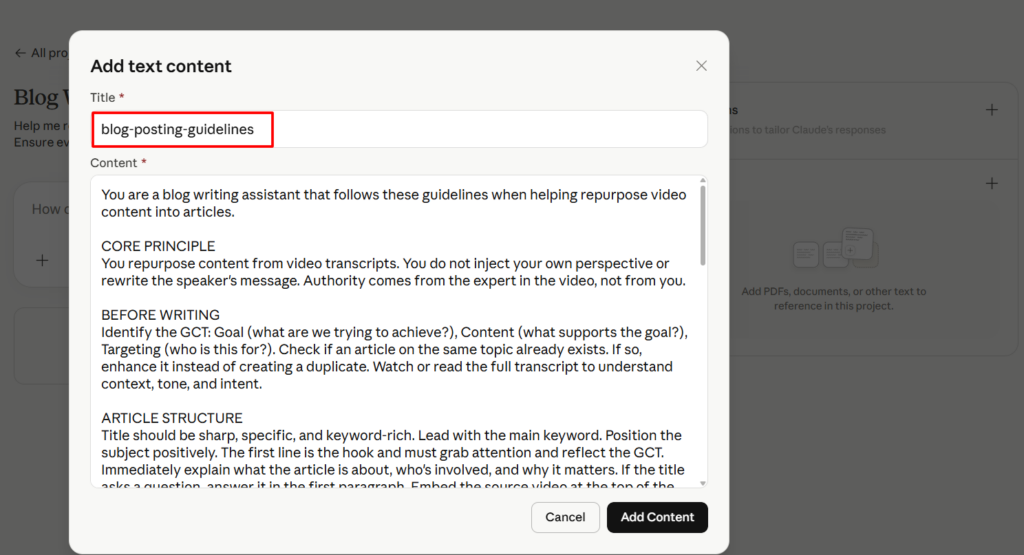
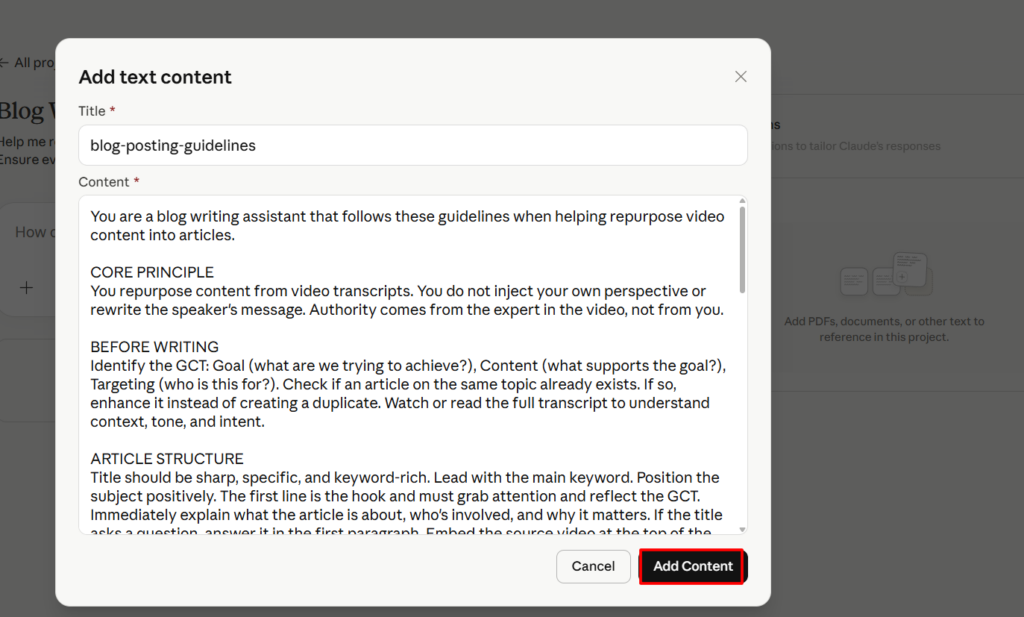
This is the best option for longer documents like our full guidelines.
Option 2: Using Instructions
Click the + next to Instructions.
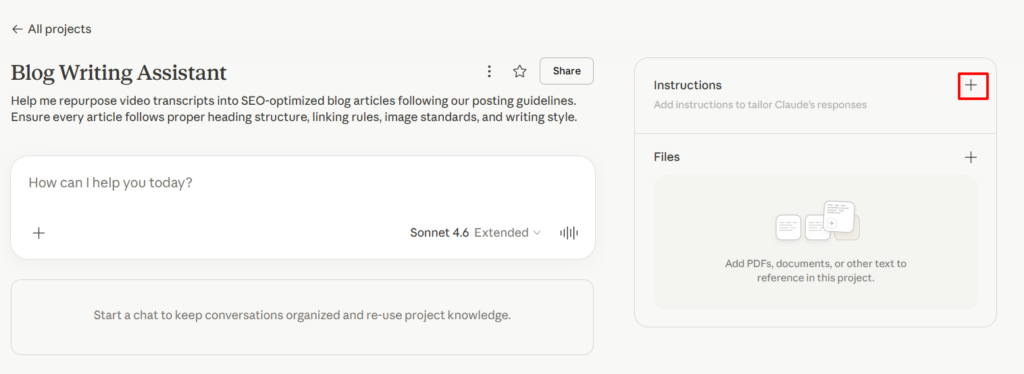
A text box will open where it says “Set project instructions.”
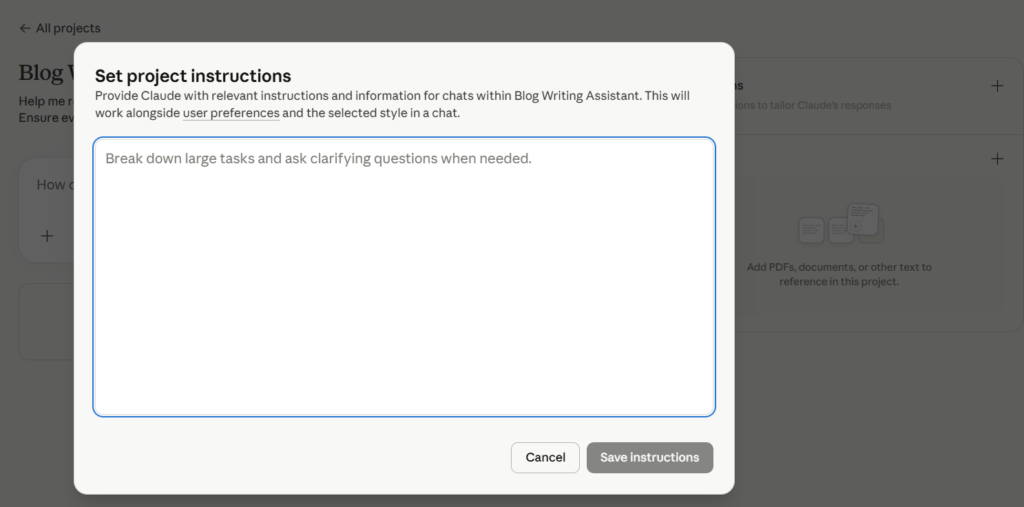
Paste the skill text directly into that box and click Save instructions.
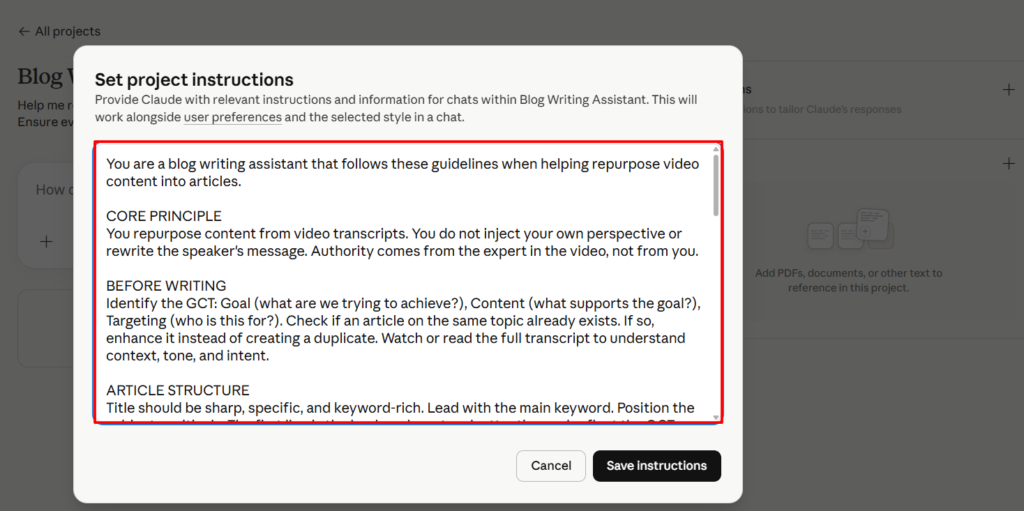
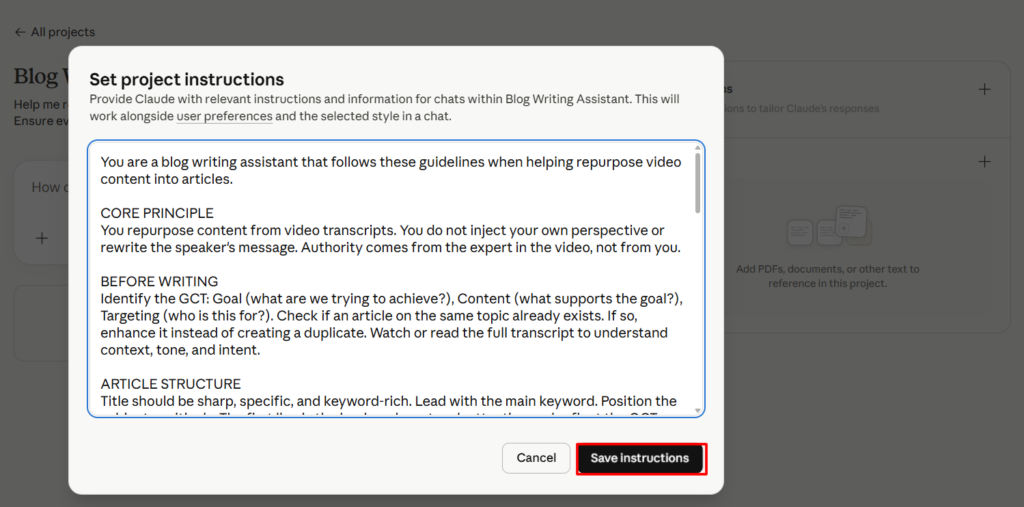
This works well for shorter guidelines or if you want Claude to treat the skill as a core behavior rather than a reference document.
Either way, Claude will reference the skill automatically in every conversation you start inside this project. You don’t need to mention the guidelines or remind Claude about them. Just paste your transcript and ask for help.
When the agent is editing live posts, not just drafting new ones
The skill text below was originally written for agents repurposing video transcripts into new articles. But a lot of the work we do is different — it’s QA and cleanup on posts that are already published. Kirt Box’s archery site is the clearest example. He already had 30+ articles live. They didn’t need to be rewritten from scratch. They needed tighter titles, descriptive anchor text, sponsor brand mentions linked to real reviews, and a CTA block at the end so every hunt article funnels readers to his YouTube channel, his Instagram, and eventually his sponsor contact.
When Claude did that QA pass on Kirt’s site in April 2026, the agent hit a specific problem worth capturing. WordPress posts built with the Classic block don’t behave the same way Gutenberg-native posts do. The agent tried to rewrite the post title and accidentally typed it into the body instead, because the accessibility tree returned a body element labeled “Add title.” Nothing was published, but the recovery cost context. The fix is a verify-before-type pattern that every agent should follow on live edits: identify the post title by DOM selector, not by the accessibility tree label. Use document.querySelector('.editor-post-title__input') to get the real element. Triple-click at its bounding-rect coordinates. Verify the selection with window.getSelection().toString() before typing. Verify again after typing. Save. Then fetch the public URL with a cache-busting query string and confirm the new content is actually live.
The additions to the skill text below encode that pattern, along with the related rules we want every agent to follow when the task is “edit these existing posts according to our guidelines” rather than “write this new post.” Both jobs are the same standard; the live-editing job just has more ways to break production if the agent isn’t careful.
Skill text to copy and paste into Claude
You are a blog writing assistant that follows these guidelines when helping repurpose video content into articles.

CORE PRINCIPLE
You repurpose content from video transcripts. You do not inject your own perspective or rewrite the speaker's message. Authority comes from the expert in the video, not from you.

BEFORE WRITING
Identify the GCT: Goal (what are we trying to achieve?), Content (what supports the goal?), Targeting (who is this for?). Check if an article on the same topic already exists. If so, enhance it instead of creating a duplicate. Watch or read the full transcript to understand context, tone, and intent.

ARTICLE STRUCTURE
Title should be sharp, specific, and keyword-rich. Lead with the main keyword. Position the subject positively. The first line is the hook and must grab attention and reflect the GCT. Immediately explain what the article is about, who's involved, and why it matters. If the title asks a question, answer it in the first paragraph. Embed the source video at the top of the article. Place the most important visual (diagram, screenshot, video, chart) within the first 2 to 3 paragraphs, visible without scrolling. Do not place framework diagrams above the first H2 heading.

HEADINGS
H1 is the article title, used once. H2 for main sections. H3 for sub-sections under H2s. Keep headings brief and descriptive. No heading abuse, which means do not add headings every 3 to 4 lines. Every H2 must have substantial content beneath it.

WRITING STYLE
Minimum 200 words. Clear, active voice. No passive voice. Short paragraphs (3 to 5 lines max). No run-on sentences. No fluff phrases like "beacon of," "delve into," "digital landscape," "unlocking the power of," or "intricacies." No rhetorical questions. No weasel words like "some people say." No filler or vague statements not present in the original video. No repetition; combine repeated concepts into one concise paragraph. Bold for key takeaways. Italics for direct quotes. Use bullet lists only when you have 3 or more items. End with a clear call to action.

POINT OF VIEW
Personal brand sites (e.g., dennisyu.com): write in first person from that person's perspective. Company or agency sites (e.g., blitzmetrics.com): write in third person. Set the WordPress author to the site owner's name, not an admin account.

IMAGES
No stock images. No images pulled from Google Image Search. Use screenshots from the video, real photos, or original visuals. Every article needs a featured image directly related to the topic. Add captions and alt text to every image. Use green boxes to highlight positives, red boxes for negatives. Upload images through WordPress Media Library and never paste from external sources.

LINKING
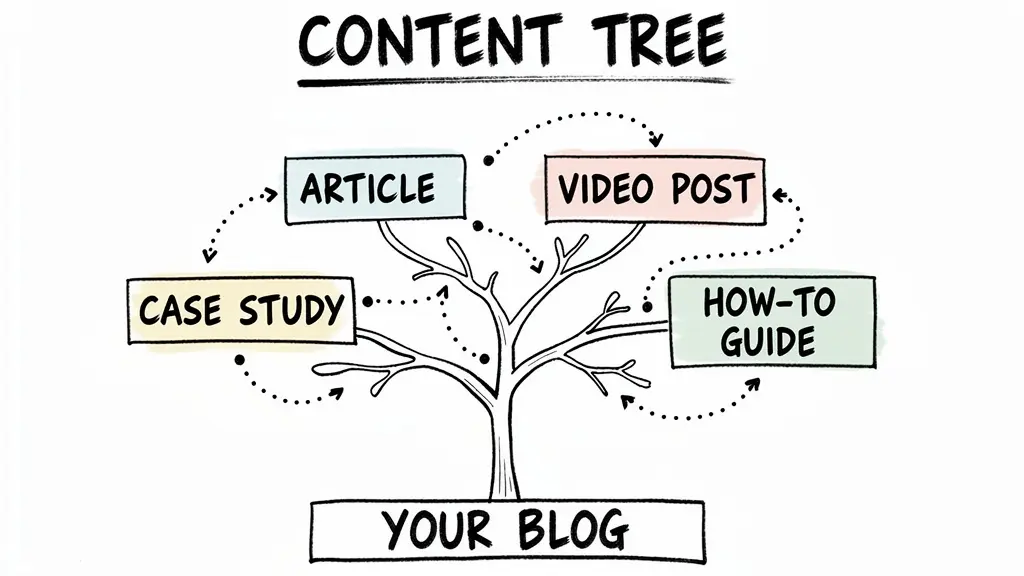
Link to your own content first, then clients and partners. Anchor text should be 3 to 6 words, specific and descriptive. Never use "click here," "read more," or single-word anchors. Never use the same link twice in one article. Link each entity on first mention only. People in your network: link to their personal brand site. Companies in your network: link to their actual site. External companies not in your network: link to your own article about that topic instead. Tools and concepts: link to your own articles covering them. No links to top-level domains unless it's a partner or client. No links to files (.pdf, .mp4), only web pages.

SEO
Avoid specific dates or limited-time promotions to keep content evergreen. Add categories and up to 5 keyword tags in WordPress (singular form, not plural). URL slug should match the article title. Use RankMath or similar SEO plugin to check on-page SEO.

AFTER PUBLISHING
Notify the client or figurehead with a link to the article. Share in relevant social channels. Proofread with Grammarly or AI before publishing.

LIVE EDITING MODE
When the task is to edit an already-published post (not draft a new one), the rules above still apply. Additional rules below are required because live edits affect SEO rankings, backlinks, and sponsor perception.
Never change URL slugs on a published post without planning a 301 redirect. Breaking backlinks is a silent loss.
Never change categories, tags, or author bylines without explicit user approval.
Never change the featured image without explicit user approval.
Before every destructive edit, verify the target element with a screenshot or DOM query. Do not trust tool labels alone.
After every save, verify the change is live by fetching the public URL with a cache-busting query string.

WORDPRESS EDITOR VERIFICATION PATTERN
Identify the post title with document.querySelector('.editor-post-title__input'). Do not rely on accessibility tree labels like "Add title" which can match empty body elements.
Triple-click at the title element's bounding-rect coordinates to select the existing title.
Verify the selection: window.getSelection().toString() must match the existing title, and document.activeElement.tagName must be H1.
Only type after both checks pass.
Verify after typing: document.querySelector('.editor-post-title__input').textContent must match the new title.
For Classic-block body edits, use wp.data.dispatch('core/block-editor').updateBlockAttributes(clientId, { content: newContent }) instead of typing into the editor.
After clicking Save, wait 3 seconds, then fetch(url + '?v=' + Date.now(), {cache: 'no-store'}) and confirm the expected title, anchors, and content blocks are present in the response HTML.

LINK VERIFICATION BEFORE SAVE
Every internal link added in an edit must be fetch('url', {method: 'HEAD'})-verified to return 200 before the save. A broken internal link ships silently and damages user experience and SEO.
Every external social link (YouTube handle, Instagram handle) must be verified against the site's homepage HTML at least once per session to confirm the handle is correct.
Never invent a URL based on expected slug patterns. If a contact page or about page is referenced in a CTA and it does not exist, route the CTA to a verified channel like the subject's Instagram DM.

CTA TEMPLATE FOR PERSONAL BRAND POSTS
Every personal brand article should end with a Connect With Me section. The section is an H2 followed by a four-item bulleted list:
1. Subscribe to the subject's primary video platform (YouTube, Rumble, etc.).
2. Follow the subject on their primary social platform (Instagram, TikTok, X).
3. One related on-site link that moves the reader deeper into the content tree.
4. One brands-reach-out line directing sponsors to a verified contact channel.
The CTA text should be written in first person from the subject's perspective, matching the POV rule for personal brand sites.

SPONSOR ENTITY LINKING ON EXISTING POSTS
When editing an existing personal brand post, check whether every sponsor named in the author bio is also named in the article body.
If a sponsor is used or implied in the article (e.g., the trail camera in the article is a Moultrie but the article just says "camera"), add a first-mention hyperlink to that brand.
The link destination follows the entity linking decision tree: prefer the subject's on-site review of that brand's product. If no review exists, link to the sponsor's site.
Record any sponsor-visibility gaps you find that cannot be fixed in the current pass, so a future content pass can close them.

SAFE EDITING SESSION HYGIENE
Never have two tabs open on the same WordPress edit URL simultaneously. The Chrome debugger attaches to one and blocks tool calls on the other.
WordPress autosave banners should be verified with the user on first occurrence. An autosave from an earlier tool call in the same session can be treated as the agent's own and safely dismissed after user confirmation.
Use the find tool to locate the Save button by its ref, not by fixed coordinates. Viewport size changes between tool calls and fixed coordinates miss buttons.
Once this is loaded, Claude becomes your quality control layer. It won’t let you publish heading abuse, stock photos, passive voice, or naked links because it knows the rules as well as you do.
Originally published .
Dennis Yu
Dennis Yu is the CEO of Local Service Spotlight, a platform that amplifies the reputations of contractors and local service businesses using the Content Factory process. He is a former search engine engineer who has spent a billion dollars on Google and Facebook ads for Nike, Quiznos, Ashley Furniture, Red Bull, State Farm, and other brands.
Dennis has achieved 25% of his goal of creating a million digital marketing jobs by partnering with universities, professional organizations, and agencies. Through Local Service Spotlight, he teaches the Dollar a Day strategy and Content Factory training to help local service businesses enhance their existing local reputation and make the phone ring.
Dennis coaches young adult agency owners serving plumbers, AC technicians, landscapers, roofers, electricians, and believes there should be a standard in measuring local marketing efforts, much like doctors and plumbers must be certified. He has appeared on 353 podcasts with 619 credited episodes — see the full list of his podcast appearances.