
 by
by
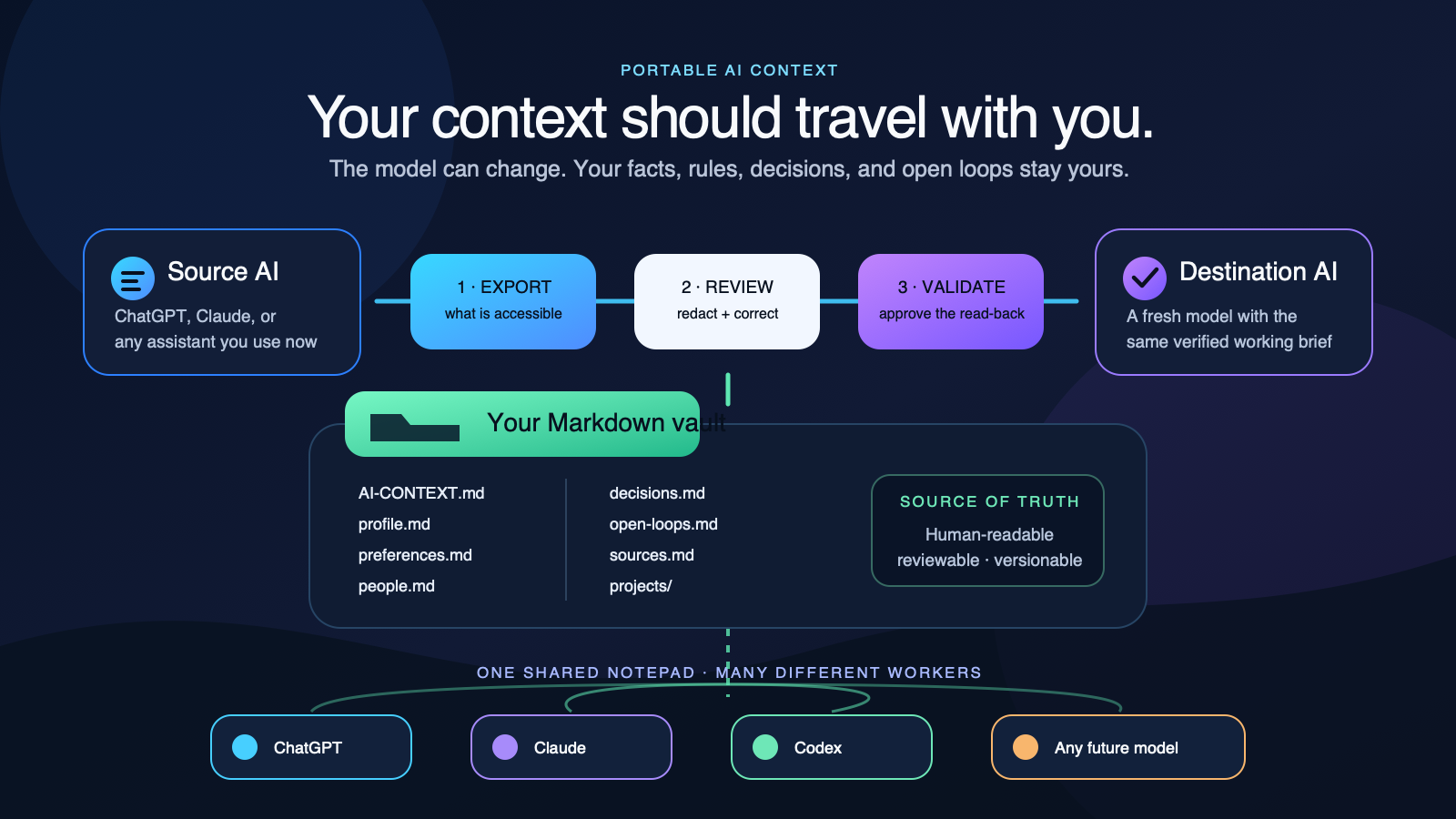
Two weeks ago we shipped the lockdown files pattern — a three-tier memory layout on disk (CLAUDE.md hot cache, memory/ deep storage, per-client bundles as source of truth) that gives Claude a workplace memory between Cowork sessions. The article answered one half of a question Dennis was actually asking. The other half: you also need that memory. And so does every other agent in the stack — ChatGPT on the desktop, Grok in a browser tab, whatever model ships next quarter. We built three separate knowledge graphs across three separate tools, and none of them talked to each other.
This article documents the fix we landed on: an ordinary Markdown folder that humans browse in Obsidian and authorized local agents read through their permitted file tools. ChatGPT, Grok, or another web or cloud workspace receives only the files it is authorized to use, through a supported connector or a reviewed context packet. This page explains that file interface. The governing shared-memory architecture determines which record belongs where and which agent may use it.
TL;DR
An Obsidian vault is an ordinary folder of Markdown files. Humans browse it with links, backlinks, search, and graph view; authorized file-capable agents read the permitted files; web projects receive only the reviewed context they need. Keep one authoritative home for each record type. Keep passwords, tokens, and other secret values in the approved secret store, outside the vault and every context export. Notes may reference the store and key name without containing the value; share confidential records only with an approved audience.
Strategy: One Folder, Many Readers
The knowledge-trapped-per-tool problem is the same problem Google’s Knowledge Graph solves for the public web: without a canonical entity record, every system has to re-derive what it knows about a person or a project from scratch every time. Inside a team, the same thing plays out across AI tools. Claude learns about Carson Teagarden in one Cowork session; ChatGPT starts a separate conversation and asks “who’s Carson?”; Grok never gets told in the first place. Three weeks in, you’re explaining the same context three times and paying the attention tax three times.
Obsidian’s vault model solves the human half of this. A vault is just a folder of markdown files; links between notes use [[double brackets]]; the graph view shows you every entity and every relationship. No database, no SaaS, no lock-in. Open any vault folder on any machine and every note is readable as plain text with or without Obsidian running.
The part we added: the vault folder is also Claude’s workspace root. Every note you write in Obsidian is a file Claude can read the next session. Every file Claude writes to memory/ is a note that shows up in your Obsidian graph with full backlinks and search. There is no sync process between the two — there’s nothing to sync, because they are reading the same files.
The Problem: Knowledge Islands Per Agent
Here’s what a week inside BlitzMetrics looked like before this layer existed. Dennis takes a discovery call with a new client on Tuesday. He types notes into Basecamp, dictates a voice memo to himself in his car, forwards an email thread to a colleague, then opens ChatGPT on Wednesday morning to draft a proposal — and has to paste in a fresh summary of who the client is, because ChatGPT’s “memory” feature only remembers generic preferences, not project-specific context. Thursday he opens Cowork, asks Claude to research the client’s competitors, and has to paste the same summary again. Friday he opens Grok in a browser tab to cross-check a technical claim, and pastes it a third time.
Three pastes is the minimum. The actual cost is that each agent’s answer is only as good as the last paste, which is often a shorter, staler summary of what Dennis knows. The lockdown files article addressed this for a configured Claude workspace: reading CLAUDE.md and the relevant memory/ files lets a new session recover the state the previous session actually saved. Verify that retrieval with a harmless read in a fresh task. That file pattern alone does not give another runtime access to a prior conversation or notify it that work is waiting.
The other thing that broke: Dennis’s own note-taking was already fragmented before any AI was involved. A note about Carson lives half in Apple Notes, half in a Basecamp thread, half in a Google Doc from three months ago, half in a voice memo that was never transcribed. There’s no graph, no backlinks, no single canonical answer to “what do we know about Carson Teagarden.”
One folder, many readers — solves both problems at once.
The Pattern: Workspace Folder = Obsidian Vault = Claude’s Memory Root
The vault lives at a single known path on disk. In Dennis’s case, that’s the Cowork workspace folder (~/Claude/local-agent-mode-sessions/ under the hood; Obsidian opens it as BlitzMetrics-vault). The same folder contains:
- Claude’s hot cache (
CLAUDE.mdat the selected workspace root — confirm that the configured runtime loads it in a fresh task) - Claude’s deep storage (
memory/subtree — approved profiles, projects, access-location references, and terms; no secret values) - Per-client bundles (
carsonteagarden-site-bundle/,kirtbox-site-bundle/— the source-of-truth content artifacts) - A human-facing
Home.mdwith[[wikilinks]]to everything - Obsidian’s own config (
.obsidian/— plugins, themes, graph settings)
The only new addition is the .obsidian/ config folder. Everything else was already there from the lockdown pattern. What the config does: it tells Obsidian “this folder is a vault, here are the plugins I want enabled (Dataview for querying, Templater for daily-note scaffolds, Tasks for todo capture, Outliner for bulleted thinking), and here’s the graph color scheme.” Open the folder in Obsidian once, accept the trust prompt, and every existing markdown file becomes a linkable note with full-text search and backlinks.
The Layout — Annotated by Reader
The same tree from the hero figure, with annotations showing who reads what:
BlitzMetrics-vault/                        # Obsidian vault root = Claude's workspace root
├── .obsidian/                             # Obsidian config — you, local only
├── .obsidianignore                        # Hide noisy session/audit logs from the vault
├── .gitignore                             # Exclude private notes; keep secret values outside this vault
│
├── Home.md                                ← START HERE in Obsidian
├── CLAUDE.md                              ← Claude reads this first
│
├── memory/                                ← Claude's deep storage
│   ├── people/
│   │   ├── carson.md                      ↔ same file as [[Carson Teagarden]]
│   │   └── kirt.md                        ↔ same file as [[Kirt Box]]
│   ├── projects/
│   │   ├── blitzmetrics-com.md
│   │   └── carsonteagarden.md
│   ├── context/
│   │   ├── glossary.md                    ↔ [[Glossary]]
│   │   └── access-locations.md            store/key names only — values stay in the approved secret store
│   └── preferences.md
│
├── clients/                               ← human-facing client dashboards
│   ├── Carson/
│   │   └── index.md                       wikilinks to bundle, schedule, notes
│   └── Kirt/
│       └── index.md
│
├── carsonteagarden-site-bundle/           ← source-of-truth bundle
│   ├── STRATEGY.md
│   ├── BLOG-POST-PLAN.md
│   ├── QA-PASS-LOG.md
│   └── pages/posts/schema/…
│
├── kirtbox-site-bundle/                   ← completed reference bundle
│
└── meta-articles/                         ← drafts for blitzmetrics.com
    ├── how-we-built-carsonteagarden-com.html
    ├── lockdown-files-cowork-memory-system.html
    └── obsidian-cowork-layer.html         # (this article)
Every human-named file (Home.md, clients/Carson/index.md, etc.) uses Obsidian [[wikilink]] syntax to point at the snake-case files Claude writes. Obsidian resolves [[Carson Teagarden]] to memory/people/carson.md because it searches by basename and alias. That means Dennis writes in human names, Claude writes in snake_case, and they both end up pointing at the same file.
Per-Entity Notes — The Seed Set
The vault we bootstrapped for Dennis starts with seven human-readable notes that act as graph hubs, plus whatever Claude had already written to memory/:
| Note | Purpose | Backlinks to |
|---|---|---|
Home.md |
Vault dashboard — what’s active, who’s who, this week’s priorities | Every project + person |
Dennis.md |
Your own index — your role, your projects, your preferences | Projects + team |
people/Carson Teagarden.md |
Client profile — bio, channel stats, three-audience strategy, current status | [[carsonteagarden.com]], [[Pure Strength]] |
people/Kirt Box.md |
Past-client profile — sponsors, veteran status, site playbook reference | [[kirtbox.com]], [[Victory Archery]] |
projects/BlitzMetrics.com.md |
House blog project — house style, publish cadence, running post log | Every published meta article |
projects/carsonteagarden.com.md |
Active client build — page IDs, workarounds, contact emails | [[Carson Teagarden]] |
terms/Glossary.md |
Shorthand decoder — BlitzAdmin, bundle, WAF gotcha, app password | Everything that uses those terms |
The point of these seven files isn’t that Claude needs them — Claude already reads memory/ directly. The point is that you need them, as a human opening Obsidian’s graph view and actually being able to navigate your own knowledge. The seed set establishes the entity hubs. Everything you write from here on — daily notes, meeting recaps, ideas — links into the hubs using [[wikilinks]], and the graph grows organically.
Cross-Agent Sync — The Honest Engineering
This is the part that sounds like it should be magic and isn’t. There is no single sync protocol that works across Claude, ChatGPT, and Grok. Each agent has its own file-access model, and we pick whichever one fits best per agent. Three patterns, in order of effort:
Pattern 1 — Claude (Cowork desktop): native. No sync needed.
In a configured Cowork workspace, Claude can use the file tools and folder access that the user has granted. Open the intended vault workspace, then verify a harmless read of CLAUDE.md and a relevant saved record in a fresh task. Writing or editing a file still depends on the current task’s authorization and the tools available in that runtime.
Pattern 2 — ChatGPT Projects and other file-aware workspaces: attach reviewed context files.
Add the short AI-CONTEXT.md, the relevant project and people files, and the original source artifacts to the destination project or workspace. Do not upload the entire private vault by default, and do not rely on a fixed file-count claim because plan limits change. If the useful context still lives inside another AI, run the reviewed context migration workflow first.
Pattern 3 — ad-hoc web agents: paste one scoped note.
When an assistant cannot read the folder, paste or attach only the relevant person, project, decision, or open-loop note. Ask the destination to read it back and flag contradictions before doing work. At the end, save the approved delta back to the vault instead of trusting the chat as the only record.
For more frequent updates, maintain a reviewed context folder in an approved cloud location. A runtime can read it only when its supported connector is configured for the intended account and files; verify one harmless read and check the record’s freshness. A shared drive or local save does not itself load context into every agent or send a message. Keep passwords, tokens, and other secret values in the approved secret store, outside the vault and all sync or export folders. An access note may record the store and key name, never the value. .gitignore controls Git tracking; it does not exclude a file from cloud sync or make the file safe to share.
How This Plugs Into Basecamp and Email
Dennis’s capture reality: he does not sit down and type carefully-structured Obsidian notes. He fires off Basecamp comments mid-conversation, forwards emails to himself as reminders, and dictates voice memos from his car. The vault has to meet that capture style, not the other way around.
The pattern we landed on is a daily note at daily/2026-04-23.md that acts as the inbox for the day. Anything quick — a Basecamp thread you want to remember, a screenshot of a customer message, a voice memo transcript, an idea scribbled between meetings — gets pasted or dropped into today’s daily note with a timestamp. Rough shape is fine. No templates required.
At the end of the week — or when Claude starts a Cowork session — anything in the daily notes that’s worth keeping gets promoted into a permanent hub. A Basecamp thread about Carson’s new video series gets a line added to people/Carson Teagarden.md. An email from a prospect becomes an entry under people/ with a new note and a backlink to the email. Claude can do the promotion pass for you — ask it “look at this week’s daily notes and promote anything that matters into the right entity note.” The daily notes stay as a raw chronological log; the hubs stay as the distilled, structured view.
This is the same pattern Tiago Forte calls PARA, but shrunk to four folders (people/, projects/, clients/, terms/) plus a rolling daily/ inbox. The point isn’t the taxonomy. The point is capture without friction, distill on cadence, and keep the entity graph tight enough that every agent reading it can answer a question in under 3 lookups.
Your Playbook When You Want the Vault Running Today
- Install Obsidian — download from obsidian.md. It’s free for personal use.
- Open the vault folder — on first launch, choose “Open folder as vault” and pick your Cowork workspace folder. Accept the trust prompt.
- Install four plugins from Community Plugins: Dataview (for querying notes as a database), Templater (for daily-note scaffolds), Tasks (for todo capture), and Outliner (for bulleted thinking). Enable each.
- Enable Daily Notes — set the folder to
daily/and the date format toYYYY-MM-DD. Now pressing Cmd+D drops you into today’s inbox. - Open Home.md — it already has wikilinks to every entity hub. Click a few to see the graph populate.
- Start capturing — paste tomorrow’s Basecamp thread into tomorrow’s daily note. Don’t format it. Just capture.
- Ask Claude to distill — at the next Cowork session, start with “read this week’s daily notes and promote anything client-relevant into the right hub.” Claude will write backlinks from the hubs into the daily notes so the graph stays connected.
- Share reviewed context files — attach the short hot cache and only the relevant project, people, decision, and source files. Use the cross-agent shared-memory protocol when more than one agent can write, and never upload the private vault by default.
Why This Compounds
The three-tier lockdown pattern stopped Claude from forgetting between sessions. The Obsidian layer stops you from forgetting between days, and stops the other agents in the stack from forgetting what Claude already knows. The compounding happens at three levels:
- Within a project — every session adds to the hub. Session N+1 is more informed than session N because session N wrote to the graph.
- Across projects — patterns from the Kirt build are visible in the vault when the Carson build starts. Claude can see “we hit a similar auth problem last time, the fix was X” because the old bundle is still in the vault.
- Across agents — ChatGPT answering an email proposal on Monday, Claude drafting a meta article on Tuesday, and Grok fact-checking a claim on Wednesday are all looking at the same set of notes. The answer to “who is Carson Teagarden, what matters about him, what’s the current status” is identical across all three because it’s literally the same file.
The Takeaway
The lockdown files article argued that Claude needs a workplace memory on disk. This article argues that the workplace memory should be shared with you and with every other agent you use, and that the cheapest way to do it is to make the workspace folder an Obsidian vault. No new tool. No new service. A config folder, a seed set of entity hubs, and a weekly zip upload to whatever other agents live outside Cowork.
When the three agents in your stack all know who Carson is, who Kirt is, how the bundle-as-source-of-truth pattern works, and what your house style for meta articles looks like — without you pasting any of that in at the top of a conversation — you’ve moved from per-session context management to one team memory, queried by many readers. That’s the outcome the lockdown pattern was pointing at. Obsidian is what closes the loop.
Related Meta Articles
- Lockdown files: how we give Claude a workplace memory between Cowork sessions — the three-tier architecture this article extends
- From Brain to Bot — How to Turn What You Know Into SOPs and AI Agents That Scale Your Business — the upstream framing: why knowledge needs to be captured once and re-used by both humans and agents
- Why I switched from ChatGPT to Claude for Chrome — and what 72 hours without sleep taught me about AI agents — the multi-agent reality check that motivated this cross-agent sync pattern
- How we built carsonteagarden.com when Elementor hijacked every page — the client build whose bundle lives inside the vault as a reference case
- How to run weekly AI agent SEO audits across all your clients — another cadence pattern that reads from the same vault
- How to build your authority engine — the outer loop this all feeds into
Originally published .
Dennis Yu
Dennis Yu is the CEO of Local Service Spotlight, a platform that amplifies the reputations of contractors and local service businesses using the Content Factory process. He is a former search engine engineer who has spent a billion dollars on Google and Facebook ads for Nike, Quiznos, Ashley Furniture, Red Bull, State Farm, and other brands.
Dennis has achieved 25% of his goal of creating a million digital marketing jobs by partnering with universities, professional organizations, and agencies. Through Local Service Spotlight, he teaches the Dollar a Day strategy and Content Factory training to help local service businesses enhance their existing local reputation and make the phone ring.
Dennis coaches young adult agency owners serving plumbers, AC technicians, landscapers, roofers, electricians, and believes there should be a standard in measuring local marketing efforts, much like doctors and plumbers must be certified. He has appeared on 353 podcasts with 619 credited episodes — see the full list of his podcast appearances.