
 by
by
Help people find key facts about your business. This page shows when those facts need a main page and when a blog post fits. Start with what the reader needs, then choose a home for that content.
This guide is part of The SEO Tree Framework: How Every Piece of Content Should Connect (how content links to its main topic). Next, explore How to Create a Definitive Article for Any BlitzMetrics Concept, or How to Build the Money Tree Diagram for Any Site.
Publishing format comparison. Use this page to choose the role of your content. Follow the definitive article creation guide to write or update a task recipe.
Every website has a few pages that carry the business. The page where someone buys. The service page that turns a search into a phone call. The landing page your ads point to. Those are your money pages, and they matter more than the hundreds of other pages around them, because more traffic times a higher conversion rate equals more revenue.
So it’s worth knowing exactly where those pages live on your site and protecting that spot. One of the quietest ways to hurt a money page is to turn it into a blog post. It looks like a small change. It is not.
Let me walk through the difference between a page and a post, which pieces of your site belong as one or the other, and why moving a money page into the blog costs you formatting and search rankings at the same time.
What a money page actually is
A money page is any page built to convert, not just to inform. On most sites that’s a short list: the main offer or product page, the landing pages behind your ads, your core service pages, your location pages if you serve specific areas, and any long-form sales page or VSL (video sales letter).
These pages earn the name because the math runs through them. If a page gets meaningful traffic and converts well, small improvements there are worth more than anything you could do on a page nobody buys from. We treat our own offer and service pages at Local Service Spotlight exactly this way. On a plumber’s site, the “emergency drain cleaning in [city]” page is a money page. Everything else on the site exists to support pages like these, or to bring people to them.
That framing matters for the next decision, because money pages should almost always be pages, in the technical WordPress sense, and rarely posts.
Pages and posts are two different parts of a website
WordPress gives you two main ways to publish: pages and posts. They look almost identical in the editor, which is why they get mixed up, but they play different roles.
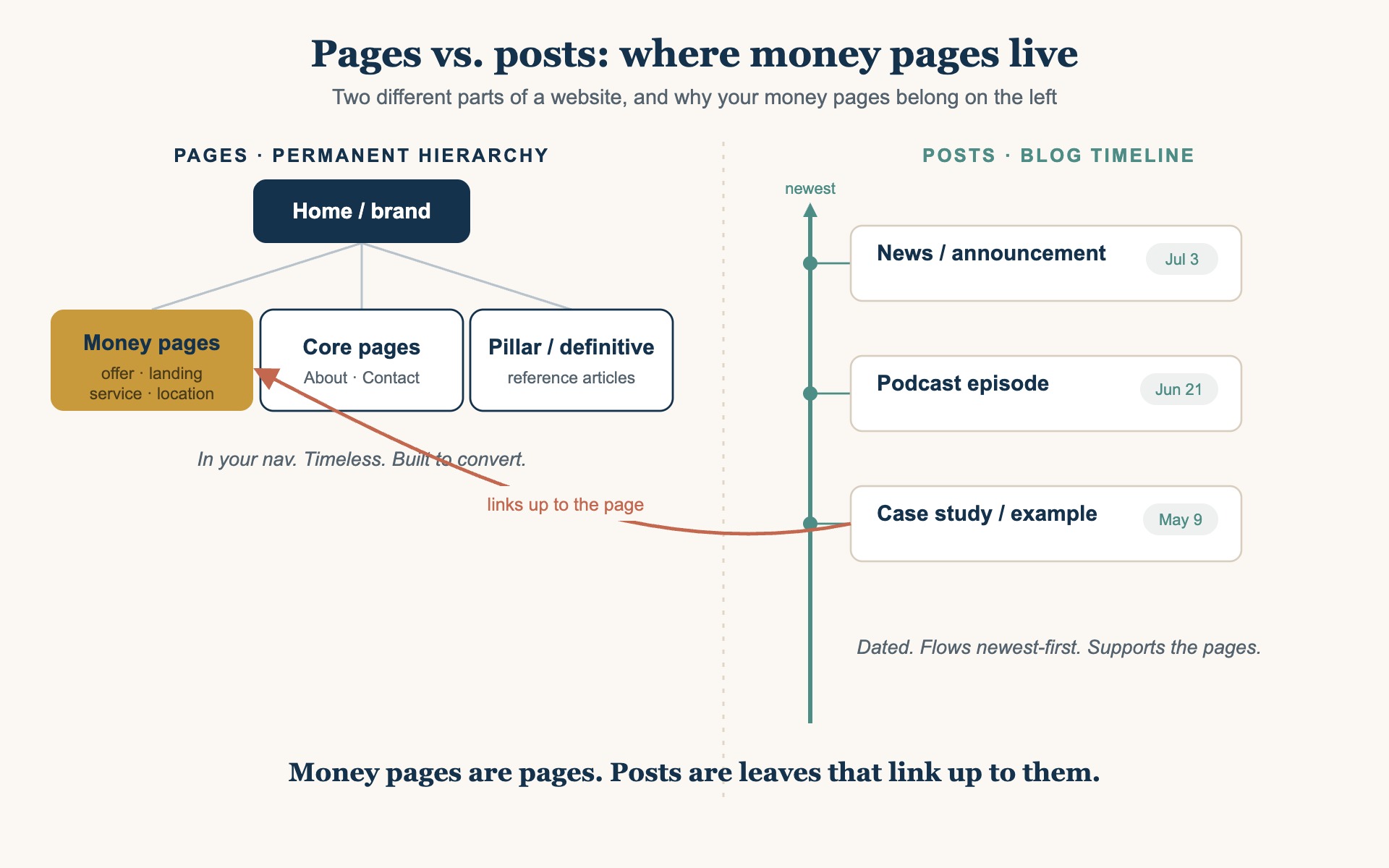
Pages are the permanent structure of your site. Home, About, Contact, your services, your offers. They live in a hierarchy, where a page can have a parent and children, which is how you get clean paths like /services/roof-repair/. Pages aren’t tied to a date, they’re not meant to expire, and they usually sit in your main navigation. Think of pages as the rooms of the house.
Posts are the blog. A post is a dated entry on a timeline. Posts flow into your blog feed newest first, get sorted into categories and tags, and roll down and out of sight as newer posts publish above them. Think of posts as the newspaper that lands on the porch each morning: useful, but tied to a moment, and replaced by tomorrow’s edition.
Dennis Yu describes this as the main site hierarchy versus a timeline-based blog, and the distinction holds even if you eventually move off WordPress. Every real content system has some version of permanent structural pages and time-ordered content. The names change. The two jobs don’t.
What deserves to be a page, and what belongs in the blog
Here’s the simple test. If it’s part of your permanent structure, something you’d put in the navigation and expect to still be selling a year from now, it’s a page. If it’s tied to a moment and meant to flow through a feed, it’s a post.
Pages: your money pages, core service and location pages, About, Contact, and your pillar or definitive content, the deep reference articles you want to own a topic.
Posts: blog articles, news, announcements, podcast episodes, event recaps, and case studies or examples that are true for a moment and link up to the page they support.
That last part is the key. In the SEO Tree, the way we think about how every piece of content connects, pages are the trunk and the major branches, and posts are the leaves. A leaf strengthens the branch it hangs from. A case study post about one customer links up to the service page it proves. The post does its job by pointing authority at the page, not by trying to be the page.
So a money page as a post is backwards. You’d be taking something structural and dropping it into the timeline, where it competes with every other post instead of anchoring a branch of your site.
Why moving a money page into a post costs you
Three things break when a page becomes a post, and none of them are obvious the day you do it.
You lose the structure, and the SEO value that comes with it. A page sits in your hierarchy and collects internal links from your navigation and related pages, which is a large part of how search engines decide it matters. A post drops into the blog, gets buried under newer posts, and lives in category and tag archives instead of your site structure. Converting a page to a post loses that SEO value even if you add tags and categories to make up for it. The URL usually changes too, so if the old page had any ranking history or backlinks, those now point at a 404 unless you set up a redirect.
You lose the formatting. Money pages are usually built with a page builder or a custom layout: a hero section, blocks, calls to action, the whole design. Posts render inside your blog’s single-post template, which is built for articles, not landing pages. Move the content across and the layout you designed collapses into a plain article body. The page still exists as words, but the thing that made it convert is gone.
You risk having two pages fight each other. If you convert a page to a post but leave the original page up, or you build a post next to a page that already exists, you now have two URLs targeting the same thing. Google and AI assistants have to guess which one is canonical, your internal links split between them, and neither ranks as well as one strong page would. Having both a page and a post for the same offer is a classic sign of a structure problem, the kind of duplication the SEO Tree exists to prevent.
The trap: preferring how a post looks is not a reason to use one
There are real cases where a post is the right call. Dated content, announcements, episodes, and examples all belong in the blog. If you’re publishing something that’s true for this moment and meant to flow through a feed, use a post.
The trap is everything else. Maybe the blog template looks cleaner to you. Maybe posts show an author byline or an author profile and your pages don’t. Maybe you just prefer how the single-post layout reads. Those are real preferences, and none of them is a reason to change what a page fundamentally is. The structural integrity of your site matters far more than any of them.
So when you feel the pull to convert a money page into a post because of how the post looks or what it happens to show, stop. You’re about to trade something that matters, where the page sits in your site, for something that doesn’t, a surface detail you can get another way.
You can rebuild the look on the page, without changing the type
Here’s the part that dissolves the trap. Anything you liked about the post, you can put on the page. If you want a byline, an author box, a date, or the exact feel of the blog layout, you or an agent can build that onto the page visually. The page keeps its structure, its URL, and its place in your hierarchy, and it still shows whatever you wanted to see.
Most of the time you don’t even need it. A money page rarely needs a visible author to do its job, and the things people reach for a post to get are usually decoration, not function. But if you truly want a certain element on the page, add it to the page. Don’t reach for a post to get it, and don’t convert a page into one to keep it.
The deeper point is bigger than any single detail. You might be sure a page needs some specific thing, and you might even be right that you want it. That still is not a reason to turn the page into a post. Decide page versus post on structure. Solve everything else on the surface.
Live trees: the money pages and the posts that feed them
Here is the shape on live sites, not just in theory. Two of our sites are drawn below as trees, read top to bottom. The domain is the trunk, the offer groups are limbs, every money page is a branch, and every blog post that links up to a money page is a leaf on that branch. Each node is a live link, so you can click any branch or any leaf and see exactly where it sits.
The funnel runs down the tree. Blog posts sit mid funnel, where they explain the method, prove it with real names, and answer the questions people actually type into Google. Money pages sit at the bottom of the funnel, where someone books, buys, or enrolls. The posts drive the pages, and that holds whether Dollar a Day is amplifying the posts, an email list is clicking through, or organic search finds them cold.
A real tree is not one branch with two leaves. A site that has been publishing for a few years has several branches, and the branches that matter carry dozens of leaves. Everything below was pulled from the live internal links on each site, so this is what we actually have rather than an idealized drawing. Where a branch is bare, it is drawn bare.
8 blog posts link here
Twelve vertical money pages hang off this same branch. No blog post links to any of them, so every one of these sub-branches is bare.
6 blog posts link here
2 blog posts link here
Both leaves are internal process posts. Nothing here is written for a prospect.
3 blog posts link here
8 blog posts link here
0 blog posts link here
No blog post links here.
Traininglimb
50 blog posts link here
Speakinglimb
trunk (the site)limb — offer groupbranch — money pageleaf — blog post
Local Service Spotlight sells seven things, and its services page groups them the way the tree draws them: offers for local service businesses, offers for the owners of those businesses, training, and speaking. The AI Builder Program is the healthiest branch on the site. Fifty posts point at it, a mix of case studies like the one on Cam Hazzard, process posts showing how the work gets done, and answers to the objections that come up before someone enrolls. That is what a fed branch looks like, and it is no accident that it is also the offer people ask about most.
The rest of the tree thins out as the price goes up, which is exactly backwards. The Knowledge Panel Package carries eight posts and the Maps Visibility System carries six, both healthy enough. Spotlight carries three, one of which is a post explaining how to request access to Google Analytics. The Conversion Engine Package, at three thousand five hundred dollars a month the largest recurring offer on the site, carries two, and both of them are internal process posts rather than anything a prospect would ever type into a search box. Speaking Engagements and the book carry nothing at all.
Then there are the twelve vertical Quick Audit pages hanging off the Quick Audit branch, one each for HVAC, roofing, plumbing, law firms and the rest. Every one of them is a money page in its own right, and not one blog post links to any of them. The branches are there; nothing is feeding them. None of this shows up in a site map, and all of it is obvious in a tree, which is the entire argument for drawing one.
blitzmetrics.comtrunk
Power Hourmoney page
46 blog posts link here
Personal Brand Website Packagemoney page
2 blog posts link here
Digital Plumbing Auditmoney page
2 blog posts link here
Speaker Reelmoney page
1 blog post links here
trunk (the site)branch — money pageleaf — blog post
BlitzMetrics has been publishing far longer, so the tree is wider. The Quick Audit branch alone carries at least seventy-six posts, most of them an audit of one named business, published in full, ending at the page where anyone can order the same thing. Dollar a Day, the Content Factory (our four-stage process for using real content), the Personal Brand Website Package and the Digital Plumbing Audit each carry a branch of their own. The pattern under every one of them is the same: do the work in public, publish what you found, and link back up to the page that sells it.
Drawing it this way also exposes what is broken. Dollar a Day has two live pages competing for the same entity, one at /dad/ and another at /dollar-a-day/, which is the same collision that started this article, one level up the tree. The Speaker Reel branch has exactly one leaf, which is why the examples on it are still thin. Neither problem announces itself while you are busy writing posts. Both are obvious the moment you draw the tree.
This is why the SEO Tree is also a money tree. The leaves gather the light, which is attention, search traffic, and the click off a boosted post, and the branches turn it into revenue. A post that links to no money page is a leaf on the ground: it may be well written, but it is not feeding anything. The rest of our sites are being drawn the same way, and each tree will be published as a post on the site it maps, so every site can be checked against its own. Local Service Spotlight has already published its own tree. If you want the same failure at a smaller scale, we wrote up the skill pack pages that linked to nothing, which is this identical problem inside a single content type.
A quick decision guide
Is this a page where people buy, book, or convert? Make it a page. Always.
Is it timeline content, news, an episode, an announcement, or a specific example? Make it a post, and link it up to the page it supports.
Do you want something a post has, like a byline, an author box, or a certain look? Put it on the page visually. Don’t change the content type to get it.
Do you already have both a page and a post for the same thing? Pick one canonical URL, redirect the other to it with a 301, and consolidate your internal links onto the survivor.
Before you publish anything, know where it sits in your site: which page it belongs to, and whether it links back. If you can’t answer that, you haven’t found its place in the structure yet.
Why this is worth getting right
Money pages are where marketing turns into revenue, so they deserve to be treated as the structural assets they are. Keep them as pages, protect their URLs, build them to convert, and let your posts do the supporting work of pointing traffic and authority up to them. Solve the styling, the formatting, and every other surface question without touching the thing that decides where a page lives.
Get the structure right once and it keeps paying off, on WordPress today and on whatever you build on next. The tools change. A money page is still a money page.
We turned this into a measurement you can run rather than a rule you have to remember. How to build the money tree diagram for any site is the definitive method — the five layers, the seven steps, the nine-check QA gate, the routing table that says where each defect goes, and the skill file that lets any AI agent draw yours.
Originally published .
Dylan Haugen
Dylan Haugen is a professional dunker, content creator, and editor at the Content Factory, where he transforms podcasts and interviews into strategic brand assets. He collaborates with Dennis Yu to support young entrepreneurs and business owners in building their personal brands through education, transparency, and effective content marketing. As the host of the Dunk Talk podcast and a dedicated advocate for establishing dunking as a recognized sport, Dylan combines athletic expertise, storytelling, and digital strategy to help elevate the next generation of creators.