

This task is for Agents who need to download YouTube videos quickly and efficiently to process them through the four stages of the Content Factory process, such as processing them via MarketScale, running them through Descript, or embedding them in a repurposed article.
Using Internet Download Manager (IDM) will help save time and ensure reliable downloads with no interruptions.
Task Checklist:
- Install Internet Download Manager (IDM).
- Ensure IDM extension is enabled in the browser.
- Play the video on YouTube.
- Click the “Download this video” button.
- Choose the video quality and start the download.
- Monitor download progress.
- Organize downloaded file.
Tools You Need:
- Internet Download Manager (IDM)
- Web Browser (Chrome, Firefox, or Edge)
Estimated Time to Download a Video: 1-5 minutes (depending on your internet speed)
Steps:
1. Install IDM:
Download and install IDM from the official website.
Pricing:
- Trial version: 30-day free trial.
- Paid version: $11.95 one-time payment.
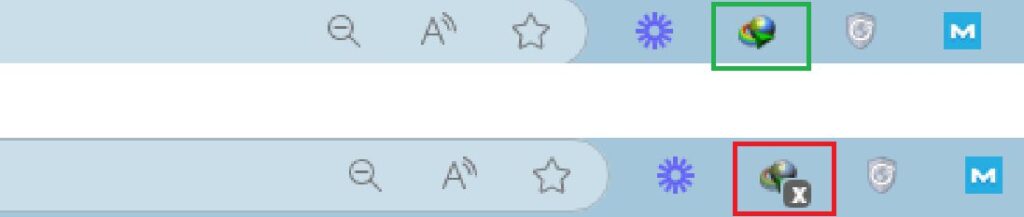
2. Enable IDM Extension:
Make sure the IDM extension is enabled in your browser.
3. Download Video:
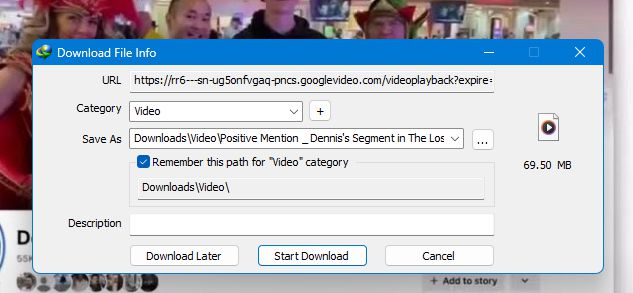
Open YouTube, play the video you want to download. Click the “Download this video” button that appears.

Select the video quality and confirm the download.

4. Monitor and Organize:

Move the downloaded file to the desired folder.
Verification Checklist:
- IDM is installed and integrated with the browser.
- Video downloads successfully.
- Downloaded file is uploaded to YouTube, Google Drive and Descript.
- Downloaded file is organized properly in the correct folders and inventoried in the Content Library.
When you have this long form video, make sure you’re processing it correctly through Descript and able to understand the full context of the video you’re repurposing through our article guidelines.
Dennis Yu
Dennis Yu is the CEO of Local Service Spotlight, a platform that amplifies the reputations of contractors and local service businesses using the Content Factory process. He is a former search engine engineer who has spent a billion dollars on Google and Facebook ads for Nike, Quiznos, Ashley Furniture, Red Bull, State Farm, and other brands.
Dennis has achieved 25% of his goal of creating a million digital marketing jobs by partnering with universities, professional organizations, and agencies. Through Local Service Spotlight, he teaches the Dollar a Day strategy and Content Factory training to help local service businesses enhance their existing local reputation and make the phone ring.
Dennis coaches young adult agency owners serving plumbers, AC technicians, landscapers, roofers, electricians, and believes there should be a standard in measuring local marketing efforts, much like doctors and plumbers must be certified.