
 by
by
- 1Why Wikidata Matters for Your Knowledge Panel
- 2Example 1: Fixing Trenton Sandler's Wikidata (Q136384612)
- 3Wrong Given Name
Your Wikidata entry is one of the most important factors in triggering and maintaining your Google Knowledge Panel. Yet most people never check it — and when they do, they find errors that actively hurt their digital presence.
We recently fixed two real Wikidata entries — for Trenton Sandler and Dennis Yu — and the process reveals exactly how to audit and repair your own.
Why Wikidata Matters for Your Knowledge Panel
Google’s Knowledge Graph pulls structured data from Wikidata to populate Knowledge Panels. If your Wikidata entry has wrong values, missing descriptions, or zero references, Google either shows incorrect information or lacks the confidence to display your panel at all.
Fixing Wikidata is one of the highest-leverage actions you can take for your digital presence — and it costs nothing but attention to detail. This is what we teach in our step-by-step Knowledge Panel guide.
We use a systematic approach: audit every statement, verify values against authoritative sources, add references, and fill in missing properties like official website, family name, occupation, and education.
Example 1: Fixing Trenton Sandler’s Wikidata (Q136384612)
Trenton Sandler is a former LSU track and field athlete who recently launched his personal brand website. When we audited his Wikidata entry, we found several critical problems that would confuse Google’s Knowledge Graph.

Wrong Given Name
The entry listed “Joan Vives i Llull” as the given name instead of “Trenton” — a data import error from a previous entity. Imagine Google pulling this into a Knowledge Panel: it would display a completely wrong name. We corrected this to the proper Wikidata item for the given name Trenton.
Wrong Education
The “educated at” field pointed to an item called “elbow” instead of Louisiana State University. This kind of error — where a Wikidata item ID gets swapped with a completely unrelated entity — is more common than you would think. We replaced it with the correct LSU entry and added a reference URL from LSU Athletics.
Zero References on Most Claims
Statements for instance of, sex/gender, date of birth, country of citizenship, and sport all had zero supporting references. Without references, Google has less confidence in the data. We added references to each using authoritative sources like World Athletics and LSU’s official roster pages.
Missing Statements
We added three new statements that help Google understand and disambiguate this entity:
- Family name: Sandler
- Member of sports team: LSU Tigers
- Official website: trentonsandler.com
You can see the corrected entry live at wikidata.org/wiki/Q136384612.
Example 2: Fixing Dennis Yu’s Wikidata (Q12246156)
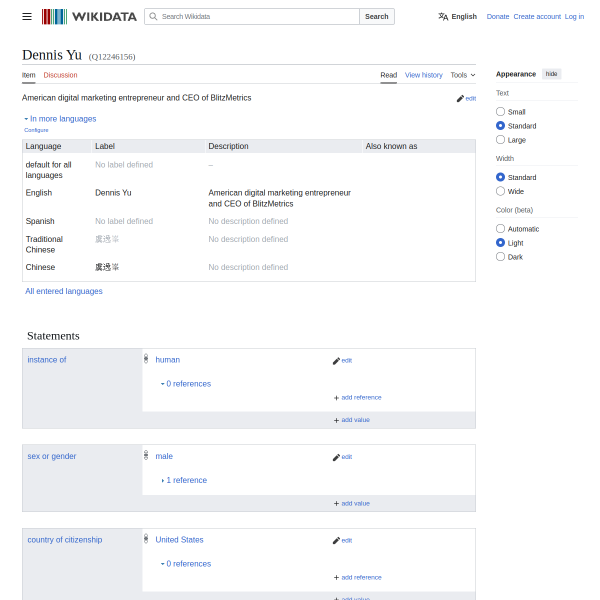
Dennis Yu’s Wikidata entry had its own set of problems — despite already having an active Google Knowledge Panel. This shows that even if you have a panel, bad Wikidata can cause it to display wrong information.
No Description
The entry had no English description at all. We added “American digital marketing entrepreneur and CEO of BlitzMetrics” so Google and other systems can immediately understand who this entity is.
Wrong Occupation
The only listed occupation was “television presenter” — carried over from a possible entity conflation with a Hong Kong TV personality who shares the same name and has Chinese Wikipedia pages linked to this item. We added “entrepreneur” as an additional occupation value.
Missing Properties
We added three critical properties:
- Family name: Yu
- Official website: dennisyu.com
- Country of citizenship: United States
These structured properties help Google disambiguate between the multiple “Dennis Yu” entities in its Knowledge Graph. See the corrected entry at wikidata.org/wiki/Q12246156.
The Wikidata Audit Checklist
Based on our work fixing these two entries, here is a repeatable checklist for anyone looking to clean up their Wikidata:
- Find your Wikidata item by searching at wikidata.org. If you do not have one, you may need to create it.
- Verify every statement value is correct. Look for data import errors where values belong to a different entity entirely.
- Add a description in English that clearly identifies who you are and what you do.
- Add references to every claim using authoritative URLs — your official website, employer pages, sports databases, LinkedIn, or news articles.
- Add missing properties: given name, family name, official website, occupation, educated at, country of citizenship.
- Check for entity conflation — if your name matches someone else, make sure your data has not been mixed together.
- Verify your Google Knowledge Graph ID is present in the Identifiers section.
How Wikidata Connects to Your Broader Digital Presence
Wikidata is just one piece of the puzzle. To fully control your Knowledge Panel and digital presence, you also need:
- A personal brand website with proper schema markup that serves as your entity home.
- A complete understanding of how Google Knowledge Panels work.
- A step-by-step plan to trigger your panel from scratch.
- Our Done-For-You Personal Brand Website and SEO System if you want expert help.
We practice what we preach — every technique in this article was performed live on real Wikidata entries for real people. The Trenton Sandler entry and Dennis Yu entry are both now cleaner, better-referenced, and more useful to Google’s Knowledge Graph than they were before.
If your Knowledge Panel is missing, showing wrong information, or not appearing at all, start with Wikidata. It takes 30 minutes and the impact on your digital presence is immediate.
Rather not edit Wikidata yourself? See a done-for-you Knowledge Panel package — we run every step from audit through the claim. We check your KGMID before you pay: if we take you on, your panel goes live or you get a full refund.
Originally published .
Dennis Yu
Dennis Yu is the CEO of Local Service Spotlight, a platform that amplifies the reputations of contractors and local service businesses using the Content Factory process. He is a former search engine engineer who has spent a billion dollars on Google and Facebook ads for Nike, Quiznos, Ashley Furniture, Red Bull, State Farm, and other brands.
Dennis has achieved 25% of his goal of creating a million digital marketing jobs by partnering with universities, professional organizations, and agencies. Through Local Service Spotlight, he teaches the Dollar a Day strategy and Content Factory training to help local service businesses enhance their existing local reputation and make the phone ring.
Dennis coaches young adult agency owners serving plumbers, AC technicians, landscapers, roofers, electricians, and believes there should be a standard in measuring local marketing efforts, much like doctors and plumbers must be certified. He has appeared on 353 podcasts with 619 credited episodes — see the full list of his podcast appearances.