
 by /
by /
Every time our agent tried to attach a PDF to a Gmail draft, it died on the same cryptic line: “Cannot access a chrome-extension:// URL of different extension.” Not our code. Not a permission. It was Boomerang — quietly holding the one channel our automation needed. Here’s the diagnosis, and the one move that’s made attaching work every time since.
3
tools went dark
screenshot, click, JavaScript — all blocked
1
channel stayed open
the DOM — where file_upload lives
0
base64 through the model
the binary never touches context
Start with the symptom
We build agents that do real work in a browser — read a Gmail thread, write a draft, attach the deliverable, hand it back for a human to send. The whole loop worked except the last mile: attaching the file. Screenshots came back empty. Clicks refused. Every attempt returned the same error, whether we aimed at the compose window, a button, or nothing at all: “Cannot access a chrome-extension:// URL of different extension.”
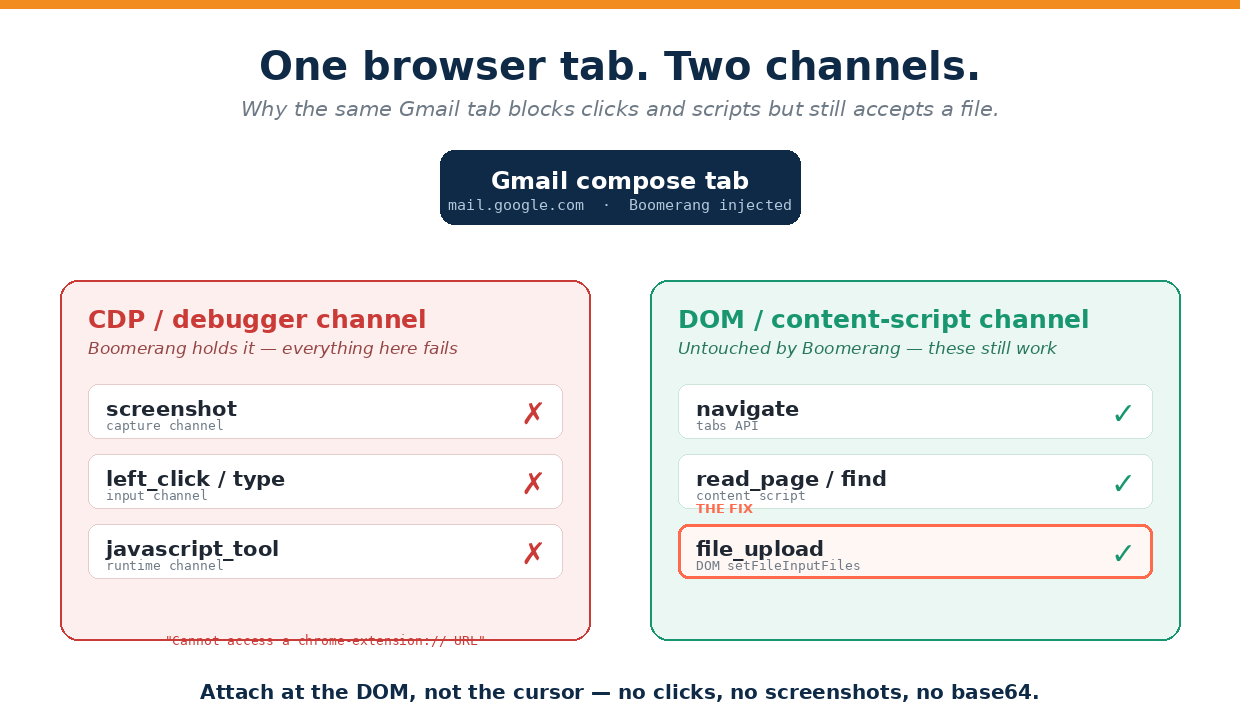
That error is a tell. It doesn’t come from Gmail. It comes from Chrome’s DevTools Protocol — the debugger channel — refusing to act because another extension already owns the surface it’s pointed at.
Trace it to the real culprit
Boomerang lives inside Gmail’s compose window. It adds “Send Later,” “if no reply,” the whole tracking layer — and to do that it injects its own extension frame and hooks Chrome’s debugger on the tab. Chrome only lets one debugger client own a tab at a time. Once Boomerang has it, anything our automation tries to do through that same channel fails instantly, browser-wide on Gmail tabs, with the “different extension” error.
Here’s the part that turns a dead end into a fix: not every tool rides the debugger. Some talk to the page a different way — through the content script and the DOM — and Boomerang never touches those. So the same tab that rejects a click will still accept a file.
Split the tools into two lanes
The moment you sort your tools by which channel they ride, the workaround writes itself. Everything on the debugger is dead; everything on the DOM is alive.
| Tool | Rides on | In a Boomerang’d Gmail tab |
|---|---|---|
| screenshot | CDP capture | ✗ blocked |
| click / type | CDP Input | ✗ blocked |
| javascript_tool | CDP Runtime | ✗ blocked |
| navigate | tabs API | ✓ works |
| read_page / find | content script | ✓ works |
| file_upload | DOM setFileInputFiles | ✓ works — the fix |
Attach at the DOM, not the cursor
The trick is to stop trying to drive the compose window like a human — no cursor, no keystrokes, no screenshots — and instead hand the file straight to the input element. Four steps, zero clicks:
1. Open a prefilled compose (no typing needed):
   https://mail.google.com/mail/u/0/?view=cm&fs=1&tf=1
       &to=<emails>&su=<url-encoded subject>&body=<url-encoded body>

2. Locate the hidden file input:
   find  "file input for attaching files"   →  ref

3. Attach at the DOM level (no picker, no base64):
   file_upload(path, ref)

4. Gmail auto-saves the draft — recipients, subject, body, attachment intact.
The view=cm link does the typing for you: recipients, subject, and body arrive pre-filled straight from the URL, so you never need a keystroke the debugger would have blocked. Then file_upload sets the file on the input through the DOM, and Gmail treats it exactly as if a human had picked it.
Keep the binary out of the model
There was a tempting shortcut: base64-encode the PDF and hand it to the email API as an attachment. We don’t do that. Pushing a binary through the model’s context bloats every message that follows and risks corrupting the file. file_upload reads the bytes off disk and drops them on the page directly — the model never sees them. A 102 KB PDF costs zero tokens. That’s not a nice-to-have; it’s the difference between an agent that scales and one that chokes on its own attachments.
Proof, live — 5 July 2026. Attached a 5-page, 102 KB PDF to a six-recipient Gmail draft in a single DOM call. Zero clicks. Zero screenshots. Zero base64 through the model. The draft saved itself with recipients, subject, and body untouched — ready for a human to hit send.
Make it the default move
This isn’t a one-off. Any time an extension like Boomerang is in the way, an agent should reach for the DOM lane first and skip the cursor entirely. We wrote it into our standing rules so no one — human or agent — has to rediscover it: attach files at the DOM, prefill compose by URL, keep binaries off the context. And because we document every fix like this one, the next agent inherits the answer instead of the error. That’s the whole point of a meta article — we learn out loud, once, on purpose.
Build agents that document themselves.
Every build, fix, and gotcha we hit becomes a written playbook — so the work is repeatable and teachable. Here’s the standard we hold ourselves to.
Dennis Yu
Dennis Yu is the CEO of Local Service Spotlight, a platform that amplifies the reputations of contractors and local service businesses using the Content Factory process. He is a former search engine engineer who has spent a billion dollars on Google and Facebook ads for Nike, Quiznos, Ashley Furniture, Red Bull, State Farm, and other brands.
Dennis has achieved 25% of his goal of creating a million digital marketing jobs by partnering with universities, professional organizations, and agencies. Through Local Service Spotlight, he teaches the Dollar a Day strategy and Content Factory training to help local service businesses enhance their existing local reputation and make the phone ring.
Dennis coaches young adult agency owners serving plumbers, AC technicians, landscapers, roofers, electricians, and believes there should be a standard in measuring local marketing efforts, much like doctors and plumbers must be certified. He has appeared on 353 podcasts with 619 credited episodes — see the full list of his podcast appearances.