
 by /
by /
Build a Wispr Flow alternative with no dictation subscription. We used GPT-6 Astra to make a Mac app that records, saves, and pastes our words.
From your voice to your selected text box
1 · SpeakHold Fn while you talk.
2 · FinishRelease Fn. LocalVoice transcribes and saves your words.
3 · PasteYour text goes into the field you selected before recording.
The goal was a tool I could use while talking to AI: hold a key, explain the task, and keep the context I actually said. I wanted a visible recording indicator, recoverable history, and a way to fix recurring word mistakes. The app now has those features. Getting there took several rounds of testing and corrections.
This is the build record for LocalVoice through 0.5.1, a native app for Apple Silicon Macs on macOS 26 or later. It uses Apple’s local speech engine and requires no LocalVoice account or paid transcription API. It currently targets US English. The complete rebuild prompt below gives another coding assistant the requirements, file structure, failure cases, and checks.
LocalVoice is simply the name we gave our version. “Free” means the installed app has no dictation subscription or paid transcription API. Building with an AI assistant may use a paid plan, and public app distribution can add signing costs; those are covered below.
The reason for building it comes from giving AI the context it needs: voice makes it easier to explain a full assignment. This article documents the specific software build. It follows the BlitzMetrics meta-article writing method, which records the work, its evidence, and its failures so the next build starts with better instructions.
Start with the behavior you actually need
My first request was to look at people building their own Wispr-style tools and see whether the agent could make one. I described the result in normal language. I didn’t start with a programming language or a software design.
Once the prototype worked, my real requirements became clearer. I needed it to paste into the selected box, reopen when I clicked its icon, keep old dictations, and show me that a long recording was still running. The first shortcut used Control + Option + Space. I wanted the familiar Fn gestures once Wispr was out of the way.
“Because I’m mainly just talking to AI with Wispr Flow anyway”
That sentence changed the editing requirement. If I say Saturday, explain why Saturday won’t work, and then choose Sunday, the rejected option may still matter. An AI assistant can use that explanation. Automatically deleting it would make the dictation less useful to me.
We kept ordinary filler removal, punctuation, and explicit word corrections. We removed automatic free-form AI rewriting from the normal path. The optional Polish button remains a separate action with a check that rejects changed content words.
Use GPT-6 Astra to build the app, then let the Mac run it
I used GPT-6 Astra’s coding capabilities through the desktop coding assistant. My reported setting for the initial build was Medium effort. Near the end, I asked for Extra High effort for a harder QA review, then High to finish the work. Those settings describe how I directed the session; we did not capture an independent effort-setting audit for every turn.
The agent had tools to read and write local files, compile Swift, inspect the app, and operate authorized parts of the Mac interface. That access matters. A chat that can only return text can give you code and instructions, but you still need a way to save, compile, install, and test them on your Mac.
GPT-6 Astra helped write and inspect the software. It does not transcribe each dictation after installation. LocalVoice runs as its own Mac app and uses Apple frameworks. A coworker using the finished app would not need my chat, my account, or my computer running.
Choose the smallest local speech stack that fits
The research covered accessible creator pages, indexed tutorial material, and repositories. We did not watch every video about the topic. One useful starting reference was the native Murmur dictation example, which described the same general Apple speech route. Other examples used extra local model runtimes. We wrote LocalVoice’s implementation for this specific workflow.
We chose Swift, AppKit, SwiftUI, and Apple’s Speech framework. AppKit manages windows, menus, and Mac behavior. SwiftUI draws the interface. AVAudioRecorder captures a WAV file. SpeechAnalyzer and SpeechTranscriber turn that file into text. FoundationModels supplies optional local polishing when Apple Intelligence is available.
The app does not bundle Whisper weights, require Ollama, run a web server, or call a paid cloud transcription provider. Its narrower compatibility requirement is an Apple Silicon Mac with macOS 26 or later and a supported English speech model. The development machine used macOS 26.6.2 and Swift 6.3.3, compiling in Swift 5 compatibility mode.
The actual processing path
CaptureSave 16 kHz, mono, 16-bit PCM audio to a recovery WAV.
TranscribePrepare Apple’s speech assets, then collect the final text segments.
PreserveSave original words, clean lightly, and update the same history entry.
InsertReturn to the captured app and selected range. Request a clipboard paste.
| Source file | What it owns |
|---|---|
main.swift | Recording state, target capture, insertion, main/history/panel views, menus, and app lifecycle. |
Engine.swift | Speech model preparation, transcription, timeout checks, deterministic cleanup, and guarded optional Polish. |
FnShortcut.swift | Fn gesture state machine and the macOS keyboard event tap. |
History.swift | Per-entry storage, reload, and isolation of damaged history files. |
Words.swift | The “It wrote” / “I meant” form and a reference vocabulary list. |
Icon.swift and Assets/ | The original waveform icon generator and the included app icons. |
build.sh | Compilation, app-bundle metadata, icon copying, ad hoc signing, signature checks, and self-tests. |
Make three decisions before adding features
Choose a narrow platform. Apple’s native speech engine removed a separate runtime and paid transcription dependency. The tradeoff is compatibility: this build targets Apple Silicon, macOS 26 or later, and US English. A Windows or older-Mac version would need a different implementation.
Preserve the raw material. Save the transcript before attempting insertion, and keep failed audio for retry. This adds storage and recovery work, but a failed paste no longer has to mean a lost five-minute explanation.
Keep rewriting optional. My priority was preserving context for AI. We chose predictable cleanup and explicit corrections for the normal path, with guarded Polish as a separate action. That choice favors faithful dictation over automatically polished prose.
Build and test in a useful order
- Prove the speech core. Make a short synthetic speech fixture and a silence fixture. Check the actual audio duration before testing. A bad test recording can look like a speech-engine failure.
- Build the first recording loop. Start the microphone, stop it, transcribe the saved file, and show the result. Keep one recording or processing operation active at a time.
- Make insertion a separate acceptance test. Save the external application, focused text field, and selected range before opening or hiding any LocalVoice window. Then prove that the correct selection changes in the destination.
- Add light cleanup. Remove common um/uh/ah/erm fillers, normalize spacing, add simple punctuation and capitalization, and handle spoken “new line” and “new paragraph.” Keep the raw words too.
- Add the visible panel and history. Show elapsed recording time and microphone level. Save each completed dictation before requesting paste. Make Copy and a clear Back button available.
- Add word corrections and Fn gestures. Test the key logic separately from microphone permissions. Quit the competing Fn dictation app before the physical-key test.
- Freeze, install, and recheck. Build the final executable before repairing permissions. Test the exact installed copy, then preserve the source, tests, findings, and recovery instructions.
The speech setup follows Apple’s speech asset lifecycle documentation. It reserves the locale and asks for any missing assets at use time. The system owns the downloaded models; we do not copy model files into the app ZIP.
// Actual model preparation from Engine.swift.
_ = try await AssetInventory.reserve(locale: Locale(identifier: "en-US"))
if let request = try await AssetInventory.assetInstallationRequest(supporting: [transcriber]) {
    try await request.downloadAndInstall()
}
After preparation, a separate task reads the transcription results while the analyzer processes the audio file. We join those final segments into the transcript. A 60-second analysis deadline rejects an expired result rather than treating a partial transcript as complete. Model installation can take longer; the final QA added a cancel control for transcription and retained the audio for retry.
Make Fn behave like a recording control
The shortcut needed three states: idle, held recording, and hands-free recording. Treating Fn as a normal toggle would not match the behavior I asked for. We put those transitions in a small state machine, separate from the Mac event listener and asynchronous microphone permission request.
Two ways to talk
Hold to recordPress Fn → speak → release Fn → transcribe and paste.
Record hands-freeHold Fn + press Space → release both → keep talking → tap Fn or click ✓ to finish.
The event tap watches Fn flag changes and Space key events. It captures the Space release as well as its press so latching does not type a stray space into the text box. Repeated key-down events do not repeatedly start or stop a session. Other Fn combinations cancel a tentative held recording and let the other key through.
Before using Fn, open System Settings → Keyboard → Press 🌐 key to and choose Do Nothing. On some keyboards the setting is labeled “Press fn key to.” This removes the Mac’s built-in single-key action while allowing our app to handle Fn. Apple documents the choices in its Keyboard settings guide.
Real use exposed this conflict after our initial QA: tapping Fn to stop hands-free recording opened the emoji picker, and the transcript landed in its search box. The Mac was still set to Show Emoji & Symbols. We changed it to Do Nothing and verified the saved setting. The next physical hands-free test must confirm that the picker stays closed and the selected text field receives the words. A passing state-machine test does not establish that system-level behavior.
A permission prompt adds another case. Someone can release Fn before macOS returns the microphone decision. Each request gets an identity token. If that request is no longer current when permission arrives, the app does not start recording late.
// Actual request guard from main.swift.
let allowed = await AVCaptureDevice.requestAccess(for: .audio)
guard captureRequest == request else { return }
captureRequest = nil; busy = false
The floating indicator is a nonactivating NSPanel: it appears without becoming the typing destination. It shows a timer, a live input level, a finish check mark, and a discard control. The panel sits near the bottom of the screen under the pointer, stays available across spaces, and disappears when idle. The current app stops recording at ten minutes.
Keep history useful when something goes wrong
History is a recovery feature. Each dictation gets one JSON file with an ID, timestamp, original transcript, and cleaned transcript. The app saves the original first, then updates that same entry after cleanup. It uses an atomic file write so a save does not deliberately leave a half-written replacement.
Loading history handles each file separately. One damaged entry produces a warning while healthy entries still appear. The History window supports search, Copy, export, and a Back route to dictation. Clicking the app icon reopens the main window.
| Location on each user’s Mac | Contents and lifetime |
|---|---|
~/Library/Application Support/LocalVoice/History/ | Original and cleaned text. No automatic expiration or retention cap. |
~/Library/Application Support/LocalVoice/Recordings/ | Recovery WAV files. Failed or cancelled transcription keeps audio; successful saved text normally allows its source recording to be removed. Explicitly discarding a recording deletes that recording. |
~/Library/Application Support/LocalVoice/Vocabulary.json | Optional imported vocabulary reference and explicit replacement seed. |
| macOS preferences for the app’s bundle identifier | Personal correction rules and the latest recovery-audio pointer. The clean sharing build uses app.localvoice.standalone. |
History survives app restarts and updates because it lives outside the app bundle. “No expiration” does not mean a guaranteed forever backup. Deleting the files, losing the Mac, or a disk failure can still remove them. Export history gives you a JSON snapshot; a normal Mac backup should include the application-support folder and preferences. The app does not yet offer a one-click JSON history import.
The private project lives in my Personal → Tools → LocalVoice area in BlitzBase, beside my other tools. Its source folder, development log, build-and-recovery guide, QA evidence, version archives, and file hashes let another agent resume the work. My personal dictionary and old dictations stay in a separate private folder. Readers can keep the same structure in their own project directory.
Import useful words without creating bad replacements
A dictionary of correct spellings is different from a list of “when you hear this, write that” rules. We preserved the Wispr vocabulary and local text history privately before quitting Wispr. The migration used a read-only transaction against its local database, leaving the original data in place. That is a version-specific migration method, not a universal export command for every Wispr installation.
The database also contained observed corrections. Some were contextual enough to be unsafe as global replacements. We archived those observations without activating them. A preferred spelling by itself does not tell the new app which mistaken phrase should become that spelling.
In LocalVoice, open Words & corrections, put a real error in It wrote…, put the desired text in I meant…, and click Add. The imported spellings appear as a reference. We did not train or fine-tune Apple’s speech model.
The final QA caught a further issue in our correction logic: sequential replacement could turn one replacement into the input of another. A synthetic test with red => blue and blue => green now turns “red blue” into “blue green,” applying each rule to the original words once. Longer phrases win when rules overlap, and the latest rule wins for a duplicate source phrase.
Fix the bugs the prototype exposed
Recording worked, but the text stayed inside LocalVoice
Symptom: I could record and finish, but the words did not appear in the selected text box. Cause: microphone permission did not grant cross-app insertion permission, and the first focus-handling logic abandoned insertion after the foreground app changed.
Fix: capture the destination before recording, restore its app and selected field, and use clipboard Command-V for editors that reject direct Accessibility text writes. If the app cannot return to that destination, it copies the text, shows the failure, and keeps the history entry. It does not press Enter or submit a chat.
The permission switch was on, but the app was untrusted
Symptom: System Settings showed Accessibility enabled, while the updated app still could not insert text. Cause: rebuilding changed the ad hoc-signed executable, leaving the previous permission entry stale.
Fix: after I authorized it, the agent removed the stale LocalVoice entry, added the exact installed app, and restarted that unchanged build. We checked the app’s “Insertion enabled” state and then the destination text in controlled tests. Repeatedly rebuilding during permission repair would have invalidated the thing we were trying to verify.
“Ready” disagreed with the model preflight
Symptom: a later version looked ready but failed to process after Finish, showing a request to prepare the speech model. Cause: a strict installed-status check did not match the model lifecycle after startup preparation.
Fix: reserve the English locale and request any required installation at the point of use. Surface processing errors and keep a Retry recording route. A ready label is useful feedback, but the acceptance test is actual file transcription.
Polish invented a time of day
Symptom: a test saying “three” came back with an invented PM. Cause: the model treated editing as permission to complete or improve the message.
Fix: tighten the instructions, compare content tokens before accepting a polished result, and make free-form polishing manual. The normal dictation path preserves tangents and self-corrections. We also fixed deterministic cleanup so it did not remove the legitimate word “ER.”
The editing boundary we tested
Keep the content“The number is three” → “The number is three.”
Reject invented detail“Friday at three” → “Friday at 3 PM” fails the Polish content check.
Preserve the reasonA change from Saturday to Sunday keeps the explanation for rejecting Saturday.
History felt like a dead end
Symptom: opening History left no obvious way back, and reopening from the app icon was unreliable. Cause: the first version had not finished its window lifecycle and navigation behavior.
Fix: add Back to dictation, return to the main view when a secondary window closes, and handle app reopen events. The final sweep also added explicit deminiaturization when showing History. The blank app icon received an original teal speech-wave design.
A slow transcription had no useful escape
Symptom: code review found that a stalled transcription left the user waiting without a cancel-and-recover control. Cause: the processing task had no visible cancellation path, even though recordings already had Finish and Discard controls.
Fix: add cancellation, keep the audio, and change the session identity before returning the UI to idle. An injected test deliberately returned a transcription after cancellation. The app ignored that late result and left the recording available for retry. A separate injected speech error also preserved audio and cleared the busy state.
// Actual late-result fence from main.swift.
session = UUID(); processingTask?.cancel(); processingTask = nil
processingAudio = nil; busy = false; recorder = nil; recordingURL = nil
failedAudio = url; UserDefaults.standard.set(url.path, forKey: "failedAudio")

// The processing task checks its captured token before using results.
guard token == session else { return }
Keep the test honest when automation changes focus
Symptom: a transcription test could finish without proving text reached the intended document. Cause: UI automation could operate an app in the background; concurrent work could also change the actual foreground destination.
Fix: use a known TextEdit fixture, select only REPLACE THIS between Before: and :After, then inspect the resulting document. An early retest was interrupted. A later attempt put the synthetic sentence into an unsent AI input because TextEdit had only been operated in the background. We cleared that test text, opened TextEdit through Finder to activate it, and repeated the test. The installed 0.4.1 app then replaced only the selected placeholder and preserved both surrounding markers.
Separate tested behavior from promises
| Check | Evidence and boundary |
|---|---|
| Build, signature, and regression checks | Passed for 0.4.1 on the development Mac, including the clean sharing build. |
| Long audio | A 334.06-second synthetic recording contained 65 repeated passages. The updated engine returned all 65 “meeting” and all 65 “project notes” occurrences. This tests completeness for that fixture, not general speech accuracy. |
| Fn hold and hands-free logic | State-machine checks cover hold/release, latch, next-Fn stop, repeated events, busy rejection, and ended sessions. The installed app shows the event listener is active. |
| Physical keyboard behavior | Live use showed a held Fn recording. A controlled end-to-end check of both physical gesture sequences remains a separate acceptance step. |
| History and recovery | Reload, same-ID update, damaged-file isolation, late-result cancellation, and injected-error recovery passed. |
| Actual paste | The installed 0.4.1 app transcribed a five-second synthetic WAV and replaced only REPLACE THIS in TextEdit, preserving Before: and :After. Earlier normal microphone dictation/paste was also confirmed in my use. |
| Still to test | Another Mac, a full ten-minute live capture, Bluetooth input changes, wake/fullscreen/multiple displays, and all target editors. |
These limits matter before someone treats the app as their only way to dictate. A working prototype, a green permission switch, a passed speech test, and a successful paste are different pieces of evidence. We kept them separate throughout the build.
Add a word counter that makes the habit visible
After the core dictation worked, I asked for something less practical: a total word counter. I had 474,500 words in Wispr Flow and enjoyed watching that number grow. Switching tools did not have to mean starting that visible progress from zero.
Version 0.4.3 adds a Lifetime dictated words card. It shows the grand total first, then LocalVoice words plus the Wispr Flow carryover. In my updated September 16 screenshot, that is 16,728 + 474,500 = 491,228 words. Those numbers describe that moment, not a live website counter.
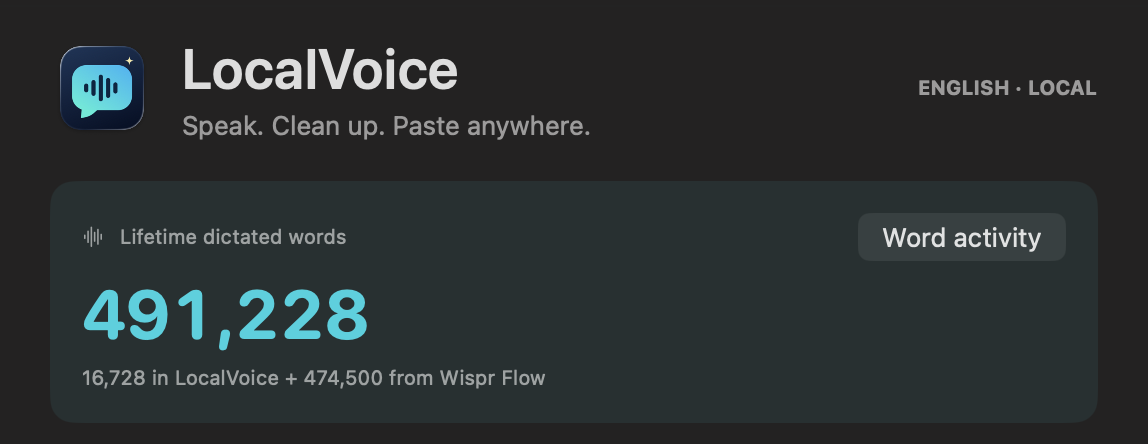
The app calculates its own count from original transcripts in saved history, counting each entry ID once. It counts whitespace-separated tokens containing letters or numbers and skips punctuation-only tokens. Updating an entry with cleaned text, copying it, or using Polish does not add another dictation. Existing history counts too, including any saved test or imported-audio entries. This is a simple activity counter, not a claim that our counting method exactly matches Wispr’s.
The 474,500 starting balance is my supplied figure, stored in a local preference. It is not hardcoded for everyone who builds the app. On restart, LocalVoice reads that preference and recalculates the local portion from history. Deleting history lowers the local count, so preserving this total means backing up both history and the carryover setting.
Prompt to reproduce it: Add a lifetime dictated-word card. Show the grand total prominently, then this app’s saved words plus a separately stored prior-app starting balance. Count original text once per history-entry ID; copying and polishing must not increment it. Include old history, test punctuation-only input and duplicate IDs, and back up the starting balance with the history.
Back up the corrections you add after migration
We also saved a dated private backup of my 72 reference words and 30 active correction rules, with file hashes and restoration instructions in BlitzBase. The original vocabulary import is only one part: later corrections live in the app’s preferences. Backing up the import file alone would miss those edits. These are point-in-time copies, not automatic synchronization, and the personal words and rules are not included in this article or public download packages.
Keep an empty transcription available to retry
A later failure opened the app without pasting. Inspection showed “No speech detected,” rather than an insertion error: there was no recognized text to paste. The selected input was AirPods, but we did not establish that the microphone choice caused the failure. The useful first check is Sound → Input, followed by the actual app status.
Code review found a separate recovery bug: an empty recognition result was being treated as a successful save, allowing its WAV to be deleted. Version 0.4.2 fixed that. Empty, whitespace-only, and cleanup-empty results now retain their audio and offer Retry recording. Tests covered those cases as well as errors and late results after cancellation.
Finish the update by checking permissions again
Installing a rebuilt, ad hoc-signed app again invalidated its Accessibility grant. Fn stopped working along with insertion. We repaired only LocalVoice’s entry, re-added the exact installed app, and checked for both HOLD FN and Insertion enabled. A later macOS Touch ID prompt also had to be completed before the repair could finish. This is part of updating this development build, even when the visible change is just a label.
After the final counter layout and permission repair, I tested it and reported, “It works, let’s go!!” That is confirmation from my normal use on this Mac. It does not replace separate testing of every keyboard sequence, microphone, editor, or a coworker’s machine.
Track daily activity and personal records
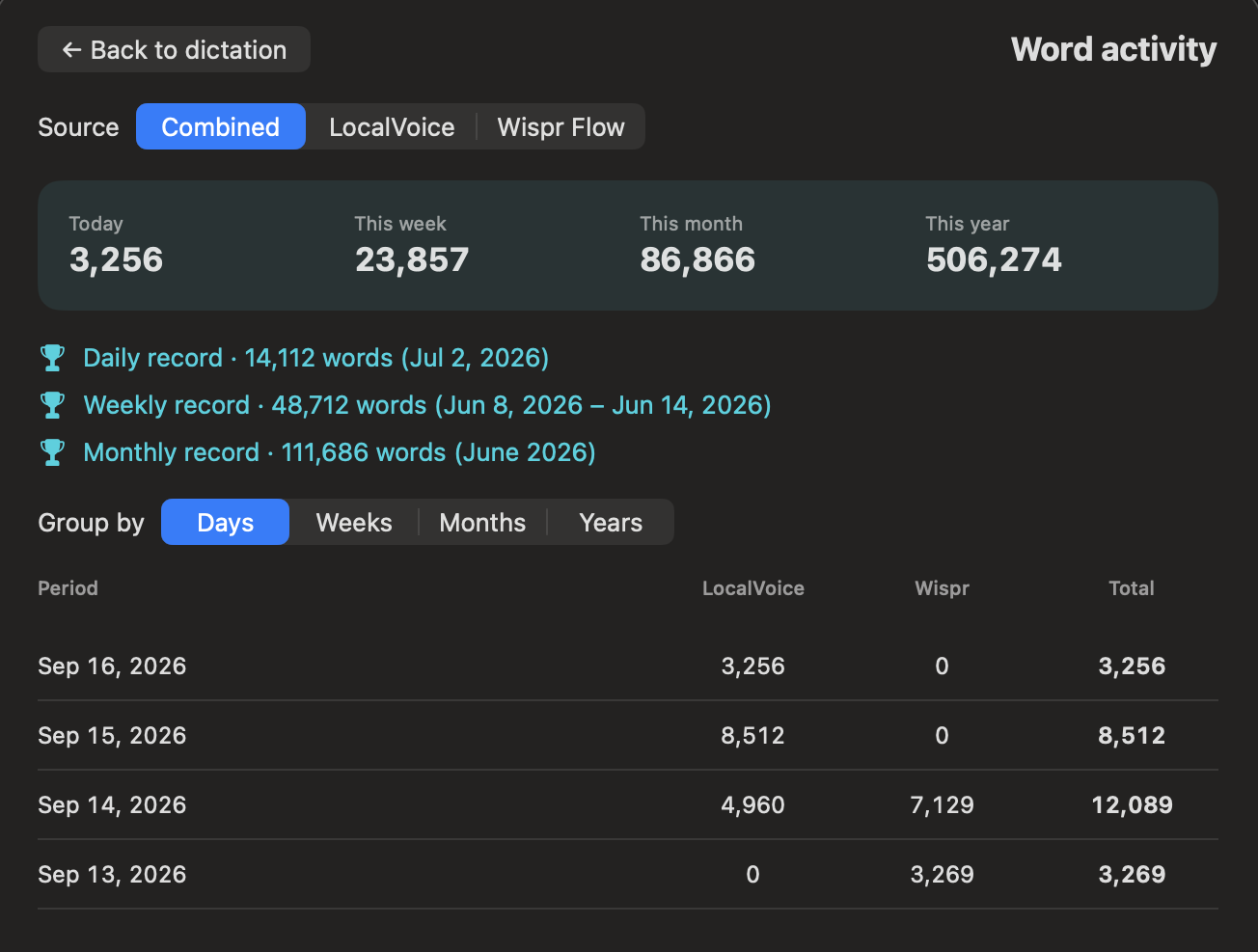
The lifetime counter led to another request: let me see how much I dictate each day, week, month, and year. I wanted that detail on a separate screen, with a button on the main counter card. Versions 0.5.0 and 0.5.1 added Word activity and stacked daily, weekly, and monthly records.
Open Word activity, choose Combined, LocalVoice, or Wispr Flow, then group the rows by Days, Weeks, Months, or Years. The summary shows today, this week, this month, and this year for the selected source. Beneath it, the records show the best recorded day, Monday–Sunday week, and calendar month. The weekly record includes its date range; these are calendar periods, not rolling seven-day or thirty-day windows.
Import dated activity without counting it twice
We reused the private Wispr export preserved during migration. It contained 7,572 unique entries with usable saved word counts, covering April 16 through September 14 in my Mac’s time zone. Another 173 entries lacked valid saved counts, so we left them out rather than guessing. The imported activity file contains only entry IDs, timestamps, and counts; the original transcripts stay private.
The dated Wispr records total 489,546 words, while the lifetime starting balance I supplied was 474,500. We did not establish why those source figures differ, and we did not force them to match. The activity screen reports the available dated records. The main card keeps my supplied balance. In these screenshots, that produces 506,274 combined words for the year versus 491,228 on the lifetime card. Neither figure is added to the other. The 14,046-word difference comes from the two different Wispr source totals.
Build the calendar logic from saved history
We added Activity.swift for date grouping and the new screen. LocalVoice activity uses the original words in saved history. Each source is deduplicated by entry ID, then records are grouped using the Mac’s current time zone and a Gregorian calendar with Monday as the first day of the week. The record rows select the largest daily, weekly, and monthly buckets for the chosen source. The screen opens as a sheet with Back to dictation and closes when recording starts.
The imported counts live in ~/Library/Application Support/LocalVoice/WisprActivity.json. Preserve that file along with History and the app’s preferences. There is no automatic history expiration, but deleting history changes the totals. Days without recordings contribute zero and are omitted from the table. This is a view of retained records, not an independent permanent accounting ledger or a live connection to Wispr.
Prompt to reproduce it: Add a Word activity button to the lifetime card and open a separate screen. Group original saved dictation counts by day, Monday–Sunday week, calendar month, and year in the current local time zone. Let me filter by this app, imported prior-app activity, or both. Stack daily, weekly, and monthly records with their dates. Deduplicate IDs within each source, skip missing imported counts, and keep dated imports separate from any undated lifetime starting balance. Include a clear Back button and preserve existing recording behavior.
Check the numbers, the screen, and Fn after installation
Tests covered local midnight, year and month boundaries, Monday-based weeks, daylight-saving changes, duplicate IDs, separate sources, and empty data. An independent calculation matched the imported monthly totals and the best day and week. We inspected the rendered screen, exercised all four time views and all source filters, and checked Back navigation. A later dictation also increased the displayed local total when the activity screen reopened.
The update exposed the same deployment problem again: the rebuilt ad hoc-signed app lost its effective Accessibility permission, so Fn stopped working. We refreshed only LocalVoice’s existing permission and restarted the installed build. The app then showed HOLD FN and Insertion enabled. That readiness check is distinct from a fresh physical-key and destination-paste test. The lesson belongs in the build instructions: a feature update is not finished until the installed app’s recording controls and insertion access are checked again.
Give your own coding assistant the build brief
Start with a compatible Mac and a coding assistant that can work with local files and developer tools. Have it inspect your installed SDK and current Apple documentation before coding. The following is a reusable prompt reconstructed from the finished requirements; it is not a verbatim transcript of my first request.
Build a native personal macOS dictation app called LocalVoice, using this article as the implementation brief. First inspect my Mac architecture, macOS version, developer tools, and the current Apple Speech APIs. Target Apple Silicon and macOS 26+ with US English for this version. Tell me if my machine cannot run it before changing settings.

Use Swift, AppKit and SwiftUI. Use AVAudioRecorder for mono 16 kHz, 16-bit PCM WAV capture; use SpeechAnalyzer with SpeechTranscriber for on-device recognition. Reserve the locale and obtain/install required assets at use time. Do not add a paid transcription service, API key, web backend, or extra model runtime. Keep optional FoundationModels polishing separate from automatic transcription.

Create Source/main.swift, Engine.swift, FnShortcut.swift, History.swift, Words.swift, Activity.swift, an original icon and Assets folder, and build.sh. Make the build relocatable. Compile, create the app bundle and permission descriptions, include the icon, sign an isolated staging copy, verify the signature, and run meaningful regression checks. Keep one stable bundle identifier per installed build. Do not change any other app's settings.

Before recording, capture the external application, focused field and selected range. Hide the main app and show a nonactivating floating panel near the bottom of the active screen. Show actual microphone level, elapsed time, Finish and Discard. Stop capture at ten minutes. After stopping, process the file, save the original transcript, clean it lightly, update the same history entry, and return to the captured field for clipboard Command-V. Never press Enter or Send. Verify foreground activation. If insertion cannot safely proceed, copy the transcript and show a clear recovery message. Restore the old clipboard only if the user has not changed it since our paste.

Implement Fn with a pure state machine: hold Fn to record; release to finish; while holding Fn press Space to latch hands-free; release both without stopping; tap Fn again or click the check mark to finish. Capture both Space press and release. Ignore repeats. Other Fn combinations should remain usable. Preserve Control+Option+Space as a toggle fallback. Do not activate a conflicting shortcut while another dictation app owns Fn; confirm the existing app is quit first. Check System Settings > Keyboard > Press Fn/Globe key to. With the owner’s authorization, set it to Do Nothing so stopping hands-free recording cannot also invoke the emoji picker. Verify this with the physical keyboard and actual destination text; pure gesture tests do not cover the system action.

Guard delayed microphone permission with a request identity. Releasing Fn before approval must not start a late recording. Keep event-tap callbacks brief. Handle disabled taps and sleep without leaving a held recording running. Track current Accessibility availability.

Save per-entry JSON history under Application Support/LocalVoice/History with an ID, timestamp, original text and cleaned text. Use atomic writes and restricted permissions. One bad file must not hide the others. Include search, Copy, Export history and Back. Reopen a usable window when the app icon is clicked; restore minimized secondary windows. No automatic history expiration.

Keep failed/interrupted audio under Application Support/LocalVoice/Recordings, not a temporary folder. Add Retry recording and cancel transcription while keeping its audio. Fence every async result with a session identity so a cancelled or superseded result cannot paste. Treat empty, whitespace-only and cleanup-empty recognition as failures; retain the recording for retry. Do not delete recorded audio before text is safely stored. Explain how to open older retained audio and how to back up history and preferences.

Automatic cleanup may remove um/uh/ah/erm, tidy spacing and punctuation, and interpret new line/new paragraph. Preserve explanations, tangents, false starts, names, dates, numbers and changed plans. Do not automatically summarize or infer missing details. Manual Polish must reject content-word changes. Test that three never becomes 3 PM and ER remains ER.

Provide an It wrote / I meant correction form. Use explicit whole-word/phrase matches only, once against the original text. Longest phrase wins; latest duplicate rule wins. Escape matching syntax and preserve literal replacement characters. Imported correct spellings are reference data, not claimed speech-model training. Do not activate contextual observed corrections as global rules. Export any existing dictation app's data only with my authorization and keep it private.

Add a lifetime word counter based on original saved transcripts, deduplicated by entry ID, plus a separately stored user-supplied prior-app word balance. Show this app’s words first in the breakdown. Copying and polishing must not add words. Back up the history, carryover preference, vocabulary file and current correction preferences; distinguish dated backups from automatic sync.

Add a separate Word activity screen with day/week/month/year grouping, current-period totals, source filters and stacked daily/weekly/monthly records. Use local calendar boundaries and Monday–Sunday weeks. Show the best week’s date range. Deduplicate entry IDs within each source. Import only dated records with valid counts, and keep these separate from an undated lifetime starting balance. Back up WisprActivity.json alongside history. Test midnight, year boundaries, daylight-saving changes, empty data, navigation and record totals.

QA the exact installed app. Test synthetic speech and silence, a long fixture with known expected content, selection replacement preserving surrounding text, no valid destination, repeat/latch/release cases, cancelled permission, late transcription results, error recovery, history reload and damaged history, navigation, and the physical Fn sequences. Report what passed, failed, or remains untested. Fix defects and recheck affected behavior. Do not equate a requested paste with visible insertion.

Deliver the app, reproducible source, setup guide, development log, QA evidence, recovery instructions and a source manifest. Keep public release candidates separate from personal dictionaries, recordings, history, credentials, private paths and logs. Do not publish, send anything, buy developer membership, cancel a subscription, or disable macOS security protections. Work through the authorized local build and tests, then report the concrete result and remaining release decisions.
For a source snapshot, the normal rebuild command is ./build.sh from the project folder. The development build compiles the runtime Swift files with the macOS 26 SDK, then creates and signs LocalVoice.app. If the SDK is missing, install Apple’s matching developer tools before proceeding.
After installing the app, select a harmless text field and verify both Fn modes. Grant Microphone and Accessibility separately. If a rebuild makes insertion fail, repair only LocalVoice’s stale permission entry and restart the unchanged executable. Keep the old working version and your data backup until the new version passes your own daily workflow.
Share a clean app, with a clear release status
A coworker can use a standalone Mac app built from this project. Their speech model and permissions belong to their Mac. Their history and corrections are created locally; copying the app does not require copying my personal data.
We prepared two clean review packages: a source ZIP and a Mac app ZIP. The allowlist contains code, the original icon, the build instructions, or the compiled app as appropriate. It excludes private exports, dictation history, recordings, vocabulary, preferences, account information, and internal logs. We checked the archive contents and verified the extracted app’s signature.
The current executable is ad hoc signed and is not notarized. That makes it a development/review build, not a frictionless public installer. A Mac receiving a downloaded copy may warn or block it. The normal public-distribution route is Apple Developer ID distribution with notarization and a clean installation test on another Mac.
Apple currently lists its Developer Program membership fee as US$99 per membership year. That is a distributor’s membership cost, not a fee for each dictation or coworker. We did not enroll, notarize the app, cancel Wispr, or post a public download during this build.
A ZIP link can eventually live in this article, but it needs a release version, a checksum, compatible Mac requirements, reviewed contents, clear installation steps, and a supported distribution decision. A draft post does not make media-library attachments private. We kept both ZIPs out of the public media library while the release remains under review.
Account for costs without inventing savings
| Part of the work | Known cost or limit |
|---|---|
| Using LocalVoice for dictation | No LocalVoice subscription, paid speech API, or per-dictation charge in this implementation. A compatible Mac and ordinary storage are required. |
| Building and maintaining it with an AI assistant | Uses the operator’s AI plan or usage allowance. Exact token totals, active build time, and attributable charges for this entire build are UNKNOWN. |
| Sharing the existing development build privately | No per-copy fee built into LocalVoice; recipients still face installation and permission requirements. |
| Preparing a broadly distributed Mac release | Developer Program membership currently US$99/year for the standard signing/notarization route. Release maintenance and testing still take work. |
We did not time a human team doing the same assignment, so there is no defensible “X times cheaper” comparison. Applying another article’s Claude prices to a GPT-6 Astra session would produce a made-up receipt. The useful cost result is narrower: the installed app’s normal dictation path has no paid transcription dependency.
Turn the build into instructions the next agent can use
The agent handled: source research, Swift implementation, the icon, compilation, data-preservation work within my authorization, test fixtures, code checks, app inspection, fixes, and the private build record. It also prepared the sanitized sharing candidates and this article draft.
I supplied: the workflow, real-use feedback, permission decisions, the reason to preserve tangents, the Fn behavior, and the WordPress login. Physical keyboard acceptance and the public release decision still need their own evidence or input.
The source inventory includes the Swift implementation files, the build script and icon assets, the versioned development/recovery/QA records, my reported tests and screenshots, creator references, Apple’s documentation and installed SDK, and the article standards. Exact session-wide file-read counts, tool-call counts, and token totals were not captured as an auditable receipt. We have not substituted estimates for those missing totals.
For presentation, we reviewed the Cam Hazzard build record and the Trenton Sandler optimization record. Their useful pattern is specific decisions and visible checks, with real bugs explained. We applied the maintained article quality standard to this article rather than copying their facts or cost estimates.
Review the article against the publication standard
The article needed its own repair pass. In the WordPress preview, the site theme made code too dark against the code-block background and broke ordinary words in the middle on phones. Scoped styles restored readable contrast and normal word wrapping. We also made the storage table fit a narrow screen and checked the lead diagram on desktop and phone layouts.
| Check | Status | Evidence or next action |
|---|---|---|
| Reader and purpose clear | PASS | Mac users who want a personal dictation tool and a reproducible build brief. |
| Answer in the opening | PASS | Names the app, the model, and the next step. |
| Named version and evidence | PASS | LocalVoice through 0.5.1 with version-specific checks and limits. |
| Source fidelity | PASS | Implementation and incident claims trace to the build record; effort history is attributed to the operator. |
| Useful headings and short paragraphs | PASS | Technical detail follows the plain-language opening. |
| No invented time or savings | PASS | Unavailable metrics are UNKNOWN. |
| Distinct topic | PASS | Site search found voice-briefing articles, not an existing LocalVoice build tutorial. |
| Parent topic linked | PASS | The voice-context guide appears near the start. |
| Sibling build records linked | PASS | Cam and Trenton references are linked in the body. |
| Rebuild instructions | PASS | Inputs, ordered phases, prompt, output, and acceptance checks included. |
| Code examples | PASS | Short excerpts from the actual implementation; full build requires the complete project. |
| Original visuals | PASS | Four topic-specific diagrams and two author-supplied app screenshots cropped to exclude private content. |
| Private information review | PASS | Examples are synthetic; private exports and paths are excluded from article and sharing candidates. |
| Source video player | PASS | Embedded at the top; playback and captions verified in the saved preview. |
| Featured image | PENDING | Select a safe frame from the finished video or the prepared app graphic for the article. |
| WordPress author | PASS | Dylan Haugen is set in the editor and appears on the saved preview. |
| Category, tags and SEO metadata | PASS | AI Builder and Meta Articles; five relevant tags; explicit 46-character SEO title and 155-character description. |
| Rendered desktop and phone checks | PASS | Saved WordPress preview checked at 1440 × 860 and 390 × 844. Fixed theme code contrast, mid-word breaks, and table overflow. Video embed checked separately after insertion. |
| Public ZIP release | PENDING | Review candidate packages; notarization and separate-Mac acceptance remain open. |
| Publication and next owner | PUBLISHED | Dylan supplied the video. The article is published; the app ZIP release remains under review. |
Use the result, then improve the recipe
I now have a personal dictation app whose behavior I can change and whose source I can rebuild. The most useful change was small: preserve the thinking I want the next AI to receive. History and retry make a failed paste less costly, while the visible panel makes a long recording easier to trust.
For BlitzMetrics, the useful asset is the checked process: describe the behavior, build it, use it, record the failure, and improve the instructions. The app supplies a way to capture a brief; the build record turns the experience into a lesson another operator can apply.
For your own app, start with the rebuild prompt and demand a visible paste test before relying on it. For help turning your business’s real work into useful marketing content, see Local Service Spotlight’s implementation services.
BUILD YOUR OWN VERSION
Take the brief. Keep the tests.
Use the requirements above with your own coding assistant. Public app downloads remain pending release review.
Use the rebuild promptDylan Haugen
Dylan Haugen is a professional dunker, content creator, and editor at the Content Factory, where he transforms podcasts and interviews into strategic brand assets. He collaborates with Dennis Yu to support young entrepreneurs and business owners in building their personal brands through education, transparency, and effective content marketing. As the host of the Dunk Talk podcast and a dedicated advocate for establishing dunking as a recognized sport, Dylan combines athletic expertise, storytelling, and digital strategy to help elevate the next generation of creators.