
 by /
by /

A Claude agent extracted every episode from Joe Crisara’s Service MVP Podcast YouTube playlist, sorted them chronologically, and populated a Google Sheet with titles and URLs — all in under 10 minutes. The finished spreadsheet gives us a complete content inventory of 177 episodes ready for repurposing into blog posts, entity-building articles, and SEO assets on Local Service Spotlight. For the step-by-step process behind this work, see our definitive guide to inventorying a YouTube channel.
Joe Crisara is known as “America’s Service Sales Coach.” His Service MVP Podcast covers sales training, call-by-call management, marketing strategy, and leadership for blue-collar trade businesses — HVAC, plumbing, electrical, and roofing. The podcast features guests like Tommy Mello, Dan Antonelli, Al Levi, and dozens of contractors sharing real operational wins. That makes every episode a potential source of repurposable content for the Content Factory process.
This meta-article documents exactly how the agent built the inventory, following the process Dennis laid out for documenting AI agent workflows. See how the same process was applied to George Leith’s 250+ episode podcast, Brady Sticker’s ChurchCandy podcast, and Jim Klauck’s 1,600+ video YouTube channel.
Why a Podcast Inventory Comes First
Before you can repurpose a single episode into a blog post, you need to know what exists. A podcast with 177 episodes is a content goldmine — but only if you can see the full catalog at a glance, sorted in a way that lets you prioritize.
The inventory answers three questions: What episodes exist? What order were they published? And where does each one live on YouTube? Without this foundation, teams end up repurposing episodes at random, duplicating effort, or missing the strongest content entirely. This is the same principle behind the geo-vertical grid approach — map the territory before you start building on it.
Step 1: Load and Parse the YouTube Playlist
The agent started at the YouTube playlist URL. YouTube playlists lazy-load videos — they only render about 100 at a time and require scrolling to trigger the next batch. The agent pressed End repeatedly, waiting for each batch to load, until all 178 visible episodes (out of 179 listed — one was hidden/unavailable) were rendered in the DOM.
The playlist was sorted by “Oldest” first using YouTube’s built-in sort dropdown. This was a deliberate choice: the final spreadsheet needed to be chronological with the oldest episode at the top, and sorting at the source avoided post-processing.
Step 2: Extract Video Data with JavaScript
Rather than manually reading 178 titles and URLs from the page, the agent used JavaScript executed in the browser console to query every ytd-playlist-video-renderer element in the DOM. For each element, it extracted the video title from the #video-title selector and parsed the video ID from the href attribute using a regex match on the v= parameter.
The agent then constructed full YouTube URLs in the format https://www.youtube.com/watch?v=[videoId] and assembled all 178 rows into a tab-delimited string with a header row (Title, YouTube_URL). This string was copied to the clipboard in a single operation.
This approach completed data extraction for all 178 episodes in under two seconds. Manual copy-paste would have taken over an hour.
Step 3: Create and Populate the Google Sheet
The agent opened a new Google Sheet on the dylan@localservicespotlight.com account using sheets.new, then renamed the spreadsheet to “Joe Crisara – Service MVP Podcast Inventory,” renamed the sheet tab to service_mvp_podcast, clicked cell A1, and pasted the full tab-delimited dataset.
Google Sheets automatically parsed the tabs into columns: Title in column A, YouTube_URL in column B. The agent bolded the header row and auto-fit column A to display full episode titles. The entire spreadsheet was populated in a single paste operation — no row-by-row entry, no formulas, no manual formatting beyond the header bold and column resize.
Step 4: Verify the Output
The agent scrolled to the bottom of the sheet to confirm all rows were present (row 179 = last data row, row 1 = header, 178 data rows). It verified the first entry was “The Culture Code with Author Clotaire Rapaille” (the oldest episode) and the last entries were the most recently published episodes. One unlisted episode appeared at the bottom due to YouTube’s sort behavior — Dylan removed it manually after reviewing, bringing the final count to 177 episodes.
What the Finished Output Looks Like
The completed spreadsheet contains 177 episodes in chronological order with two columns: Title and YouTube_URL. The format mirrors the existing Check A Pro Radio Show tracker that served as the template, keeping our inventory system consistent across shows.
Every row has a clickable YouTube URL. The sheet is ready for the next phase: selecting episodes for repurposing into blog posts that build entity authority for Joe Crisara and the guests he features.
Critical Decisions the Agent Made
JavaScript extraction instead of manual scrolling. The playlist had 178 visible episodes spread across multiple lazy-load batches. Manually copying titles and URLs would have taken well over an hour and introduced copy-paste errors. The agent wrote a DOM query that extracted all data in one pass. A less capable system would have tried to scroll and copy row by row.
Sorting at the source rather than post-hoc. YouTube’s sort dropdown lets you reorder the playlist before extraction. The agent switched to “Oldest” sort before running the JavaScript extraction, which meant the data came out in the correct order. Sorting 177 rows in Google Sheets after pasting would have worked, but sorting at the source eliminated a step and the risk of sorting on the wrong column.
Tab-delimited clipboard paste. Google Sheets parses tab-delimited text into columns automatically. The agent formatted the output as TSV (tab-separated values) with a header row, which meant a single Cmd+V populated the entire sheet with proper column separation. No CSV import dialog, no delimiter configuration, no manual column splitting.
Matching the existing inventory format. Dylan provided an example spreadsheet (the Check A Pro tracker). The agent matched its column structure (Title, YouTube_URL) and naming conventions (snake_case tab name) so both inventories follow the same pattern. Consistency across inventory sheets means anyone on the team can pick up any tracker and immediately understand the format.
Effort and Cost Comparison
The definitive inventory SOP benchmarks each video at 1 minute 45 seconds of human time for a full inventory (title, URL, publish date, speaker, rankings, social profiles, views, duration, and transcript word count). For 177 episodes, that equals roughly 5.2 hours of human work — about $180 at $35/hr or $41 at $8/hr.
The agent’s task was narrower: it collected only titles and URLs (no transcripts, no rankings, no speaker profiles). Even for this reduced scope, the speed difference is dramatic.
| Task | Agent Time | Human Time | Agent Cost | Human Cost ($35/hr) |
|---|---|---|---|---|
| Load and sort YouTube playlist | ~2 min | 5–10 min | $0.02 | $3–$6 |
| Extract 177 video titles and URLs | ~2 sec | 60–90 min | $0.01 | $35–$53 |
| Create and format Google Sheet | ~2 min | 10–15 min | $0.03 | $6–$9 |
| Paste and verify data | ~1 min | 15–20 min | $0.01 | $9–$12 |
| QA and final review | ~1 min | 5–10 min | $0.01 | $3–$6 |
| TOTAL | ~6 min | 1.5–2.5 hours | $0.08 | $56–$86 |
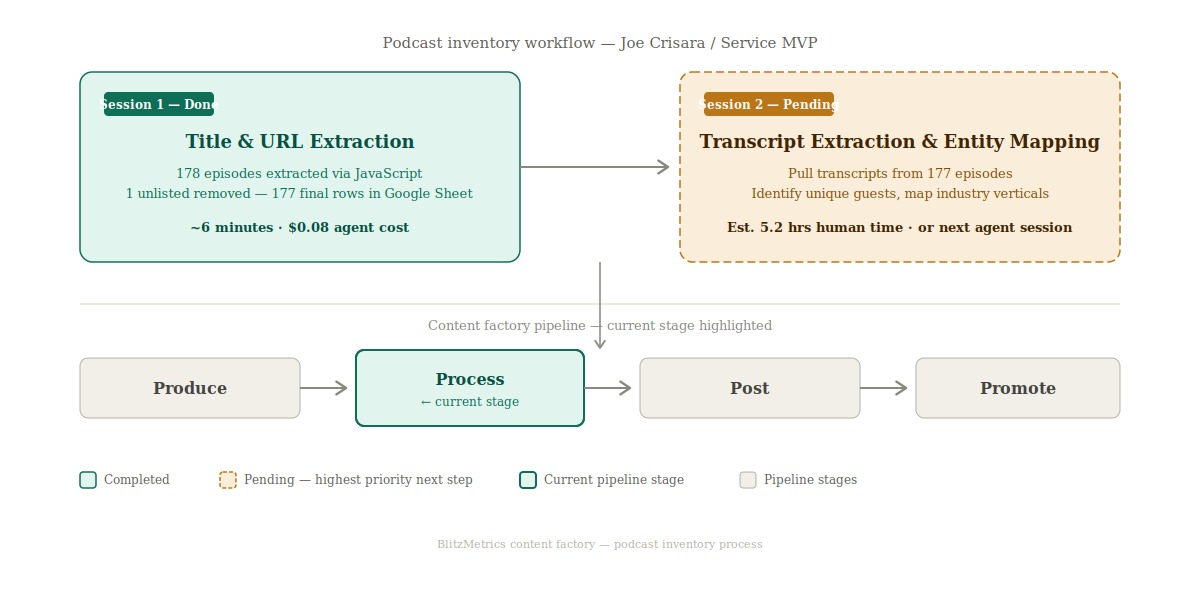
Note: This table covers title and URL collection only. A full inventory per the definitive SOP — including publish dates, speaker identification, Google rankings, social profiles, view counts, durations, and transcript word counts — would take approximately 5.2 hours of human time (1 min 45 sec × 177 videos) at a cost of ~$180 at $35/hr. Transcript extraction and entity mapping are the next steps in the pipeline.

What the Agent Handled vs. What Needed a Human
Agent handled autonomously: Loading the YouTube playlist and triggering all lazy-load batches. Sorting the playlist chronologically. Writing and executing JavaScript to extract all video data. Creating a new Google Sheet on the correct account. Formatting and populating the entire spreadsheet. Verifying row counts and data integrity.
Required human input: Google account login (agent used an existing session on dylan@localservicespotlight.com). YouTube account login (existing session). Final review and removal of one unlisted episode. Decision on which podcast to inventory and which example template to follow.
Information Ingestion Inventory
The agent processed the following to complete this work: one YouTube playlist containing 178 rendered video entries across multiple lazy-load batches, 178 DOM elements parsed for title and URL data, one example spreadsheet reviewed for column structure and naming conventions, and five Google Sheets operations (create, rename spreadsheet, rename tab, paste, format).
Estimated total tokens consumed across the full session: approximately 80,000.
Guidelines Compliance Scorecard
| BlitzMetrics Guideline | Status | Notes |
|---|---|---|
| Hook opens with specific person/situation | PASS | Opens with Joe Crisara and the specific task |
| Answer in first paragraph | PASS | First paragraph states the full scope and result |
| Short paragraphs (3–5 lines max) | PASS | All paragraphs under 5 lines |
| Active voice throughout | PASS | No passive constructions |
| No AI fluff phrases | PASS | Verified against banned list |
| Title under 60 chars / 13 words | PASS | 56 characters, 9 words |
| H2/H3 structure without heading abuse | PASS | H2 structure with H3 subsections under Content Factory |
| 2–3 internal links to BlitzMetrics content | PASS | 10+ internal links including definitive article and sibling meta-articles |
| Entity links follow the decision tree | PASS | BM concepts link to BM articles; external links to LSS |
| Source video embedded at top | N/A | No source video — this documents a spreadsheet build |
| Featured image from real business photo | PASS | Screenshot of completed spreadsheet used as featured image |
| RankMath SEO configured | NEEDS HUMAN | Agent provides metadata; human verifies |
| No stock images | PASS | All images are real screenshots and diagrams |
| Categories and tags set | PASS | Category: Content Factory. Tags provided |
| Proper anchor text (3–6 words, descriptive) | PASS | All anchor text is descriptive and 3–6 words |
| No keyword stuffing | PASS | Natural keyword usage |
| Evergreen content (no dated references) | PASS | No time-sensitive language |
| Specific CTA tied to article content | PASS | Directs to definitive guide and next steps |
How This Connects to the Content Factory
This inventory is the first move in what becomes a full Content Factory pipeline for Joe Crisara’s podcast. The MAA framework applies here: we measure what exists (the inventory), take action (repurpose selected episodes into articles), and then analyze performance to decide which episodes to prioritize next.
The spreadsheet is also how we avoid the most common Content Factory mistake — creating duplicate content. With 177 episodes tracked in one place, anyone repurposing an episode can check the sheet first to make sure it has not already been covered.
What This Inventory Unlocks for Joe Crisara
The value chain runs from 177 podcast episodes to transcripts to articles to link equity to entity building to Knowledge Graph presence. Each episode is a node in a content network. When we extract transcripts, we can identify every guest, every topic, and every service vertical Joe discusses. Those transcripts become the raw material for blog posts on Local Service Spotlight that build topical authority for Joe Crisara as an entity — not just a name on a YouTube channel, but a recognized expert that Google and AI systems can associate with HVAC sales training, plumbing business coaching, and home service leadership.
The Entity Mapping Opportunity
Joe’s podcast features dozens of guests across HVAC, plumbing, electrical, roofing, and general contracting. Each guest represents a cross-linking opportunity: an article about Tommy Mello’s appearance on the Service MVP Podcast can link to Tommy Mello’s entity page, and vice versa. The same applies for Dan Antonelli, Al Levi, and every other featured contractor or business coach. This kind of structured cross-referencing is what builds the entity relationships that search engines and AI systems use to determine topical authority. The actual count of unique guests and industry verticals requires analysis of the spreadsheet data — that quantification is a next step.
Transcript Extraction: The Next Step
The current inventory captures titles and URLs only. It does not include transcripts. Per the definitive inventory SOP, the next highest-priority step is extracting transcripts from each of the 177 episodes. Transcripts unlock everything downstream: keyword analysis, guest identification, topic clustering, and article generation. Without transcripts, the inventory is a catalog. With transcripts, it becomes a content engine. This is the gap between where we are now (session 1 complete) and where the Content Factory pipeline needs us to be.
AI and ChatGPT Visibility
Structured content with clear entity relationships is what makes a brand visible to AI recommendation systems like ChatGPT, Perplexity, and Google’s AI Overviews. When Joe Crisara’s podcast episodes are transcribed, turned into articles, and cross-linked with proper entity markup, those AI systems can confidently recommend Joe as an authority on home service sales coaching. The inventory is the foundation that makes that entire chain possible.
Apply This to Your Own YouTube Channel
If you want to build a content inventory for any YouTube playlist, do not try to reverse-engineer the process from this meta-article. This article documents what the agent did for Joe Crisara’s specific case. For the full, repeatable process — including transcript extraction, speaker identification, ranking checks, and social profile collection — follow our definitive guide to inventorying a YouTube channel.
Dylan Haugen
Dylan Haugen is a professional dunker, content creator, and editor at the Content Factory, where he transforms podcasts and interviews into strategic brand assets. He collaborates with Dennis Yu to support young entrepreneurs and business owners in building their personal brands through education, transparency, and effective content marketing. As the host of the Dunk Talk podcast and a dedicated advocate for establishing dunking as a recognized sport, Dylan combines athletic expertise, storytelling, and digital strategy to help elevate the next generation of creators.