 by / Last updated
Google can associate more than one Knowledge Graph record with the same name. Sometimes two records describe the same person; sometimes they describe different people who share a name. A second record may appear in a Knowledge Graph tool without producing a second visible panel in ordinary Google Search. Before asking Google to combine anything, confirm what each record actually represents.
If you have no panel yet, start with how to get a Google Knowledge Panel. If you have a panel but have not claimed it, use the claim walkthrough. This guide covers the separate problem of two records that appear to represent the same entity.
Watch the walkthrough on YouTube.
1. Find and identify the records
Search your full name in the Knowledge Graph Explorer. Record the KGMID of the panel you have claimed and each possible duplicate. Open each See on Google link and save the resulting URL, which looks like https://www.google.com/search?kgmid=/g/....
Compare more than names and scores. Check the role, website, linked profiles, images, posts and third-party sources. A person with the same name is not a duplicate. A KGMID in the Explorer does not guarantee a public panel exists or can be claimed.
The Explorer labels its number a “Confidence Score,” but we have not verified how its current number maps to Google’s API fields. Google’s legacy resultScore described query matching rather than an absolute confidence threshold, and the newer Enterprise API removed that field. Check the records and linked sources instead of using a score to decide that two results are the same person or to predict whether a panel will appear. Legacy API field definition · Enterprise API migration notes
2. Collect a common link Google can check
Put both KGMID links in one note. Then add at least one exact public link that connects the records to the same person. Strong examples include the same post appearing in results for both IDs, an official profile named in both, or an official site that links to the relevant profile. If a third party appears in the results, link to its page about the person, not merely its homepage.
For each link, say what it proves. “Both are me” gives support less to work with than “This identical Instagram post appears under both KGMIDs, and my official site links to the account that published it.” Save screenshots of the two search views, including the URL bar and the matching result, in case support asks for them.
If the evidence actually points to two different people, request a correction to the mixed information instead of a merge. Google’s Knowledge Panel help directs people to support when panel information is mixed with someone of the same or a similar name.
3. Contact Knowledge Panel support
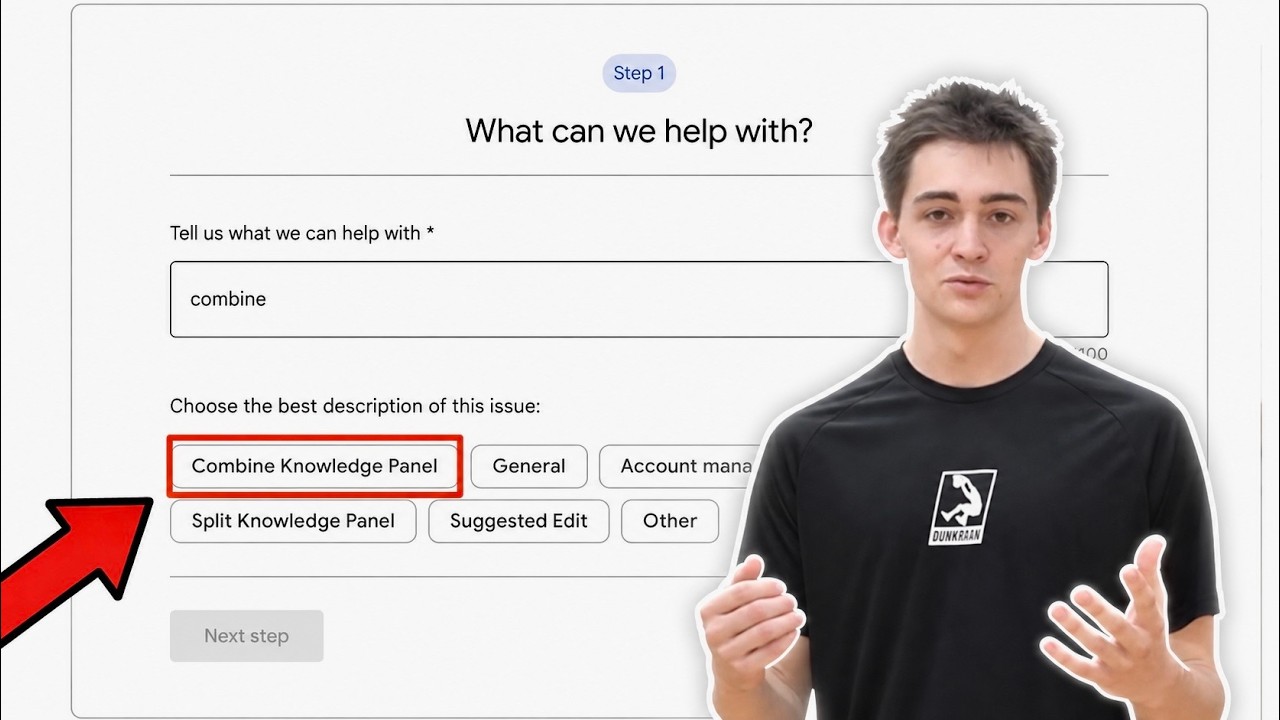
Sign in with the Google account used to claim the primary panel. Open Knowledge Panel support. In the November 2026 walkthrough, the route was:
- Type combine in the first box and select Combine Knowledge Panel.
- Select Next step, review the suggested resources, then continue to the contact step.
- Choose the email contact option when offered.
The labels and fields can change. If that route is unavailable, choose the closest applicable Knowledge Panel issue and describe the two IDs and the common proof clearly.
Enter your name, entity name, official contact email and the URL of the claimed primary panel where the form asks for the panel URL. In the description, identify the secondary KGMID and provide the common proof links. Keep a copy of the submission and the case number. If Google asks for more evidence, reply in that same support conversation.
What to put in the request
Please review these two Knowledge Graph records for a possible merge. Both appear to represent [person or organization name].
Claimed primary panel: [Google Search URL containing the primary KGMID]
Possible duplicate: [Google Search URL containing the duplicate KGMID]
Official website: [URL of your website]
Common proof: [URL of the exact post or profile connecting the records]The common proof connects the records because [one specific sentence explaining what appears under both records and how the official website identifies the account or person].
If you have several possible duplicates, verify each separately and identify each KGMID clearly. Keep the support record organized so you can answer questions about a specific ID. Do not include a namesake’s record merely because the name matches.
4. Respond to support and check the outcome
Google may request a common link or other identity proof. Reply in the existing case with direct URLs and a one-sentence explanation for each. Do not open repeated requests for the same pair while support is reviewing the first one. Google does not publish a guaranteed merge time in its general Knowledge Panel help, so watch for its email rather than counting on a fixed number of days.
If Google asks for a “common link” or more proof
Reply in the same support conversation. Give Google the exact page or post to inspect and explain the connection; repeating only the two panel URLs may not answer its question.
Hello,
Thank you for reviewing my request. Here is the common link connecting the two records:
Exact shared post or page: [URL]
Claimed primary panel: [Google Search URL containing the primary KGMID]
Possible duplicate: [Google Search URL containing the duplicate KGMID]This same [post/page/profile] appears in results associated with both records. It belongs to [name], as shown by [official website URL linking to the account, or another direct identity source].
Additional independent proof: [URL of a relevant third-party profile or article, if available]. This page identifies [name] as [specific role or affiliation].
Please let me know if you need a different link to establish that these records represent the same entity.
When Google says it has taken action, check both KGMID URLs, an ordinary name search, the primary panel and the source links. Record what changed and what did not. A support reply or a change in the Explorer is not, by itself, proof that the public result now shows one accurate panel.
Frequently asked questions
Do I have to claim the secondary record first?
Google’s public Knowledge Panel help does not state a universal requirement to claim every possible duplicate before contacting support. Start from the account that manages the claimed primary panel and follow any case-specific instructions Google gives you.
Is every lower-scoring result a duplicate?
No. The Explorer’s number alone cannot establish identity. Compare the associated sites, profiles and sources before making a merge request. A different person with the same name should remain a separate entity.
What if the smaller KGMID does not show a full panel?
Describe it accurately as a Knowledge Graph record or partial search result. Give Google the ID, the visible results and the links connecting it to your claimed primary record. Support will decide whether it can combine the records or correct the association another way.
Can the records split again?
Google generates Knowledge Panels from information it finds online, so keep your official site and profile facts accurate and connected. No one can guarantee that a duplicate will never recur. How Google says panels work
Related Knowledge Panel guides
- How to get a Google Knowledge Panel covers establishing a clear, source-backed identity when you do not have a panel yet.
- How to claim your Knowledge Panel covers verification and suggestions after a panel appears.
- How to fix your Wikidata profile covers one public source you may need to correct when identity details conflict.
- What to do when a Knowledge Panel disappears addresses a missing panel rather than a confirmed duplicate.
If you want help with the underlying identity work, review the Knowledge Panel service and its current terms.
Originally published .
Dylan Haugen
Dylan Haugen is a professional dunker, content creator, and editor at the Content Factory, where he transforms podcasts and interviews into strategic brand assets. He collaborates with Dennis Yu to support young entrepreneurs and business owners in building their personal brands through education, transparency, and effective content marketing. As the host of the Dunk Talk podcast and a dedicated advocate for establishing dunking as a recognized sport, Dylan combines athletic expertise, storytelling, and digital strategy to help elevate the next generation of creators.