

If you manage multiple WordPress sites and spam comments are eating up your team’s time, the answer is not a better spam filter. The answer is turning comments off completely across every site, at once, without clicking through each one manually.
Fifty-three production WordPress sites on WP Engine. Comments disabled on all of them in a single session. No plugin subscriptions, no moderation queues, no manual site-by-site configuration. This is the same principle behind replacing internal linking plugins with AI agents — intelligent automation that understands context beats mechanical tools every time.
Here is every step, including the errors that came up and how the agent handled them.
Why Akismet Was Not the Answer
An audit of the BlitzMetrics WP Engine account found 32 sites had Akismet installed, only 9 had it active, and 36 had nothing at all. Standardizing Akismet across 68 sites would mean managing licenses, keeping the plugin updated, and still reviewing a moderation queue full of spam.
Dennis Yu made the call: turn off comments entirely. If 99.9% of comments are spam anyway, there is no point in filtering them. Close the door.
WP Engine manages hosting infrastructure (backups, environments, deployments) but it does not expose a bulk WordPress settings toggle inside the portal. Every comment setting lives in each site’s individual database. To change it across 53 sites, the right path is WP Engine’s SSH Gateway combined with WP-CLI, the official command-line tool for WordPress.
Backing Up Before Touching Anything
Before any commands ran, manual backups were triggered for two production sites through the WP Engine portal. The remaining 51 production sites had WP Engine’s automatic daily checkpoint backups confirmed to have already run that morning.
This step is not optional. Disabling comments across 53 live sites via direct database commands has no single undo button. A restore point is required before proceeding.
Getting SSH Working on Windows From Scratch
The .ssh directory does not exist on Windows by default, so the first ssh-keygen attempt failed immediately with “No such file or directory.” A mkdir command created the folder, and the key generation ran cleanly after that.
From there: generate an ed25519 key pair in the WP Engine SSH Gateway format, retrieve the public key, add it to WP Engine at my.wpengine.com/profile/ssh_keys, and create an SSH config file at ~/.ssh/config mapping the WP Engine pattern to the correct key file.
The Script That Ran Across All 53 Environments
The PowerShell script looped through every production environment name and SSHed into each one through the WP Engine gateway. Three WP-CLI commands ran per environment:
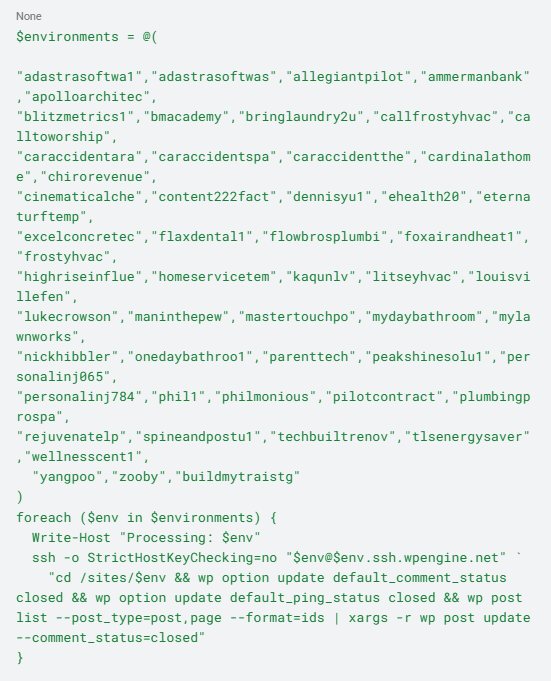
The first command, wp option update default_comment_status closed, prevents comments on any new post going forward. The second disables pingbacks. The third loops through every existing post and page and closes comments on each one.
The first version of the script asked for a manual “yes” at every SSH connection to confirm the host key. That meant 53 separate confirmations. By site number 9, it was clear that it was not going to work. The script was revised to include -o StrictHostKeyChecking=no, which bypasses those prompts for trusted gateway connections. The remaining 44 environments ran without interruption.
The Errors That Showed Up and Why They Did Not Matter
Several environments produced PHP warnings during execution. Sites with the Link Whisper threw a foreach() argument must be of type array|object, null given during initialization. In a terminal window, those warnings look like failures.
They are not. PHP warnings fire during plugin bootstrap — before WP-CLI runs its commands. Every environment that produced warnings still processed all three commands successfully. The warning and the result are independent events.
The session was also interrupted by an internet disconnection midway through. When the connection restored, the terminal output showed the last environment in the list (buildmytraistg) had been processed and the PowerShell prompt had returned. The script completed during the disconnection.
Verifying the Changes Stuck
Terminal output confirms the script ran. A database query confirms the changes actually wrote correctly.
The agent opened phpMyAdmin through the WP Engine portal available at [environment].phpmyadmin.wpengine.net for every WP Engine site and ran this query:

One detail worth knowing: the WordPress options table in WP Engine environments is wp_options, not a prefixed version. Running SHOW TABLES LIKE ‘%options%’ first confirms this before executing any query.
Verification ran on three environments spread across the list early, middle, and late to confirm consistent results across the full range, not just on the environments visible before the disconnection.
What the Network Looks Like Now
Fifty-three production sites. Zero comment queues. Zero Akismet licenses. Zero spam to review going forward.
The default_comment_status and default_ping_status options in wp_options now read closed across every production environment. This is a database-level change — not a plugin toggle that resets on update, not a theme setting that can be accidentally reversed. It stays closed unless someone runs the same WP-CLI command to reopen it.
Doing this manually — logging into each WordPress admin, opening Settings > Discussion, toggling the checkbox, saving — would take a full working day across 53 sites. The script ran in under 30 minutes.
What Any Multi-Site WordPress Operator Can Take From This
Agency owners and network operators running multiple WordPress sites on WP Engine face this same situation constantly: one change needs to happen everywhere, and the portal does not have a bulk WordPress settings tool.
WP Engine’s SSH Gateway and WP-CLI solve this. The initial setup takes about 20 minutes. After that, any site-wide operation — disabling a feature, activating a plugin, running a database update becomes a script that handles every environment in one run.
The spam comment problem is gone. The script above is a starting point for any operator facing the same issue. Swap in your own environment names, connect your SSH key, and run it.
If you’re also looking to improve internal linking across these sites, we tested Link Whisper for automated internal link suggestions — worth reading before you scale any multi-site WordPress operation.
For a step-by-step walkthrough of this same process, see How We Bulk-Disabled Comments Across 53 WordPress Sites Using an AI Agent.
Managing a WordPress network and want to see how the BlitzMetrics Content Factory handles operations at this scale? Start with the four stages of the Content Factory to understand the full system.
Dennis Yu
Dennis Yu is the CEO of Local Service Spotlight, a platform that amplifies the reputations of contractors and local service businesses using the Content Factory process. He is a former search engine engineer who has spent a billion dollars on Google and Facebook ads for Nike, Quiznos, Ashley Furniture, Red Bull, State Farm, and other brands.
Dennis has achieved 25% of his goal of creating a million digital marketing jobs by partnering with universities, professional organizations, and agencies. Through Local Service Spotlight, he teaches the Dollar a Day strategy and Content Factory training to help local service businesses enhance their existing local reputation and make the phone ring.
Dennis coaches young adult agency owners serving plumbers, AC technicians, landscapers, roofers, electricians, and believes there should be a standard in measuring local marketing efforts, much like doctors and plumbers must be certified.