


Rank Math Pro is one of the most powerful SEO plugins available for WordPress.
We provide Rank Math Pro to all clients under our enterprise license, along with many other premium tools. This means you don’t have to purchase or manage these licenses yourself; we cover it.
The impact of this curated suite of tools is straightforward:
- Better rankings in Google. Your site is structured and optimized to meet modern SEO standards.
- Better rankings in ChatGPT. Since AI assistants increasingly reference structured, authoritative content, plugins like Rank Math Pro give you an extra edge in discoverability.
This guide will walk you through how to access Rank Math Pro inside your WordPress site.
Task checklist
Information you’ll need:
- WordPress admin login (yourwebsite.com/wp-admin).
- Confirmation that Rank Math Pro is already installed (we handle this under our enterprise setup).
Tools required:
- WordPress dashboard.
- Rank Math Pro plugin (already provided via BlitzMetrics enterprise license).
Don’t worry if you don’t see “Pro” labeled everywhere. Pro features unlock automatically under our license.
Step-by-step guide
Step 1: Log into your WordPress dashboard
Go to yourwebsite.com/wp-admin.
Enter your username and password.
Once you’re logged in, you’ll be taken to the WordPress Dashboard.

Step 2: Locate Rank Math in the sidebar
On the left-hand panel of your dashboard, you should see a menu item labeled Rank Math.
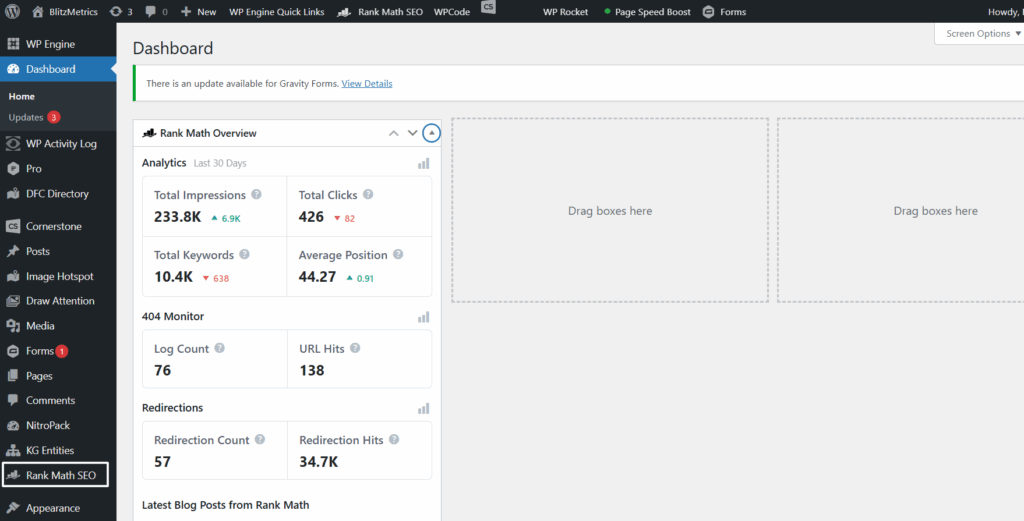
If you only have the free version, it will just say Rank Math.
If you have Rank Math Pro, you’ll still access it the same way, but additional features will be unlocked.
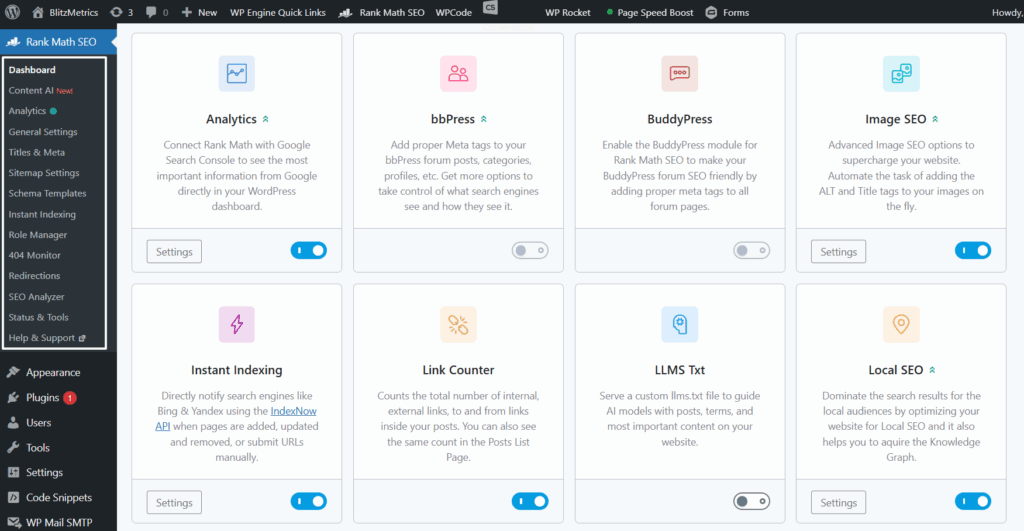
Clicking on Rank Math will open up its settings, analytics, and tools.
Step 3: Connect or verify your account
If Rank Math Pro was purchased for you (for example, by your developer or agency):
- You may already have it connected and running.
- If you need direct access, ask your developer/agency for the login credentials to the Rank Math Pro account used for licensing.
Inside the plugin settings, you can see whether your site is connected to Rank Math Pro.
If it’s not connected (rare, since we usually handle this for you). Ask our team for assistance, we manage the credentials. We don’t give out shared enterprise logins (for security), but we can reconnect your site in minutes.
Step 4: Explore the Rank Math Dashboard
Once active, you’ll find powerful features unlocked, including:
- SEO Analysis: Run audits to find opportunities.
- Keyword Tracking: Monitor how you’re ranking.
- Local SEO: Optimize for maps and local intent.
- Schema Markup: Add structured data for rich snippets.
- Redirections & Breadcrumbs: Manage site navigation and user experience.
These features are why we chose Rank Math Pro for our enterprise stack, it goes beyond the basics.
Step 5: Troubleshooting access issues
If you don’t see Rank Math in the left-hand panel, make sure the plugin is installed and activated.
Go to Plugins → Installed Plugins and check if “Rank Math SEO” is listed.
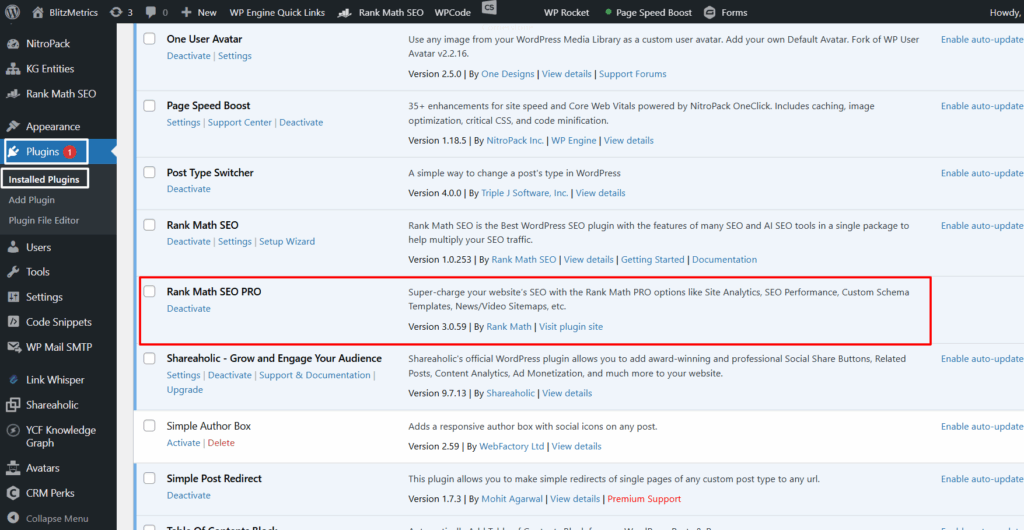
If not, you may need to reinstall it.
If you’re running into conflicts (like Elementor slowing down), you can temporarily deactivate Rank Math Pro while editing pages in Elementor, or use Elementor’s Safe Mode.
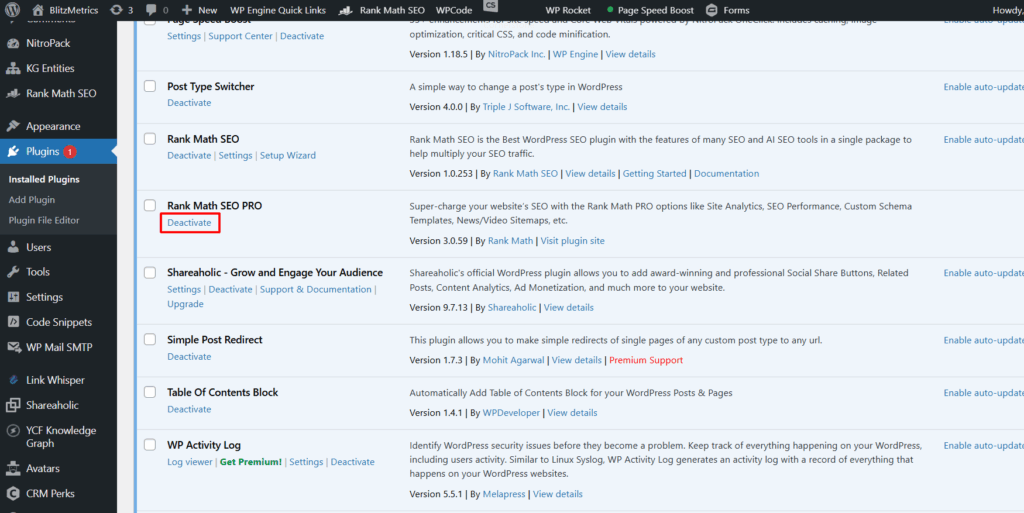
Don’t worry, temporarily deactivating Rank Math won’t harm your SEO.
Why keep Rank Math Pro?
Even if you’re not inside the plugin every day, it’s quietly working in the background.
Rank Math Pro helps ensure your site is structured in a way that Google understands, which increases your chances of showing up when customers search for your services.
It automatically generates sitemaps, manages meta data, and adds schema markup that can give you an edge in search results.
Verification checklist
Before finishing, confirm these:
- WordPress login works.
- Rank Math appears in the sidebar.
- The site is connected under our enterprise Rank Math Pro license.
- SEO features (analysis, schema, redirections) are visible.
- Any plugin conflicts are resolved.
If all the above are true, you’re fully set up with Rank Math Pro.
Dennis Yu
Dennis Yu is the CEO of Local Service Spotlight, a platform that amplifies the reputations of contractors and local service businesses using the Content Factory process. He is a former search engine engineer who has spent a billion dollars on Google and Facebook ads for Nike, Quiznos, Ashley Furniture, Red Bull, State Farm, and other brands.
Dennis has achieved 25% of his goal of creating a million digital marketing jobs by partnering with universities, professional organizations, and agencies. Through Local Service Spotlight, he teaches the Dollar a Day strategy and Content Factory training to help local service businesses enhance their existing local reputation and make the phone ring.
Dennis coaches young adult agency owners serving plumbers, AC technicians, landscapers, roofers, electricians, and believes there should be a standard in measuring local marketing efforts, much like doctors and plumbers must be certified.