
 by
by

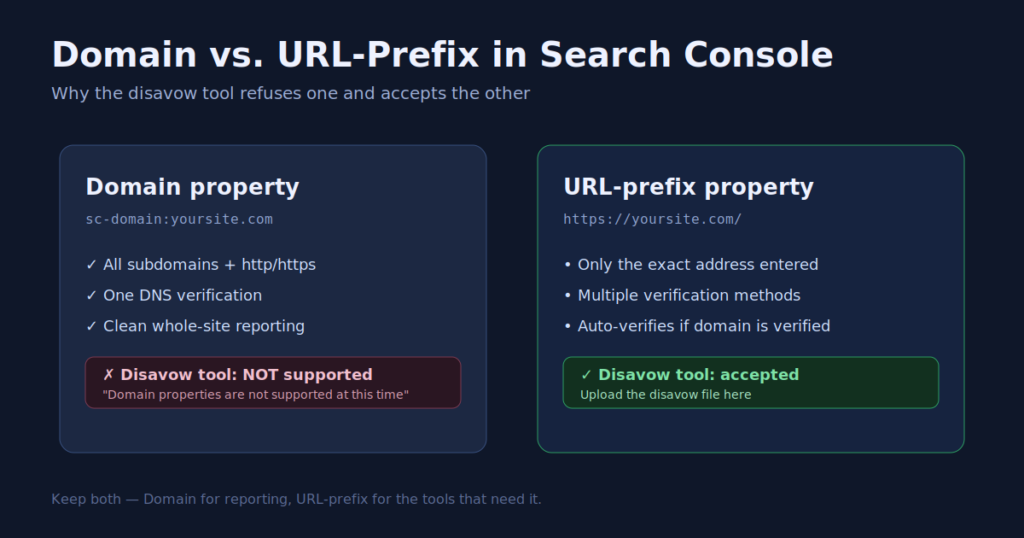
We went to upload a disavow file the other day and Google flat‑out refused it. The reason was not the file, the links, or the account. It was the type of property we had in Search Console. If you manage sites and have never thought about Domain versus URL‑prefix properties, this is the five‑minute read that saves you an afternoon of confusion.
Who this is for: anyone who owns a site in Google Search Console and has ever tried a tool that quietly did not work — disavow, in particular. The fix is simple once you see it.
Start with the two property types
When you add a site to Search Console, Google offers two kinds of property. A Domain property (shown as sc-domain:yoursite.com) covers every subdomain and both protocols at once, and it is verified with a single DNS record. A URL‑prefix property (shown as https://yoursite.com/) covers only the exact address you enter, and it accepts several verification methods.
Most people pick Domain because it sounds more complete, and for reporting it is. The catch shows up later, in the tools.
Hit the wall we hit
Our sites were set up as Domain properties. When we opened the disavow tool to neutralize a batch of toxic backlinks, Google returned a single grey line: “Domain properties are not supported at this time.” No upload button, no workaround, nothing.
The gotcha: the disavow links tool only accepts URL‑prefix properties. If your site is a Domain property, the tool refuses the upload entirely. Nothing you do to the file will fix it, because the block is the property type.
This is the exact wall we ran into while cleaning up the attack described in how a coordinated backlink spam attack works. The links were ready to disavow; the property type was the only thing standing in the way.
Add a URL-prefix property in two minutes
The fix is to add a second property of the URL‑prefix type. You keep your Domain property for reporting and add the URL‑prefix version for the tools that need it. Here is the whole process.
Open Search Console, choose Add property, and pick URL prefix. Enter the full address, protocol included, like https://yoursite.com/. If you already verified the Domain property by DNS, Google usually verifies the new one instantly.
What actually happened: we added https://blitzmetrics.com/ as a URL‑prefix property and Google returned “Ownership auto verified” on the spot, because the domain was already verified. The disavow tool accepted the file immediately afterward.
If auto‑verification does not fire, Google offers other methods: an HTML file at your site root, a meta tag on your home page, or your Google Analytics or Tag Manager tag. Any one of them works, and a plugin like Rank Math makes the meta‑tag method a copy‑and‑paste job.
Keep both, and know which needs which
You do not choose one type over the other. Keep the Domain property for clean, whole‑site reporting, and keep a URL‑prefix property for the tools that demand it. Verify a couple of different ways so you never lose ownership if one method breaks.
The practical rule is short. Reach for the Domain property when you want all subdomains and protocols in one view. Reach for the URL‑prefix property when a tool refuses to run, disavow being the classic example. Setting both up once means you are never blocked again, which is the same lesson we applied when an agent verified 46 sites in Search Console across the Spotlight network.
Get this checked on your own sites
Most site owners never notice the property‑type trap until a tool silently fails. If you want us to confirm your properties are set up so every tool works, and to look at your backlink health while we are in there, get a quick audit — the same review our agents run across the Spotlight network of local‑service sites.
Part of the Access Checklist — the nine accesses we capture before any content ships. See also why we rebuilt it in July 2026.
Originally published .
Dennis Yu
Dennis Yu is the CEO of Local Service Spotlight, a platform that amplifies the reputations of contractors and local service businesses using the Content Factory process. He is a former search engine engineer who has spent a billion dollars on Google and Facebook ads for Nike, Quiznos, Ashley Furniture, Red Bull, State Farm, and other brands.
Dennis has achieved 25% of his goal of creating a million digital marketing jobs by partnering with universities, professional organizations, and agencies. Through Local Service Spotlight, he teaches the Dollar a Day strategy and Content Factory training to help local service businesses enhance their existing local reputation and make the phone ring.
Dennis coaches young adult agency owners serving plumbers, AC technicians, landscapers, roofers, electricians, and believes there should be a standard in measuring local marketing efforts, much like doctors and plumbers must be certified. He has appeared on 353 podcasts with 619 credited episodes — see the full list of his podcast appearances.