
 by /
by /

As a local service business, your only goal is getting inbound calls for your service.
The trouble is: how do you measure which calls are turning into appointments and which are a waste of time?
You probably have a Google Business Profile (GMB), a Facebook page, and online ads. How do you measure the quality of the calls coming from each one?
You use CallRail.
CallRail is analytics software that lets you track calls, texts, forms, and chats from individual channels. That means you can compare, in real time, the quality of the calls coming from your GMB, your Facebook page, and your website.
The benefit of call tracking is that you can trace leads back to their source and focus your marketing efforts on what’s working best.
For example, you might find that Facebook ads are “generating calls,” but when you listen to the conversations, they’re garbage. On the other hand, you might find that local service ads perform well and almost always lead to a booked appointment.
Knowing this, you can allocate your ad budget to the channels giving you the best return on ad spend.
How to set up CallRail
1. Visit CallRail’s website and click the blue “Sign up free” button
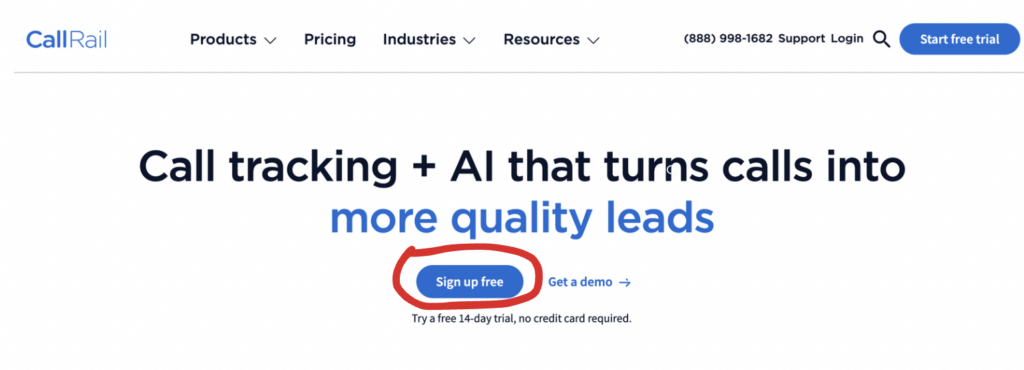
From there, you’ll be prompted to fill out a form. Enter your email address, choose a password, and enter your name, company, and industry.

You’ll then be asked to verify your email address. CallRail will send you an email, and you only need to click the link to get started.

2. Configure tracking numbers
After you’ve signed up for the free trial, you’ll be prompted to create a tracking number.

Click “I’ll use it online.”

From there, you can choose where the number will be used.

As a local service business, it’s recommended that you create numbers for the following sources:
- Your website
- Your GMB
- Your LSA
- Your PPC ads
- Your Facebook and Instagram ads
You can even make them specific to certain landing pages if you’d like. The point is that for each of these pages, you can measure where leads are coming from and the quality of the calls you’re receiving.
In the end, your dashboard should look like the one our friends at EternaTurf use.

3. Measure lead quality
With CallRail, you can listen back to the conversations you’ve had with potential customers.
This comes in handy when you’re determining which lead source produces the best leads, which in turn determines where you should focus your marketing efforts.
To listen to conversations, click the “Analytics” icon in the top left.
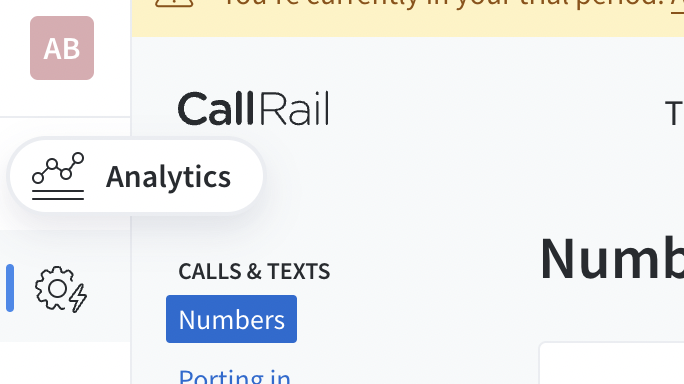
Then go to “Activity” in the middle of the new screen. From there, you’ll be able to view all of the call activity from each source.

Next, click the blue play button on the call you’d like to hear.

You’ll then see more details: how long the call lasted, a transcript of the call, and what percentage of the conversation was handled by the potential customer.

CallRail is an analytics tool and isn’t meant to replace your entire CRM
But by using it, you can determine where to allocate resources for the best ROI.
You might find that leads from Facebook are unqualified while leads from your organic GMB convert the best. These indicators tell you where to deploy resources and where your best customers are.
Dennis Yu
Dennis Yu is the CEO of Local Service Spotlight, a platform that amplifies the reputations of contractors and local service businesses using the Content Factory process. He is a former search engine engineer who has spent a billion dollars on Google and Facebook ads for Nike, Quiznos, Ashley Furniture, Red Bull, State Farm, and other brands.
Dennis has achieved 25% of his goal of creating a million digital marketing jobs by partnering with universities, professional organizations, and agencies. Through Local Service Spotlight, he teaches the Dollar a Day strategy and Content Factory training to help local service businesses enhance their existing local reputation and make the phone ring.
Dennis coaches young adult agency owners serving plumbers, AC technicians, landscapers, roofers, electricians, and believes there should be a standard in measuring local marketing efforts, much like doctors and plumbers must be certified. He has appeared on 353 podcasts with 619 credited episodes — see the full list of his podcast appearances.