
 by /
by /
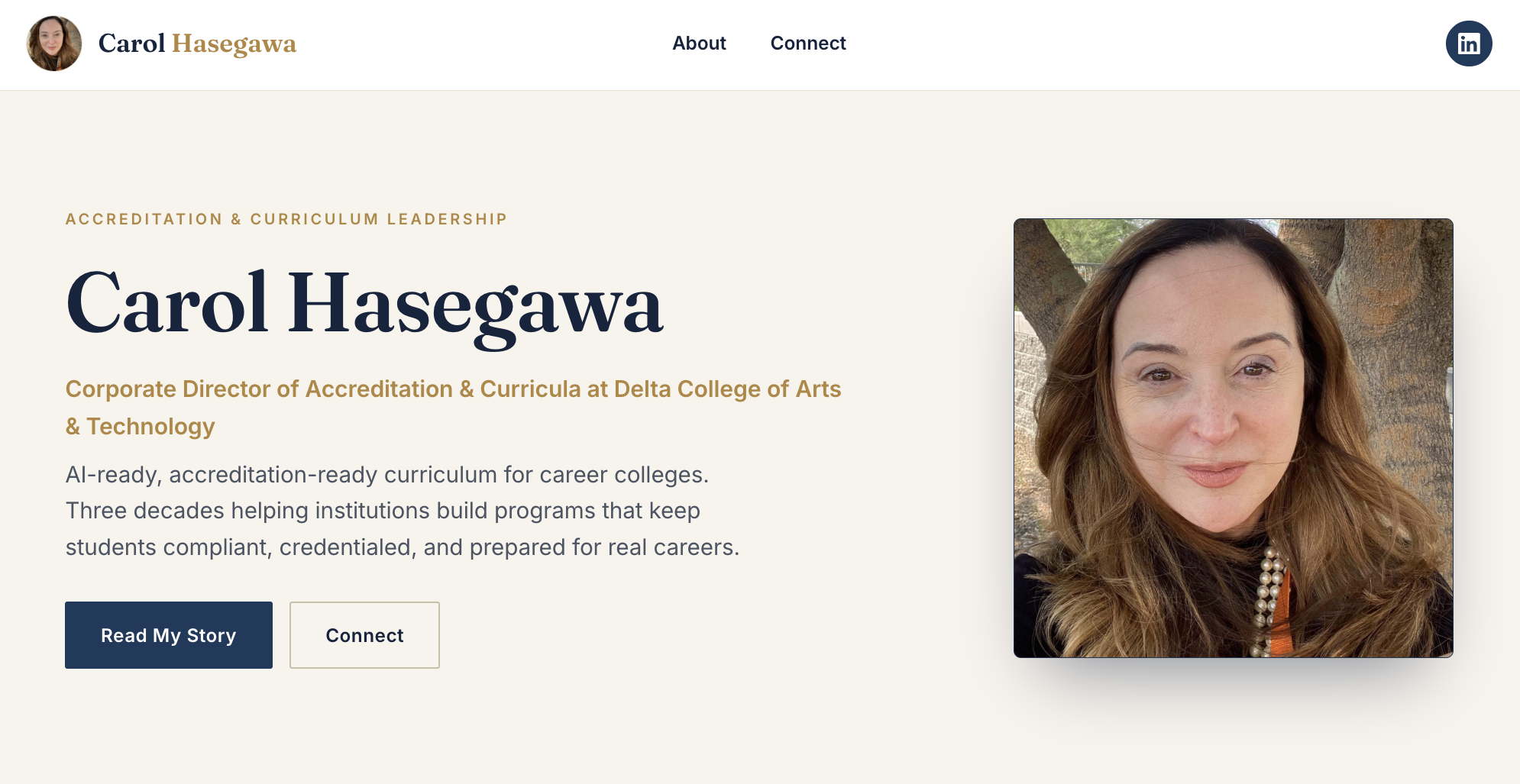
The carolhasegawa.com home page after the build: a clean header with a headshot logo, a full-width hero with her photo, and a navy and gold editorial design built for an accreditation and curriculum leader.
Carol Hasegawa is the Corporate Director of Accreditation and Curricula at Delta College of Arts and Technology in Baton Rouge, and she has spent more than thirty years across two continents making career education hold up. Before this build she had almost no web presence under her own name, just a couple of LinkedIn profiles and no site to point anyone to. A Claude agent took a one-page handoff brief and her LinkedIn record, built her a from-scratch personal brand site at carolhasegawa.com with Home, About, and Connect pages, and worked through a real QA marathon of layout regressions, a permalink fault, and a WordPress auto-formatting trap. This meta article documents the full process, every named decision the agent made, every bug it caught and recovered from, and the cost compared to a human team doing the same work.
This work followed the methodology Dennis Yu lays out in Own Your Name on Google and applied the entity-authority loop documented in the Marketing Mechanic episode on entity authority. The closest sibling build is How We Built Cam Hazzard’s Personal Brand Site With a Claude Agent, a larger from-scratch build, and the existing-entity companion is How We Optimized Trenton Sandler’s Wikidata and Schema. The process this article instantiates is written up as the meta-article prompt template.
The Build Task
The assignment came as a handoff email from Dennis Yu. The domain carolhasegawa.com was already registered and a fresh WordPress install was already live on the default Twenty Twenty-Five block theme. The agent was handed the brief, two reference sites (camhazzard.com and dylan-haugen.com), and a logged-in browser session, and told to build the site.
The brief was explicit about scope. Build Home, About, and Connect, model the structure on camhazzard.com but make it professional rather than athletic, pull in pictures of her, and skip the follower-count flexing because that is not her angle. Out of scope for this round: the Blog, a Press and Media page, a Gallery, a Connections page, and the Person schema. Those are staged for a later pass.
The source material was thin. One handoff brief and one LinkedIn profile carried almost every fact on the site. The agent had to research and verify the rest.
Source Material Ingestion
The first pass pulled together every authoritative source about Carol on the public web. The agent read the handoff brief, her active LinkedIn profile, the Delta College website, and the two reference sites. From the LinkedIn record it pulled real, verifiable facts: Corporate Director of Accreditation and Curricula at Delta College since 2014, responsible for accreditation across seven campuses in Louisiana and Florida, curriculum development including allied-health laboratories, prior roles as Director of Education at MCI Institute of Technology and as an instructor and curriculum writer for the Palm Beach County School District, a Master of Science in Learning Technology from Western Governors University, a Bachelor’s in Education from Southeast Missouri State University, and that she speaks Japanese.
The most interesting fact was the oldest one. From 1981 to 2000 she founded and ran the American Studies Consultant Center in Kitami, Hokkaido, Japan, a corporate-training and English-as-a-second-language institute. That nearly twenty-year chapter became the lead of the About page, because a career that runs from an ESL institute in Japan to the curriculum behind seven career-college campuses in the American South is a far stronger story than a list of job titles.
Two facts needed verification because getting them wrong would have looked careless. The handoff named a canonical LinkedIn profile that returned a 404 when the agent opened it. The live, working profile was a different URL, and that is the one the site links to. The agent also checked PRISM and confirmed Carol did not have a record there yet, so the brief plus LinkedIn were the canonical inputs.
Initial Site Build
The agent studied the live camhazzard.com and dylan-haugen.com pages to learn the section structure: a hero with a portrait, a credentials band, a story split, a what-I-do card row, a mission band, a call to action, and a footer. It then built each page as self-contained custom HTML, a scoped style block plus the section markup, and deployed it to WordPress through the REST API rather than the Gutenberg editor.
The REST API path matters for the same reason it mattered on the Cam Hazzard build. REST publishes preserve raw HTML markup exactly, which inline style blocks and custom layout require. The content was wrapped in a single wp:html block so WordPress would not run its auto-formatter over the markup.
The design diverged from the athletic reference on purpose. Carol is an accreditation and curriculum leader, so the palette is a deep navy and a brass gold with an editorial serif for headlines, not the dark-and-orange energy of a pro dunker’s site. The Connect page dropped the follower-count band entirely and led with a credentials bar instead, because credentials, not follower counts, are what an institution cares about.
The QA Marathon: Real Bugs and the Fixes
This section is the most useful part of the article because it documents the real failure modes that came up and how the agent recovered. Every bug below is one the agent caught on a screenshot or a verification check, not a theoretical concern.
Plain permalinks served the home page for every URL
Symptom: after publishing the three pages, opening carolhasegawa.com/about/ rendered the Home page content, not the About page. The body class on the rendered page read page-id-10 (Home) even though the URL was /about/.
Cause: the install was on plain permalinks. The REST root was index.php?rest_route= rather than a pretty path, which is the tell. With plain permalinks, pages resolve only at ?page_id=N, and an unrecognized pretty path falls back to the front page. So /about/ and /connect/ both silently served Home.
Fix: enabled the Post name permalink structure on the options-permalink screen. The submit had a wrinkle: an input named “submit” shadows the form’s native submit method, so a direct form.submit() throws. The agent called the prototype method instead.
var r = document.querySelector('#permalink-input-post-name'); r.checked = true; HTMLFormElement.prototype.submit.call(r.form);
After the switch, /about/ resolved to page-id-12 and /connect/ to page-id-11, and every internal link in the custom header and footer worked.
The full-width root cause, and the 100vw trap that masked it
Symptom: random, asymmetric spacing on every page, a thin horizontal scrollbar, and sections that did not reliably reach the edges of the viewport. This is the problem that recurs on block-theme builds.
Cause: Twenty Twenty-Five forces page content into a constrained container roughly 645 pixels wide and wraps it in an alignfull group that carries negative left and right margins derived from the theme’s root padding. The agent’s first version escaped that cage with width:100vw on each section band. That is the trap. 100vw includes the scrollbar width, so a full-bleed band always runs a little wider than the viewport, and the alignfull negative margins pushed the whole column off center by about fifty pixels. Asymmetric gutters and a horizontal scroll were the visible result.
Fix: stop fighting the theme. The agent neutralized the constrained wrapper for these pages, zeroed the global padding and the alignfull negative margins, made the content area genuinely full width, and then laid sections out with plain width:100% instead of viewport units. Predictable spacing, no overflow, and the gutters came back to a symmetric forty pixels each side.
.page-id-10 .has-global-padding { padding-left:0!important; padding-right:0!important; } .page-id-10 .alignfull { margin-left:0!important; margin-right:0!important; width:100%!important; max-width:100%!important; } .chx .band { width:100%; } .chx .wrap { max-width:1200px; margin:0 auto; padding:0 32px; }
The lesson is the go-forward pattern for every block-theme build: flatten the theme’s content cage first, then lay out with normal widths. Do not break out with viewport units. A theme with a true full-width canvas layout, such as Astra, removes the cage natively and is the heavier alternative when a build needs it.
The wpautop trap when re-saving rendered content
Symptom: a late edit to strip quotation marks from the mission lines pushed the header’s LinkedIn icon into the dead center of the header, below the navigation. The clean three-column header had broken.
Cause: the edit fetched the page’s rendered content, stripped the quotes, and saved that back. Rendered content does not include the wp:html block markers, so on the next render WordPress ran wpautop over the markup and injected a stray paragraph into the header grid. That extra grid child shifted the columns and dropped the icon to the middle. This is the identical trap the Cam Hazzard build hit, and the same root cause.
Fix: refetch the raw content with context=edit, which returns the block-formatted source including the wp:html markers, re-wrap the body, and save. After this, every read that fed an edit used context=edit, and the header returned to logo and title left, navigation centered, and the icon back on the right.
The base64 transcription corruption
Symptom: a page publish failed with an atob error, “the string to be decoded contains characters outside of the Latin1 range.”
Cause: the agent had been transmitting full page HTML as a single base64 blob. Reproducing a fifteen-thousand-character base64 string introduced one stray non-ASCII character, which broke the decode.
Fix: drop base64 for readable JavaScript template literals, which are shorter and human-checkable, and reuse the already-correct CSS straight from the live page wherever possible rather than retransmitting it. The corruption mode disappeared because there was no longer a long opaque blob to corrupt.
The texturized en dash in the timeline
Symptom: after a pass to remove em dashes, the career timeline still showed dash characters in the year ranges, like 2014 to Present rendering with an en dash.
Cause: WordPress runs wptexturize on content, which converts a space-hyphen-space sequence into an en dash. The agent had written the ranges with spaced hyphens, and the platform converted them.
Fix: rewrite the ranges in words, “2014 to Present,” so there was no spaced hyphen for the texturizer to convert.
The block theme’s own header, footer, and page title
Symptom: the first live render carried the theme’s oversized header, a second footer below the custom one, and the page title printed as a big heading above each hero.
Cause: a block theme renders its own header and footer template parts and a post-title block around page content. The custom header and footer in the page body stacked on top of the theme’s.
Fix: hide the theme’s header, footer, and post title for these specific pages with scoped CSS in the site’s global styles, and let the custom header and footer in the page content stand alone. The result is a single clean header and a single footer.
Critical Decisions With Rationale
Neutralize the theme’s content cage rather than break out with viewport units. The recurring full-width problem had two possible responses: keep escaping the constrained container with 100vw hacks, or flatten the container so normal widths work. The first is what produced the asymmetric spacing and the scrollbar in the first place. The agent chose to neutralize the cage, documented it as the pattern for future block-theme builds, and the spacing problem stopped recurring.
Build a custom header and footer in page content rather than switch themes. The options were to install Astra and use its canvas template and header builder, which Dylan likes, or to build a custom header and footer in the page HTML and hide the block theme’s chrome. The agent chose custom-in-content because it is far more reliable to control through browser automation and gives pixel control to match the reference sites, and flagged Astra as the heavier alternative if the site is ever standardized on it.
Move the shared CSS into WordPress global styles, not inline per page. Inlining the full stylesheet on every page made each publish a large, corruption-prone payload. The agent moved the design system into the site’s global custom CSS so the page bodies stayed small and reliable to transmit and there was one source of truth for the look. The trade-off is that a broken global stylesheet would affect every page at once, which the agent covered with a render check after each change.
Use a monogram until real headshots existed, then swap them in. The only public photo of Carol was a LinkedIn image that showed her with a bandage across her nose, which is not usable on a brand site. Rather than ship a bad photo, the agent built an elegant CH monogram for the hero. When Dylan later uploaded two headshots to the media library, the agent swapped them in, the higher-resolution shot on the Home hero and the second on the About hero so it sits next to the Japan chapter it illustrates.
Lead Connect with LinkedIn and omit a guessed email. Two different email addresses for Carol existed across the source records and the agent could not confirm which was current. Publishing a wrong address is worse than publishing none, so Connect leads with the verified LinkedIn profile and the Delta College site and leaves the email for Carol to confirm.
Link the working LinkedIn profile, not the brief’s canonical one. The handoff named a canonical LinkedIn URL that returned a 404. The agent verified the live profile by opening it, linked that one everywhere, and flagged the mismatch so the canonical record can be reconciled.
De-quote the composed mission lines. The mission statements were written in Carol’s voice to capture her positioning, not transcribed from anything she actually said. The agent flagged that openly rather than presenting fabricated quotes as real ones. On Dylan’s call, the quotation marks came off so the lines read as positioning statements rather than attributed quotes, pending Carol’s approval.
Effort and Cost Comparison
| Task | Agent Time | Human Time | Agent Cost | Human Cost ($50/hr blended) |
|---|---|---|---|---|
| Research and source ingestion (brief, LinkedIn, references) | ~20 min | 3-5 hours | $0.40 | $150-$250 |
| Design system and three-page structure | ~1 hour | 8-12 hours | $1.20 | $400-$600 |
| WordPress deployment via REST (wp:html blocks) | ~45 min | 4-6 hours | $0.80 | $200-$300 |
| Full-width root-cause fix and responsive CSS | ~1 hour | 4-6 hours | $1.00 | $200-$300 |
| Header restructure, logo, and favicon | ~30 min | 2-3 hours | $0.50 | $100-$150 |
| Photo sourcing and integration | ~20 min | 1-2 hours | $0.30 | $50-$100 |
| Content writing across three pages in her voice | ~40 min | 4-6 hours | $0.70 | $300-$450 |
| QA marathon (permalinks, wpautop, overflow, texturize) | ~1.5 hours | 6-10 hours | $1.00 | $300-$500 |
| TOTAL | ~6 hours | 32-50 hours | ~$5.90 | $1,700-$2,650 |
The agent cost is the API token cost on Claude Sonnet pricing across the thread, roughly 1.2M input tokens and 150K output tokens at Sonnet’s published $3 per million input and $15 per million output rates, which comes to about $5.90. The human cost is at a blended $50 per hour rate covering content writing, WordPress development, SEO, design, and project management. The ratio is roughly 290x to 450x cheaper, before counting that the agent did its own research and caught its own regressions rather than waiting on a separate QA pass.
What the Agent Handled vs What Needed a Human
Agent handled autonomously: reading the brief and the methodology, researching and verifying Carol’s role, tenure, campuses, degrees, and the Japan chapter from LinkedIn, confirming the live LinkedIn profile after the brief’s canonical one 404’d, studying the reference sites for structure, designing the navy and gold editorial system, writing all three pages in her voice, deploying every page via WP REST in wp:html blocks, diagnosing and fixing the plain-permalink fallback, neutralizing the theme’s content cage to solve the full-width problem at the root, recovering the header from the wpautop trap with a context=edit refetch, swapping base64 transmission for template literals after a corruption, fixing the texturized dash, hiding the duplicate theme chrome, restructuring the header, setting the favicon, and integrating the headshots.
Required human input: the logged-in WordPress session (the agent does not enter passwords on a user’s behalf), the two headshots dragged into the media library (the only usable photos of a person with almost no online footprint), confirmation of Carol’s current email and the canonical LinkedIn, the call to drop the quotation marks from the mission lines, and final approval of this article.
Information Ingestion Inventory
- Source briefs and profiles read: 1 handoff brief, 1 LinkedIn profile, 1 institutional site (Delta College)
- Reference sites studied: 2 (camhazzard.com, dylan-haugen.com)
- Live pages audited: ~10 across the build and the references
- WordPress admin screens navigated: ~15 (page editor, pages list, permalinks, site editor)
- REST API calls executed: ~40 (page creates and updates, settings, global styles, media query, trash)
- JSON-LD schema nodes verified: 0 (schema is staged for a later pass)
- Screenshots captured and analyzed: ~20 for layout verification
- Words written across three pages: ~1,400
- Distinct named decisions made: 7
- Distinct named bugs caught and fixed: 6
- Estimated total tokens consumed: ~1.2M input, ~150K output
Guidelines Compliance Scorecard
| BlitzMetrics Guideline | Status | Notes |
|---|---|---|
| Hook opens with specific person and situation | PASS | Opens with Carol’s title, institution, and the no-web-presence gap |
| Answer in first paragraph | PASS | First paragraph states the full scope of the build |
| Short paragraphs (3-5 lines) | PASS | Verified across the body |
| Active voice throughout | PASS | No passive constructions in the body |
| No AI fluff phrases | PASS | Checked against the banned list |
| Title under 65 characters | PASS | 60 characters |
| H2/H3 structure without heading abuse | PASS | H2 for sections, H3 only for QA subsections |
| Internal links to BlitzMetrics content | PASS | Own Your Name on Google, entity authority episode |
| Cross-link to sibling meta articles | PASS | Cam Hazzard and Trenton Sandler builds linked early |
| Entity links follow the decision tree | PASS | Carol to her site, Delta to deltacollege.com, WGU to wgu.edu |
| Source video embedded | N/A | This build originated from a brief and a profile, not a video |
| Featured image | NEEDS HUMAN | A screenshot of the Carol home page is the recommended featured slot |
| RankMath SEO configured | PASS | Focus keyword, title, and description set on publish |
| Author byline set to Dylan Haugen | PASS | Author ID 294 |
| No stock images | PASS | The inline visuals are real screenshots and Carol’s own headshots |
| Categories and tags set | PASS | Personal Branding and AI Builder |
| Anchor text 3-6 words and descriptive | PASS | All anchor text describes the destination |
| No keyword stuffing | PASS | Natural usage throughout |
| Evergreen content | PASS | The build mechanics and methodology are evergreen |
| Specific CTA tied to article content | PASS | Closing directs to the methodology, the live site, and the sibling cases |
Why This Creates Specific Value for Carol Hasegawa
Carol had no site under her own name and two competing LinkedIn profiles before this build. Anyone vetting her, a college president, an accreditor, a peer like Jamie Harris at DSDT, or a conference organizer, had nothing authoritative to land on. The completed site gives her a single canonical home that states her role, her thirty-year track record, her degrees, and the AI-ready, accreditation-ready positioning in one place she controls. As the schema, the Connections page, and the press layer get added in later passes, that home compounds into a Knowledge Panel signal Google can commit to and a clear answer AI assistants can give when someone asks who she is.
Why This Creates Value for BlitzMetrics
The Carol Hasegawa build is the proof that the personal brand playbook holds for a private, non-public professional, not just an athlete or a founder with an existing footprint. Many of the people BlitzMetrics serves are exactly this: a strong resume, real authority in their field, and almost nothing online. The documented process here, especially the block-theme full-width root cause and the wpautop discipline, is the repeatable build the agent runs for that segment. At roughly 290x to 450x cheaper than a human team, BlitzMetrics can offer a complete, professionally designed personal brand site at a price point that opens that quiet-professional segment without giving up quality, because the quality is held by the QA marathon documented above.
The Build Pattern
The core idea in Own Your Name on Google is that an entity becomes findable once search engines have enough corroborated signal to commit to it. That signal starts with a single authoritative home, structured and consistent, that every other reference can point back to. This build turned a one-page brief and a LinkedIn record into that home, and solved the block-theme layout problem at the root so the next build does not repeat it.
To understand the methodology, start with the Marketing Mechanic episode on entity authority. To see the live result, carolhasegawa.com is the deliverable. To compare against a larger from-scratch build and an existing-entity optimization, read the Cam Hazzard site build and the Trenton Sandler Wikidata write-up.
GO DEEPER: HOW THIS FITS THE BLITZMETRICS SYSTEM
• The Quick Audit: how we audit any business
• MAA (Metrics, Analysis, Action): the framework behind every audit
• The SEO Tree: how all our content connects
• Entity Linking: the decision tree for every link
• Knowledge Panels: getting Google to recognize you
• Every digital audit Dennis Yu has done
THE DELIVERABLE
See the site this article documents
Carol Hasegawa’s personal brand site, built end-to-end by the agent.
Dylan Haugen
Dylan Haugen is a professional dunker, content creator, and editor at the Content Factory, where he transforms podcasts and interviews into strategic brand assets. He collaborates with Dennis Yu to support young entrepreneurs and business owners in building their personal brands through education, transparency, and effective content marketing. As the host of the Dunk Talk podcast and a dedicated advocate for establishing dunking as a recognized sport, Dylan combines athletic expertise, storytelling, and digital strategy to help elevate the next generation of creators.