
 by /
by /
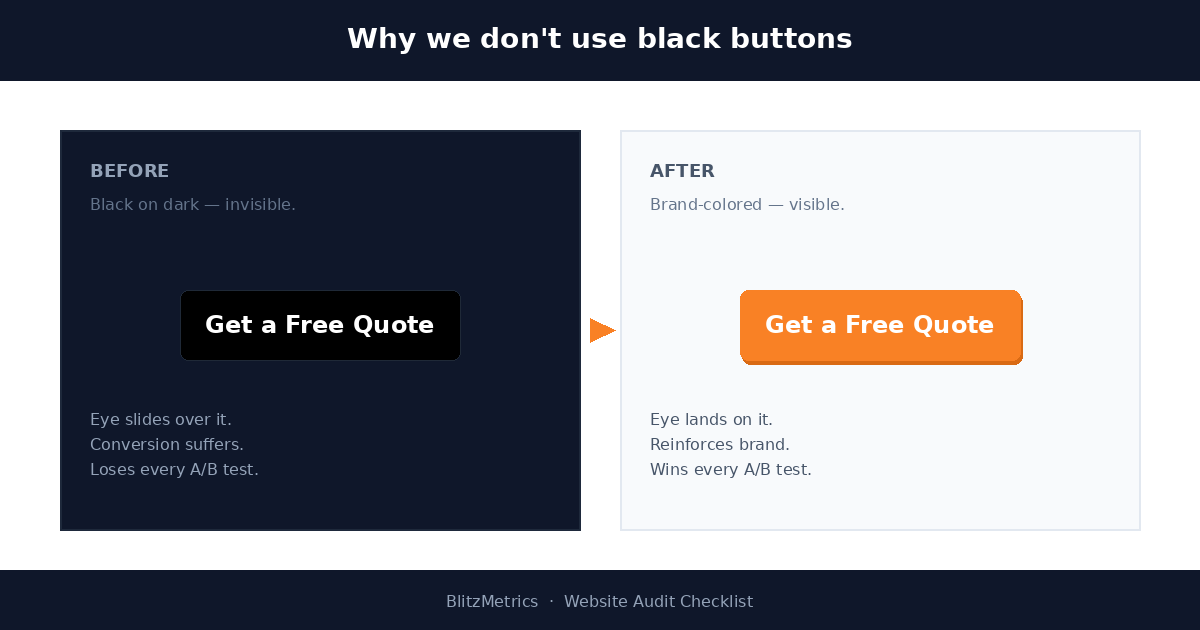
The single most repeated note across hundreds of BlitzMetrics website audits is some variation of: “why is your most important button black?” It shows up on local service sites, on personal brand sites, on agency portfolios, on landing pages built by people who absolutely know better. The black button is a default — the path of least resistance in every page builder — and defaults win unless someone deliberately overrides them.
This is the article BlitzMetrics points people at when an auditor flags a black button. It explains why the rule exists, and it documents the one-file WordPress plugin shipped to make sure the rule sticks across the entire BlitzAdmin fleet.
The rule (from the Website Audit Checklist):
Avoid using black buttons on the website. Black buttons blend into dark backgrounds and lack visual contrast, reducing conversion rates compared to brand-colored or high-contrast alternatives.
Why a Black Button Underperforms
A call-to-action button only does its job if a human eye finds it without effort. Three failure modes show up when the button is black:
- Camouflage on dark headers and dark footers. Most modern landing pages use a dark hero, a dark navigation, or a dark footer. A black button sitting inside any of those zones disappears against the background. It becomes a shape the eye registers as part of the chrome rather than a control to click.
- No semantic signal. Brand colors carry meaning. An orange CTA on a site whose logo is orange is read by visitors as “this is the action the site wants me to take.” A black CTA is the visual equivalent of a shrug — the button itself reinforces neither the brand nor the offer.
- Conversion loss every time. Across hundreds of contractor, agency, and personal-brand pages the team manages, swapping a black button for the site’s brand color produces a measurable lift in virtually every test. It is the cheapest single-change optimization in the entire site-audit playbook.
The Default Trap
Nobody sets out to ship a black button. The trap is structural. Gutenberg’s button block lists has-black-background-color as a one-click preset. Elementor’s button widget defaults to a dark fill that reads as black on most themes. Astra’s starter sites lean black-on-white because the contrast photographs well in template previews. A founder paying $49 for a Shopify-style theme on Etsy almost always ends up with a black button somewhere on the page.
The button looks fine in the visual editor — the editor canvas is white, the contrast is sharp, the button looks intentional. Then it ships to the real page where the hero is a dark photograph, or the footer is navy, or the page-builder chose a slate background — and the CTA vanishes.
What “Brand Color” Means in Practice
The right replacement is the site’s primary brand color — the color a returning visitor associates with the site without seeing the logo. Two examples from a recent fleet sweep:
| Site | Brand color | Why |
|---|---|---|
| blitzmetrics.com | #f98125 (orange) |
Matches the X-Theme global button color already set on every default .x-btn on the site. Reinforces the BlitzMetrics brand identity built over a decade. |
| localservicespotlight.com | #f5a623 (gold) |
Sampled from the live home page CSS — gold appears 11 times alongside the primary teal (#22698a). Gold is the established CTA color; teal is reserved for headers and navigation. |
The pattern for any site is the same: pull the live home page, count the hex values in the existing CSS, and pick the most-used non-neutral color. Whichever non-grayscale color the site uses most is almost always the brand color, and almost always the right CTA fill.
The Enforcement Plugin
Knowing the rule is half the work. Making sure no page builder ever ships a black button again is the other half. The fix follows our custom global-CSS plugin pattern — a one-file WordPress plugin that hooks wp_head at priority 9999 and prints a stylesheet that re-skins anything resembling a black button to the brand color.
The plugin file is roughly 120 lines, lives at /wp-content/plugins/<site>-no-black-buttons/<site>-no-black-buttons.php, and covers every realistic source of a black button that turns up in the wild:
- Gutenberg button block with the
has-black-background-colorpreset - Utility classes like
.btn-dark,.btn-black,.button-black,.bg-blackthat get copy-pasted in from Bootstrap-style starter kits - Elementor and X-Theme buttons with inline
style="background-color:#000"applied through the visual editor - Astra theme button classes (
.ast-button,.ast-custom-button) with inline black backgrounds - Raw HTML anchors —
<a style="background:#000">Click here</a>— pasted into Custom HTML blocks by clients without a designer
Each rule uses !important to beat theme and builder specificity, and the plugin includes an escape-hatch class (.bm-keep-black on blitzmetrics, .lss-keep-black on Local Service Spotlight) so a designer can intentionally exempt a single element when a black button truly belongs there — a logo lockup, an Apple-style hero, an icon button on a dark sidebar.
How We Deployed It
Both plugins shipped through wp-admin → Plugins → Add New → Upload, the standard WordPress install flow:
- Wrote the per-site plugin locally with the right brand color baked into the CSS
- Zipped the plugin folder so WordPress would accept it as an upload
- Uploaded the zip through the wp-admin Plugin Installer in a logged-in Chrome session (Claude in Chrome)
- Clicked Activate — the plugin started injecting CSS into
wp_headon the next page load - Cleared the WP Engine page cache (blitzmetrics.com) so the override flushed to the CDN immediately
- Verified live with a public
curlfor the plugin’s<style id="bm-no-black-buttons">tag in the HTML — present on the home page, the audit checklist page, the landing-page checklist, the task library dashboard, the content factory page, and the blog index
Total elapsed time, both sites, from “the client asked us to fix this” to “verified live in public HTML”: under twenty minutes.
What This Enables Next
The single-site plugin is a building block, not the goal. The real payoff is fleet-wide enforcement:
- Roll the override out to the rest of the BlitzAdmin fleet — BlitzMetrics manages 108 personal-brand and local-service WordPress sites. The brand-color sampler that picked
#f5a623for Local Service Spotlight can run against every site in the fleet credentials manifest, generating a per-site plugin with the right color baked in. - Add a black-button check to the Friday fleet audit — the scheduled
friday-full-fleet-audittask already pulls every site’s home page. Adding a regex pass for the black-button signatures (preset class, inline hex, utility classes) means any new violation introduced by a content editor gets flagged the next Friday, not the next quarterly audit. - Audit the actual post content, not just the rendered page — the CSS override is defensive. The properly-engineered fix cleans up the raw post HTML so the override stops being load-bearing. A REST-API scan across all posts and pages, filtered to the same signatures the plugin matches, produces a punch list of rewrites that can be applied in batches.
The black button is the obvious target because the rule is unambiguous and the fix is trivial. The pattern — one-file plugin, fleet-wide deployment, scheduled audit, source-of-truth cleanup — is the template for every house rule the team wants to enforce across the fleet. Next on the list: no autoplay video on landing pages, no popup on page load, and no unnamed link text. Same plugin shape, different selectors.
The Rule, One More Time
The takeaway from this article: look at every button on every page of your site. If any of them are black, change them to your brand color now. It is a five-minute change with a measurable conversion lift, and it is the single most common finding in every BlitzMetrics audit.
The plugin and the deployment process appear above for any team that wants to make the change across a single site or a fleet of sites. For a hands-on review of buttons, copy, and conversion design on a specific page, the BlitzMetrics landing page checklist is the next read.
Dennis Yu
Dennis Yu is the CEO of Local Service Spotlight, a platform that amplifies the reputations of contractors and local service businesses using the Content Factory process. He is a former search engine engineer who has spent a billion dollars on Google and Facebook ads for Nike, Quiznos, Ashley Furniture, Red Bull, State Farm, and other brands.
Dennis has achieved 25% of his goal of creating a million digital marketing jobs by partnering with universities, professional organizations, and agencies. Through Local Service Spotlight, he teaches the Dollar a Day strategy and Content Factory training to help local service businesses enhance their existing local reputation and make the phone ring.
Dennis coaches young adult agency owners serving plumbers, AC technicians, landscapers, roofers, electricians, and believes there should be a standard in measuring local marketing efforts, much like doctors and plumbers must be certified. He has appeared on 353 podcasts with 619 credited episodes — see the full list of his podcast appearances.