
 by
by
Manually enrolling students wastes time and creates room for error. We built an automated system that gives users instant access to their LearnDash course the moment they’re tagged in Keap.
Here’s how to set it up.
Step 1: Create an Auto-Enroll Tag in Keap
In Keap, go to CRM → Settings → Tags and click Add Tag.

Name it clearly, following the template Enroll: | [Course Name] |, then save.
This tag will serve as the trigger for automatic enrollment.
Step 2: Assign the Tag in Memberium
In your WordPress dashboard, go to Memberium → Courses (or Memberships).
Open the course access settings and locate Auto-Enroll Tags under the LearnDash Integration section.
Enter the Keap tag you just created and save changes.
Step 3: Link the Tag in LearnDash
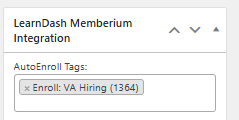
Go to LearnDash LMS → Courses → [Your Course] → Settings.
Scroll to Learndash Memberium Integration and add the same auto-enroll tag.
Save the course.
Now Memberium knows which tag unlocks which course.
Step 4: Test the Workflow
We picked a test contact in Keap, applied the tag manually, and waited.
Within moments:
- The tag was recognized by Memberium.
- The user could log into WordPress and see the course appear under “My Courses” in LearnDash.
If it didn’t work: we checked that the tag names matched exactly (tags are case-sensitive), cleared caches, and verified Memberium’s API connection to Keap.
Once the test passed, we moved into live mode.
The Result
What we built is more than just a link between systems. It’s a micro-moment of delight: a user gets tagged → they walk into the course as if by magic.
There’s no waiting, no manual enrollment, no friction. The system sees the tag, Memberium unlocks access, LearnDash delivers content and the user feels seen and attended to.
This article connects to BlitzMetrics processes including one-minute video, SEO Tree. Each of these concepts has a definitive article that explains the full framework.
Originally published .
Dennis Yu
Dennis Yu is the CEO of Local Service Spotlight, a platform that amplifies the reputations of contractors and local service businesses using the Content Factory process. He is a former search engine engineer who has spent a billion dollars on Google and Facebook ads for Nike, Quiznos, Ashley Furniture, Red Bull, State Farm, and other brands.
Dennis has achieved 25% of his goal of creating a million digital marketing jobs by partnering with universities, professional organizations, and agencies. Through Local Service Spotlight, he teaches the Dollar a Day strategy and Content Factory training to help local service businesses enhance their existing local reputation and make the phone ring.
Dennis coaches young adult agency owners serving plumbers, AC technicians, landscapers, roofers, electricians, and believes there should be a standard in measuring local marketing efforts, much like doctors and plumbers must be certified. He has appeared on 353 podcasts with 619 credited episodes — see the full list of his podcast appearances.