
- 1TL;DR — Key Takeaways
- 2What Is Google's Knowledge Graph?
- 3How Entities and Objects Work
TL;DR — Key Takeaways
- The Google Knowledge Graph is a structured database of billions of entities — people, companies, places — and the relationships between them. It powers Knowledge Panels, entity cards, and AI-generated answers.
- Every entity gets a unique KGMID (Knowledge Graph Machine ID) and a confidence score that determines whether Google shows your panel publicly.
- You don’t need to be famous. Anyone with organized, verifiable proof of who they are can appear in the Knowledge Graph — Scott Shagory went from a confidence score of 24 to a full panel in weeks.
- The highest-leverage action is creating a Wikidata entry, pairing it with schema markup, and maintaining consistency across every platform where you appear.
- Check your current status right now with our free Knowledge Graph Explorer.
Before going deeper: You can check your own current presence in the Knowledge Graph right now using the BlitzMetrics Knowledge Graph Explorer — it returns your KGMID, type, and confidence score in seconds.
I’ve spent over a billion dollars on Google and Facebook ads for brands like Nike, Red Bull, and State Farm — and the single biggest shift I’ve seen in search over the last five years is that Google stopped ranking web pages and started ranking entities.
The Google Knowledge Graph is the system behind that shift. It’s how Google understands who you are, what your company does, and how you’re connected to the broader web of people, places, and organizations. Every Knowledge Panel you’ve ever seen, every entity card, and increasingly every AI-generated answer — they all pull from the Knowledge Graph.
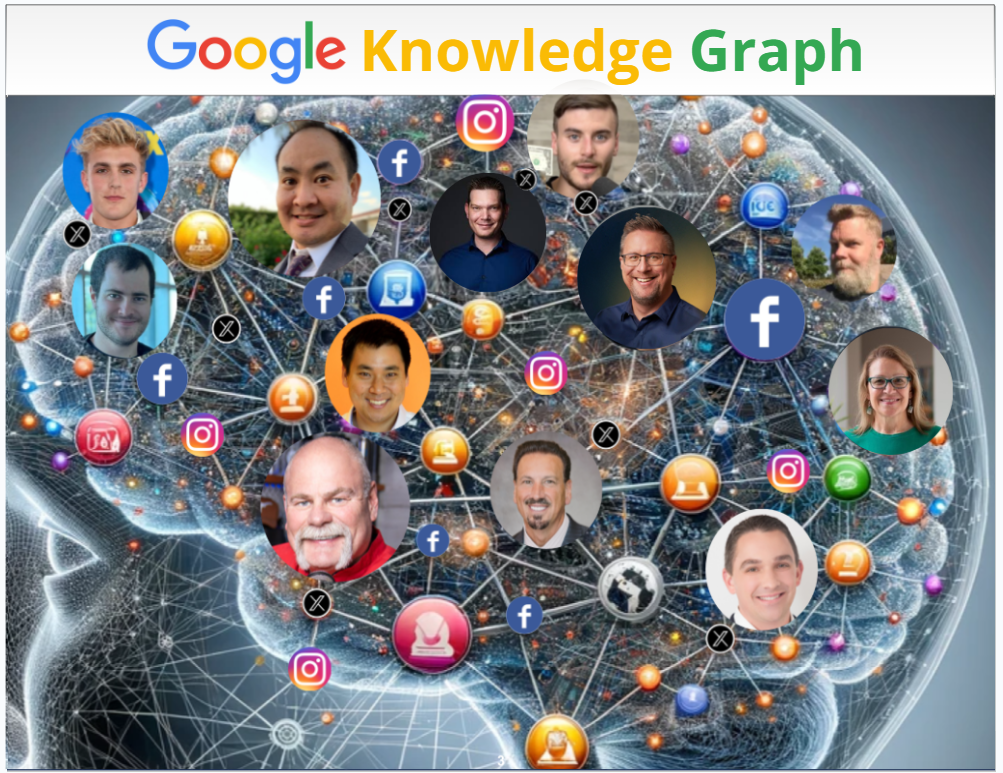
If you’ve ever Googled a celebrity and seen a panel on the right side with their photo, bio, and social links — that’s the Knowledge Graph in action. But it’s not just for celebrities. Anthony Hilb owns Anthonys Lawn Care, Tree Removal & Landscaping in Bloomington, Indiana, and his business ranks number one in both Google and ChatGPT. Dan Leibrandt was a college dropout who built Pest Control SEO from scratch — he has a full panel now too.
The difference between people who show up in the Knowledge Graph and people who don’t isn’t fame or budget. It’s whether you’ve organized the digital proof of who you are in a way that machines can verify. This guide covers everything: what the Knowledge Graph actually is, how entities and objects work inside it, what a KGMID is and why it matters, how confidence scores control your visibility, and how to check and improve your own presence.
This is the pillar resource for our complete Knowledge Panel guide series.
Before we get into the mechanics below, here’s the short version on video. In this Marketing Mechanic episode, Dennis walks through how entities work in the Knowledge Graph, why structured data matters more than content volume, and the exact process we use with clients to trigger Knowledge Panels. If you prefer watching over reading, start here — then come back for the details below.
What Is Google’s Knowledge Graph?
Google launched the Knowledge Graph in 2012, and it fundamentally changed how search works. Before 2012, Google matched keywords on web pages. After 2012, Google started building a structured map of real-world things — people, companies, places, events, creative works — and the relationships between them.
Think of it as Google’s brain. Not web pages connected to each other, but entities connected to each other. You are an entity. Your company is an entity. The conference you spoke at is an entity. The podcast you appeared on is an entity. And all of these entities have attributes (your title, your location, your founding date) and relationships (you founded that company, you spoke at that event, you co-authored that book).
The Knowledge Graph currently contains billions of these entity entries, sourced from trusted databases like Wikipedia, Wikidata, Crunchbase, government registries, and schema.org markup on websites. When Google is confident enough about an entity’s data, it surfaces that information directly in search results through Knowledge Panels — the information boxes that appear on the right side of desktop search or at the top of mobile search.
Here’s what most people miss: the same Knowledge Graph data now feeds into AI tools. ChatGPT, Perplexity, Claude, and Google’s own Gemini all pull from structured knowledge bases when answering questions about people and companies. When I told Darby Rollins this on his Gen AI University Podcast, he was surprised — he’d been thinking about Google search and AI as separate things. They’re not. If you don’t exist in the Knowledge Graph, you’re invisible to the AI layer of search, and that layer is growing fast.
How Entities and Objects Work
Everything in Google’s Knowledge Graph is either an entity or a relationship between entities. Dylan Haugen and I developed a framework called the SEO Tree to explain how this works in practice.
Your personal entity is the trunk. Your company, your books, your podcast, your conference appearances — those are branches. Each individual piece of content, citation, or profile is a leaf. A tree with a strong trunk but no branches doesn’t produce anything. A tree with lots of leaves but no trunk can’t stand up. The system only works when every level connects to the others.
To put it simply: you or your personal brand is an object. Your company is an object. Events are objects. Every social post, video, or published article is an object. Every noun is an object. When these objects are all connected together in the Knowledge Graph, Google can see who you are and what you do.
The more connected every object related to you is, the richer the metadata becomes. The stronger the connections you have with objects already trusted by Google (high authority) in a particular topic, the better you will rank on that topic. You want Google to see that you are connected to people who are in the same industry as you. You want to show Google that you are not just what’s in your resume, and not just what you say, but there’s proof that you are good at what you do, and you’re associated with people who do the same thing as you.
That’s entity SEO — and it’s the foundation of modern search optimization. For the full breakdown of how entity SEO connects to AI rankings, see our entity SEO deep dive.
What Is a KGMID?
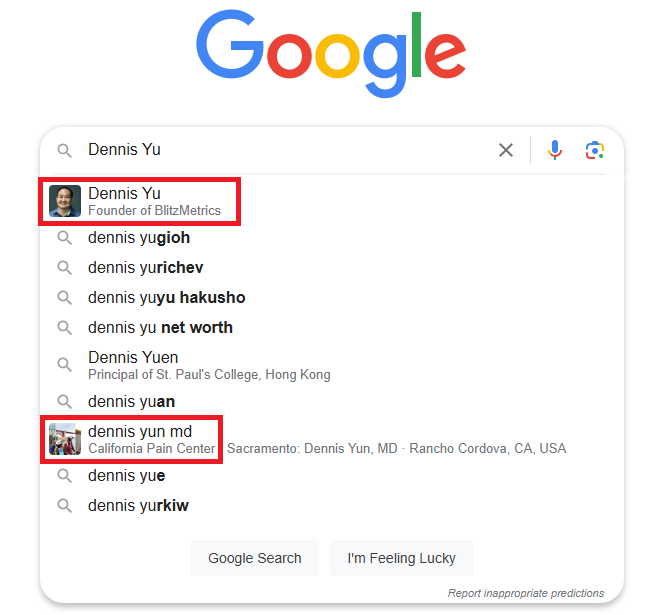
Every entity in the Knowledge Graph gets a unique identifier called a KGMID — a Knowledge Graph Machine ID. It looks something like kg:/m/0d7_4z or kg:/g/11b7lsr1sn. This is how Google internally distinguishes “Dennis Yu the marketing expert” from “Dennis Yu the dentist” or any other person with the same name.
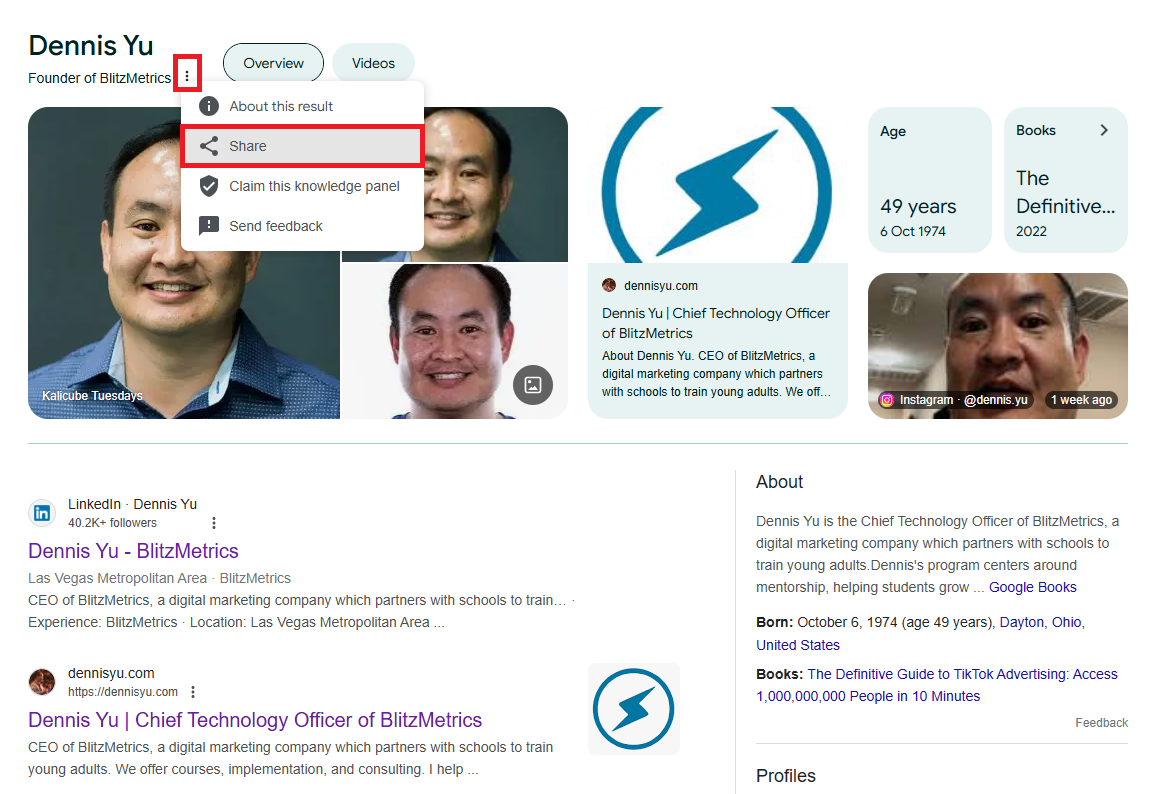
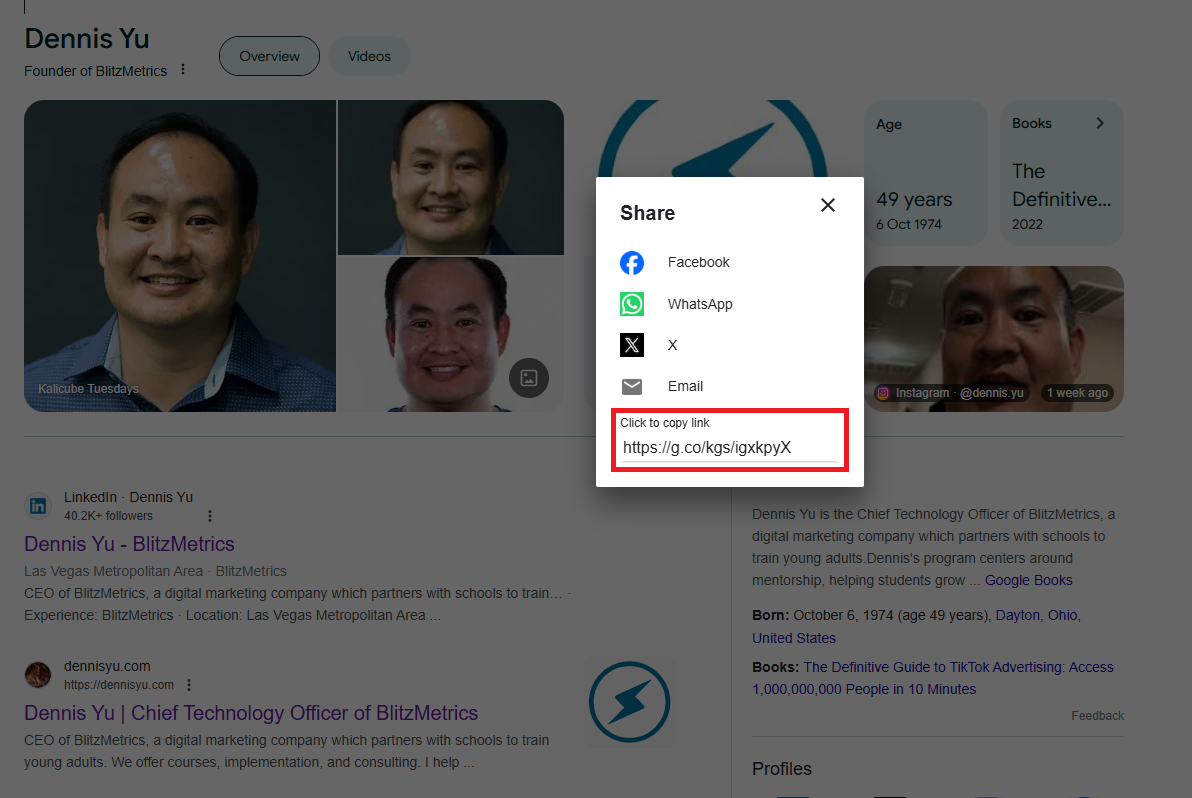
When you click “share” on a Knowledge Panel entity, you’ll see a URL that starts with g.co/ followed by a string of characters. This is the Knowledge Graph Machine ID — it’s like a social security number for every entity on the internet.
Your KGMID is important because it’s the anchor point for all the data Google associates with your entity. When Google connects your Wikidata entry, your LinkedIn profile, your Crunchbase page, and your press mentions, it ties all of that information back to your KGMID. Without one, Google doesn’t consider you a distinct entity worth tracking.
This matters especially when your name is common. Parisa Rose had 14 different people sharing her name in Google’s results. During a live session with her and Michael Silvers, I used our Knowledge Graph Explorer to find her unique KGMID — the one ID that tied specifically to her and not to the 13 other Parisa Roses. Once we connected her profiles to that specific ID, Google started treating her as the right one.
You can find your KGMID using our BlitzMetrics Knowledge Graph Explorer — just search your name, and if Google has an entity for you, the tool will return your KGMID along with your confidence score.
A Visual Walkthrough: How to Find Your KGMID
Here’s the simplest way to think about the Knowledge Graph: it’s Google’s brain — a giant cluster of entity objects connected to each other. Not web pages connected, but entities (people, companies, events, social posts, videos — every noun is an object). Each object has citations attached to it, and each connection between objects builds the graph.
When these objects are connected together, Google can see who you are and what you do. The richer the connections — especially with high-authority objects already trusted by Google in your topic — the better you’ll rank in that topic. Any object is only as valuable as the relationships it has with other objects. That’s the core principle.
For example: if I’m at a conference with person X in Boston, Google sees this as one connection. If I see the same person again in Barcelona, that’s another connection. If we take a picture and post it on social, we create more. By visibly spending time with people who are well-known in a particular industry, I reinforce my SEO in that industry. The intersection of expertise and experience is what compounds.
Spotting Knowledge Graph Objects in Google Search
When you search for something on Google — especially a name — do you see small icons next to some of the terms? Those icons mean Google recognizes that thing as an object in their Knowledge Graph.
When you click on one of these objects, you’ll see a triple-dot icon next to the name.
Click “share,” and you’ll see a URL that starts with g.co/ followed by a string of letters. That string is the Knowledge Graph ID — a kind of social security number for everything on the internet. Products, addresses, exams, cars, people, companies — everything indexed in the Knowledge Graph has one.
You can plug that ID into the Knowledge Graph Explorer to see how many objects are associated with each other for that KGMID, and what Google currently knows about the entity.
How Confidence Scores Determine Your Visibility
Every entity in the Knowledge Graph also has a confidence score — a numeric value that represents how certain Google is about the information it has on you. A low score means Google has some signals but isn’t sure enough to show a panel. A high score means Google has cross-referenced enough data from enough authoritative sources to treat you as a verified entity.
I’ve watched this number move up and down for hundreds of clients, and the pattern is always the same: the people who understand what drives the score are the ones who get panels. The people who don’t understand it keep publishing content into the void wondering why nothing happens.
Real numbers make this concrete. Scott Shagory came to us with a confidence score of 24 — Google kinda knew who he was but wasn’t confident enough to display the panel publicly. After we worked through the process (Wikidata entry, consistent citations, structured data), he triggered a full Knowledge Panel within weeks. Trenton Sandler sits at around 497, driven by consistent entity references across music platforms and a well-structured Wikidata item. My own score has stabilized at a level that maintains a full panel with photos, social links, and company associations.
The confidence score is generated by Google’s Knowledge Vault algorithms, which evaluate the authority, consistency, and connectedness of information across the web. It’s not just about how many times you’re mentioned — it’s about how many independent, trustworthy sources confirm the same facts about you.
Understanding your confidence score is one of the most important — and most overlooked — parts of entity SEO. We’ve written a dedicated deep dive on how confidence scores work and how to raise yours, including real score comparisons and the three strategies that reliably move the number.
How to Check Your Knowledge Graph Presence
The fastest way to check whether Google has a Knowledge Graph entity for you is to use our BlitzMetrics Knowledge Graph Explorer. Type your name or company name, and the tool queries Google’s Knowledge Graph API directly. It returns your confidence score, your KGMID, and the entity description Google has on file.
If no result appears, that means Google doesn’t have an entity for you yet. That’s actually useful information — it tells you exactly where you stand and what you need to build. If you do get a result but the score is low, it means Google is aware of you but doesn’t have enough corroborating data to trigger a panel. That’s where Scott Shagory was when we started — a score of 24, invisible to the public but not invisible to the API.
You can also check by simply Googling your name and looking for a Knowledge Panel on the right side of the results. But the API tool gives you the raw data — especially the confidence score — that you can’t see from a regular Google search. Darby Rollins had a panel he didn’t even know about until I pulled it up during his podcast. That’s more common than people think.
Why Your Knowledge Graph Presence Matters
Your Knowledge Graph presence isn’t just about having a nice panel when someone Googles you. It’s the foundation of how you appear across all of Google’s products — Search, Discover, Images, News, and increasingly, AI-generated answers.
When Google trusts its understanding of who you are, it presents you confidently to searchers across every surface. More importantly, the same Knowledge Graph data feeds into AI tools. ChatGPT, Perplexity, Claude, and Google’s own Gemini all pull from structured knowledge bases. If you don’t exist in the Knowledge Graph, you’re invisible to the AI layer of search.
Anthony Hilb proves this at the local level. He owns Anthonys Lawn Care, Tree Removal & Landscaping in Bloomington, Indiana — no marketing team, no fancy equipment, just his phone recording clips of his crew doing the work. That real-world content combined with structured local citations made his company rank number one not just in Google search, but in ChatGPT when people ask for lawn care in his area. The Knowledge Graph is the mechanism that made that happen.
For business owners and personal brands, this translates directly into trust. When a potential client Googles you before a sales call and sees a verified panel with your photo, company, and credentials, the conversation starts on completely different footing than if your name returns a jumble of irrelevant results.
How to Improve Your Knowledge Graph Presence
Building or strengthening your Knowledge Graph presence comes down to three things: giving Google structured data it can read, getting authoritative sources to confirm who you are, and maintaining consistency across every platform where you appear.
The single highest-leverage action for most people is creating a Wikidata entry with proper references and identifiers. Wikidata is one of Google’s primary structured data sources, and a well-referenced entry there directly feeds into the Knowledge Graph. This single action triggers more Knowledge Panels than any other step we’ve seen.
Pair that with schema.org markup on your personal website (using sameAs properties to link to your profiles), consistent information across LinkedIn, Crunchbase, and industry databases, and verifiable press mentions that Google can crawl. Each verified identifier acts as an anchor point for your entity, making it harder for Google to confuse you with someone else.
If your LinkedIn says “Marketing Strategist,” your website says “Growth Consultant,” and your Crunchbase says “CEO,” Google doesn’t know which version is correct — and uncertainty kills your confidence score. We call this corroboration: when multiple independent sources confirm the same facts, Google’s confidence goes up. When they contradict each other, it goes down.
We’ve documented the complete process across our guide series. For a step-by-step walkthrough of how to trigger your Knowledge Panel — including the tactical details on Wikidata entries, schema markup, citations, and digital PR — see our 7-step guide to getting a Knowledge Panel.
Where This Fits: Content Factory, Dollar-a-Day, and the SEO Tree
Your Knowledge Graph presence doesn’t exist in isolation — it’s one outcome of the broader Content Factory process we teach at BlitzMetrics and Local Service Spotlight.
The Content Factory is our four-step system: Produce (record real work — Zoom calls, customer wins, podcast clips), Process (turn raw footage into articles, social posts, and structured content), Post (share it across platforms with consistent naming and identity), and Promote (boost top content with Dollar-a-Day advertising). Every step in that system feeds your Knowledge Graph presence, because every piece of content you produce, process, post, and promote creates another signal that Google can cross-reference against your entity.
The SEO Tree framework connects it structurally. Your personal entity is the trunk. Your companies, books, and projects are branches. Each article, video, podcast appearance, and social post is a leaf. When every level connects to the others through internal links, schema markup, and consistent identity, Google sees a unified entity rather than scattered content.
Dollar-a-Day advertising accelerates the whole thing. When you put even a dollar a day behind your best content — the articles that demonstrate your expertise, the videos of you doing real work — you generate traffic and engagement signals that strengthen your entity in Google’s eyes. This is especially powerful if you share a name with someone more famous, because the advertising pushes your version of the name to the top.
Next Steps
Start by checking your Knowledge Graph presence with our free Knowledge Graph Explorer. It takes ten seconds and gives you a baseline — your KGMID, your confidence score, and whether Google recognizes you as an entity.
From there, the path depends on where you are:
If you don’t have a Knowledge Graph entity yet, start with our guide on how to trigger a Knowledge Panel — the seven steps that build the entity foundation Google needs.
If you have an entity but your confidence score is low, read our confidence score deep dive to understand what’s holding you back and how to fix it.
If you already have a panel but haven’t claimed it, follow our step-by-step claiming guide with real screenshots from Scott Shagory’s claiming process.
If you want to see what’s possible, browse our real before-and-after case studies from people at every stage.
And for the complete picture of how entities, authority, and AI search all connect, see our full Knowledge Panel series hub — every guide in one place.

Dennis Yu
Dennis Yu is the CEO of Local Service Spotlight, a platform that amplifies the reputations of contractors and small businesses. He has spent over a billion dollars on Google and Facebook ads for brands including Nike, Red Bull, and State Farm, and is a long-time guest speaker on digital marketing, AI, and entity SEO.