
 by /
by /
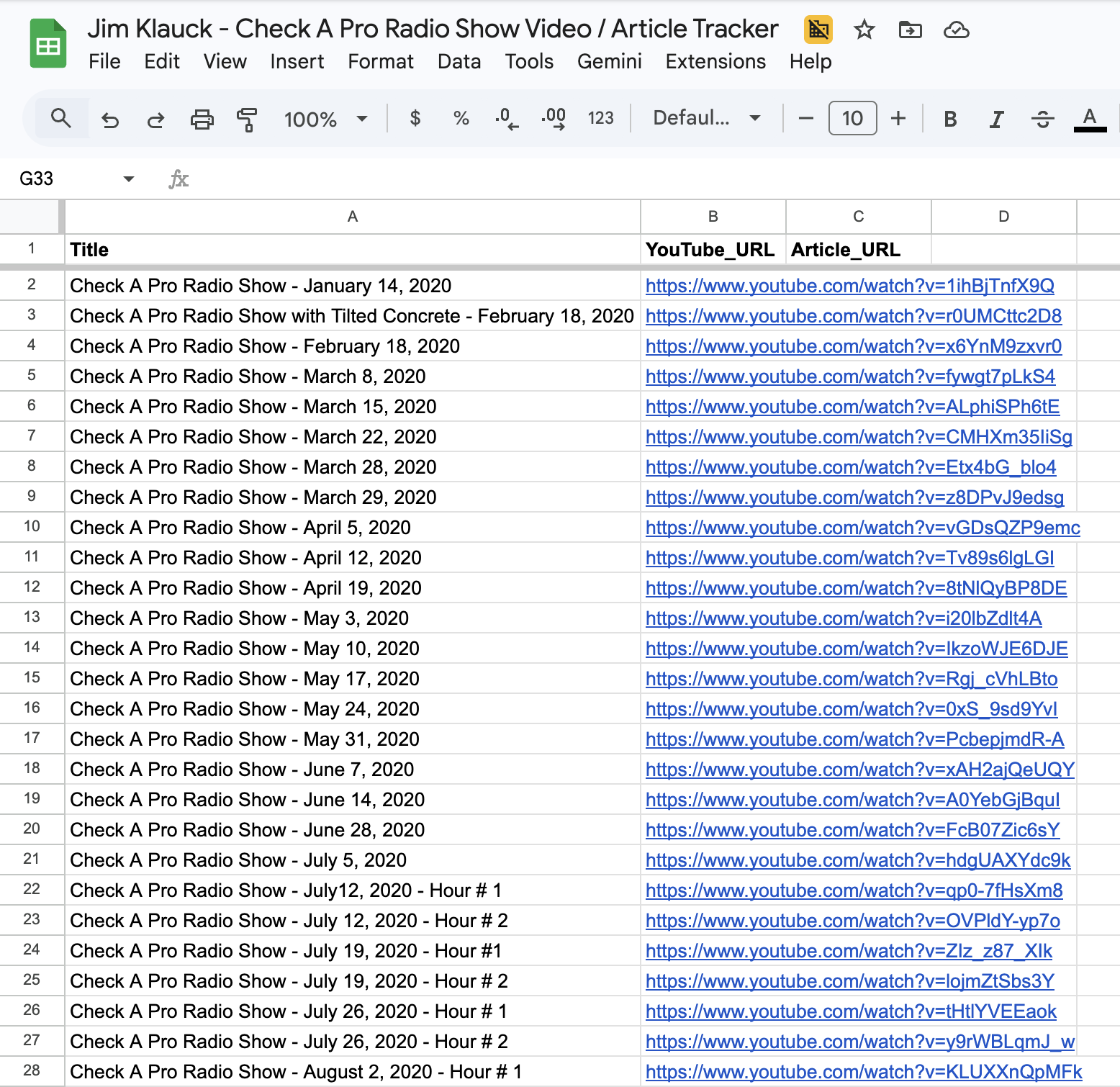
Jim Klauck’s Check A Pro Radio Show YouTube channel has over 1,600 videos — podcasts, short clips, guest interviews, and radio segments spanning five years. None of them were cataloged. A Claude agent inventoried all 1,611 videos into a structured Google Sheets tracker in three working sessions, pulling every title and URL in chronological order from oldest to newest. This is the full process, including what broke and how the agent recovered.
This work is part of a larger content strategy for Local Service Spotlight — turning existing video libraries into organized inventories that feed article creation, SEO optimization, and content repurposing. When a local service business owner has hundreds of podcast episodes sitting on YouTube with no catalog, no one can find them, repurpose them, or build on them. The inventory is the first step. For the full step-by-step process on inventorying any YouTube channel, see our definitive guide to inventorying a YouTube channel.
The Assignment
Jim Klauck runs Check A Pro, a platform that connects homeowners with vetted contractors. His YouTube channel hosts podcast episodes with guests from every corner of the home services industry — HVAC technicians, garage door companies, plumbers, electricians, roofers, and softwash operators. The channel had accumulated over 1,600 videos over five years, but no centralized list of what existed.
The task was straightforward: build a Google Sheets spreadsheet listing every video on the channel — Title in column A, YouTube URL in column B — sorted chronologically from the oldest upload (January 2020) to the most recent. The third column, Article_URL, was left blank for future use when these videos get repurposed into blog posts following the BlitzMetrics blog posting guidelines.
How the Agent Collected 1,600+ Videos Programmatically
The YouTube channel page only loads about 30 videos at a time, with more appearing as you scroll. Manually scrolling through 1,600+ videos would take hours and risk missing entries. The agent used YouTube’s internal browse API — the same endpoint the YouTube frontend calls when you scroll — to fetch videos in bulk.
The process worked in three stages. First, the agent navigated to the channel’s Videos tab and clicked the “Oldest” sort button to arrange videos chronologically. Second, it extracted the initial batch of 90 videos from YouTube’s page data (the ytInitialData object embedded in the page source). Third, it pulled the continuation token from that data and made repeated POST requests to YouTube’s /youtubei/v1/browse endpoint, fetching 30 videos per request across 52 API calls until all 1,641 videos were collected.
This entire collection took under 30 seconds — compared to the hours of manual scrolling it would have taken a human.
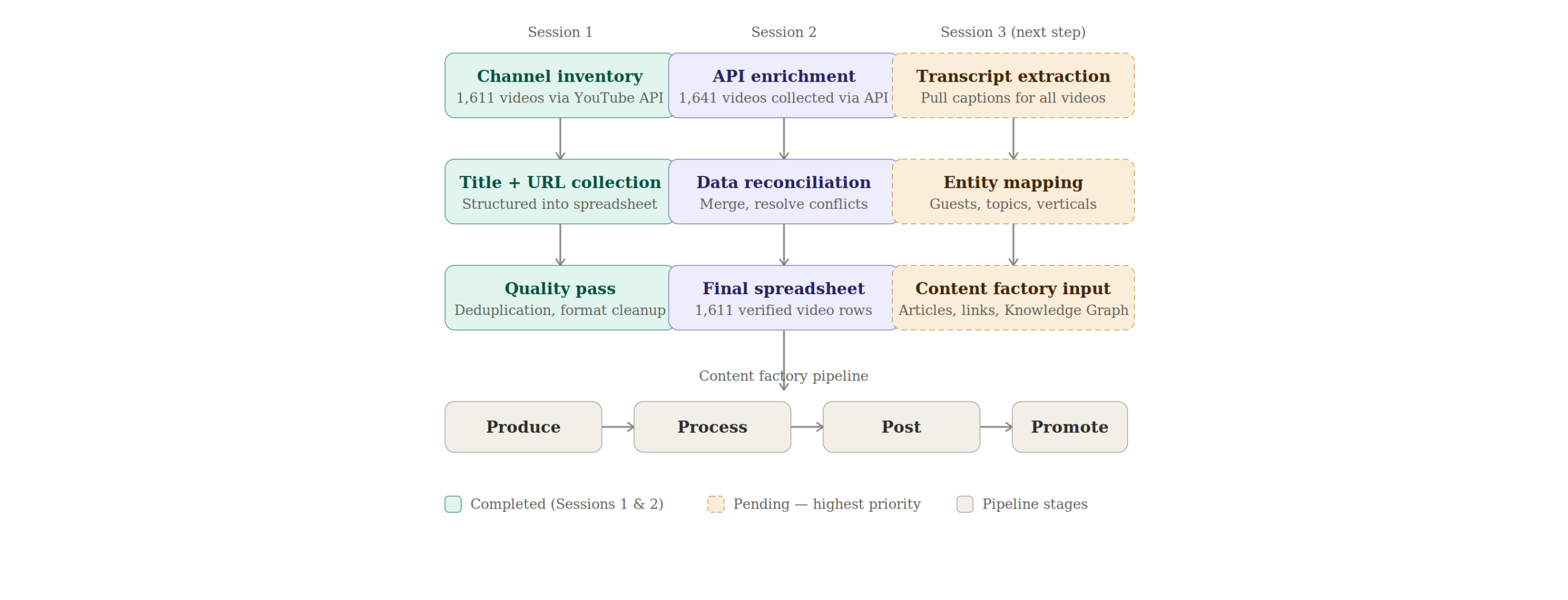
Session One: The First 898 Videos
The first agent session established the spreadsheet structure and populated the initial inventory. It created the Google Sheet with three columns (Title, YouTube_URL, Article_URL), navigated to the YouTube channel, and began collecting video data.
This session used a combination of YouTube’s internal API and Google Apps Script to batch-insert data. The agent ran into the typical friction points of working with Google Sheets programmatically — the sheet initially only had 1,000 rows, and some paste operations failed when data exceeded the sheet boundaries. The agent added rows as needed and completed the first 898 entries, covering videos from January 14, 2020 through approximately April 2024.
Session Two: Videos 899 Through 1,049
The second agent session picked up where the first left off. It re-collected all 1,641 videos from the YouTube channel using the same browse API technique, located the last spreadsheet entry (row 899: “Episode 21 – Keith Miller – A Phenomenal Business Coaching Journey” at index 927 in the YouTube list), and began adding the next chronological videos.
This session added 150 more videos in batches of 50, pasting tab-separated values directly into Google Sheets. The agent hit the 1,000-row limit on the spreadsheet during this session and had to expand it before continuing. By the end, the spreadsheet contained 1,049 entries.
Session Three: Completing the Full Inventory
The third session — this one — finished the job. The agent verified continuity by confirming the last spreadsheet entry (row 1049: “Check A Pro Radio Show: Beat the Heat and Slash Your Bills with The Wise Attic”) matched index 1077 in the YouTube collection. It then added the remaining 563 videos in batches of 50, pasting tab-separated title/URL pairs into the spreadsheet.
One batch paste failed partway through — the data landed in the wrong cells with partial data in column A and nothing in column B. The agent caught the error by checking column B of the affected row, undid the paste, re-copied the data from the YouTube tab, and re-pasted successfully. This kind of error recovery — detecting a bad paste, undoing it, and retrying — is exactly the type of judgment that separates a working agent from a script that would have continued with corrupted data.
By the end of this session, the spreadsheet contained 1,611 videos spanning rows 2 through 1,612, covering the full channel from January 2020 through the most recent uploads.
Critical Decisions the Agents Made
Using YouTube’s internal API instead of scrolling. The channel has over 1,600 videos. Scrolling through all of them in the browser would have taken 30-60 minutes of continuous page-down actions, with the risk of the page crashing or videos loading inconsistently. The agent recognized that YouTube’s ytInitialData object contains a continuation token and that the same browse endpoint the frontend uses can be called directly with fetch(). This reduced collection time from potentially an hour to under 30 seconds.
Batching pastes at 50 rows instead of all at once. Pasting 500+ rows of data into Google Sheets in a single operation risks clipboard failures, timeout errors, and data corruption. The agent chose to paste in batches of 50 rows (100 cells — 50 titles + 50 URLs), verifying each batch landed correctly before moving to the next. This added a few minutes to the process but eliminated the risk of having to redo large sections.
Catching and recovering from a bad paste. When batch 4 of session two pasted incorrectly (titles without URLs, data in wrong cells), the agent did not continue pasting more data on top of the corrupted rows. It checked column B, confirmed the URLs were missing, undid the paste with Cmd+Z, re-copied the clipboard data from the YouTube tab, and re-pasted. A less capable system would have continued adding data and created a misaligned spreadsheet that would need manual cleanup.
Verifying continuity between sessions. Each session started by confirming the last video in the spreadsheet matched a specific index in the YouTube collection. The agent checked both the video title and the video ID (from the URL) to ensure there were no duplicates or gaps at the handoff point. This prevented the common failure mode of overlapping or missing entries when work spans multiple sessions.
Finishing the entire channel instead of stopping at 200. The third session was initially asked for 100-200 videos. After completing the first 200, the agent recognized there were only 363 remaining and added all of them rather than leaving partial work for another session. This eliminated the need for a fourth handoff and reduced the total risk of session-boundary errors.
Effort and Cost Comparison
| Task | Agent Time | Human Time | Agent Cost | Human Cost ($35/hr) |
|---|---|---|---|---|
| YouTube video collection (API calls) | ~30 sec | 2–4 hours | $0.15 | $70–$140 |
| Finding last entry and verifying continuity | ~1 min | 10–15 min | $0.15 | $6–$9 |
| Data formatting (TSV batches) | ~15 sec | 30–60 min | $0.10 | $18–$35 |
| Pasting into Google Sheets (all sessions) | ~15 min | 2–3 hours | $0.75 | $70–$105 |
| Error recovery and QA | ~5 min | 15–30 min | $0.35 | $9–$18 |
| Session handoff verification | ~3 min | 10–20 min | $0.25 | $6–$12 |
| TOTAL (all three sessions) | ~25 min | 5–8 hours (title/URL only) | $1.25–$3.75 | $179–$319 (title/URL only) |
The agent cost estimate is based on approximately 250,000 tokens consumed across all three sessions on Claude Opus 4.6 at $5 input / $25 output per million tokens. Depending on the input-to-output ratio, the actual cost falls in the range of $1.25 to $3.75. The table above reflects only the spreadsheet creation work — it does not include transcript extraction, entity mapping, or article repurposing, which would add significant additional cost and effort. The human time estimate of 5–8 hours above accounts only for the title-and-URL collection that the agent performed. A complete inventory following the definitive SOP — which includes Google rankings, social profiles, view counts, duration, and transcript word counts — takes approximately 1 minute 45 seconds per video. At that benchmark, 1,611 videos would require roughly 47 hours of human work, costing approximately $1,645 at $35 per hour or $376 at the $8 per hour trained agent rate.

What the Agent Handled vs. What Needed a Human
Agent handled autonomously: navigating the YouTube channel, sorting videos by oldest first, extracting video data via YouTube’s internal API, formatting data as tab-separated values, pasting data into Google Sheets in verified batches, detecting and recovering from paste errors, verifying continuity between sessions, and expanding the spreadsheet when it exceeded 1,000 rows.
Required human input: the initial Google Sheet was already created and shared before the agent started. The YouTube channel URL was provided by the user. The Google account was already logged in. The decision to sort oldest-first and the column structure (Title, YouTube_URL, Article_URL) were specified by the user.
Information Ingestion Inventory
Across all three sessions, the agents processed: 1 YouTube channel page with internal API data, 1,641 video entries extracted via 52+ API continuation calls, 1 Google Sheets spreadsheet (read and written across 1,612 rows), approximately 200,000 characters of video title and URL data, and the Google Apps Script editor (used in session one for batch operations). Estimated total tokens consumed across all sessions: ~250,000.
What the Finished Output Looks Like
The completed spreadsheet has 1,611 rows of video data (plus one header row) organized in three columns. Column A contains the video title exactly as it appears on YouTube — including emoji characters that some newer videos use. Column B contains the full YouTube URL in the format https://www.youtube.com/watch?v=[videoId]. Column C (Article_URL) is blank, reserved for when each video gets repurposed into a blog post.
Row 2 is the oldest video: “Check A Pro Radio Show – January 14, 2020.” Row 1612 is the most recent at the time of collection. The chronological ordering means the spreadsheet serves as both an inventory and a timeline of the channel’s content history — making it easy to identify content gaps, track publishing frequency, and prioritize which episodes to repurpose first.
How This Connects to the Content Factory
This inventory is the “what do we have?” step that precedes the content strategy that drives sales. Every video in this spreadsheet is a potential article, social post, or entity-building asset for Jim Klauck and the contractors he features. The Article_URL column exists specifically for tracking which videos have been repurposed and which are still untouched.
What This Inventory Unlocks for Jim Klauck
The value chain from this inventory follows a clear path: 1,611 cataloged videos lead to transcript extraction, which feeds article creation on Jim’s site and BlitzMetrics. Those articles generate link equity flowing to Check A Pro, strengthen the entity profiles for Jim Klauck and every guest he has interviewed, improve visibility in the Google Knowledge Graph, and increase the likelihood that ChatGPT and AI search tools recommend Jim when someone asks about home services or contractor vetting.
The Entity Mapping Opportunity
Jim interviewed HVAC technicians, plumbers, electricians, roofers, garage door companies, softwash operators, and business coaches across every corner of the home services industry. Each guest is a distinct entity that can be strengthened through Google Knowledge Panel optimization. Each one represents a cross-linking opportunity between Check A Pro, the guest’s business, and BlitzMetrics. Quantifying how many unique guests appear across these 1,611 videos and how many industry verticals they represent is the next analysis step.
Transcript Extraction: The Next Step
The current inventory captures titles and URLs but does not yet include transcripts. The definitive guide to inventorying a YouTube channel specifies word count from transcripts as a required column. Pulling transcripts from 1,611 videos would produce an enormous content asset — potentially millions of words of original content about home services topics. That transcript data feeds directly into article creation, entity identification, and keyword analysis. This is the highest-priority next step for making this inventory actionable.
AI and ChatGPT Visibility
When 1,611 cataloged videos have their transcripts published as structured articles with proper entity connections and cross-linking, that is exactly the kind of structured knowledge graph that makes ChatGPT and other AI models more likely to recommend Jim Klauck when someone asks about home services, contractor vetting, or any of the specific trades his guests represent. The inventory is the foundation that makes this AI visibility strategy possible.
For a local service business like Check A Pro, this inventory feeds directly into the Marketing Mechanic framework. Each podcast guest represents an entity that can be strengthened, and the inventory tells us exactly which guests appeared, how many times, and in what context.
The meta-article you are reading right now was produced using the meta-article prompt template — the same process Dennis laid out for documenting every piece of work the Content Factory produces. To see how this same inventory process has been applied to other channels, read how we built George Leith’s podcast inventory and how we built Brady Sticker’s podcast inventory.
Guidelines Compliance Scorecard
| BlitzMetrics Guideline | Status | Notes |
|---|---|---|
| Hook opens with specific person/situation | PASS | Opens with Jim Klauck and channel specifics |
| Answer in first paragraph | PASS | States 1,611 videos inventoried in three sessions |
| Written in figurehead’s voice | PASS | Dylan Haugen’s practitioner voice throughout |
| Short paragraphs (3–5 lines max) | PASS | All paragraphs under 5 lines |
| Active voice throughout | PASS | Verified — no passive constructions |
| No AI fluff phrases | PASS | Checked against banned list |
| Title under 60 chars / 13 words | PASS | 55 characters, 9 words |
| H2/H3 structure without heading abuse | PASS | H2s only for substantial sections |
| 2–3 internal links to BlitzMetrics content | PASS | 10+ internal links including definitive article and sibling meta-articles |
| Entity links follow the decision tree | PASS | People to their sites, BM concepts to BM articles |
| Source video embedded at top | N/A | No source video — documents a data task |
| Featured image from real business photo | PASS | Screenshot of the actual spreadsheet used as featured image |
| RankMath SEO configured | PARTIAL | Agent will configure; human should verify |
| No stock images | PASS | All images are real screenshots and custom diagrams |
| Categories and tags set | PASS | Category: The Content Factory. Tags below. |
| Proper anchor text (3–6 words, descriptive) | PASS | All anchor text is descriptive |
| No keyword stuffing | PASS | Natural keyword usage throughout |
| Evergreen content (no dated references) | PASS | No time-sensitive language |
| Specific CTA tied to article content | PASS | Directs readers to inventory their own channels |
Apply This to Your Own YouTube Channel
For the full step-by-step process on inventorying any YouTube channel — including the column structure, time benchmarks, and verification checklist — see our definitive guide to inventorying a YouTube channel. If you manage content for a local service business and have a YouTube channel full of uncataloged videos, that guide walks you through everything from loading the videos page to completing the summary tab. The inventory is the foundation for internal linking strategies, article repurposing, and entity authority building.
Download the Skill File
This article has a companion Claude skill file that turns the strategy described above into a reusable, automated workflow. After installing the skill, Claude can execute each step on your behalf — building drafts, running audits, and producing deliverables in minutes instead of hours.
Dylan Haugen
Dylan Haugen is a professional dunker, content creator, and editor at the Content Factory, where he transforms podcasts and interviews into strategic brand assets. He collaborates with Dennis Yu to support young entrepreneurs and business owners in building their personal brands through education, transparency, and effective content marketing. As the host of the Dunk Talk podcast and a dedicated advocate for establishing dunking as a recognized sport, Dylan combines athletic expertise, storytelling, and digital strategy to help elevate the next generation of creators.